8 min read
Internet Redundancy: High-Availability Designs for the Office
Internet redundancy: simple high-availability designs for small offices, branches and headquarters, plus clear methods for testing and controlling failures.
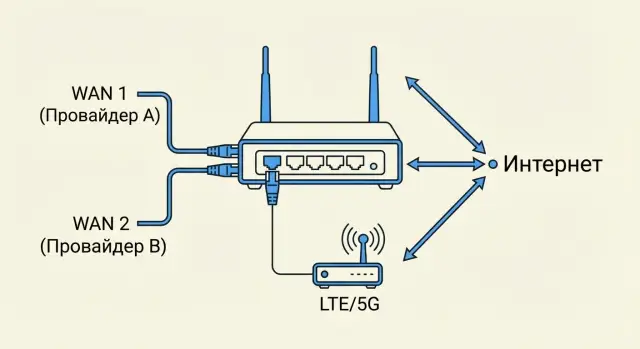
Why bother with internet redundancy and routing
Office internet outages are rarely "bad luck" — there are many weak links in the chain. Redundancy is not about speed, it's about keeping work going when something goes wrong.
Failures can have many causes: provider outages, congestion, cut cables in the building or on the street, a frozen router or misconfiguration, port or power issues. Sometimes the problem is a "small" thing like DNS: the physical link is up, but sites and services don’t load.
One more important nuance: "the internet is available" doesn't always mean "everything works." Messengers may open, but a VPN to the office or cloud may not come up. IP telephony can crackle, point-of-sale terminals may stop processing payments, video surveillance may not show the archive, and cloud files or email may not sync.
For business, availability is about specific processes: connection to headquarters, payments and POS, access to 1C and other systems, remote workers, cameras and security. If everything relies on a single channel and a single router, any failure turns into lost time and money.
Risks differ by site type. A small office often has one weak point — a single provider and no UPS. A branch adds dependency on VPN and corporate services. The headquarters has more failure points: more providers, more routing, and more critical services for all sites. A solution that saves a small office may be insufficient for HQ.
Example: a branch shows "internet is up," but the provider changed a route and the VPN to headquarters breaks. From the outside everything looks fine, but sales and support stop. A backup channel and proper fault-tolerant routing address these situations.
Basic concepts: what exactly are we protecting
When people talk about internet redundancy, they often mix different issues. In practice you can lose the channel itself (provider, "last mile", backbone) or equipment on your side (router, modem, power). These failures are handled differently.
Channel redundancy means a second independent path to the internet: another provider, another route, or another technology (for example, fiber plus 4G/5G). Equipment redundancy means two devices (or a cluster) take over routing if the main router freezes, its power supply fails, or a port dies.
Automatic failover is when the network detects the main path is down and shifts traffic to the backup without manual action. For users this usually looks like a short pause: a call may drop, but websites and email quickly come back.
For VPNs, symmetry matters. Symmetric internet means inbound and outbound traffic flows via the same channel. Asymmetric routing — when the "there" and "back" paths differ (often due to two providers or incorrect routing policies) — can break VPNs: packets arrive from an unexpected address, sessions drop, and applications timeout.
A provider SLA is a promise on paper, but real availability depends on outages, maintenance windows, and reaction time. Keep your own metrics: downtime, incident frequency, causes (provider, power, equipment, configuration), failover time, and which services were affected (VPN, telephony, POS). This helps identify whether the weak point is the channel, the router, or routing policies.
Simple high-availability designs
Start by answering honestly: what exactly must survive a failure — just internet access, or also VPN, telephony, POS, and cloud services? In a small office, it’s often enough that staff can keep working, even slower.
Two providers or wired plus mobile
The classic is two independent providers: main and backup. The keyword is independent. If both lines enter through the same conduit and follow the same route, a single cable fault can take them both out.
If a second wired channel is expensive or unavailable, a wired + LTE/5G combo often saves the day. For email, messengers, remote access, and basic cloud work this usually suffices. For heavy loads (large files, video surveillance, constant calls) the mobile link may be unstable.
One router with two WANs or two routers
The simplest option is one router with two WAN ports and automatic failover. It's quick and cheap, but the router remains a single point of failure.
For higher reliability, deploy two routers: primary and backup. Configuration is more complex, but the failure of one device won't cut connectivity.
A practical minimum on a budget:
- two providers and one router with two WANs
- or one wired provider plus an LTE/5G modem as backup
- a UPS for the router and modem to survive short power outages
UPSs are often underestimated: the provider can be online, but your router may already be off. Even 10–15 minutes of autonomy cover typical brief power cuts.
What to choose for a small office: 2–3 practical options
The goal for a small office: when the main link fails, people keep working. You don’t need the backup to match the primary in performance — it just has to keep cloud services, VPN, and telephony usable.
Common choices:
- Two wired providers plus one router with failover. Common for 10–50 employees.
- Wired provider plus LTE/5G as backup. Fast to deploy but dependent on signal quality.
- Two wired providers plus two routers (one active, one hot spare). For cases where downtime is critical and device failure itself is a risk.
Ask providers to route lines differently: separate building entries, different risers, different cross-connects. Two contracts with the same operator routed to the same cabinet often give a false sense of reliability.
For backup speed, think in terms of "enough to keep working." Example: a 20-person office needs email, CRM, and 5–7 simultaneous calls during an outage. The backup can be 3–5 times slower than the main, but stability and latency matter more.
Decide in advance what must be preserved on failover: VPN to HQ, telephony, video calls, email/CRM/accounting access, remote admin access.
Mobile backup is poor if the site is in a basement, an industrial area, or experiences signal swings during peak hours. In such places a second wired channel, even at higher cost, is often more reliable. If you need help selecting a design and equipment, integrators like GSE.kz usually start by measuring channel quality before proposing a configuration.
Designs for a branch office: keeping VPN and services up
Branches often rely on VPNs to HQ for accounting, 1C, telephony, file access, and sometimes POS terminals. On failover it’s not just internet that breaks — sessions do: the VPN tunnel drops, the external IP changes, applications hang and require re-login.
Two independent channels and a stable VPN
A practical branch setup uses two channels from different providers (or at least different technologies: fiber plus LTE/5G) and one router with failover.
To help the VPN survive switching:
- prioritize VPN traffic (QoS) on both channels
- use short failure-detection timers without causing frequent flapping
- choose VPN solutions that reestablish quickly and define clear rules for IP changes
- have a separate guest network so external traffic doesn’t saturate the channel during failover
If POS or payment terminals are critical, you often need both hardware and traffic logic: route payments through the more stable channel and general office traffic through the main one. Then sales keep working even if the office loses bandwidth.
One device or two
One router is sufficient for a small branch with simple requirements and a spare power supply. Two devices (active/standby) make sense when you must survive a router failure too.
Choose two devices when the branch is 24/7, handles money, has many VPNs and rules, suffers frequent power issues or overheating, or has strict recovery-time requirements.
Discuss independence with providers: separate cable entries, different connection nodes, and different physical routes solve more problems than buying a more expensive router.
Example: a clinic branch maintains a VPN to HQ and sends data to a medical system. If fiber drops, LTE takes over, the VPN reconnects within a minute, and terminals use a prioritized route. Integrators like GSE.kz document this in the design and tests before launch to make failover predictable.
Designs for headquarters: more failure points require more redundancy
The HQ often hosts email, telephony, cloud gateways, VPNs for branches, remote access, and internal systems. A single "fat" channel is usually worse than two independent ones: it doesn’t protect against provider outages, backbone issues, or mistakes during maintenance.
A basic HQ design uses two different providers and two edge devices (routers or firewalls). Ideally the providers use different building entries and points of presence, and devices are powered from separate UPS units. Then a channel or device failure won’t stop the office.
Don’t forget internal routing redundancy. A common mistake is having two providers but relying on a single switch, firewall, or link to the server room. At minimum, edge devices should switch routes based on link state, and the LAN gateway for users should not be a single point of failure.
When to consider BGP
BGP is not for everyone. Consider it when you need to use both channels simultaneously (not just failover), require stable inbound traffic for external services, have your own addressing and routing requirements, or when simple failover causes noticeable session loss.
Separate contour for server room and critical services
At HQ it’s useful to isolate the server room: dedicated VLANs, separate security rules, and sometimes a separate internet exit. Protect VPN concentrators, telephony, terminal servers, and accounting systems separately so user-network problems don’t affect critical services.
If you need help designing and testing such a scheme, an integrator like GSE.kz usually starts with a failure-point map and a failover test plan before production launch.
Step by step: how to design and deploy redundancy
Start by listing what must keep working. For some it's POS and telephony, for others it's CRM and VPN. Note each service’s acceptable downtime: 0 minutes, 15 minutes, 2 hours. This quickly filters out unnecessary costs.
Next, verify channels are truly independent. Two tariffs from one provider may follow the same route and enter the building through the same point. It's safer to combine different operators and different entry points or technologies (e.g., fiber plus LTE/5G).
Decide whether failover happens on one router with two WANs or on two devices. Also secure power: a backup channel won’t help if the router and switch have no UPS.
Typical sequence:
- list services and priorities, agree acceptable downtime;
- obtain two independent channels and verify entries, routes, and SLA conditions;
- choose the architecture (one or two routers) and UPS for the network node;
- configure failover and traffic rules (what goes via primary and what may use backup);
- create a test plan and have a rollback procedure.
Example: in a small office the main channel carries all traffic and the backup only activates on failure. VPN and telephony can be tied to the more stable channel, while updates and guest Wi‑Fi are limited so they don’t choke the backup.
Standardize settings across sites if you manage multiple locations and package them into templates. In Kazakhstan, integrators often deliver such projects with 24/7 support so incident resolution doesn’t depend on a single person.
How to test resilience without pain or risk
Testing is not for the checklist — it proves the scheme works: routes switch, VPNs survive or reestablish, calls don’t fall apart, and staff barely notice.
Start with safe failure simulations. Do tests in a pre-agreed window (evening or weekend) and notify users. Common checks:
- unplug the main WAN cable (physical link failure);
- disable a WAN port on the router (failover logic test);
- power off the provider modem/ONT (CPE failure scenario);
- temporarily disable the primary channel via the provider dashboard or by asking the provider, if allowed.
Test services individually to identify what breaks. Minimum checks: internet access, cloud and email access, VPN to HQ, telephony (SIP), and critical internal systems.
Measure failover time by running continuous pings to an external address and to a VPN address while starting a video call or downloading a file. It's important to know not only when the internet returns, but whether sessions recover. A ping may return in 10 seconds while a call stays dropped until re-registration.
Frequency: for small offices quarterly testing is usually enough and after any provider changes or configuration updates. Assign an owner (admin or contractor) and a business-side owner for results.
Record results in a simple log:
- date and time window
- what was disabled and for how long
- failover time and full recovery time
- which services were affected and how
- what was fixed and when recheck occurred
This shows quickly where the real weakness is: the channel, the router, the VPN, or telephony.
Monitoring and alerts: make redundancy actually work
Redundancy often exists only on paper until the first outage. The worst case is both main and backup fail at night and you learn about it in the morning from clients. Monitoring helps detect issues before users.
Minimum monitoring even for a small office:
- availability of both channels (checks from outside and inside)
- latency and packet loss
- channel load during peak hours
- timestamps of switching to backup and back
- modem/router and power status
Alerts should be simple. Assign one primary recipient and a backup, and predefine what constitutes an incident: for example, ">10% packet loss for more than 3 minutes" or "latency doubled and holds for 5 minutes." Make sure alerts go to a channel that will be noticed, not only to an email box.
Keep failover logs. When a branch VPN is "flaky," logs show if there were many short switches rather than a single outage. That points to provider, equipment, or config issues.
Check mobile backups by actual measurements, not signal bars. Record signal level and do a short speed and latency test during working hours. A typical case: daytime is fine, evenings congest the cells and the backup exists in name only.
If an integrator (e.g., using GSE.kz equipment and support) builds your infrastructure, ask them to configure clear metrics, event logs, and test alerts upfront. This usually pays for itself at the first incident.
Common mistakes and traps in redundancy
Issues often come from small oversights. A diagram can look correct, but in a real outage the system fails.
What breaks in practice
Sometimes both channels run along the same physical path: one building entry, one conduit, one node. An excavator, a fire, or a line failure can take down both "primary" and "backup."
Another trap: the backup link exists but critical services don’t work over it. The office switches to LTE, but the VPN to HQ won’t come up due to routing, policies, or operator restrictions.
Sometimes you get "internet is up but nothing loads." Failover succeeded, but DNS, mail, or cloud apps are tied to the old address, old DNS servers, or long timeouts.
And the banal case: power is out and both modems and the router are down. Without UPS, redundancy won’t help.
Test the setup regularly. A single test at launch won’t reveal what happens after six months of tariff changes, router updates, or VPN tweaks.
Quick signs your scheme is risky:
- both channels converge at one point (one entry, one cabinet, one backbone);
- critical services don’t work over the backup (VPN, mail, telephony);
- DNS resolves slowly and apps hang for minutes;
- no UPS on router, switch, and modems;
- no habit of testing at least quarterly.
Example: a branch was fine until power on the floor was cut. The provider link was up, the LTE modem was up, but both devices lacked power — so POS, VPN, and email all went down at once.
Short checklist before launch and for quarterly checks
Redundancy is working when staff barely notice outages and failover and recovery are predictable.
A short checklist to run before launch and quarterly:
- Confirm channel independence: different providers or different entries, different operator equipment, separate physical routes at least to the building.
- Perform real shutdowns: unplug WAN1, disable the port, or power off the modem for each channel and measure recovery time for internet and VPN.
- Verify critical services on the backup: agreed list (email, telephony, accounting, CRM, cloud access, VPN) and "works/doesn't work" criteria.
- Ensure the network node survives power loss: UPS for router, switch, and optical equipment, plus a simple duty plan for the on-call person.
- Configure monitoring and testing discipline: who receives alerts, where alerts go, and the calendar for checks.
Example: a 15-person branch loses primary connectivity but VPN doesn’t come up on the backup because the HQ has access rules tied to the old external IP. Only a real shutdown reveals this issue, not a green LED on the router.
After each test, log what was disabled, how long switching took, what failed, and who fixes it. Over a few quarters these notes save hours troubleshooting.
Realistic scenarios and next steps
Redundancy pays off not only in major outages but in everyday incidents: when one provider digs up a cable and your calls, payments, email, and VPN keep working.
Example 1: small office plus branch. Two different channels (fiber + 4G/5G) and a router with automatic switching are often enough. At the branch make sure VPN comes up automatically without manual reboots and that telephony and cloud services survive the switch.
Example 2: headquarters. More failure points mean you must separate providers, hardware, and power. Minimum: two independent entries from different operators, two edge devices, separate power supplies and UPSs. Ideally use different racks and cable routes; otherwise one electrical fault can nullify the whole redundancy.
Before procurement, specify:
- which services must remain during an outage (VPN, telephony, POS, remote admin);
- acceptable downtime and switch time;
- channel types and their independence (providers, routes, equipment);
- who is responsible for setup, tests, and support;
- maintenance windows to avoid stopping the business.
Integrators are usually engaged when multiple sites, complex VPNs, security requirements, or regulated resilience testing are involved.
If needed, GSE.kz can help with site surveys, solution design, and configuration as a system integrator, plus 24/7 support. They can also cover basic infrastructure for services (servers, workstations) so redundancy applies not only to internet but also to internal systems.
Frequently asked questions
Зачем вообще резервировать интернет, если «обычно и так работает»?
Резерв нужен, чтобы рабочие процессы не останавливались при сбое: упал провайдер, оборвался кабель, завис роутер или пропало питание. Даже если «интернет есть», могут не работать VPN, телефония, кассы или облака — резервирование закрывает именно такие ситуации.
Какой самый простой и недорогой вариант резерва для малого офиса?
Минимум — второй независимый канал *или* мобильный LTE/5G как запасной, плюс ИБП для роутера и модема. Практичный старт: - основной проводной канал + LTE/5G резерв; - роутер с двумя WAN и автоматическим переключением; - 10–15 минут питания от ИБП, чтобы пережить краткие отключения света.
Как понять, что два провайдера действительно независимы?
Два провайдера — это не всегда независимость. Важно, чтобы линии не сходились в одну точку. Проверьте: - разные вводы в здание (по возможности); - разные стояки/кроссовые/шкафы; - разные трассы хотя бы до здания; - разные узлы подключения у операторов (если это можно согласовать). Два договора, заведенные в один и тот же шкаф по одной трассе, дают слабый резерв.
Что лучше: один роутер с двумя WAN или два роутера?
Один роутер с двумя WAN — быстрее и дешевле, обычно хватает небольшому офису. Минус: роутер остается единственной точкой отказа. Два роутера (active/standby) стоит выбирать, если: - простой критичен (деньги, 24/7); - много VPN/правил и сложно быстро восстановиться; - бывают проблемы с питанием/перегревом/портами; - нужно пережить отказ самого устройства без ручных действий.
Почему при переключении на резерв часто падает VPN?
Чаще всего проблема в смене внешнего IP и маршрутов: туннель рвется, сессии не восстанавливаются, приложения «висят». Иногда добавляется асимметричная маршрутизация — пакеты «туда» и «обратно» идут разными каналами. Что помогает: - корректные политики маршрутизации, чтобы VPN работал предсказуемо; - приоритизация (QoS) для VPN/голоса; - адекватные таймеры проверки канала, чтобы не было постоянных «дерганий».
Может ли быть так, что интернет «есть», но сайты и сервисы не открываются?
Да, и это частая ловушка. Физически канал поднялся, но доменные имена не резолвятся, потому что: - DNS-сервер недоступен через резерв; - настройки DNS привязаны к «основному» провайдеру; - таймауты слишком длинные, и приложения ждут минутами. Проверяйте отдельно: доступ в интернет, DNS, почту/облака и VPN — тогда быстрее понятно, где именно сбой.
Хватит ли LTE/5G как резерва, или нужен второй проводной канал?
Если важна работа «как обычно» — да, лучше два проводных. LTE/5G часто годится как аварийный вариант для почты, мессенджеров, удаленного доступа и базовых облаков. Мобильный резерв может подвести, если: - слабый сигнал (подвал, удаленная промзона); - сильные просадки в час пик; - критична задержка (звонки, VPN, терминалы). Правильный подход — заранее проверить скорость и задержку в рабочее время, а не ориентироваться на «палочки» связи.
Нужен ли ИБП, если есть резервный интернет-канал?
ИБП нужен почти всегда. Если пропало электричество, то вместе с основным каналом часто гаснут роутер, коммутатор, ONT/модем — и резерв не поможет. Минимум: - ИБП для роутера и модема/ONT; - при необходимости — для коммутатора, если без него пользователи не выйдут в сеть; - запас по времени хотя бы 10–15 минут для типовых кратких отключений.
Как правильно тестировать failover, чтобы не устроить аварию?
Начните с безопасных тестов в согласованное окно и по очереди имитируйте разные аварии. Простые проверки: - вытащить кабель WAN основного канала; - выключить WAN-порт на роутере; - обесточить модем/ONT. И обязательно проверьте не только «интернет появился», но и конкретные сервисы: VPN, SIP/телефонию, кассы/эквайринг, облака. Зафиксируйте время переключения и что не восстановилось само.
Когда действительно стоит задуматься о BGP, а когда это лишнее?
Не всем. BGP обычно нужен, когда важно одновременно использовать два канала, управлять входящим трафиком к вашим внешним сервисам и иметь более предсказуемое поведение при сбоях. Если задача — «упал основной, включился резерв» для офиса или филиала, чаще достаточно обычного failover на пограничном устройстве. Если сомневаетесь, начните с простого сценария и измерьте результаты тестов: время переключения, восстановление VPN и голосовой связи — по этим фактам проще понять, есть ли смысл усложнять схему. В таких проектах системный интегратор (например, GSE.kz) обычно помогает оценить точки отказа и собрать план тестов до запуска.
