8 min read
Internal developer portal: Backstage and painless alternatives
An internal developer portal helps centralize a catalog of services, templates and documentation. We review Backstage, alternatives and a clear implementation plan.
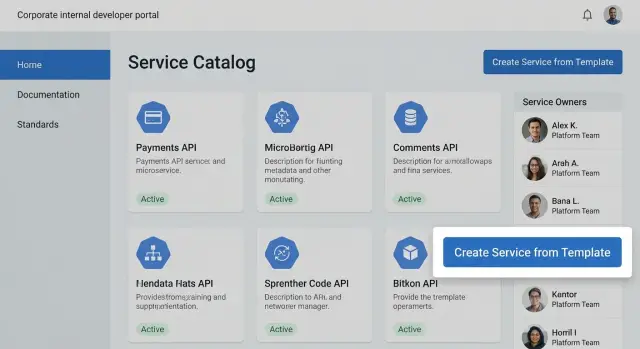
What problems an internal portal solves
When a company has dozens of services and multiple teams, knowledge spreads across many places: some in a wiki, some in repositories, some in chats, and important decisions remain in people’s heads. An internal developer portal gathers this in one place and makes information convenient for daily work.
The most common pain is search. A developer tries to find the repository, required env vars to run, who owns the service, where dashboards and alerts are, and how releases work. Support and SRE look for contacts and a runbook during an incident. Time is spent digging rather than doing work.
The second pain is fuzzy responsibility. If it’s unclear who owns a service, every change becomes a chain of manual approvals: who approves access, who knows whether a library can be updated. A service catalog with clear owners and responsibilities removes much of this uncertainty.
The third pain is lack of common standards. Teams pick different repo layouts, logging approaches, pipelines and documentation styles. That makes reviews, onboarding and maintenance harder. The portal helps lock in a "golden path": project templates, checklists, accepted practices and minimal requirements that are easy to repeat.
There are simple signals that an internal developer portal is already needed:
- onboarding new people takes weeks because "you have to ask N people"
- the same questions about services appear in chats every week
- during incidents time is lost finding the owner and instructions
- every service looks like a separate world and nobody is sure it’s "done right"
- releases and access rely on manual agreements
If you recognize a couple of these points, the portal usually pays off not because of the interface but because it reduces friction in teams’ daily work.
What a developer portal is and what it consists of
A developer portal is a single workspace where a team sees its services, owners, run and support instructions, and common rules. In short, an internal developer portal collects a service catalog, documentation, standards and self-service elements in one place so people jump between systems and ask in chats less.
The portal doesn’t replace your tools. It connects them and provides a clear "entry point": the repository stores code, the tracker stores tasks, the wiki stores notes. The portal answers practical questions: what is this service, where is the documentation, how to deploy, what are the dependencies, who owns it, and what checks are mandatory.
Typically the portal includes several basic blocks: a catalog of entities (services, libraries, components, databases, queues), project templates and the "golden path", documentation attached to services, standards and policies (logging, monitoring, security requirements), and self-service operations (common requests and actions without manual tickets).
The portal is useful beyond developers because roles overlap. Developers find what they need faster and create new services from templates. Product owners see responsibility and system status. SRE/DevOps get unified expectations for metrics, alerts and releases. Security enforces mandatory checks and exceptions. Support knows where to escalate incidents and where to find runbooks.
In large organizations with system integration and multiple teams (for example, manufacturers and integrators like GSE.kz) the portal helps keep consistent rules even when services live in many repositories and environments.
Backstage: when it fits and what matters most
Backstage is often chosen as the foundation for an internal developer portal when you want to gather everything in one place without building a portal from scratch. The idea is simple: a catalog of entities (services, libraries, components, teams, environments) is the core and plugins are attached around it. Plugins add docs, project templates, search, integrations with CI/CD, monitoring and internal systems.
The most important thing to agree on beforehand is not code but conventions. Without them, the catalog will quickly become a dump or remain empty because nobody knows what and how to describe.
Before you start it’s useful to agree on four things:
- catalog model: which types of entities are really needed in the first 1–2 months
- data sources: where the "truth" comes from (repos, Kubernetes, CMDB, Jira, manual input)
- ownership: every entity must have an owner (team or role)
- quality rules: what counts as a minimally complete service card
Backstage fits well when you have many teams and services and problems like not finding an owner, unclear onboarding for new services, scattered docs, and unchecked standards. In that environment a unified catalog and repeatable templates deliver quick value.
It’s harder in small teams or where there’s no platform owner. Backstage requires maintenance: updates, plugin configuration, resolving data model conflicts, and onboarding teams. If no one can work on this at around 0.5–1 FTE, the portal will annoy more than help.
Backstage alternatives and simpler options
Backstage is great when you need a catalog, templates and integrations. But you can often start simpler if the goal isn’t an "ideal platform" but a clear entry point for developers and unified rules.
Option 1: lightweight portal using wiki and repo
The fastest route is to agree on a wiki page structure and keep project templates in a separate repo. The "portal" becomes a single landing page with navigation: how to create a service, where docs are, where standards live, who owns what.
This works when there are tens of services rather than hundreds. For example, a team launching an internal API can follow a checklist: create a repo from the template, add a page with owner and SLA, and enter a catalog row.
Option 2: commercial developer portal platforms
Commercial solutions save time on building and maintaining but require careful selection. The platform should offer a catalog with owners and search, templates and automation (repo and environment creation), integrations with SSO, CI/CD, tracker and monitoring, access control and audit, a clear extension model and predictable cost of ownership.
Option 3: portal on a corporate intranet or CMS
Sometimes a section in the corporate portal is enough. It’s convenient for new hires and related teams. But watch that service data doesn’t become static pages without owners and updates.
To avoid mistakes, start with the essentials: a service catalog (who owns it and where it runs), one "golden" template and enforceable standards. Everything else — metric displays, complex plugins, fancy dashboards — can wait until the pilot proves the basics.
Service catalog: what to describe and how not to drown in details
A service catalog in the portal acts as a directory: quickly understand what a service does, who owns it and where to go if something breaks. The main mistake is trying to document everything from the start like a full architecture dossier.
Aim for a card that helps make a decision in 30 seconds. If a field doesn’t help an on-call, developer or manager in their work, postpone it.
Minimum for each card
A small set that must always be filled:
- service purpose: 1–2 sentences what it does and for whom
- owners: product owner and technical owner (one each, not a vague "the whole team")
- contacts: support channel and escalation path (on-call or responsible person)
- criticality: how painful is downtime for the business and recovery expectations
- status: active, in development, decommissioning
Relationships that save time
Add relations as needed but they usually pay off quickly: dependencies on other services, owning teams, main APIs, database or storage, environments (dev/test/prod). In an incident you then see what could be affected and who to call.
To keep the catalog from becoming a graveyard of stale cards, make updates part of normal workflows: changing a service means updating the card. Assign owners, add simple reminders (e.g., quarterly) and a minimal check on release. In companies with multiple business lines like GSE.kz (manufacturing, integration, support) this helps preserve ownership across team boundaries.
Templates and the golden path for the team
Templates in the portal aren’t for looks — they make every new project start predictably. A team gets a repo with a base structure, CI and a minimal set of checks. This saves hours of discussion and reduces the risk that a service only exists on the author’s laptop.
Start with a few templates you actually use: new service (API or worker), library or shared module, scheduled job, infrastructure module (e.g., IaC for an environment). The template must define a clear "golden path": where to put code, where configs go, how to run tests and how to deploy.
What to bake into a template
Add only what you are ready to support and verify. Usually enough:
- naming conventions (services, teams, environments)
- basic logging and a unified field format
- default metrics and health checks
- test stubs (unit and a simple smoke test)
- quality checks in CI (linter, tests, build)
Approvals without delays
Approvals work when they’re short and mostly automated. Make 1–2 steps mandatory (e.g., secret checks and minimal tests) and turn the rest into soft guidance.
A practical flow: a developer creates a service from a template. The portal immediately adds an owner, registers the service in the catalog, enables metrics and kicks off CI. If owner or health check is missing, the build fails. Other requirements (e.g., extended docs) can be completed later without blocking the first release.
Documentation and standards: make them clear and verifiable
Documentation in the portal is valuable not by the number of pages but by whether it helps people act without questions, especially under stress. A good minimum covers the service lifecycle: from first run to emergency rollback. Then the portal becomes a working tool, not a showcase.
A few short pages usually help most: how to run locally (dependencies, variables, test data), how to deploy (environments and where to check status), how to roll back, how to be on-call (alerts, thresholds, typical incidents, contacts), and how to request access and secrets.
A single readable format
Agree on one short-page template: service goal, owners, how to run, how to check health, how to fix common problems. Add example commands and expected results so someone can repeat them.
A night scenario shows value: an integration fails, the on-call sees an alert and opens a runbook. It has three diagnostic steps, a config-check command and a clear rollback path. With 24/7 support this saves tens of minutes per incident.
Standards you can check
Standards (security, code review, branching, versions, secrets) are better enforced with checks rather than text. For example: linters and formatters in CI, mandatory files (owners, runbook, changelog), secret scanning and a ban on committing keys, mandatory catalog fields (owner, criticality, repo), and a PR checklist for release changes.
That way standards stop being "recommendations" and become rules enforced automatically.
Access, security and integrations
Once the internal portal exists it quickly becomes a development showcase. So the question isn’t only convenience but who can see, change or run what.
Start with a simple separation: what the whole company can see (service name, owner, status, short description) and what should be restricted to the team or project (env vars, internal addresses, architecture details, vulnerabilities). Usually a role model and groups from the corporate directory are enough without a separate permission system.
Answer a few questions early: who can change service metadata, which sections are public and which are project-only, do guest roles for adjacent teams make sense, how actions are audited (who created a template, who granted access, who triggered a release), and how contractor access is handled (expiry, least privilege, revocation after work ends).
Choose integrations not by "connect everything" but by what saves time every day. Most useful are links to repos, CI/CD, monitoring and incident systems: an engineer opens a service card and sees where the code is, how to build, where alerts are and who is on-call.
To avoid duplicate data, agree on a single source of truth: owners and teams from IAM, code and history from repositories, infrastructure from IaC or the orchestrator, statuses from CI/CD. The portal should show and link these sources, not store them anew.
Security and compliance are easiest to bake into templates and standards. For regulated organizations (government, finance) this usually means mandatory fields in the service card, a minimal set of pipeline checks and clear audit logs. Then rules are enforced automatically rather than through manual agreements.
Implementation in steps: from pilot to scale
A frequent cause of failure is trying to cover everyone and document every service perfectly from the start. Better to take small steps and validate value on real work.
Start with a pilot: 1–2 teams and a small set of live services (e.g., 5–10) that change often and regularly prompt support questions.
Five steps that usually work
- Form a pilot group and list services to include in the catalog first.
- Agree on a minimal service card and a unified documentation format: what’s mandatory and what can wait.
- Launch one typical template and ask a team to go from zero to service using it.
- Add integrations one by one, starting with those that give daily benefits. Assign a platform owner who maintains rules.
- Expand coverage with clear onboarding rules: what a team must do to add a new service to the portal.
After 2–3 weeks gather feedback: where people stumble, which fields nobody fills, what really helps. In organizations with system integration and 24/7 support, fields like "owner", "support channel", "SLA" and "dependencies" quickly become critical.
A good sign of progress: the portal answers typical questions without private messages and new services are created from templates in hours rather than days.
Example scenario: launching a new service without chaos
Imagine a new internal service. Two dev teams, operations and security are involved. Within a week questions arise: who owns it, where is the repo, what are dependencies, how to deploy, who to contact in incidents. Answers live in chats and some people don’t even know the service exists.
The internal portal turns this into a clear path. The team starts with a service card in the catalog. It takes 10–15 minutes but immediately records the basic "truth": owner and on-call contacts, repo and pipeline, environments, short purpose and key dependencies, criticality and escalation rules, and status (draft, pilot, prod).
Then the developer creates the service from a template: the repo already has the right structure, CI/CD settings, basic observability and minimal standard checks. Docs appear as a skeleton: how to run locally, deploy, and roll back. Details are added later.
For support and security the main change is simple: they find owners faster and see agreed rules. No guessing where instructions live or what requirements are mandatory.
To measure portal impact track a few metrics: share of services with owners and contacts filled, average onboarding time for a new service, percent of services with up-to-date runbooks, time to find the responsible person during an incident, and number of standard violations in reviews or pipelines.
Common mistakes and pitfalls
The most common mistake is trying to document everything at once: the whole catalog, all docs, all standards. The portal becomes an endless project nobody uses. Do a pilot on 10–20 services, verify cards help, then expand.
The second trap is making the portal "only for developers" and ignoring support and security. If a service lacks on-call contacts, criticality and clear instructions, support will still hunt people in chats. If there are no basic data and access marks, security will block releases because there’s nothing to check.
Another problem is missing a platform owner and responsible people for service cards. When "everyone does a bit" nobody is accountable and the catalog quickly gets stale: links break, teams change, repos move. Simple rule: the portal needs an owner (a platform team or assigned person) and each service must have a specific owner for the card and on-call support.
Finally, templates and rules that are too complex. If creating a service requires ten forms, rare knowledge and weeks of approvals, teams will bypass the process: they copy an old repo and configure manually, leaving the portal as a checkbox. Keep the golden path short: minimum mandatory fields, 1–2 templates for common cases, and tighten rules only after teams are used to the process and see the benefit.
A sanity check:
- Can a new service be created in 30–60 minutes without a "portal expert"?
- Does support know where to go during an incident without asking in chats?
- Does each card have a live owner, not just "Team X" without contact?
- Do templates avoid forcing extra work for small or experimental services?
If these are hard to answer "yes" to, simplify the portal rather than expand it.
Quick checklist and next steps
To make the portal useful quickly, focus on basics. Don’t try to document every service and rule at once. Launch a minimal set and build the habit of using it.
"Minimum that must work" checklist
Items you can agree on in one call and fix with a repo change:
- A portal owner is assigned and there’s a clear rule for accepting changes.
- A simple catalog model is defined: what counts as a service, what is a library, and which fields are mandatory (owner, criticality, contacts, repo, environments).
- At least one working project template exists with basic settings (CI, linter, folder structure).
- One documentation standard and an example "reference" page (how to run, how to deploy, where to check logs, how to roll back).
- Access rules are set: who can view the catalog, who can edit cards, and how updates are recorded (via PR/review or a request). Choose 1–2 quality metrics (e.g., share of services with owners and card freshness).
What to do next week
Pick a small pilot where results are visible in 1–2 weeks and run a short workshop:
- In 60–90 minutes agree on mandatory catalog fields and one template
- Create cards for 1–2 services, write one runbook each, and run service creation through the template
- At the week’s end review metrics and the list of blockers, and remove 1–2 most painful obstacles
It makes sense to involve an integrator when you have many disparate systems (CI/CD, IAM, CMDB, monitoring) and need a unified approach to integrations, roles and support. If you also need infrastructure and reliable operations (servers, workstations, support), GSE.kz can help as a system integrator and equipment manufacturer for these processes.
Frequently asked questions
How to tell if our company already needs an internal developer portal?
If your team regularly wastes time looking for the repository, owner, environment variables, dashboards and instructions, the portal will already pay off. A practical signal: if onboarding takes weeks and during incidents people first search for contacts and runbooks, a single entry point quickly reduces lost time.
What is a developer portal in simple terms?
It’s a single workspace where you can quickly see for each service what it does, where the code and docs are, who owns it, how to run it and how to support it. It doesn’t replace the repository, tracker or wiki, but links them so common questions are answered in minutes rather than in chat threads.
What parts does a good internal portal usually consist of?
Usually you start with a service catalog, documentation attached to services, and one or two project templates for the "golden path." After that add standards that can be enforced in CI and basic self-service operations, so fewer tasks are done manually via tickets.
When is Backstage really suitable, and when is it better not to start?
Backstage fits when there are many services and teams and problems with finding owners, onboarding and maintaining common rules. It’s especially useful if you can agree on a catalog model, data sources and quality rules for cards, and if you can assign a person or team to keep the portal alive and up to date.
Which fields should be in a service card in the catalog first?
Start with a minimal card that helps make a decision in 30 seconds: purpose, owners, support contacts, criticality, status and links to code and pipelines. Add other fields only if people actually use them — otherwise cards quickly stop being filled in.
Which project templates should we make first?
The most useful templates are the ones you see every day: a new API/worker, a library, and a simple infrastructure module. A template should give a predictable start: repo structure, basic CI, minimal checks, plus skeleton docs and observability so the service isn’t only on the author’s laptop.
What documentation is important to fix in the portal so it actually works?
Keep a short set of pages that let someone act without extra questions: how to run locally, deploy, roll back, check service health and handle common incidents. The main rule — less text, more repeatable steps and expected results so an on-call engineer can follow instructions even at night.
How to set up access and security in the developer portal correctly?
Immediately separate what is fine for the whole company to see (service name, owners, status, short description) from what must be restricted (environment variables, internal addresses, vulnerability details, secrets). Then define who can change service metadata and how changes are audited, so edits happen transparently and without private agreements.
How to start implementation without drowning in scale?
A working pilot is 1–2 teams and 5–10 active services that change often and generate support questions. In 2–3 weeks you can test value: create cards, connect basic integrations, run service creation from a template and gather feedback on which fields block people or are left empty.
What mistakes are most often made when implementing an internal portal?
The most common mistakes are trying to document everything at once, lacking a platform owner, and making the service creation process too heavy. Another typical problem is ignoring support and security: without on-call contacts, criticality and runbooks the portal won’t help during incidents, and without enforceable minimums for access and secrets releases will get blocked.
