7 min read
iLO/iDRAC events in SIEM: what to collect and how to filter
Which iLO/iDRAC events in SIEM are worth collecting for investigations, and how to set filters, noise suppression and correlations to reveal real threats.
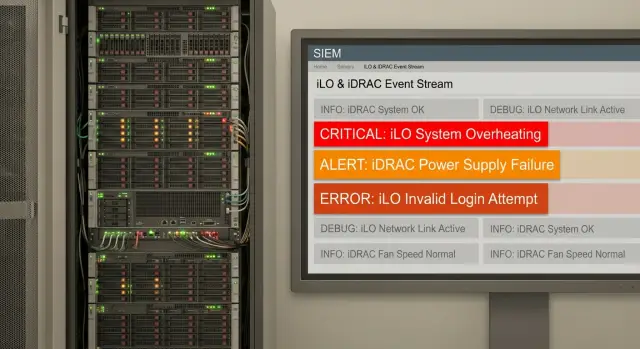
Why bring iLO and iDRAC events into SIEM
iLO (HPE) and iDRAC (Dell) are baseboard management controllers (BMCs) for remote server management. They operate separately from the OS and often keep working when the OS has crashed, a disk failed, or the server is powered down. Their logs provide a layer of facts that OS logs usually don't contain.
Standard OS monitoring misses many of these events for a simple reason: the OS only records what happens inside it. Actions through the BMC happen “outside” the OS — remote consoles, virtual media, power control, BIOS/UEFI changes, firmware updates. If someone rebooted the server via iLO/iDRAC, the OS log may only show an unexpected reboot, while the key detail will be in the BMC events.
For investigations this is especially useful in three common cases:
-
Out-of-OS access: who logged into the BMC web UI, from where, how they authenticated, and whether there were failed attempts.
-
Remote console and virtual media: who opened the KVM, who attached an ISO, and whether the server was booted from an external image.
-
Power and hardware actions: power off/on commands, forced resets, sensor triggers, and configuration changes. These matter both for sabotage investigations and for confirming admin actions.
There is a downside: iLO/iDRAC events can easily become noise in SIEM. BMCs tend to repeat the same messages (periodic health statuses, repeated sensor warnings, service messages), and different vendors use different formats and field names. So collect these logs intentionally: keep events that prove “who did what,” and filter, suppress, or lower priority for the rest.
Which event types to prioritize
If you're just starting to ingest iLO/iDRAC events into SIEM, don't try to collect everything at once. For investigations, human actions and configuration changes that grant remote control or hide traces are most important.
Five groups are essential:
- Authentication and sessions: successful logins, logouts, timeouts, failed attempts, account locks. This answers who accessed the device and when.
- Accounts and privileges: user creation and deletion, password changes, role or privilege changes, enabling local accounts. These events often precede unauthorized activity.
- BMC network settings: IP, DNS, gateway, netmask changes, enabling DHCP, VLAN changes (if supported), and time/NTP changes. These reveal attempts to move management to another network or restore access after compromise.
- Remote console and virtual media: KVM sessions, Virtual Media mounts, ISO mounts, booting from virtual media. BMCs can install or boot anything, so these are high-signal events.
- Power and restarts: power on/off, reset, hard power cycles, controller resets, and changes to power policies. Relevant for both sabotage and legitimate admin actions.
Simple example: a hard power cycle at night with a successful login and Virtual Media mount two minutes earlier. Even without OS logs you can reconstruct the sequence and narrow down users, IPs, and timing quickly.
Hardware and firmware events: what to collect and how to interpret them
BMC events often provide the earliest and most accurate view of hardware issues because the OS may not have time to log them. They are useful in investigations not only for failures but also for unexpected reboots and unexplained hangs.
What to collect
Start with categories that affect availability and data integrity. Usually it's enough to collect:
- Disk and RAID errors and degradation: rebuilds, predictive failures, dropped drives, cache/battery warnings.
- Memory, CPU and PCIe errors: corrected/uncorrected ECC, machine checks, device removed/failed.
- Sensors and power: overheating, fan failures, power drops, PSU loss/return, switching to battery (if present).
- Pre-failure warnings: increasing corrected errors, marginal sensor readings, unstable fan speeds.
- Firmware operations: updates, rollbacks, failed updates, component version changes.
How to interpret
Look at repetition as well as severity. A single temperature spike may be load- or sensor-related, while repeated warnings for the same fan often precede failure.
For investigations distinguish corrected versus uncorrected errors. Corrected ECC increasing over days usually points to a degrading memory module or a bad slot. Uncorrected ECC or machine checks followed by resets usually require incident handling for availability.
Treat firmware events as configuration changes: record who initiated them (if present), which component was updated, and whether a reboot occurred. For example, if sensor errors appear after an iDRAC or BIOS update, it may be a compatibility issue or changed monitoring thresholds.
If you have a fleet supported locally (for example, in projects with GSE.kz), hardware signals are useful for early failure detection and for separating “hardware” causes from admin actions.
How these events help investigate real incidents
iLO/iDRAC events in SIEM often fill the missing piece when an incident looks like “the server rebooted by itself” or “an admin account stopped working.” BMC logs show out-of-OS actions: who accessed the controller, what changed, and which power commands were executed. This matters because an attack or mistake can bypass system logs.
When compromise is suspected, first check the authentication trail: successful and failed logins, logins from new IPs, role changes, new local accounts, and admin password changes. A successful login after many failures followed by immediate settings changes is a strong signal.
Sabotage and quiet failures may look identical until you inspect power and alert events. Power Off, Reset, Power Cycle commands, disabling hardware alerts, or marking sensors as “ignored” change the picture: the issue was in remote management rather than the OS or rack power.
Another category is BMC configuration tampering. When investigating, quickly answer:
- Were BMC network settings changed (IP, gateway, DNS)?
- Was remote access or the console enabled?
- Were certificates or SSH keys changed?
- Was authentication switched (local vs LDAP/AD)?
- Was a firmware rollback or update performed?
A clear sign of cover-up is log clearing, disabling syslog forwarding, or a sudden drop in events from a specific iLO/iDRAC. If that coincides with unusual host activity (new services starting, EDR disabled) and a BMC session from the same network segment, BMC events help link hardware actions to OS events in a single timeline.
Fields, normalization and asset mapping
To make iLO/iDRAC events useful in SIEM you must not only ingest them but normalize and map them to the correct server. Otherwise investigators ask: “Which hardware does this log belong to, and what exactly happened?”
Minimum fields to extract during parsing:
- Event timestamp (preferably in UTC) and receipt time;
- Host or management device identifier (iLO/iDRAC name, management IP);
- Source type (iLO or iDRAC) and firmware/product version;
- Severity (from the message and normalized to your SIEM scale);
- Event code and short description (message).
Normalization of actions is most important. Different firmwares phrase the same action differently, so it’s helpful to map vendor messages to unified action names such as: login, logout, auth_failed, config_change, firmware_update, power_cycle, virtual_media_mount. This makes correlation rules less dependent on vendor wording.
Asset mapping should rely on more than hostname. Enrich events with serial number, model, rack/site, system owner and service criticality. For example, if an alert is from a BMC in rack S200 in production, the on-call person immediately knows who to contact and which changes are allowed.
Tags that help filter without losing context:
- environment: production/test
- maintenance_window: yes/no
- asset_criticality: high/medium/low
- system_owner: team or department
- site: location or city
Retention: keep 90–180 days in hot access for investigations and consider up to 12 months in archive for audits, subject to your industry and regulator requirements.
Step-by-step setup: from enabling logs to SIEM ingestion
Start with the basics: enable auditing on iLO/iDRAC and configure syslog export to your collector. Choose severity levels so security events and configuration changes are reliably sent. Connect informational health messages later once you know what is actually useful, otherwise noise will overwhelm the pipeline.
Next, check time. Configure NTP, timezone, and ensure BMC clocks match your servers and SIEM. Even a 2–3 minute difference breaks investigations: the sequence “login — change — reboot” can appear as separate incidents.
Transport and management network
Decide how to forward events: plain syslog or syslog over TLS (if supported by your models/firmware). Ensure traffic travels via a dedicated management segment and is limited by access controls.
Short checklist to avoid missing critical events:
- BMC can reach the collector on the required port;
- relevant log categories are enabled (security, audit, configuration);
- severity settings are appropriate (often Warning and above is a good start);
- delivery is confirmed: BMC shows send counters/status.
Parsing verification in SIEM
After enabling forwarding, generate test actions: failed login, successful login, network setting change, and remote console start. Compare the iLO/iDRAC UI output with what arrived in SIEM: do timestamp, user, IP and event code match?
If possible, separate streams: security (logins, roles, config) apart from health/telemetry (temperatures, fans, degradations). This lets you apply different retention and suppression rules: keep security logs longer and analyze deeply, while handling health telemetry with thresholds and aggregation.
Reducing noise: filters, suppression and thresholds
BMC noise usually stems from two causes: too many health informational messages and repetitive identical warnings. For iLO/iDRAC events it’s best to agree up front which logs are investigation-critical and which are operational.
Practical filtering approach:
- Keep everything related to security and configuration: logins and authentication errors, password changes, session starts, user and role changes, enabling remote console, virtual media, and network setting changes.
- Limit informational health telemetry and verbose statuses (periodic OK messages, link up/down flaps), but retain warnings/criticals for power, fans, temperature, RAID and disks.
- Pass firmware update and reboot events but mark them as potentially planned so maintenance windows can suppress noise.
Enable repeat suppression (deduplication): if identical messages arrive within 2–5 minutes with the same host, source and code, store one record with a repeat counter. This greatly reduces volume during a noisy sensor or power issue.
For alerts use thresholds rather than firing on every log. Examples: 10 failed logins in 10 minutes, or 3 attempts on a locked account in 5 minutes.
Maintenance windows must silence expected noise. Create windows for BIOS/BMC updates, disk replacements and scheduled reboots (especially for racks with S200 servers) so warnings don’t flood ticketing systems.
Separate channels by severity: critical goes to operational alerts, warning to an analyst queue, informational to archive and search. Whitelisting bastion hosts and authorized admin accounts helps, but don’t fully disable logging — lower priority and increase thresholds instead.
Correlation and alert ideas for investigations
BMC events are most valuable when linked with OS telemetry, network logs and change requests. Then signals form a clear picture: who accessed the console, what they changed, and what happened afterward on the host.
Correlations that help
Keep rules simple and short-windowed (5–30 minutes) with contextual qualifiers (asset criticality, role, allowed admin networks).
- BMC + host: a successful iLO/iDRAC login followed by host EDR or OS events (new local admin, RDP/SSH enabled, agent stopped, suspicious process start). This bridge shows BMC access could be the initial foothold.
- “Impossible” access: BMC login from an unexpected network, outside normal working hours for that team, or from an unusual region (if you enrich with geo). Allow exceptions for on-call staff.
- Config change + silence: role/account changes, logging or syslog config changes, then a sudden drop in incoming events from that BMC.
- Power cycle without a change request: power off/reset on a critical server without a maintenance ticket, especially for virtualization hosts or DB nodes.
- Virtual media and boot changes: ISO mounts, Virtual Media usage, boot-order changes. Even diagnostic actions require attention.
Making alerts less noisy
Raise an indicator to incident level only when additional conditions are met: the asset is critical, the IP is unusual, there were multiple failed logins before a success, or the event repeats across a group of servers.
Example: a successful iDRAC login from an uncommon IP, followed 10 minutes later by creating a local admin on the Windows host and stopping the EDR agent. That chain provides a clear narrative: access, action, and attempt to reduce visibility.
Common mistakes when collecting and filtering iLO/iDRAC logs
- Collecting only health telemetry (temperatures, fans, power) and assuming it’s sufficient. Investigations also need security events: console logins, password and user changes, network setting changes, virtual media usage, and power/reboot commands.
- Time configuration. If NTP is not set on BMCs and collectors, the timeline will be broken and investigation becomes speculation.
- Mixing BMC and host logs without clear source tags. When iLO/iDRAC logs flow into the same stream as Linux or Windows syslog, it’s easy to lose context: was the reboot from the OS or the management controller?
- Overly aggressive syslog filtering by text patterns. Trimming “noisy” lines by pattern can accidentally drop rare but critical messages like failed logins or remote media events.
- Not separating test and production. The same alert means different things on a testbench and in production, so assign environment tags and different thresholds.
Also verify who can actually reach the management network:
- Is there a separate VLAN/subnet and ACLs?
- Are management interfaces exposed to the general network?
- Are contractors and service accounts accounted for?
- Is access controlled through jump hosts or VPN?
On integration projects (for example, building server infrastructure in a data centre) auditing the management network often yields more benefit than fine-tuning log filters.
Short checklist before rolling out to production
Before enabling iLO/iDRAC events for all servers, verify basic items. They seem trivial until an incident shows timestamp drift or crucial actions are buried in noise.
Start with time and delivery: BMC and collector clocks must be synchronized, and a simple test (log into a BMC and confirm the event appears in SIEM with correct time) should pass.
Next, assets and responsibility: tag critical servers in SIEM (system, environment, owner, site) and keep an up-to-date owner list. For example, a server for a medical system needs immediate visibility of owner and priority.
Confirm you collect key investigation events: authentication attempts, config changes, power cycles and reboots, firmware updates, and console/virtual media access if used.
Set noise controls before launch:
- deduplication of identical messages over short intervals;
- thresholds for repeated events (e.g., failed login bursts);
- exceptions for maintenance windows and planned work.
Final test — a “investigation scenario”: use one server and simulate the chain: BMC login, a setting change, reboot. Ensure logs show who, where and what, and that events map to the correct asset in SIEM.
Example scenario: investigating a BMC-initiated reboot
At 03:12 a server unexpectedly rebooted. The on-call sees a brief service outage and suspects a power cycle via BMC rather than an OS-initiated reboot. If iLO/iDRAC events are collected, this is easy to investigate.
Set a time window (e.g., 02:45–03:30) and look for power_cycle / reset / chassis power events. Determine whether it was a soft reboot, full power loss, or controller reset.
Next check for a login before the action: login success/fail, session start, logout, role usage, and privileged actions.
Basic checks that usually answer the question:
- Who initiated the action: account, role, session ID;
- Where from: IP address, subnet, sometimes user-agent or client type;
- What happened before the reboot: virtual media mount, remote console, boot order change;
- Were BMC settings changed: network, NTP, DNS, new services enabled;
- Does the time match host events: shutdown, kernel panic, service stop/start.
If virtual media was mounted and boot order changed 10 minutes before a power cycle, it looks like preparation. If this coincides with failed logins from an unusual IP, password brute force is possible.
Save artifacts: raw BMC syslog messages, initiating account and IP, exact times, session IDs, and related host and network events. Then tune rules: an alert for power_cycle without a change window, suppression for repetitive health messages, and a threshold for multiple failed logins from rare subnets. For critical racks (e.g., S200), such alerts are often worth higher priority.
Next steps: pilot, rules and support
Start with a short pilot rather than collecting from every server. This reveals which events help investigations and which only fill SIEM with noise.
Create an inventory: server model, BMC type (iLO or iDRAC), system role (AD, DB, virtualization), criticality and owner. Pick 5–10 priority nodes for the pilot: systems that affect key services and are frequent in incidents.
Define mandatory events: session and authentication events, role and privilege changes, configuration changes, remote actions (power on/off, reboot), firmware updates, authentication failures, and access from unknown addresses. Leave everything else as diagnostic and enable it selectively when needed.
Ensure the management network is separated, access is limited to least-privilege groups, and administrator actions are tied to accounts and logged.
Minimal pilot plan
- Approve priority servers and owners, prepare an asset map for SIEM.
- Enable required log categories and a consistent ingestion format (e.g., syslog), verify NTP and time.
- Generate typical events: failed login, successful login, setting change, console start, reboot, firmware update.
- Run alerts for 2–3 days and tune suppression: thresholds, exceptions for service accounts, maintenance windows.
- Document response: SLA, contacts and escalation flow.
If you need help with the pilot and further support for server infrastructure, GSE.kz can assist: from SIEM source setup and rule creation to ongoing support, including S200 servers and 24/7 coverage.
Frequently asked questions
Why collect iLO/iDRAC events in SIEM if OS logs already exist?
BMC logs record actions that happen outside Windows/Linux: signing into the controller web UI, launching the remote console, mounting virtual media, power commands, and changes to BIOS/UEFI and firmware. If the server froze, a disk failed, or the OS didn’t have time to log events, iLO/iDRAC entries are often the only factual record.
Which iLO/iDRAC events should I collect first if time is limited?
Start with events that answer “who did what”: authentication and session events, user and role changes, network setting changes on the BMC, remote console and virtual media usage, and power/reboot commands. This gives the most investigation value with minimal volume.
Which signs in BMC logs most indicate unauthorized activity?
The strongest signals are chains of events: a successful BMC login, then Virtual Media mounting or KVM start, followed by a power cycle/reset or boot-order change. Even without OS logs, that sequence usually indicates a deliberate action rather than an accidental reboot.
How do I avoid drowning in noise from iLO/iDRAC in SIEM?
Keep all security and configuration events, and add health/status messages slowly. Use deduplication and aggregation so identical repeated messages store as one record with a repeat count rather than thousands of lines. Prefer threshold-based alerts (e.g., multiple failed logins) instead of alerting on every single informational message.
What fields and normalization are needed to make these logs useful in SIEM?
Normalize events to common action names and fields so correlation rules aren’t dependent on vendor wording. A practical minimum set of fields: timestamp, management IP or BMC name, type (iLO/iDRAC), severity, event code and short message, plus a normalized action such as `login`, `auth_failed`, `config_change`, `power_cycle`, `virtual_media_mount`. This lets you build reliable correlation rules.
Why is NTP and correct time on BMCs critical for investigations?
Even a 2–3 minute time drift breaks timelines: a login can appear to happen after a restart, which makes investigation guesswork. Configure NTP on BMCs and ensure collectors and SIEM use the same time source and timezone.
Which transport to choose for iLO/iDRAC logs: syslog or syslog over TLS?
Start with syslog from the management network to your collector. If devices support encrypted delivery, syslog over TLS is preferable, but stable delivery and correct parsing are more important than the transport. Make sure BMC traffic flows from a dedicated management segment with restrictive access rules.
How long should iLO/iDRAC events be retained in SIEM?
Keep security and configuration events longer because they are often needed retrospectively. Typical practice: 90–180 days in hot storage for investigations and up to 12 months in archive for audit or regulatory needs.
Which BMC correlations and alerts are really useful?
Simple short-window correlations work best: a BMC login from a new IP followed by host-side changes; a power cycle on a critical server without a change request; configuration/audit logging being changed and then a sudden drop in events from the device. These give clear context and fewer false positives than overly broad rules.
How should I start: what’s the pilot plan for iLO/iDRAC logs?
Run a pilot on 5–10 critical servers. Define mandatory events (logins, role changes, config changes, remote actions, firmware updates) and generate test events: failed login, successful login, remote reboot, setting change, firmware update. Verify user, IP and precise time appear in SIEM, tune suppression and thresholds, and only then scale up.
