8 min read
HPE StoreOnce for Isolated Environments: Updates and Restore
A practical blueprint for HPE StoreOnce in isolated environments: offline updates, keys and certificates, and regular restore testing without internet.
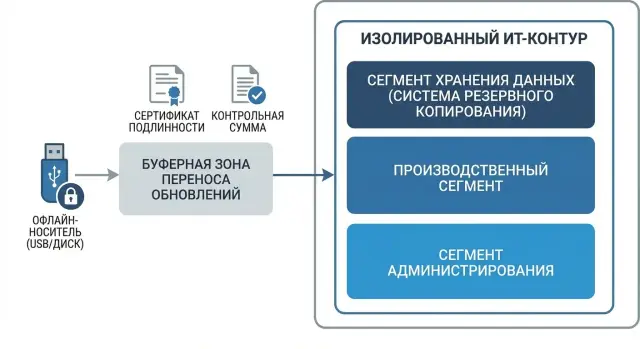
What makes StoreOnce difficult in an isolated environment
HPE StoreOnce in isolated environments usually runs into problems not because of deduplication or performance, but because of the surrounding processes that are normally invisible on an internet-connected network. Once the environment is closed, the usual logic breaks: where to get updates, how to verify them, how to keep correct time, and how to prove that restores actually work.
The first thing that suffers is updates and all the checks around them. External repositories are unavailable, automatic package downloads are impossible, and signature and trust-chain verification depend on which certificates and root CAs exist inside. Even a “small” issue like incorrect device time becomes a problem: certificates may appear expired or “not yet valid”, and event logs become useless when investigating incidents.
The second pain point is procedures. A one-off "we'll copy the package on a USB stick" usually works only once, and then chaos follows: where is the canonical file, who checked it, how was integrity proven, which exact steps were taken. In an isolated environment, a repeatable process matters more than an engineer’s heroics on a particular night.
People often underestimate transfer risks: compromised media, package substitution, infecting the buffer workstation, and configuration drift when a test bench is updated but production is not (or vice versa). As a result, a restore at a critical moment may fail due to mismatched versions, encryption settings, or access parameters.
Finally, it’s always about coordination. Operations need a maintenance window and clear rollback steps, InfoSec needs a trust model for keys and certificates, and you need rules for removable media and auditing. Without agreed rules you risk either “nothing is allowed” or “everything is allowed but without proof” — both outcomes are bad for audits and real incidents.
Constraints and agreements before you start
In an isolated environment, problems begin with expectations, not with the update itself. Until you agree rules, any “quick patch” turns into a blame game about responsibility, downtime, and which artifacts auditors need. For StoreOnce this is especially important: you will move files, verify them and have to document every step.
First, record the isolation type. Full air gap means no DNS, no NTP, and no external certificate validation chains, so all checks must be self-contained. If there is a gateway or a buffer zone, specify exactly what is allowed: one-way file transfer only, or temporary access by request, who approves it and how it is logged.
Next, distribute roles so there is no conflict of interest. A simple separation usually helps in practice:
- Package preparation: who downloads updates, release notes, checksums and prepares the media.
- Independent verification: who validates signatures/hashes and confirms the package matches the work plan.
- Application: who performs the StoreOnce update and is responsible for rollback.
- Observation: who records metrics before/after and collects logs.
Also agree on maintenance windows and acceptable downtime. Write down what counts as “success”: version applied, services available, replications (if any) restored, and a test restore completed within the agreed time. If downtime is not acceptable, decide in advance what maintenance mode is allowed and where the line of risk is.
Finally, define a minimal set of logs and records for audits. Typically these are: the change request, a list of update files with hashes, the quarantine verification protocol, the execution protocol, and a final record with the test restore result and any remarks. This saves time later when questions come from InfoSec or internal control rather than the engineer.
Practical architecture: three zones and clear roles
A simple three‑zone setup works best for StoreOnce in an isolated environment. It removes the main risk: accidentally bringing something into the closed network and spending weeks investigating the consequences.
The three zones
-
External preparation zone. This is where firmware, patches, hash utilities, documentation and a single “update package” are downloaded. Important: this is not an installation area, only assembly and initial verification.
-
Buffer zone (quarantine). The package arrives here first: it is rechecked, checksums are recorded, the transfer is formalized, and the media or channel for moving into isolation is prepared. The buffer is also convenient for managed file transfer (MFT) if you exchange files strictly within the buffer network.
-
Isolated zone. The package is only received, logged, and applied according to procedure here. Any additional downloads are forbidden.
Roles and privileges
To minimize mistakes, separate duties and accounts. Usually the following roles are enough:
- Package assembler (external zone): no access to the isolated zone.
- Quarantine operator (buffer): accepts, verifies, and logs the package.
- StoreOnce administrator (isolated): performs the update and the restore test.
- Auditor/InfoSec: approves the package and accompanying documents.
Choose one stable transfer method: disposable media, a dedicated transfer PC (no mail or browser), or MFT in the buffer zone. It is important that the method be singular and documented.
A unified naming and versioning standard helps. For example: SO_Patch_<model>_<version>_<dateYYYYMMDD>_SHA256.txt. This makes it easier to verify what exactly entered the isolated environment and to roll back to the previous package quickly.
If you work with an integrator such as GSE.kz, agree in advance who assembles the package, who signs the log, and where the reference hash set is stored. In practice this saves days during investigations and repeat tests.
Steps: how to prepare an offline update package
In a closed network the main risk is not the update itself but bringing in an incomplete or unverified set of files. Start with a precise inventory: current StoreOnce software/firmware version, model and hardware revision, and compatibility requirements (for example, with your backup software and drivers). Read release notes fully and record whether intermediate versions or separate packages are mandatory.
Download only in the external preparation zone with controlled internet access. Also store all accompanying files there: release notes, bundled utilities (if required) and rollback materials. If your organisation has a central registry, log versions and receipt dates there.
Before transferring into the closed network check authenticity and integrity: digital signatures (if provided by the vendor) and checksums. Don’t rely on memory: record in a separate protocol what was checked, how, who performed it and what hashes were produced.
It is convenient to assemble everything into one “offline package” so staff inside the isolated environment don’t have to hunt for missing files. Common contents include:
- update file(s) and release notes
- checksum file and your verification protocol
- a short step‑by‑step instruction tailored to your access method
- a rollback plan (failure criteria, return points, and steps to take on error)
- a change journal: what is updated, why, maintenance windows and responsible people
Scan the package with antivirus and any InfoSec checks required by your organisation before release. The end result should be an act of admission for the media/archive into the closed environment with a date, signature and file list. In integration projects (including those run with GSE.kz) this often becomes the most useful document: it lets you repeat the procedure months later without improvisation.
Steps: how to safely apply an offline StoreOnce update
Offline updates in an isolated environment win not on speed but on predictability. The goal is simple: after work StoreOnce returns to a normal service state and the backup chain continues without surprises.
Before you start, confirm the maintenance window and the basic scenario: who stops jobs, who confirms the start, and who accepts the result. If the device serves critical systems (for example, medical systems or payment services), agree in advance which backups may be skipped and which must be performed before freezing operations.
Recommended sequence of actions
-
Export a configuration backup of StoreOnce and separately export critical parameters you often check manually: network settings, DNS/NTP (if used inside), replication/catalog settings (if present), and the list of users and roles.
-
Check health before intervention: sufficient free space, no degraded disks, no critical system log errors, no stuck deduplication tasks. If there are existing hardware warnings, postpone the update — it will complicate diagnosis.
-
As per the agreed scenario, freeze workload: stop or pause backup jobs, wait for active sessions to finish, and ensure the backup server does not retry and reopen connections.
-
Apply the update in the correct order (as specified in the release notes) and keep a simple log: start time, version before/after, steps, reboots, and final statuses. This helps when reconstructing history months later.
-
After reboot check basic functionality: key services up, stores/catalogs visible, test connections accepted, and a small trial backup can be created.
Simple rollback plan
Define rollback before work begins. Minimum: failure criteria (services do not start, stores not mounted, or repeated critical errors), rollback steps (restore configuration, revert to previous version per vendor procedure), and decisions about data: which test jobs to remove so you don’t mix “before” and “after” data. If possible, keep a separate configuration restore point and verification protocol to quickly confirm the system returned to a controlled state.
Keys and certificates: a simple trust model for a closed environment
In an isolated environment the challenge is usually not creating certificates but deciding which keys are needed, where they should live and who is responsible. The simpler the model, the less likely an update or restore will be blocked by an expired certificate or lost key.
A practical minimum for a StoreOnce scheme looks like this:
- an admin TLS certificate for the StoreOnce interface to avoid warnings and MITM inside the network
- certificates for integrations with backup and replication systems if they require TLS and hostname verification
- backup encryption keys (if application‑side or storage encryption is used) and a clear recovery policy for them
- an offline package signing key (if you sign updates and accompanying files in the buffer zone)
- admin access keys (for example, SSH) with personal accountability
Separate storage is important. Working keys live where they are used (on the device or in a protected key store). Backup copies of keys and the internal CA root certificate should be kept separately with restricted access and issuance records. The package signing key should be stored off the administrator’s workstation, ideally on a dedicated media or a protected node in the buffer zone.
To prevent trust failures due to time, ensure stable time inside the environment: your own NTP server or at least a rule to manually verify time before updates and restore tests.
Define rotation with simple rules:
- scheduled by time (for example, every 12 months) and unscheduled after an incident
- triggered by events: change of responsibility, suspected compromise, or lost media
- with a fixed owner: who issues, who approves, who installs
- with a clear revocation plan: what to do with the old certificate and how clients update trust
Useful documents include: a single trust diagram (who trusts whom), a log of issuance and replacements, step‑by‑step replacement instructions, and a short incident investigation plan in case of compromise. In projects for government and large organisations these regulations are often produced together with the integrator (including GSE.kz) so they align with access and operations rules in the isolated environment.
How to test restore without internet and without unnecessary complexity
A restore test in an isolated environment is not for paperwork — it is to avoid discovering on the day of an incident that backups exist but services cannot be brought up. You don't need internet or a dream lab. You need a small test area and a clear minimal set of checks.
Minimal set of tests (to cover real risks)
Start with 3–4 representative restores that reflect your main workloads. Usually the set includes:
- one small file or folder (verifies the backup chain is readable)
- one virtual machine or server image (checks integrity and basic boot)
- one database or its dump (checks consistency and data access)
- one critical application “as users see it” (for example, 1C, mail, medical system or portal)
These tests give quick signals: whether the issue is storage, keys, backup software or application level.
Test environment inside the network
Create a separate segment or at least dedicated test VMs/servers. The important part is that the test must not affect production and must not depend on external services. If an application normally calls external addresses, prepare stubs (local DNS records, local repositories, test accounts) so the restored system starts without trying to reach the internet.
A practical example: after a StoreOnce update you restore a test VM into the isolated network, start the service, log in with a test account and open 2–3 key screens/reports. This is more reliable than just seeing the status “Restore completed.”
When to run the test and what to record
Test on a schedule (for example, monthly) and always after changes: StoreOnce updates, backup software updates, certificate/key changes, access right changes, or network rule changes.
In the protocol record: what object was restored, size, time to service start (RTO), actual recovery time, errors and the exact remediation steps. After 2–3 cycles you will have real numbers and can identify bottlenecks: network, storage, keys, or process.
Integrity control and documents that actually help
In a closed environment the main risk is later being unable to prove what was transferred, who authorized it, and that nothing was swapped. Therefore agree in advance which artifacts are “sufficient evidence”, where they are stored and who is responsible.
Start a folder (or a section in your internal document store) called “Offline transfers and updates.” Put not only files there but traces of how they entered the environment.
A short set of artifacts that help in audits and investigations:
- checksums (for example SHA‑256) for each transferred file and a master hash list
- signatures/source confirmations (if you sign packages internally)
- transfer log: date, media, origin and destination, who moved it, who received it
- act of admission for the media into the environment (even a one‑page template)
- execution logs: what was done on StoreOnce, when, and under which account
Also keep a single change journal, not scattered across emails: what was updated, why, which risks, who approved the window, and the rollback plan. This saves time when someone asks months later why a version or certificate changed.
Capture configuration snapshots before and after work in the same way each time: exported configuration, list of key parameters, or screenshots if that’s your practice. Attach these materials to the change record so they can be found by the change ticket number.
Storage and retention
Logs and evidentiary files grow quickly. Define retention (for example, 1–3 years) and storage location inside the environment: where the archive lives, who has access, and how the archive itself is backed up.
Incident investigation template
If something goes wrong (update, certificate, restore), use a simple template to avoid losing details:
- symptoms and start time
- actions performed and by whom
- artifacts proving integrity (hashes, acts, logs)
- root cause and remediation
- what to change in the procedure to avoid repetition
Such discipline is especially useful in organisations with formal quality and security requirements. If you follow internal standards (for example ISO), these documents map easily to your environment without extra complexity.
Common mistakes in isolated environments
The main issue in a closed network is you can’t quickly “fix” a mistake. If an update fails you can’t download a missing file or search the internet for hints. Even minor oversights turn into downtime and a dispute between InfoSec, IT and vendors. Below are mistakes commonly seen in StoreOnce projects in isolation.
Mistakes that cost the most
- Updating without a rollback plan and without a saved configuration. When things fail people don’t know how to return to a working version and waste time manually restoring settings, network parameters and integrations.
- Moving packages “as is” without quarantine and checksums. A single corrupted file on a USB stick or a swapped package produces an installation error that is hard to prove and reproduce.
- Mixing roles: one person downloads, verifies and applies the update in production. This breaks control and makes investigations pointless: there is no independent confirmation the package was what was expected.
- Forgetting about time and certificate lifetimes. In isolation time may go unchecked for years; then suddenly certificate/TLS/signature checks fail because things have expired.
- Testing restore only with small files and being reassured. Large databases, VMs and many small files behave differently: you may discover bottlenecks in network, permissions, deduplication or maintenance windows.
A short practical example
A team transfers an offline StoreOnce update on a “clean” USB stick. They did not record checksums, did not use quarantine, and left the date on one node set to last year. The update starts but some checks fail and logs are not trusted: is it a corrupted package or a certificate/time issue?
Such issues are cured by discipline: a transfer log, two people verifying, proper checksums, and regular time and certificate expiry checks. If an integrator or service team (for example GSE.kz) is involved, agree the format of verification acts and the list of artifacts in advance so nobody has to remember what was done.
A short pre‑update and pre‑restore checklist
Before touching StoreOnce in an isolated environment run the same short checklist each time. It reduces the chance of surprises and helps prove the work was done correctly.
Before work
Check the basic things often forgotten in closed networks:
- The offline update package is approved: exact version, file list, checksums, signature verification (if applicable), and a clear rollback plan.
- The transfer media (USB, disk, secured gateway) is scanned for malware and an admission act is issued per your organisation’s rules.
- A configuration copy of StoreOnce is taken and a restore point is recorded: current version, network settings, accounts, repository parameters, licenses.
- The maintenance window is approved by service owners. Backup jobs are stopped correctly, no active copies or background tasks remain.
- Roles and contacts are assigned: who updates, who accepts the result, who authorises rollback and who owns the backup system.
Briefly review the restore scenario: what exactly will be restored, where and how success is confirmed. Preferably choose one small object (a VM or a file folder) and one medium object (an application server) so the results are meaningful.
After the update
Record minimal checks and mandatory entries:
- Smoke test performed: console login, storage availability, service status, no critical alerts.
- A restore test without internet is planned and executed: restore to a test environment or isolated host, verify data integrity and recovery time.
- All results entered in the work journal: dates, versions, hashes, who performed, who accepted, deviations and how they were closed.
If an integrator accompanies work in your environment, record the participant (for example, an engineer from GSE.kz) and responsibility boundaries in the journal.
A realistic scenario and next steps
Imagine a government organisation with two sites: primary (production) and secondary (DR). The environments are isolated and have no direct internet. A courier brings a media package to the buffer zone weekly with updates and service files. Inside the isolated network StoreOnce holds backups of critical systems and restores are verified on a separate test segment to avoid risking production. This approach works if roles and a calendar are agreed in advance.
To avoid turning the process into a one‑off “heroic” operation, schedule actions:
- Weekly: transfer to the buffer zone, checksum verification, media movement log.
- Monthly: restore test on the test bench with RTO recording and notes.
- Quarterly: planned offline update (with downtime window and rollback plan).
- Semiannual: review certificates, keys, accounts and privileges.
- Annually: a drill simulating an incident and full recovery “as in real life”.
Measure as you go. Key metrics that quickly show control status:
- RPO and the actual age of the last successful backup.
- RTO by data type (DBs, files, VMs).
- Percentage of successful restore tests and reasons for failures.
- Downtime during updates and number of rollbacks.
Start small: a pilot on one segment and one data type (for example, a departmental file share). Within 2–4 weeks you will see realistic timelines, media bottlenecks, and which procedures need tightening.
An integrator is especially helpful to quickly and safely formalise a mature scheme: design zones, prepare clear procedures, deliver training, and then maintain the process. If you lack an internal team, GSE.kz can take on system integration, select servers and infrastructure for backup and test stands, and provide agreed support and 24/7 maintenance.
Frequently asked questions
Why is StoreOnce usually harder in an isolated environment than in a normal network?
Start by documenting the isolation rules: is there a buffer zone, is any controlled transfer allowed, who approves transfers and how that is recorded. Then describe one repeatable process: where the offline package is assembled, where an independent check happens, who applies the update, and how success is confirmed with a restore test.
What is the biggest risk when doing an offline update of StoreOnce?
The main risk is bringing in an incomplete or tampered package and then not being able to quickly fetch or re‑verify files. The working minimum is to keep update files together with release notes and precomputed checksums, verify integrity before transfer, and recheck again in the quarantine/buffer area or inside the isolated zone.
Why have three zones (external, buffer, isolated)? Can't it be simpler?
The most practical layout is three zones: an external preparation zone for downloading and assembling packages, a buffer/quarantine zone for rechecking and formalizing the transfer, and the isolated zone where the package is only received and applied. This reduces the chance of accidentally introducing unauthorized items and makes audits simpler because each step has a clear owner.
Which roles should be separated when transferring and installing updates?
To avoid conflicts of interest and single-person mistakes. Typically you separate: package preparation, independent verification (hashes, signatures, version vs plan), update application, and result recording (logs, metrics, restore test). This makes it easier to prove integrity and speed up incident investigations.
What should be included in an offline update package for StoreOnce?
Assemble a single offline package so people inside the isolated network don't have to hunt for missing files. It usually includes: update files and release notes, a checksum file and your verification log, a short step‑by‑step instruction for your access method, and a prewritten rollback plan with criteria for failure.
Why is time (NTP) so important in an isolated environment and what if NTP is not available?
Ensure time is consistent on key nodes inside the environment. If there is no internal NTP, enforce a rule to manually verify time before updates and restore tests; otherwise you can get TLS, signature, or log ordering failures because events appear to be in the past or future.
How to organise keys and certificates so updates and restores don't fail?
Keep the trust model as simple as possible: an internal root CA, clear certificates for admin access and integrations, and well-defined storage for backup copies of keys. If you sign offline packages internally, keep the signing key separate from administrators' workstations to reduce compromise risk.
How to properly test restoration (restore) without internet?
At minimum, restore not only a small file but also at least one typical server or VM and one application scenario “as users see it” in a test segment inside the network. Success is not only the restore status but that the service starts and basic data checks pass. Record recovery time and any errors.
What is the minimum sequence of actions for an offline StoreOnce update to avoid downtime?
Always save configuration before work and define rollback criteria in advance: what counts as a critical failure and who decides. After the update, do a short availability check and run a control restore test; only then resume regular backup jobs.
Which documents and logs are actually required for auditing offline transfers and updates?
Usually four items are sufficient: a list of files with hashes, a transfer log (who, when, with what media, from where to where), the quarantine verification record, and the execution log with versions before/after and the restore test result. If an integrator (e.g., GSE.kz) participates, agree in advance who prepares packages, who signs protocols, and where the reference set of hashes is stored inside the environment.
