7 min read
HPE ProLiant DL360 Gen11: selecting CPU, memory and drives for 1U
HPE ProLiant DL360 Gen11: how to choose CPU, memory and drives for “many cores, little space”, and what to check about cooling and expansion before purchase.
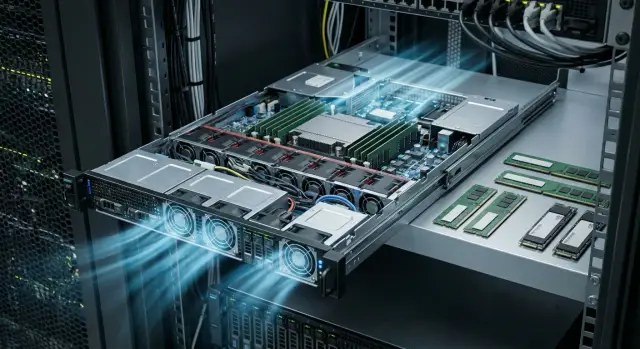
“Many cores, little space” use cases: what usually goes wrong
The phrase “many cores, little space” typically means a simple goal: maximize vCPU count and rack density while keeping the node at 1U. In practice this almost always becomes a compromise between cores, frequency, memory capacity and whether the server can reliably dissipate heat under sustained load.
These projects rarely fail for a single reason. CPU looks primary for virtualization, but a month later you may discover there isn’t enough RAM for VMs, disks can’t handle random I/O, or the hypervisor noticeably lags during peaks.
In 1U configuration mistakes are more visible than in 2U or 4U. There’s less room for heatsinks and airflow, fewer expansion slots, and drives and controllers sit closer together and heat each other. Because of that, an otherwise suitable many-core CPU can quickly hit power and temperature limits and you’ll see frequency drops exactly when load peaks.
Common missteps repeat: pick maximum cores and forget frequency (databases and VDI suffer), skimp on RAM (CPU idles waiting for swap), choose fast NVMe but the wrong RAID/controller, or plan to add a NIC later and then discover there are no slots or PCIe lanes left.
Before requesting a quote for HPE ProLiant DL360 Gen11, lock down: workload type (virtualization, DB, analytics), target number of VMs or containers, required RAM and 12–24 month growth, I/O profile (random or sequential), availability requirements and rack power/cooling limits. Then choose CPU, memory and drives to match real needs and avoid surprises after purchase.
How to read 1U constraints before choosing a configuration
You buy a 1U server for density, but you almost always pay for it with constraints. Before building a HPE ProLiant DL360 Gen11 configuration, it helps to review three frames: processors (sockets and classes), thermal budget, and space for expansion and drives.
First decide how many sockets you truly need and which CPU classes realistically “live” in 1U. Formally you can fit very powerful processors, but in practice the choice is limited by TDP, cooling requirements and the fact that dense rack layouts make nodes warm each other.
Next is the balance of cores vs frequency. Many cores are great for virtualization, containers and parallel analytics. But for latency-sensitive databases or software licensed per-core, fewer cores and higher frequency often pay off. Licensing is also a factor: “more cores” can noticeably increase license or support costs even if the workload can’t use them effectively.
TDP in 1U affects more than noise. It determines whether the server will hold stable frequencies under sustained load or throttle in a hot server room. If you plan dense deployment (many 1U in a row), check ambient conditions, acceptable noise levels and fan operation modes in advance.
To avoid assembling a config blindly, ask the customer for at least:
- workload type (virtualization, DB, VDI, AI inference, etc.)
- SLA and acceptable downtime
- expected growth over 12–24 months
- power and cooling constraints in the rack
- licensing model for key software
Finally: in 1U there’s always a trade-off between drives, controllers and network cards. If you don’t fix priorities early (NVMe, more network ports, RAID controller, HBA), you may end up with a configuration that doesn’t fit physically or thermally. A good practice is to validate compatibility with the integrator who will handle racking and support.
Quick mapping of configuration to your workload
HPE ProLiant DL360 Gen11 is often chosen when you need a lot of compute in 1U and can’t use larger servers. The fastest way to pick a configuration is to name the workload type first, then discuss specific CPU and drive models.
Workload -> where to focus
For dense virtualization prioritize cores and plenty of RAM; storage must be fast and predictable in latency. For transactional databases and services you often prefer higher frequency and fast NVMe over the maximum number of cores. VDI typically needs a balance: cores for peaks, RAM with margin and storage that sustains writes. In HPC and compute-intensive tasks cores and memory-per-core matter; for small services (web, AD, monitoring) moderate CPU is usually enough but don’t skimp on drive reliability and redundancy.
Choosing “more cores or higher frequency” is simpler than it seems. If you have many independent tasks (VMs, containers, batch jobs), cores pay off. If you have one or two heavy threads (some DBs, per-core licensed apps), frequency and cache are more important.
Memory per core: quick rules of thumb
As a starting guideline: 2–4 GB RAM per virtual core for light VMs/services, 6–10 GB per core for medium workloads and more when VMs hold caches or large datasets. For example, 64 cores for virtualization often pair with ~512 GB RAM as a realistic baseline. Then refine based on actual consumption.
Plan accelerators ahead. In 1U the limit is often not “can you install one” but “is there enough power and cooling and are there PCIe lanes left for network and RAID”. If you need GPUs, SmartNICs or HBAs, verify TDP, available PCIe lanes and whether you’ll have to sacrifice drive bays or network ports.
Step-by-step algorithm to choose CPU, memory and drives
The main risk with a dense 1U server is buying many cores and then hitting memory, storage or thermal limits. To avoid overpaying and getting a node that can’t sustain load, follow steps.
First fix what you’re trying to densify. If the goal is maximum VMs, balance cores and RAM. If it’s compute jobs, focus on cores and frequency. If it’s a DB or VDI, latency and IOPS often matter more than core count.
Then build the HPE ProLiant DL360 Gen11 configuration as follows:
- Describe 1–2 typical workload scenarios (how many VMs, what apps, growth in a year) and pick the primary constraint: cores, memory or IOPS.
- Choose CPUs by core/frequency mix, but immediately filter out options that fail on TDP for 1U and your rack.
- Calculate RAM from the workload, not from “what fits”. Check you can reach that capacity using the right number of DIMMs to populate all memory channels.
- Pick drives by profile: SATA for low-cost capacity, SAS for predictable behavior and reliability, NVMe for low latency and high load. Choose RAID based on capacity, read speed, write speed and rebuild time.
- Verify drives and controllers don’t conflict with network plans (e.g., 25/100G), HBA, accelerators and other cards. In 1U some options may be mutually exclusive.
Before final order confirm site conditions: rack power budget, temperature and airflow, noise limits and service access. Nodes used for dense virtualization often fail not because of CPU but because memory was undersized (swap) or drives weren’t suited for heavy writes.
CPU: how to pick many-core options without overheating or overpaying
For a 1U like HPE ProLiant DL360 Gen11 the core question is: how many cores are needed under sustained load, not on paper. For virtualization start with the number of VMs and their average vCPU. For example, 25 VMs × 4 vCPU = 100 vCPU, but not all run at full use simultaneously. A common safety approach is to apply a concurrency factor of 0.4–0.7 and add 15–25% headroom for peaks and growth.
Frequency matters more where many short operations and latency decide outcomes: transactional DBs, some ERP components, brokers and terminal farms. In such cases a CPU with fewer cores but higher base frequency and better single-thread performance often outperforms the maximum-core option.
Be cautious with TDP in 1U. A high-TDP CPU without verifying cooling can translate into hidden performance loss: the server holds turbo for minutes, then shifts to a lower all-core frequency for prolonged load. You pay for a top CPU but get mid-range performance because of thermal or power limits.
Treat turbo frequencies as a bonus. For 24/7 sustained loads focus on base frequency and long-duration benchmarks, not peak specs.
When to choose two mid CPUs instead of one top CPU:
- You need both cores and memory bandwidth: two sockets give more memory channels and higher aggregate bandwidth.
- Planned VM growth: sometimes adding a second CPU later is easier than replacing one.
- Licensing per-socket considerations: sometimes fewer sockets are beneficial, but often licenses are per-core and overbuying cores is expensive.
- Mixed loads: some services need frequency, others need cores; a mid-range dual-socket setup can balance both.
Practically this often means: a node for dense virtualization and some heavy services performs better with two mid-TDP CPUs and predictable frequencies than with a single maximal CPU that in 1U will more often hit cooling limits and drop frequencies.
Memory: capacity, speed and correct DIMM placement
Memory is often the first limiter in a 1U like the HPE ProLiant DL360 Gen11. A typical mistake is buying many cores but only populating RAM “for now”. As a result VMs or databases choke on swap and wait for disks.
Practical rule: populate memory evenly across channels, not “as it fits”. Leaving channels empty or populating asymmetrically reduces bandwidth and multi-threaded performance.
How much RAM to plan for host and VMs
A bottom-up estimate: sum the memory of all VMs and add headroom for the hypervisor, cache and spikes. For example, 12 VMs × 6 GB = 72 GB, but a host will often be more comfortable with 128 GB: some RAM is used by system processes, file cache and transient peaks, plus you want a buffer for growth without downtime.
For dense clusters consider worst-hour load and failover requirements: can the host sustain losing a neighbor node without severe memory pressure?
What really matters: ECC, ranks and speeds
ECC is basic hygiene for servers. Performance is influenced more by how memory runs after mixing DIMMs. Different sizes, ranks and batches can force a lower speed and tighter timings for all modules.
To avoid the many-cores-but-not-enough-memory trap, track simple metrics: how many GB of RAM per physical core for your workload. For VDI and heavy DBs this metric is usually much higher than for light services.
Plan expansion in advance. It’s better to leave slots free to grow while keeping channel symmetry than to buy whatever modules are available later and lose speed.
Drives and RAID: what to choose for a dense 1U server
In 1U the storage subsystem often hits physical limits: how many front bays exist, which PCIe lanes go to the backplane and whether the chosen sled supports NVMe. Check this before buying or you may end up intending NVMe but only getting SAS.
If you need capacity and predictable behavior, SAS (or SATA for less critical uses) is common. For maximum IOPS and low latency, NVMe wins, but NVMe in 1U can be limited by PCIe lanes, so you can’t always just add more drives and expect linear speed gains.
Separate roles: the OS disk should not compete with data disks. A safe layout is two small SSDs in RAID1 for boot and a separate pool for VM storage (NVMe or fast SAS/SATA SSDs depending on budget). Archive and backups are better kept off the node if possible.
There’s no universal RAID answer. Hardware RAID is convenient for SAS/SATA and offers cache (if battery-backed or with flash protection). For NVMe, simple mirrors or software RAID/ZFS are often more sensible if you need transparency and predictable failure behavior. Remember that rebuilds in dense arrays can be long and under load 1U cooling is already near limits.
Look at endurance (TBW) for SSDs but focus on matching drive class to your write profile and keeping spare capacity. If hot-swap is required, confirm the chosen sled supports hot-swap and that the controller and OS handle failures cleanly.
Cooling and power: the constraints that break procurement
In 1U everything is close, and small fans run at high speed. The HPE ProLiant DL360 Gen11 is especially sensitive to rack temperature and air quality. If the room is a bit hotter or dustier than spec, the server will not only get louder — it may start dropping frequencies.
The main heat sources in a dense node are usually three: a many-core CPU with high TDP, many DDR5 memory sticks (heat rises with module count near the CPUs) and fast NVMe drives that heat up under sustained writes.
Before buying, check rack conditions, not just server specs. Often missed items:
- actual intake temperature at the server (especially high in upper rack units)
- front-to-back flow (use blanking panels and avoid hot-air recirculation)
- cables blocking rear exhaust and creating a hot pocket
- power budget: rack capacity, chosen PSUs and N+1 scenarios
- degradation plan: what happens on fan or PSU failure and how quickly it’s detected
If room temperature rises by just 2–3°C (a common summer issue) three things usually happen: fans spin up (noise), power draw increases, CPUs drop to lower frequencies and NVMe may enter thermal protection and slow writes. In virtualization this looks like “suddenly things are cramped” even though the spec didn’t change.
A good rule: confirm rack airflow and power first, then choose maximum TDP, memory density and the fastest storage.
Expansion: network, controllers and 1U compromises
A dense 1U server is convenient until you start adding “one more card.” In HPE ProLiant DL360 Gen11 expansion typically hits three limits: number and size of PCIe slots (via risers), available power and cooling budget, and how many PCIe lanes are already used by drives and controllers.
Expansion slots: how many exist in reality
In 1U you typically have 1–2 full-length slots via risers. One slot gets used quickly by a NIC, the second by an HBA/RAID card or an accelerator. If you plan two NICs plus a separate RAID, conflicts are likely.
So before ordering, clearly separate “must-have” from “nice-to-have”: how many physical network ports do you need, do you require a separate RAID/HBA, are Fibre Channel or additional 1/10/25G ports required, are there telemetry/security cards, and what headroom remains.
Network 10/25/40/100G: avoid running out of ports and heat
Choose speed not only by throughput but by how many physical ports you need. A common mistake is to pick 100G with two ports, then realize you need separate networks (virtualization, backup, replication, management). Adding another NIC may then exceed slots, power or airflow.
High-speed NICs and RAID/HBAs produce notable heat. In 1U that’s critical: a card may start increasing latency or lowering throughput if a hot controller sits beside it and there’s no thermal margin.
Another compromise is front drive bays. The more front NVMe/SAS drives you want, the tighter the constraints on PCIe lanes and ability to add controllers. Sometimes it’s better to move some capacity to external storage than cram everything into 1U and lose expandability.
Example selection: a 1U node for dense virtualization
Imagine a rack with limited space and the need for 40–80 VMs on a single 1U node. Typical profile: many vCPU, significant RAM consumption, and some VMs with active disks (DBs, terminal services, monitoring).
Option A: focus on cores and RAM for density
If the aim is VM density, favor many cores and a lot of memory. A practical baseline: 2 × Intel Xeon Scalable (4th gen) CPUs optimized for cores, DDR5 RDIMM populated evenly, and storage sized to avoid IOPS bottlenecks.
Typically choose small SSDs in RAID1 for hypervisor boot and a separate pool for VM storage (NVMe or fast SAS/SATA SSDs depending on budget). In 1U check exactly how many NVMe the chassis/backplane supports; otherwise you may have “physical space but no PCIe lanes”.
Option B: focus on frequency and NVMe for latency-sensitive services
If the node will run services that don’t scale well with cores (some DBs, licensed software, high-activity VDI), choose CPUs with higher frequency and increase the share of NVMe. You’ll host fewer VMs, but each will be more responsive and disk stalls will be rarer.
Before ordering ask the vendor to confirm compatibility: allowed CPU TDP in this chassis with the chosen fans, how many DIMMs run at the required DDR5 speed without downclocking, how many NVMe are available simultaneously with selected PCIe cards (network, HBA, RAID), NVMe RAID options and boot-disk limitations, and expected power/thermal draw under typical virtualization load.
Provision rack power reserve (dual feeds, N+1), spare network ports, space for cable management and proper front air intake. For a 1U node the placement conditions are often more important than the raw top-end specs.
Checklist, common mistakes and next steps
Before buying a 1U node fix not only “how many cores” but what you can actually cool, power and expand in the rack. A good HPE ProLiant DL360 Gen11 configuration starts from constraints and then adds performance.
Short checklist before sending the spec to procurement:
- CPU: target class (frequency vs “more cores”), TDP and cooling profile for 1U
- RAM: total capacity and channel-population scheme (to avoid losing bandwidth)
- Drives: NVMe/SAS/SATA according to workload and redundancy plan (RAID/mirrors/replication)
- Network: how many ports and which speeds now and in a year, which networks must be separate
- Expansion: which controllers must fit and what you’re willing to sacrifice in 1U
Common mistakes are predictable: choosing maximum cores but minimal memory; adding NVMe “for speed” without planning data protection and rebuild; planning many expansion cards and hitting slots/PCIe lanes; ignoring rack limits on power and temperature — 1U is especially sensitive to airflow.
To prepare a proper spec, describe the workload (virtualization, DBs, VDI, containers), target metrics (IOPS/latency, VM density, 12–24 month growth) and site constraints (available rack power, redundancy, noise and service access).
If calculations show high TDP, many drives and many cards, compare 1U with 2U: you may win on cooling and expandability. Also consider local alternatives; for example, evaluate GSE S200 Series alongside other options.
Final step before procurement: validate the spec — check compatibility, thermal profile, resilience and real bottlenecks. This is usually done during systems integration; GSE.kz, for example, combines that validation with 24/7 infrastructure support.
Frequently asked questions
Where do I start when sizing a DL360 Gen11 for “many cores, little space”?
Start with the workload type and what you’re trying to pack: number of VMs, containers or specific services. Then determine the main bottleneck — CPU, RAM or I/O — and design the rest around it, verifying that the configuration meets 1U power and cooling limits.
What matters more in 1U: more cores or higher frequency?
For virtualization and containers you usually benefit more from more cores if you have enough memory, because many parallel tasks scale well. For databases, VDI and latency-sensitive apps, higher frequency and per-core performance often win, even with fewer cores.
How to avoid overpaying for a CPU and getting throttling in 1U?
Base your decision on sustained load rather than peak turbo frequencies. In 1U a high TDP often leads to the system throttling after a short time due to temperature or power limits, so you end up with less performance than expected.
When is it better to take two mid-range CPUs instead of one maxed-out one?
Two mid-range CPUs are worth it when you need both cores and memory bandwidth: dual sockets give more memory channels and higher aggregate throughput. A single top-end CPU fits when per-core frequency matters or licensing/budget favor fewer sockets.
How to quickly estimate how much RAM is needed for virtualization?
A rough starting rule: 2–4 GB RAM per vCPU for light VMs and services; 6–10 GB per vCPU for medium workloads, and more for VMs that hold large caches or datasets. Always validate against real consumption and include headroom for hypervisor, cache, spikes and 12–24 month growth.
Why is DIMM placement so important in 1U?
Populate memory evenly across channels — uneven or asymmetric placement reduces bandwidth and hurts multithreaded workloads. Also avoid mixing lots of different DIMMs: different sizes and ranks can force lower memory speeds for all modules.
What should I choose for drives: NVMe, SAS or SATA?
NVMe offers the lowest latency and highest IOPS, so it’s great for virtualization and databases, but in 1U NVMe may be limited by available PCIe lanes and the backplane. SAS is more predictable for capacity and reliability; SATA is fine where capacity and budget matter more than peak performance.
Which RAID scheme makes sense for a 1U server?
Separate the system disk from data so the boot device doesn’t contend with workload I/O. RAID1 is a typical start for the OS, while data RAID should match your write profile and recovery needs. Be aware that rebuilds in a dense 1U can take long and impact performance.
Which rack conditions commonly “break” 1U performance after purchase?
Check intake air temperature at the server, front-to-back airflow (use blanking panels and avoid hot air recirculation), cable routing that might block exhaust, rack power budget and N+1 plan, and failure scenarios for fans/PSUs. Small increases in room temperature often push fans up, raise power draw and reduce CPU/NVMe performance.
How to avoid hitting limits with NICs, RAID/HBA and PCIe in 1U?
Decide in advance which adapters must fit: NICs, RAID/HBA, accelerators — because slots, PCIe lanes and thermal budget run out quickly in 1U. Compatibility and power/thermal validation are best done as part of systems integration.
What should I validate before finalizing the spec for purchase?
If your profile ends up with high TDP, many drives and many cards, compare 1U vs 2U: 2U often gives better cooling and expansion. Also validate compatibility for CPU TDP, how many DIMMs run at their rated speed, real NVMe availability with chosen PCIe cards, RAID options for NVMe and expected power/thermal draw under typical virtualization load. Include rack power reserve, cabling and front-to-back airflow in planning.
What information is needed to prepare a proper specification (TZ) before procurement?
Provide workload profile (virtualization, DBs, VDI, containers), target metrics (IOPS/latency, VM density, 12–24 month growth) and site constraints (rack power available, redundancy, noise and service access). With that you can create a realistic RFP and avoid common mistakes.
