7 min read
HPE Apollo for HPC: designing a GPU/CPU node and metrics
HPE Apollo for HPC: how to design a densely populated GPU/CPU node and which pilot metrics to collect to confidently defend the procurement budget.
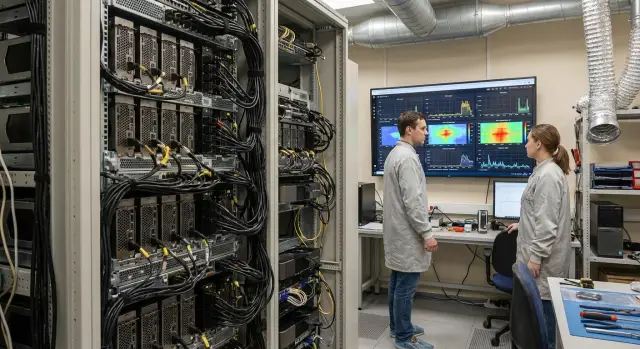
Where problems usually begin in an HPC lab
In an HPC lab the goal is not “the most powerful server”, but predictable time‑to‑result for specific workloads. This can be GPU model training, CFD, molecular modeling, image processing, genomics or batch runs for courses and publications. Typical constraints are the same: room in the data center, power limits, noise, maintenance budget and the people who will operate the system.
Plans usually break when someone wants to “pack GPUs and CPUs densely”. On paper it looks like you just add accelerators and cores. In practice you almost always hit power (not enough kW per rack or per phase), cooling (air cannot cope, hot aisles are not organized) and network/storage (GPUs idle because data does not arrive fast enough). Sometimes a fourth limit appears—"physics": node height, rack depth or weight limit.
People commonly compare three approaches: build nodes from components, buy purpose-built dense GPU nodes like HPE Apollo, or use chassis with multiple nodes per rack U. The difference is not only price but the “cost of surprises”: how well requirements for racks, PDUs, redundancy, maintenance and spare parts availability are known in advance.
To avoid buying for future growth and wasting money, agree up front which metrics will prove the pilot’s value. For example: time‑to‑result (wall time) on a representative job, GPU/CPU utilization, I/O throughput, stability during multi‑hour runs and how many jobs complete per week. Design the node for measurable effect, not for maximum spec sheet numbers.
Short example: a research group has three common pipelines and one of them saturates disks and network more than GPUs. If you discover this in the pilot, it makes more sense to spend the budget on proper storage and networking rather than extra accelerators that will sit idle.
Requirements gathering: what to clarify before choosing hardware
Buying HPC hardware almost always fails not because of brand, but because workloads are not described accurately. The same HPE Apollo for HPC can be configured for different profiles: in some cases GPUs matter more, in others CPU memory, and sometimes data access speed is key.
Start simple: document which calculations you run regularly and how you will know things got better. Group workloads into a few categories (for example ML, CFD, molecular modeling, visualization, VDI/remote desktops) and list 2–3 typical jobs per category: input size, duration, launch frequency and what counts as a successful result.
Next—balance GPU vs CPU. A common mistake is buying many GPUs and then hitting limits in CPU, memory or I/O. For each job clarify how many CPU threads are truly used, how much RAM is needed, how many GPUs per run and whether fast inter‑GPU communication matters; also check precision requirements (FP32/FP16/FP64) if that affects accelerator choice.
Separately describe the operating mode: is it a queue with nightly long runs or interactive sessions where quick response matters? For example, short daytime experiments for hyperparameter tuning and long overnight trainings affect scheduler, reservations and how many nodes are required.
Fix data requirements early: volumes now and in a year, file types, read/write frequency and where data “lives” between runs. If datasets are large and writes are continuous, bottlenecks usually appear in storage and network rather than compute.
Finally, define SLA: target times to result, acceptable downtime and maintenance windows. If availability is critical, provision power, service and spare parts before choosing the configuration.
Architectural sketch: how to pick a direction for HPE Apollo
An architectural sketch prevents starting from “the most powerful node” and helps quickly identify what will actually improve results. For HPE Apollo for HPC the fork is usually: chase maximum GPUs per node or build a more balanced GPU/CPU ratio to avoid hitting memory, network or power limits.
First, fix the target scenario. For training, rendering or molecular dynamics, more GPUs per node often win. For classic CPU+MPI workloads, preprocessing/postprocessing or simulations that need many threads, CPU cores, RAM and network bandwidth matter more.
Then check the site “physics”. Even a perfect configuration will not run if the rack cannot supply the power or the cooling capacity is missing.
What most often constrains
Bottlenecks typically appear in one of four areas: compute (GPU/CPU imbalance), memory (insufficient RAM or bandwidth), network (synchronization and scaling problems) and storage (slow I/O and dataset preparation).
Choose 2–3 candidate configurations for the pilot so comparisons are fair. For example: “4 GPUs + more RAM”, “8 GPUs + minimal CPU”, “balanced 4–6 GPUs + fast NVMe for scratch”. Agree in advance which parameters must not change (GPU family, kW limit per node, form factor), otherwise the pilot becomes endless tweaking.
Also lock budget limits: CapEx (hardware, racks, network, storage) and OpEx (power, cooling, support, downtime). A practical metric is cost per useful compute hour and the cost of GPU idle time caused by memory, network or disk bottlenecks.
Step by step: designing a GPU/CPU compute node
To make a GPU node predictable, start from the workload profile: neural network training, inference, CFD/CAE, rendering, bioinformatics. That determines whether CPU frequency, memory bandwidth, VRAM size or local scratch speed is most important.
1) CPU: frequency vs cores and NUMA
Single‑thread‑sensitive tasks (some preprocessing, licensed applications, certain CAE) often prefer higher frequency and fewer cores. For MPI and massive parallel jobs, more cores and stable long‑term performance matter.
Consider NUMA: in a dual‑socket node bind GPUs and network adapters so they are “closer” to their CPU. Watch power per socket: in dense configurations, an extra 50–100 W per socket can noticeably complicate cooling.
2) RAM: how much and how to populate channels
Memory is often under‑provisioned, especially when GPUs are fed from the CPU. For some workloads plan 32–64 GB RAM per GPU, but it’s better to confirm with dataset and pipeline calculations.
Speed often matters less than proper channel population. Install modules symmetrically to preserve bandwidth rather than chasing the highest MHz with an unbalanced configuration.
3) GPU: accelerator type and VRAM
Choose GPUs based on VRAM size, memory characteristics and supported precision modes. Training usually needs capacity, inference favors energy efficiency and cost per request.
If PCIe and SXM options exist, consider trade‑offs: SXM tends to deliver higher per‑node density and performance but imposes stricter power and cooling requirements.
4) PCIe topology: avoid exchange bottlenecks
Verify how many PCIe lanes each GPU actually gets and where network and NVMe are connected. A common mistake is having accelerators physically present but on “sliced” lanes or sharing bandwidth with fast disks, which reduces data ingestion and inter‑device transfers.
5) Local drives: NVMe for scratch and cache
Even with central storage, nodes often need a fast local tier: NVMe for scratch, dataset cache, temporary files and checkpoints. Define how much space one experiment needs and whether read speed, write speed or durability matters. A good pilot node lets you validate this with real jobs before rolling the setup cluster‑wide.
Dense deployment: power, cooling and rack surprises
Dense deployment of HPE Apollo nodes with multiple GPUs almost always fails due to power and heat, not because of rack fit. Mistakes here lead to throttling, emergency shutdowns and clashes with operations.
Count real consumption, not just TDP. GPUs have short peaks and simultaneous loads of CPU, GPU and network add up. Budget and reliability require margins both in node PSUs and in rack‑level power (PDU and mains feed).
Before ordering racks and PDUs check: peak and typical power per node and per rack, 15–30% margin for PDUs and the main breaker, need for A/B power and whether the facility can support it, allowable inlet air temperature (and what happens if it’s +2–3 °C above plan), and noise constraints.
Cooling often starts with air, but dense GPUs quickly consume the cold aisle. Monitor inlet temperature, fan speeds and pressure drop. Plan cable management so airflow isn’t blocked and technicians can reach handles, PSUs and rails.
Plan maintenance while the rack is still on paper: how quickly can you replace fans and PSUs, which spare drives to keep, and is there room to slide a node out on rails. Rule of thumb: if a technician cannot safely pull a node and change a PSU within 10–15 minutes, density is too aggressive.
Network and storage: so GPUs don’t idle
A fast GPU still pays idle if data arrives slowly. In HPC this shows as low GPU utilization while waiting on I/O or inter‑node exchanges.
Network: Ethernet or InfiniBand
If jobs are mostly independent (many separate runs, rendering, parametric sweeps) and data is colocated, good Ethernet often suffices. For MPI, tight node exchanges, distributed training or frequent synchronizations, consider RDMA—InfiniBand or high‑speed Ethernet with RDMA—because latency and stability matter.
On the pilot check message sizes and frequency, the share of time spent in communications, real latency and throughput between nodes, and spare ports/uplinks for growth.
A leaf‑spine topology avoids mid‑scale bottlenecks. Plan ports with headroom: growth usually outpaces budget for a second switch.
Storage: where to keep datasets and results
If reads are high bandwidth with many parallel clients you typically need a parallel filesystem. Simpler scenarios may work with NAS/SAN, but verify it can withstand peak concurrent runs.
A hybrid approach often wins: local NVMe as a fast tier (cache, scratch) plus shared storage as the single source of truth. Example: 32 jobs each read 200 GB and write 20 GB results. With local NVMe for scratch, network and shared storage avoid choking and result offload can happen in batches.
Don’t forget the data lifecycle: where results go after a project. An archival tier and clear backup rules are often cheaper than expanding fast storage.
Software and operations: what affects pilot results
Pilots fail not because of hardware but due to minutiae in software and operations. Typical pattern: a node with powerful GPUs shows poor numbers because driver versions mismatch libraries, or jobs run without needed flags or with wrong CPU‑GPU bindings.
The stack must be predictable: OS, GPU drivers, libraries (MPI, math, ML frameworks) and an environment packaging strategy. Containers reduce “it works for me” problems, but only if versions and run rules are fixed. In a pilot choose a stable stack and avoid daily changes.
The scheduler affects numbers: queues, priorities, quotas and fair‑share must reflect real lab usage. If everyone runs jobs manually on one pilot node you won’t see real waits, resource contention and GPU downtime patterns.
Agree ahead how images and updates are managed: one golden image, change log, maintenance window and fast rollback, and compatibility checks for drivers and libraries before updates.
Without monitoring you end up arguing from impressions. Minimum monitoring: CPU/GPU utilization, temperatures and throttling, ECC errors, memory usage, network counters and scheduler events (queue wait, actual runtime). Also plan security: access segmentation, MFA where possible, and audit of commands and accesses.
Metrics to collect on the pilot to defend the budget
A pilot is valuable when it produces numbers to decide how many jobs you can complete, the electricity bill and where bottlenecks lie. Choose 2–3 representative workloads (for example training, numerical simulation, image processing) and collect the same metric set for each.
Metrics engineers and finance both understand
Collect data at the level job → node → cluster so you can see what drove gains.
- Performance: time‑to‑result, throughput (jobs/hour), scalability when adding GPUs/nodes.
- Utilization: GPU/CPU load, memory usage, idle time due to I/O, network, PCIe (is the bus saturated?).
- Energy efficiency: watts per job or iteration, kWh per project, consumption peaks.
- Stability: errors, overheating, throttling, restarts, share of failed runs.
- User experience: queue wait time, share of canceled jobs, environment startup time.
Example: training went from 10h to 4h, but GPUs are only 55% utilized. The pilot shows not only improvement but also the cause of lost potential—e.g., slow storage or network. That is more useful than raw TFLOPS on a spec sheet.
Turning metrics into budget arguments
In the pilot report do a simple economic calculation: cost per compute hour (electricity + support + depreciation) and a TCO forecast for 3–5 years under workload growth. Show two scenarios: “as is” and “after removing bottleneck”.
For procurement committees present a table “jobs / time before / time in pilot / annual effect”, a couple of utilization and kWh graphs, and a list of risks (overheat, power, failures) with mitigation measures.
Running a pilot: simple work plan and artifacts
A pilot should quickly prove three things: the chosen configuration delivers required performance, fits power and cooling constraints, and survives realistic operations.
Start with an honest comparison of 2–3 node variants on the same tests. Differences must be clear: more GPUs but fewer CPUs; different memory; different GPU power profiles.
In two weeks you can usually deploy a baseline environment, run synthetic tests and one real pipeline. In 4–6 weeks you can add a second pipeline, tune network and storage and gather stability statistics.
To make measurements defensible, set rules before the first run: 1–2 warmup runs don’t count; minimum 3 measured runs with recorded variance; freeze BIOS/firmware, GPU drivers, CUDA, MPI and container/image versions; equal conditions (power limits, clocking, room temperature).
Deliver a short report: results table by configuration, 2–3 charts (time/cost, performance per watt, scaling) and a clear purchase recommendation—what to buy now and what can be added later.
Common mistakes when designing dense GPU nodes
First trap—look only at TFLOPS. Real workloads often hit GPU memory (size and bandwidth), CPU↔GPU transfers and I/O. The outcome: expensive accelerators run at 40–60% utilization and users ask for more GPUs.
Second mistake—ignore throttling. In dense installs power and temperature limits engage faster than expected: clocks drop, runtime increases and reports look like “bad model” or “poor hardware”. For HPE Apollo for HPC this is critical: density works only if power and cooling are planned honestly.
Third mistake—mixing goals. Maximum rack density and ease of maintenance rarely coincide. If the lab lacks staff to swap a card or fan in a tight chassis, downtime will erase any density benefit.
Another pain—pilot without version control. One silent driver or library update and before/after comparisons lose meaning.
Quick checklist before procurement and scaling
Before locking HPE Apollo configuration and signing purchase orders run a short review. It helps catch hidden blockers that make pilots succeed but scaling fail due to engineering or operations.
-
Rack engineering readiness: compute peak rack power with margin and check phase/PDU distribution; ensure cold/hot aisles are enforced and there is enough airflow for dense GPU nodes; fix where and how inlet temperature is measured.
-
Data path performance: validate network bandwidth and latency both per node and cluster‑wide under peak; for storage verify fast dataset reads and stable result writes (including many small files and checkpoints).
-
Metrics and operations: agree which numbers define success and how to measure them; assign responsibility for updates, monitoring, incident response and spare parts.
Example scenario: how a lab justifies an HPE Apollo cluster
A lab of 10–20 researchers is limited by queue length. Two workload types exist: GPU model training (short, frequent runs) and CPU simulations (long runs, large memory). There is a strict electrical limit, e.g. 20–30 kW per rack, so you can’t simply add more servers.
The team selects two candidate nodes for a pilot: one maximizes GPU density (many accelerators, modest CPU) and the other is balanced (fewer GPUs, more CPU cores and RAM). The goal is to understand which yields better results for their queue and kW constraints.
The pilot runs real workloads, not only synthetic tests: several representative trainings (time to target accuracy, repeatability), 1–2 CPU simulations (time and memory use), a parallelism test (how many jobs run concurrently without degradation), and measurements of power and inlet temperatures under peak.
Then translate numbers into money. If average run time drops from 12h to 8h, a queue of 50 runs per month saves 200 hours. Multiply saved hours by team cost (salaries, missed deadlines, equipment idle time) to get a clear benefit. Separately quantify risk costs: overheating, throttling or failures convert into lost days.
Next steps: moving from pilot to production cluster
A pilot yields numbers, but a production cluster requires disciplined documentation and agreements. After tests, formalize what worked, what did not and what must change before procurement.
Assemble a minimal artifact set: one‑page requirements (workloads, target times, data and access constraints), one‑page risk register (power, cooling, network, GPU shortages, delivery times, security), 2–3 node configurations to compare and a measurement methodology (software versions, datasets, warmup and repetition rules). Also prepare a short budget file: pilot metrics, 3–5 year TCO forecast and which risks are mitigated by each item.
Plan scaling: doubling capacity typically forces revisiting rack power and redundancy, cooling and hot spots, port capacity and latency, plus storage and scratch.
If you need help from concept and pilot to an industrial cluster, system integrators often assist. For example, GSE.kz (gse.kz) operates as a manufacturer and integrator in Kazakhstan: they help build a target architecture, prepare an implementation plan and provide support so pilot numbers turn into stable operations.
Frequently asked questions
Where is the right place to start when designing an HPC node, instead of choosing the “most powerful” server?
Start with 2–3 representative jobs and a target metric “time to result” (wall time). Then verify site constraints: how many kW are really available per rack, whether cooling is sufficient, and whether there is spare capacity for network ports and I/O. Only after that choose node configurations for the pilot—otherwise you risk buying “fast hardware” that will idle because of power, temperature or data bottlenecks.
What constraints most often break the plan for dense GPU installation in a rack?
Most often power and cooling surface first, not compute. After that you may find that network or storage cannot feed the GPUs and accelerators idle. Less frequently but painfully, physical limits such as rack depth, weight or difficult maintenance access cause problems.
How to decide between maximum GPUs per node or a more balanced GPU/CPU configuration?
Focus on what limits your workloads. If you run training, rendering or molecular dynamics that scale well on GPUs, higher GPU density per node makes sense—but only if power and cooling readiness are confirmed. If you run CPU+MPI jobs, heavy preprocessing/postprocessing or have memory and I/O bottlenecks, a balanced node will deliver more predictable time-to-result and reduce accelerator idle time.
How not to mistake the CPU choice for a GPU node?
Measure how many CPU threads are actually busy during a typical run and how much memory they require. A common mistake is to install many GPUs and then bottleneck on the CPU side, data preparation or RAM limits. First capture the application profile (CPU time, I/O wait, communications), then choose cores and frequencies.
How much RAM is needed in a multi‑GPU node and why is it often underestimated?
As a rule, budget memory with margin to avoid swapping and silent performance drops as datasets grow. It’s important not only how much RAM but how it’s configured: symmetric population of memory channels often yields more benefit than squeezing a few extra MHz. On the pilot measure peak and sustained RAM usage, not just a short test.
Which GPU parameters matter for training, inference and scientific computing?
Look at VRAM size and the accelerator’s memory characteristics and which numeric precisions you actually use. For training, VRAM and memory bandwidth typically matter most, not headline TFLOPS. For inference, cost per request and energy consumption under steady load are more important to avoid hitting kW limits.
What is PCIe topology and how can it eat GPU performance?
Powerful GPUs can still run slowly if each gets an undersized PCIe lane allocation or if the network and NVMe share the same lanes. During design, check where GPUs, the network adapter and local disks are physically wired and how that maps to CPU NUMA. On the pilot this shows up as drops in GPU utilization and increased copy/exchange times, even though “all devices are detected.”
Why have local NVMe in an HPC node if there is central storage?
Local NVMe serves as a fast layer for scratch, dataset cache and checkpoints so shared storage isn’t overloaded by read/write peaks. Even with good central storage, a local layer often yields more stable iteration times and reduces dependence on neighbors' workloads. On the pilot measure how much space one experiment needs and whether read latency, write speed or durability matters more to you.
When is Ethernet enough for HPC and when do you need RDMA/InfiniBand?
If jobs are mostly independent and data is local, a well-provisioned Ethernet often suffices. For MPI, tight node-to-node exchanges, distributed training or frequent synchronizations, latency and predictability matter—look at RDMA options. The best way to decide is to measure communication share on the pilot and see how wall time changes when adding nodes.
Which pilot metrics truly help defend the budget and prove impact?
The minimum useful set is wall time, throughput (jobs per week/hour), GPU/CPU utilization, I/O‑related idle time, actual kWh consumption and signs of throttling. Always fix BIOS/firmware, driver and library versions; otherwise before/after comparisons are invalid. To argue for budget, translate results into understandable numbers: how many team-hours you save, the cost of a GPU idling due to disk/network, and the impact on project timelines.
