7 min read
How to Get LLMs to Cite: UX for Confidence and Verification
Practical UX techniques to make LLMs cite sources: links, highlighted excerpts, confidence levels and feedback — all without unnecessary complexity.
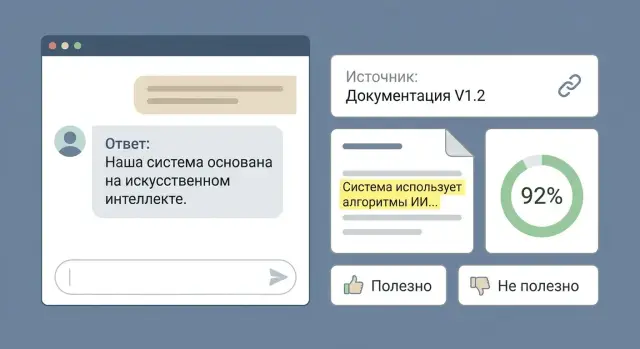
Why citations and confidence boundaries matter
When someone reads an LLM answer, the immediate question is almost always: “Where did this come from?” If the source isn’t visible, the reply feels like an opinion, even when it’s correct. Citations and confidence markers turn "nice text" into a verifiable hint.
It’s important to distinguish a link from a citation. A link shows where you could theoretically find confirmation. A citation gives a concrete excerpt the answer is based on and reduces verification to a few seconds. If you’re thinking about how to get LLMs to cite, the goal isn’t to decorate the UI but to lower the cost of verification for the user.
Without citations and confidence signals you get repeated risks: the model invents details, misreads documents (especially contracts and regulations), mixes versions of data, makes overconfident inferences from hints, and quickly loses trust after one noticeable mistake.
Confidence boundaries aren’t about math but honesty. The user should know where the model is paraphrasing found text and where it’s drawing a conclusion that might be wrong. Imagine an internal document chat: an employee asks about warranty terms. If there’s a nearby citation from the current regulation and the conclusion is marked “high confidence,” the decision is quick. If confidence is low and no citation appears, that’s a clear signal: open the document or clarify the question.
Success is easy to measure: more trust without blind faith, faster verification, fewer follow-up questions, and fewer disputed decisions based on a single answer.
What LLMs do well and where they fail more often
LLMs write coherent text, paraphrase, explain in simple terms, and help draft. But the model itself doesn’t "seek truth" or fact-check. It continues sentence after sentence to make the reply sound plausible.
Errors show up where precision matters, not smooth prose: concrete facts (who, what, where), dates and document versions, decree numbers, figures (amounts, percentages, limits), and legal wording. Another common trap is replacing "what was in the source" with "what usually happens."
Confidence levels fit questions that admit generalization or probabilistic answers: “Draft a letter to the client,” “Propose a report structure,” “Explain a term in plain language.” Here even medium confidence is safe because the user will edit.
When the question is about precise rules or numbers, it’s sometimes more honest to decline than to guess. Better to say “no data in available materials” or “need a source” than to produce a polished but fabricated detail. Example: “What is the retention period for contracts under our regulation?” If the model can’t see the current document, a precise number looks dangerously confident.
Show limits without scaring users: separate “generated” from “confirmed by sources,” highlight places where the model makes assumptions (often dates and figures), provide a clear “not found in documents” option, and offer to narrow context—period, policy version, department. Then the user quickly sees where the draft is trustworthy and where to open the primary source.
Source formats you can use in the UI
In workplace scenarios “show the source” quickly becomes an expectation. Users don’t want to take things on faith; they want to understand in 10 seconds whether the answer relies on a document or is a guess. So the question of how to get LLMs to cite usually becomes a UI question: how to surface data support conveniently.
There are three straightforward formats, and you can combine them.
1) Link to a document
The easiest format to consume: a single document that can be opened and checked. Works well when the answer is short and based on one file (a policy, regulation, contract).
2) Citation (text excerpt)
The most useful format for verification. The user sees 2–4 sentences that the conclusion rests on and can immediately compare them with the answer. This is crucial for internal knowledge bases: “Where exactly does it say that?”
3) Structured fact card
A card with fields, values and the source for each field. Good for recurring queries (e.g., “warranty period,” “delivery requirements,” “security policy version”) and reduces the risk that the model will paraphrase nicely but mix up details.
Next to the answer you almost always need minimal context: document title, date or version, and section. Without this, verification becomes a search through the whole file.
To avoid clutter, keep sources compact: a collapsible block under the answer, a single line “document – date – section,” a consistent style and a limit of 1–3 anchors. Hide the rest.
Highlighting excerpts: how to make verification fast
If you want to know how to get LLMs to cite, start not with links but with quick verification. The user should see not just the document title but the exact piece of text that supports a specific claim.
A practical UI rule: one idea in the answer — one source excerpt. Don’t show long texts “just in case.” Prefer 2–4 short excerpts, each with a clear label, over one massive block where it’s hard to find the relevant line.
How to mark excerpts
Highlighting should be unambiguous: the user immediately understands what the model “took” from the text. Simple methods suffice: mark 1–2 sentences, label them “Citation 1/2/3,” indicate the binding (section and paragraph), and add a page number for PDFs or a timestamp for transcripts. It’s also helpful to provide an anchor to the section heading so there’s a place to land.
After the excerpt add a short context line, e.g.: “Procurement policy, version 2.1, p. 14.” No extra detail.
When there are multiple sources
If the answer is assembled from different documents, group them: “Contract,” “Regulation,” “Email.” Inside each group show one short excerpt per claim and label what it confirms.
Example: an employee asks whether equipment can be written off for a specific reason. The answer has three points and three excerpts: one from the regulation, one from the application form, one from exceptions. The user quickly verifies each point and sees where the rule is exact and where there’s nuance.
Confidence levels: explain them without math
Users don’t need percentages like “73%.” They need to know whether they can rely on the answer now or should double-check. So plain three-state scales work better than numbers.
A good option is a short label next to the answer:
- High confidence: the answer is directly supported by sources and matches the wording.
- Medium confidence: data exist but are partial or allow multiple interpretations.
- Low confidence: no direct support, little data, or information is outdated.
Make “confidence” mean reasons, not “how smart the model is.” People read it through three signals: data completeness (was anything found), source match (is there a citation), and freshness (how old are the materials).
Make the level explorable via a “why” button or a short note under the label. One or two facts suffice without technical terms: “Found in 2 documents,” “Direct quote present,” “No direct quote — inference from indirect mentions,” “Last source update: 2023.” This helps the user understand both the logic of the answer and how to get LLMs to cite in your product.
Example: in an internal document chat someone asks about 24/7 support terms. If the regulation contains the wording and it matches, mark “High” and show: “Confirmed in 1 document: support regulation, section 3.” If the information only appears in a sales deck without exact wording, mark “Medium” with “No direct quote.” If the model guessed an SLA because that’s common, mark “Low” and suggest a clarifying question.
Sometimes it’s better not to show a confidence level: in creative prompts, when summarizing a long text briefly, when sources aren’t available to the user, or if the label would be almost always “medium” and lose meaning. When in doubt, show a concrete fact instead of a level: whether a citation exists and how many sources were found.
Feedback buttons: collect quality signals the right way
Feedback buttons convert user frustration into fixable signals. If you want to know how to get LLMs to cite, providing sources is not enough. You must capture moments when citations don’t help or mislead.
Quick actions work best and don’t demand long comments: “Useful/Not useful” with a short reason, error flags (“no source,” “wrong citation,” “wrong document”), “Show how to fix” with a small edit field, “Mark correct excerpt” (the user highlights the right bit in the source), and a separate button for privacy issues.
Separate two signals: answer quality and source linkage quality. A user may like the wording but see the citation points to the wrong place. Put source-related error reporting next to the citation block, not buried in the main menu.
The edit field shouldn’t be a blank page. Show the model’s answer and a short prompt: “How should this be?” or “Paste the correct phrase from the document.” Internal document chats (for example, at a company like GSE.kz with many regulations and specs) benefit from this mode: the user doesn’t rewrite everything but pastes the exact line from the file.
Users should know their feedback was received. A short status after clicking is enough: “Accepted,” “Thanks — we’ll check the source,” “Queued for improvement.” Avoid promises like “we’ll retrain tomorrow.” If feedback affects the current dialog, offer “regenerate answer with a different source.”
Step by step: how to add citations and confidence to your product
If you want to get LLMs to cite, start with rules, not the UI: where a source is mandatory and where it only gets in the way. For facts from internal documents, a source is always required; for tasks like “draft a letter” you can omit it.
A minimal working version is easy to assemble in six steps.
-
Classify answer types: “requires source,” “recommended,” “not needed.” This reduces disputes and sets expectations.
-
Choose a source format by task. Short answers work with a 1–2 sentence citation. Longer answers use a document card (title, section, date) so the user sees context without reading everything.
-
Add one-click verification. In UX the speed matters more than the “tick.” Show 1–3 citations and highlight the fragments the answer relies on. If a fragment is too long, split it into meaningful pieces so people read it.
-
Introduce confidence levels without numbers. Three states are enough: “confident,” “some doubts,” “needs checking.” Add a short reason: little context, conflicting sources, document outdated.
-
Configure feedback so it helps fix the system. Beyond “useful/not useful” add reasons: “no source,” “source not about this,” “outdated information,” “wrong inference.”
-
Run scenarios with real user questions. Take 20–30 common queries, see where people get confused, and rewrite microcopy in the interface. An internal document chat (policies, regulations, specs) quickly shows which answers need mandatory citations and clear explanations of doubts.
Common UX mistakes and traps with citations
The worst mistake is an interface that looks "verifiable" but makes verification impossible. If you work on how to get LLMs to cite, the aim is a truthful link: conclusion -> specific fragment of a source.
Mistake 1: fake citations
Sometimes a highlighted paragraph is similar but does not support the conclusion. The user clicks, reads, finds no confirmation and begins to doubt the whole answer.
Rule of thumb: the citation must answer "where exactly does this claim come from?" If the conclusion is synthesized from several places, show 1–2 key excerpts and label that this is an aggregation rather than a direct quote.
Mistake 2: source overload
A list of 12 documents is almost always worse than 2 precise hits. People won’t check "just in case."
Provide a minimum a user can realistically scan in 20–30 seconds: 1–3 sources, short excerpts next to the claim, and the ability to open the exact fragment, not the whole document.
Mistake 3: confidence percentages without explanation
"Confidence 73%" sounds precise but gives false precision. Users don’t know what 73 means and how it differs from 68.
Use clear levels with one-line explanations: “High: direct fragment in document” and “Low: looks likely but no exact match.” Low confidence should change UI behavior, e.g., suggest clarifying the question.
Mistake 4: one UX for all query types
Facts, advice and instructions need different verification. Facts need citations. Instructions need steps and warnings. Advice needs caveats and context.
Example: in an internal chat, "what is the delivery term?" should show the exact contract clause. "How to prepare a PC for employee onboarding?" should have a checklist and a pointer to where the rule is described.
Mistake 5: feedback buttons that don’t lead anywhere
If the user clicks "incorrect" and nothing happens, trust drops.
Minimum useful feedback: a reason chooser (wrong source, no source, off-topic, outdated), a one-line "what should be correct" field, and a quick system response (suggest rephrasing or show alternative excerpts).
Quick UI check: a 2-minute checklist
Open a recent dialog and pick an answer where accuracy matters (numbers, rules, deadlines, names). Run five checks. If you can’t find the right button or clue in 2–3 seconds at each step, users won’t either.
-
Is there a visible "Source" block (document, date/version, section) and is it clear what was used?
-
Can you open the source and immediately see the highlighted fragment? If you always land at the document start or see no highlight, trust decreases even if the answer is correct.
-
Is confidence explained in words and is there a reason: “confirmed in document,” “indirect support,” “no exact match”?
-
Is there a quick way to flag an error and select what’s wrong: "incorrect fact", "no source", "source doesn’t confirm", "off-topic"? A "what should be correct" field is useful but shouldn’t be mandatory.
-
What happens when there’s no source? Say it calmly: "Source not found" and immediately offer next steps: refine the query, choose a different document or period, switch to "source-only" mode, or send the question to a person.
This mini-checklist reveals whether the interface actually implements "how to get LLMs to cite" rather than just claiming it.
Example scenario: an internal document chat
Imagine an internal chat that answers only from your documents: regulations, orders, procurement rules, contract templates. A purchasing employee asks: "What is our response time requirement for critical support tickets?"
A good answer fits one screen and has three parts: a short human-friendly summary (1–2 sentences), a citation from the document, and a brief note on how to apply the rule. The user gets an answer and immediately sees its source.
For example: “Critical tickets must be accepted for processing within 15 minutes. This is stated in the support regulation. If a ticket arrives outside business hours, the time counts from the moment it’s logged in the system.” Below the chat the system shows the document fragment with the highlighted line, the document name and the section. This is a simple way to make LLMs cite without turning the UI into a "PDF search."
If confidence is low, the UI must honestly warn rather than pretend accuracy. The user sees: “There is a risk of error: similar wording appears in documents,” and 2–3 quick refinement options: choose a period (business hours vs 24/7), specify contract type, or pick the regulation version.
Feedback works best when it’s specific. Instead of a single "bad" button provide "show where it’s wrong": the user highlights the incorrect excerpt in the citation and selects a reason (wrong document, outdated version, wrong interpretation). They can add a short "how it should be" and attach the correct clause if needed.
To measure quality, track simple metrics: time to confirmation (when the user stops asking follow-ups), share of "not useful" clicks, share of low-confidence answers, number of repeat questions on the same topic, and how many user edits turned into document updates.
Next steps: how to run a pilot and improve quality
Start with content. Collect a short list of frequently used documents: regulations, instructions, email templates, policies. List 20–30 typical questions (from chats, tickets, calls). This quickly shows where citations matter and where a search is enough.
Then build a small prototype with 2–3 UI variants and show them to potential users. Often the winner isn’t the smartest option but the one where verification takes 10 seconds: answer + 1–2 citations; answer + highlighted excerpt in the text; answer + a "show sources" button on demand.
Define simple system behavior rules. Users value predictability: when will there be a citation and when will they see "no data"?
- Show a citation if the answer relies on a specific wording in a document.
- Say "no data" if there’s no suitable fragment or it’s too general.
- Mark "inference" when several similar sources exist and the choice is unclear.
- Allow opening the excerpt and viewing 1–2 paragraphs of context.
Roll out in phases. Choose one department and one scenario where mistakes are moderately costly but benefits are clear (e.g., HR answering internal policy questions or IT providing instructions). A 2–4 week pilot yields real data: which queries repeat, which documents are missing, which wordings mislead the model.
After the pilot expand coverage alongside an improvement process: add missing documents, remove outdated versions, clarify the "no data" rules, and use feedback to analyze errors. For corporate AI projects where integration, infra and systems help is needed, GSE.kz has experience in system integration and AI/data-center solutions, which often becomes a natural next step after such pilots.
Frequently asked questions
When are citations really mandatory, and when can you do without them?
A citation is needed when the user must quickly verify a specific fact: a deadline, a rule, or the exact wording from a regulation or contract. If the task is creative or a draft (a letter, structure, or a plain-language explanation), you can usually omit citations to avoid cluttering the screen.
How is a citation different from a simple link to a document?
A link tells you where to look for confirmation, but checking still takes time. A citation shows the exact fragment (usually 1–4 sentences) that the answer relies on, allowing you to compare meanings in seconds.
How many sources should you show to be useful rather than noisy?
Keep sources compact and tied to specific claims. In most cases 1–3 anchors are enough: document name, version or date, the relevant section, and a short excerpt next to the assertion.
How should fragments be highlighted so verification is fast?
Use a one-thesis–one-fragment rule: show exactly the piece that supports the claim. If the fragment is long, cut a sensible excerpt and add 1–2 sentences of surrounding context so the meaning isn't lost.
Which confidence levels are best to use in the interface?
The clearest option is three worded levels: high, medium, low. Add a short reason next to the label, for example: "direct citation exists", "formulations conflict", "source missing or outdated".
Where does "confidence" come from if you don't show percentages?
Show reasons rather than percentages: whether there's a direct match with a source, how many documents support the answer, and how fresh the documents are. If there is no confirmation, better mark low confidence and propose next steps than give a numeric guess.
What to do if the system didn't find a source but the user expects a precise answer?
Say plainly: "No source found in available materials" and offer next steps: refine the period, choose a policy version, specify the department, or upload the needed document. This reduces the risk of fabricated details and preserves trust.
Which feedback buttons actually help improve citation quality?
Separate signals about answer quality and source linkage. Make it easy to indicate specific problems like "citation not about this", "wrong document", or "no source". Otherwise you won't know whether to fix text generation or data linking.
Why do "fake citations" occur and how to avoid them?
This usually happens when the highlighted paragraph is merely similar but does not support the claim, or when a generalization is presented as a direct quote. Fix it by strictly linking assertions to fragments and by marking "derived from multiple places" if no exact line exists.
Where to start implementing citations and confidence in the product if time is limited?
Start with rules, not design: which question types always need a source. Then build a prototype, run 20–30 real queries, and measure how fast users can check: the path from answer to the exact line in the document should take seconds.
