7 min read
How to Choose a VDI Platform in 2025: Citrix, Horizon, AVD
Tips to choose a VDI platform in 2025: Citrix, Horizon, AVD and alternatives for on-prem, cloud bans and GPU needs.
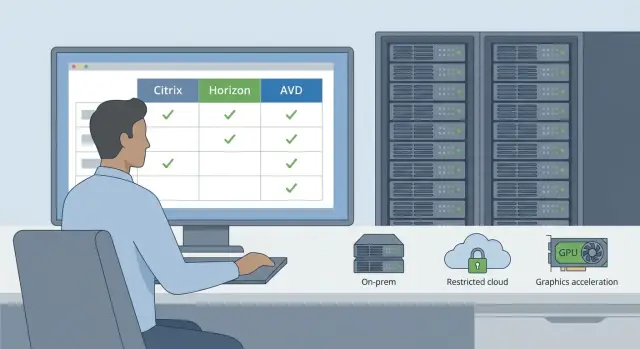
Where to start: what problem are you solving
You don't need VDI because it's trendy—you need it to address a specific pain. Start simple: what should become easier, cheaper to support, or more secure for users and the IT team?
Desktop virtualization is usually justified where there are many users, a variety of devices, and control is more important than endpoint autonomy: government bodies, banks, universities, healthcare, and project teams. If you have 20 people in one office and all tasks are local, sometimes physical PCs are cheaper and more reliable.
Don't mix up approaches:
- VDI – personal virtual desktops (one per user), usually for office and more demanding scenarios.
- RDS – shared server sessions where applications share resources (often cheaper but less flexible).
- Physical PCs – maximum autonomy, but harder to manage for patching, updates and security.
Common pains include: managing the estate (images, updates, inventory and support), security (data must not leave endpoints), remote work and branches (uniform desktops without a “zoo” of devices), and quick onboarding.
Next, document conflicting requirements that will determine the platform: you need on-prem but want cloud flexibility; you need GPU workstations but have a limited budget; strict security but users need performance and peripheral support. The clearer the brief, the easier it is to compare Citrix, Horizon, AVD and alternatives without false expectations.
Cloud restrictions and on-prem: set the boundaries
If documents state a “ban on public clouds,” clarify what exactly is forbidden. For some organizations this is only storing personal data outside the perimeter. For others it’s any dependency on an external provider, including authentication, updates and telemetry. These nuances will immediately exclude some options or require a hybrid design.
On-prem requirements also vary. In one case data and profiles must remain in your datacenter while management components can be external. In another case every VDI component (broker, licensing, monitoring, databases) must be inside and fully self-administered. Decide up front who will operate it: your team, a contractor, or a 24/7 managed model.
Reliability is often underestimated. VDI depends on infrastructure more than individual PCs: if storage or network stops, dozens of desktops are affected. Check power, redundancy and maintenance windows: what will happen to users during updates and outages.
Network and branches are their own story. The main office may work fine while regional sites suffer latency and narrow links, making work painful—especially for graphics and video. For home access, decide whether corporate VPN, MFA, allowed devices and support model are required.
To fix the boundaries, answer a few questions:
- Which data cannot leave the perimeter and why (regulation, contracts, internal policy)?
- Where must systems physically reside: one datacenter, two, or multiple regions?
- What is acceptable downtime: minutes, hours, or "only at night"?
- How many remote users and what links do branches have?
- What are the logging, encryption and access control requirements?
A practical example: a government body in Kazakhstan may require on-prem and a predictable supply chain. The choice then depends not only on the platform but also on site readiness (servers, storage, network) and who will provide support and updates.
Landscape in 2025: what to compare
First, classify options by deployment type: fully on-prem, hybrid (some in your datacenter, some in cloud), or mostly cloud.
Three widely discussed vendors sit in their ecosystems. Citrix is often chosen where flexibility and complex conditions are needed: many sites, many user types and strict UX or access requirements. VMware Horizon is logical where VMware virtualization already exists and the team knows how to manage it. Microsoft AVD works well if you're deep in the Microsoft world and comfortable with key services tied to Azure.
For a fair comparison look beyond license price to practical aspects: where management components will run and what happens if the cloud is unavailable; access and security model (MFA, roles, audit); image and update management; behavior of heavy apps; and peripheral support (printers, scanners, smart cards).
Fully on-prem is chosen where autonomy and control are critical: classic Citrix or Horizon deployments, or a simpler Microsoft RDS approach when tasks are purely office and graphics are not required.
Hybrid is chosen when rapid scaling is needed but some systems must remain internal—then Citrix hybrid designs or AVD (if cloud restrictions allow) are considered.
Alternatives exist too: simpler commercial products (e.g., Parallels RAS) or minimal schemes for small teams. Treat them as full alternatives only if they meet required security, manageability and app support, including graphics.
Citrix: when it fits and when it doesn't
Citrix is often selected where VDI is a critical service rather than just a "remote desktop." Its strength is maturity in large deployments: fine-grained policies, multiple delivery modes (full desktops and published apps), and flexible access scenarios.
Flexibility comes with complexity. Typically you need dedicated roles for Citrix (policies, catalogs, publishing) plus specialists in virtualization, storage, network and security. Plan where controllers and management services will run, how to provide HA, and requirements for AD, DNS, certificates and monitoring.
Licensing is a common source of surprises. Issues arise from subscriptions, user types and additional components (secure remote access or advanced monitoring). The set used for a pilot and for production often differs, so document exactly what you're buying and for which scenarios.
Citrix is a good fit when unified sign-on and publishing rules matter: you can neatly separate contractors, employees, branches and critical apps. It's justified if you truly need fine policies, scale, varied publishing scenarios and a long solution lifecycle. It will be overkill for simple cases (a few dozen desktops), when there's no admin resource, or when you expect a "set and forget" outcome.
VMware Horizon: practical pros and limits
Horizon is commonly chosen where VMware is already standard for server virtualization. If you run vSphere and vCenter and have established processes, Horizon usually integrates cleanly: fewer new components, easier to find specialists and a faster pilot.
In on-prem scenarios Horizon is comfortable, but define boundaries: where brokers will run, how external access is arranged and who is responsible for perimeter security. For organizations with strict data location rules (government, banks, healthcare) this is often decisive.
Horizon is especially convenient for standard office desktops: accounting, contact centers, branch operators and classrooms—where stability and predictable support matter more than rare special cases.
Before deciding check product lifecycle and licensing model. Changes in the VMware ecosystem in recent years make this point important, especially for a 3–5 year project.
Check in advance:
- licensing model and what support includes
- host sizing with headroom for peaks, not averages
- storage: latency, IOPS at peak, profile growth
- redundancy: broker failure, host failure, recovery plan and tests
- remote access: secure entry for external users
Example: if an organization in Kazakhstan already has VMware clusters and must keep everything inside the datacenter, Horizon often becomes the most straightforward option—but only with honestly calculated infrastructure and a clear licensing scheme.
Microsoft AVD: strengths and cloud limits
Azure Virtual Desktop fits naturally if your environment is Microsoft-centric: Windows, Microsoft 365, familiar admin tools and unified user accounts. In that case AVD offers a quick start, a familiar access model and good integration with existing policies.
AVD's strength is that Azure handles parts of the infrastructure: management services, publishing and autoscaling. This is convenient for small teams and variable demand: 200 users today, 600 tomorrow.
The key limitation is Azure dependency and connectivity. With unstable links users notice latency and session drops. If public cloud is prohibited or strict rules prevent exporting credentials and event logs outside the perimeter, AVD may be rejected despite solid business logic.
Typical scenarios where AVD is unsuitable: organizations with an outright cloud ban; environments where credentials and logs can’t leave the perimeter; or sites with limited network capacity.
Total cost of ownership should include licenses, VM costs, network and support. For 3D workloads (CAD, visualization) resource and traffic requirements grow, raising expenses for compute and redundancy.
Before choosing verify:
- internet stability and redundancy to Azure
- requirements for storing data, logs and backups
- access model: MFA, conditional access, admin roles
- who will support AVD 24/7 and the responsibility boundary
- cost estimate: compute, traffic, support and user growth
If cloud restrictions exist, also evaluate an on-prem alternative in parallel so you don’t hit a policy wall after a pilot.
Alternatives to Citrix, Horizon and AVD: realistic evaluation
If those big vendors don’t fit due to price, licensing, cloud limits or on-prem needs, alternatives exist—but judge them by how they will perform in 3–5 years: updates, security, support and compatibility.
Commercial alternatives often win on simplicity. They usually have clearer licensing, fewer components and faster time-to-value for typical scenarios (office desktops, contact centers, contractor access). Still, check what the base package includes: broker, gateway, MFA integrations, monitoring, profiles, printing and peripheral support.
Open-source and "lightweight" options suit teams with strong internal skills and narrow scenarios. The risk appears when you need 24/7 support, strict security or clear incident responsibility. A common trap: a pilot works, but at scale problems arise with profiles, printers, USB devices and fine tuning.
To evaluate alternatives ask vendors: how are patches released and is rollback possible; what support is provided and what counts as an incident; ecosystem (profiles, printing, MFA/SSO, audit, APIs); compatibility with your hypervisor, network and security; and the product's roadmap for 2–3 years.
Also check vendor lock-in. A good sign is an architecture with clear layers (hypervisor, broker, protocol, profiles) so migrating users and images does not mean "rewriting everything."
Practical scenario: a government body in Kazakhstan wants on-prem VDI and a transparent supply chain. Assess how the platform fits into your security domain and whether server resources are sufficient. GSE.kz, as a local vendor and integrator, can help with local infrastructure and support, but platform selection should still rely on requirements and test results.
Graphic workstations: GPU and VDI requirements
Office VDI comparisons focus on convenience and price, but graphic workstations quickly hit hardware and latency limits. CAD, GIS, 3D modeling, video editing, video analytics and some ML tasks behave differently: some need smooth model rotation, others stable FPS, color accuracy or no artifacts.
Common GPU options
The simplest scenario is a dedicated GPU per user or per VM—predictable but costly and harder to scale. More common in VDI is shared GPU (vGPU), where one accelerator is split among users by profiles. A third approach is remote physical workstations (physical or virtual) for a small group that needs full driver and app compatibility.
Users typically need three things: low latency, image quality (text, thin lines, fonts) and stability during peak hours. Evaluate the graphics path with a separate pilot, not just presentations.
Capacity planning and pilot
Size capacity by applications and user types. A project team with CAD/GIS usually divides into 2–3 profiles: light drawings, heavy assemblies, rendering. Choose vGPU profiles and users-per-GPU accordingly, then test on real files.
In a pilot test: use 2–3 typical projects and one heavy file; measure latency and smoothness during peak; check image quality at different protocol settings; test dual monitors and high resolutions; and verify GPU driver compatibility with specific app versions.
If you plan on-prem VDI, reserve space for GPU servers, cooling and power. Test on hardware available locally and supported in Kazakhstan, including local product lines such as those from GSE.kz.
How to pick a platform: a step-by-step plan
The logic is simple: define who needs a virtual desktop and for what, check constraints, then compare products. Otherwise the discussion becomes "which is better" instead of "what fits."
Time-saving steps
-
Describe user groups and tasks. Office users need stability and quick login; engineers need heavy 3D apps and GPU; contact centers need predictable latency and headset support.
-
Classify data: what can live in the cloud, what must stay inside, who accesses personal data, state secrets or financial systems. This often rules out fully cloud models.
-
Choose deployment model as a frame: on-prem, hybrid, or cloud. If on-prem is required, specify where brokers, profiles and file services will live and how HA is arranged.
-
Create comparison criteria and weight them. Debates usually focus on security, user experience (speed, stability, peripherals), total cost (licenses, infra, network) and support (internal skills, vendor, partner, 24/7).
-
Run a short pilot and define success criteria beforehand.
To avoid pilots becoming "we tried and forgot," document numeric metrics: login time, app startup, session stability at peak, USB/printing behavior, network and server load, and support requests.
Example: with 80 office users and 15 engineers pilot two tracks: office VMs and engineer GPU nodes. For on-prem test using the server class planned for production.
How to present the decision to management
Summarize on 1–2 pages: cloud/on-prem constraints, user groups, pilot results with metrics, risks and mitigations, and a 3-year cost estimate. Decisions backed by numbers and facts are easier to defend.
Common mistakes when choosing and deploying VDI
The costliest mistake is choosing a platform and then discovering the network and infrastructure can't handle it. Quality often fails due to latency, packet loss and overloaded links between branches, datacenter and endpoints—not vendor choice.
Common failures: selecting a solution by name without peak-hour measurements; underestimating profiles and peripherals (USB, printers, smart cards, scanners, headsets); counting only licenses and forgetting updates, support and training; assigning graphic users to office profiles; and omitting redundancy and a recovery procedure.
Reduce risk by agreeing in advance how success will be proven. Lock metrics before procurement, not after complaints begin.
Small example: an organization in Kazakhstan deploys on-prem VDI for regulatory reasons but pilots only with office users. Later they add a project team and discover they need separate pools, GPUs and a different storage model.
Quick checklist before the final decision
Before signing contracts and starting a pilot run a short check to align facts: where data will live, who uses what, and which risks you accept.
First, document cloud and data boundaries: which data cannot leave, where profiles live, and whether cloud is allowed for management or backups. Then describe user groups (3–5 profiles are usually enough) and list key apps and peripherals—this is where demos often fail.
Short list to cover before choosing:
- cloud and data location restrictions (including backups and logs)
- typical user profiles and their apps/peripherals
- GPU requirements and list of 3D workstations
- network checks for branch links and peak latency
- agreed security model and access (MFA, roles, external contractors)
Finally, agree how you will measure pilot success: login time, session stability, image and video quality, USB/peripheral behavior, 3D performance and support load.
A realistic scenario and next steps
Imagine a university or government agency in Kazakhstan: student or citizen data can't go to public clouds and some desktops must keep working even if external links fail. Most staff need email, documents, browser and ERP like 1C, while a small group uses CAD and 3D.
Often the answer is on-prem VDI: infrastructure stays in your datacenter, easing compliance. This leads to a split: office users can use standard VMs, while CAD users need GPU (vGPU or passthrough) or they will experience lags and complaints.
Run a pilot on two groups rather than an "average" user: e.g., 30 office staff and 10 CAD engineers. Predefine measurements: login time, file open time, remote protocol image quality, printing stability, CAD latency, and CPU/RAM/GPU/network load.
Budget items typically include VDI servers and GPU nodes, storage (or hyperconverged) with predictable latency, network with redundancy and segmentation, licenses (hypervisor, broker, OS, vGPU, CAD), plus monitoring and support.
Next steps: fix security and availability requirements, draft target architecture, prepare a pilot environment and test plan. If you need a partner to assemble on-prem gear and assist with deployment in Kazakhstan, this often goes to a system integrator. For example, GSE.kz can provide hardware and integration (including S200-based servers) and ongoing support if that model fits.
Make the final decision based on pilot metrics, feedback from both groups and a 3–5 year total cost calculation.
Frequently asked questions
How is VDI different from RDS and what is usually chosen for an office?
VDI gives each user a separate virtual desktop, which makes it easier to manage environments, separate user groups and support heavier applications when needed. RDS provides shared server sessions where multiple users share resources; it is cheaper and simpler for typical office tasks but offers less flexibility and isolation. In practice, RDS is often chosen for operators and classrooms, while VDI is used when individual settings, tighter control and a wider set of scenarios are important.
When is VDI definitely not worth implementing and is it better to keep regular PCs?
If you have a small office, everyone works on-site, applications are local and there are no strict data control requirements, physical PCs are often cheaper and simpler. VDI becomes cost-effective when there are many users, branches and remote work, when you need to provision desktops quickly and centrally update images. A good rule of thumb is when the cost and time to support the PC fleet become a noticeable problem.
How to correctly understand public cloud restrictions so you don't make a mistake with AVD?
Start by writing down the requirements: which data cannot leave the perimeter, where profiles, logs and backups must be stored, and whether a third-party provider is allowed even for management services. Often the restriction is not “no cloud at all” but specific data types or logs. After this, it becomes clear if a hybrid model is possible or if everything must stay on-prem.
What is critical to consider in on-prem VDI besides platform choice?
For fully on-prem deployments think through high availability: if network, storage or a broker fails, dozens of users stop working. You need redundancy for key components, agreed maintenance windows and a tested recovery plan—not just documentation on paper. Also decide who will operate the platform and infrastructure 24/7 and where the responsibility boundary lies.
How to organize a VDI pilot so it gives clear results?
Run pilots on 2–3 real profiles, including the heaviest workloads and required peripherals. Agree in advance what success looks like numerically: login times, session stability, speed opening typical files, printing and USB behavior, and image quality. Without metrics set before the pilot, it often becomes a debate based on impressions.
Which network issues most often 'break' VDI in branches?
Even a perfect platform will suffer with high latency, packet loss and narrow links, especially in branches and when accessing from home. Test link quality during peak hours, not just averages. Decide if you need VPN, MFA and which devices are allowed. For graphics and video the network and stability requirements are usually stricter than for office apps.
Why does Citrix or Horizon licensing often turn out to be more expensive than expected?
Surprises often come from using only minimal components for a pilot while production requires additional features for secure remote access, monitoring or advanced capabilities. People also mix up user types, subscriptions and what support covers. The best way to reduce risk is to describe access scenarios and required features first, then verify which licenses and options are needed.
How to understand if VDI needs a GPU and which approach to choose?
For CAD, GIS and 3D you need to test GPU scenarios separately from office users. Usually you choose either a dedicated GPU per user for predictable performance or vGPU to share resources more economically. In the latter case correct profiling and limits are critical. Before buying, test with real projects and check driver compatibility with your application versions.
What basic security measures should be included in a VDI project?
Include MFA for external access by default and separate administrator roles so each person has only the required permissions. Define where logs are stored and how auditing is done, since this is often a regulatory requirement. Also prepare scenarios for contractors and temporary staff to avoid over-granting rights and complicating support.
How can a local manufacturer and integrator help deploy VDI in Kazakhstan?
A local vendor and integrator help where predictable delivery, unified support and the ability to deploy on-prem under regulator requirements matter. In Kazakhstan this typically includes selecting servers, storage, network and providing ongoing support across the country so the VDI does not depend on a single specialist. For example, GSE.kz can cover infrastructure supply and support, but platform choice should still be validated by pilot results and metrics.
