7 min read
Hot-swap in servers: what to check in the spec and at acceptance
Hot-swap in servers: how to specify requirements in the spec and verify at acceptance that PSUs, fans and drives can be replaced without downtime or dismantling the rack.
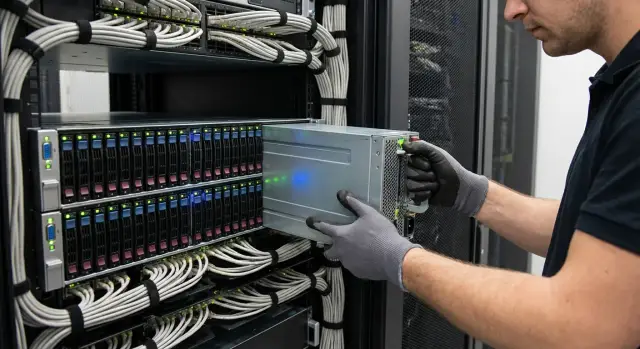
Why you should check hot-swap in advance and what typically goes wrong
Hot-swap in servers often sounds like a promise: any module can be pulled and inserted without downtime. In reality this is often a "conditional hot-swap": the part can be physically removed, but the service may still suffer downtime because of power, cooling, or simply awkward access in the rack.
The worst outages usually happen not because of the replacement itself, but because the system isn't ready to survive the operation. The power supply may be removable on paper, but the redundant unit is missing or there isn’t enough capacity, and pulling one PSU shuts the server down. The story repeats with drives: there may be a tray, but the controller or array settings react with errors, and instead of a quick swap you get downtime and manual recovery.
The gap between "on paper" and "in practice" usually has one cause: the spec just says hot-swap, but doesn't define conditions. Different vendors mean different things by that word: from a real one-minute swap to a scenario where you must remove a cover, unclip an airflow duct, wait for alerts to clear, and only then replace the module.
Hot-swap is most often required for three groups of components: power supplies, fans, and storage devices. But you should check not only the module itself, but the entire context around it: redundancy, access, indicators, monitoring behavior, and how it actually looks in your rack.
Before acceptance, watch out for signs such as:
- the unit is blocked by cables, cable guides, or neighboring equipment;
- replacing it requires pulling the server out, risking disturbance of cabling;
- there's no service position (server can't be safely secured when pulled out);
- replacement triggers excessive alarms or noticeable performance degradation;
- documentation doesn't state exactly what is hot-swappable and under what conditions.
If these points aren't clarified in advance, even a good server can become a source of late-night calls. In projects where the supplier does installation and integration, it's useful to ask not only for the options list but also for a rack layout showing access to components. For example, materials from GSE.kz (GSE.kz) often help to understand in advance whether replacements will actually be quick at your site.
What hot-swap means in practice: a simple definition
Hot-swap in servers is replacing a unit (for example, a PSU, fan, or drive) without stopping the service and without powering off the server. The key is not just that the part is removable, but that it is removed in a way that the system continues to operate and does not go into a failure state.
"Without stopping" usually implies three things at once: power is not lost, cooling remains adequate, and data and applications do not suffer errors. If the server reboots when a component is replaced, loses access to disks, or goes into critical overheating, that's not hot-swap—even if the module is physically removable.
Hot-swap vs warm-swap: where is the line
Warm-swap is often confused with hot-swap. In practice, warm-swap means a module can be replaced without fully disassembling the server, but some action stops operation: shutting down the node, switching to service mode, rebooting, stopping a controller, or partially cutting power.
Hot-swap means the component is changed so that users (or connected systems) don't notice, apart from a monitoring alert.
What must be in place for hot-swap to be real
A single handle on a module guarantees nothing. Typically you need clear conditions:
- redundancy (minimum N+1 for power and fans, and a fault-tolerant array for disks);
- controllers and backplanes that support removal and insertion "on the fly";
- BIOS/UEFI, controller and OS settings so the device correctly "leaves" and "returns";
- indicators and events (LEDs, logs, BMC) that make it clear what can be removed and that the system noticed it;
- physical access: replacement from the front or rear without removing cable bundles, pulling the chassis to extremes, or disassembling adjacent devices.
A simple rule of thumb: if you must first "make room by hand" (unplug half the cables, move neighboring equipment, pull a heavy chassis without a service position), in operation this almost always becomes downtime.
How to describe hot-swap correctly in the specification
To accept hot-swap by formal act, write requirements as verifiable actions with clear outcomes. Not "supports hot-swap", but "exactly what can be removed, under what conditions, and what must not stop".
Too-general phrases lead to disputes at acceptance. "Hot-swap drives" sometimes means only that drives can be replaced while the server is powered down but without opening the case. "Hot-swap PSU" might be real, but access to the unit may require removing cable management or other rack equipment.
Wording that can actually be accepted
It's convenient to express criteria through observable signs and access constraints:
- the unit (PSU/fan/drive) can be removed and installed without powering off the server and without stopping the OS and services;
- replacement is performed by a single person from the front or rear (specify which) while the server is installed in the rack;
- no chassis covers, rails, or other cables need to be removed except connections to the replaced module (if any);
- the system records the event (indicator/log/BMC) and after installation the module returns to normal status without manual "tweaks".
Documents to request in advance
Ask for a package that proves hot-swap is intended as a serviceable operation:
- service manual with replacement steps;
- chassis diagram showing access to modules (front/rear views);
- list of FRUs (Field Replaceable Units) with exact part numbers.
It's also helpful to require a demonstration before delivery: on the same chassis show replacing one PSU, one fan, and one drive under load, documenting statuses before and after. This answers many questions already at the specification stage.
Power supplies hot-swap: what to specify and test at acceptance
Hot-swap most often "breaks" on power supplies: the catalog shows "2x PSU", but in reality replacement needs shutdown or risks overload. So in the spec describe not only the number of PSUs but also system behavior when one is removed.
What to lock in the spec
Start with redundancy and real power capacity. If N+1 or 1+1 is claimed, state that the server must remain operational when one PSU is removed under typical load, not just at idle.
Useful points to include:
- redundancy mode (N+1 or 1+1) and the minimum available power with one PSU failed;
- modularity and tool-free replacement from the rear (if PSUs are rear-mounted);
- clear indicators on each PSU (OK/Fail/AC) and alerts in monitoring;
- journaled events for removal/insertion and for loss of input power;
- two independent power feeds and requirement to connect them to separate PDUs/circuit breakers.
What to check at acceptance
At acceptance you should see the behavior for yourself:
-
Connect both PSUs to different power lines and verify both are operational.
-
Apply a load (at least 20–40% of typical) and remove one PSU: the server must not reboot.
-
Check PSU indicators and alerts in the BMC/monitoring.
-
Reinsert the PSU: it should be accepted back without manual intervention.
-
Record in the acceptance report which PSU was removed, at what load, and what events occurred.
If logs are silent on removal or access requires opening the chassis, this is not practical hot-swap.
Fans hot-swap: cooling and accessibility nuances
With fans people often confuse "module is removable" and "module can be removed safely." For real hot-swap, the server must survive removal without overheating or emergency shutdown.
In the spec require redundancy and expected behavior: remaining fans should automatically increase speed and temperatures should stay within limits. Without redundancy, replacement becomes a race against time.
The second issue is access. At acceptance check where modules are removed from and whether they can be replaced in-rack and without tools. A typical failure: a latch hits cable management or a neighboring server, and instead of a quick swap you must pull the chassis and disassemble cabling.
Another important point is what admins see. There should be clear events: fan failure, temperature rise, transition to a higher acoustic/noise mode. Reactions and thresholds should be predictable: where alarms appear (BIOS, BMC, monitoring), what is considered critical, and how quickly the system warns.
If you want something measurable, specify in the spec how many minutes the server must tolerate a removed fan under typical load and room temperature without entering failure mode.
Drives and trays: how to verify hot-swap of storage
Hot-swap of drives is often promised but in practice stumbles on three things: drive type, tray/backplane design, and RAID or software storage settings.
Clarify which drives truly support hot-swap. SAS, SATA and NVMe can behave differently. SAS and SATA commonly work through a shared tray and controller. NVMe sometimes requires separate PCIe routing and chassis/BIOS support—otherwise the slot may exist physically but hot-swap isn't guaranteed.
Tray and backplane: signs of real hot-swap
In the spec request the model of the tray/backplane and compatibility with specific drive types. At acceptance check basics:
- the drive is removed from the front without tools and without removing covers;
- the latch works cleanly and the drive doesn't snag neighboring drives;
- removal doesn't affect power to neighboring drives;
- the controller/system log shows remove/insert events;
- empty bays have blanking panels.
Problems often relate to cache and protection mode. If write-back cache is enabled, clarify how it's protected on power loss (battery or supercapacitor). For drive replacement, the array must be in a redundant state (RAID 1/5/6/10) and free of accumulated errors.
Slot indication should help the technician avoid mistakes: activity for activity, fault for problem, locate to light the correct slot via management.
And don't forget airflow: empty bays without blanks break airflow and neighboring drives can overheat after the first swap.
Rack access: avoid disassembling half the rack to replace a module
Hot-swap often "breaks" not because of hardware but because of how the server is mounted in the rack. A PSU or drive might be hot-swappable, but you can't reach it: blocked by cables, neighboring gear, or the rear door.
Separate what you will change from the front versus the rear. Drives usually need front access. PSUs and some fans are often changed from the rear. If the rack is pushed against a wall or there’s no proper aisle, rear hot-swap becomes complex.
Check the rails: it's important not just that rails exist, but that you can pull the server into a service position without disconnecting power, network, and optics. If pulling out requires removing cables, it won't be quick service.
Cable management solves half the problems. You need service loops (extra cable length), proper fixation, and clear entry points so nothing is strained or pulled when sliding equipment.
A short on-site check before signing acceptance:
- is there real front and rear access in your rack (aisle, doors, opening angles)?
- does the server pull out without hitting cables or neighboring devices?
- is there enough slack on power and network cables, are there service loops and brackets?
- don't neighboring devices block tray handles and latches?
- does the chassis hit the rear door when cables are connected, especially with short cables?
A typical situation: a 42U rack packed tightly with switches and PDUs. You try to pull a PSU from the rear, but the handle hits the power bundle, and you can't slide the server because the fiber is too short. The result is either downtime or dismantling cabling.
Step-by-step hot-swap check at acceptance
Acceptance testing of hot-swap should be short but realistic: simulate a typical emergency replacement and record the result.
Before you start
First ensure the risk is controlled. If the server runs critical systems, better perform tests on a bench or with test load.
Prepare the minimum:
- a typical load (e.g., a test VM and a file copy) so a failure is noticeable;
- confirmation of redundancy: two PSUs, RAID assembled, monitoring enabled;
- observation window: events, sensors, logs (BMC and OS);
- baseline values: power draw, fan speeds, temperatures, RAID status.
Three short tests
-
Power supply. Remove one PSU. The server must not power off and load should stay stable. Check that the remaining PSU picks up the load and a proper alert appears. Reinsert the PSU and ensure it comes online.
-
Fan. Remove one fan module (if supported). Other fans usually increase speed, but temperatures must remain within safe limits. If the server trips into protection or sharply throttles even under moderate load, cooling margin is insufficient.
-
Drive. Note the bay and serial number, then pull a drive from a redundant array (preferably RAID1/RAID6). The system should tolerate the loss. After inserting a new drive, a rebuild should start. Verify rebuild starts and the drive doesn't remain in "foreign" or "unconfigured" status.
After each step give the system 3–5 minutes and look for hidden consequences: I/O errors, service drops, overheating.
To make the test useful, record in the acceptance protocol:
- exact time and which module was removed (bay, model, serial number);
- system reaction (reboot, link loss, application errors);
- events and alerts (what BMC/OS reported);
- temperatures and fan speeds before/after (including peaks);
- for drives—RAID status and proof of successful rebuild (start and finish times).
Such a protocol shifts disputes from words to facts if hot-swap proves conditional.
Common mistakes and traps when buying and accepting
The most common trap: the specification lists hot-swap, but there's no redundancy in practice. For example, two PSUs are present but the second isn't connected to a separate line or doesn't actually share the load. When one PSU is removed, the server loses power and reboots.
A second problem appears in the rack. On the bench a module is removable, but in the cabinet cables, neighboring devices, or short cords block access. Sometimes replacement is only possible after removing a cover, using a screwdriver, or pulling the chassis far enough that cable management must be dismantled.
There are drive-related traps too. The tray may support hot-swap, but indicators are poor or there's no clear mapping between tray, slot and logical disk. Technicians then pull the wrong drive and the array degrades.
Common “hidden conditions” include:
- hot-swap is claimed but without N+1 or 1+1 the power/cooling won't survive a swap;
- replacement requires removing the cover or using tools;
- module hits cables or neighboring servers and can't be removed;
- slot indicators don't clearly identify the correct unit;
- manual configuration is needed after replacement (powering on the unit, confirming the disk in the controller).
Also check cooling profiles. A technician might pull a fan and the system unexpectedly does not increase other fans' speed; temperature rises quickly and critical alarms appear. Formally the module is removable, but replacement without risk is impossible.
Short checklist: what to verify in 30 minutes
If time is limited, check things by hand. Hot-swap is easy to claim in specs, but at acceptance it often turns out a module is only replaceable when powered down or if you have free access that your rack doesn't provide.
Start with the bill of materials and documents: open the FRU list and verify what is considered field-replaceable. Check that spare modules actually arrived (a second PSU, blanking panels, trays, rails, keys), not left as "options for the future."
Quick checks:
- labeling: chassis should have clear slot labels and documentation should show replacement order;
- PSU test: under load remove one PSU—server must not power off;
- fan test: remove one fan and check fan speeds, temperatures and events;
- drive test: remove one drive from a protected array and verify degradation and rebuild are recorded correctly;
- rack access: all this should be doable with power and network connected and without disassembling neighboring equipment.
During each action note where alerts appear (BMC, OS, monitoring) and whether they clear after the module is returned. For example, if removing a PSU leaves the server running but no log entry records power loss and recovery, monitoring is poorly configured. In operation this leads to "silent" failures.
Next steps: prepare maintenance and choose a supplier
Hot-swap pays off only when it's clear in advance who replaces modules, where spares are stored, and what counts as restored. Start with operations: who is on call, is the server room accessible 24/7, can work be done in-rack without stopping neighboring systems.
Then determine a minimal spare parts stock. Without spares hot-swap quickly becomes downtime. A reasonable minimum for most sites: one PSU, one fan module and 1–2 drives of the same type and capacity as those installed. If drives are mixed models, add labeling and compatibility rules.
To avoid disputes during incidents, define support and a clear procedure in advance: who delivers spares, who performs replacement, how events are logged, and what counts as "restored."
Before purchase ask for a maintenance demo not just on a bench, but in a configuration as close as possible to your rack and cabling. If local manufacturing and service in Kazakhstan matter, consider supply and integration from GSE.kz, including S200 series rack servers and on-site support. The main point is to lock verifiable conditions in the spec and repeat them at acceptance.
Frequently asked questions
What is hot-swap in a server?
Hot-swap lets you replace a module in a running server without stopping the OS, services, or power. The system needs redundancy, compatible controllers, and proper physical access to the module.
How does hot-swap differ from a simply removable module?
A removable module can be physically removed, but that does not guarantee operation without downtime. True hot-swapping maintains power, cooling, and data access during the operation.
What is the difference between hot-swap and warm-swap?
Warm-swap usually requires stopping part of the system, putting it into service mode, or rebooting the server. With hot-swap, the server and applications keep running.
How should hot-swap be specified in a technical requirement?
Specify the exact modules, replacement conditions, and expected outcome. For example: one PSU can be removed under normal load without rebooting the server, the system reports an event in the BMC, and after installation it automatically returns the module to normal status.
What should you check for hot-swap power supplies?
Check for 1+1 or N+1 redundancy, power capacity after one unit fails, and two independent power feeds. Two installed PSUs will not help if the second is not connected or the remaining capacity cannot handle the load.
How do you test hot-swappable fans?
The remaining fans must increase their speed, and temperatures must stay within acceptable limits. Also check that the module can be removed in the rack and that monitoring reports both the failure and recovery.
What does hot-swap support for drives depend on?
You need compatible drives, a hot-swap-capable drive bay, and a properly configured RAID or software-defined storage system. Before testing, make sure the array is protected and has no accumulated errors.
Why is it important to check rack access?
Even a supported module can be inaccessible because of cables, PDUs, rack doors, or adjacent equipment. Check front and rear access, the service position of the rails, and available cable slack.
How do you perform a hot-swap acceptance test?
Create a test workload, open the BMC and OS logs, then test the PSU, fan, and a drive in a protected array one at a time. After each operation, verify that the server kept running, an alert appeared, and the module returned to service correctly.
What documents should you request from the supplier in advance?
Request the service manual, a chassis diagram showing access to components, and an FRU list with part numbers for replaceable modules. It is also useful to require a live replacement demonstration under load before delivery or during acceptance.
