8 min read
Hot and Cold Aisles in the Server Room: Quick Measures
Hot and cold aisles in the server room: quick measures without renovation — blanking panels, curtains, rack rearrangement and sensors, plus verification with measurements.
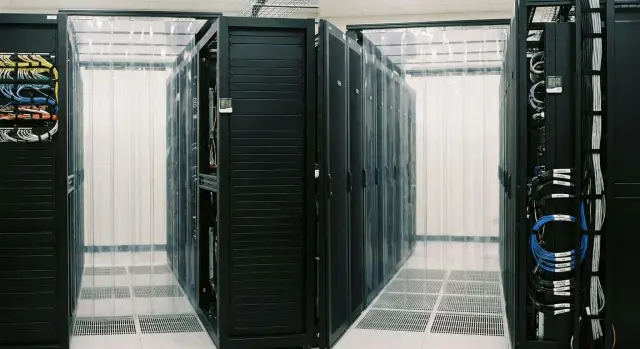
Where overheating starts: air mixing in the server room
Overheating in a server room often doesn't begin with a “weak air conditioner”, but with air mixing. Cold air should reach the fronts of servers and hot air should leave from the rear and return to the cooling units. When there is no clear boundary between these zones, some hot exhaust gets pulled back into equipment. Inlet temperatures rise even if the room overall seems cool.
Mixing quickly harms reliability and budget. Server fans spin up, noise increases, and power consumption rises in two places at once: the IT load (fans) and the cooling system (trying to compensate). From there you get throttling, errors, and more frequent failures, especially in high-density racks.
You can usually spot it with simple signs: "hot spots" appear in certain racks while the room looks normal, the same servers’ fan speeds jump, and inlet temperatures vary significantly between neighboring racks. Overheating often appears after small changes: a server was added, a blanking panel removed, cables moved. Another typical sign is hot air flowing around a rack and entering the cold aisle through gaps.
The good news is that you can often improve the situation significantly without major renovations. It’s enough to restore clear airflow directions and close paths where air "short-circuits": gaps in racks, empty units without blanking panels, and open passages between rows. Confirm the effect with inlet measurements.
Quick diagnosis: how to find where cold is lost
Before making changes, agree which side is the cold aisle and which is the hot aisle. A common mistake is racks placed "as it fit": supply is on one side but servers draw from another. For hot and cold aisles, the most important thing is preventing mixing.
Start with equipment orientation. Almost all servers and most network devices draw air from the front and exhaust to the rear. If a rack contains non-standard devices (for example, with side exhaust), note them separately — these often break the aisle.
What to check in 30 minutes
Structure your walkthrough around one question: where does warm air reach the server inlets? Often you can see this without complex tools: in the same row some devices have hot inlets and others are normal.
Check basic items:
- Where the AC supply and return are located. If the return "sees" the cold aisle, cold is lost immediately.
- Where there are "air short-circuits": empty U-spaces, gaps around cables, open side panels, unsealed floor openings.
- What happens above racks: hot air rises and often leaks over the top into the cold zone.
- Any obstacles in front of racks: boxes, cable reels, temporary panels. They create areas with no cold supply.
- Differences between neighboring racks. If one overheats at similar load, the cause is usually leaks or wrong airflow direction.
To avoid guessing, record the initial state. Take 5–10 photos of problem areas and keep a simple table: rack, where it’s hot (inlet or outlet), what blocks flow, quick fixes (close gap, rotate rack, remove obstacle), and how you will verify the result. Even a couple of portable thermometers or iDRAC/IPMI readings before and after changes will show where cold is actually lost.
Blanking panels and sealing gaps: the fastest step
When a rack has empty units or open gaps, cold air finds the easiest path. It bypasses the servers and flows through holes. At the same time hot exhaust from the rear is more easily drawn back into inlets. As a result, aisles stop working even if the AC units are fine.
The fastest step that shows results within hours is to close all "holes" in racks and around them.
Install blanking panels in all empty spaces between equipment. It's important to fit them tightly, without gaps, otherwise the effect will be weak. Then inspect the rack like a box: if air can bypass a server’s front, it will.
Quick on-site checks:
- Empty U-spaces in racks, especially near hot servers.
- Gaps on the sides, loosely mounted slides and rails.
- Open cable entries, floor openings, missing rack covers or panels under the raised floor.
- Removed side panels and doors left "for a minute".
- Temporary "windows" after maintenance: a server removed and its blanking panel not returned.
A separate story is front doors left open or side panels removed for convenience. This often creates a direct bypass: some cold airflow goes around the equipment and part of the hot exhaust is pulled back in.
Measure the effect. Compare the inlet temperature (front inlet) before and after at least at three heights in the rack: bottom, middle, top. Often after installing blanking panels and sealing gaps, inlet temperature drops and becomes more even, and fan speed swings reduce. If the top of the rack used to be 3–5 °C hotter than the middle, after sealing the difference often falls within a day.
Curtains and simple aisle isolation without construction
Curtains and soft partitions help when a major renovation is not possible and airflow mixing is already causing overheating. This is an option to temporarily isolate the hot aisle (so exhaust doesn't return to servers) or the cold aisle (so cold reaches rack fronts). In many server rooms it is safer to start with the hot aisle: you isolate the "dirty" air and reduce the risk of accidentally blocking supply air.
For isolation to work without construction, three places are critical: top, ends, and gaps. Curtains should reach the ceiling or the nearest overhead slab, otherwise hot air will escape upward and mix again. End-of-aisle curtains should allow quick movement for maintenance.
Plan access. Equipment needs to be rolled out, rack doors opened fully, and walkways kept to facility rules. If there are fire safety and evacuation requirements, curtains must not turn the aisle into a space without quick exits. Choose materials with known properties and no strong odor, and use secure but removable mounts.
A short pre-start checklist:
- Curtains cover the top and ends but don't block rack doors or interfere with trolleys.
- AC supply and grilles are not obstructed.
- Server exhaust and the overhead hot-air path are not blocked.
- Walkways are safe and emergency shutdowns are accessible.
- There is a defined working access path, and a rule not to keep it open for long.
Simple example: in a six-rack row the ends were open and hot air was swirling back to the row start. After isolating the hot aisle with curtains at the ends and up to the ceiling, inlet temperatures evened out and fans ran quieter.
Rack rearrangement: aligning flow directions
The rule is simple: rack fronts should face the cold aisle and rears should face the hot aisle. If even one rack is reversed, it mixes exhaust into the intake zone and nearby servers lose cooling margin. This is a common reason why hot/cold aisles exist on paper but don't work in practice.
Problems are often single racks put "where they fit": by a wall, near a door, next to a UPS or a patch panel. Fixing this often does not require construction: rotate the rack, swap it with a neighbor, or move it to the row end. If a rack is heavy and fully loaded, assess cable and power risks first and act according to a plan to avoid downtime.
If the room contains devices with different airflow directions (for example, some equipment exhausts to the side or forwards), it's better to group them in a separate zone rather than mixing them in one row. Otherwise even ideal aisles will have local hot spots.
Pay attention to high-density racks. A nearby empty or nearly empty rack often "leaks" airflow and worsens the situation: cold bypasses equipment and hot air returns to the intake.
Before and after moves, use a short plan:
- mark racks that are not following the rule "front to cold, rear to hot";
- identify 1–2 hottest and most densely populated racks;
- check where exhaust goes (does it go into a face of other racks?);
- compare inlet temperatures at the same points after changes.
Practical example: if a rack in a row faces the hot aisle with its front, inlet temperatures for neighbors usually rise. Rotating that rack often produces a noticeable same-day improvement, especially if you then install blanking panels and seal cable entries.
Cables and obstacles: what actually blocks the air
Even when aisles are laid out correctly, air often "breaks" on everyday items: cable loops, boxes, open doors, random gaps. The result is the same — cold doesn't reach servers and hot air returns to the intakes.
The first risk area is the front and rear of the rack. If cables hang in front of a perforated door or are gathered tightly at the intake, servers begin to draw air from the side or gaps rather than from the cold aisle. At the rear the same occurs: cable bundles block exhaust and trap hot air inside.
If there's a raised floor, chaos under it often has a greater effect than expected. When power and low-voltage runs are mixed and cover grilles, underfloor pressure is uneven: there may be cold near one grille and none at the next.
Quick fixes that usually help:
- remove cables from intake and exhaust zones, clear perforated doors and side gaps;
- separate power and low-voltage runs to avoid blocking grilles under the floor;
- don't store boxes, supplies and tools in aisles or at rack ends;
- keep rack doors closed and remove anything that wedges them open.
A simple indicator: if after cleaning and freeing passages inlet temperature evens out by height (top and bottom differ less), you restored the airflow path. Often just removing boxes from the cold aisle and securing cables in vertical organizers reduces upper-unit hot spots the same day.
Sensors and control points: measure, don't guess
For hot and cold aisles to work in practice you need numbers, not impressions. A few sensors and a simple scheme of points are enough to see where air mixes and what effect changes produce.
The main placement rule is to measure where servers "breathe". The most useful point is the equipment air inlet (cold side) in the middle of the rack. A second required level is bottom and top to see vertical differences: the top often overheats even when the bottom is fine.
Add a measurement in the hot aisle (rack exhaust) and at the return to the AC. That makes it easier to see whether hot air is mixing into the cold side because of gaps, missing blanking panels or wrong rack orientation.
What to record during a walkthrough:
- inlet temperature at servers (bottom, middle, top);
- temperature in the hot aisle at exhaust level;
- humidity (especially in winter when air is dry);
- the temperature difference between the top and bottom of a rack;
- time and load conditions (peak hours, night mode).
To keep things simple, make a rack "map": three points per rack on the cold side and one point in the hot aisle opposite. Even without a monitoring system, manual readings taken with the same pattern show trends.
Frequency is simple: take baseline measurements 2–3 times a day for 2 days, then repeat at the same times after changes (curtains, rearrangement, blanking panels). If you deploy new racks or servers (for example, S200), add points next to them for the first week to catch local overheating.
Step-by-step 1–3 day plan: from simple to more involved
Work in short cycles: make one change, measure, log the result. This shows what actually helped and reduces the risk of breaking something that worked.
Day 1 (2–4 hours): record the baseline and close leaks
Start with basic measurements and photos. Capture the overall row layout (which sides are cold and hot) and problem spots: empty U-spaces, gaps around cables, open side panels.
Then install blanking panels and seal gaps. This is the fastest measure and often immediately lowers inlet temperatures.
Short sequence:
- measure inlet temperature at 3 heights: bottom, middle, top;
- document with notes and photos "before": empty U-spaces, openings, unsealed entries;
- install blanking panels and close air paths (including around cable entries);
- repeat the same measurements after 20–30 minutes of stable operation.
Day 2 (2–6 hours): simple aisle isolation
If hot air still gets into the cold aisle after blanking panels, add isolation: curtains, screens, temporary partitions. The goal is the same: make cold reach rack fronts and keep hot exhaust flowing back without mixing.
After installation, re-measure inlet temperatures in the same points. If the top of the rack remains noticeably hotter than the bottom, look for bypasses: open space above, unsealed side gaps, or breaks at aisle ends.
Day 3 (4–8 hours): targeted rearrangement and locking rules
If quick measures haven't achieved the goal, move problematic racks and remove obstacles. Sometimes rotating one rack, clearing a wall of boxes, or rerouting cables so they don't block intake/exhaust is enough.
Lock in changes with short rules for staff: always close empty U-spaces after work, return panels after any service, don't store items in aisles, and only change rack layout after re-measuring. If you use temperature sensors, assign specific control points (rack inlet, hot zone) and thresholds for action.
Common mistakes: why aisles don't work
Even when aisles are implemented "by the book", the effect can be weak or short-lived. The reason is usually not the AC unit but airflow finding bypasses and mixing again.
The most common small issue with a big effect is empty rack spaces. If U-spaces are open, cold air goes through them to the hot zone and servers draw already-warmed air. Installing blanking panels often lowers inlet temperature more than trying to "tweak" the AC.
Another mistake is mixing equipment with different airflow directions in the same rack or row. One device exhausts forward, another to the rear, a switch has its own flow — instead of a clear scheme you get a local vortex.
You can also overdo curtains. If isolation blocks access or accidentally obstructs supply, staff will keep curtains open. Even a small gap is enough for hot air to be sucked into inlets again.
Finally, measurement mistakes happen. One sensor on a wall doesn't show the whole picture: it can be hot at the ceiling and fine at the bottom. You need points at rack inlets and in aisles, not only where it's convenient.
Signs that bypasses are the cause:
- empty U-spaces without blanking panels and large gaps around cable entries;
- mixed airflow directions in a rack;
- rack doors open or panels removed, causing recirculation;
- curtains interfere with access so they are kept open;
- temperature readings taken at a single location and generalized to the whole room.
Practical example: after installing curtains in one server room the aisle felt "stuffy" and staff left a curtain open. Reports showed no change because the sensor hung by the door. After moving the sensor to a rack inlet and sealing a gap, the problem became obvious and was solved without adding cooling.
Quick checklist: what to check after changes
After blanking panels, sealing gaps, or moving racks it's important to quickly verify whether things improved or the problem just moved somewhere else. Check inlet temperatures and fan behavior, not impressions.
What usually gives a clear answer in 10–15 minutes:
- inlet temperature of key servers is stable and doesn't spike during normal operation;
- vertical imbalance in racks is small: top is not noticeably hotter than bottom at the same density;
- fans are not constantly at maximum speed;
- there are no hot spots or intake leaks at aisle ends and above racks;
- all empty spaces are closed: blanking panels in place, doors and covers closed, no open slots in racks.
If one item fails, don't rush into new measures. Usually find the one source of intake: a loose rack door, an unfilled slot, a gap under cable entries, or an open aisle end. A quick test is to temporarily cover the suspected spot (with a panel or screen) and re-check inlet temperature and fan speeds.
Case study: improving cooling without renovation
An 8-rack room: two rows face each other, but one row had been rotated the wrong way. As a result some racks drew warm air while the "cold" aisle was ineffective. Complaint: upper units warmed during the day and the air conditioner ran almost continuously.
First, non-construction measures: installed blanking panels in empty U-spaces and sealed cable entry gaps. Hung curtains at aisle ends to reduce side intake. Then swapped and rotated two racks so fronts faced a single cold aisle and exhaust went to the hot aisle.
To avoid guessing, they added a few temperature sensors: rack inlet (bottom and top) and one sensor in the hot aisle at head height. Measurements were taken before and after, in the morning and during the warmest part of the day.
Results:
- top inlet became 3–5 °C cooler;
- difference between bottom and top decreased;
- hot aisle temperature stabilized without sharp spikes.
Blanking panels plus correct airflow direction produced the biggest effect. Curtains locked in the improvement, and sensors became a rule: any layout change is checked by measurement.
Next steps: maintain the result and what to do next
Quick measures work only if they are maintained. Otherwise within a week someone will prop a door open, remove blanking panels for convenience, add cables into the aisle, and airflow will mix again.
To keep the improvement, establish a short, practical regimen:
- keep doors and panels closed, especially on the cold side;
- always close empty U-spaces with blanking panels and don’t remove them without reason;
- secure cables and keep them out of the intake zone at the front;
- after any work (added a server, changed patch cords) do a quick temperature check.
Next, plan for growth. Overheating often returns not because of mistakes but because load increased: more servers, higher density, GPUs added. Plan where new racks will go, how to preserve airflow direction, and whether there is cooling margin (or need for redundancy if one AC fails).
If you hit limits and don’t want to guess, work with an integrator: multi-point measurements, a hot-spot map, and a modernization plan with minimal cost. In these tasks GSE.kz is often useful as a manufacturer and integrator: you can tie hardware, placement, cooling and support into one clear plan instead of fixing overheating spot by spot.
Frequently asked questions
Why are servers overheating if the server room seems cool?
Most often due to recirculation: hot exhaust from the rear is partially drawn back into server inlets through gaps, empty U-spaces, open aisle ends, or incorrect rack orientation. Focus not on the room temperature but on the *front inlet* temperature in specific racks.
How can I tell if the issue is airflow mixing and not the air conditioner?
The clearest signs: - “Hot spots” in individual racks while the room temperature looks normal; - the same servers’ fans spike in speed intermittently; - adjacent racks show different inlet temperatures at similar load; - it got worse after small changes (added a server, removed a blanking panel, moved cables).
What can I check in 30 minutes to find cold air leaks?
1) Agree on which side is the cold aisle and which is the hot aisle. 2) Walk the row and mark where warm air reaches server inlets: empty U-spaces, gaps, open cable entries, removed panels. 3) Quickly take inlet readings (bottom/mid/top) and repeat after one change. That shows what really helps.
Why install blanking panels if servers already draw air?
Because air takes the easiest path. If there are empty U-spaces, cold air bypasses equipment and goes straight to the hot zone. Practical steps: - close all empty spaces with blanking panels *tightly, without gaps*; - put panels and side covers back in place; - then compare inlet temperature at three heights before and after.
Which aisle is better to isolate with curtains: hot or cold?
A safe start is to isolate the *hot aisle*: you keep the hot exhaust separate and reduce the risk of accidentally blocking supply air. To work well: - seal tops and ends (otherwise hot air will escape upward and recirculate); - keep access for maintenance (curtains should slide away easily); - ensure supply diffusers and grilles are not blocked.
Can a single reversed rack worsen cooling for the whole row?
Yes. One misoriented rack can mix exhaust into the intake zone and worsen inlet temperatures for neighbors. Simple rule: rack fronts face the cold aisle, rears face the hot aisle. If a rack is reversed, try: - rotating the rack or swapping it with a neighbor; - after that, close empty spaces and seal cable entries.
What cables and obstacles most often cause overheating?
Typical obstructing items: - cable loops in front of perforated doors (blocking intake); - dense cable “beards” at the rear (blocking exhaust); - boxes and supplies in aisles (creating dead zones without cold intake); - chaotic routing under a raised floor that blocks grilles and disrupts pressure. Quick fix — clear perforations, secure cables in organizers, and remove stored items from aisles.
Where should temperature sensors be placed so you don't have to guess?
Minimum set — 3 points per rack on the cold side: bottom, middle, top (at the intake level). Additionally useful: - a point in the hot aisle opposite the rack at exhaust level; - a point at the air return to the CRAC/AC unit. Record values before changes and repeat at the same times afterward — this makes comparison easy.
What is the 1–3 day action plan to quickly improve the situation?
Work in short cycles: make one change, measure, log results. - Day 1: photos + baseline measurements, install blanking panels and close gaps, re-measure after 20–30 minutes. - Day 2: simple aisle isolation (curtains/screens) where intake is being contaminated, then re-measure. - Day 3: targeted rack moves/rotations, remove obstacles, and lock in simple rules (close empty U-spaces, keep doors closed).
When should I bring an integrator in and how can GSE.kz help?
First collect measurements and a map of problem areas so you don't fix things by guesswork. A final plan usually includes: - layout audit (rack orientation, leaks, obstacles); - list of quick measures (blanking panels, sealing entries, aisle isolation, cable cleanup); - monitoring points and thresholds for action; - evaluation of cooling margin for future density growth (including high-load racks). If you need a single contractor that covers hardware and integration, GSE.kz can help as both a manufacturer and system integrator to tie placement, cooling and support into one plan.
