8 min read
High-density GPU racks in the server room: pre-install checklist
High-density GPU racks: what to check in an existing server room for power, cooling, space, weight, maintenance and consumables.
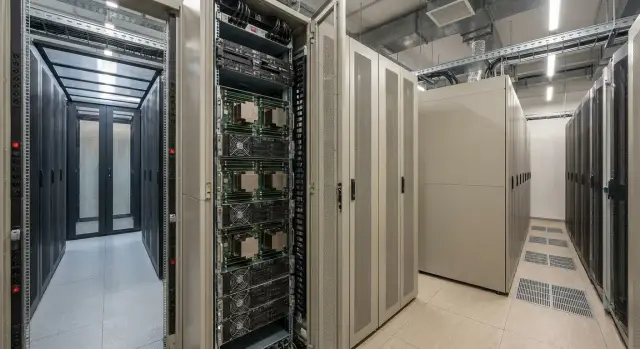
Why you need a checklist before installing a GPU rack
High-density GPU racks don’t behave like ordinary server cabinets. They have much higher heat per U, greater power draw per rack, and often nonstandard requirements for power and cabling. If you install a rack “as is,” problems usually surface on the first day under load, when rollback is difficult.
Free space in a server room doesn’t mean the site is ready. It’s important not only whether the unit fits by height, but whether there’s enough electrical capacity for that row, whether cooling can evacuate hot air, whether the floor can bear the weight, and whether there is adequate access for swapping PSUs, fans and GPUs.
A checklist helps you find common failure points ahead of time: overheating from weak airflow or air mixing, tripping breakers during consumption peaks (or when multiple nodes are powered on simultaneously), cabling and PDU bottlenecks, insufficient rack depth or rear space for wiring and servicing, and weight or rigging limits during delivery.
To make checks quick and accurate, gather baseline data in advance. Without it the assessment often becomes a visual guess and critical details get missed. Minimum items to prepare: permitted power per row and per rack (with phase diagrams and breaker ratings), room layout (racks, cooling, aisles, heights and passages), equipment list (node counts, maximum power, connector types), current loading for power and cooling with planned margin, and delivery/maintenance constraints (doors, lifts, access panels, spare parts and consumables).
Such a checklist reduces downtime risk and makes deployment predictable: you know in advance what to reinforce before installation rather than after an incident.
Power: capacity, phases, breakers, UPS
High-density GPU racks almost always run into power limits before they run out of U-space. Start with an honest number: how many kW the rack will draw in real operation, not a “nameplate average.” Add headroom for growth (often 20–30%), because within months teams commonly add accelerators, more memory, or move to higher-power PSUs.
Next, check what the site wiring provides: single-phase or three-phase. For high density three-phase is usually preferable, but what matters is not just “having three phases” but the ability to distribute load evenly. Phase imbalance heats cables and trips protections, and the problem then looks like “something’s wrong with the servers.”
Assess power quality separately. Voltage sags, interference, poor grounding and a “floating neutral” can cause reboots and strange errors that are hard to reproduce and trace. If possible, measure under load during the building’s peak hours.
For circuits and breakers the rule is simple: a GPU rack should be fed from dedicated circuits with a clear redundancy scheme (A/B) and breakers sized for continuous load, not just marginally. Clarify how redundancy is actually implemented on your site. Two PDUs in a rack mean little if both feeds converge at a single point without real redundancy.
Before ordering equipment record:
- calculated kW per rack now and forecast for 12–18 months;
- power type (1φ/3φ) and phase-balancing plan;
- breaker ratings, cable gauge, and allowable continuous load;
- presence of two independent inputs (or an honest failure scenario);
- results of power quality measurements and grounding condition.
UPS is often estimated as “servers plus a bit,” which fails for GPUs. Size UPS by real watts, include inrush currents, efficiency and growth. A simple rule: if you want 10 minutes autonomy for a GPU rack, the battery system may rival the rack itself in both cost and space.
If you plan server procurement and integration for heavy workloads, discuss power and UPS sizing with a system integrator in advance. For example, GSE.kz as a manufacturer and integrator in Kazakhstan supplies server solutions and can help match GPU-server configurations to real site constraints, including power and ongoing support.
PDU and cabling: connectors, routes, redundancy
Installation delays often stem from small things: the wrong connector, not enough outlets, or a cord that doesn’t reach. For high-density GPU racks these issues are critical because currents are higher, heat is greater and the cost of a mistake rises quickly.
Decide on the PDU type up front. Basic PDUs work when you only need power delivery. Metered or monitored PDUs (current, voltage, consumption) are useful to quickly identify where overloads occur and what consumes power. Always allow spare outlets: some will be used for switches, management devices and temporary connections during PSU swaps.
Check connector compatibility before buying. Surprises often come from the PDU having one inlet type, the UPS or panel another, and the servers a third. Another common issue is cords that are too short or, conversely, form loops that block doors and worsen airflow.
If you need resiliency, plan A/B power as two independent paths: from breakers to two PDUs and then to dual PSUs in servers. This only works if independence is real (different circuits, different breakers, ideally different UPS). If A and B share a panel without real separation, installation becomes more complex and reliability doesn’t improve.
For safe maintenance set simple rules: consistent cable labeling on both ends, different colors for A and B, a fixed outlet scheme per node, spare cords of required types and lengths on-site, and ensure cable management does not pinch or pull conductors.
Real-life example: retrofitting GPU servers into an existing room, installers find they’re 30–50 cm short of the rear PDU and extensions are not allowed. The fix is simple, but the work window is missed waiting for proper cords. Catch such issues with route measurements and cable selection before the rack arrives.
Cooling and airflow: where plans most often fail
Most surprises with high-density GPU racks start with cooling. On paper the AC capacity often seems sufficient, but a rack overheats because of how air actually moves through and around equipment.
Quick heat math
A simple rule: servers convert nearly all consumed electricity into heat released in the room. If a rack draws 20 kW it releases roughly 20 kW of heat. For unit conversion: 1 kW ≈ 3400 BTU/h.
Check two levels: heat per rack and total heat in the room. A common mistake: “average 6 kW per rack in the room,” but a single GPU rack at 25 kW breaks the whole plan because cooling is unevenly distributed.
Cold and hot aisles: what to verify on site
If you already use cold and hot aisles, evaluate not just the layout but the discipline of execution. Intake must come from the cold aisle and exhaust must go strictly to the hot aisle without mixing.
Cold air is most often “lost” and recirculation begins because of simple issues: empty U-units without blanking panels, cable cutouts without brush grommets, gaps around PDUs and rails, racks oriented into the hot aisle, and insufficient airflow at the bottom of the rack. The latter is particularly common with heavy GPU nodes.
Measure inlet temperature at the servers (front inlet), not the room average. Two sensors at different rack heights may show several degrees difference — a sign of bypass or poor airflow.
If total AC capacity seems adequate but local cooling is insufficient, practical steps often help: redistribute hot devices across rows, seal the cold aisle (blanking panels, grommets, gaps), add local cooling at the overheating rack, and coordinate fan setpoints so you don’t create reverse flows. Run a load test before commissioning and record inlet temperatures at different U positions.
Rack space: U, depth, front and rear access
Even when power and cooling are OK, projects often stall on a simple detail: there’s not enough physical space or you can’t reach equipment for service. This is especially visible with high-density GPU racks because servers, switches, cabling and accessories quickly consume U-space.
First, make a U-space plan. Account not only for GPU servers but also ToR switches, patch panels, organizers, KVM (if needed), shelves for accessories, and a 2–4U spare. If space is tight, maintenance slows and cabling becomes a tangled mess.
Check rack depth and rail compatibility next. Different chassis have different requirements: a server may fit physically but rails won’t match, or rear cable channels interfere. Also decide where power and network cables will exit so they don’t hit doors.
Both front and rear must remain serviceable. You need space to swap PSUs, fans and access network ports without blocking hot exhaust.
Five checks that almost always find problems:
- actual free U-space accounting for mandatory accessories;
- rack depth and safe cable bend radius;
- whether doors, locks and cable channels impede sliding and removal;
- proper weight distribution (heavy items low, light items high);
- whether neighboring racks block access or airflow.
Practical planning example: you allocate 4 GPU servers at 4U each and one switch. On paper that’s 17U, but with two patch panels, organizers and spare space, it becomes about half a rack. Without proper bottom placement the rack can get unstable and inconvenient to work with.
Weight and placement: floor, rigging, stability
High-density GPU racks often fail not by U-space but by mass. Mistakes here are costly: cracked raised floors, leaning racks, damaged sliding rails and even equipment falls during maintenance.
Start with a realistic weight estimate: empty rack + PDU + cabling + rails + all servers and GPUs + allowance for future nodes. Manufacturer weights are a guide, but in reality heavy PSUs, copper cables and fasteners add up.
Assess not only total weight but point loads. The rack presses on the floor via casters or feet, which translates to high point loads on a raised floor. Risk increases if the rack stands over cable cutouts or between structural supports.
Before ordering check: rack weight empty and fully populated, floor type and location of load-bearing elements, support points and need for pads, delivery route (doors, turns, clearances, freight elevator), and fastening plan (anchoring or stabilizers), especially with sliding rails and heavy modules.
Plan the delivery path. In many rooms thresholds, narrow corridors and 90° turns cause trouble. Sometimes a rack fits by width but not by turning radius, forcing unpacking and using roller jacks.
Stability is critical during maintenance. When a heavy server is slid out on rails, the center of gravity shifts forward and the rack can tip if there are no anti-tilt stops or anchors. Design for safe one-person service.
Also consider vibration and noise. In office or educational buildings these can affect neighboring rooms and even alarm or fire-detection sensors.
Order of checks before installation: from measurement to test
To prevent high-density GPU racks turning into a series of emergency fixes, follow a clear sequence: facts and measurements, calculations, on-site verification, then power-on under load.
Start with inventory. Collect the electrical schematic (which circuits feed where, breaker and UPS locations), a rack plan with occupied U-spaces and real dimensions, and cooling data (type of AC, temperature and airflow limits). If plans don’t exist, perform a walkthrough and consolidate everything into one sheet.
Translate “I want GPUs” into specifics. You need not only GPU counts but server classes, their max draw, connector types and expected operation mode (constant load or spikes). This determines whether you’ll hit breakers, UPS, PDU or cooling first.
On-site checks fall into five steps:
- Measurements and photos: voltage, phases, current load, free rack slots, aisle widths.
- Load calculation: total rack power, margin on circuits and UPS, failure scenarios (what remains powered on loss of one feed).
- Electrical inspection: breaker ratings, cable gauge, PDU inlet types, cable lengths and routes without stretching or bottlenecks.
- Cooling check: where cold air is taken from, where hot air exhausts, any recirculation, and whether airflow is sufficient at the rack level.
- Physical and installation: available U and depth, floor load limits, front and rear access, rigging plan and work window.
Final step — test start. Power nodes one at a time, then increase load in stages. Record baseline metrics: PDU consumption, UPS loading, inlet and outlet temperatures, fan speeds and any hot spots. These numbers become your operational baseline and help conversations with contractors.
If you deploy in an active room, agree on outages and a work plan with operations in advance. This coordination often saves days of downtime.
Common mistakes when deploying GPU racks
The main problem with high-density GPU racks is that people evaluate them by nameplate or room averages. In reality failures occur at a single point: one rack, one PDU, one breaker or one hot-air pocket.
A typical error is summing kW and being satisfied. If a rack sits against a wall, in a corner, or without proper intake in front, a local hot zone will appear even if total capacity seems normal. Fans will run at max, noise and dust increase, and temperature-related failures rise.
Another mistake is packing the rack to the brim with no PDU or cabling margin. On paper everything fits, but then the right connectors, cable lengths or spare outlets are missing and people resort to adapters. That’s bad for safety and maintenance.
UPS capacity is often overestimated. What matters is measured current by phase and actual runtime at your load. In tests a UPS may hold only minutes at 70–80% load, not the expected tens of minutes.
Maintenance-related errors occur when rear access is poor (narrow aisles, messy cabling, doors that hit). Replacing a PSU, fan or GPU can then halt the whole rack.
Finally, consumables and lead times are forgotten. Filters, fans, correct cables, rails and fasteners are small items that can stop work if not on hand.
A useful habit before launch: check not only total power but risk points (rack, PDU, phase, hot aisle), budget extra power and connectors, load-test the UPS and measure real autonomy, confirm rear access even with doors closed and cables routed, and keep a small stock of consumables for your models.
A recurring example: a room ran at 5–7 kW per rack, then adding GPUs made one rack draw many times more. If you don’t check local cooling and phase currents beforehand, the issue appears not immediately but on the first hot day or under peak tasks.
Short checklist before purchase and installation
Before ordering a high-density GPU rack, record numbers in one file: how many kW are actually available for that rack, inlet temperature at the chosen location, available U and depth, and whether the rack will fit through corridors and doors.
Minimum list to verify and document (preferably with photos of panels, racks and measurement results):
- Power: confirmed dedicated capacity for the rack, phase distribution, breaker ratings, A/B redundancy scheme, proper grounding, UPS presence and its capacity for desired autonomy.
- Cooling: actual cold/hot aisle setup, potential bypass points, blanking panels for empty U, inlet temperature measurements at server front by rack height under test load.
- Rack and cabling: sufficient U and depth for servers and cable bends, PDU compatibility for outlets and power, cabling routes without sharp bends, and front and rear access for service.
- Weight and delivery: allowed floor and raised-floor loads, delivery route, rigging and fastening plan, and anti-tip measures for heavy slide-out modules.
- Operations and consumables: work windows, who monitors (temperatures, power, fans), spare parts to keep on-site, and required consumables (correct cables and lengths, transceivers, filters, fans).
If the room is already marginal on cooling, buying a bigger PDU won’t fix it. First confirm with measurements that, with blanking panels and no bypass, inlet temperatures at GPU servers remain acceptable. Then finalize procurement and installation configuration.
Example: preparing an existing server room for GPUs
Typical scenario: an active server room currently hosts virtualization and storage, and you need to add one rack for AI workloads. Planned are 4–6 GPU servers with the goal to install and run without stopping critical services and without surprises a month later.
Do a quick check of what will limit you first: power, cooling, or space. Even if documentation says everything fits, the bottleneck is often a detail: a breaker grouping, inlet temperature at the rack, rack depth, or cord lengths.
An approach that gives clarity in 1–2 days:
- Measure actual power loading by phase and group during peak hours.
- Measure temperatures in front of and behind racks, and inlet temperature by rack height at the chosen spot.
- Check free U-space, depth, room for cable organizers and rear access.
- Assess weight (rack, servers, PDU, cables) and delivery route.
- Verify availability of consumables: correct-length cables, filters, spare fans.
If major rework isn’t possible, simple measures often help: move the hottest 1U/2U nodes to other racks, install blanking panels to prevent mixing, and put the GPU rack on dedicated power lines without touching legacy groups. In some cases limit server power (power cap) temporarily while monitoring.
Schedule work windows to minimize risk to live services: deliver and mount the rack separately, then power infrastructure, then network, and only after that power servers in stages with checks.
After commissioning record metrics and compare to the baseline: peak phase load, inlet temperatures at GPU servers, fan behavior, any thermal throttling, and UPS stability if used.
Next steps: how to prepare for procurement and launch
After measurements and checks, lock results so procurement matches the server room capabilities. Start with a final spec: server models, node counts, network card types, expected consumption, and airflow/temperature requirements. Attach a placement plan mapping specific U positions, PDUs and feed points.
Then align infrastructure requirements with building operations. Constraints often appear upstream: the building feed, phase distribution, floor or room limits, ventilation modes and allowable temperatures. Agree who will do the work, by when, and what downtime is acceptable.
Build in margin for the next 6–12 months: not only power but cabling, ports, free U, and consumables.
A practical minimum before purchase: approved spec and placement diagram, list of power and cooling tasks with responsible parties and dates, defined reserve limits (what counts as critical), list of consumables and spares, and an acceptance test plan after installation (load, temperature, failure scenarios).
Also document the maintenance plan: front and rear access, maintenance windows, node replacement workflow, and who decides on actions when overheating or protections trip. If internal resources are limited, a system integrator helps move from assessment to safe commissioning faster. In Kazakhstan such projects are handled, for example, by GSE.kz (gse.kz): the company combines server manufacturing and system integration, and provides support and service networks — convenient when you want procurement and commissioning under one plan.
Frequently asked questions
How to correctly estimate how many kW a GPU rack really needs?
Start from the maximum power draw of all nodes in the rack, not from an “average” in the specs. Then add a reasonable growth margin, because GPU projects often add accelerators or raise power limits later.
Which is better for a GPU rack: single-phase or three-phase power?
For high density three-phase is usually more convenient because it’s easier to spread the load and keep currents lower. The critical part is not just having three phases but the ability to balance consumption across them evenly — otherwise you’ll overheat cables and trip protection on one phase.
What counts as real A/B redundancy and what is just "for show"?
A/B redundancy only makes sense when there are two truly independent power paths from the breaker to the PDU and then to the server PSUs. If both lines converge at the same point without real independence, redundancy is mostly cosmetic and complicates fault diagnosis.
Why do UPS systems for GPU setups often turn out "unexpectedly large" and how to estimate them?
Calculate the UPS based on the real watts under the expected load and decide the autonomy target in advance. On GPU racks the battery system can quickly become significant in cost and space, so many opt for short autonomy for graceful shutdowns rather than long runtime.
What PDU and power cable issues most often derail installation?
First, match connector types on the switchboard/UPS side, the PDU input, and the server inlets so you don’t face incompatibility during installation. Then check cord lengths to the actual rack location — in high-density racks extension cords are usually unacceptable, and extra loops hurt airflow.
How do I know cooling will actually handle a GPU rack and not just on paper?
Judge cooling by the temperature at the server inlet and fan behavior under load, not by average room temperature. If inlet temps differ noticeably by rack height, that indicates recirculation or insufficient airflow at that location.
What typically breaks the cold/hot aisle arrangement specifically for GPU racks?
Cold air is most often lost through empty U-units without blanking panels, cable cutouts without brushes or seals, gaps around PDUs and rails, incorrect rack orientation (e.g., face into the hot aisle), and insufficient lower-rack airflow. The rule: intake must be from the cold aisle, exhaust strictly to the hot aisle — verify with measurements at the chosen rack.
What to check for rack space: U-units, depth, and maintainability?
Count not only the GPU servers but also ToR switches, patch panels, cable managers and reserve U-space, otherwise the rack will quickly become tangled and hard to service. For depth, include space for safe bending of power and network cables so doors close without pinching anything.
How to check if the floor will bear the load and how to safely bring in a heavy GPU rack?
Compare the fully populated rack weight to the allowed floor or raised-floor load, and check point loads where the rack feet or casters sit. Plan the delivery route with turns and clearances, and ensure the rack will remain stable when heavy units are slid out on rails — include anti-tip anchors or stabilizers if needed.
How to run a proper test start of a GPU rack after installation?
Start staged: power on nodes one by one, then raise the load stepwise while recording baseline metrics. At minimum record PDU power, circuit and UPS load, inlet temperatures at the servers, and hot spots so you can later separate normal behavior from emerging issues.
