7 min read
Handwritten Text Recognition: an honest HTR plan
Handwritten text recognition for forms: where HTR achieves accuracy, what limitations to record in requirements, and how to organize manual validation.
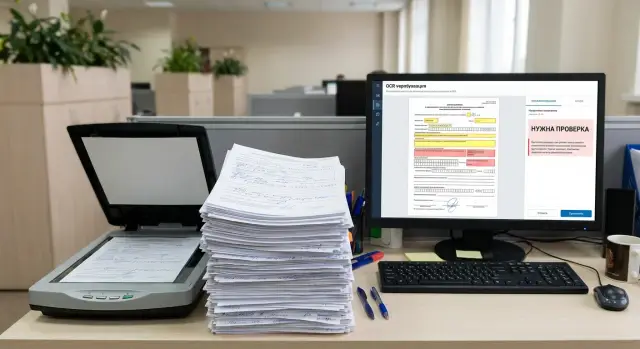
What HTR actually means for forms and applications
HTR (Handwritten Text Recognition) for forms and applications is a way to turn handwritten answers on paper into structured data: full name, address, IIN, phone number, amounts, dates, checkbox marks. The usual goal is simple: make data searchable, verifiable, importable into accounting systems and avoid manual retyping.
It’s important not to confuse HTR with standard OCR for printed documents. OCR works well with consistent fonts and stable layout. Handwriting varies from person to person: slant, connected letters, gaps, corrections, different digit styles. So the promise to “recognize everything 100%” for handwritten fields is almost always unrealistic, especially at scale.
To keep a project from collapsing under unrealistic expectations, agree up front what counts as success. In practice, fields are divided by importance and by how easily they can be rechecked:
- critical fields: affect decisions or money (IIN, amount, date, contract number);
- important but checkable: can be verified against a directory or database (name, address, phone);
- non‑critical: needed for statistics or comments (notes, free text);
- fixed‑choice fields: checkboxes, codes, predefined answers.
A typical workflow looks like this: the system confidently recognizes the IIN and date, but hesitates over a street name because of a smudge. Then only that field goes to manual validation, not the whole record. That’s where speed comes from: HTR does the heavy lifting and a person confirms the parts with higher risk of error.
The main idea: HTR is not “magical recognition,” but a combination of automated reading, checks, and targeted manual validation where the cost of a mistake is too high.
Where HTR really works—and where it doesn’t
Handwritten recognition performs best where people write short entries in an expected format. The less freedom a field allows, the higher the chance of correct recognition and the easier it is to catch errors with checks.
Good candidates for HTR in forms and applications: dates, amounts and numbers (digits are usually more stable), single words in one field (city, position), names if handwriting is clear and dictionaries are available, fixed‑format answers ("yes/no", single character), and fields where the fact of being filled is more important than long text.
Signatures are a special case. Usually a signature is treated as a presence/integrity check, not as readable text. Trying to convert a signature into a surname with HTR often yields false results.
Problems start when a field becomes “live” and unpredictable. For example, someone writes a reason for contact in two or three lines, uses abbreviations and corrections, switches between languages, or mixes Latin letters. Even a strong model will err and manual validation costs will rise.
Commonly poorly recognized items are long phrases and free comments, rare surnames and toponyms without directory support, mixed alphabets in a single word, unusual notations and scribbles in margins, very small text, smudges and crossed‑out parts.
Scan and paper quality affect results more than you might think. Blurred strokes, low resolution, shadows from folds, grey copies instead of originals, skewed pages, faint ink — all turn confident recognition into guessing. Practical rule: if a human finds it hard to read a field at first glance, the system will struggle more. It’s better to record this limitation honestly in requirements.
Form layout, image quality and field zoning
HTR accuracy often depends less on the model and more on predictable forms and good images. If forms are filled on different templates (different margins, field sizes, labels), recognition starts to get confused: the same digit or letter may appear in different places and context shifts.
Strict forms work best: boxes for digits, lines for names, fixed fields with a clear expected length. Free fields (e.g., “Comment”) can be recognized, but they carry higher risk of omissions, line wraps and variable handwriting. Requirements should state clearly which fields need high accuracy and which are expected to require frequent manual checks.
Many errors come not from handwriting but from image artifacts: stamps over text, signatures crossing multiple lines, patterned backgrounds, watermarks, dirty backgrounds from copying. Even a thin security grid on a form can create false strokes.
For scanning and photos, set minimal mandatory requirements: scans at least 300 dpi (photos must be equivalent in detail), even cropping without cut‑off fields, minimal skew, normal contrast (faint ink mustn’t blend with the background) and consistent source types in a processing stream rather than a chaotic mix.
A key practice in projects is zoning fields before recognition. First the document is cut into zones (series, number, date, name, address), then each zone goes to the appropriate recognizer and checks.
Example: an application has IIN filled in by boxes. If you crop the zone exactly to the boxes, the model sees exactly 12 characters and makes fewer mistakes. If the zone includes a nearby stamp or signature, errors rise and length/checksum validations trigger too often.
How to choose the right approach: HTR, ICR, rules and checks
Choice is easier if you immediately separate form fields by type. Not every document needs a neural network. Often 60–80% of value comes from “down‑to‑earth” work: proper zoning, format checks and a clear manual validation process.
When rules and ICR are enough
If a field is constrained by length and format, start with rules; add recognition where it’s truly needed. For IIN, birthdate, phone and postal codes it’s often more important to catch format errors than to “guess meaning.”
Typical checks that quickly reduce errors: date ranges and format (DD.MM.YYYY), IIN (12 digits and checksum), phone (digit count and allowed prefixes), directories (districts, branches, service codes), length limits (document series, application number).
ICR usually suffices when a field consists of digits or short printed symbols and handwriting is like filling boxes. Example: a person writes 12 IIN digits one per cell. There, digit ICR plus strict validation often outperforms trying to apply complex HTR.
When HTR is needed and how to combine methods
HTR is needed where free handwriting starts: names, addresses, employer, comments, reasons for contact. Especially when letters and digits mix (e.g., "mkr 12, bldg 7/2") and handwriting varies a lot.
In practice the most reliable setup is:
- rules and checks (formats, directories, ranges);
- recognition for remaining fields (ICR for digits, HTR for handwriting);
- manual validation only for “uncertain” places (low confidence or rule conflicts);
- save corrections as training examples.
Also fix language constraints separately. Cyrillic, Latin and mixed entries are recognized differently. If forms may be in two languages or people write names in Latin, plan ahead: choose models for both alphabets and allow mixed input in rules, otherwise the validator will flag many false errors.
Project example: digitizing 10,000 applications per month
Typical flow: a clinic accepts applications for attachment or data processing consent, or a bank accepts card issuance forms. That’s 300–500 forms a day, and some need to be in the system today, not next week. Major risks: backlogs from manual entry, missing characters, swapped dates and “silent errors” that surface only during reconciliations.
In a pilot it’s sensible to group fields into three sets. First automate what checks well with rules: IIN/passport (length and format), birthdate, phone, postal code, contract number, amounts in digits. Short fixed‑choice answers are also good if people tick boxes or write short codes.
Fields better left for mandatory review from day one: names with rare surnames, free‑form addresses, organization names, comments, and any field where people often write outside boxes. Recognition can produce a plausible but wrong word there.
Users care about a clear status, not a pretty image with text. After processing, a document becomes a record (search, filters, client card) and gets a label “done” or “needs review.” For disputed characters the system highlights the field and shows the image fragment next to the recognized value.
In a pilot judge success not by average model accuracy but by process metrics: average time per document (before and after), share of fields without corrections, corrections per 100 documents and where they occur, percentage of docs routed to manual review, SLA adherence (e.g., 95% processed same day).
Roles are usually simple: an operator uploads a batch and completes basic checks, a reviewer handles the “needs review” queue, an administrator manages rules, directories and quality reports.
If the project runs on site, plan where recognition and validation will run (server, workstations, access rights). In Kazakhstan such solutions are often delivered turnkey with infrastructure and support to avoid hitting performance and stability limits in real flows.
Training and test data: what to collect and how to label
HTR quality almost always depends more on the examples shown to the model than on the model itself. For forms and applications variety matters most: people write differently, branches scan differently, and forms drift over time.
Start by collecting a document set similar to the real flow. Don’t take only perfect scans from one office. The dataset should include good, average and problematic cases.
A starter dataset usually includes documents from different branches and shifts, scans and photos from different devices and settings, varied handwriting (large, small, printed, mixed), different form conditions (crumpled, stamped, marked), and rare but important cases (double surnames, abbreviations, numbers with letters).
Next you need ground truth—what’s correct. Label per field, not continuous text: name, date, address, document number etc. Decide who is responsible for correctness. A common mistake is to give annotation to a single data entry operator without verification: they work fast but may “autofill” by habit.
To avoid self‑deception about accuracy, split data into training and test sets so they are independent. For example, put all documents from one branch or period into test. Then the model can’t “peek” at similar handwriting and templates.
If fields use directories (streets, organizations, employee lists), agree the version and format before starting. Also document rules for edge cases: how to treat empty fields, crossed‑out entries, normalizing “no/none,” and ambiguous characters like 0/O or 1/I.
Such agreements make comparisons meaningful and simplify acceptance.
Step‑by‑step process to introduce HTR into a document flow
Implement HTR as a pipeline with clear inputs and outputs. That way you can see where errors will appear and don’t end up fixing recognition when the problem is a bad scan.
First, set up input image control: minimal requirements for resolution, straightness, contrast and cropping. If a document is captured at an angle, with shadows, or cropped at field edges, HTR will fail even on easy words. At this step automatically flag files that need rescanning.
Next the document must be split into fields. This is done by template (for fixed forms) or auto‑zoning (when there are many variants). The goal is for HTR to see specific zones: name, address, number, date.
Then recognition and normalization occur: remove extra spaces, normalize case, replace similar characters by rules (for example, O and 0 in account numbers). Immediately apply format checks: date must be a date, IIN must have the correct length, phone must have allowed structure.
A typical flow looks like:
- image quality check and basic preprocessing (rotate, crop);
- field zone extraction and form type mapping;
- recognition, normalization and format checks;
- confidence assessment and routing;
- export to target system and logging of all changes.
Routing solves half the problems. High‑confidence records move automatically, borderline ones go to review, and “bad” images (blurred, empty field, heavy skew) go for rescan. Log operator corrections: they serve for quality control and as training data for model improvements. In integrations this log is a convenient feedback source for rule tuning and retraining.
How to build manual validation and quality control
Manual validation is not a fallback; it’s a normal part of the project. Without it quality will drift and errors will enter accounting systems.
At the start you almost always need full review: an operator checks all recognized fields and corrects errors. This gives fast risk control and a set of real corrections to improve models and rules. When the flow stabilizes, move to exception‑based review—humans look only at uncertain or flagged items.
Operator UI matters. Show the original field fragment next to the recognized value, not the whole scan. Add simple hints like “expected 12 digits”, “Cyrillic only”, “date format DD.MM.YYYY”. This lets an operator fix issues in seconds, not minutes.
For critical fields double verification is useful: amount, IIN, account number, contract number. A practical scheme: first operator enters or corrects, second confirms only high‑risk items (e.g., amounts above a threshold or IINs failing checksum).
Plan queues and SLAs before Go‑Live. A common priority scheme: urgent requests with today’s deadline, payment and financial documents, batches with high low‑confidence rates, then the rest by arrival time.
Keep all corrections: what was recognized, what the corrected value is, which template, who edited and why. These data feed retraining and rule tuning. For example, if 0 and O are often confused in account numbers, targeted normalization and checks can significantly improve quality.
Metrics, acceptance and honestly recording limitations in the requirements
To avoid disputes about “looks similar,” agree metrics and acceptance rules before the pilot. Requirements should record quality not “on average” but per field and per document type.
Metrics that actually help
For forms and applications measure quality on two levels: per field and for the processing flow. Then you see not only recognition accuracy but also time savings.
- CER (character error rate) for free text where individual letters matter.
- Field accuracy: correctness of a full field value (date, IIN/number, amount, name).
- Auto‑pass rate: percent of documents proceeding without manual correction.
- Average manual review time per document (and separately for “hard” cases).
- Operational losses: rescans, percent of documents impossible to recognize due to image quality.
Set acceptance criteria per classes: numeric fields, dates, names, addresses, and per form version. Otherwise a good average can hide a failure in critical fields.
How to record limitations without arguments
In requirements explicitly list unsupported inputs and the fallback actions (manual entry, rescan request, rejection). Usually this list includes heavy corrections over text, multiple values in one field (two dates or two phones), writing outside boxes or over service text, unreadable images (blurred, shadowed, skewed, low resolution), nonstandard abbreviations and home formats (e.g., dates without year).
For transparent acceptance keep test protocols: test sample composition, annotation method, metric calculation rules and thresholds per field. Specify how often to remeasure (e.g., quarterly and after a form or scanner change) and include regression tests on a control sample.
Common mistakes and traps when implementing HTR
The most expensive mistake is vague goals. When requirements say “recognize handwriting for any form,” the project immediately loses boundaries. Different forms have different fields, fill habits and print quality, and accuracy will jump around.
Second trap: ignoring input image quality. HTR doesn’t fix crooked scans, fold shadows, low resolution, over‑compressed JPEGs or angled photos. Without input control and a clear rescan rule you’ll spend time on manual fixes where fixing the source is easier.
Third problem: relying on the model alone without checks. Without dictionaries, formats and field logic the system becomes a generator of plausible letters. IIN, passport number, phone, postal code and date should all be validated by length and format; names should have at least basic character checks or frequency lists.
Another source of “strange” errors is languages and layouts. A flow can include Russian and Kazakh, plus mixed entries where part of a word is in Latin. If you don’t define allowed languages per field and how to handle mixing, errors won’t reproduce on a test set.
Finally, underestimate flow variability. Forms change, new pens and markers appear, new branches join with habits of their own. If you don’t plan rule updates and periodic retuning, quality will slowly degrade.
Practices that solve most problems: fix the list of forms and specific fields, introduce input scan control and rescan rules, add dictionaries and format checks before manual validation, specify allowed languages and characters per field, and schedule regular quality reviews after flow changes.
Simple example: if you digitize 10,000 applications a month, the introduction of a new template midquarter without updating requirements almost guarantees more manual review and missed deadlines, even if the model “generally worked” on old data.
Quick checklist and next steps for the project
Before buying or training a model, quickly check if the project can deliver stable results. Handwritten recognition usually depends on input quality and clear acceptance rules.
Short prestart checklist:
- which fields to recognize exactly (name, address, dates, amounts, signature — signatures usually checked for presence, not read);
- how constrained the fields are (one value per cell or free text);
- image quality (scan/photo, resolution, skew, shadows, compression, contrast);
- share of difficult cases (corrections, crossed‑out, stamps over text, mixed languages);
- acceptance criteria (which fields must be accurate, where manual checks are allowed, required auto‑fill percentage).
Then run a pilot on real flow, not on “ideal” examples. In 2–4 weeks you can pick 1–3 typical forms, collect a representative sample (including bad scans), annotate key fields and run an end‑to‑end process from upload to export.
To prevent post‑launch degradation plan support: regular metric reviews, top‑error analysis, rule updates and periodic retraining on new handwriting.
For scaling plan server resources and processing queues (including month‑end peaks), image and recognized text storage and versioning, backups and recovery, access control and logging, integration with current systems and user support.
If you need a partner to deliver infrastructure and implementation turnkey, it’s often easier to work with a system integrator. For example, GSE.kz (gse.kz) can help with servers, integration and 24/7 support so a pilot moves to production without hardware and maintenance headaches.
Frequently asked questions
Чем HTR отличается от обычного OCR в анкетах?
HTR recognizes handwriting and turns it into structured data for specific fields (name, address, IIN, dates). OCR is aimed at printed text and stable layouts. Handwriting varies a lot, so HTR almost always needs extra checks and manual validation for uncertain parts.
Можно ли реально добиться 100% распознавания рукописных полей?
Don’t aim for “100%.” Set measurable goals per field and for the process. For critical fields, set strict checks and a confidence threshold so anything unclear goes to a human for confirmation. A reliable workflow without silent errors is more important than a pretty average accuracy number.
Какие поля в заявлениях лучше автоматизировать в первую очередь?
Start with dates, IIN/numbers, phones, amounts and checkboxes — their formats are clear and errors are easy to catch with rules. Then add short textual fields (city, position) and only later tackle complex free‑form fields like full addresses.
Нужно ли распознавать подписи через HTR?
Signatures are usually checked for presence and integrity, not read as text. Trying to extract a surname from a signature often produces false matches and legal risks. It’s more practical to separate the task “is there a signature” from reading the name field.
Какие требования к сканам и фото критичны для качества HTR?
Set minimum requirements: sufficient resolution, normal contrast, no heavy skew, and clean cropping so no fields are cut off. If a human can’t read the image at first glance, the system will almost certainly fail. It’s better to automatically mark files for rescan than to correct them all manually later.
Зачем заранее размечать поля на бланке, если есть нейросеть?
Zoning is when a document is split into specific fields and each zone is recognized separately with its own rules. This reduces the impact of stamps, neighboring lines and signatures. It also lets you send only a single problematic field for review instead of the whole document.
Когда достаточно ICR и правил, а когда нужен HTR?
ICR is usually better for digits and cell‑by‑cell entry because there’s less freedom and format validation is easier. HTR is needed for free handwriting with letters, mixed symbols and varied handwriting. In practice the best approach is a combination: ICR for numeric fields, HTR for textual ones, plus common checks.
Как правильно организовать ручную валидацию, чтобы она не съела всю экономию?
Use exception‑based checking by default: humans review only low‑confidence or rule‑conflicting fields. For critical fields, add stricter workflows up to mandatory confirmation. Always show the operator the image fragment next to the recognized value so corrections take seconds.
Какие метрики и критерии приемки реально помогают, а не создают споры?
Fix metrics per field and for the flow: field value accuracy, percent auto‑passed, average operator time per document, percent rescans and backlog for review. Accept by field classes (numbers, dates, names, addresses) so a good average can’t hide failures in critical fields. Also list unsupported cases and how to handle them.
Какие данные нужны для обучения и честного теста HTR на анкетах?
Collect data similar to the real flow: different offices, devices, scan quality, handwriting, stamps and markings. Annotate ground truth per field (not continuous text) and agree rules for ambiguous cases (empty, struck out, ambiguous symbols). Keep the test set independent to measure real performance on unseen handwriting and form variants.
