8 min read
High-Availability Virtualization Cluster: Network, Quorum, and Dependencies
High-availability virtualization cluster: a practical network diagram, quorum and domain-dependency guidance to remove hidden single points of failure and correctly test node failures.
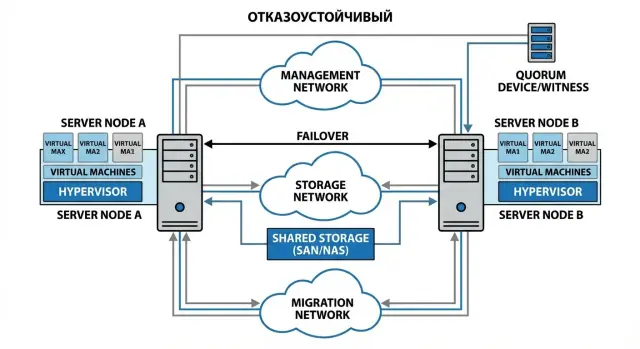
Which failures do you actually want to survive
Before drawing the diagram, agree on a simple point: which exact failures must be handled “without service interruption” and which you accept as planned downtime. Saying “HA is enabled” alone guarantees nothing. Often the cluster does restart VMs, but the business still stops because of the network, DNS, or data access.
For a resilient virtualization cluster list target failures and responsibility boundaries in advance:
- a single host failure
- a single switch or network link failure
- storage failure or loss of one path to it
- loss of connectivity between sites (if you have two)
- failure of critical infrastructure services (DNS, AD, NTP)
Next you need metrics to discuss not by “feel” but by numbers. RTO — how many minutes until service is back. RPO — how much data loss is acceptable. It's also useful to define a “degradation window”: for example, the first 10 minutes after an incident users may experience slower response but availability is preserved.
The most painful outages come from hidden single points of failure. Classics: one switch “for the cluster”, one DNS server, a single domain admin account, one licensing or monitoring server that automation depends on. Formally the cluster is alive, but the service doesn't come up.
A successful node-failure test is not just “VM started on another host”. Better to set criteria in advance:
- users and applications can actually log in and work
- data is intact, no desynchronization or “lost” transactions
- recovery meets the agreed RTO/RPO
- it is clear what happened and what to do next (logs, alerts, instructions)
- after the incident the system returns to a predictable state without manual "hacks"
Example: accounting runs in one VM and domain/DNS are in another. On host failure the cluster may quickly restart both, but if DNS comes up later users will see “everything is broken” even though VMs are running. Find such dependencies before deployment.
Basic HA architecture without unnecessary complexity
A resilient virtualization cluster is easiest to build starting from a minimal scheme and verifying that failure of any single element does not “drop” everything. The practical purpose of HA is to survive failure of a node, port, link or switch without a full outage.
A minimal working configuration for a small datacenter or office is 2–3 nodes and several logically separated networks. Even with limited physical ports, avoid mixing all traffic into one “flat” lane.
A typical set is enough:
- cluster management network (hypervisor access, control traffic)
- virtual machines network (user services)
- storage access network (if storage is separate)
- migration network (VM movement between hosts)
Then decide whether to separate by VLANs or by physical hardware. VLANs are often sufficient if you have two independent physical uplinks and two switches and the risk of congestion is low. Separate pairs of ports for storage or migration are needed when traffic is heavy (databases, backups, VDI) or when an issue in the VM network must not affect storage access.
Hidden SPOFs usually appear where “everything seems duplicated” but one point was forgotten:
- a single uplink for the whole rack or one switch
- an LACP bundle without independent switches on each side
- a single gateway for the VM network (no redundancy)
- a single domain controller or DNS that all logins and services depend on
In placement models there are two clear approaches. Hyperconverged (storage inside nodes) is simpler in cabling and administration, but requires careful resource and network planning. External storage gives clear role separation but adds another critical component and separate access paths.
Keep a simple rule in mind: any single failure should cause degradation, not a full outage.
Cluster network: traffic separation and redundancy
Network is often the hidden SPOF in HA: two cables may exist, but a wrong switch configuration can bring down the entire virtualization cluster. Start with role separation and a clear redundancy plan, not with speed.
You usually need several logical networks (often as VLANs), each with its purpose. Management – for host and cluster management, production – for VM traffic, storage – for SAN/NFS/iSCSI or replication, replication – for site-to-site replication, live migration – for moving VMs. If everything is mixed in one flat network, normal VM load will interfere with migration or disk access. HA will look like a hypervisor problem while the real issue is network noise.
Redundancy must be real: two switches, two uplinks from each host, different cable paths and power where possible. In a small office this can be a pair of ToR switches and two NICs per server; for critical systems have separate pairs for production and storage.
A frequent failure relates to link aggregation. LACP, MLAG and similar setups are easy to configure so that a failure or misconfiguration on one switch causes both links to be blocked and the host to lose all connectivity. Agree in advance who controls LACP mode, timers, hashing and failure behavior.
With MTU and jumbo frames the rule is simple: enable them only when you control the entire path. If one segment is 9000 and another 1500 you will see odd timeouts: pings work but storage fails.
Minimal checks before go-live:
- disconnect one port on a host and ensure storage access and connectivity remain
- power off one switch and verify nodes and VMs stay reachable
- create and catch a loop in a test zone, check STP and port protection
- verify MTU end-to-end (especially for storage and migration)
- test LACP failure behavior: ensure the network doesn't disappear entirely
If you work with an integrator, make these checks mandatory for acceptance. In system integration practice (including projects based on GSE.kz servers and infrastructure) such tests quickly reveal where HA “rests on a single switch”.
Quorum and split-brain protection
Quorum in plain terms is the rule by which the cluster decides who has the right to keep running when some nodes or network links are lost. Without quorum a cluster can try to be “alive” in two places and that almost always ends badly.
Why split-brain is dangerous
Split-brain happens when nodes lose contact with each other but each believes it is the leader and continues to run VMs. The worst case is the same VM writing to the same storage from both sides. Result — filesystem corruption, lost transactions and long, stressful repairs.
Quorum ensures that during a network partition the cluster chooses one side to remain active and puts the other side into a safe or stopped state.
Witness: types and placement
A witness is commonly added to quorum as an extra vote to decide a 1-to-1 tie.
Variants:
- witness as a separate server or service (external witness)
- disk witness (a shared disk or volume available to all nodes)
- witness in another site or segment reachable by both nodes
Key placement rule: the witness should not “die” for the same reason as the nodes. If both hypervisor hosts and the witness depend on the same switch, UPS or link, it’s not protection but an illusion.
A practical option for an office: two nodes in the server room and the witness placed in another cabinet or room, or on a small separate host in a different segment — with independent power and a port on a different switch.
For a resilient virtualization cluster, predefine tests and criteria for “correct” behavior:
- break node connectivity while witness is reachable (which side stays active)
- lose the witness while nodes remain connected (cluster must continue)
- fail one node (VMs should start on the other)
- break one network segment (for example storage network only)
- simultaneous failure of a switch that witness should not be tied to
Include these tests in acceptance along with diagrams and runbooks when designing infrastructure for procurement and deployment.
Domain and infrastructure dependencies: what can stop HA
Even if the virtualization cluster survives a host failure, external dependencies can stop services. VMs restart but services don't come up: DNS can't be resolved, IPs aren't assigned, domain logon fails, certificates fail, time is out of sync.
The most dangerous situation is site loss. If core services (AD, DNS, NTP, PKI) live only in one site, the backup side may have a running cluster but users cannot log in, apps can't find databases and admins can't manage infrastructure.
Minimum services that must be available in an outage (locally on each site or in a separate zone with independent power and network):
- DNS (and preferably local resolvers for service zones)
- DHCP (or static addresses for critical hosts)
- NTP (at least one reliable time source)
- AD/LDAP (minimum two domain controllers distributed across failure domains)
- PKI/certificates and licensing services (if apps depend on them)
Place these services so a single node failure doesn't take them down with the cluster. Practical rule: don't host all fundamental dependencies on one hypervisor.
- separate VMs for infrastructure roles (don't combine everything in one)
- spread them across different hosts and racks/UPS
- don't run the only DNS/DC on the host that is serviced most often
- ensure access to them when a single switch fails
Pay special attention to time. NTP drift quickly causes domain login failures, Kerberos issues, expired certificates and API failures. In a node-failure test verify not only VM boot but actual user logon and services that rely on time and certificates.
Storage and access paths: the most frequent source of downtime
VM data lives on storage, not on the hypervisor. A resilient virtualization cluster often “fails” because the second node cannot quickly and safely see the same volumes. If storage is unavailable or partially available, HA turns into a long outage or, worse, a data corruption risk.
A common hidden SPOF looks like this: storage is connected to each node by a single cable through one switch or SAN zone. Formally there are two nodes and HA is enabled, but in reality one port or one switch decides the cluster's fate.
Path redundancy: the minimum that works
A good basic scheme relies on independent paths: two controllers on the storage array (or two independent storage nodes), two switches, two network or FC ports per server and multipath on the hypervisors. Then the loss of any single element allows VMs to keep reading and writing.
Typical traps to catch before go-live:
- one “key” datastore without a backup pair or a clear recovery plan
- one SAN zone for everything, so a config error cuts access for all nodes
- asymmetric paths (one fast, the other “for fallback”) causing large latency jumps during failover
What to check in advance and during a failure test
Define responsibility boundaries: the cluster is responsible for restarting VMs and orchestration, storage must ensure correct locking and stable volume access during failures.
In tests check behavior under load, not just “are VMs alive”:
- disconnect one path (port, cable, switch) and measure latency increase
- fail over between storage controllers and measure recovery time
- ensure multipath does not stick on a dead path
- confirm there is no I/O storm or repeated failures when the path returns
- verify VM journaling and consistency remain intact
Practical example: a two-node cluster on rack servers (e.g., S200-level) may look reliable, but real resilience is defined by how those two nodes see the same storage under any single failure.
Step-by-step HA cluster design plan
A good resilient virtualization cluster starts not with settings, but with clear expectations. If you don't agree in advance what failures to survive and in what time, you can end up with “paper HA” and real outages.
1) Fix goals and failure scenarios
Describe the 3–5 most likely situations: one host fails, a switch goes down, a link is severed, storage is unavailable, AD/DNS fail. Next to each, specify requirements: how many minutes of downtime are acceptable and how much data can be lost (even if the answer is “0”). This directly affects quorum, network and storage choices.
2) Draw a diagram: networks, roles, dependencies
One diagram should show cluster nodes, switches, separate networks (management, VM traffic, storage, migrations), plus witness and external dependencies: AD, DNS, NTP, update repositories. A common trap: “HA exists, but AD is down and some services don't start or accept logon”.
3) Plan placement of critical VMs
Decide in advance which VMs must not coexist on a single host and which to boot first. Anti-affinity rules, startup priorities and resource reservations (CPU/RAM) help the cluster survive a host failure without resource battles.
Before production record a minimum configuration:
- placement rules and startup priorities for critical VMs
- quorum parameters and behavior on link loss
- who and where the witness runs
- overcommit limits and resource reservations
- list of mandatory dependencies (AD/DNS/NTP/storage)
4) Set up monitoring in advance
Alerts must exist before go-live: link loss, latency increase, disk degradation, datastore filling, cluster errors and flapping ports. Ensure notifications are delivered even if some infrastructure parts are down.
5) Create a test and rollback plan
Prepare a short “how we break it” and “how we return it” scenario, assign responsible people and a maintenance window. Test not only host failure, but partial incidents: network partition between nodes, shutting down one switch, witness unavailability. After each test update diagrams and procedures.
If building the cluster on new hardware, pre-check network card and storage support and spare parts availability. For organizations in Kazakhstan that often comes down to delivery times and on-site support, so local manufacturing and support (for example GSE.kz) should be considered during design.
Example simple scheme for an office or branch
Typical request for a branch: a resilient virtualization cluster on 2 nodes to survive one server failure and keep key services running (file shares, 1C, mail, terminals). This is a good minimum, but only if hidden SPOFs are removed first.
Imagine a scheme: two hypervisor hosts (e.g., GSE S200 Series servers), shared storage (or local disks with replication if supported) and a third component as a tie-break: a witness. VMs: a couple of business services and domain services.
To avoid trivial outages, spread roles like this:
- DNS/AD: at least two domain controllers, preferably one on each host (two separate VMs). Then a host failure won't remove logins, DNS and GPO.
- NTP: not defaulting to a domain controller, but a clear source (often one external and one internal). Ensure both nodes and both DCs sync the same way.
- Witness: not on the same storage or host. Ideally a small VM or a file share at headquarters, or a small separate device in the branch with different power and management network.
- Monitoring: a separate VM (can be at HQ) so during an outage you can see whether the node, network, storage or gateway failed.
Common branch risks: one switch for storage or a single gateway for management network. If the only switch dies both nodes may remain up but lose disk access. If the gateway fails you may lose management and witness at once and face leadership disputes.
When one node fails, services usually restart on the second: some VMs boot quickly, others take longer (depends on boot checks and application startup). Load on the remaining node spikes, so design it with headroom.
On a split between nodes quorum decides: the side with the majority of votes “wins”. A witness prevents split-brain in a 1+1 setup: one node continues, the other stops VMs and waits for recovery.
Common mistakes and hidden SPOFs
The worst HA outages rarely look like “host crashed”. More often they are caused by small savings or dependencies nobody treated as critical until a real incident.
First trap — the network. When all cluster, storage and management traffic go through one switch or uplink, you get one single point of failure. In a host-failure test everything may look fine, but a real switch failure can make the cluster lose access and behave unpredictably.
Second trap — witness located in the same failure domain as the cluster. If the witness is in the same rack and network it doesn't help during partitions. Quorum becomes a formality: a single incident takes out nodes and arbitration.
Third trap — domain dependencies. When AD, DNS and NTP run on a single VM without redundancy or recovery plan, its failure turns an “HA cluster” into a set of hosts that can't authenticate, resolve names or keep time. Example: after a power flicker the AD VM doesn't start, hosts lose name-based storage access, services won't start and admins spend hours doing manual workarounds.
There are expectation errors too: HA doesn't replace backups, tested restores and simple documentation. With no backups you may survive a node failure but not data deletion, ransomware or admin mistakes.
Finally, updates. Without a maintenance mode and clear reboot windows any update is risky: one host reboots, the other is briefly rebooted “for a minute” and the cluster slips into an emergency state.
Quick self-check before a pilot:
- are there at least two independent network paths to management and storage?
- is the witness separated by failure domain (power, rack, network)?
- are AD/DNS/NTP distributed and is there a recovery plan?
- are backups available and a tested restore procedure?
- is there a documented maintenance order and decision owner for incidents?
If building a new cluster (for a branch or public agency), include these items in the specification. It's cheaper than “fixing” hidden SPOFs after the first outage.
Node-failure and network-split test checklist
Before the test
Run the HA test as a mini exercise: with a clear goal and a safe rollback. Verify recent backups of VMs and cluster configs, agree the maintenance window and prepare a rollback plan with exact steps.
List critical services and their owners: accounting, mail, 1C, VDI, file shares. That helps quickly identify what must “come up by itself” and who confirms success.
During the test
Execute scenarios one at a time and restore the system before the next step.
- Network: disconnect one host port, then power off a whole switch, then test gateway failure. If MTU differs (e.g., for storage), ensure there are no silent packet losses under failure.
- Quorum: remove the witness and check quorum. Then partition nodes and observe which side remains active and which enters safe mode.
- Dependencies: verify DNS/NTP/AD availability during failures. Ensure an admin can access management console and certificate-dependent services continue.
Example: you shut down one host: VMs move in 2–3 minutes, but some users lose logon because DNS was on the same VM and didn't start in time. This is not a “cluster error” but a hidden dependency.
After each scenario record facts: real RTO by service, what failed, which alerts fired or didn't, and what fixes are needed (network, witness, DNS/NTP/AD placement, startup order).
Next steps: turn the diagram into a working project
To avoid leaving the design “on paper”, formalize the project into clear artifacts. Then a resilient virtualization cluster is easier to agree, build and test without surprises.
Start with documents you can hand over for build and acceptance:
- diagram (physical and logical): nodes, networks, switches, storage, witness, control points
- failure matrix: what breaks (node, link, switch, domain controller), what must happen (VM restart, degradation, stop)
- test plan: steps, expected timings, who confirms results
- dependency register: DNS, AD, NTP, DHCP, PKI, backups, console access
- rollback plan: how to return services if a test or update goes wrong
Then proceed by priority to get the most effect. First remove obvious SPOFs in network and witness (single switch, single link, witness in same failure zone). Then test domain and infrastructure dependencies (e.g., cluster can't start VMs because DNS and NTP are unavailable). Only after that perfect storage and all access paths.
Choose hardware for HA with headroom. If one node fails, the remainder must handle the load without reaching critical CPU/RAM thresholds. It's useful to require: dual PSUs, enough NICs for traffic separation, clear disk layout (and growth margin), remote console access.
Bring in an integrator when networks are complex (multiple VLANs, L3, security zones), when you have two or more sites, or procurement rules require local sourcing and certification.
If you are in Kazakhstan, it's convenient that GSE servers and workstations are manufactured locally and that 24/7 design and support can be obtained within one provider. This helps not just to assemble but to verifiably test HA and record results.
Frequently asked questions
Where should I begin designing a high-availability virtualization cluster?
Start with a list of failures you must survive without service interruption: **host**, **switch/link**, **storage path**, **site split**, **DNS/AD/NTP**. Then record **RTO** (how many minutes until service is restored) and **RPO** (how much data loss is acceptable). Without these numbers, “HA enabled” means nothing verifiable.
Why did the cluster survive a host failure but the service is still unavailable?
Because the cluster often restarts VMs, but the **business service doesn't come up** due to dependencies: DNS, AD, NTP, storage access, licensing, gateway. The minimal success criteria for a test are not just “VM started”, but: - users can actually log in and work; - data remains consistent; - recovery meets RTO/RPO; - there are clear alerts and logs; - the system returns to normal without manual "band-aids".
Which networks should be separated in an HA cluster and why?
For a minimal working setup you usually need: - **management** (host/cluster management), - **production** (VM traffic), - **storage** (access to SAN/NFS/iSCSI or replication), - **migration/replication** (live migration or replication traffic). Even with few physical ports, separate roles at least by VLAN and keep a clear redundancy plan (2 switches, 2 links).
How many switches and links are needed for true HA?
A practical minimum is **two independent points**: two switches and two ports/links from each host (preferably with separate cable routes and power). A common mistake is “two cables into the same switch”. It looks redundant, but the single switch remains a single point of failure.
Why does LACP sometimes break high availability instead of helping?
LACP/MLAG are useful, but they can be configured so that if a switch or its side fails, **both links** become blocked and the host loses network entirely. What helps: - agree in advance on LACP mode, timers and hashing; - test behavior when one member of the pair fails; - have a plan for what happens if aggregation collapses.
What is quorum and why is split-brain dangerous?
Quorum is the rule by which the cluster decides **who may continue** when nodes or network fragments are lost. Without quorum, split-brain can occur: two partitions both act as active and may write to the same data, risking filesystem corruption and lost transactions.
Where should I place a witness so it actually protects the cluster?
The witness is an extra vote in a 1+1 situation so the cluster can decide which side stays active. Main rule: the witness must be in a **different failure domain** (not the same rack, UPS, switch or network segment). Otherwise you can lose nodes and arbitration at once.
Which infrastructure dependencies most often stop HA from working?
Make sure these services remain available during an outage: - **DNS** (preferably local resolvers for service zones), - **DHCP** (or static addresses for critical hosts), - **NTP** (at least one reliable time source), - **AD/LDAP** (minimum two domain controllers distributed across failure domains), - **PKI/licenses** (if applications depend on them). Practically: don't host all fundamental services on a single hypervisor.
Why is storage the most common source of downtime in virtualization?
Because the second node must be able to **fast and safely** access the same volumes. If storage is partial or inaccessible, HA becomes a long outage or risks data corruption. Check in advance: - two independent paths (controllers, switches, ports); - multipath configured and not stuck on a dead path; - delays and IOPS during a path failure; - no single critical datastore everyone depends on.
What tests must be performed before commissioning an HA cluster?
A basic set of tests that often reveals hidden SPOFs: - disconnect one port on a host and confirm storage and connectivity remain; - power off one switch and verify hosts and VMs stay reachable; - break connectivity between nodes with a live witness and observe which side remains active; - remove the witness while nodes stay connected (cluster should continue); - disable one storage path and check latency and multipath failover. Record real recovery times by service (RTO) and actual data loss (RPO), not just a green cluster status.
