8 min read
Grounding in the IT Room: Protecting Against Static in Old Buildings
Clear steps to get grounding right in an IT room of an old building, reduce static and prevent intermittent failures of PCs, servers and peripherals.
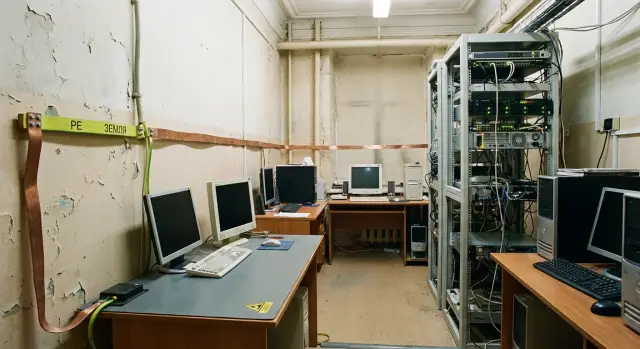
Why equipment in an IT room suddenly fails
The most annoying failures are the ones that are "sometimes yes, sometimes no." A computer works fine for weeks, then suddenly reboots, loses the network or stops seeing a flash drive. People usually blame a "weak power supply," a "bad driver" or a "bad update." But in IT rooms of old buildings a much more prosaic cause is common: grounding problems and static electricity.
Static shows up not only as a noticeable "zap" when touched. ESD (electrostatic discharge) can be tiny and imperceptible but still harmful to electronics. It doesn’t always kill a device instantly. More often it "nicks" a port, chip or controller, and real problems surface later as random glitches.
Typical symptoms that often point to poor grounding and ESD:
- spontaneous reboots and freezes without a clear cause;
- flaky USB (mouse, keyboard, flash drive working intermittently);
- unstable network: link drops, speed fluctuations, errors;
- failures when plugging cables (HDMI, RJ-45, USB), especially in dry weather;
- premature failure of ports, NICs, and storage controllers.
In old buildings this happens more often because there is frequently no full protective conductor (PE): outlets may be ungrounded, panels may have makeshift jumpers, and connections are worn. Add dry winter air, carpet, plastic furniture, synthetics and people constantly moving around the room — charge accumulates faster.
In practice ports and connectors (USB, Ethernet, video), motherboard interfaces, controllers and drives suffer the most. Even if equipment doesn’t die immediately, the number of small faults and "floating" problems that are hard to reproduce and diagnose increases.
ESD is not about "whether a person feels a shock." You may feel nothing and the electronics still get hit. So, if unexplained reboots and port failures happen regularly, check grounding in the IT room as one of the first items, not as an afterthought.
Grounding and static in plain terms
Grounding in an IT room isn’t to make equipment faster, it’s to make it predictable. When devices have no clear path to divert interference and leakage, small discharges and induced voltages turn into strange symptoms: freezes, dying ports, reboots, print errors.
Protective earth (PE) is a separate conductor that connects equipment enclosures and outlets to the building’s grounding system. Its job is human safety and reducing the risk of equipment damage during insulation faults and interference.
Neutral (N) is the conductor that carries load current back in normal operation. It must not be treated like earth: N can carry voltage, especially with poor connections.
PEN is a combined conductor where PE and N functions are joined. This is common in older buildings and, because of worn contacts, jumpers and DIY modifications, it’s often the source of the worst surprises.
Another important concept is equipotential bonding. Put simply: all metal parts in the room (rack, PC cases, cable trays, sometimes radiators and metal ducts) should be at the same electrical potential. Then a discharge has nowhere to "jump" through a port, connector or board.
Why an extension with a grounded plug alone may not help: if the wall socket has no real PE (or it’s broken), the ground contact in the extension is decorative. Enclosures remain without a proper path for interference, and static discharges happen through the weakest points.
Most affected are PCs and workstations, network gear (switches, routers), printers and MFPs, thin clients and terminals. If there’s a server or rack in the room, grounding and ESD discipline requirements are higher. Even quality hardware, including servers like GSE S200, may behave unpredictably if potentials float and discharges travel via interfaces and cables.
What’s usually wrong in old buildings
Problems with electrical systems in old buildings are often "quiet": a PC powers on, a server runs, but small failures accumulate and look random. The root cause is usually that protective grounding was not done to standard, or it’s simply absent where needed.
Often issues hide around sockets and wiring. From the outside everything may look normal, but inside the panel or junction boxes there are errors that raise the risk of static and interference.
Typical findings:
- PE missing in outlets (two-wire wiring);
- N and PE swapped or joined somewhere along the line;
- old outlets and extensions with poor contacts (heating, sparking);
- "earth" made via random metal elements without a proper grounding system;
- different power groups having different potentials (adjacent sockets behave differently).
There are also weak spots inside the room. Metal racks, radiators, cable trays, racks and even raised floors can become a "pseudo-earth." Cable shields and equipment enclosures are tied to them, and wiring errors then cause induced voltages, potential differences and unpleasant discharges on touch.
Areas with high static generation are a separate issue: carpet, dry winter air, plastic chairs and tables, synthetic clothing. In such an environment a discharge may be invisible but enough to damage a port, cause a freeze or odd memory errors.
If you regularly feel sparks when touching a PC or rack, hear clicks, or notice a faint ozone smell near sockets or extensions, check grounding in the IT room as soon as possible.
Quick diagnostics: what to check before calling an electrician
Before calling an electrician, spend 30–60 minutes to collect a clear picture. That speeds up finding the cause and saves time spent on chasing theories. In old buildings problems are often not in just one place, so record facts.
Start with a visual inspection without opening panels or sockets. Check for obvious damage: loose plugs, cracked outlet covers, pinched extension cords, signs of heating (plastic discoloration, smell). See if outlets have a ground contact and if it’s intact. If a power strip or surge protector is used, confirm it has a three‑wire cable and the PE contact has not been removed.
Sketch a simple layout of the room: where servers, switches, PCs, printers and UPS are located. Mark which devices are plugged into which outlets and which points likely belong to the same circuit (this can often be seen by what trips one breaker — don’t operate breakers unless you’re authorized).
For a ticket to facilities a minimal package usually suffices:
- 3–5 close-up photos of suspect outlets and plugs;
- photo of the UPS (model and how input and load are connected);
- an overall photo of the rack or desk and power cable routing;
- a list of what fails and under which conditions (dry air, after cleaning, when a heater is on);
- note where the equipment with frequent faults is located.
After this, a qualified electrician should perform loop impedance (phase-to-neutral) tests, measure grounding resistance, check PE continuity along the line, find open earths in junction boxes and evaluate protective devices (RCDs/differential breakers). This is the base for proper grounding in an IT room.
When contacting facilities ask direct questions: is there an up-to-date panel and outlet diagram, when was the grounding last tested, have there been wiring repairs in the room, who services the UPS. The more precise the initial data, the quicker the weak spot is found.
Step-by-step plan: how to sort grounding and ESD
If an old building has "some earth somewhere," that doesn’t mean it works where sensitive equipment stands. The plan below helps tidy grounding in the IT room and reduce random failures caused by static.
First limit the work area. Critical items are those you touch and those connected to network and power: the rack, switches, server and UPS, and workstations where cables and components are frequently swapped.
1–3. Electrical: make sure PE actually exists and is used
Identify the "critical zone" and draw a short diagram: which outlets power the rack, network equipment and problematic workstations. Then verify the presence of PE and correct wiring of outlets in that zone (not "the next room is fine"). If in doubt, forbid use of suspect sockets until verified.
Standardize extensions, surge protectors and PDUs: same plug types, good contacts, clear labeling, no "adapter on adapter" chains. Doing this usually reveals where the issue is: a specific outlet, an extension or the fact that different room areas are on different systems.
4–6. Equipotential bonding and ESD habits
Bond the rack and nearby metal structures (trays, cabinets, brackets). The idea is simple: metal must be connected correctly so it doesn’t accumulate potential differences.
At the same time implement ESD discipline: an antistatic mat for servicing, wrist strap when working inside PCs or servers, store boards in ESD bags, and forbid touching contacts with bare hands.
After changes, recheck and document results in a simple log: date, what was checked, what was replaced, which outlets and power strips are marked as "approved."
A practical rule: if the room has both PCs and a rack (for example, workstations and a GSE S200 server), start with the rack and network node. Small PE mistakes or a variety of extensions there most often cause reboots, network dropouts and rare but costly failures.
Practical antistatic measures without rewiring the building
If the building is old and you can’t rework the electrical system now, you can noticeably improve protection against static with everyday measures. The idea is to accumulate less charge and discharge it safely before touching electronics.
Daily practices that reduce static
The main static driver is dry air and dust. Maintain reasonable humidity, do damp cleaning and avoid synthetic "dry" cloths that generate charge. If the floor gives big shocks (carpet, old laminate), an antistatic coating or at least a service mat where equipment is handled helps.
Mats and straps: when they’re really needed
An antistatic mat and wrist strap are required when you open a case and touch boards, memory, drives or internal cables. The strap is worn on the wrist and its lead attached to a grounded point or to a properly connected mat. Don’t attach the strap to random items and don’t use a heating radiator as a universal solution.
Rule of thumb: changing a keyboard, monitor or network cable usually doesn’t require a strap. Removing RAM, a GPU, SSD, PSU or a board from a server — use a strap.
How to work with an open PC or server
Choose one permanent place for disassembly: a mat, good lighting and minimal clutter. Before starting, dump any charge: touch a properly grounded point (if available) or use a wrist strap. Place boards on an antistatic mat or store them in ESD bags. Don’t touch contacts, and don’t place components on plastic, film or cloth.
Parts storage and an ESD zone
Reserve a shelf or box "for electronics only": ESD bags, labels, small boxes for memory and SSDs. Everything removed from a PC should be put into an ESD bag immediately, even if it’s "for five minutes." This discipline noticeably reduces random failures.
Power, UPS and cabling: how to reduce failures in practice
Many random glitches start from power and cables. Voltage sags, brief outages, overloaded extension cords and loose plugs look mystical but are solved by basic discipline.
UPS and surge protectors have different roles. A UPS keeps devices running during outages and smooths sags so servers, switches and workstations don’t reboot for milliseconds. A surge protector at best trims small spikes. But neither a filter nor a UPS will fix a bad neutral, swapped conductors or missing PE. They are not a cure-all for serious wiring issues.
A common problem in old buildings is mixed loads. If a rack, a kettle and a heater are on the same line, equipment sees sags and socket contacts begin to heat.
What usually gives a quick effect:
- separate loads: keep the rack and network separate from workstations;
- do not plug household appliances into IT sockets even for a minute;
- choose a UPS with power and runtime margin to allow graceful shutdowns;
- use one quality PDU or power distributor instead of a chain of extensions;
- ensure the UPS and outlets have a real PE, not just a chassis "earth."
Cable management also affects failures. A cable mess increases the risk of accidentally pulling a plug, breaking a patch cord, bending a PSU cable and causing overheating in a tight bundle. Label ends, secure cables with Velcro, relieve strain on connectors and separate power and data runs by a few centimeters.
Protect data lines where cables exit the building or run between buildings: internet feed, phones, outdoor cameras. Don’t install random surge protectors — cheap units can worsen the link and create ground loops. Plan protection together with proper grounding. If unsure, system integrators like GSE.kz typically start with a survey of power and cabling routes, not by swapping all equipment.
Common mistakes that make things worse
Many "random" failures in old buildings start not with broken equipment, but with quick improvised fixes to the wiring. Such solutions give a false sense of safety and often increase risks for people and gear.
Dangerous "lifehacks" to avoid
When people say "there’s no earth — let’s make one ourselves," things usually get worse. Constant interference appears, reboots begin, and network ports die without an obvious reason.
Common harmful actions:
- jumpering N and PE directly in an outlet or extension to "create earth";
- connecting a rack or PC chassis to a heating radiator or water pipe;
- putting IT and heavy loads (heater, kettle, AC) on the same outlet group;
- cheap extensions and filters with a formal PE terminal (it exists but is poorly wired or not connected);
- ignoring dry air and carpet while hoping only for "correct wiring."
A real example: a school IT room lost ground, and someone put a jumper in the outlet. PCs stopped shocking people, but within a week network ports began failing and the switch froze. The root cause was an incorrect circuit and a shared line with a heater.
When organizing grounding in an IT room, spend time on measurements and proper connections rather than quick workarounds. This is crucial for servers and workstations: hidden ESD damage can surface later and eat support budgets.
A realistic example: what can be done in 1–2 weeks
A typical IT classroom in a 1970–1990s building: 12–20 PCs, a small cabinet (switch, UPS, patch panel), lots of extension cords and outlets with unclear history. Complaints repeat: USB devices drop out, PCs freeze for no reason, the network briefly disappears, especially when someone touches a system case or cabinet.
In 1–2 weeks it’s usually possible to bring order without major repairs if you act step by step and document results.
Practical work plan
First find where PE exists and where it doesn’t. Remove homemade fixes, make power predictable and add basic ESD protection.
- Check outlets with a socket tester and multimeter: wiring correctness, presence of PE, gross faults (N and PE swapped, earth missing).
- Allocate a proper power line for the cabinet and, if possible, separately for workstations: clear labeling and minimal extensions.
- Implement equipotential bonding in the room: connect the cabinet, metal trays (if present) and the PE bus with one line of appropriate cross‑section, without twists or random contacts.
- Tidy UPS and power: remove cascaded filters, check plugs and contacts, replace worn outlets.
- Add an ESD kit for servicing: wrist strap with a connection point, mat on the bench, simple rules for storing boards and modules.
Important: grounding status in an IT room is judged by measurements and by how fault repeatability changes, not by impressions.
How to tell it got better
In 7–14 days improvements are usually visible: fewer reports about flaky USB and freezes, a more stable link on switch ports, fewer failing ports and adapters, and the clicking when touching a case disappears.
If symptoms persist after basic measures, call an electrician with proper instruments for a full check of the grounding system rather than continuing to guess and replace equipment.
Short checklist for regular inspection
Routine checks catch small grounding and static problems before they become failures. Pick one day a month (and after furniture moves, outlet changes, UPS installs or new extensions) and go through the list.
Room and connection inspection
- Outlets: no overheating, cracking, darkening, or looseness; PE contact present and intact.
- Extensions and filters: no cracks or twisted joints, no chains of adapters; plugs sit firmly.
- Rack and metal parts: no dangling earth wires, loose terminals or DIY jumpers.
- Power and interface cables: not pinched by doors, not under chair wheels, not under tension.
- Humidity and dust: too dry air increases static; dust in fans raises temperatures.
Staff habits
- Before working inside a PC or server discharge yourself (touch a properly grounded point or use a strap).
- Open cases on a clean surface, not on carpet or near synthetics.
- Keep boards, memory and drives in ESD bags.
- Don’t carry boards around the corridor without packaging, especially in winter.
- After any replacement check that cables are fully inserted and nothing is trapped by the lid.
In a log note: date, what happened (symptoms), where (outlet, workstation, rack), what changed before (extension, UPS, move), and whether it recurred.
Call a specialist if failures repeat in one place, outlets smell, sockets heat up, breakers trip, there’s sparking, or equipment starts misbehaving for many users. That’s beyond static and becomes a real safety risk.
Next steps: lock in improvements and update IT without surprises
When weak spots are identified (outlets without PE, odd "earths", dry air, cable chaos), don’t stop at a one‑time fix. The common regression is when someone brings a new extension or swaps a PC and rules live only in people’s heads.
A minimal maintainable plan
Create a one‑page plan: what the electrician does, what IT does, and what is checked whenever equipment is moved. For grounding in an IT room this prevents "eyeballing" and repeating incidents.
The plan should contain three blocks:
- Electrical: circuit diagram, PE check, measurement protocol, marking of correct outlets.
- ESD procedures: where straps and mats are, when to use them, how to store boards and disks.
- Maintenance: cleaning schedule, humidity control, cable routing and replacement rules, a short acceptance checklist for new workstations and UPS.
Prioritize by risk. Start with servers, network and storage, then workstations, then peripheral devices. If budget is tight, bring one critical node (rack + power + ESD rules) to standard better than slightly improving everything.
Updating the fleet without creating a zoo
Failures are often caused by small differences: varied PSUs, random cables, mismatched PDUs. Standardization reduces mistakes on replacement and speeds diagnosis.
Standardize power cords (type and length), UPS models within a zone, PDUs and connection rules, and a reference workstation configuration.
If you plan an infrastructure refresh, decide who owns the full cycle: selection, supply, deployment and support. In Kazakhstan this is often done with locally produced PCs, all‑in‑ones and servers from GSE (series L200, M200, S200) and system integration services with 24/7 support. When one contractor handles hardware and deployment it’s easier to keep unified standards for power, cabling and operations. For reference, see gse.kz (provide the address as reference information, without adding links in documentation).
A simple rule: every new device should add predictability, not become "one more special case."
Frequently asked questions
Why can a computer work fine for weeks and then suddenly start rebooting or freezing?
Most often it looks random because electrostatic discharges and poor grounding don’t always destroy a device instantly. They can gradually damage ports, controllers or chips, and a failure later appears as a reboot, freeze or a brief device dropout.
Can you tell from symptoms that static and grounding are to blame?
Indirectly yes — especially if the problem shows up in dry weather, after cleaning, when cables are frequently reconnected, or when discharges happen through connectors. But the same symptoms can come from overheating, power issues or faulty RAM, so confirm the hypothesis with measurements and observations rather than guessing.
What’s the difference between PE and N, and why can’t you treat the "neutral" as earth?
No — they are different. N is the working conductor that returns load current and can carry voltage if connections are poor or imbalanced. PE is the protective conductor for enclosures and safety; it must be separate and reliable, not mixed in randomly.
Why might an extension with grounding not solve the problem?
Because that only helps if the wall socket actually has a continuous, correct PE all the way to the panel. If PE is missing or open, the earth contact in the extension becomes decorative, and discharges and interference still seek paths through ports and cables.
Can you "make earth" with a jumper or by connecting to a radiator?
Don’t do it. Jumpering N and PE in an outlet or extension, or connecting a rack to a heating pipe or water pipe, can create dangerous conditions for people, increase interference and accelerate failure of network and USB ports. The right approach is diagnostics and restoring PE correctly.
What can I safely check myself before calling an electrician?
Start with a safe visual inspection without opening panels: check for loose or overheating sockets, damaged plugs and extension cords, discoloration, smell, or sparking. Record which devices and which outlets show faults and under what conditions — these facts speed up the electrician’s work.
When do you really need an antistatic wrist strap and when can you do without it?
For routine cable and peripheral swaps you usually don’t need a wrist strap. Wrist straps and mats are necessary when you open a case and handle boards, memory or drives. They’re especially important in winter and dry rooms.
What simple measures reduce static in the room without rewiring?
Keep humidity at a normal level, do regular damp cleaning, and remove obvious static generators from the service area where possible. Designate one place for disassembly with an antistatic mat and store removed parts in ESD bags — this reduces hidden damage.
Will a UPS or power filter help if grounding is poor?
A UPS helps ride through short outages and smooths dips, and a filter can reduce small interference. But neither fixes swapped conductors, poor contacts or missing PE. If potentials float, equipment can still misbehave even with a good UPS, so fix power and grounding first.
Where should you start if the room has both workstations and a rack with network equipment?
Start from the critical node: rack, network, servers, UPS and connection points where cables are often handled. Even good PCs and servers, including systems like GSE S200, can act unstable when potentials differ and discharges travel through interfaces, so sorting PE and equipotential bonding usually gives the biggest gain.
