8 min read
GitOps in an air-gapped perimeter: Argo CD vs Flux
Air-gapped GitOps lets you deploy without direct cluster access. We compare Argo CD and Flux and cover environments, audit and change control inside a closed perimeter.
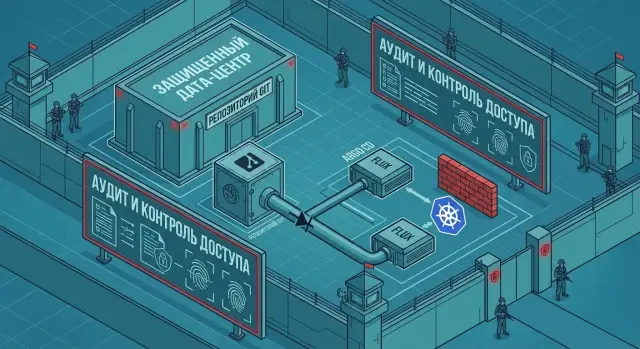
The challenge: deploy without direct cluster access
Saying “engineers have no cluster access” usually means something simple in practice: developers and DevOps don't use kubectl, they don't have rights to create or modify resources, and they can't "fix" production manually. The cluster lives in an air-gapped perimeter and changes get in only via predefined channels and rules.
This requirement rarely comes from a desire to forbid things; it’s usually about closing concrete risks. Most often it's about three points: human mistakes (wrong namespace, wrong version, accidental deletion), insider actions (intentional edits), and one-off manual changes that later nobody can repeat or explain.
Manual deploys and the "let's give access for an hour" pattern stop working quickly. As teams and services grow, it becomes hard to track who did what, and temporary access turns into permanent exceptions. Any incident invites manual fixes that don't end up in history and break reproducibility.
Security expectations typically sound like: it must be clear who changed a configuration, what changed, when it happened and why. Ideally this isn't screenshots from chat, but a chain such as: request or ticket → change in Git → checks → apply → confirmation of result.
A simple example: a team wants to update a service from 1.2.3 to 1.2.4 and add an environment variable. In a good process the engineer doesn't have an "apply now" button. They change configuration in the repo, run checks and approvals, and then a system inside the perimeter pulls and applies exactly what's described in Git, leaving a clear audit trail.
GitOps in a nutshell and what it brings to an air-gapped perimeter
GitOps in an air-gapped environment is an approach where Git is the single source of truth for what should run in Kubernetes. Instead of manual commands in the cluster, a controller pulls changes from Git and reconciles the real state to the declared state.
Manifests (Helm, Kustomize, plain YAML) usually live in a separate repository or next to the code. The flow looks like: an engineer makes changes, opens a PR, the change goes through checks and review, then gets merged. After merge the GitOps controller pulls the new configuration and applies it to the target environment.
In an isolated environment this gives several practical benefits. First, fewer manual actions in the cluster and fewer chances to "click the wrong thing" in production. Second, clear accountability: changes go through PR and review. Third, improved reproducibility: the environment can be rebuilt from the repository. Finally, it's easier to separate access: engineers don't need direct Kubernetes access.
Audit in GitOps usually means more than commit history. It's important that three layers line up: who made the change (author and reviewers), what exactly changed (diff in Git), and what actually was deployed (CI artifacts, image versions, tags, test results). In an air-gapped perimeter this is often critical for internal security reviews.
GitOps doesn't solve everything by itself. Secrets still shouldn't be stored in Git, so separate solutions are required (encryption, external secret stores, policies). And GitOps doesn't replace release processes and testing: delivery becomes predictable, but quality still depends on CI and team rules.
Air-gapped architecture: what belongs inside the perimeter
The main principle in a closed perimeter is simple: the cluster does not pull anything from outside, and everything that enters is subject to clear controls. Then GitOps behaves predictably: the controller in the cluster fetches desired state from an internal Git and applies it, without engineers entering the cluster.
A typical minimal setup inside the perimeter usually includes an internal Git server as the source of manifests and rules, an internal CI system (builds and checks), an internal container registry, a GitOps controller (Argo CD or Flux) running in Kubernetes, and, if needed, a secrets and artifact store (for Helm repos, OCI packages, etc.).
Delivering artifacts without internet often uses an "update gateway": a controlled point where packages and images can be ingested, scanned, signed, and then moved into the secure zone. It’s important this is a regular, documented process, not a one-off manual operation.
To ensure only approved versions end up in the cluster, enforce rules rather than rely on agreements. A practice that pays off quickly is to store images only in the internal registry, forbid pulls from external sources, and require image signature or at least pinning to a digest. Then Git points to a specific, verified build rather than "latest".
Managing base images and dependencies is not about magic but disciplined updates. Regularly import base images and packages into internal repositories, run scans and CI tests, and record results. Then update versions via pull requests in Git so the change is tracked, and deploy to test first, then prod the same way.
The scenario ends up simple: a team builds a service in CI, the image lands in the internal registry, and the version update is committed to Git. The GitOps controller sees the commit and applies the change. The engineer doesn't need kubectl, and the audit shows who changed the version, when, and which artifacts were allowed inside.
Argo CD vs Flux: key differences
Both Argo CD and Flux solve the same problem: the cluster pulls desired state from Git and reconciles Kubernetes. But they work differently, and in an air-gapped perimeter those differences affect operations, security and incident investigations.
Argo CD shapes toward an "application" model. You declare an Application and the tool shows what's installed, what should be, and where divergences exist. Argo CD's strong point is a visual UI and clear sync statuses. This is convenient for a platform team that oversees multiple teams and environments: it's easier to spot what is "red" and to restore expected state quickly.
Flux is organized as a set of controllers and is often seen as more "Git-first": key entities are declared in the repository and controllers in the cluster apply changes. Flux is often chosen when compact components and minimal dependency on a single rich UI service are priorities.
In practice differences appear like this: both detect drift, but Argo CD often explains it via the UI, while Flux shows it via controller events and logs. Rollbacks in both are basic: return the commit in Git. In Argo CD rollbacks are more visible to operators due to history and statuses. Architecturally, Argo CD centralizes work around "applications," while Flux distributes it across controllers and resources.
For an air-gapped perimeter predictability and minimal privileges are usually most important. In either case engineers don't need direct cluster access: they make a pull request and the cluster applies changes. The choice typically boils down to what you prefer: visual control (Argo CD) or a maximally declarative set of controllers (Flux).
How to separate environments without confusion or manual edits
Environment separation in GitOps often breaks for one reason: people start copying manifests from dev to stage and editing them manually. In an air-gapped perimeter this is especially dangerous: engineers can't enter the cluster, so any "manual" fix becomes a long hunt to find where configurations diverged.
A practical approach is to keep a single source of truth for the application base and overlay only minimal environment differences (replicas, resource limits, ingress, feature flags). This works well with Kustomize overlays or Helm values. Key principle: base is common, differences are small and explicit.
Repository structure is chosen as a compromise between convenience and access control. In a monorepo base and overlays for all environments sit together, making it easier to search and compare. In multi-repo setups the app and environments are separated, which is stricter with permissions but needs more coordination.
Promotion between environments should keep the history readable. A common pattern is that the build publishes an immutable image (for example, tagged by commit) and promotion happens only by changing Git describing the environment. This could be a PR from stage to prod or a separate releases repository where each commit represents a new version for a specific environment. Git tags are possible but harder to manage with code review.
Most important is a prod change policy. Not "whoever dares", but a clear process: only via PR, only with approvals, and only by a limited set of people (SRE or release engineers). Within the PR require at minimum: a description of the change, a link to the ticket, and a rollback plan.
Example: a team updates a service in test changing only the image and a single parameter. After verification, the same commit is promoted to stage via PR. Prod receives a separate PR, confirmed by two responsible people. The cluster pulls changes from Git, and you keep a clean chain: who, what and why changed.
Change audit: what to record and how to investigate later
Audit is easier if you agree in advance what kinds of changes are "normal." Prod should contain only things you can show as a chain of facts: a Git patch, a specific image in the internal registry (ideally by digest), and deployment parameters (Helm values or Kustomize overlays). Manual in-cluster edits should be considered exceptions and investigated separately.
Minimum discipline for prod usually rests on PR rules. You don't need to overcomplicate the process, but you must close basic risks: all changes via PR (no direct pushes to prod branches), CODEOWNERS for prod manifests and shared charts, at least two approvals before merge, and mandatory CI checks (linting and dry-run at minimum).
To increase trust in the source of changes, add commit signing and/or release tags. Then during incident investigation you can see not only "who wrote it" but that the change came through the expected process and not via a bypass.
For probes you need more than Git logs. Collect GitOps controller logs (Argo CD or Flux), Kubernetes events and, if possible, API server audit logs. Example: prod memory limit changed unexpectedly. From Git you find the PR that edited values, controller logs show when it applied the change, and Kubernetes events show which resources were recreated and why.
Access and security: living without kubectl for engineers
When engineers are not allowed to access the cluster directly, security seems simpler at first glance but requires strict rules to avoid chaos from exceptions and manual deploys. Lock down access the same way you lock manifests: people change Git, the GitOps controller changes the cluster.
The GitOps controller should have minimal privileges. It typically does not need access to all namespaces or cluster-scoped resources. Grant rights only to the resource types and namespaces it actually manages. Also plan who can stop synchronization or roll back a release.
A practical role model often looks like this: developers have write access to Git but no Kubernetes write access; SRE or platform administer GitOps projects and get limited cluster admin as needed; operations and security have read-only Kubernetes access and log access; the GitOps controller runs under a service account with RBAC limited to specific namespaces.
Organize environment separation so accidental changes don't "leak" into prod. The most robust option is separate clusters. If that's too expensive, use separate namespaces and separate GitOps projects plus bans on cross-namespace access. A helpful rule: one team — one set of namespaces — one set of repositories.
Secrets in Git almost always lead to leakage, even on a closed network. Choose a delivery method ahead of time: a local secret manager inside the perimeter, encrypted secrets in the repository (with decryption keys kept outside Git), or secrets generated in-cluster by policy. Make sure decryption keys are available only to the controller and a narrow set of admins, not to everyone who commits manifests.
Step-by-step rollout of GitOps in an air-gapped perimeter
Introduce GitOps in a closed perimeter as a managed project: first agree rules, then automate the artifact path, then go live. This removes the main risk: manual cluster actions that cannot be reproduced or explained.
Start by defining responsibilities. Developers own code and app manifests, platform/DevOps owns templates, policies and access, and security owns promotion rules and audit.
Next follow the artifact path. Choose a tool (Argo CD or Flux) and decide who approves repo changes and who can promote between environments. Stand up internal Git, CI and registry inside the perimeter and document the image path from build to cluster (including image signing and retention rules). Define repository structure and PR rules: where base manifests live, where dev/test/prod overlays live, and how promotion happens (via image tag change or a separate environment repo). Install Argo CD or Flux with minimal privileges: dedicated namespace and strict role limits on applied resources. Configure observability: sync history, alerts for drift and health failures, and a clear rollback process (revert commit or switch to previous tag).
Then run a pilot on a single service and lock down the rules: who opens changes, how many approvals for prod, what counts as an emergency rollback. For example, in a government organization start with an internal service where CI pushes images to a local registry and prod is updated only after a PR in the environment repo, with no engineer access to the cluster.
When the pilot succeeds without manual interventions, expand the approach to other teams and add security policies as you scale.
Common mistakes and pitfalls when moving to GitOps
The most common problem in air-gapped GitOps is environment leakage. As a result, prod gets test variables or an image that didn't pass the right checks. This usually stems from a shared manifests folder, manual file copying, or unclear source-of-truth rules.
A second common trap is promoting a release via manual edits. For example, an engineer edits the image tag directly in the prod branch because it’s faster. This breaks traceability: you can't tell who promoted a version or how to reproduce the step.
In the first weeks of adoption, focus on a few things. Separate environment configs explicitly (directories or repos) and decide what can change in dev/test and what is forbidden in prod. Promote versions only by changing the version (tag, digest, chart version), not by ad-hoc manifest edits. Don't give the GitOps controller excessive privileges: cluster-admin by default is almost always too much. Choose a method to store and update secrets and certificates up front, or the process will stall on approvals and manual exceptions.
Another common gap is rollback and responsibility. It must be clear in advance who performs rollbacks, on what signal (alert, metric, regression) and to which version. If a prod release degrades response time and there's no rule to revert to the last confirmed commit/tag, teams argue instead of quickly restoring a working version and investigating afterward.
Quick checklist before the first prod launch
Before the first production release in an air-gapped perimeter stop and check basics. This saves hours during incident triage when cluster access is restricted and changes must be fast and careful.
Verify you have a single source of truth: one main repository (or a clear multi-repo scheme), fixed naming rules and a clear directory structure per application and environment. Ensure promotion dev → test → prod is done without manual manifest edits: only intended things change (e.g. image version or package reference) and environment parameters don't overwrite each other by accident. For prod require mandatory approvals: designated approvers and a description of what they check (migrations, permissions, network policies, resources). The GitOps controller should have minimal privileges, and engineers should be blocked from direct cluster access: no "backdoor" kubectl paths. Finally, audit must work in practice: controller logs, Kubernetes events and Git history should answer "who", "what", "when" and "why" quickly.
Also test rollback. A simple test: deploy a faulty version, then revert in Git and confirm the system returns to the previous working configuration without manual cluster edits.
Release example: deploying a service without developer cluster access
Imagine a team where developers cannot write to Kubernetes directly: no kubectl and no write permissions. This is a typical GitOps air-gapped scenario where all changes go through Git and approvals.
A developer changes code and opens a pull request. After review, CI builds, runs tests and produces a container. The image is pushed to the internal registry and the manifests repo is updated with the new image version (usually a separate PR targeting the dev environment).
The release becomes a repeatable ritual. An on-call or release manager approves the version for stage via a Git change. After verification on stage they promote to prod the same way—via Git. The GitOps controller (Argo CD or Flux) pulls the changes and applies them. The team sees sync status and app health in the UI and logs but cannot accidentally edit production by hand.
Investigating what happened is also simpler. Git shows which file changed, which version became active, who approved and when it merged. Controller logs and cluster events show when the change applied and any errors.
Rollback is equally calm: revert the commit or change the image version in Git and wait for the controller to sync. For fast rollback keep the last stable version handy and a rule: always revert via Git, no manual cluster edits.
Next steps: how to start and what to outsource
Start small: write down the rules you actually need for GitOps in an air-gapped perimeter. Otherwise choosing a tool and a repo layout quickly becomes a debate of preferences rather than a managed process.
Formulate security and operations requirements so they are testable. It helps to answer in writing questions about audit, rollback timeframes, access and availability expectations: what is the source of truth (Git, image registry, Helm repo), how long history is kept, how rollback works (by commit, release tag or stored artifact), who can approve changes and how it's recorded, and what SLA to expect from the platform team.
Then pick Argo CD or Flux according to your working style. If visual diff checks, manual sync buttons and a clear UI are important for operations, Argo CD is easier to start with. If you prefer a Git-first approach with modular controllers and no mandatory UI, Flux may fit better.
Run a pilot on one service and one team, but apply real rules. Define success criteria upfront: mean time from merge to deploy, number of incidents caused by configuration, time to find root cause from change history, and the share of manual actions outside Git.
Some tasks are sensible to outsource: building perimeter infrastructure, setting up internal repositories and registries, defining base roles, audit and logging. If you also need hardware and support for the perimeter (servers, workstations and operational support), you can bundle it as one project with GSE.kz (gse.kz) as vendor and integrator with its own hardware line and service support.
Frequently asked questions
What is GitOps in an isolated environment?
GitOps moves changes from manual commands into Git. An engineer updates a manifest, goes through review and checks, and a Kubernetes controller applies the approved configuration automatically.
How can you deploy without direct access to Kubernetes?
Developers and DevOps engineers do not receive permission to modify resources through kubectl. They work with code and Git, while the GitOps controller applies changes inside the cluster according to defined rules.
What do you need for GitOps in an air-gapped environment?
The isolated environment needs a Git server, CI, an internal registry, a GitOps controller, and usually a secrets store. Artifacts enter through a controlled gateway, are checked, and moved into internal repositories.
Which should you choose: Argo CD or Flux?
Argo CD is more convenient if the team needs a visual interface with application and synchronization statuses. Flux is a good fit if you prefer defining controller behavior in Git and do not need a mandatory UI.
How do you separate dev, stage, and prod in GitOps?
Keep a shared application base and separate, small settings for each environment. Use Kustomize overlays or separate Helm values, changing only replicas, limits, ingress, and other differences.
How can you safely promote a release between environments?
Build an immutable image in the internal registry, then change its tag or digest through a pull request for the required environment. After validation, promote the same version through separate PRs from dev to stage and then to prod.
What rules are needed for changes in prod?
For prod, require pull requests, mandatory CI checks, configuration owners, and at least two approvals. It is also useful to require a change description, a link to the task, and a rollback plan.
What should you retain for change audits?
Record the Git patch, author, reviews, image version by digest, CI results, and controller synchronization time. Argo CD or Flux logs, Kubernetes events, and API audit logs help correlate a change with the actual action in the cluster.
Where should secrets be stored in GitOps?
Do not store secrets in plain text. Use an internal secrets manager, encrypted secrets in the repository, or policy-based secret generation, while keeping decryption keys with the controller and a limited group of administrators.
How do you roll back without kubectl?
Revert the commit or restore the previous image digest in Git. The controller will detect the change and return the cluster to its previous configuration, so test this scenario in a test environment in advance.
