8 min read
FreeRADIUS 802.1X setup: a zero-downtime deployment plan
A practical office deployment plan for 802.1X: FreeRADIUS 802.1X setup, choosing EAP, guest network, device accounting and a rollout with no downtime.
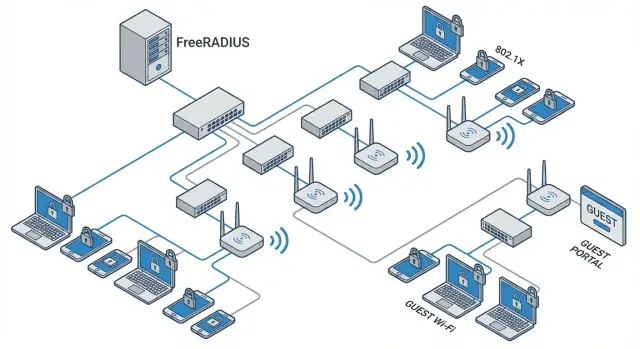
Why 802.1X if you don't want to buy NAC
Commercial NAC often scares organizations not by the idea itself but by the price and consequences. Licenses are counted per user, device, or port. The project becomes a long rollout, and after a year you may be locked to a specific vendor and their update cycle.
The 802.1X + RADIUS combo closes the basic problem more simply: who connected and whether they are allowed on this network. FreeRADIUS is frequently used as the RADIUS server. For many companies FreeRADIUS 802.1X setup is a clear, manageable project: standard protocols, transparent rules, minimal "magic".
Without NAC you can usually achieve:
- Checking the user or device before granting network access (Wi‑Fi and wired).
- Splitting access by roles (employee, contractor, guest, service device) and assigning different VLANs.
- Keeping connection logs and basic reports about authentication attempts (who, when, from where).
- Reducing "gray" connections: random laptops in meeting rooms, unknown APs, desk moves.
But it's important to understand the limits. 802.1X itself does not verify device health: it won't "fix" an infected laptop, check antivirus presence, or confirm “this is the corporate image” without additional components (MDM, EDR, OS policies). For scenarios requiring strict posture checks, advanced guest portals, and extended analytics, a full NAC (or other systems) may be more appropriate.
Users will notice changes. First login may require credentials or certificate installation, and the familiar “plug the cable and it just works” will become rarer. Stress is reduced if you explain the changes in advance, start with a pilot, and keep a temporary fallback for critical workstations.
How it works: a simple 802.1X scheme with FreeRADIUS
Think of 802.1X as a guard at the network entrance. Until a device proves it is "authorized", the switch port or Wi‑Fi will not grant access to corporate resources.
A typical scheme has four roles:
- Switch or access point (NAS) — asks the device "who are you?" and forwards the answer for verification.
- RADIUS server (FreeRADIUS) — receives the request, applies policies and returns a decision: allow or deny.
- User directory (for example, AD/LDAP) — the source of accounts to avoid creating separate passwords.
- Certificate Authority (CA) — issues certificates if you choose certificate-based authentication.
On wired networks 802.1X runs on the switch port: the port is closed by default and opens after successful authentication, receiving parameters like VLAN. For Wi‑Fi the logic is the same but implemented via WPA2-Enterprise or WPA3-Enterprise: the client connects to the SSID and authentication happens through 802.1X and RADIUS.
The most useful place in FreeRADIUS is policies. They answer three questions: who is connecting (user or device), where they connect from (port, SSID, office), and under what conditions (time, device type, group in the directory). The policy result is typically one of three: allow, deny, or place into a restricted segment.
A simple example: a user from the "Finance" group connects by cable and receives the corporate VLAN. The same person joins the guest SSID and ends up in the guest VLAN with internet-only access.
To avoid separate passwords, FreeRADIUS usually checks logins against the directory. For stronger security a second scenario uses certificates. Then the flow is predictable: the port or Wi‑Fi asks, RADIUS decides by rules, and credentials remain where you already manage them.
Choosing an EAP method: EAP-TLS, PEAP and trade-offs
EAP is not a single protocol but a "container" for authentication methods in 802.1X. For users the experience is similar: the device connects and is authenticated. But whether it proves access by a certificate or a password affects security, support effort and rollout speed.
EAP-TLS: maximum security for managed devices
EAP-TLS uses mutual certificate validation: the server proves its identity and the device proves it is allowed. Passwords do not travel over the network.
This is the best option for corporate laptops and desktops under management (MDM/GPO), where you can centrally issue and renew certificates. With this setup FreeRADIUS 802.1X often delivers the cleanest result: access can be tied to a device and the risk of leaked passwords is significantly reduced.
PEAP/MSCHAPv2: convenient but with caveats
PEAP is often chosen to start quickly without per-device certificate infrastructure. Inside a protected tunnel a username and password (usually an AD account) are transmitted. This is convenient for pilots and mixed environments.
The trade-off is that security depends on password quality and client discipline. If users are allowed to "click OK always" and ignore server certificate checks, a fake access point can harvest credentials. Therefore with PEAP it's vital to enforce strict server certificate validation (correct CA and server name) and strong password policies.
TEAP and other options: when they make sense
Consider TEAP if you need "both device and user" validation and more flexible BYOD policies. However, TEAP support across clients and network equipment is still uneven, so it is usually adopted later after the basic scheme is stable.
Typical guidance for offices:
- Managed corporate PCs and laptops: EAP-TLS.
- Quick pilot and mixed environment: PEAP/MSCHAPv2, but only with mandatory server certificate validation.
- Need both device and user in one flow: TEAP (if clients and controllers fully support it).
- Printers/IoT without 802.1X: separate policy (e.g. MAB) and isolated segment so the main scheme isn't weakened.
Simple rule: where you control devices, use certificates. Where you don't yet manage devices, use password-based methods as a temporary bridge with limits and a plan to move to EAP-TLS.
Accounts and certificates: prepare without pain
The hardest part of 802.1X is often not FreeRADIUS but preparing credentials. If you decide in advance whether devices will authenticate by username or certificate, the rollout becomes much smoother.
Which CA to choose
EAP-TLS requires certificates. Choose a CA based on whether you have a domain and who will maintain the infrastructure.
If you use Active Directory, AD CS is a common choice: it fits domain PCs and supports autoenrollment via group policies. For a more isolated model run an internal CA on a dedicated server or provide a separate CA just for network access. This reduces risk: access CA issues problems that affect a smaller surface of your PKI.
In many office environments AD CS is sufficient. For critical segments (finance, healthcare, government) a more isolated CA is often preferred.
Certificate lifecycle without panic
Treat certificates as consumables instead of one-time setup. That reduces surprises.
- Issuance: clear templates (user and machine), minimal issuance rights.
- Validity: typically 6–24 months to avoid "forever" certificates.
- Renewal: automated with buffer before expiry.
- Revocation: a clear process for termination, lost devices or compromise.
- Inventory: a list of issued certificates and binding to owner or device.
Automatic distribution: domain Windows via GPO and autoenrollment, macOS and mobile via MDM profiles, unmanaged devices via an installer and short instructions.
If you must use PEAP
PEAP is fine for starting, but it relies on passwords. To reduce credential theft risk, forbid the "trust any server" pattern: clients must validate the RADIUS server certificate (trusted CA and correct server name). Use separate service accounts with limited rights and add MFA where feasible.
Devices lacking required EAP
Printers, cameras and legacy terminals may not support EAP-TLS or 802.1X. Plan a secure compromise: separate VLAN, strict address/port rules, MAC-bypass on the port or dedicated non-802.1X ports. Exceptions should be rare, documented and scheduled for retirement.
Guest network: secure and convenient, without manual control
Guest Wi‑Fi often becomes a manual task: "give a password", "change the password", "it doesn't work." With 802.1X and FreeRADIUS it can be more controlled: a visitor authenticates and the network automatically applies restrictions. Guests never get access to internal resources even if they know corporate SSID settings.
A practical model starts with three segments: employees, guests and a separate group for printers/IoT. On the network this is usually separate VLANs or policy sets assigned based on authentication outcome.
Typical rules: employees pass a "strong" check (certificate or domain account) and get access to internal services; guests land in an "internet only" segment; IoT and printers get minimal permissions (e.g. to a print server or monitoring).
Common guest approaches:
- Dedicated "Guest" SSID with 802.1X and temporary accounts (for example, 1-day access).
- Captive portal issuing access via one-time code or consent.
- Simplest: separate SSID with WPA2-PSK — cheaper but requires frequent password changes and gives poorer visibility over who connected.
Most important — isolation: block internal subnets, block discovery of internal devices and block access to network equipment. Contractors and temporary staff should not be mixed with guests: they often need access to 1–2 internal systems and are better handled with a separate role and policy.
A quick test that prevents common mistakes: connect as a guest and verify internal IPs and office devices are unreachable. If the test passes, the guest 802.1X is correctly isolating guests from internal resources.
Device inventory: corporate, personal, printers and IoT
When implementing 802.1X you soon realize it's important to know not only who but also what is connecting. The same username could appear on a personal laptop, a phone, and an unknown box in a meeting room.
What counts as a device
There are several ways to identify a device. Choose one or combine them depending on risk and convenience.
- Device certificate (most reliable if you control issuance).
- User account (convenient but doesn't separate personal from corporate devices).
- MAC address (fast but spoofable and not suitable for strict security).
- Combined scheme: 802.1X for managed devices and MAC for exceptions.
- Port/segment profile (different rules for meeting rooms and workstations).
For BYOD separate "who connected" and "on what". Simple scenario: a corporate laptop gets internal access, a personal phone only gets internet or limited services. BYOD device accounting reduces leak risk even without posture checks.
Handling IoT and printers
Printers, cameras and old scanners often lack reliable 802.1X support. Use MAB but avoid making it the default hole. Best practice — a dedicated VLAN and strict rules: allow access only to required servers (print server, recorder), not the whole network.
You can run minimal accounting without heavy endpoint controls. Start with disciplined logs and clear reports:
- record who and which device connected, from which port and which VLAN it was placed into;
- keep an exceptions list (printers/IoT) with owner and location;
- set review periods for exceptions so the list doesn't grow indefinitely;
- send unknown devices to a quarantine VLAN.
Deeper posture checks (patch level, disk encryption, antivirus, jailbreak/root) require MDM/endpoint management or a full NAC. Even without those, separate policies for corporate, personal and incompatible devices significantly reduce risk.
Step-by-step: pilot FreeRADIUS and 802.1X
A pilot verifies access rules on a small group of users and devices without risking the whole office. The "small zone, clear rules, fast rollback" approach works best: it reveals where the chain breaks.
Start with a short inventory. Check not only whether equipment supports 802.1X but which modes are available: RADIUS for wired network, WPA2-Enterprise for Wi‑Fi, dynamic VLAN, MAB for printers and IoT. Verify firmware, limits on number of RADIUS servers, and presence of a guest SSID or separate VLAN.
Pick one floor, department or SSID and one wired VLAN for the test zone—ideally where few critical devices exist. Agree a plan B to temporarily revert a port or move a user to a quarantine VLAN.
Then configure FreeRADIUS: add network devices as clients (IP and shared secret), create test groups and simple policies. Example: employees — full access, test BYOD — internet only, unknown — quarantine.
On the switch or AP enable 802.1X and set the parameters that commonly save pilots:
- port authorized only after successful authentication, otherwise guest/quarantine VLAN;
- timeouts and retry counts to avoid client loops;
- MAB option for devices without 802.1X;
- method order: 802.1X first, then fallback.
Test with concrete scenarios. Use 2–3 test users and devices (corporate laptop, personal phone, network printer) and predefine expected results: which VLAN and restrictions. If outcomes differ, start with FreeRADIUS logs (password failure, unsupported EAP, wrong secret, wrong NAS-IP) instead of changing settings indiscriminately.
Deploy without stopping the office: migration plan
Migration idea: observe first, then restrict, then enforce. This avoids cutting off the office with one switch and helps find devices that aren't ready.
Migration stages: visibility to enforce
Start where it's easiest to control consequences: one floor, department or switch. Initially focus on visibility, not blocking.
- Prepare pilot: 20–50 users and a few device types (laptop, PC, phone, printer).
- Enable 802.1X in a soft mode (monitor/low impact): port allows traffic but you collect authentication results and rejection reasons.
- Allow fallback scenarios: MAB for specific devices, temporary VLAN for unknowns or dedicated non-802.1X ports for critical gear.
- Move pilot to enforce: only authenticated devices get working network access; others go to guest or quarantine segments.
- Expand by location: first workstations, then meeting rooms, then common areas.
Leave 2–5 business days between phases to see real behavior: who connects in the morning, what devices appear at night, what breaks after updates.
Communication, change windows and rollback plan
Tell users what changes mean for them: credential prompts, certificate installation, separate guest access. Announce pilot dates, target users and support contacts.
Rollback plan must be short and rehearsed:
- record current port and VLAN settings to revert in minutes;
- keep a break-glass port without 802.1X for emergency admin access;
- coordinate change windows with owners of critical services (IP telephony, POS, terminals);
- set stop criteria, e.g. if more than 5% of pilot users lose connectivity.
This approach lets you move quickly but safely: access control is enabled in parts while the office keeps running despite incompatibilities.
Troubleshooting: logs, rejection reasons and quick checks
If 802.1X "won't let in", the answer is almost always in the logs. With FreeRADIUS and network gear check both sides: what the switch/AP requested and why FreeRADIUS accepted or rejected it.
Where to start
On FreeRADIUS the clearest debug mode is interactive; it shows where the flow breaks: EAP method selection, password check, certificate validation, policy application.
freeradius -X
On switches and Wi‑Fi controllers look for 802.1X/RADIUS events: Access-Request sent, Access-Reject received, timeouts, port falling back to guest or unauthorized. Often the issue is network reachability (ACLs, wrong shared secret, incorrect source IP), not RADIUS logic.
Common failure reasons:
- Time mismatch on clients and server (certificates appear not yet valid or expired).
- Wrong username or password (domain suffix missing, cached credentials).
- RADIUS policies don't match (user placed in wrong group, wrong VLAN assigned).
- Transport issues (packets blocked, ports 1812/1813 closed, shared secret mismatch).
- EAP errors (client chose unsupported method or blocked TLS versions).
Quick EAP checks
For EAP-TLS issues usually the trust chain is the culprit: client doesn't trust CA, misses an intermediate certificate, or server name in cert doesn't match the client expectation.
For PEAP typical problems are profile mismatches (MSCHAPv2 expected but server configured differently) and legacy TLS negotiations.
To escalate to support efficiently collect:
- snippets from FreeRADIUS debug output (error lines, omit passwords);
- device MAC and attempt timestamp;
- SSID/port and switch/AP IP;
- used method (EAP-TLS or PEAP) and device type (Windows, iOS, printer);
- client error message screenshot (no personal data).
Common mistakes and traps when configuring 802.1X
The most common problem isn't FreeRADIUS but how it's enabled. A test laptop authenticates — and admins immediately switch the whole office to enforce. Result: incompatible devices fail, printers drop, rollback isn't prepared.
Frequent painful mistakes:
- Turning on strict blocking on ports without a pilot and rollback plan.
- Mixing employees and guests in one policy: same VLAN, same rules and exceptions.
- Using certificates without a lifecycle strategy: who issues, how to renew, what to do on compromise and how to revoke.
- Leaving an open fallback (MAB or "allow without 802.1X") permanently, turning 802.1X into a checkbox.
- Forcing printers/phones/terminals into the same process as PCs despite different capabilities and risks.
Typical scenario: Wi‑Fi pilot goes well. Then 802.1X is enabled on switches and an accounting MFP only supports MAC auth. Without a separate profile and segment you must choose between downtime or weakening protection across the network.
To avoid traps, keep these checks:
- separate policies for employees, guests and unmanaged devices;
- ability to return a port to a safe mode in 5 minutes without touching others;
- clear ownership of where to look for failure (switch, AP, FreeRADIUS) and who fixes it;
- expiry for temporary exceptions so they aren’t permanent.
Short checklist and next steps
Before enabling 802.1X for everyone record a minimum readiness set. This saves days of mass failure handling and makes FreeRADIUS 802.1X setup predictable.
Minimum before start
Check essentials that usually block pilots:
- Switches and APs support 802.1X and required features (MAB/fallback, RADIUS-assigned VLANs, guest VLAN).
- Clear credential model: domain (AD/LDAP) or local, and rules for contractors and guests.
- Defined access policies: who goes where (employees, guests, printers/IoT) and what to do with unknowns.
- Certificates prepared and trusted on clients (for EAP-TLS) or a secure password scheme (for PEAP).
- Rollback plan: how to quickly restore port/Wi‑Fi to open mode.
Run a short set of tests and record results (success/failure, login time, VLAN outcome). One reference laptop, one smartphone and one "problem" printer is better than random checks.
Tests before full office rollout
Cover common cases that break at scale:
- Wired: employee login on a clean port and after reconnect.
- Wi‑Fi: employee connection and roaming between APs without disruption.
- Guest: registration/login, isolation from internal resources and a clear access duration.
- Printers/IoT: auth (certificate, MAB or dedicated profile) and stability after reboot.
- Remote work: VPN/VDI scenarios so 802.1X doesn't block required services.
For daily monitoring you don't need rocket science. Track Access-Reject rate, top rejection reasons (wrong password, untrusted certificate, unsupported EAP), authentication time, spikes per switch/SSID and appearance of new MACs/devices.
If mass failures occur, contain the problem (one SSID, VLAN or switch), enable temporary access (guest VLAN or rollback port), check time on RADIUS and clients, certificate chain and recent policy changes.
Next steps usually are: expand the pilot by departments, move key groups to EAP-TLS, and formalize rules for non-802.1X devices. Engage an integrator when migrations must be downtime-free across many switches, complex segmentation, redundancy and monitoring are required.
In Kazakhstan such projects are often run by companies like GSE.kz — a technology vendor and systems integrator that can help build the full solution: servers, workstations, deployment and ongoing support.
Frequently asked questions
Why use 802.1X if we don't want to buy NAC?
If you need basic access control — "let only authorized devices/users in" — and to assign different VLANs by role, 802.1X with RADIUS usually covers that without heavy NAC. You get enforcement at the Wi‑Fi and wired network edge and clear authentication logs. If you need to verify device health (antivirus, disk encryption, conformity to a corporate image) or build sophisticated guest portals, then a full NAC or integration with MDM/EDR is often required.
What should be prepared before launching FreeRADIUS and 802.1X?
Minimum — network equipment that supports 802.1X (switches/APs), a RADIUS server (often FreeRADIUS) and a source of credentials, e.g. AD/LDAP. For EAP-TLS you also need a certification authority and a clear process for issuing and renewing certificates. Before configuration, agree on roles and segments: who is an employee, guest, contractor, and what to do with devices that don't support 802.1X.
How to choose an EAP method: EAP-TLS or PEAP?
For managed corporate PCs and laptops the usual best choice is EAP-TLS: passwords are not transmitted, access can be bound to the device, and the risk of leaked credentials is lower. To start quickly in a mixed environment you can use PEAP/MSCHAPv2, but only if clients strictly verify the server certificate. TEAP makes sense later when clients and network gear reliably support it and you need both device and user checks.
How to make PEAP safer so passwords don't leak?
The key rule — clients must validate the RADIUS server certificate: a trusted CA and the correct server name in the profile. That prevents users from accepting a fake server and handing over passwords. Also limit where PEAP is used and migrate managed devices to EAP-TLS over time, keeping PEAP as a temporary bridge.
What to do with printers and IoT that don't support 802.1X?
If a device doesn't support 802.1X or is unreliable with it, common approaches are MAB (MAC authentication) or dedicated ports. Critical point — such exceptions must not grant "full network" access. A practical approach is a separate VLAN for printers/IoT with minimal permissions to only required services, so authentication compromises don't become large holes.
How to organize guest Wi‑Fi so it doesn't reach the internal network?
The simplest reliable pattern is to separate employees and guests by policies and VLANs: guests go into an "internet only" segment and must not see internal subnets. This works with a dedicated guest SSID or with temporary guest accounts. Most important — test by connecting as a guest and confirming internal IP addresses and office devices are unreachable; otherwise isolation is only nominal.
How to start an 802.1X pilot without disrupting work?
Start in a small, easy-to-rollback zone: one floor, one department, or one SSID. Use a few representative devices and predefine the expected outcome, e.g. which VLAN a corporate laptop should receive and where a personal phone should end up. If results differ, check RADIUS and network device logs first instead of changing settings randomly — that usually reveals the real cause faster.
How to migrate to 802.1X without stopping the office?
Move in stages: first collect visibility and run in a soft mode, then divert unknowns to quarantine/guest VLAN, and finally enable strict enforcement for the working network. Between stages allow several business days to observe devices that don't connect immediately. Always have a short rollback plan: how to revert a port or SSID to the previous mode in minutes and an emergency access option for critical workstations.
What are the most common causes of 802.1X failures and where to look?
Most often it's a wrong shared secret or source IP of RADIUS requests, blocked ports 1812/1813, mismatched policies, or certificate/time issues on clients/servers. For EAP-TLS, many failures stem from untrusted CA chains or wrong server names. For diagnosis, enable FreeRADIUS debug and correlate it with switch/AP logs — the cause is usually visible in the authentication flow.
What to log and when should an integrator be engaged?
Minimum useful logging — who connected, when, from which port or SSID, by which method, what VLAN they were placed into, and reasons for Access-Reject. This helps quickly separate credential and certificate issues from network or policy faults. When rollout spans many sites and switches, a systems integrator can help design segmentation, RADIUS redundancy and monitoring, and provide 24/7 support. In Kazakhstan such projects are often run by GSE.kz.
