8 min read
F5 BIG-IP iSeries for Load Balancing and WAF: HA and Certificates
We review typical HA patterns, TLS certificate and logging requirements, and failover tests for F5 BIG-IP iSeries used for load balancing and WAF.
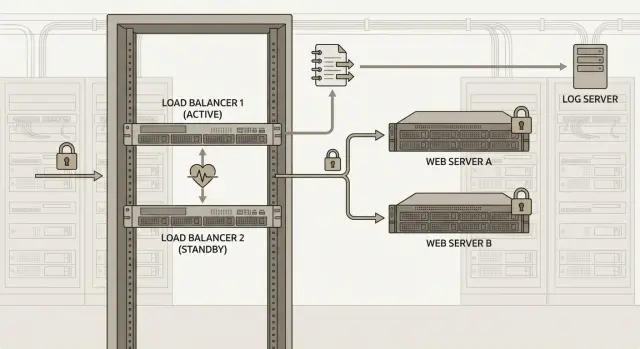
Task: predictable availability and security control without surprises
F5 BIG-IP iSeries is usually placed at the most sensitive point: the ingress for web services, portals and APIs. The goal is not just “distribute traffic between servers” but to achieve predictable availability and transparent security even when something fails.
In practice, systems are checked more often by ordinary failures than by load tests. Decide in advance which incidents the service must survive without downtime or with minimal pause: failure of one BIG-IP node, power loss in a rack, an interface to a switch going down, a cut to a provider or edge router, or partial backend unavailability (application, database, subnet).
In this context HA means more than “two boxes in a rack”; it means managed role switching with clear rules: who is active, how the leader is chosen, what happens to sessions and how quickly users can resume work. If failover behaves differently each time, you will likely have night-time incidents.
Certificates and logs are another common pain. One TLS mistake (wrong CN/SAN, missing chain, expired cert, incorrect SNI, weak cipher suites) creates a “partially working” service where the failure looks like an application problem.
The same goes for logs. If WAF blocks requests but events are not recorded in a useful format (time, IP, host, URI and reason), investigations become guessing games. A typical case: after an application update users complain about login failures. Without proper logging it’s unclear whether this is a new vulnerability, false WAF positives, or a backend fault.
BIG-IP acts as both an L4/L7 load balancer and a point of WAF policy enforcement. That directly affects the design: where TLS terminates, which headers the application needs, what events you must record, and how HA should behave on node failure so protection doesn’t "disappear" with the failed node.
Common HA patterns for iSeries: active-standby and active-active
For F5 BIG-IP iSeries used for load balancing and WAF, the two most common high-availability patterns are active-standby and active-active. Both work but offer different trade-offs between simplicity, resource usage and failure predictability.
Active-standby is usually simpler and more reliable operationally. One node handles traffic, the other waits ready to take over. The benefit is consistent behavior during failover and easier testing. The downside is unused capacity.
Active-active is suitable when you need both nodes to handle load or when multiple independent services can be distributed between nodes. Complexity typically comes from session state, asymmetric routing and differences in modules or policies between devices. Small configuration differences quickly turn into intermittent incidents.
Floating IP and traffic group in simple terms
Clients connect to a virtual service address (floating IP), not a physical device address. That address belongs to a traffic group. When the active node fails, the traffic group moves to the second node together with what’s needed to continue operation: virtual addresses, VIPs and related self IPs (and sometimes routes, depending on the design).
Sync-failover: what must match on both nodes
For predictable failover, key objects must match on both nodes: Virtual Servers, Pools and Monitors; WAF policies and related profiles; SSL profiles and certificate chains; iRules and data groups; and SNAT/NAT and routing if you use them.
Decide in advance how to handle private keys. Some organizations forbid copying private keys between nodes. That’s not a minor restriction — it affects architecture and operational processes.
Sometimes it’s better to avoid a single complex pair across sites and instead deploy two independent pairs by zone/data center and shift traffic with an external mechanism (DNS/GSLB/routing). That reduces the risk that inter-site delays or L2/L3 issues turn a failure into repeated unstable failovers.
Network requirements and basic settings for stable failover
To avoid surprises during BIG-IP failover, first map the network by roles. At minimum you need management (admin), external (clients) and internal (backends). Many setups also separate an HA network for state exchange (heartbeat and sync). Segmentation reduces risk: a problem on the client segment should not "kill" management or pair communications.
Remove single points of failure on ports and switches. A common approach is two physical interfaces per segment connected to two different switches. On BIG-IP this is often implemented with link aggregation (LACP), but only if switches support the correct setup (e.g., MLAG/vPC). A frequent mistake: enabling LACP while switches are not coordinated, resulting in a single link failing but traffic not flowing.
Network checks to perform:
- Management is separate and reachable even if external/internal segments have issues.
- External/internal segments have link and switch redundancy.
- VLANs and tags match on both nodes and both switches.
- The HA network is not overloaded and not unintentionally filtered by ACLs.
Routing directly affects correct failover. A default route is usually needed on the traffic context (client responses and outgoing checks), while management should use a separate route to the admin network. If some backends are reached via a different gateway, add identical static routes on both nodes; otherwise some pools may become “invisible” after failover.
User sessions depend on persistence. In active-standby without connection-state synchronization, some TCP sessions will drop, while HTTP sessions often recover on retry if persistence is cookie-based or SSL session ID is configured. If the service can’t tolerate disconnections, make that a requirement rather than hoping it will "fix itself."
Finally, health of pools matters. Use not only TCP monitors but HTTP/HTTPS checks (for example, a request to /health expecting 200). A working service is not just an open port — the application must respond correctly and promptly.
TLS certificates on BIG-IP: plan ahead
Before deploying F5 BIG-IP iSeries for load balancing and WAF, decide where TLS will terminate: on BIG-IP or on the backends. Termination on BIG-IP centralizes certificate, cipher and logging management. If you choose this, decide whether to re-encrypt traffic to backends so internal traffic is not sent unencrypted.
To avoid client errors, maintain not only the server certificate but the full chain. A common mistake is installing just the leaf certificate without intermediates; some browsers and mobile clients will fail and troubleshooting can take hours.
If one VIP hosts multiple domains, SNI is almost always required. Otherwise one clientssl profile may accidentally cover another site and return the wrong certificate for some requests. Verify that each domain has the correct cert+key and that the CN/SAN matches how users reach your service.
Document certificate rotation and key access in advance:
- who tracks expirations and how many days before expiry replacement starts;
- how to replace certificates without downtime (upload new cert, switch profile, quick rollback);
- who has access to private keys and how that access is controlled;
- how HA synchronization handles certificates and keys (they must end up on both devices);
- the accepted TLS policy (minimum version, allowed ciphers) so you don’t unexpectedly block older clients.
A simple example: if you operate a government portal and a separate API domain, separate profiles by domain and run compatibility tests with older clients before production to catch TLS incompatibilities early.
TLS to applications: re-encryption and common risks
When BIG-IP terminates client HTTPS, you must decide whether traffic to applications is re-encrypted. A common pattern: client TLS ends on BIG-IP, and BIG-IP opens a separate TLS session to each backend. This centralizes policies and inspection but introduces additional places for mistakes.
Certificates to backends and mutual TLS
If backends are in a separate segment, compliance requires it, or you don’t fully trust the internal network, enable TLS to backends. Mutual TLS (mTLS) is required when the application needs to verify not only the user but also the proxy (BIG-IP) as a client. In that case BIG-IP holds a client certificate and private key, while backends hold trusted CA chains for verification.
To prevent mTLS from becoming chaos, agree on rules up front: which CAs are used for internal services, where trusted chains are stored for backend verification, and how key rotation is handled.
Backend authenticity checks and common failures
Always enable server certificate validation for backends (chain verification and name). Without it you may not notice misconfiguration or substitution. With validation enabled, BIG-IP may reject connections for small issues: wrong name in the cert, a missing intermediate, or an expired CA.
Another trap is mixing environments (dev/test/prod). Teams sometimes reuse test certificates or CAs in production; everything looks fine until the first rotation and then failures begin.
A scenario that impacts availability: a backend certificate expires. If checks are enabled, BIG-IP will mark the node down. If the pool is small, users will see errors even though the overall service is still up. Monitor internal certificate expirations as strictly as public ones.
Logging: what to record for load balancing and WAF
When F5 BIG-IP iSeries sits on the edge, logs are the primary source of truth: what was in the request, why it passed or was blocked, and what happened during HA transitions.
Define a minimum log set in advance. Typically you need:
- L7 access logs for Virtual Servers (who, where, status, duration);
- processing errors (5xx, timeouts, resets);
- WAF events (rule/violation, threat level, action block/alarm);
- configuration change audit;
- HA events (failover, lost heartbeat, role change).
To make logs useful, agree on a common set of fields. Usually it’s enough to have: precise timestamp (with timezone and synced clocks), VIP and port, client IP (consider X-Forwarded-For if used), backend pool member, HTTP method and URI, response code, WAF event identifier (policy, rule/violation), action (blocked/allowed) and a request ID (correlation ID). A request ID is useful to pass into the application to correlate BIG-IP events with backend logs.
Store logs in two tiers: a small local buffer for fast diagnostics and forwarding to a centralized store (log server or SIEM) for long-term retention. This is important to avoid data loss if the node is compromised or disk fills during an event.
Separate roles: log viewing should be available to security and operations, while changing WAF policies and LTM objects should be limited to a small group and recorded in an audit trail.
Before production verify delivery continuity:
- logs arrive from both nodes (active and standby) and the source is distinguishable by hostname;
- manual failover events are recorded and do not break correlation;
- if the log server is unreachable there is buffering and later delivery;
- time is synchronized on both nodes and the log server;
- access rights for viewing and changing logs/policies follow the rules.
How to configure HA step by step (without unnecessary details)
For predictable HA start by agreeing requirements: which VIPs are critical, acceptable downtime in minutes (RTO), and what constitutes data/session loss (RPO). These influence persistence, sync requirements and test plans.
A short practical sequence:
- Decide which addresses move on failure: VIPs and usually floating Self IPs on client and server VLANs. Also verify default route, DNS and the source of outbound backend connections.
- Prepare networks for failover and sync: stable L2/L3 paths between nodes, correct MTU and clear interface roles (client, server, HA). A dedicated failover network helps avoid false switches.
- Pair the devices: device trust, config sync and Sync-Failover group. Perform an initial sync and confirm the right objects sync (Virtual Server, Pool, Monitor, WAF policy, certificates) and that status is green everywhere.
- Start with a test service, then migrate production VIPs. Minimum: a VIP, a pool with real members, a health monitor and persistence if needed (e.g., a cookie for a web account). The monitor should validate real functionality (HTTP 200 and content checks if needed).
- Roll out WAF gradually: start with logging on selected URLs, then enable blocking. Decide early where TLS terminates because it affects WAF visibility into request parameters.
After setup enable centralized log forwarding (LB, WAF and system events) and verify failover events are recorded on both BIG-IP and the collector. A simple check: open a session in the web service with a request every 2–3 seconds, force a failover and verify the VIP remains reachable, monitors don’t flip to red, and logs contain a clear chain (reason for switch, which device became active, what happened to the session).
Verifying operation when one node fails: test plan
Good HA is verified by measurable tests, not diagrams. For F5 BIG-IP iSeries for load balancing and WAF, agree in advance what success looks like: service reachable, active sessions not dropped (or within acceptable limits), and WAF/LTM events arriving in the centralized logs.
Before tests record a baseline: average response time, number of active connections, pool health, sync status and the current active node. Choose a simple control action (for example, open login page and submit a test form) that you can repeat every 2–5 seconds.
Practical test set
Five checks usually give full coverage:
- Manual failover: force an active node switch and measure recovery time from the user's perspective.
- Link/port failure: disable an external link or one port in an aggregation on the active node and verify the VIP still responds.
- Node reboot: observe the control request and any spike in 5xx/timeouts rather than just pings.
- Backend outage: stop the service on a backend and ensure traffic shifts to healthy nodes without sticking.
- WAF behavior during failover: trigger a test blocked event before and after failover and verify blocking and log delivery.
What to record in the test report
After each test note start and end times, which node was active, user-visible symptoms, key LTM/ASM log excerpts and system messages, and the result (pass/fail) with recommended fixes.
A simple, honest RTO measure: during a forced failover an operator refreshes the page every 2 seconds and notes one or more “misses.”
Common mistakes and traps in HA, certificates and logs
Even when active-standby roles look correct in the GUI, failover often breaks on small details. A typical case: Virtual Server and policies match but VLAN, self IP or routes differ. Failover occurs but traffic doesn’t flow because the new active can’t reach a required subnet or uses the wrong gateway.
Another common issue is persistence. Without a proper session sticky method (cookie, source IP, token), users get logged out and long operations or payments are interrupted during failover or pool redistribution. This is especially visible in account portals and B2B systems.
Certificate issues often come not from "forgetting to install" but from updating only one node or not checking the chain. After failover a client may receive a different or incomplete chain and see TLS errors. Always verify expiry, SAN, intermediate certificates and that the key matches the certificate.
With WAF the pattern is similar: enabling blocking without an observation phase cuts off legitimate traffic. For example, search or document upload triggers false positives and teams learn about it from user complaints.
In logging many lose the full picture: logs are forwarded only from the active node, and in a failure those logs become unavailable. As a result it’s unclear whether an issue was an attack, an application error or a network problem.
Practical minimum checks before and after changes:
- Compare VLAN, self IP, routes and next-hop reachability on both nodes.
- Test persistence with a real user flow.
- Ensure certificates and chains are identical and applied to the correct profiles.
- Run WAF in observation mode first and collect exceptions for your traffic.
- Configure centralized logging from both nodes, including failover events.
Another trap is missing a failback plan. If windows for rollback, decision authority and post-failback validation are not defined, any switch becomes manual stress and introduces risk of repeated downtime.
Quick checklist before production and after changes
Before launching F5 BIG-IP iSeries, complete a short verification.
Before production
- HA: both nodes see each other, sync has no errors, VIP actually moves on role change.
- Network: link/path redundancy, routes and ARP behavior are predictable, health checks validate important app behavior (HTTP response).
- TLS: expirations and algorithms are current, chain is complete, SNI matches names, weak protocols and ciphers disabled.
- WAF: policies enabled on the intended Virtual Servers, mode chosen consciously, exceptions minimal and documented.
- Logs: LTM/ASM and system events arrive at the central store from both nodes, time is synchronized.
After changes (certificates, rules, pools)
- Run a short validation: open site, authenticate, exercise key forms and uploads.
- Review WAF logs for false positives and test blocking patterns.
- Simulate a node failure and verify VIP behavior and session handling.
Assign process owners: who updates certificates, who approves changes and who stores test results.
Example topology for a typical web service: what and how to check
Consider a public portal with an account area: login, payments, document uploads. Two sites (primary and backup) and security requirements: action audit, log retention and a test report.
For such a service teams commonly choose active-standby on F5 BIG-IP iSeries. Both nodes connect to two switches (different racks and power feeds) and have upstream via two providers. Externally users see a single VIP; internally traffic goes to an application pool. Balancing and WAF logs are sent to a centralized log server so records are not lost if one node fails.
For TLS, it’s common to use one set of certificates and chains on the VIP (seen by clients) and separate internal certificates for backend services, often from an internal CA. Agree the rotation plan ahead: who updates, how chain verification is performed, where keys are stored and how changes are recorded.
Enable WAF gradually: start with logging and tuning, then enable targeted blocking for clearly malicious requests. After each rule change monitor false positives specifically on critical account URLs.
What security and ops teams will want to see to approve the design:
- Planned node failover: VIP reachable, new sessions created, existing sessions not dropped beyond acceptable limits.
- Link or switch failure: traffic takes the backup path, no routing loops and no increased latency to backends.
- Provider outage: VIP remains reachable, and VIP certificate does not change unexpectedly.
- Logs: WAF events, VIP access, config changes and blocking reasons are sent to storage with correct timestamps.
- Report: list of tests, actual failover times, confirmation that WAF and TLS policies were not weakened after the incident.
Next steps: pilot, procedures and operational support
To avoid surprises in production, start by collecting requirements: which services are critical, acceptable downtime, who owns certificates and how security wants logs stored and accessed.
A good practice is a short pilot on one VIP where you validate the full cycle: failover, TLS (client and backend), basic WAF policies and logging. The pilot quickly reveals practical constraints: missing permissions to send logs to SIEM, or a certificate rotation process dependent on a single person.
Define pilot readiness criteria in advance: target RTO/RPO, TLS requirements (expiry, algorithms, key storage), logging requirements (fields, retention, access), change rules (who approves WAF policies and exceptions) and the method to confirm successful failover (user-visible checks and monitoring).
Procedures are critical. Certificate updates should be a repeatable process, not an ad hoc operation. For WAF use a simple change cycle: make a change, test with simulated traffic, enable it in production, then monitor for days and tune false positives. Also schedule regular failover tests (for example quarterly) and record results.
If you lack time or experience for design, deployment and ongoing support, engage a systems integrator. GSE.kz as manufacturer and system integrator can take responsibility for integration and 24/7 operational support so failovers, updates and incident investigations don’t depend on a single specialist.
Frequently asked questions
Which HA topology should I choose for F5 BIG-IP: active-standby or active-active?
For most web services, start with active-standby. One node handles traffic, while the other takes over if it fails, making the setup easier to test and maintain. Choose active-active if you are prepared to manage sessions, routing, and consistent configuration across both devices separately.
What is a floating IP and why is it needed?
A floating IP is a virtual address that clients connect to. If the active node fails, the address moves to the second BIG-IP, so users do not need to change DNS or the service address.
What should be synchronized between two BIG-IP devices?
Synchronize virtual servers, pools, monitors, WAF policies, SSL profiles, certificates, iRules, data groups, and the required routes and SNAT/NAT settings. Also review how private keys are handled: your security policy may prohibit copying them between nodes.
What network requirements are needed for reliable failover?
Separate the management, external, and internal networks, and preferably provide a dedicated path for heartbeat and synchronization. Connect each traffic segment to at least two independent switches and verify that VLANs, MTU, self IP addresses, and routes are identical on both nodes.
Where is it best to terminate TLS: on BIG-IP or on the backend?
First, choose where to terminate TLS. If HTTPS terminates on BIG-IP, the device centrally applies TLS and WAF rules, and you can establish a separate TLS connection to the applications. Check whether internal traffic must be unencrypted: it is better to encrypt it for many segments.
Why do some clients see a TLS error after a certificate is installed?
Check the server certificate, private key, and complete intermediate certificate chain. For multiple domains on one VIP, configure SNI and separate, valid profiles. The name in the CN or SAN must match the domain used by clients.
When is mutual TLS needed between BIG-IP and an application?
Use it if the application needs to verify that the request came specifically from BIG-IP, or if the internal segment requires mutual authentication. BIG-IP presents a client certificate, and the application verifies the trusted CA and certificate chain.
Which logs should I collect from BIG-IP and the WAF?
Record requests to the VIP, response codes, latency, 5xx errors and timeouts, the selected pool member, WAF events, configuration changes, and HA role changes. Include the precise time, client IP, URI, WAF action, and request ID so entries can be correlated with application logs.
How do I enable a WAF without blocking legitimate users?
First, enable the policy in monitoring mode for the required URLs and review legitimate traffic. Then enable blocking gradually, starting with clearly malicious patterns. After each change, check for false positives in authentication, search, uploads, and other important actions.
How do I test BIG-IP when one node fails?
Perform a forced failover, disconnect one link, reboot the active node, and simulate the failure of one backend. During testing, repeat a real user request every few seconds, measure recovery time, and verify VIP availability, sessions, WAF blocking, and log delivery from both nodes.
