8 min read
Event Storming for Requirements Gathering: Workshop Script
Event Storming for requirements gathering: a step-by-step workshop script that helps collect events, commands, aggregates and an initial backlog in 1–2 sessions.
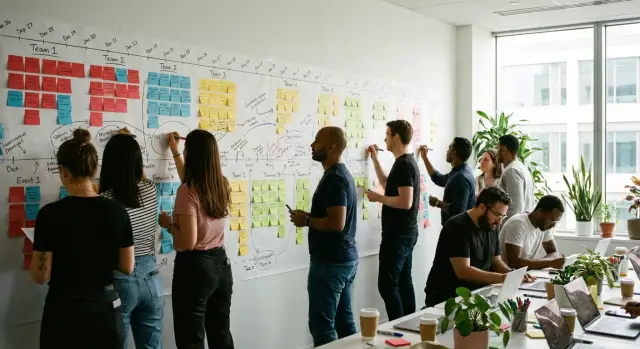
Why run Event Storming for requirements
Event Storming helps collect requirements when knowledge about the process is spread across people and “how it works” is hidden in chats, emails and the heads of key employees. Instead of a long document, you quickly get an overall picture: what actually happens, where delays occur, and why different teams interpret the same words differently.
Most often the method relieves three pains. First — scattered requirements: everyone remembers their piece, but no one sees the whole process. Second — terminology: “request”, “order”, “invoice” can mean different things to sales, accounting and IT. Third — hidden exceptions: “what if the customer changes the address”, “what if delivery is partial”, “what if there is no approval” usually surface only when you walk the chain of events step by step.
The method is especially useful when you need to align a process between several roles and quickly understand where automation will have a tangible effect. For example, when launching an internal service for handling requests: support describes steps “how it is done”, development thinks in terms of statuses, and managers need metrics. An event map helps everyone speak about the same thing instead of arguing over wording.
But it’s not a universal tool. If the task is small and clear, it’s faster to run short interviews and sketch a mockup. If the team hasn’t agreed on product goals yet or you need to test a user scenario with real people, prototyping and tests will be more useful.
Measure session success not by the number of sticky notes, but by results:
- there is a shared process timeline from start to finish, including frequent exceptions;
- a vocabulary of key terms is agreed (what each word precisely means);
- bottlenecks and questions to clarify after the workshop are visible;
- the team can move from the event map to a list of tasks without losing meaning.
If these points are met, it’s easier to identify teams, aggregates and turn the discussion into a real backlog.
Artifacts you should get from the session
The value of the session is not that you “talked”, but that the team is left with artifacts that let them continue working without retelling everything. They should be equally understandable to business and development.
Domain events are facts that have already happened, so they are written in the past tense: “Order placed”, “Invoice issued”, “Delivery confirmed”. This form disciplines discussion: you record the result of a change, not intentions or UI screens.
Commands differ from events because they initiate a change. This is the action someone triggers: a person, an external service or a scheduled process. A command usually reads like an imperative verb: “Place order”, “Check budget limit”, “Confirm shipment”. An event answers “what became true”, a command — “what must be done to make it happen”.
An aggregate (DDD) in simple terms is a boundary within which rules must be applied consistently. Inside an aggregate data changes together under the same rules, and other parts of the system should not bypass those rules directly. For example, in a procurement flow the aggregate can be an “Order”: it has a status, line items and allowed transitions (you can’t “Confirm shipment” if the order is not “Paid”).
After the workshop you should have a set of items that are easy to move into working documents and turn into a development plan:
- an event map (timeline) with key branches and variants;
- a list of commands tied to events, with explicit initiators (role or system);
- draft aggregates and their boundaries (where the rules are, where statuses live, where direct changes are forbidden);
- a separate list of contentious points: disagreements on terms, rules, responsibilities;
- hypotheses and open questions: what needs clarification from legal, security, accounting, users.
A simple quality sign: if a day after the session you can open the map and answer “which 5–10 things do we build first and why”, the artifacts are usable. If all you have are arrows and vague words without events, commands and rules, the session should be repeated.
Preparation: people, boundaries, materials
A strong session starts not with sticky notes but with choosing the right process. For requirements gathering it’s better to take one value stream you can walk from start to finish during the meeting. If you try to cover sales, warehouse, accounting and support at once, you’ll get a long wall and few agreements.
Define boundaries in advance: where the process starts (trigger, incoming request, event), where it ends (what counts as “success”), and what is definitely out of scope. The “write exceptions in advance” technique helps: 3–5 typical “what if…” scenarios. For example, if you’re examining “procurement and commissioning of servers for the organization”, warranty repairs or asset write-offs are better handled in a separate session.
Participants should reflect the actual work of the process, not the org chart. Usually 6–10 people are enough: process owner/product owner, operations representative, analyst, developer, QA. It’s important to have both decision-makers and those who do the daily work present.
Assign roles before the start so the meeting doesn’t drift: facilitator enforces rules and tempo, timekeeper watches timeboxes, scribe captures results, and the process owner decides on disputed interpretations.
Keep materials simple. Offline you need a wall, sticky notes and markers. Online any board that allows dragging cards and shows participants’ cursors will do. Usually 3–4 colors are enough (events, commands, questions, notes) and three naming rules:
- events — past tense (“Order confirmed”);
- commands — imperative (“Confirm order”);
- aggregates — nouns (“Order”, “Invoice”).
If boundaries, people and materials are ready, the session moves faster and the result becomes clear events, commands, aggregates and a task list for the team.
Step-by-step session format (1 day or 2×2 hours)
This format suits when you want to finish not just with “a map on the wall” but with clear next steps.
One-day option (about 3.5–5 hours of focused time)
Start with a short opening: why you are here and what counts as success today (for example: an agreed event map, a list of questions for the business, a draft backlog). Agree rules right away: events are written in the past tense, don’t debate wording longer than a couple of minutes, mark contentious items and move on.
Then proceed step by step, keeping tempo:
- Event timeline: participants place domain events in order, merge duplicates, align sequence.
- Pains and unknowns: mark questions, manual steps, places where things “often break”.
- Commands and actors: add who initiates key events and which command leads to them.
- Systems and integrations: mark where automation exists, where handoffs are manual, and which external systems participate.
To avoid drowning in details, follow the principle “breadth first, depth second”. Close the end-to-end chain first, then deep-dive into the most important 3–5 nodes.
A short example for a B2B supply process: “Supply request received” -> “Proposal sent” -> “Contract signed” -> “Shipment dispatched” -> “Equipment accepted” -> “Support registered”. At each step manual approvals, signing authorities and integrations (CRM, accounting, service desk) usually surface quickly.
Option: 2 sessions of 2 hours
If people are busy or the domain is complex, split the work into two evenings. The first meeting focuses mostly on events and problems. The second is about commands, integrations and consolidating results.
Between sessions appoint one person (often the analyst or facilitator) to tidy the map: rewrite events in a unified style, remove obvious duplicates, group questions into 5–10 themes and highlight 3–5 bottlenecks you will return to.
Keep the closing tight in any format. In 15–20 minutes capture: what is agreed, which questions remain open (and who owns them), and what the team will work on in the first wave. This saves weeks of post-workshop email.
How to move from events to commands and aggregates
When the event map is ready, you need to turn it from a narrative into a model the team can work with: commands and aggregates. Don’t try to design everything at once. Start from the meanings and rules that emerged on the wall.
From events to meaningful blocks and aggregate boundaries
Group events into small fragments that answer “What is this part of the process about and who is responsible?” Blocks usually form around one goal: place an order, approve it, ship, accept, close.
Then in each block look for aggregate boundaries. A practical technique: see which events consistently occur together because of shared rules or a shared entity. If events require the same checks and change the same piece of state, it’s a candidate for an aggregate.
Signs of a good aggregate:
- a single responsibility (not “everything about the customer” but “order”, “shipment”, “acceptance”);
- a cluster of rules kept together, not scattered across the system;
- minimal size: only what’s necessary to enforce rules and record changes;
- a clear owner of changes: who can modify state and under what conditions.
How to derive commands and actions from events
A command is an intention to do something that leads to an event (or a rejection if a rule is violated). For each event ask: “What had to be done for this to happen?” and “Who initiates it: a user, the system, an external counterparty?” This yields both user-level actions and API-level commands.
Keep commands in the form “verb + object + qualifier”: “Create order”, “Confirm order”, “Cancel order with reason”, “Register shipment”. If a command does not result in an event, it’s probably too technical or describes a read operation.
Quick quality checks for a command:
- there is a clear initiator (role or system);
- it’s clear which aggregate it changes;
- it’s clear which data is required as input;
- you can expect specific events as output.
Record invariants next to the aggregate
Write invariants near the aggregate in short phrases: “cannot”, “always”, “only if”. This turns the map into a set of rules that can later become tests.
Example from equipment procurement: events “Order created”, “Order approved”, “Shipment dispatched”, “Acceptance confirmed” often reveal two aggregates — “Order” and “Shipment”. Next to “Order” note: “cannot ship until approved”, “only if budget limit exists”, “always store cancellation reason”. Next to “Shipment”: “cannot confirm acceptance without serial numbers”, “only if shipment is registered”.
This yields the chain: event -> command -> aggregate + invariants. That is the bridge from the map to actionable tasks.
How to build a backlog from Event Storming results
The map becomes a backlog when you translate events into understandable work items: epics, stories and tasks the team can estimate and pick up for a sprint.
First, slice the map into logical chunks. Epics are convenient to build either by process areas (“order”, “payment”, “delivery”) or by key aggregates (“Order”, “Invoice”, “Shipment”). Choose one main approach and use the other as a cross-check to avoid losing important boundaries.
Then turn event chains into stories. A useful technique: take the user goal and check which events must occur for the goal to be achieved. Gaps or contentious spots also become backlog items as research tasks.
Working template:
- choose one end-to-end scenario (happy path);
- formulate 1–3 stories that start and finish that scenario;
- add tasks for integrations that unblock the next step;
- list risks and unknowns as spikes/research;
- repeat for exceptions (errors, cancellations, returns, partial deliveries).
Acceptance criteria are convenient to write as events because they are verifiable. Simple format: “when X happened, Y must appear”. For example: “When the event ‘Request approved’ occurs, ‘Request forwarded to procurement’ must appear and the system status changes to ‘In progress’.”
Prioritize along three axes: value, risk, unblocking. Value — what delivers results to the user. Risk — what can break expensively (rules, money, security, legal). Unblocking — integrations and infrastructure without which other tasks won’t move.
Example scenario: from event map to first tasks
Imagine a workshop about procurement and delivery of IT equipment for an institution: from need identification to acceptance and closing documents. This is a typical case when an organization buys PCs or servers, goes through approvals, receives the shipment and finalizes paperwork.
On the wall a chain of domain events appears: “Request created” -> “Budget approved” -> “Supplier selected” -> “Contract signed” -> “Equipment delivered” -> “Acceptance act completed”. Immediately mark branches: what happens if budget is not approved, if delivery is partial, if the acceptance act is unsigned due to defects.
Then turn key events into commands: “Create request” leads to “Request created”, “Approve budget” leads to “Budget approved”, “Select supplier” to “Supplier selected”, “Register delivery” to “Equipment delivered”. Also clarify initiators and where rules are checked (limits, authority, deadlines).
Next, identify aggregate candidates to understand where state lives and which rules must be enforced together. In this scenario aggregates usually include: “Request” (line items, amounts, statuses), “Contract” (details, conditions, versions), “Shipment” (invoices, batches, serial numbers), “Acceptance” (inspection results, remarks, act).
After that you can assemble the first backlog. Don’t try to detail everything: the goal of the first release is to enable an end-to-end flow for the most common cases.
- Request: creation, line item list, statuses “Draft/Sent”
- Budget: limit rules, approval route, recording confirmation
- Supplier selection: criteria, selection log, decision recording
- Contract: card, signing (date/number), status transitions
- Delivery and acceptance: register delivery, partial deliveries, acceptance act accepted/rejected
To reach 10–15 tasks, split each point into 2–3 concrete stories: roles and permissions, fields and validations, statuses and transitions, notifications, simple reports, plus 1–2 integrations (catalog of items and counterparties). This gives the team a clear first release, and the map remains a reference point for future iterations.
Facilitation: how to keep tempo and agree on terms
Facilitation rests on a simple principle: record domain events first, then discuss details. If the group leaves the timeline too early to focus on schemes, statuses, fields and integrations, the map stops growing and participants quickly fatigue.
At the start it’s useful to state the “room rules” and remind participants of them during the session. This is especially important in companies with overlaps across sales, production, logistics and support: each department has its own terms and view of the same process.
A set of rules that usually works:
- write events in the past tense: “Order confirmed”, “Server dispatched”, “Support request registered”;
- argue only about what affects an event or its order; send everything else to “questions”;
- one card — one idea; if it doesn’t fit, it’s two cards;
- if stuck, start a timer and either decide or move the item to the parking lot.
Terminology conflicts are inevitable. The facilitator’s role is not to “decide for everyone” but to give the group a safe way to agree. A working technique: record alternatives nearby (“client” vs “customer”, “shipment” vs “handover to delivery”) and ask: “Which word do we use on this map today to move forward?” A temporary definition preserves tempo and the “official” term goes into the question list.
To involve quiet participants, pause and ask directed questions without pressure: “What happens next in your part of the process?” or “How do you know this event occurred?” “One-round-30-seconds” works well, where everyone adds one event or clarification. For dominant participants keep a frame: capture the thought on a card and return the turn to the group.
Timeboxes save you from endless discussions. A practical conflict routine:
- 5 minutes: formulate two definition or order options;
- 3 minutes: name consequences of each option;
- 2 minutes: choose a working option for today and assign an owner for the question.
If tempo drops, a short aloud summary helps: “We already have the chain up to shipment, we still need the acceptance and warranty complaint block.” This refocuses attention and gives a feeling of progress.
Common mistakes and traps
The most common problem is losing the goal. You may be collecting requirements but after an hour end up discussing everything: exceptions, integrations, reports, future releases. Keep the frame: which process, which product slice and what time horizon you are exploring.
Typical mistakes and quick fixes:
- Too wide scope. If sales, accounting, logistics and support are on the wall at once, stop and pick one value stream. Move others to separate workshops.
- Mixing events and actions. “Customer paid and we shipped” are two facts. Event = what already happened; command = what is done to make the event happen.
- Diving into DB and UI design. “There will be a status field in the table” and “let’s draw the form” are premature. First agree on events, rules and boundaries.
- No process owner or decision rights. If two departments argue and no one decides, the group stalls. You need someone who can make a decision or at least record a variant and assign follow-up.
- Open questions and next steps aren’t recorded. Without a question list and owners you will take home pretty sticky notes and zero actions.
A trick to avoid wording confusion: check “can this be written in the past tense?” If not — it’s not an event. “Check the client” is a command, “Client checked” is an event.
Another trap is drawing an ideal process and forgetting rollbacks, errors and manual workarounds. After the main flow do a short pass for exceptions: what breaks most often, where delays occur, what is handled manually.
To avoid getting lost in debates, create a separate area for questions and decisions. Simple rule: any dispute longer than 3–5 minutes becomes a question card with an owner and a deadline.
Short checklist and next steps
After the session it’s helpful to quickly validate results while memories are fresh:
- Event map: events in past tense, no gaps in the chain, actors are clear (who triggers and who receives results).
- Commands: each has an initiator and a verifiable result (what should change).
- Aggregates: each has responsibilities and rules (invariants), and logic is not duplicated in different places.
- Backlog: tasks are grouped by value, priorities and dependencies are set, and a follow-up meeting for clarifications is scheduled.
- Risks and unknowns: contentious spots are marked and there is a plan to close them (data, decision, prototype).
If you find holes in the map, don’t try to close them in a chat. It’s faster to run a short clarifying meeting (45–60 minutes) with the right people and finish the specific piece of the process.
Next steps (what to do this week)
- Record the glossary: 10–20 key terms with simple definitions.
- Agree the first slice: which 1–2 scenarios go to work first and why (value, risk, dependencies).
- Make a quick prototype: a screen flow or rough interface to validate shared understanding of the outcome.
- Draft an integrations and infrastructure plan: which systems we touch, which data is needed, who is responsible for access.
- Set a checkpoint: date to review the map, update the backlog and resolve open questions.
If the project depends on infrastructure (servers, endpoints, data centers), integrations and 24/7 operational requirements, it’s useful to involve a systems integrator early. In Kazakhstan this part is often covered by GSE.kz: from selecting and supplying equipment to integration and ongoing support, so workshop results reach a working solution faster.
Frequently asked questions
When should you use Event Storming for requirements?
Event Storming helps bring a process together into one clear flow when knowledge is spread across departments. The team sees the real steps, delays, exceptions, and terminology gaps before development begins.
When is Event Storming unnecessary?
For a small, well-understood task, brief interviews and a mockup are usually enough. Event Storming is better suited to processes with multiple roles, approvals, integrations, or frequent exceptions.
How should you prepare for a session?
First, choose one process with a clear start and outcome. Define the boundaries, 3-5 typical exceptions, participants, and expected meeting outcome in advance.
Who should you invite to the workshop?
Usually, 6-10 people are enough: the process owner, the person who does the work, an analyst, a developer, and QA. You need a facilitator, and the process owner should resolve disputed interpretations.
How long does Event Storming take?
For a straightforward process, set aside 3.5-5 hours of focused time. If the domain is complex or participants have limited availability, hold two two-hour meetings: first cover events and problems, then commands, integrations, and decisions.
How does an event differ from a command?
Domain events describe facts that have already happened and are written in the past tense: “Order confirmed.” Commands express intent and trigger a change: “Confirm order.”
What is an aggregate in simple terms?
An aggregate groups data and rules that must change together. For example, an “Order” stores line items and status, and its rules can prevent shipping until approval is granted.
How do you turn an event map into a backlog?
First, arrange the events in sequence, then add commands, initiators, rules, and integrations. Next, group the map into epics and scenarios, and turn disputed areas into separate discovery tasks.
How should you document process rules?
Capture each rule right next to the aggregate in a short form: “Cannot ship until the order is approved.” You can then easily turn these rules into acceptance criteria and tests.
What mistakes most often derail a session?
Do not try to cover every department at once, and do not get sidetracked by screens or database structure. If a dispute lasts more than a few minutes, log it as a separate question with an owner and a deadline for resolution.
