7 min read
ESD protection during equipment unpacking: a warehouse minimum
ESD protection during equipment unpacking reduces hidden damage. The minimal set of tools and procedures for the warehouse and initial setup.
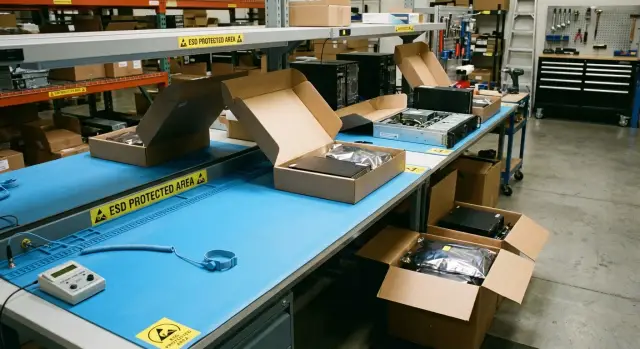
Why ESD matters during unpacking and initial setup
ESD (electrostatic discharge) is a short "spark" of electricity that occurs when two objects with different charges touch. People often don’t feel or hear it. For electronics, however, that is often enough to damage a chip or weaken it so the problem appears later.
The main trouble with ESD is that failures look inexplicable. The device powers on and passes initial checks, but after a week strange issues start: occasional freezes, random reboots, a disappearing network interface, memory errors, or intermittent USB or disk problems. Logs show nothing obvious, swapping cables doesn’t help, and the fault can’t be reproduced on demand.
Risk is higher during unpacking and initial setup because three things coincide: lots of movement, many hand contacts and often dry air. The most vulnerable moments are the ones that seem harmless: pulling a device from a bag, setting it on a table, moving it to a rack, peeling protective film, inserting a memory stick or drive, connecting cables, pressing the power button.
Especially vulnerable are moments when you hold a board, RAM module, SSD or touch connectors. A discharge can pass through your fingers into sensitive traces while everything looks fine from the outside.
The usual pattern of ESD damage in the field is instability without an obvious cause: rare memory, disk or network errors; freezes and reboots with no pattern; a device that passes tests but fails under load or after some time.
Minimal ESD protection during unpacking and initial setup is not a formality. It reduces the number of “floating” failures that later become expensive to find, explain, and document.
Where on the warehouse floor static usually appears
Static problems happen where there is friction, dry air and lots of plastic. So ESD protection matters not only in service centers but also on ordinary warehouse floors where devices are first taken out of boxes and checked.
The first factor is climate. In the heating season the air is often too dry and charge accumulates faster. If a worker in a synthetic jacket or fleece moves boxes, cuts film or walks between racks, they easily build up charge and then discharge when touching a case, connector or board.
The second source is packaging. Bubble wrap, ordinary polyethylene bags, plastic trays and stretch film not only hold charge but generate it with each movement. A risky moment is when a bag is yanked off a device and someone immediately touches ports or internal components.
The third risk is metal nearby. Metal racks, carts and tables don’t create static but often become convenient discharge points. A common scenario: a person rolls a cart, touches a rack, then picks up a memory module or board — and the discharge happens at the worst time.
Mixing zones is another problem. If unpacking happens next to areas with lots of paper, boxes and ordinary packaging, static “noise” grows. Typical risky points: the table where film is cut and bags are removed; aisles by metal racks and carts; the receiving area where boxes are quickly moved; the area with plastic bins; and the spot used for initial power and peripheral connections.
The closer unpacking is to these points, the higher the chance of unexplained failures that appear later at the user.
Minimal kit: what to buy to make it work
To make ESD protection on the warehouse actually reduce failures, you don’t need a maximal kit — you need a few items that deliver consistent results every day. The list below covers most common risks during unpacking and initial preparation of PCs, servers and components.
1) A wrist strap that really works
Choose an antistatic wrist strap with a proper cord and a reliable clip. Cheap options usually fail at the contact: the clip wiggles, the cord breaks, and the user assumes they are protected.
To avoid guessing, have a wrist strap tester for a quick check before each shift. It takes seconds and shows whether the contact and cord are intact.
2) A mat and a clear grounding point
An antistatic mat on the table solves two problems: where to place a device after unpacking and where to safely put boards, memory and drives. The mat needs a permanent, labeled grounding point — either a common building earth (properly connected) or a local verified point. It’s important that the wrist strap and the mat go to the same grounding point; otherwise protection often becomes meaningless.
3) Storage and transport packaging
Boards, memory modules, SSDs and small electronic parts need ESD bags or simple ESD containers. The most common problem looks like this: a module is removed “for a minute”, placed on a box or pallet, then reinstalled — and a week later strange failures appear. ESD packaging prevents those situations.
4) Simple labeling so people don’t forget
Make the ESD zone visible: a sticker on the table and on containers where components are stored. Labels don’t protect by themselves but help enforce discipline: a worker doesn’t have to remember where to open a bag and where not to.
How to quickly set up an unpacking ESD spot
Choose one specific spot in the warehouse and make it the only correct place for unpacking and initial checks. A table away from the main flow of boxes, carts and film-cutting is best. The less packaging debris nearby, the lower the chance that pieces of film and foam will end up near boards and connectors.
The key is a clear grounding point. Not “somewhere there is earth” but one visible connection: a terminal or outlet with a verified earth contact to which the mat and wrist strap are connected. Make the spot obvious: a sign, a sticker, a wall label. The worker shouldn’t have to think where to plug in.
Minimum on the table
Keep only what’s necessary: a mat with a cord to ground; a wrist strap (preferably with a coiled cord) and a dedicated ground connection; a wrist strap tester or a clear check procedure before a shift. Nearby, but not on the table, have a container for removed packaging.
Remove packaging and put it into the separate receptacle immediately. Cardboard, bags, film and foam should not return to the mat even for a minute. A good rule: nothing that was outside the box goes on the work surface.
One‑page rules
Post a short reminder: what is not allowed on the table (drinks, ordinary plastic bags, stray boxes), what is mandatory (wrist strap connected to the correct point), and where removed components should go (only ESD bag or mat). Then the ESD spot stops being a special check and becomes the normal work routine.
Step‑by‑step procedure: from box to first power‑on
A consistent order of actions matters more than expensive accessories. Most unexplained failures start with a couple of random touches and the wrong surface.
Treat the box as cargo first, not as precious hardware. Inspect corners, seals, signs of moisture and punctures. If in doubt, document before opening (photo, receiving note). This saves time when the device is already unpacked.
Next, prepare the ESD spot and yourself. Put on the wrist strap and check it with the tester (if available). Connect only to a known grounding point — the mat’s point or a dedicated terminal, not “whatever is convenient.” If there’s no wrist strap, at least reduce risk: don’t rub the packaging on clothing, avoid working on carpet, and frequently touch a grounded metal part of the workbench.
A convenient five‑step routine:
- Prepare a clean ESD surface (mat or ESD bag) and remove paper and film from the table.
- Open the box without jerking; remove the top inserts first.
- Remove the device by holding the case or frame. Avoid touching connectors, contacts and board edges.
- Place the device and components only on the ESD mat or into an antistatic bag. Not on cardboard, stretch film or “just on a shelf.”
- Before first power‑on, check that nothing is loose inside, modules are seated correctly, and cables aren’t pinched.
If you need to set parts aside (for example, memory sticks during initial PC setup), use antistatic bags and label them. That both reduces ESD risk and prevents mixing up parts.
At first power‑on, touch only what’s needed: the power button, chassis handles, and fasteners. Anything resembling a connector or board edge should be left alone unless required.
Initial setup without unnecessary risk to the electronics
For initial setup keep only what you need on the table: the device, power, one monitor, one keyboard and one network cable. Fewer items and cables mean fewer accidental touches and tugs.
Place the device on the antistatic mat and carry it with both hands without sliding it across the table. Don’t use the outside of an antistatic bag as a pad — its outer surface doesn’t always protect as expected.
A simple order for connecting peripherals helps: plug power into a power strip first (not into the device), confirm the workspace is grounded, then connect monitor and keyboard, then network; finally plug power into the device. Power on while holding the chassis, not exposed metal.
At startup you don’t need to dig inside. Check for basic signs: no burning smell or odd noises, normal indicators, BIOS/UEFI sees the drive and memory. For batches of PCs and servers a short repeatable test is useful: boot into a preinstalled environment, verify network, do one restart.
To make troubleshooting easier later, log minimal information: serial number and model, date and time of unpacking, the operator, result of the basic check and notes.
Storage and transport: keep protection beyond the rack
ESD protection often fails at a simple moment: someone takes a device off the mat, carries it a few meters and places it on a regular table or cardboard. From there nobody understands why strange failures appear.
For boards, memory and drives the rule is simple: outside the ESD spot they must stay in an ESD bag or closed container. Ordinary clear bags, stretch film and foam are not protection. If a part is removed but will be installed later, return it immediately to antistatic packaging and label where it came from.
Inside the warehouse, transport equipment on a cart with a tray or box so everything stays stable and covered. Risk rises when a worker presses a board against clothing or moves parts without packaging.
Small items matter too. Store covers, screws, trays and adapters in a separate container (preferably with a lid) and keep it near the device. Loose screws rolling on the table or kept in a pocket create both confusion and extra handling.
Separate zones: a “clean” ESD area for open electronics and a normal zone for cardboard, film and documents. Mark the boundary with tape and a simple rule: cardboard and film do not cross onto the ESD table.
Monitor humidity. When air is dry (roughly below 35–40%), static builds faster. Simple measures include a humidifier, closed doors, less synthetic clothing near the work area and regular damp mopping of floors.
People and discipline: simple rules people will follow
ESD protection on a warehouse usually fails not for lack of a mat but because of habits. This can be fixed with habits too — but very simple ones.
A 15‑minute hands‑on briefing works better than slides. Show one idea: a discharge may leave no immediate trace but will cause a strange failure later. Then teach three actions everyone must know: put on the wrist strap, check it on the tester, put devices only on antistatic surfaces.
Clothing and shoes cause more trouble than expected. Synthetics, fleece, down jackets and some sweaters easily pick up charge, especially in winter. Ideally wear cotton and ESD‑safe shoes. At minimum, remove outer synthetic layers before unpacking and don’t work with electronics on carpets or soft coverings.
Gloves are useful when handling boards, SSDs and memory or working in a dusty area. Thin ESD gloves (or finger cots) that don’t slip and allow feeling small connectors are suitable. Ordinary household gloves or unmarked rubber gloves often make things worse.
Make roles as clear as possible: one person ensures the ESD spot is ready (mat, grounding, cleanliness), a second performs unpacking and setup (wrist strap and checks), a third manages consumables and packaging, and the shift lead makes a short note in the log.
In shift work a quick handover helps: the new shift checks the tester and grounding in a couple of minutes, and receiving always goes through the one designated ESD spot rather than wherever is convenient.
Common mistakes that turn ESD protection into a formality
Floating failures after commissioning often start with small moments during unpacking. ESD protection works only as a system: the person, the workspace and the checks. If one element drops out, the rest becomes decoration.
Most frequent mistakes:
- The wrist strap is worn but not connected, or it’s clipped “where convenient” (for example to a painted part of the rack or a random screw).
- The mat exists but is covered with film, paper, ordinary bags or boxes — and the working surface ceases to be antistatic.
- Unpacking is done on cardboard on the floor or on an ungrounded metal rack.
- Boards and modules are placed “for a minute” on a box, on bubble wrap, or held in the hand while searching for a screwdriver.
- Tests with a tester are rare or perfunctory: “looks OK” instead of a clear check of cord and contact.
In practice it looks like this: a server is unpacked on a laminated table with no grounding, a plastic chair nearby and a pile of film and foam. In dry weather charges build up easily. Damage can be hidden: the component works but becomes sensitive to temperature, vibration or load.
To keep ESD procedures from being cosmetic, build simple habits: connect the wrist strap only to the correct point, keep the mat clean (no film or paper) and check straps and cords on a schedule.
A short checklist for the warehouse: 2 minutes before work
This short ritual catches situations where ESD protection exists “on paper” but static still affects boards.
Before start: check the wrist strap, cord and clip; make sure the strap contacts the skin. The surface should be dry and clean.
Before unpacking: remove film, foam, ordinary bags and extra items from the table. Put packaging in a separate area so it won’t return to the mat.
During work: keep boards, memory, SSDs and cables in ESD bags until needed. If a part won’t be installed within a minute, it must be in a bag, not on the table. Handle components by the edges and avoid touching contacts.
Before moving: any removed or spare module must be packed back into an ESD bag, closed and labeled (what it is, where it was taken from, date and operator).
End of shift: replenish consumables and note issues immediately (broken strap, missing grounding, damaged mat). These small problems later become inexplicable failures.
A real example: how a warehouse reduced "unexplainable" failures
A batch of equipment arrived for workplace rollout and a small server rack: desktop PCs, all‑in‑ones and several rack servers. At first everything seemed fine, but then strange reports appeared: some PCs intermittently didn’t detect memory, one all‑in‑one didn’t always power on on the first try, and a couple of servers showed rare startup errors. In service this was described as “cannot reproduce.”
Inspection found a simple source: unpacking was done on a regular laminated table with no grounding, a plastic chair nearby, and film and foam piled in one heap. In dry weather charges accumulated easily. Damage could be hidden: the component worked but became sensitive to temperature, vibration or load.
The fix wasn’t a full standard overhaul but a minimal, quick change: one ESD mat on the table with a cord to ground; one antistatic wrist strap with checks before each shift; a short unpack‑inspect‑install‑power routine; and a single log (date, serial number, who unpacked, wrist strap check and startup result).
After a month the effect was visible: fewer returns after installation, fewer floating failures at startup, and disputed cases were resolved faster because the log showed who and how the initial work was done.
Next steps: introduce and keep the process without overload
Start small but make it consistent. Choose one permanent unpacking spot, appoint a shift responsible person and buy the minimum: an antistatic wrist strap, an antistatic mat and a simple wrist strap tester. When the spot is fixed and clear, people stop improvising between racks.
To avoid ESD becoming a one‑time fix, record the process in a very short format: one page of rules at the workstation and a simple trace in the log. Usually three things work without heavy bureaucracy: a short instruction (what to do before touching hardware and where to put removed components), a work log (date, model, serial number, who worked, was the strap checked), and a weekly check of mats, cords and consumables.
A stricter ESD regime isn’t needed for everyone or immediately. It becomes mandatory if volumes grow, repeat failures appear, you do repairs, or you often work with open boards, memory modules, drives and server internals.
If you regularly purchase and commission PCs and servers, agree unpacking and startup requirements with your integrator in advance. For example, GSE.kz as a manufacturer and system integrator in Kazakhstan can help align warehouse procedures with commissioning, especially for organizations where downtime is expensive.
Frequently asked questions
What is ESD and why do we need protection?
ESD — an electrostatic discharge — can pass into electronics when touching a case, connector or a circuit board. People often don’t feel it, but it can damage a chip immediately or weaken it so failures appear later.
Why is ESD risk highest during unpacking and initial setup?
Unpacking involves many movements and hand contacts, lots of plastic from packaging, and often dry air. This makes charge build up faster and raises the chance of an accidental discharge into ports, memory modules or SSDs.
How can I tell if failures look like ESD damage rather than a configuration issue?
A typical sign is “floating” problems without a clear cause: rare freezes, random reboots, memory errors, a disappearing network interface or strange USB/disk faults. Often the device passes initial checks, and instability appears days or weeks later.
Where in the warehouse does static and discharges usually occur?
Most often it’s dry air in the heating season, friction from clothing and packaging, and bubble wrap, stretch film and ordinary plastic bags. Metal racks, carts and tables don’t generate static but often become convenient discharge points when a charged person touches them and then handles electronics.
What is the minimal set of ESD equipment to buy for a warehouse?
The realistic minimum that actually reduces risk is an antistatic wrist strap with a reliable cord, an antistatic mat on the work table and a clearly verified grounding point. If possible, add a simple wrist strap tester so you don’t have to guess whether the contact works.
How to quickly set up an ESD station if time is limited?
Choose one permanent spot, clear away cardboard and film, place an antistatic mat and connect it to one verified grounding point. It’s important that both the wrist strap and the mat go to the same grounding point, otherwise the protection often becomes symbolic.
Which actions during unpacking are the most dangerous for ESD?
Handle the device by the case or frame and avoid touching connectors, contacts and board edges. Any removed memory modules, SSDs or boards must be placed only on the mat or into an antistatic bag. Keep packaging separately so it doesn’t get back onto the work surface.
Can I put equipment on an antistatic bag instead of a mat?
An antistatic bag is good for storage and transport, but using it as an external “pad” is a bad habit: the outside surface doesn’t always protect the way people expect. It’s safer to place the device on an antistatic mat or keep components inside ESD packaging when not installed.
What errors most often make ESD protection merely symbolic?
Common mistakes: the wrist strap is worn but not connected or is clipped to a painted rack or a random screw; the mat is covered with film, paper or ordinary bags so it loses effectiveness; boards are laid “for a minute” on boxes or bubble wrap; testers are used rarely or only for show. These gaps turn procedures into decoration.
How should I store and move modules and parts so protection doesn’t stop at the rack?
Keep components outside the ESD area only in antistatic bags or closed containers, and label where they came from. Transport equipment on a cart with a tray or closed box rather than carrying it uncovered. Small items like screws and brackets should be stored in a closed container near the device to avoid loose parts on the table and unnecessary handling.
How to implement and maintain the process without overload?
Start small and make it consistent: one permanent unpacking spot, a shift responsible person, and the basics bought — a wrist strap, a mat and a simple tester. If you regularly bring many PCs and servers into service, agree unpacking and startup rules with your integrator; GSE.kz as a manufacturer and system integrator in Kazakhstan can help align warehouse procedures with commissioning, especially where downtime is costly.
