8 min read
ESB and on-prem iPaaS: how to choose WSO2, MuleSoft, Camel
ESB and on-prem iPaaS: how to compare WSO2, MuleSoft, Camel and Kafka Connect, choose an architecture and avoid an unmaintainable tangle.
What is the real problem with integrations
Integrations rarely fail because the "wrong" product was chosen. More often the process breaks: systems multiply, requirements change faster, and responsibility is spread across teams.
Usually the pain is the same: each system uses different protocols and conventions, data fields have different names, and changes are agreed "by arrangement" in chats. The result is an integration that becomes a set of exceptions only the authors understand.
A typical scenario: at first you need to quickly connect ERP to CRM and a couple of internal services. Then an event bus appears, a data mart, integration with a government portal, new branches, new contractors. Each time they "tweak a bit", and after a year you get an unmaintainable tangle: rules hidden in dozens of routes and scripts, no tests, and updating any system triggers a chain of unpredictable edits.
On-prem ESB and iPaaS platforms usually cover four things: connecting different protocols (HTTP, SOAP, MQ, files, JDBC, etc.), data transformation and routing, reliability controls (retries, queues, deduplication), and observability (logs, metrics, tracing, alerts).
But a tool won't save you if there are no clear boundaries and operating rules. Successful integrations don't look like "everything is connected", they look like "changes happen predictably." For example, when a bank changes the request format in CRM, the team knows exactly which flows are affected, where to update the contract, how to run tests, who is on duty and how to roll back.
If you keep one criterion for selection, let it be this: in a year a new team should be able to safely make changes and maintain integrations without heroics and night fixes.
ESB, iPaaS and on-prem: the differences in plain language
People often confuse three things in integration talks: the approach (how you build), the deployment (where it runs) and the level of responsibility (tool or platform). Because of that it's easy to buy "the wrong thing": take a powerful component and turn it into a homemade platform without support or rules.
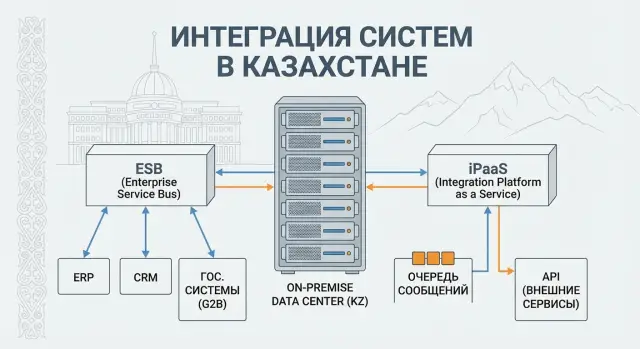
ESB (Enterprise Service Bus) is usually understood as a "central hub" through which integrations pass. It accepts requests, routes them, changes data formats, adds validations, and sometimes manages a chain of steps (for example: create a client, then a contract, then send a notification). This is convenient when there are many integrations, formats differ, and order of actions matters.
iPaaS (Integration Platform as a Service) is closer to a managed platform inside an organization: not only the assembly of flows matters, but also lifecycle control. That typically means an integration catalog, templates, roles and access, centralized monitoring, unified rules for versioning and releases. The emphasis shifts from "we made an integration" to "we manage integrations as a service for teams."
On-prem means all of this runs inside your infrastructure. Reasons are usually pragmatic: data and regulatory requirements, isolation from the public Internet, access to internal systems that are not exposed externally. In a bank or government agency you often can't move data to the cloud, and integrations must live near internal boundaries.
The line between a "tool" and a "platform" appears when, beyond developing flows, you need shared standards and templates, monitoring and alerts with clear business expectations, access control and audit, release and rollback processes like ordinary software, and an operations team with clear ownership.
If this sounds like a minimum requirement, choose a platform approach rather than a set of fragmented scripts. Look not only at "how to connect" but at "how to live with it in a year."
Typical architectures: from point-to-point to event streams
The main debate in integrations is usually not about brands, but about operating mode.
Synchronous calls (APIs) are convenient when the user needs a response right away: check application status, create a record, show a balance. Asynchronous queues and events are better when reliably delivering a fact matters more than instant response: "invoice paid", "shipment dispatched", "patient registered." If you mix them up you'll get either slow chains of APIs or delays where users expect immediate responses.
There are several common patterns, each with its limits. Point-to-point integrations let you start quickly, but as systems grow they become a web of dependencies. Hub-and-spoke is easier to reason about, but the central hub can become a bottleneck. An ESB centralizes routing, transformations and control, which helps manage complexity, but risks becoming that same tangle. An event-driven model reduces coupling and scales more easily, but requires discipline around event quality and observability of chains.
The question "where is a single brain needed" is straightforward. If you have many rules (validation, orchestration, routing, retries, deduplication, audit), you need a platform where these are transparent and maintainable. If the task is to move data from system A to system B on a schedule or trigger, a connector and minimal logic are often enough.
To avoid a single point of failure, avoid long synchronous chains through a central node. Break flows into steps, place queues between critical sections and plan for fault tolerance in advance: multiple instances of integration components, independent storage for queues or journals, and a clear playbook for degradation (for example temporary switch to asynchronous processing).
Brief on WSO2, MuleSoft, Apache Camel and Kafka Connect
When choosing ESB or iPaaS on-prem, it's more useful to understand the type of work you need: API management, process orchestration, data transfer or event streaming — rather than who is more popular.
WSO2 is often used as a set of products rather than a single component. A typical scenario: API Management for publishing and controlling APIs, an integration layer (ESB or Micro Integrator) for routing and transformations, plus IAM for SSO and roles. WSO2's strength is a unified ecosystem, but it requires careful operation: versioning, security and observability must be set up "properly", otherwise exceptions and manual workarounds start to accumulate.
MuleSoft performs well as an iPaaS: many connectors, templates and convenient practices for teams that need to assemble integrations quickly. The flip side of convenience is licensing and the need to agree rules in advance: how environments are deployed, how access is granted, how the API catalog is managed and who owns the lifecycle of flows. Without governance the platform becomes an expensive set of disconnected flows.
Apache Camel is a library approach. It fits when you have a strong engineering culture and are ready to live in code: tests, CI/CD, reviews, logging standards. Camel gives freedom, but provides little "guardrails", so without discipline teams can easily spread into many bespoke integrations understood only by their authors.
Kafka Connect makes sense when the focus is on data and event streams: capture changes from systems, publish them to topics and deliver onward. It is not a replacement for business process orchestration: Connect handles transport and connectors, while complex logic is usually pushed to separate services.
A practical selection frame:
- Managed APIs, policies, rate limits and a developer portal — often WSO2 or MuleSoft.
- Complex orchestration and many ready-made connectors — often MuleSoft.
- Maximum flexibility and "everything in code" — Camel.
- Reliable event delivery and moving data between systems — Kafka Connect.
An important question at the start: who will maintain this in 12–18 months. In strict on-prem organizations (government, finance) they usually fix a platform owner, budget for updates, development rules and a schedule for key personnel replacement.
Gather requirements so the choice is fair
Most selection mistakes start not with WSO2 or MuleSoft, but with vague requirements. The result is buying a "universal platform" and a year later getting a collection of exceptions nobody wants to support.
Start by inventorying integrations: list systems, owners, criticality, change frequency. Assign an owner on each side. If a service has no owner, changes arrive suddenly and the integration quickly becomes fragile.
Then classify flows. Reference data syncs usually tolerate delays and batching. Transactions require predictable response times and clear error handling. File-based transfers depend on format, schedule and duplicate control. Events require ordering, idempotency and clear retry semantics.
Don't skip non-functional requirements. SLA, RPO/RTO, encryption, audit, logging, log retention and regulations (government, healthcare, finance) often influence the choice more than connector lists.
For on-prem, list constraints up front: network segmentation, where agents and connectors can be placed, allowed ports, update windows and what hardware is actually available. Often it's easier to change a network route than to build a complex workaround.
A mini-check that reduces special cases: can formats and reference data be standardized before starting; where are synchronous calls required and where are queues or events preferable; which errors are critical and who resolves them at night; what must survive a restart (messages, statuses, correlation); which systems will change most in the coming year.
When requirements are documented this way, the choice becomes a comparison of concrete scenarios and risks rather than a debate.
Selection criteria people forget
When comparing ESB and on-prem iPaaS people often focus on connectors and development ease. A year later they find that the "platform" is just a collection of settings and scripts nobody dares change.
Operations and 24/7 support
The first question is not about development but life after launch. You need monitoring, tracing across systems, clear alerts and easy replay of messages. If incident analysis requires manually collecting logs from servers, the team will burn out fast. Check how the platform shows stuck integrations, whether the error cause is visible and whether you can replay processing without "manual hacks."
Making changes without breaking things
Integrations fail more often because of changes: new API versions, field format edits, system migrations. You need rules for contract versioning, contract tests and a clear migration path. A good sign is being able to run two interface versions in parallel and migrate consumers gradually.
What to verify before choosing (and what demos often skip): how secrets and certificates are stored and rotated and whether access is audited; how networking is handled (segments, proxies, mTLS, closed contours); how retries, idempotency and dead-letter queues are configured without "magic"; how the platform handles load spikes and node failures; and the total cost of ownership — licenses, training, development, maintenance and hiring.
Example: if a hospital changes the patient identifier format and there are no API versions and contract tests, the change can stop exchanges with registration, lab and billing simultaneously. With versioning, a dead-letter queue and replay, you first collect "unknown" messages separately, update consumers, and then process the accumulated data.
A final test is simple: "Can a small on-call team safely maintain this by clear runbooks?" If the answer is unclear, you'll end up with an unmaintainable tangle in a year.
Step-by-step plan: how to choose properly
Don't start with marketing comparison tables. Take a few real integrations that will definitely be active in the first year and see how the chosen approach behaves in your conditions.
Pick 2–3 flows of different nature. For example: an API between the frontend and CRM, events for order statuses and a nightly file exchange with accounting. This quickly shows where you need an orchestrator, where connectors are enough, and where reliable delivery matters most.
Next, fix data rules. Assign domain owners and answer: who is the authoritative source for customer, contract, employee and reference data. Without this you'll get endless reconciliations and manual fixes even with a good platform.
Validate the approach in steps. Define contracts (format, frequency, acceptable delay, message size). Do a PoC in your real network and security conditions: segments, proxies, closed ports, InfoSec requirements, certificates. Then plan operations: which dashboards are needed, which alerts are mandatory, who is on call and under what procedures.
Don't postpone standards. Route templates, a unified error format, correlation IDs, logging levels and retry rules solve more than the choice of product.
Roll out in waves rather than "everything at once." For example, start with 5–7 integrations in one domain (say procurement), then move to the next. This gives the team time to adopt practices and prevents the platform from turning into a tangle.
Common mistakes that create an unmaintainable tangle
The most frequent cause of failure is trying to build a "universal bus for everything" without boundaries. They dump 1C exchanges, mobile APIs, data warehouse uploads, queues, files and schedules into one layer. A year later no one knows what is platform responsibility and what is business logic, and any change becomes risky.
The second mistake is mixing business-process orchestration and data transport. When the integration layer decides "who should call whom and in what order," it quickly accumulates conditions, manual exceptions and timers. In on-prem environments this is obvious when one product is pushed to replace BPM, API management and message broker at once.
A third problem appears later: there are no shared error rules. Without standards for timeouts, retries, deduplication and idempotency you get duplicate orders, stuck statuses and night incidents that are hard to reproduce.
Another path to a tangle is overcomplicating transformations. Once calculations, validations and branching live in platform mappings and scripts, the team stops knowing where the real product logic lives.
Red flags to notice early:
- no owner for each integration flow and its SLA
- errors handled "ad hoc" in each project
- integrations maintained by 1–2 people without runbooks
- no catalog of interfaces and message schemas
- changes deployed manually and without tests
Real example: in an organization combining procurement, warehouse and accounting one specialist built dozens of flows and transformations "inside the bus." When they left, new staff faced a set of mysterious routes and couldn't safely add a single field.
Quick checklist before purchase and launch
Before buying licenses or starting development do a short check: it shows whether you'll get a manageable system or a collection of scripts.
Take 2–3 real flows (for example portal -> CRM -> accounting or HIS -> lab -> archive) and run them through five questions. Do this with the business owner, the integration team and operations together.
Check:
- Operability: is there an integration catalog, is an owner assigned to each flow, are responsibilities for data, SLA and changes clear?
- Observability: can you find where a request is stuck within 5 minutes without manual log searching across servers?
- Versioning: are there rules for API versions and support windows for old contracts?
- Failures and retries: where are queues stored, how are retries configured, is there a clear way to handle "poison" messages?
- Updates: can key components be updated without stopping critical services, and who will actually do that outside business hours?
Small test: ask an engineer who didn't participate in the project to find a specific transaction by ID and explain its path. If it takes more than 10–15 minutes, the platform hinders rather than helps.
Example: choosing a stack for a real organization
Imagine a regional hospital in Kazakhstan. There is an HIS, accounting, warehouse, lab, a patient portal and a separate system for government reporting. For security reasons everything runs strictly on-prem, and changes go through approvals.
Flows are varied. Appointment requests and lab orders run via APIs almost in real time. Reference data (doctors, rooms, services, prices) sync once a day. Financial operations and drug write-offs are convenient to handle as events: who did what and when, so mistakes are traceable and data isn't lost.
Option A: ESB + separate message queue
If lots of orchestration is required (one request triggers a chain of 5–7 steps) an ESB is convenient: routing, transformations, rules. A queue is added to avoid losing data on failure and to offload systems. The downside: you will need to build monitoring, deployment, versioning and developer discipline separately, otherwise integrations become manual configurations.
Option B: on-prem iPaaS for lifecycle management
This path is chosen when unified processes are important: who changed an integration, how it is tested, how it's deployed and how it's rolled back. In a hospital or bank with many approvals and strong audit needs this control reduces the cost of errors.
Option C: Kafka Connect for data + Camel for custom routes
If the main volume is data movement and transaction events, Kafka Connect covers common connectors and delivery. Apache Camel can be used for rare custom routes.
To understand what your operations can handle, answer practical questions: how many people will realistically support integrations 24/7; can they investigate incidents without developers; do you need strict releases and audit; how many integrations will there be in a year (10 or 100); is there time to maintain custom connectors and updates.
If the team is small but control requirements are high, a managed platform approach usually wins. If the team is strong and flexibility matters, Connect + Camel may produce less of a tangle and clearer responsibilities.
Next steps: how to start and not abandon halfway
Start with a clear goal: what integration layer you need and where its boundaries are. Define which systems must communicate only through this layer (for example ERP and CRM) and where direct calls are acceptable (for example inside a single application). This reduces the risk of turning the platform into "everything for everyone."
Next, run a short pilot for 6–8 weeks that tests team viability and the approach, not just pretty diagrams. Choose 2–3 integrations of different types (request-response, batch load, event), set success criteria (development speed, stability, observability, how much manual support is needed), agree rules (API versions, retries, timeouts, error handling) and perform an "operational drill": deploy, upgrade, rollback.
At the same time prepare basic infrastructure requirements, otherwise the pilot will "run on a laptop" and fail in production. You need environment roles (dev, test, prod), network and access (segmentation, proxies, secrets), redundancy and recovery (backups, RTO/RPO), monitoring and logs (metrics, alerts, tracing), and update policies (windows, responsibilities, compatibility checks).
To avoid relying on "heroes", include training and handover to support: short guides, integration templates, incident checklists, on-call roles. If the project requires on-prem deployment and 24/7 operation, it's reasonable to involve a systems integrator to take on infrastructure and support responsibilities. For example, GSE.kz handles system integration, server supply and round-the-clock technical support with a service network across Kazakhstan.
Frequently asked questions
Why do integrations fail more often even when the "right" product was chosen?
Most often it's not the product that fails, but the process: there are no owners for flows, data fields are named inconsistently, changes are agreed in chats, and there are no tests or procedures. As a result, an integration becomes a set of exceptions understood only by its authors, and any update to a system triggers a chain of unpredictable fixes.
What is the simple difference between ESB and iPaaS?
An ESB typically acts as a central hub that accepts requests, routes them, transforms data and can manage sequences of steps. iPaaS focuses more on lifecycle management of integrations: standards, catalog, roles and access, centralized monitoring, versioning and releases.
Why run ESB/iPaaS on-prem rather than in the cloud?
On-prem is chosen when data cannot leave the organization, you need control over network boundaries and access to internal systems that are not exposed to the Internet. This is common in government, finance and healthcare where audit and regulatory requirements and predictable maintenance windows matter.
When are APIs preferable, and when are queues and events better?
Synchronous APIs are for when the user needs an immediate response, for example creating a request or checking a status on screen. Queues and events are better when reliable delivery matters more than immediacy: "payment received", "order shipped", "patient registered". Problems start when long synchronous chains are built where resilience is required, or when queues introduce delays in user-facing scenarios.
How not to turn the integration platform into an unmaintainable "combine"?
Keep transport, routing, transformations and reliability control in the integration layer, but keep business logic in services where it can be tested and versioned. Enforce boundaries: which systems must go through the platform, a unified error format, timeout and retry rules, and forbid unique scripts without review and tests.
Which selection criteria are usually forgotten when comparing ESB and iPaaS?
Check not only connectors but how the platform will live after launch: monitoring, tracing, clear alerts, replay capabilities, log storage and rotation. Also verify secret and certificate management, access audit, resilience to node failure and load spikes, and the real cost of ownership — licensing, training, development, support and hiring.
How to practically choose between WSO2, MuleSoft, Apache Camel and Kafka Connect?
WSO2 is often used as an ecosystem: API management, an integration layer and access management, but it needs careful operation and discipline around versions and observability. MuleSoft works well as an iPaaS with many connectors and templates, but governance and ownership must be agreed early. Apache Camel gives freedom with "everything in code" and fits teams with strong engineering practices, but without standards it fragments. Kafka Connect is suitable when the focus is on data movement and event streams; complex orchestration is typically handled elsewhere.
How to run a pilot (PoC) correctly so the choice is honest?
Run a short PoC on 2–3 real flows of different types and execute it in your network and security conditions, not on a demo stand. A successful PoC is not only "it worked", but also that the team can quickly find a transaction by ID, understand the error cause, replay a message and safely deploy a change with rollback.
How to version APIs and change formats without breaking anything?
Start with simple rules: who owns the contract, how versions are released, how long an old version is supported and how compatibility is tested. A common practice is to support two versions in parallel during migration and to have contract tests so format changes don't break consumers unexpectedly.
Who should maintain the integration platform after a year and what if you lack an in-house team?
For on-prem with 24/7 operation, decide in advance who is responsible for the platform, updates and on-call, and where service support will come from. Such projects often bring in a systems integrator to take responsibility for infrastructure, deployment, monitoring and support; for example, GSE.kz can provide system integration, server supply and round-the-clock technical support with a service network across Kazakhstan.
