8 min read
Synchronizing ERP and CMMS directories: what to unify and who’s the master
ERP and CMMS directory synchronization: which data should be unified, where to assign the source of truth, and how to avoid code and unit-of-measure conflicts.
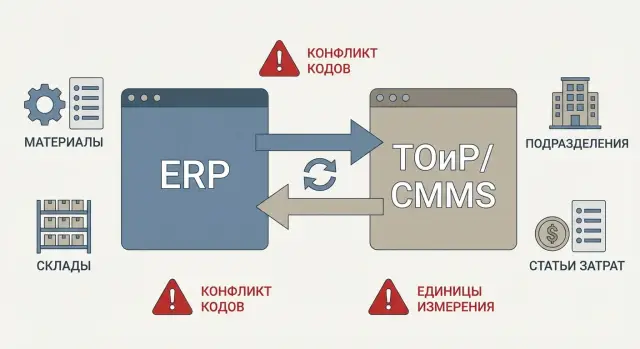
Why synchronize directories and what usually hurts
When ERP and CMMS use different directories, problems start not at the integration layer but in day-to-day operations. The planner creates a repair request, procurement buys, the warehouse issues, accounting closes costs — and at every step the same question appears: is this the same material or two different ones?
Synchronization ensures that a request, an order, a warehouse issue and a cost posting all refer to the same object. “Almost identical” records (similar name, different code, slightly different unit of measure) cause real errors: incorrect stock, wrong price, costs posted to the wrong place. The worst outcome is equipment downtime because the “needed part exists” but under a different code.
What processes usually break
Three chains typically suffer: maintenance planning, spare parts supply, and cost accounting. A common example: in CMMS a spare part is registered as “Bearing 6205”, while in ERP it’s “6205-2RS”, and the systems don’t link them. As a result, procurement buys extra parts while what’s in the warehouse isn’t picked up by the request.
Conflicts usually look like this: different coding rules, different units of measure, duplicates, mismatched statuses, and discrepancies by warehouses and departments that hide the storage location and responsibility.
Who is involved and what decisions are needed
This isn’t only an IT task. Maintenance, procurement, warehouse, accounting and ERP administrators are usually involved. To reduce conflicts you need data rules and roles, not just another exchange: who creates records, who checks, who approves, and where the "source of truth" for each directory is. Technical integration enforces those rules but doesn’t replace them.
Which directories should be unified in ERP and CMMS
To make repairs, procurement and consumption align without manual fixes, the basic directories in ERP and CMMS must speak the same language. This is where gaps most often appear: in one system an item “exists,” while in the other it is “almost the same” but with a different code or unit of measure.
Typically you should unify first:
- Materials and nomenclature: unified names, codes, base unit of measure, manufacturer, criticality (if used), and attributes like "alternate/replacement."
- Warehouses and storage locations: warehouse structure, zones and addressing (slots), statuses, and links to legal entity and site.
- Departments and responsibility centers: codes, names, hierarchy and effective dates (important during reorganizations).
- Cost items and accounts: mapping to budgets, work types and repair types.
- Counterparties (as needed): spare parts suppliers, service contractors, service centers.
Materials are almost always first. CMMS thinks in spare parts and assemblies, while ERP focuses on procurement, warehouse accounting and finance. If ERP has an item as “Oil filter 10"” while CMMS shows “Filter, oil, 10 inches,” users quickly create duplicates simply because they “couldn’t find” the right one.
Warehouses are similar: CMMS often accepts the level “Warehouse - area,” while ERP requires exact storage locations. If not aligned, CMMS will post consumption “from warehouse,” while ERP shows the stock in a specific slot and formally unavailable.
Departments and cost items are equally important: they link a repair request to a responsible owner, budget and correct accounting entry. If codes differ or a department is “closed” in one system, the repair may be posted to the wrong cost center and discrepancies will appear in reports.
Where to designate the "source of truth" (master) for each directory
The "source of truth" (master) is the system where a record is created and changed according to rules, and other systems receive updates from it. Each directory should have a single master. Otherwise synchronization quickly becomes a dispute over whose data is “more correct.”
The usual logic is simple: where a directory is used as the basis for accounting and reporting, that system becomes the master. Therefore ERP often becomes master for financial and warehouse entities, and CMMS for technical objects and maintenance structure.
A practical split often looks like this:
- ERP as master: materials and procurement nomenclature, warehouses and storage locations (if they participate in accounting), cost items, departments and responsibility centers.
- CMMS as master: equipment, functional locations, technical passports, criticality, plans and work types, service routes.
Two-way synchronization is acceptable but only in limited cases. For example, you can exchange certain attributes (description, responsible person, flags) while strictly forbidding changes to key fields (code, base unit of measure, type). Statuses can work similarly if there is a clear scenario: who changes a status and when it is considered frozen. Otherwise you get loops where ERP updates CMMS and CMMS immediately reverts it.
Document roles in writing. Assign a data owner for each directory and a quality owner (often a key user). The owner approves rules and dispute resolution; the quality owner monitors duplicates, units of measure and required fields.
Example: if a new warehouse is created “at the request of a shop” directly in CMMS but not set up in ERP as an accounting object, part requests will point to a non-existent storage location. The rule “warehouses are created only in ERP, CMMS receives a copy” prevents this problem before exchange starts.
Identifier model and minimum fields for exchange
For stable synchronization, first agree on how systems will identify the same record across databases. Many problems start because the “key” in one system behaves independently.
A good identifier model is usually two-tier: a human-friendly code (useful for everyday work) and an immutable technical identifier (useful for exchange). The technical identifier (GUID or ExternalID) should be permanent: if you rename a material or change its code, the connection between systems must not break.
Unified keys and aliases
A practical approach is to keep one main identifier for integration and store historical codes as aliases.
- GUID/ExternalID: the main exchange key, never changes.
- Code: the working code, may change by rules.
- Alias/OldCode: list of previous codes for search and history.
- SourceSystem: where the record came from.
- LastUpdateAt: when the data was last updated.
Aliases save typical situations: ERP has already recoded the material while CMMS still has requests and balances under the old code. Instead of two materials you get one record with history.
Minimum fields and versions
Don’t publish a record to exchange until the minimum is filled. For materials this usually includes: name, base unit of measure, group or category, status (active/archived), and rounding or multiplicity rules if they affect issuance.
For structural directories (departments, warehouses, storage locations) versioning is important: store an effective start date and, if needed, an end date. Then renames and reorganizations don’t break reports and work order history, and systems understand which structure was “correct” on a document date.
Typical conflicts: codes, UoMs, duplicates and statuses
Integration failures are often about the meaning of data rather than message transport. Requests turn into manual searches, and stocks and consumption stop matching.
Different codes for the same item
The same item may live under different codes: in ERP as “MAT-000123” and in CMMS as “6204-BEAR”. A mechanic picks what they see in CMMS, while the warehouse ships by ERP. Later someone reports “not in stock,” although the item is present under a different identifier.
Different units of measure and conversions
Classic case: ERP tracks cable in meters, while CMMS tracks it in coils or pieces. If the conversion factor isn’t fixed and identical, consumption postings will go through but actual quantity and cost become distorted. This shows up especially in cost items and maintenance reports.
Duplicates and different granularity
Duplicates often appear innocuous: “Bearing 6204” exists twice, but one record has manufacturer and seal type while the other does not. Or ERP stores a general code “bearing 6204” while CMMS needs separate items for 6204-2RS and 6204-ZZ. Then warehouse and CMMS speak at different levels of precision.
Statuses and lifecycle
Statuses are another error source. An item may be active in ERP but archived in CMMS, so it can’t be selected in a request. Or a department is closed in ERP but CMMS still assigns jobs to it.
In practice, conflicts usually reveal themselves as identical names with different codes and stocks, inability to create requests or post consumption due to an item being “inactive,” odd amounts from UoM conversion, rising manual fixes and temporary replacements.
How to prevent conflicts before data exchange
Most problems arise before integration: items are created inconsistently, with different rules and without checks. The main focus should be on data preparation and input discipline.
Start with name normalization. Provide a simple template: type + key parameters + manufacturer (if relevant) + model. Fix word order and mandatory attributes (e.g., voltage, size, material, accuracy class). This reduces the chance that the same bearing appears as “Bearing 6205” and “6205, bearing”.
Units of measure should be aligned to one directory and one logic. Define a base UoM for each group (e.g., cable in meters, oil in liters, fasteners in pieces). Conversion isn’t always allowed: “pcs” to “kg” without a norm for the specific item causes constant mismatches. If conversion is needed, store the factor as an item attribute and pre-agree who confirms it.
Mapping tables are useful as a temporary measure when historical data already diverged. But they must have a lifetime: once directories are cleaned and input rules fixed, mapping should be phased out, otherwise it becomes a persistent source of errors.
To prevent new items from creating chaos, define the item creation process: who creates the card (role and system), who approves (inventory control, maintenance, procurement), which fields are mandatory, and the rule “don’t create a new item without searching for similar ones.” For urgent requests describe a separate scenario so temporary cards don’t become permanent.
Finally, add automatic checks. Before export, enable validation of required fields and uniqueness (code, name, base UoM), duplicate search by similar words and parameters, and status checks (is the item active, allowed for purchase?).
A simple example: in CMMS a filter is registered in “pcs,” while ERP has it as “set” with a different code. If you check base UoM and require a name template before exchange, such mismatches are usually caught at approval rather than at consumption time.
Step-by-step plan to implement synchronization
1) Preparation and rules
Collect which directories are really used in ERP and CMMS and where they currently “live.” Often materials are maintained in two places, warehouses in one, and cost items in a spreadsheet. Pick 2–3 directories that cause the most problems in requests, procurement and consumption and start with them.
Next, designate the source of truth for each directory and fix edit rights. For example: materials and UoMs only in ERP, CMMS can only select them; functional locations and equipment — the opposite. Define what to do with changes: who approves and how quickly they appear in the other system.
2) Cleanup, exchange and pilot
Before enabling exchange, align the data. Typical minimum steps: remove duplicates, harmonize units of measure and conversion factors, agree statuses, unify key attribute formats, set up mappings for old codes if immediate renaming isn’t possible.
Then configure the exchange: online or batch on a schedule. Many companies prefer to start in batch mode (for example, hourly or nightly) with a clear report: what was created, changed and rejected.
Run a pilot in one department or for one work type — for example, the maintenance shop at a site where CMMS requests consume ERP stocks. After the pilot, finalize error-handling procedures and only then scale to other departments and directories.
Common mistakes and traps during ERP–CMMS integration
What usually breaks the exchange
The most common problem is starting synchronization as a purely technical task. You set up the exchange, confirm messages flow, and stop there. Without data owners and simple rules, the exchange quickly becomes a "fire brigade" that manually fixes errors.
The second trap is allowing edits in both systems “because it’s convenient.” Eventually the item is changed in ERP while its card is edited in CMMS, producing conflicts: different codes, different names, different accounting flags.
Ignoring units of measure and packaging is particularly dangerous. Typical case: ERP tracks bearing 6205 in pieces while CMMS recorded it in boxes of 10. CMMS posts “1” while ERP interprets it as “1 piece” instead of “1 box.” The error may go unnoticed for a week until stock discrepancies arise.
Another issue is archival records and history. CMMS needs past repairs, replaced parts and closed orders. If you delete or rename old records during cleanup without rules, you lose history links: a report shows a repair but can’t find the part or warehouse.
Finally, treating manual import as a permanent practice is risky. Excel seems fast, but over time templates proliferate, file versions diverge and quality control is lost. Errors multiply faster than you can fix them.
How to mitigate risks
To avoid repeated traps, lock in constraints and validations beforehand:
- Appoint directory owners and a single source for each data type; make the second system a consumer.
- Prohibit free edits to key fields (code, UoM, base packaging) in the consumer system.
- Introduce mapping for codes and UoMs plus automatic validation during exchange.
- Define archive rules: what can be closed, what cannot be deleted, and how statuses are transferred.
- Add quality control: reports on duplicates, suspicious changes and stock deviations.
This is usually cheaper than constantly fixing integration issues manually, especially when warehouses and consumption are involved and small errors quickly translate into money and downtime.
Short checklist before starting the exchange
Before the first run, check not only whether the exchange “works” technically but whether directories are ready. Most failures start from small things: different codes, different units of measure, duplicates and unclear responsibility for fixes.
- Identifiers: materials, warehouses, departments and cost items should have one external ID (or a clear mapping table). Codes in different systems may vary, but the external ID must match.
- Units of measure: is there a single UoM directory and conversion rules (e.g., piece, pack, meter, kilogram)? Ensure conversion factors aren’t kept in manual notes.
- Data owners: who creates new nomenclature, who registers a new warehouse, who opens a cost item, and which fields are mandatory. Fix a simple approval route.
- Pre-quality check: duplicate search (by name, article, barcode), validation of mandatory attributes (UoM, group, status, VAT/tax if needed), and prohibition on publishing drafts.
- Conflict resolution: who decides, how fast, and which system has priority (for example, ERP wins for finance and cost items, CMMS wins for technical attributes). Without response SLAs the exchange becomes an error queue.
Mini-check example: if CMMS counts a spare in “packs of 10” while ERP counts it in “pieces,” without a unified conversion rule you will have over- or under-consumption. Catch such conflicts before publishing, not after the first repair request.
If the above points are covered, start with a limited scope (1–2 warehouses and one material group) and then expand.
Real-world example: one spare part, two records in systems
A pump on site needs a shaft seal urgently. In CMMS it’s registered as “SEAL 35x52x7”, code CMMS-014587, UoM "pcs". In ERP the same item arrived from a supplier as “Seal 35-52-7”, code ERP-009911, but is accounted as a "set" where 1 set = 2 pcs.
The error often starts unnoticed. The planner creates a request in CMMS for 1 pc. The request goes to ERP for reservation, but ERP does not find the code and either substitutes a similar item or a new nomenclature is created manually "to avoid stopping the repair." The warehouse reserves 1 set (2 pieces), issues it, and at consumption closing a discrepancy appears: CMMS recorded 1 pc consumed, ERP removed 2 pcs. At inventory this becomes an unexplained shortage or surplus and accounting demands adjustments.
The solution is almost always the same but better done proactively. First appoint the master for nomenclature (often ERP if procurement and warehouse are there, but CMMS can be master if it maintains technical descriptions and alternates). Then create a mapping for the pair: a common identifier or a table "ERP code — CMMS code." Next align units: pick a base UoM (e.g., "pcs") and define conversion for "set." Finally retire duplicates: keep one card active and mark the other as archived and forbidden for use in new requests.
To prevent recurrence, use the rule: new spare parts are created in one system only — following a request and a field template (name, base UoM, manufacturer, criticality, status, synonyms). Add duplicate checks by article, dimensions, manufacturer and key words, and brief training for those who create cards: how to verify an item already exists.
After launch, track practical metrics rather than pretty reports:
- how many manual mapping and UoM corrections were made per week;
- how many returns and consumption corrections occurred for CMMS jobs;
- how many discrepancies remain between ERP stocks/issues and CMMS consumption for top spare parts.
If these numbers fall, synchronization truly works, not just exchanges files.
Next steps: lock rules and build support
If the exchange is already set up, the main work is just beginning: without rules and owners it quickly becomes manual fixes and disputes about "what is correct."
Start with a short inventory. List directories actually used in processes (materials, warehouses, cost items, departments) and assign a data owner for each. The owner is responsible not for integration but for meaning: what qualifies as a duplicate, when a record can be closed, who may change a unit of measure.
Agree on quality criteria: percent of required fields filled, acceptable number of duplicates, response time for exchange errors. These metrics are easy to convert into regular reports.
Artifacts to prepare
Prepare simple documents that prevent most conflicts:
- Coding rules (how material, warehouse, department codes are formed; allowed prefixes and length).
- Permission matrix (who creates, who approves, who closes records).
- Mapping tables (code, UoM, status, reason-for-consumption mappings).
- Minimal field set for exchange and the source of truth for each field.
Support after launch
Define how incidents are captured and handled: an integration error queue, daily monitoring of “stuck” messages, and a clear escalation path. Good practice is to record technical cause (invalid format) separately from business cause (ERP closed a warehouse while CMMS still uses it).
If there are many directories, multiple ERP/CMMS contours or plans for MDM, it’s often cost-effective to bring in an integrator to design the data model and exchange rather than fix architecture piecemeal.
If you need help with integration and infrastructure, GSE.kz as a system integrator can design the exchange and data quality controls, and select and deploy servers for integration components and subsequent 24/7 operational support.
Frequently asked questions
Which directories should be synchronized first between ERP and CMMS?
Start with materials (nomenclature), then warehouses and storage locations, and after that departments and cost items. These directories most often break requests, reservation, warehouse issue and cost posting, so you’ll see improvements quickly.
How to correctly designate the "source of truth" (master) for a directory?
Pick one system where records are created and changed according to rules, and let the other system consume updates. Usually ERP is the master for nomenclature, warehouses and financial attributes, while CMMS is the master for equipment, functional locations and work plans.
Is two-way synchronization needed, or is one-way enough?
It can be done, but only selectively and with a ban on changing key fields in the consumer system. A practical compromise is to exchange descriptive attributes and statuses bidirectionally under a clear scenario, while codes, base unit of measure and accounting type are changed only in the master.
What to do if ERP and CMMS use different units of measure for the same spare part?
Agree on one base unit of measure for the item and store an agreed conversion factor where the rules allow. If conversion isn’t unambiguous, it’s better to harmonize the accounting logic rather than rely on exchange workarounds, because inconsistencies will show up in stocks and costs.
How to avoid the same material having different codes in systems?
Agree on an immutable external identifier for exchange, like a GUID or ExternalID, and don’t tie integration to the human-readable code. Renaming or recoding won’t break the link, and old codes can be stored as aliases for search and history.
How to reduce duplicates in nomenclature before starting integration?
Start with a name template and mandatory attributes so identical items look the same instead of being entered inconsistently. Add a duplicate-check before creating a new item and a clear approval flow so temporary emergency cards don’t remain permanent.
What minimum fields should be passed during directory synchronization?
For materials the minimum usually includes: name, base unit of measure, group or category and status, because without these the exchange creates “half-positions” that can’t be used properly. For warehouses and departments versioning and effective dates are critical so documents reference the correct structure.
How to work correctly with archived and closed records in directories?
Do not delete records that participate in repair, purchase or consumption history, otherwise reports and documents lose links. The right approach is to set an archive status and forbid use in new requests while keeping records readable for history and analytics.
Where to start implementation so operations are not stopped?
Start with a pilot in one department or one process contour where the full chain “request — warehouse — consumption” runs. Use a batch exchange mode at first with reports of created, changed and rejected records so you can calmly resolve issues without blocking operations.
How to tell that synchronization really works?
Look at the daily pain points: how many manual mapping and UoM correction actions are done, how many returns and consumption corrections appear, and how aligned CMMS consumption is with ERP issues and stocks for top spare parts. If those numbers fall, the synchronization is actually improving processes rather than only moving files between systems.
