8 min read
Returning Equipment to Service Without Losses: A Unified Process
Returning equipment to service: how to pack, photograph, prepare a defect report and track logistics timelines without losses or disputes.
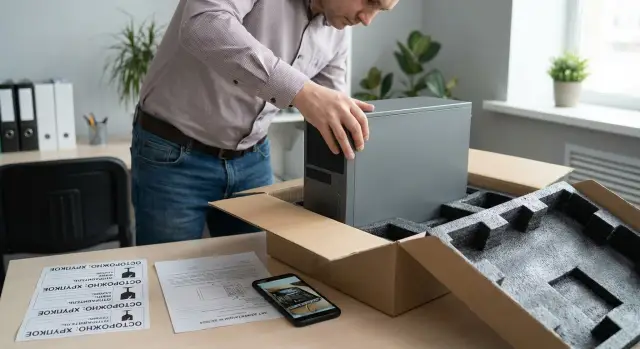
Where the returns process usually breaks down
Losses in returns almost never stem from the failure itself, but from the chaos around it. Once a device leaves a branch and the service expects it “about tomorrow” and “probably complete,” a chain of extra calls, missed deadlines and disputes begins — and those cost money.
Most problems appear at the handover of responsibility. At the branch the equipment is still “on us,” in logistics it’s “not our problem,” and at the service it’s “received, but not as expected.” If there’s no clear rule about who is responsible at what point for the condition, kit and documents, any deviation quickly turns into a conflict.
Common disputes repeat: scratches and chips (were they there before shipping?), incomplete kit (charger, cables, mounts, storage devices) and the classic “wrong serial number.” It’s particularly painful when devices were swapped within the branch and this was only noted in a chat.
“Verbal agreements” and messages in messengers are risky because they are hard to find, verify and confirm. In the end there’s no single version of truth: what exactly was sent, in what condition, to whom and when.
The process usually breaks in several places: no unique identifier and no serial-number verification before packing; kit and appearance not recorded before handing to logistics; packing done “however it fits,” without corner protection and void-filling; defect reports not issued or filled too vaguely; delivery times not monitored and delays not escalated.
“Without losses” in returns means four things at once: the device arrived in the same condition, with a complete kit, within the expected timeframe, and with a transparent action history. For example, if a branch sent an all-in-one PC and the service finds a chip on the bezel, the dispute is solved in minutes when there is a pre-shipment photo, a note in the defect report and a clear point where the risk moved forward.
A unified process: principles and roles without unnecessary bureaucracy
For returns to go without losses, all branches need the same clear process. Not “everyone their own way,” but identical steps, identical statuses and the same templates. Then any participant can understand in a minute what’s been done, what’s in transit, and what must not be sent.
The basis of a simple scheme is to separate responsibility and not mix tasks. When one person "packed, signed, shipped and received," errors have no owner.
Roles: who does what
Assign responsibility by area:
- Branch: identify the device, check the kit, take photos, pack, prepare documents.
- Warehouse/responsible custodian: confirm write-off from the operating location and approve shipment.
- Logistics/courier: accept by consignment note, check labeling, respect delivery times and transport conditions.
- Service: record receipt, compare condition against photos and the defect report, start diagnostics.
This separation is especially helpful when returns come from different cities and are received at a single center.
What to always record
Agree on a minimum set of data that must exist before shipment starts:
- model and serial number;
- who ships and who receives (name, phone);
- kit (power supply, cables, accessories);
- defect description “how it appears”;
- photos of device and packaging.
Also set rules for “stop without approval.” For example: signs of opened chassis, heavy impacts and cracks, liquid traces, missing serial number, critical damage to packaging. In such cases the branch first gets confirmation from the service or responsible person and only then arranges shipment. This reduces disputes and helps decide faster what to do next: repair, inspection, or replacement.
Preparing for shipment: identification and kit check
The most costly mistakes start before packing. If a “just a tower without cables” arrives at the service but a different serial number was expected on the paperwork, a dispute is almost inevitable. So before initiating the return, do a short on-site check — by the person who actually holds the device.
First, confirm that this exact unit is leaving. Compare the serial number on the badge with the record in your system, check inventory numbers, stickers, seals and any branch markings. If a sticker is rubbed or the badge partially torn, record that immediately as a fact, not as “someone removed it.”
Next, check the kit. It matters not “as usual” but “as right now,” because it’s hardest to find a missing power supply or mount later.
Minimum visual checklist:
- the device (exact model, serial and inventory numbers, seal condition);
- power (adapter, cable, adapters if used);
- peripherals and accessories (keyboard, mouse, external modules, stands, mounts);
- storage and access elements (SSD/HDD, smart cards, tokens, SIMs if present);
- paperwork and labeling (warranty cards, consignment notes, internal card).
Write the defect in plain words: how it manifests and when. For example: “after power on works 2 minutes then shuts down,” “does not detect network, port indicator is off.” Do not add hypotheses about causes.
One more mandatory point — data. Note whether the device contains working data and whether it needs protection (remove the drive, encryption, account lock). For office PCs, all-in-ones in schools or clinics, decide in advance who is responsible for wiping data and who confirms it was done.
Photo documentation: what and how to shoot to avoid disputes
Photos are needed to make it clear what was sent, in what condition, with which kit and what the reported problem is. Then there won’t be arguments about scratches, missing cables or “it was like that.”
Shoot against a neutral background in good light, avoid a flash that washes out wear. Keep the camera level and don’t crop the frame. It’s important that seals and the casing condition are readable: corners, edges, ports, places near mounts.
Minimum set of shots:
- overall view of the device front and back;
- badge or sticker with serial number (in focus, no glare);
- close-up of the defect (crack, chip, moisture traces, bent port);
- seals and screws close-up;
- kit in one frame (power supply, cables, mounts, docking station).
After shooting, label photos so they can be matched to the ticket without extra calls: date, branch, serial number, ticket number. It’s convenient when these details appear in the file name and in the ticket’s first comment, and the photos are stored as one package.
If the defect is intermittent (for example, reboots under heat or network drops), add a short 10–20 second video. In the video state the conditions: what’s running, how long it runs, which cable is attached, how the error appears. Repeat that one sentence in the description: “after 15 minutes under load an artifact appears on the screen.”
Example: a branch ships an all-in-one. Overall photos, serial photo, seal photo and a video of screen flicker at a certain brightness allow the service to immediately confirm the initial condition and start diagnostics faster.
Packing, step by step: so it won’t be damaged in transit
Damage in transit almost always happens for two reasons: the device moves inside the box or an impact hits a vulnerable part (corner, screen, port). The goal is simple: nothing should move inside and the outer box should withstand handling.
Basic packing scheme
Choose a box by size. Ideally there’s about 3–5 cm of clearance around the device for cushioning. It’s bad when the gap is large and stuffed with random material. The device must be fixed inside and must not shift when shaken.
Order of actions:
- disconnect power, remove removable storage (if any) and close lids, trays and ports;
- protect vulnerable parts: corners, screen, buttons and ports with soft padding;
- secure the device inside: cushioning material around the perimeter, top and bottom, without voids;
- pack accessories (cables, power supplies, mounts) separately so they don’t hit the casing;
- seal the box in a controlled way: at least two tape lines along seams, plus a control strip/seal with signature and date so opening is visible.
Before final sealing do a test: gently shake the box. If something rattles or movement is felt, add more fixation.
Specifics for different device types
Different devices have different weak points.
- All-in-ones: protect the screen with a hard insert and soft padding. Secure the stand or leg so it doesn’t press on the casing.
- Desktop towers: pad the corners, panels and the rear I/O area.
- Laptops: protect the lid and hinges, avoid pressure on the screen.
- Server modules: secure handles, rails and protruding elements separately.
Example: a branch ships an all-in-one with cables in the same box. During transit the power supply bangs against the case and leaves chips. This is easily avoided by placing accessories in a separate bag or small box, fixing it to the side and cushioning around it.
Defect report and accompanying documents without extra words
If documents are done “by eye,” the dispute starts immediately: what exactly failed, in what condition it was sent, who confirmed it. For returns, a simple set of papers is enough, but they must be unambiguous and tied to one ticket.
Minimal document set:
- defect report (what doesn’t work and how it manifests);
- inventory of kit (what was placed in the box and its condition);
- consignment note or transfer document for logistics (who handed to whom and when).
How to write the defect so they understand you
The phrase “does not turn on” as the only description almost always leads to back-and-forth. Better to describe observable symptoms and context, without guesses about causes. A working formula: symptom + frequency + when noticed + conditions.
Example: “PC powers on, fans spin, no image. Occurs every startup. Started on 15.01 after scheduled shutdown. Tried another monitor and cable — no change.” This gives the service a clear picture and reduces the risk they reply “defect not confirmed.”
Inventory list: one table instead of long texts
The inventory prevents losing power supplies, keys, mounts, drives, covers. The format can be very simple:
| Item | Qty | Condition | Note |
|---|---|---|---|
| Desktop tower | 1 | scuffed | serial number recorded |
| Power supply | 1 | intact | cable included |
To prevent the return living under different “names,” use a single ticket number. It should appear in the defect report, the inventory, the consignment note and on the box label.
Signatories: from the branch — the responsible custodian and the staff handing to logistics; from the service — the receiving engineer or storekeeper. A copy remains at the branch (scan/photo in the ticket folder), originals travel with the shipment, and the service attaches a scan to the repair record.
Handover to logistics: labeling and transport rules
At the handover to logistics disputes often arise: “wrong box,” “wrong address,” “arrived damaged,” “unclear when it was handed over.” Two things help here: clear labeling and a short check before the courier leaves.
Labeling: make the box unambiguous
Labeling should answer three questions: where to take it, who is the on-site contact and what the shipment is related to.
- service (or receiving warehouse) address, city, postal code;
- recipient and sender contacts: name, phone;
- ticket/incident/work-order number and a short note: “to service,” “warranty,” “diagnostics”;
- handling marks: “Fragile,” “This Side Up,” “Do Not Tilt” (and if needed “Do Not Open Until Receipt”).
Put labels on two sides of the box and cover old stickers or barcodes so logistics won’t confuse the routing.
Transport rules: what matters for equipment
For most office PCs and monitors dry handling and normal care are enough. But some cases need stricter conditions: servers, drives, sensitive boards, equipment recently stored in the cold.
Temperature and moisture. If it’s freezing outside, after delivery the device should “rest” indoors before powering on. Packaging must protect against condensation and wet snow.
Static. For boards, SSDs, RAM and other modules use anti-static bags. If shipping a full tower the risk is lower, but for individual modules this is mandatory.
Handover to courier: a 60-second check
Before the courier leaves, verify facts, not a sense that “everything is fine”: box integrity, seals/tape without breaks, label readability. Make sure accompanying documents (or their number) match the ticket number.
A good example: the branch ships an all-in-one. The box clearly shows the ticket number, contacts and a “This Side Up” label. The courier sees intact sealing and there’s less chance the box will be placed on its side or taken to the wrong place.
Recording the handover: close the question of “when and in what condition it was given”
Take one photo of the sealed box showing the label and integrity. A second photo can capture the consignment note or a phone screen with time/date (if company rules allow).
This leaves simple evidence of what was handed over, in what condition and when. It greatly reduces losses and speeds up dispute resolution, especially when shipments come from multiple branches simultaneously.
Timeline control: tracking, statuses and escalations
Deadlines slip not because of one big problem but because of a couple of “small” pauses: kit not assembled, forgot to hand to the courier, acceptance not confirmed. To make the process predictable, control a few measurable stages rather than everything at once.
Usually five points are enough: collection at the branch (packing and documents), actual dispatch, delivery to service, acceptance at service, start of diagnostics. If these stages are time-stamped, disputes end quickly.
Simple status log
One log for all shipments works best (a table or form) where it’s clear who updates the record and when. Update rules are simple: branch — on preparation and handover to logistics; logistics — on tracking and delivery confirmation; service — on acceptance and diagnostics start.
Make these fields mandatory:
- inventory or serial number;
- branch, contact and phone;
- date-time “ready for shipment” and “handed to logistics”;
- tracking number and carrier;
- status and date-time of last update;
- responsible person and next step.
Reminders and escalation
Set control points in advance. For example, if “ready for shipment” hangs for more than 24 hours — send a reminder to the responsible person. If there’s no movement on the track 48 hours after handover — escalate to the branch manager or logistics coordinator.
Record delays without conflict: only facts (date, status, track), who holds the ball, what we’ll do next and a hard deadline for the next update. Example: “12.01 16:40 handed to logistics, 14.01 10:00 no movement on track. Responsible: Ivanov. Action: contact carrier, update by 14.01 15:00.”
Build a buffer for seasonal peaks and remote regions of Kazakhstan: add 1–2 days for delivery and prearrange a service acceptance window.
Acceptance at the service: closing the “lost in transit” risk
The most common post-shipment dispute is “the box contained something else” or “it arrived already scratched.” Acceptance at the service should close that risk in the first minutes while the box and seals are still untouched. Then the process becomes predictable for both the branch and the service team.
Acceptance in 10 minutes: what to verify
Start with packaging: box integrity, seals, signs of opening, moisture. Then open the package under documentation and check against what was sent:
- serial number (on the case and, if possible, in BIOS/UEFI);
- kit: power supply, cables, mounts, peripherals, storage;
- external condition: chips, dents, cracks, impact marks;
- match with branch photo documentation and inventory;
- presence of accompanying documents (defect report, consignment note).
If the service is distributed, the rule is one: acceptance is recorded the same way in every city so statuses read consistently.
If there are discrepancies
The main thing is not to “investigate further” in chat, but to formally record the fact.
- stop further disassembly and repair;
- take additional photos (box from all sides, seals, contents, serial number close-up);
- make a discrepancies report (what didn’t match and what it was compared to);
- notify the branch and logistics, set status to “Under review.”
After acceptance, immediately open a ticket in the service system and give the branch clear statuses: “Received,” “Under review,” “In repair,” “Ready for return.” Also record storage: zone, shelf, bin, responsible person and date of movement. That way the device won’t “get lost” even before repair starts.
Common mistakes and traps that are easy to fix
Most losses and disputes happen not because of complex failures but due to small discipline gaps. They can be closed with simple rules.
The most frequent mistake is shipping without a serial number photo. The service then gets a “similar device,” and proving it’s your exact unit is difficult. The minimum that saves nerves: serial number in the ticket, on the box and 1–2 close-up photos so the text is readable.
The second trap is mixing accessories from several devices in one box. Cables, power supplies, mounts and adapters quickly become a “common bag,” and later it’s impossible to tell which belonged to which device. Keep the rule: “one box — one kit.” If accessories can’t be shipped separately, put them in a labeled bag inside the box.
The third cause of problems is packing “however it fits”: voids, weak fixation, no corner protection. Even a working device can arrive with new damage and start the dispute anew. Check the simple things: the device must not move inside, corners are protected, voids are filled, and fragile parts covered.
Another source of conflict — diagnoses instead of symptoms. When a branch writes “motherboard burned” or “SSD died,” the service often objects because this is a conclusion without diagnostics. Write observable signs: “does not power on,” “reboots every 5 minutes,” “stripes on the screen,” “loud fan,” “boot error.”
Finally, no single ticket number on the box, documents and correspondence. Then the same return lives under different “names” and the status is lost. Introduce one rule: one ticket number (RMA/ticket) in the email subject and chat, the same number on the box, in the defect report and consignment note, and in the photo archive of the shipment.
Short checklist and next steps for branch rollout
When a return is done “from memory,” losses appear unnoticed: forgot the power supply, didn’t record the serial, swapped boxes, missed a deadline. Below is a short checklist to keep near the packing area.
- Identification: record serial number and model, compare with the ticket, note the branch and contact responsible.
- Kit and defect: list what you send (cables, adapters, storage) and describe the defect in one paragraph (when it occurs, what you’ve already tried).
- Photo documentation: shoot the device from all sides, serial close-up, kit, condition of ports and screens, plus photos of the packed box before and after sealing.
- Packing and seal: box of the right size, cushioning on all sides, protection for vulnerable areas (corners, screen, ports), tamper-evident tape or seal with a number.
- Labeling and logistics: ticket number and contacts on the outside, mark “to service,” date handed to delivery and expected arrival date.
To make this work the same across branches, clarity of roles and a single channel matter more than a perfect manual. Start with a pilot at 1–2 sites, collect questions and refine templates.
Practical rollout plan:
- Appoint one responsible person at each branch (who takes photos, who packs, who hands to the courier).
- Approve a single ticket and defect report template (one page) and store it in a shared location.
- Agree on statuses and control points by deadlines (received, in transit, delivered, in diagnostics, ready for return) and on an escalation rule for overdue items.
- Choose a single channel to work with the service: through the manufacturer’s support or an integrator with clear statuses and a service network.
If it’s important that the process works the same in different cities, it’s easier to rely on a partner with unified acceptance standards and nationwide support. For example, GSE.kz (gse.kz) has a service network and 24/7 technical support, so branches find it easier to keep a single communication line and consistent statuses.
After 2–3 cycles you’ll get a “norm”: how many days transport and diagnostics take, where errors happen most often, and what to adjust in the checklist.
Frequently asked questions
Где чаще всего ломается процесс возврата техники в сервис?
Most often it breaks down where responsibility is unclear: between the branch and logistics, and then between logistics and the service center. If state, kit and ticket number are not recorded at these points, any chip, missing cable or delay becomes a dispute.
Как избежать спора «не тот серийник»?
Compare the serial number on the badge with the one in your system before packing and always record it in the ticket and on the box. If the badge is damaged or hard to read, note that as a fact immediately and attach a photo so you don’t have to argue later about when and why it became unreadable.
Что обязательно проверять по комплектности перед отправкой?
Follow the minimal required set: the device itself, power (adapter and cable), necessary accessories and fastenings, and any storage devices or access elements used. The key is to record not “as usual” but “as it is now,” because restoring a kit after shipment is almost impossible.
Какие фото нужны, чтобы потом не спорить о царапинах и комплекте?
Photograph the overall device from both sides, a close-up of the serial number, seals and screws, any obvious damage, and the full kit in one shot. Also photograph the box before and after sealing so it’s clear exactly what left and in what condition.
Как правильно описать дефект в акте, чтобы сервис понял с первого раза?
Write only observable symptoms and conditions, without guessing the cause. A good format: what happens, how often, when it started and what was already tried, so the service can reproduce the issue and not come back with questions.
Как упаковать устройство, чтобы оно не повредилось в дороге?
The main rule is that nothing should move inside, and accessories must not hit the casing. Use a box the right size with cushioning around the perimeter, protect corners and fragile parts, fill voids, and seal with tamper-evident tape or a control seal.
Почему нельзя опираться на устные договоренности и переписку в чатах?
Because messenger chats don’t provide a single “source of truth”: messages get lost, it’s hard to quickly find confirmation, and files and photos scatter across chats. It’s better when one ticket number is used and all data (serial, photos, report, status) are stored in one place for easy verification.
Что проверить за минуту при передаче курьеру?
Do a short check: is the box intact, are seals visible, is the labeling readable, and does the ticket number match the consignment note. Immediately photograph the sealed box with its label to document when and in what condition it was handed over.
Как контролировать сроки доставки и не пропускать зависания?
Track five points: ready for shipment, handed to logistics, delivered, accepted by service, and diagnostics started. If the tracking shows no movement or the status isn’t updated past an agreed time, escalate with facts: date, last status, who is responsible and the next deadline.
Как должна проходить приемка в сервисе, чтобы не было претензий «повредили по дороге»?
The service should first document box integrity and seals, then open the package under documentation and verify serial number, kit and external condition against the branch’s submission. For any discrepancies, stop further disassembly, make an discrepancies report and mark the status as “under review” so the dispute is solved by documents rather than emotion.
