6 min read
Equipment Commissioning Act: Which Fields to Include
A practical guide to preparing an equipment commissioning act after a mass delivery: which fields to include, who’s responsible for the data, and what to verify.
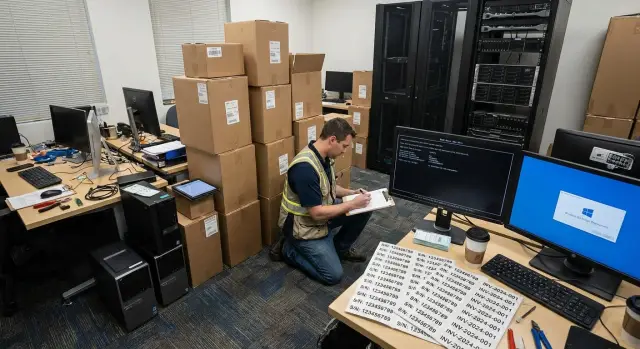
Why a serial number isn’t enough
A serial number helps distinguish one device from another, but it’s not enough for proper tracking. It doesn’t show where the equipment is located, who accepted it, what state it was in when launched, or from which day the warranty starts.
This issue becomes especially obvious after a mass delivery. When dozens of PCs, all-in-ones, or servers are installed at once, some devices can be moved from one room to another before final paperwork is completed. On paper everything looks tidy, but in reality there’s already a gap between delivery and actual use.
Because of that, context is lost. From a single serial number you can’t quickly tell whether a device is in accounting or in the server room, which OS image was installed, whether the BIOS was updated before launch, or who is responsible for the workstation. Even a simple support request takes longer in that situation.
Disputes usually don’t start on the delivery day but later. A month later a fault appears and you need to determine when the device actually began being used. If the act only lists a serial number, parties interpret the warranty start date, the delivered set, and the transfer to a specific unit differently.
A good commissioning act should answer not only “what device is this,” but also three other questions: where it is, in what state it was launched, and who is responsible for it. These details later help with accounting, inventory, repairs, and warranty issues.
What the commissioning act should accomplish
The commissioning act is not a formality. Its purpose is to record the moment when equipment from a delivery became a working asset at a specific location, with a specific employee or division.
If the document is prepared correctly, it serves several practical purposes at once. First, it confirms the device is installed, powered on, and ready for use. Second, it records the installation location and initial state. Third, it shows who is responsible for acceptance, use, or support. And finally, it provides a clear reference date for accounting, warranty, and service requests.
This protects both sides. The customer gets a clear reference point for internal accounting. The supplier or integrator gets confirmation that the equipment wasn’t just shipped on an invoice but was put into operation in the agreed condition.
The date is particularly important. In practice disputes often arise not because of the breakdown itself but over when the device started being used. If the commissioning date, the warranty start date, and the actual launch don’t match or aren’t recorded, unnecessary approvals and manual clarifications follow.
Equally important is removing ambiguity about responsibility. A phrase like “transferred to the department” sounds convenient but solves almost nothing. After a few months it becomes hard to know who accepted the equipment on site, who is responsible for its safekeeping, and who to contact for relocation, replacement, or inspection.
Which fields to include in the document
If the act only contains the model and serial number, its value runs out quickly. After a mass delivery, equipment is distributed across rooms, branches, and racks, and within a couple of months it’s hard to determine where a specific device stands, what configuration it was launched with, and which date should be used for the warranty.
A basic set of fields is best organized like this:
- exact model and serial number;
- inventory or internal asset number;
- installation location;
- responsible employee or division;
- initial configuration;
- commissioning date;
- warranty start date.
Model and serial number should be recorded exactly as they appear on the label and in accompanying documents. This reduces the risk of discrepancies between the act, the delivery note, and the service database.
The installation location must be specific. It’s not enough to write “Almaty office” or “server room.” You need the address or site, then the building, floor, room, and for servers the rack and unit. That way the device can be found quickly during inventory, repair, or relocation.
The “responsible” field is not a formality either. It shows who accepted the equipment into operation and who to contact about access, movement, and condition confirmation. In some organizations this is a specific person; in others it’s a division with an assigned role.
The initial configuration is needed as a reference point. It usually includes BIOS or firmware version, OS image, key boot parameters, and critical configuration elements that will be useful during diagnostics.
It’s worth having two separate dates: the commissioning date and the warranty start date. Sometimes they coincide, but not always. If a batch arrived at the warehouse at the end of the month but was actually installed two weeks later, you shouldn’t mix these dates.
How to describe the installation location without confusion
The installation location should answer one simple question: where exactly is this device today. If the entry is too general, it becomes hard later to find the device, check the warranty, perform inventory, or understand who uses it.
The most common mistake is limiting the entry to the branch or building name. Phrases like “Almaty office” or “school No.12” don’t help if there are dozens of rooms, floors, and workplaces inside.
It’s better to adopt a consistent format and use it across all acts. A simple sequence works well: city and address, then building or block, floor, room, workstation or installation zone. For servers add the server room, rack, and unit.
For a regular workstation it’s important to distinguish between the room and an exact spot. “Room 214, workstation 3” is far more useful than just “accounting.” For servers the precision must be greater. “Server room” alone is useless; at least include rack number and unit, for example: “Server room 1, rack R05, U18–U19.”
A useful rule: the address describes the site, and the installation location describes the point within the site. These fields are better not mixed. Start with the full address, then the room, workstation, or rack.
If equipment is delivered in batches, agree on abbreviations in advance. For example, use “rm.” for room, “WS” for workstation, “R” for rack and “U” for unit. The key is that the format must be consistent across all documents.
How to record BIOS, OS and initial configuration
If the act only contains the model and serial number, after a few months it’s hard to know in what condition the device was launched. For mass deliveries this is particularly noticeable: some devices get updated, some reinstalled, and in some places the disk or drivers are replaced.
BIOS version should be recorded precisely, not with vague phrases. “BIOS updated” is unhelpful for both service and troubleshooting. It’s much more useful to list the version and date exactly as they appear in the system or firmware menu.
The same goes for the OS image. Instead of a fuzzy note like “base image,” specify a clear name: edition, language, and, if necessary, build number or internal corporate image name.
You don’t have to copy every technical detail into the act. Record what will actually help restore the original state or understand what changed later. Typically this includes:
- BIOS or firmware version;
- installed OS image;
- critical drivers or roles if they matter for operation;
- key boot settings such as boot mode, TPM, Secure Boot, or RAID.
It’s convenient to separate factory and user configuration. The first shows how the device arrived from the manufacturer or integrator. The second records what was added or changed before handing it over for use. This separation resolves many questions if configuration diverges across the batch later.
A good configuration entry answers four questions: which firmware was installed, which OS image was used, which critical parameters were enabled, and what was changed before launch.
How to prepare the act after delivery
After a mass delivery it’s better to prepare the act following the same scheme for the whole batch. This reduces mistakes, makes devices easier to find later, and simplifies proving the condition in which equipment was handed over.
Start by reconciling the documents with the actual devices. Check quantities, models, serial numbers, and комплектация. If 100 devices arrived but 99 were received at the warehouse, or a label doesn’t match, record this before distributing devices to rooms and branches.
Then distribute the equipment to installation locations and immediately record the exact placement for each unit. At this stage avoid general phrases like “Almaty office.” It’s far better to specify the address, floor, room, division, and workstation right away.
When a device is in its place, collect data for the act: model, serial number, internal number, BIOS version, OS image, base configuration, responsible person, commissioning date, and warranty start date. For servers and workstations it’s especially important to record the initial configuration immediately, before updates change it.
For large batches, free-form entries almost always lead to confusion. Use a uniform template where fields appear in the same order for all devices. This is especially important when part of the equipment is sent to branches, schools, hospitals, or other sites and the documents are later combined into a single registry.
Before signing, do a quick check: do serial numbers and models match the devices, does each device have a responsible person, does the commissioning date reflect the actual installation, and are fields for BIOS, OS and location filled in?
The final step is to sign the completed version and store it in one place. Keep both the signed file and the working spreadsheet used to compile it. Then during service, relocation, or warranty disputes you won’t have to reconstruct the entire delivery history.
Example for a batch of PCs, all‑in‑ones and servers
Imagine a delivery containing desktop PCs for classrooms, all‑in‑ones for the registration desk, and a server for the server room. Formally all the equipment arrived in one batch, but the act entries for these groups will differ.
For a batch of classroom PCs it’s important to record not only the serial number but the exact installation location: building, floor, room, workstation or internal desk number. The responsible person could be the head of the classroom or the sysadmin if they take on support.
For all‑in‑ones at a registration desk or office, tie them to a specific zone, like a service window or workstation. It’s useful to add the computer name, OS image, and the employee or role assigned to that spot.
Servers usually require more detail. In the act write not just “server room” but the site, rack and unit. Also record BIOS version, initial configuration, commissioning date, and the customer’s responsible person.
In all three cases the idea is the same: each line should make it clear what was installed, where it stands, and in what state it was launched.
Common mistakes in commissioning acts
The most common mistake is assuming the serial number alone is enough. For warehouse records that may sometimes suffice, but for operation it doesn’t. When equipment gets distributed across rooms, branches, and sites, confusion quickly follows without additional data.
The second common error is an overly general installation location. Entries like “office,” “school,” “server room,” or “3rd floor” are almost useless. After a few months nobody will remember which room had a given PC, which division used an all‑in‑one, or in which rack a server was installed.
The third mistake concerns the responsible person. Documents often list a formal department head, facility manager, or IT specialist, while the device is used daily by someone else. Later, when it breaks, moves, or needs inventory, unnecessary back-and-forth begins.
Another problem is the warranty start date. Delivery, warehouse acceptance, installation, and actual launch often happen on different days. If the date in the act isn’t tied to a clear event, parties interpret the warranty period differently.
Finally, people often forget the initial configuration. If BIOS version, OS image, and base parameters at commissioning are not recorded, it’s hard later to tell what was originally installed and what changed.
Summing up the risky mistakes:
- only a serial number is recorded without location and responsible person;
- the installation location is recorded too broadly;
- the warranty date is not agreed in advance;
- BIOS, OS and initial configuration are not fixed;
- the act is stored where it’s hard to find later.
What to check before signing
Before signing, do a short reconciliation. This is where small discrepancies that later hinder warranty, inventory, and support are usually found.
Check that each device has an exact installation location, not just a branch or department. Make sure BIOS version, installed OS image, and key initial configuration are recorded. Verify a clear responsible person is assigned, the commissioning date matches the actual installation, and the warranty start date follows the organization’s rule.
It’s worth checking not only the main act but its attachments. Often the main document is filled correctly, but the device table lacks the room, BIOS version, or a mark that it was handed to the responsible person.
A simple test: if in a month anyone can read one line and understand where the device is, what state it was launched in, and who is responsible, the document is fine. If not, fix it immediately while the data are still at hand.
What to do next so tracking doesn’t fall apart
Even a well-prepared act won’t prevent chaos if each branch then works differently. After the first mass delivery it’s important to lock in a unified tracking procedure.
The first rule is one template for all sites. Field names, date formats, the way installation location, responsible person, BIOS version, OS image and warranty start date are recorded must be identical everywhere. Otherwise reconciliation becomes manual work.
The second step is to link the act not only to inventory but also to support. If a device has an internal number, it should match what the service team sees. Then when a breakdown happens you won’t need to separately determine which PC or server stands in a room and from what date its warranty runs.
The third step is to assign a data owner. Someone must update a record when a device is moved, reinstalled or handed to another employee. Without that even a good document becomes outdated within months.
In practice, simple role distribution is enough: the site records commissioning and installation location, the IT specialist checks configuration and service fields, the asset manager assigns an inventory number, and moves are recorded the same day.
If delivery is part of a rollout, it’s helpful to agree the field structure and final registry format with the supplier in advance. In projects with GSE this approach is especially convenient: equipment delivery, installation and ongoing support form a single clear chain, without double entry and discrepancies between the act, the warehouse and the service records.
The idea is simple: tracking must continue after the act is signed. If the template is common, roles are clear, and data are linked to inventory and support, the system won’t fall apart after the first device relocation.
Frequently asked questions
Why is a serial number alone not enough?
A serial number distinguishes one device from another, but it does not show its actual location, its condition at deployment, or the person responsible for it. This information is needed for inventory, repairs, and warranty claims.
Which fields are required in a deployment record?
Include the model, serial and asset numbers, exact installation location, person responsible, initial configuration, deployment date, and warranty start date. This set of information makes it easy to find the device and reconstruct its deployment history.
How should the installation location be specified?
Record the address or site, building, floor, room, and workstation. For a server, add the server room, rack number, and unit, for example R05, U18-U19.
Who should be listed as responsible for the equipment?
Assign the person who accepted the device on site and can confirm its presence, movement, or condition. Some organizations list a department, but it is better to define the role and contact explicitly.
What should be recorded about the BIOS and OS image?
Record the exact BIOS or firmware version, the installed OS image, and settings that matter for operation: TPM, Secure Boot, boot mode, or RAID. There is no need to include every device specification in the record.
How does the deployment date differ from the warranty start date?
The deployment date reflects when the device actually began operating. The warranty start date marks the agreed starting point of the warranty period. They may be the same, but each should be stated separately.
How should a record be prepared for a large batch of devices?
First, verify the quantity, models, serial numbers, and included components against the actual devices. Then assign the equipment to locations, enter the details into a single template, and check every row before signing.
How does the record differ for a PC, all-in-one, and server?
For a PC, specify the room and workstation; for an all-in-one, specify the service area or service window. For a server, be sure to add the site, rack, unit, initial configuration, and person responsible.
What mistakes are most common?
Common mistakes include giving an overly general installation location, failing to assign a clear person responsible, and not recording the initial configuration. Another problem is mixing up the delivery date, installation date, and warranty start date.
What should be checked before signing the record?
Check that the model and serial number match the device, the installation location is accurate, a person responsible is listed, and the BIOS, OS, and date details are complete. Also review the tables and attachments to the record.
