8 min read
Corporate software repository: winget, Chocolatey and APT
A corporate software repository centralizes winget, Chocolatey and APT packages: signing, testing, versioning and source control.
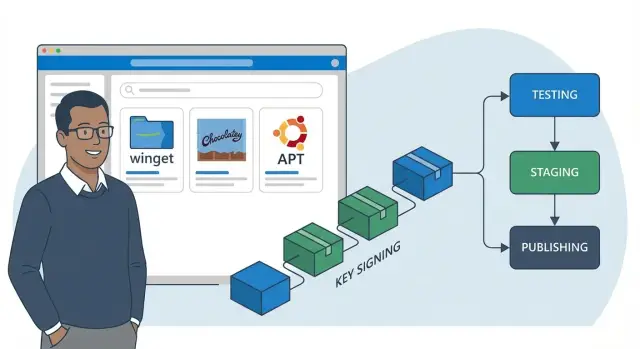
When a company has no single place to install and update software, each department starts doing things its own way. One engineer downloaded an installer from a vendor site, another used winget, a third found a “trusted” build on a forum. Formally it’s the same software, but in practice you get different versions, different install options and different levels of trust in the source.
The main risk is security. Multiple sources mean multiple supply chains: today a package is fine, tomorrow it’s replaced, and you only notice after an incident. Even without malicious intent there are problems: a corrupted installer, suddenly changed dependencies, or extra components bundled in.
Support becomes equally painful. When workstations run different versions, every issue becomes a detective story: “you have the button, I don’t,” “it works for you because your version is different.” Updating, fixing and training people becomes harder because documentation no longer matches reality.
The solution is conceptually simple: the company decides in advance which packages are allowed, where they come from, who verified them and how authenticity is proven. The corporate software repository becomes the single entry point for installs and updates.
This usually involves several teams. IT is responsible for installation convenience, updates and support. Security needs a verifiable source, signatures and a change log. Procurement and system owners decide what is permitted and in which versions.
A simple example: branches need a browser and archiver update on 400 PCs. Without a single repository, some machines update via different channels, some remain on old releases, and a few get unsupported builds. With a unified repository, the update becomes predictable and rollback is possible.
Trust model: what do you consider an “approved source”?
Any corporate software repository starts not with a server but with answering: which sources do you trust and why. Without that, people will install packages “however it happens,” and you’ll learn about issues only after an incident or failed update.
It’s important to distinguish approaches because they offer different levels of control:
- A mirror copies another repository as-is.
- A cache stores already requested packages so you don’t pull them from the internet each time.
- A proxy forwards requests outward but can enforce rules.
- An internal repository is your catalog of approved versions where you decide what is available for install.
Mirroring is often enough if your goal is faster downloads and resilience to temporary external provider outages while you trust that provider’s curation and update cadence. Your own catalog is needed when you want to pin versions, prevent unexpected updates and have consistent rules across winget, Chocolatey and APT.
Rather than trying to “catch” bad sources later, it’s better to allow only approved ones from the start. Three rules usually suffice: define an allowlist of sources and signatures (which publishers are acceptable), specify who and by what procedure adds a new source, and block direct internet installs via client policies and settings.
To make trust auditable, a package should have clear metadata: publisher and contact, hash and integrity check method, license and restrictions, and an internal package owner. It’s useful to mark which device groups the package is allowed for (office PCs, classrooms, servers, etc.).
How to fit winget, Chocolatey and APT into one scheme
If you have both Windows and Linux, it’s convenient to think not about three tools but one process: “approve, build, sign, test, publish.” Then winget, Chocolatey and APT become different storefronts for different OSes while the rules remain common.
For winget the key object is the manifest. In a corporate setup you host a private source where you control manifests: where the installer is downloaded from, which version is allowed, and which hashes are expected. Users install with the familiar winget but only receive what you approved.
Chocolatey fits neatly into a unified process via an internal NuGet repository. Packages follow a single notation (name, version, description, install scripts) and artifacts and dependencies live in your infrastructure. This prevents “downloading from the first source you find” and provides a clear version history.
APT requires discipline around metadata: Release/InRelease files, indexes and mandatory GPG signature checks. A Linux user adds your key once, after which any tampering with packages becomes evident.
A simple helpful layout is a single catalog with search and statuses (approved, testing, production) or separate storefronts per OS, a central place for artifacts (.exe, .msi, .nupkg, .deb), a repository manager for metadata and access control, and two channels — test and prod.
File storage is fine for artifacts at the start, but as you grow a repository manager becomes better: it stores versions, permissions, metadata and an audit trail. That keeps the corporate repository manageable even when you have hundreds of packages, as in large public-sector or banking environments.
Roles and rules: who owns a package from request to release
For a predictable repository you need not only tools but clear roles. Then every package follows the same path and responsibilities don’t blur across teams.
Key roles
Usually five roles are enough:
- Package author (packager) — prepares the installer, documents options and writes release notes.
- Reviewer — verifies correctness, reproducibility and metadata presence.
- Security (InfoSec) — validates source, licenses and signing requirements.
- Application owner (business owner) — decides who and when gets updates and approves functionality.
- Repository administrator — manages access, channels, publication and rollbacks.
A request to add or update is typically initiated by the application owner or the service desk on behalf of a user. The request should record: why the software is needed, target device groups, deadline and risk if it’s not installed. The packager shouldn’t have to guess these details from email threads.
SLA: what to measure
Build SLAs around observable steps, not vague “make it faster” goals: time to initial review, time to security decision, time to publish to test and time to release to prod. Also track the share of releases that required a rollback and the reasons — this quickly shows where the process breaks.
Exception policies are necessary but narrow. For example, allow direct external installs only during an incident or for one-off diagnostics. Require an exception request, a time limit, a responsible person and the exact installed artifact (version, source, hash or signature). After the incident the package should either be imported into the repository or removed and the exception closed with an audit record.
Step-by-step process: signing, testing and publishing versions
To avoid the repository becoming “another file dump,” define a single clear path for each new version. The path is useful for winget, Chocolatey and APT alike: formats differ but the control logic stays the same.
A practical basic path looks like this:
- Record the request: what to install, who needs it, on which PCs and when.
- Retrieve source artifacts from an approved source and verify legality: license, redistribution rights and update terms.
- Normalize installation: silent mode, parameters, install path, restart rules and dependencies.
- Sign and verify integrity: hashes, package or repository signatures, pinned certificates.
- Run tests and keep a report: clean install, upgrade over the previous version, uninstall (and rollback if planned).
Publish in two stages: first to a test channel, then promote to prod. For example, when updating a utility on 500 office PCs, roll out the version to a small group, collect installation errors and post-reboot behavior, and only then promote the same signed build to production.
A useful habit is to store a short change description, requirements (e.g. minimal OS version) and a rollback plan with the release. This makes updates predictable and audits straightforward.
Package signing: keys, certificates and storage policy
Signing is not a formality. It answers two simple questions: who released the package and whether it was altered in transit. In a corporate model it makes sense to sign not only the installer but also what the client trusts about the repository.
On Windows Authenticode is common: sign .exe/.msi and sometimes install scripts (PowerShell) if they run on clients. For APT the standard is GPG: sign repository metadata (Release/InRelease). This is more important than signing each .deb because the client first checks the index signature and only then trusts packages in that index.
Key storage policy should be boring and strict. A good minimum: keep private keys in an HSM, token or secure vault with auditing; grant access only to the release manager role (not all admins); forbid copying keys to workstations or group chats; log signing operations (who signed what and when).
Plan rotation and revocation ahead of time. If a key is compromised you need a rehearsed procedure: revoke, publish a new key, re-sign indexes, block the old fingerprint on clients and investigate which versions might be affected.
Make signature verification mandatory. On Windows control trusted publishers and block unsigned scripts via policy. On Linux use signed repositories and disallow unofficial sources. Then even if someone tampers with a file share, clients will refuse to install the update.
Testing before release: what to check without drowning in work
If packages enter the repository untested, problems surface during mass rollout: wrong dependencies, unexpected installer dialogs, broken settings, or impossible rollbacks. To avoid days of manual checks, keep a short, repeatable test suite and run it identically for winget, Chocolatey and APT.
Minimum tests every package should pass
Start with three basic scenarios. They catch most issues and don’t require heavy infrastructure:
- Install on a clean image — silent install with expected result.
- Upgrade over the previous version — user settings and data are preserved.
- Uninstall — the app is removed and no stray services or autostart entries remain.
Test in isolation using VMs or sandboxes and snapshot rollback to validate the package itself, not side effects from earlier experiments. Keep a few golden images with corporate policies for different device classes (office PCs, workstations, servers).
Make security checks simple and mandatory: artifact hashes match, signatures validate, the source is expected, and there are no unwanted components (toolbars, miners, hidden updaters). If the package pulls dependencies, pin their versions and verify they come from approved sources.
Finish with compatibility tests: OS versions, normal user rights, proxy and certificate environments, and conflicts with commonly installed software.
Canary release
Before a wide rollout give the package to a small group (10–20 PCs) and define stop criteria in advance: more than 1–2% failed installs or upgrades, a spike in support tickets on the same topic, noticeable performance drop, or conflicts with critical software (VPN, signing tools, accounting apps). This reveals edge cases on real workstations without risking the whole organization.
Publishing and version management: channels, rollbacks, notifications
Publishing a package is not just “upload a file.” In a corporate repository the goal is that one version installs the same everywhere and the path from verification to production is clear and repeatable.
Channels and promotion rules
Work with multiple channels and clear gates. winget, Chocolatey and APT can follow the same rules even if technically different: dev for builds and quick fixes, test for golden images and pilot groups, prod only after successful testing and owner confirmation. Maintain a hotfix path for critical fixes, but subject it to the same checks.
Fix your version notation. Keep the upstream version as-is (for example, 3.2.1) and reflect your changes with a suffix or additional number (3.2.1+corp.2 or 3.2.1-2). That way it’s clear what changed: the app or your packaging.
Reproducibility depends on pinning dependencies and sources. Record which file, hash and repository a package was built from, which dependencies are allowed and which versions are pulled.
Rollbacks and notifications
Make rollbacks quick and boring. Keep several previous versions in prod instead of overwriting the last one: at least N-1 and N-2, and test the rollback process on a small group. For APT use pinning; for Windows packages allow explicit version installation.
Send notifications by role: package owner, security, service desk and business system owners. For example, when updating a browser on 500 machines in a government organization, notify: what changed, which channel it went to, how to rollback and who to call in case of issues.
Control and audit: proving only approved software was installed
To make the repository an auditable source of truth, you need a chain of evidence: who made changes, what changed and which devices received them. Bake this in from the start, otherwise you’ll reconstruct history from fragments later.
Start with repository logs. Track not only downloads but lifecycle actions: upload, signing, promotion between channels and version revocation. For auditability each action should have an author, timestamp, comment and request ID.
Store the minimum with each package: who uploaded and who signed it (accounts and roles), the hash and signature, certificate fingerprint, test results and test date, reason for change (request, vulnerability, departmental requirement) and who promoted the version to prod.
Enforce client-side controls. Use policies to block external sources and allow only internal repositories. Prevent bypass installations without admin rights. That way even user mistakes result in installations only from the approved catalog.
The final layer is inventory and reconciliation. Reports should show which versions are on which devices and whether they match the approved list. In a hospital branch or government office you should quickly prove that only approved versions were installed and that each update passed tests.
Common mistakes when rolling out a corporate repository
The most common problem is running external and internal package sources in parallel. One admin pulls updates from public winget or Chocolatey, another uses the internal store, and a third team runs its own APT mirror. Without clear priorities and blocks you end up with several competing processes instead of one.
Mistake number two looks safe but is usually worst: signatures exist but keys are stored on the same server as the repository and too many people have access. In that case signatures stop proving trust. Compromising the server can quickly compromise the entire chain.
Another failure is testing only clean installs. Real problems appear on upgrades: dependency conflicts, broken configs, unexpected component removals. A typical scenario: some PCs have an older version and the new package updates differently than on a clean machine.
People also forget rollbacks. A package is published and the previous version wasn’t preserved or can’t be quickly restored. Then a release error becomes user pain and manual fixes.
Finally, packages are made “once and forget”: no owner, no update schedule, no assigned responsibility for vulnerabilities and deadlines.
Signs your process is failing:
- the client is not pinned to a single approved source;
- signing keys are available from the same server that stores packages;
- no upgrade test from previous versions;
- old versions are not retained and rollback procedures are undefined;
- a package has no owner or next review date.
If this looks like your setup, start with rules: one prioritized source, separate key storage and mandatory upgrade tests before publishing to the corporate repository.
Short checklist before publishing a new version
Before releasing a new version into the corporate repository take 5–10 minutes to run a quick check. It’s cheaper than investigating failures on hundreds of workstations.
First, confirm the package can be legally and repeatably installed. The distribution source must be clear: the vendor’s official channel, a verified supply chain or a contract. Check the license and assign a package owner so someone is responsible for questions and updates.
Next, verify signatures and integrity. Artifacts (installers, archives) and metadata must be signed according to your policy, and clients must enforce signature checks. Otherwise signatures are just paperwork.
Quick minimum tests:
- install on a clean target OS (or golden image);
- upgrade from the previous corporate version;
- uninstall and verify no services or autostart entries remain;
- launch the app and do a basic functional check for its primary purpose.
Don’t publish without a clear rollback. Keep the previous version in the repository and document who performs the rollback, how fast it executes and what happens to settings and user data.
Final step — document the release. Briefly describe changes, who to notify (support, security, business owners) and the rollout plan: all at once or in waves. For example, first 10–20 PCs in accounting, then the office, then branches.
Example scenario: updating software on hundreds of PCs without surprises
A company updates a critical application (e.g., a document client) on 600 PCs across offices and branches. Requirements are simple: don’t disrupt users, comply with security rules and avoid reliance on external sources that may change or become unavailable.
The package path is repeatable and shows at any moment who decided and what was installed.
Release from request to production
The application owner files an update request with version, reason and deadline. The package is built or obtained from the vendor, hashes and contents are recorded, then signed with the corporate code signing certificate. The package goes to the test channel: several representative PCs (different departments and user rights) receive the update via the corporate repository.
If tests pass, a canary is run: 2–5% of devices, preferably with experienced users. Only then a mass production rollout occurs on schedule (e.g., at night) with bandwidth throttling for branches.
Preventing external installs and supporting branches
External installs are blocked by policy: only corporate sources for winget, Chocolatey and APT are allowed and only signed packages are permitted. Remote sites use a local cache or branch mirror so the same package isn’t downloaded across a narrow WAN multiple times.
If incidents occur after the update, rollback is handled the same way: version N-1 is stored in the repository, marked as current, and devices receive the downgrade via the same mechanism used for updates.
Prepare short reports for security and management: approved version, who signed and approved it, list of devices with successful installs, exceptions (who didn’t update and why), and a rollback log (if performed) with time and reason.
Next steps: pilot, scaling and process support
Start with a short pilot to validate the process and avoid overloading the team. Choose 1–2 OSes (for example, Windows and Ubuntu), pick 10–20 most-needed packages and create one test channel where new versions land before prod.
Agree on simple “ready for release” criteria for the pilot: the package installs without errors, signature validation passes, an upgrade over the previous version works, and rollback is a single step.
For infrastructure you’ll usually need basic components: servers for repository and metadata (winget/Chocolatey/APT), artifact and log storage, backups with restore verification, a test zone (10–30 PCs or VMs), and monitoring for availability and disk space.
Integrate the corporate repository into IT and security procedures: who requests a package, who signs, who gives final approval, where the key is stored, how exceptions are recorded and how often the allowed-software list is reviewed.
To scale predictably, track 2–3 metrics: time from request to release, share of installs from the internal source and number of incidents caused by updates.
If you need to act faster and leverage external expertise, consider an integrator. For example, GSE.kz (gse.kz) as a systems integrator can help with design, server infrastructure and 24/7 support so the process doesn’t depend on one person.
Frequently asked questions
Why have a corporate software repository if programs can be installed from the internet?
A corporate software repository gives the organization one predictable source for installs and updates. It reduces the risk of package tampering, eliminates version sprawl and simplifies support: everyone uses the same versions, the same installation options and there is a clear history of changes.
What is the difference between a mirror and an internal corporate repository?
A mirror simply copies an external repository “as is” and helps with availability and speed, but you remain subject to the external provider's policies and update cadence. An internal repository is your catalog of approved versions: you decide which packages are available, in which versions, to whom, and via which channels (test/prod).
How do you stop employees from installing software “from whatever source”?
Start with an allowlist: permit only approved sources and expected publisher signatures, and block everything else via client policies and settings. At the same time, introduce a request procedure for adding a new package: who requested it, who packaged it, who verified it, who approved it, and how authenticity is proven (hash, signature, certificate fingerprint).
Can winget, Chocolatey and APT be integrated into one scheme if we have both Windows and Linux?
Yes. Use a single process: “approve, build, sign, test, publish.” The tools become different storefronts for each OS. On Windows control winget manifests and Chocolatey packages via an internal NuGet repository; on Linux use an APT repository with signed metadata. The rules for versions, tests and releases stay the same.
What metadata should a package have in a corporate repository?
At minimum — publisher and contact, version, source of the artifact, hash and method to verify integrity, license and restrictions, and the package owner inside the company. It's also useful to record which device groups are allowed to use the package and to store test results and the date of testing so support and auditors know exactly what was installed.
What should be signed: the installer, the package or the repository?
Signing answers two questions: who released the package and whether it was altered in transit. On Windows you usually sign installers and scripts (Authenticode). For APT it is critical to sign repository metadata (Release/InRelease), since the client verifies the index first and only then trusts packages listed in it.
How should signing keys be stored so the signature is a real proof of trust?
A practical minimum — do not store private keys on workstations or on the same server that holds packages, limit access by role and audit actions. Prefer HSMs, hardware tokens or secured vaults with logging, and have a planned key rotation and revocation process so you can act immediately if a key is compromised.
Which tests are mandatory before publishing a package to the approved repository?
Test three scenarios: installation on a clean system, upgrade over the previous corporate version, and uninstall without leftovers. This catches most issues with dependencies, silent installs, restarts and conflicts. Add checks for corporate policies, proxies, normal user rights and the typical software set as needed.
How to organize channels (test/prod) and rollbacks so updates are predictable?
Keep two channels: test and production. Promote the same signed build from test to prod after a pilot on a small group. For rollbacks, store at least N-1 and N-2 versions in prod and have a clear rollback procedure so a release failure doesn’t turn into manual fixes across many machines.
How to prove to an auditor that only approved versions from trusted sources were installed?
Start with lifecycle logs: who uploaded, who signed, who promoted between channels, who revoked a version, and link these actions to a request. On clients, block external sources and enable inventory so you can reconcile installed versions with the approved list and quickly spot exceptions.
