8 min read
Enterprise Password Manager in an Air-Gapped Environment: Pilot and Tests
How to compare Bitwarden (self-hosted), Passbolt and Keeper during a pilot: enterprise password manager in an air-gapped environment, backups, resilience, audit and UX.
Why test a password manager in an air-gapped environment
In air-gapped environments passwords often live in "islands": files on network shares, notes kept by admins, email, or separate systems without centralized control. That works until the first incident or a key person leaves. An enterprise password manager in an air-gapped environment is needed to remove chaos, reduce leak risks and make access manageable.
The risks here are usually not about "nice features", but about real losses. A shared password for a critical system can leave with a contractor. No one knows who used it and when. After an outage access to the vault may be lost and the team cannot bring services back. Isolation adds complexity: updates, integrations and support work differently, so it's important to test behavior in your conditions, not promises.
During a pilot it's easy to get carried away by the UI, browser extensions and integration lists. In practice it's more important to prove two things: recoverability and manageability. If after a failure you cannot quickly restore the vault and decrypt data, features won't save you. The same goes for audit: if you can't prove who accessed a secret and why, the tool doesn't meet InfoSec requirements.
To make the pilot honest, define roles and rules in advance. InfoSec records requirements, access policy, the set of events to audit and attacker scenarios. IT is responsible for deployment, backups, monitoring and integrations. System owners describe which accounts are critical and who may access them. The pilot user group tests real-life workflows and gives feedback on usability.
Measure pilot success with simple, hands-on criteria: availability during common failures and maintenance, clear roles and access grant/revocation processes, and real usage without workarounds.
A simple example: a branch network has a server turned off or DB access lost. A good pilot outcome is that within an agreed time you restore the service from backup, reestablish access via MFA and policies, and logs show who requested and opened secrets before and after the incident.
What we compare: Bitwarden (self-hosted), Passbolt and Keeper
If you need an enterprise password manager in an air-gapped environment, start by comparing not the "features on paper" but how the product runs without internet: how it's installed, updated, how it works with your directory and what happens when something breaks.
Deployment options in an isolated network
Bitwarden (self-hosted) is typically deployed on your servers as a standalone service. Usually this is Linux and containers, plus a database and attachment storage. Early on it's important to decide where the encryption keys live and who has admin access.
Passbolt is usually installed on-premises on Linux as a web app with a database. For a pilot that's convenient because you can quickly bind it to internal users and test basic shared-access scenarios.
Keeper Enterprise is often used as a cloud service. For isolated environments ask the vendor in advance whether there is a supported option to run without direct internet access (for example via controlled gateways/proxies or special delivery modes), and how updates and license checks are handled.
Licenses, updates and integrations: clarify before the pilot
In offline environments these questions may seem "paperwork", but they often block deployment. Before installation get answers to key points: how to activate a license without external access and what to do when moving the server; how updates are delivered and how often they are needed to close vulnerabilities; required dependencies (DB, mail, proxy) and who supports them; which logs and reports can be exported to your SIEM without the cloud; how admin roles work and which actions are irreversible.
Integrations usually involve AD or LDAP for users and groups, SSO (SAML/OIDC) and MFA. Check mail notifications separately: in an isolated environment messages usually go via an internal SMTP, and without it invitations and recovery procedures break.
To avoid derailing the pilot, postpone some tasks to phase two: automatic password rotation on servers and network gear, CI/CD secrets, complex DLP rules for attachments and deep role customization. For the pilot it's enough to prove the product runs reliably in your network and is understandable to ordinary users.
Pilot criteria: what exactly to test
To prevent the pilot becoming "installed, seems to work", fix measurable criteria in advance. For an enterprise password manager in an air-gapped environment what's important is not only features but behavior under failure, recovery and daily user interaction.
Resilience: what it means for you
Decide how long the service can be unavailable without halting work. An office with 9–18 hours needs different requirements than a 24/7 SOC or hospital duty shifts.
Agree target numbers: allowable downtime per month, maximum recovery time after failure, and what counts as a failure (web UI unavailable, clients not syncing, browser extensions not working).
Backups: RPO and RTO in plain terms
RPO — how much recent data you can afford to lose (for example no more than 15 minutes of changes). RTO — how quickly you must return the service (for example within 1 hour).
The test must be practical: take a backup, then simulate loss (broken VM, deleted DB, damaged disk) and actually restore the system. Time the process with a stopwatch and record admin steps.
Audit and access control
Ask InfoSec to name the events that must be in the logs. Usually it's not only logins but actions with secrets and rights. Minimum to check manually: logins (including failed attempts), lockouts and MFA; viewing a secret and operations like copy/export; create, change and delete records and attachments; granting rights to folders/collections/groups and role changes; user invites, disabling accounts and access recovery.
Clarify where logs are stored, retention, whether you can export them to your SIEM and how clearly they show "who did what".
Usability and administration
Measure usability with short tasks: how long it takes to sign in on a new PC, how quickly a record is found by search, how to hand over access for vacation, and whether mobile access is clear.
Also evaluate administration: how to add users (manual import, AD/LDAP), how to grant rights by groups, how fast to disable an employee and transfer their accesses. If these tasks require many steps or "magic" by a single admin, it will be a problem in production.
Pilot steps: preparing the stand and the group
Pilots often fail not because of the product but due to vague goals: teams test "a password manager" without agreeing what's important for the organization.
In 1–2 meetings fix the inputs: how many users will be in the system in the first 3 months; which groups are needed (IT, accounting, procurement); what types of secrets you store (passwords, keys, notes, access details); which MFA is realistic in an air-gapped environment (hardware keys, TOTP, smart cards, one-time codes via internal channels).
Choose a pilot format: 2–4 weeks, 20–50 users, 2–3 departments. Include non-technical users to surface everyday problems.
Allocate a separate environment that can be broken without fear: one server or several VMs, with clear separation of components (app, DB, backup storage). In an isolated network decide where updates come from and how you verify package signatures/hashes.
Minimum prep: separate VMs or hardware for the pilot (avoid production), a test domain/user directory or test OU, test mailboxes for invites and recovery, check client apps (browser extensions, mobile clients, SSO if used), and a separate backup location with restricted access.
Then set basic policies so the pilot reflects real life: password rules, auto-generation, idle lockouts, login attempt limits, sharing rules and handling of shared accounts. Describe an employee lifecycle: join, receive access, change role, leave, access revoked.
Create a test plan and a schedule of outage windows. For example, weekly 30-minute restore drills, a slot for lockout tests, and a mid-pilot VM failure simulation. Assign responsibilities: who records results, who verifies business continuity and who makes weekly decisions.
A small example: a 30-person pilot from IT, finance and support will quickly show where users get confused in shared vaults and where admins hit permission and audit limits. If infrastructure is already on corporate servers (for example on GSE S200), use the same isolation principle: separate roles, separate backups, separate admin accounts.
Backup and restore: proving viability
In an air-gapped environment trust begins with a simple question: can you bring up the service and restore access to the vault after a failure, admin error or node loss?
First record where data lives and what must be backed up. Typical components: database (records, users, rights), attachments/files, encryption keys, configs and integration settings (LDAP/AD, SSO, SMTP), plus infrastructure secrets like DB passwords and environment variables.
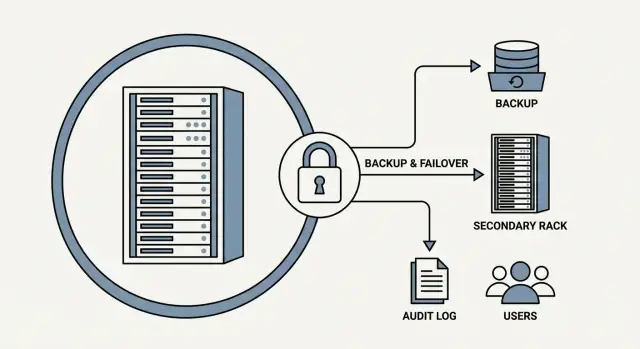
Agree backup scheme with InfoSec. For air-gapped setups a regular full backup, more frequent incremental copies and an offline copy unavailable on the network are sensible. If the pilot runs in a data center or virtualization, define whether you back up only app data or also VM snapshots. Snapshots are convenient but don't replace a restore-verified backup of DB and keys.
Check backup security: encryption, role-based access, and avoid a single account that gives both passwords and backups to an attacker.
Prove by restoring. Prepare a clean stand (new VM or server), deploy the service from backups and time the operation. A practical exercise: deploy environment, install service, restore DB/attachments/configs, return encryption keys and confirm records are readable, test login for a regular user and access to several vaults. Record times and bottlenecks.
Also practice two common cases: changing admin passwords and rotating keys (if supported). On the pilot perform the rotation in a safe window, make a new backup and verify restore works with the new state.
A good outcome: a clear list of components to back up, schedule and storage meeting InfoSec rules, and one successful restore on a clean stand with measured time and notes for production improvements.
Resilience: test scenarios and metrics
Test resilience with real failures, not documentation. In an air-gapped environment it's critical to know what happens when a service, node or network goes down and how long users lose access.
Before tests fix entry points: how login works (AD/LDAP or local accounts), which clients are used (web, desktop, mobile) and which actions are critical (login, search, copy password, autofill).
Failure scenarios to run
A few checks are enough for a short pilot:
- Application crash: stop the service/container and check auto-restart after reboot. Record recovery time and user errors.
- Node or VM failure: shut down the VM or host running the app or DB. If a standby exists, test failover and data integrity after return.
- Network loss between segments: cut the route between user and server segments (or between app and DB). Note what the user sees: a clear message, read-only mode, cache or a hang.
- Data corruption: simulate storage problems (DB unavailable) and test restore to a working point. Check rights correctness after restore, not only service start.
Have 3–5 users perform a concrete task during the failure, e.g. "log in and find the test service password." This shows where the system degrades gracefully and where it blocks work.
Metrics to record
To compare Bitwarden (self-hosted), Passbolt and Keeper fairly, use identical metrics: minutes of downtime per scenario; average and worst time to successful login after failure; number of client sync errors; actual RPO and RTO (how far data rolled back and how long recovery took); and user symptoms (error messages and support tickets triggered).
The result should be a simple table: scenario — observed result — time — consequences. This best shows whether a manager fits your availability requirements.
Audit and access control: hands-on checks
On a pilot audit is not a checkbox but a way to prove who accessed secrets and whether you can rebuild events. In an air-gapped environment built-in logs are often the only source for investigations.
Start with a small set of events and verify they are written. Create a test secret, three users (regular, group lead, admin) and enable MFA. Perform actions and immediately find them in the logs. Context is important: who did it, on what object, from which role and whether access was denied.
Practical minimum: successful and failed logins (including after password change and lockouts), MFA enable/disable and bypass attempts, secret access (view, copy/use, unauthorized attempts), record changes (edit, delete, restore), and permission operations (grant, revoke, change level, group additions).
Test whether logging can be silently disabled or cleared. Two scenarios: an admin changes log settings and an admin attempts to delete records. A good outcome: changes to logging are recorded as separate events and log deletion is either impossible or leaves a trace and requires higher privileges or second control.
Evaluate how quickly you can find an incident — 10 minutes vs an hour. Run a short scenario: an employee viewed a secret outside work hours and the manager investigates. Check filters by user, object, event type and time. Exporting logs and basic reports help InfoSec and admins preparing internal reviews.
Rights model is equally important: who can see secrets and who only administers. On the pilot separate roles: one person manages users and policies but should not read secret content; another owns departmental secrets; a third has access only to their folder. If you have supply-chain or technological independence requirements (common in government and large organisations in Kazakhstan), this check resolves typical InfoSec questions early.
Collect evidence during the pilot: policy screenshots (MFA, password rules, access rules), log excerpts for key events, an exported log for the test period with scenario descriptions, a compact roles-and-rights matrix and where/how logs are stored and who can access them.
If the pilot shows clear answers — "we can rebuild the chain of actions" and "an admin cannot silently erase traces" — the solution meets basic audit and access-control needs.
Usability for users: tasks for the pilot group
This part aims to see whether people will use the solution daily without resorting to notebooks, files or messenger transfers. Even if the manager runs in an air-gapped environment, usability determines adoption.
Select 10–15 participants from different roles: accounting, IT, support and managers. Give them the same task set and record times and errors. Use a simple case: access to a test server, a corporate email account and one internal system.
Practical tasks (on real devices)
Provide a short flow and ask them to follow it without hints, using only a one-page instruction:
- Save a new password: create a record, generate a password, check browser autofill.
- Share access: grant a colleague access for 24 hours, then revoke and confirm access is gone.
- Check roles: a regular user sees only their records, a folder owner manages access, an admin can reset access/policy but shouldn't "see everything" without cause.
- Install and update clients: browser extension and desktop client (if used), verify installs and updates comply with your policy.
- Mobile access in an air-gapped network: login, timeout lock, offline mode (open saved records), and sync after network returns.
Collect impressions immediately. Ask specifics: where they got stuck and what they did instead.
Feedback: five survey questions
Use a short form to compare groups: measured and perceived task times, where most errors occurred, convenience of autofill/password generator (1–5), trust in the share-and-revoke process (1–5) and what to improve first (UI, training, policies, mobile access).
A positive sign: most fit tasks into 15–20 minutes and questions concern company rules rather than "how to use it".
Common pilot mistakes and how to avoid them
The most frequent mistake is testing installation and login but not a "bad day". The tool may work normally, but there's no plan for failures.
Mistake 1: not testing restore
If you don't do a restore test, you have no proof backups are usable. At minimum: take a backup, deploy a clean stand (or remove a test vault), restore and verify rights, logs and folder structure. Preferably someone other than the person who configured backups performs the restore.
Mistake 2: one admin account and no roles
A shared admin account makes audit meaningless: you won't know who changed what. Split roles from the start: user management, policy changes, backups, audit review. Even on a small pilot this reduces the risk of accidental destructive actions.
Mistake 3: mixing production secrets with pilot data
People often import real passwords "for a minute" and forget to remove them. This is risky and biases the test. Agree which data can be imported, mark pilot items (for example prefix PILOT) and assign responsibility for cleanup.
Rules to keep the pilot tidy: use test accounts and secrets (except approved exceptions), record cleanup date and owner, perform one mandatory restore test and log results, and assign personal admin accounts instead of shared logins.
Mistake 4: underestimating updates in an isolated environment
Patches aren't a click away in closed networks. You need a package source, maintenance window, rollback plan and dependency mapping (DB, proxy, certificates). On the pilot test at least one planned update: who brings packages, how signatures are verified and who handles rollback.
Mistake 5: no process owner
Without an owner approvals drag on: disputed permissions linger and the pilot turns into email threads. Appoint one owner (usually InfoSec or IT) to make decisions and approve the access matrix.
Short checklist and next steps after the pilot
The pilot's outcome should be a set of proofs, not impressions. You must show the system survives failures, restores from backups and remains usable.
Mini-checklist before deciding
Check you have verified results, not just "spoken settings":
- Backups run on schedule and a manual restore was performed on a separate stand. Recovery times and returned components (vaults, attachments, groups, policies) are recorded.
- Failure scenarios were executed (app crash, DB, node, network). There is a clear playbook: what the on-call does, what is escalated and which metrics are acceptable.
- Audit covers key events: logins, permission changes, record create/delete, exports, secret access and emergency admin actions. Logs are available to InfoSec without special requests.
- Users perform basic actions without long instructions: login, save a password, find and paste, share according to rules and recover access after device change. Times and typical errors are recorded.
- Boundaries are clear: which integrations are required (AD/LDAP, SSO, browser extensions, mobile clients) and what can be postponed.
Next steps after the pilot
Document the decision: chosen product, target architecture (single node or cluster), logging and backup requirements, roles (who is admin, InfoSec, support), and success criteria for production.
Typical next steps: expand the pilot to more departments and real cases (shared accounts, contractor access, emergency access); migrate to production with a maintenance window, import and rights verification, and short scenario-based training; establish support regs (updates, backup checks, restore drills, incident response, log access times).
If you need to quickly and carefully build infrastructure inside the air gap (servers, resiliency, integrations, support), consider a system integrator. In Kazakhstan such projects are often implemented with production and service capabilities on GSE.kz (gse.kz), especially when local delivery and ongoing support without external supply chains matter.
Frequently asked questions
How do I start a pilot of a password manager in an air-gapped environment?
Start with an inventory: where passwords are stored today, who uses them and which shared accounts are critical. Then record InfoSec requirements for roles, MFA and audit, and IT requirements for deployment, backups and monitoring. The pilot should test recovery after failures and manageability of access, not just the UI.
What are the most important success criteria for the pilot?
At minimum — availability under common failures, a measured restore from backup (with times), comprehensive audit for key events, and no user workarounds. If the team can quickly recover the service after a failure and InfoSec can prove who accessed a secret and when, the pilot already delivers real value. More advanced features can wait for the next phase.
What must be clarified about licenses and updates in an offline environment?
Check how a license is activated and what happens if you move to another server without internet. Clarify how updates are delivered and how you will verify their integrity inside the network. If these questions are not resolved up front, the pilot often stalls on approvals instead of reaching real tests.
How to properly test backup and restore during the pilot?
Make a backup, then simulate loss of a component (for example a broken VM or deleted database) and restore the service on a clean stand. Time the operation and verify that access rights, storage structure and secrets are readable by regular users. If a restore completes but without encryption keys or correct rights, the scenario is considered failed.
What are RPO and RTO and how to apply them to a password manager?
RPO is how much recent data you can afford to lose (time window), RTO is how long it should take to bring the service back. Choose simple numbers that fit your operating mode and verify them by performing a restore. Record actual results in your environment, not vendor promises.
Which audit events should be checked first?
Ask InfoSec to list required events and then reproduce them while checking the logs. Typically you need successful and failed logins, MFA enable/disable and checks, secret access (view, copy/use), record changes and any operations with permissions. A good sign is seeing user, object, time and outcome in the logs, not just a generic "something happened".
How to organize roles and permissions so audit is not just a formality?
Separate roles so an administrator manages users and policies but cannot silently read all secrets by default. Use personal admin accounts and avoid a shared admin login — otherwise audit is meaningless. On the pilot, demonstrate that access is granted by groups and can be revoked quickly on termination or role change.
Which failures must be played out when testing resilience?
At minimum test three scenarios: application crash, database unavailability and loss of connectivity between segments. For each, measure how long users cannot log in and perform basic actions like finding a record and copying a password. Also check what the user sees during the outage: a clear message or an endless spinner.
How to test user convenience without relying on subjective impressions?
Give participants short real-device tasks: sign in on a new PC, search for a record, use autofill, grant a colleague temporary access and revoke it. Measure times and note where people begin to use notes or files as workarounds. If most complete tasks without long instructions, the solution is likely to be adopted.
What should be implemented immediately and what should wait until after the pilot?
First prove basic reliability: operation in the air-gapped environment, backups with verified restores, roles, audit and a clear process to disable a user. Later expand to automatic password rotation, CI/CD secrets, SSO integrations and stricter attachment policies. This order reduces the risk of adding complexity before the system is stable.
What typical pilot mistakes should be avoided and how?
Common pilot mistakes and quick mitigations: - Do a restore test: make a backup, restore to a clean stand and verify rights and logs. - Avoid a single shared admin account: assign distinct roles even on small pilots. - Don’t mix production secrets with pilot data: use labeled test secrets and a cleanup owner. - Plan updates in an offline environment: where packages come from, how signatures are checked and who can roll back. - Assign an owner for the process (usually InfoSec or IT) to speed decisions and approvals.
