8 min read
End-to-end tracing of integrations: Correlation ID and unified logs
End-to-end tracing ties Correlation ID, unified logs and a document route map together so you can find the root cause of an incident faster.
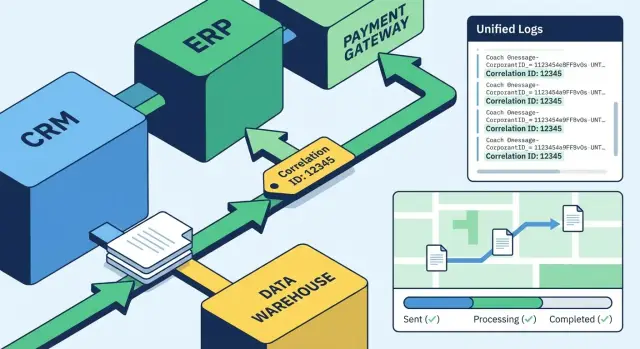
Why end-to-end tracing is needed
Integrations fail differently than a monolithic application. One failure often shows up in several places at once: a document never reached accounting, a blank row appeared in the data storefront, and support only sees a user complaint. It looks like the problem is everywhere, while the root cause is usually one.
Two things make finding the cause slow. First, every system writes logs differently and stores them separately. Second, details get lost along the way: which document was processed, at what step it stalled, which service changed the data, and how long each transition took.
End-to-end tracing is needed to answer simple questions without long calls and screenshot exchanges. For example: where is the document now (in queue, processing, error, or already in the target system), at which step did the problem occur and who saw it first, is it a one-off or a widespread issue, what data changed en route and can you prove the change was legitimate.
During downtime the business usually asks: "how many requests/payments/invoices failed and when will it be fixed?" Security asks different questions: "who sent the request, from where, under which account, was there any data tampering?" Without a single trace across the chain you have to answer with guesses.
A real example: an invoice goes from the ERP to the integration bus, then to an approval system and finally to the accounting system. At one point the contract number field disappears. As a result the document is rejected, and each system treats it as a separate error. Tracing makes the document’s history whole and lets you see within minutes where the data was lost.
Correlation ID in simple terms
Correlation ID is a single identifier assigned to a request or document and preserved along its path through different systems. It exists not for "cosmetics" but to quickly gather all logs and events related to one passage: from API entry to the last database write or response to an external service.
Correlation ID is not the document number. The document number comes from the business (for example, “Invoice No. 54821”), can repeat across environments, change after recreation, or exist only in one system. Correlation ID is technical: it appears at the entry and does not change even if the document later receives a different business number.
It also differs from a request id. A request id often lives only within a single HTTP request or one service and changes on each new call. Correlation ID links the whole chain: one incoming request, several internal calls, messages in queues, processing in the integration layer and outgoing responses.
Where is it best to create it? At the gateway or in the first service that accepts the external request. If a Correlation ID arrives in a header, accept and validate it. If not — create a new one and propagate it everywhere: in API headers, in message metadata, in the file name or in a service tag.
The Correlation ID format should be unique, short and stable (so it fits in headers and logs), must not contain personal data or encoded meaning (don’t encode customer, amount, etc.), and should still be readable enough for an operator to dictate over the phone. In practice people most often use a UUID or a short fixed-length secure token. The most important thing is to agree on one format across teams and record it in every log event.
How to carry the ID through APIs, queues and files
For tracing to work, the Correlation ID must travel with the document always, even if the exchange format changes.
In APIs it’s easiest to pass the ID in a header (for example, X-Correlation-Id). That makes it easy to read in the gateway, services and logs without touching the request body.
In queues and brokers it’s convenient to use metadata (properties/headers). If that’s not possible, put the Correlation ID in the body as a separate field. The main thing is to pick one place and stick to it everywhere.
Files are trickier because there are no headers. Usually three options help: add the Correlation ID to the file name, store a small metadata file alongside it, or add a field at the start of the content (if the format allows). The key requirement is: the recipient must be able to extract the ID before processing begins.
When branching (fan-out) keep a single common Correlation ID as the root, and add a secondary identifier for each branch (for example, Child-Id or Step-Id). When merging (fan-in) use the same root ID and store the list of incoming Child-Ids so it’s clear what converged.
Retries and duplicates must not create a new Correlation ID. Keep the original and write the attempt number (attempt=2) and a stable idempotency key next to it. Then in investigation it’s clear: this is the same operation, just a repeated delivery, not a new transaction.
Unified log format: what each record should include
A unified log format is needed to quickly assemble a document’s history across services. Without it, end-to-end tracing becomes a manual hunt through different files and field names.
Make a minimal required field set mandatory:
timestamp(with timezone)system(service/module name) andversionenvironment(prod, stage, etc.)correlation_id(and optionallyrequest_id)status(success, error, canceled, retry)
It’s almost always useful to add duration_ms, operation (what was done), endpoint or queue/topic, and doc_id (internal document identifier). That makes it easier to compare the same operations across systems and see where latency grows.
Logging levels are simple: INFO records the fact and result (started, finished, how long, which key IDs). WARN is written when the request technically passed but there’s a risk: retries, degradation, invalid data, timeout to an external system. ERROR — when an operation failed and needs investigation.
Log errors in a uniform way so they can be grouped: the same error_code, a stable exception type, a short message without unique details and a separate field error_fingerprint (for example, code + location). Put stacks and raw responses in separate fields and include them by level so you don’t drown in noise.
And finally: don’t write more than necessary. Logs must not contain personal data, passwords, tokens, API keys or whole document contents. Leave only masked values and identifiers you can use to fetch original data in a protected system.
Centralized collection and log search
When logs live in different places, an investigation becomes a quest: one service writes to a file on a server, another to the console, a third to the bus logs, and database errors live separately. Centralized collection solves this simply: all events land in one store where they can be quickly found and correlated.
Collect not only application logs. A “missing” document often disappears at an interface, so it’s useful to have records from the API gateway, integration bus, message broker, background jobs, the OS and, where appropriate, DB diagnostics. Then the Correlation ID is visible across the chain, not only in one service.
From the start, agree on naming rules. If the same service is called billing today, billing-service tomorrow and something else in testing, filters stop working. The same goes for fields: fix once how system/service, environment, correlation_id, request_id, error_code, duration_ms are written.
Typical search filters are enough: Correlation ID as the main entry point, a time interval with a margin before and after the failure, system/service, error code or exception class, and environment (dev/test/prod). A practical scenario: in production an invoice “hung,” the operator takes the Correlation ID from an API response or queue message and within thirty seconds sees the chain: request accepted, queued, handler error, retries, final status.
This only works if retention policies, access controls (who sees what) and a clear separation of environments are configured in advance so test events don’t pollute prod investigations.
Document route map between systems
A route map is a list of steps a single document (order, application, invoice) goes through, together with transition statuses. It’s essentially a tracking number for integrations: where the document was, what was done to it and at which step it stopped.
A good map is built around a few repeating events common to most systems. Usually it’s enough to record: document accepted, processed, sent further, acknowledgement received. These events should appear at every handoff between systems, even if the systems themselves differ (API, queue, file).
Statuses that actually help
Statuses should separate responsibilities. A simple approach: distinguish integration issues (delivered/not delivered, timeout, transmission error) from business errors (validation, permissions, counterpart not found), add “waiting” (in queue, awaiting confirmation) and clearly mark “success” (confirmed, closed).
Don’t try to create dozens of statuses. Better 8–12 clear ones than 40 vague ones.
How to link the map with logs and metrics
The route map should use the same identifiers as tracing: Correlation ID and, if needed, the document ID. Then with one Correlation ID you can open centralized logs and see not only errors but also the normal passage points.
A practical approach: write a short event to the log at each step (who, where, what they did, result) and at the same time update the route state. Metrics (for example, time between “accepted” and “confirmed”) will show where delays most often occur, even when there are no explicit errors.
Step-by-step rollout plan without major rework
End-to-end tracing usually stalls not because of technology but because of scale: teams try to cover all routes at once. A practical approach is to start with one critical flow and make it visible from end to end.
A plan that typically works:
- Choose the most painful route and briefly describe the steps: which systems participate, where there’s an API, where a queue, where a file.
- Agree rules: Correlation ID format, where it’s stored (header, message field, file name), which fields are mandatory in logs (time, system, operation, result, duration, Correlation ID).
- Add generation and propagation of the ID at the input and output of each step. If a step accepts a request without an ID, it must create one and pass it on.
- Set up centralized log collection and a minimal search: “see all events for a document by Correlation ID.” Then add a couple of saved queries or a simple dashboard.
- Document the route map: expected step chain and basic statuses. On top of that, set up alerts for stalls (no next step within N minutes) and recurring errors.
After initial results, run short incident drills. Give the team a test Correlation ID and ask them to answer in 10 minutes: where is the document now, at which step did it fail, what was the last successful action. Based on the exercise update rules: who looks at logs first, what to attach to a ticket, when to escalate. Integrators like GSE.kz often use this approach on projects where it’s important to quickly find bottlenecks between systems.
Example: how a document passes through 4 systems
Imagine this route: accounting creates an invoice, it goes through validation, is sent to a counterparty and lands in an archive. Four systems participate: ERP (source), validation service, integration layer (bus/API), ECM (document store).
Create the Correlation ID as early as possible, at the moment the document appears. Often the source system (ERP) generates it when the user clicks “Send” and then propagates it to all calls, messages and files. If the source cannot, the integration layer can issue the Correlation ID, but it’s important to return that ID to the source and record it in the document card.
The document then moves through steps and logs record identical anchor fields: Correlation ID, Document ID (internal number), system, step, status, timestamp, error (if any). In the route map it looks like a chain of statuses:
- ERP: CREATED -> SENT
- Validation: RECEIVED -> VALIDATED
- Integration: ENQUEUED -> DELIVERED
- ECM: STORED -> INDEXED
If a retry occurs, it’s important to distinguish a repeated attempt from a new document. A practical option: keep the same Correlation ID and add an attempt field (1, 2, 3) or retry=true. Then searching by Correlation ID shows it’s the same document, just a repeated delivery.
How to investigate incidents faster: a short investigation scenario
The speed of an investigation usually depends not on “search skills” but on the absence of a common thread between systems. End-to-end tracing provides that thread: one Correlation ID and a clear document route.
First capture context while it’s still available: time (to the minute), symptom (what exactly is wrong), who noticed (user, operator, monitoring) and which route is affected (for example: website -> CRM -> ERP -> warehouse). This immediately narrows the search area.
Next the goal is simple: quickly find the Correlation ID from an external indicator. That indicator can be a document number, user login, amount and currency, operation type, or external application identifier.
A short practical scenario:
- In the logs of the first “visible” system find a record by the external indicator in the right time window and take the Correlation ID.
- Use that ID to collect events from all systems and sort them by time.
- Compare against the route map: where should there be a confirmation of receipt (received), processing (processed) and transfer (sent).
- If confirmation is missing at step N, check neighboring events: was there a retry, a response from an external system, or a timeout.
- Formulate conclusions with facts: a specific log line, a specific step, a specific error code.
To separate “data error” from “infrastructure error,” look at repetition and failure shape. Data errors are usually consistent for one document (wrong format, missing field, business rule). Infrastructure errors often come in batches (timeouts, service unavailability, queue not being consumed).
For postmortem save artifacts while they remain available: Correlation ID, time range, list of affected systems and step, original payload (with personal data masked), key log lines with error codes and retry counts.
Common mistakes and traps
The most common mistake is the Correlation ID being created too late. It’s generated already inside one service, and meanwhile the request has passed through an API gateway, load balancer or first microservice without a single identifier, so the start of the chain is lost.
Second pain point — the ID disappears in asynchronous places. Queues, scheduled tasks, schedulers and batch processing often live separately: a message is placed in a queue with a set of headers, but the worker reads it and writes logs without the Correlation ID because nobody transferred it into the execution context.
A separate trap is time. When different systems record timestamps in different formats or timezones, events no longer sort correctly. This is especially noticeable when delays between services are short.
Often logs are either too noisy or too sparse. In the first case you drown in “successfully called method” entries; in the second, entries lack key fields that glue history: Correlation ID, system name, processing step, status, duration.
The most dangerous mistake is data leakage. Personal data, tokens, passwords, API keys or full document contents accidentally end up in logs. Then this data resides in a centralized log store typically accessible to more people than the production database.
Another issue is different definitions of “success.” For one system, 200 OK means everything is fine. For another, success is a DB write. For a third, success is confirmation from an external counterparty. Without a common definition you can’t confidently distinguish “in transit” from “stalled.”
A quick self-check:
- Correlation ID is created at the very first entry and does not change along the path.
- ID is propagated through queues and schedulers as strictly as through APIs.
- Time is written consistently (format and timezone).
- Each log record contains at least: ID, system, step, status, duration.
- Secrets and personal data are masked or not logged at all.
Quick checklist before production rollout
Before release, verify that tracing works in a real incident, not just on a test bench. The simplest test: take one transaction (document, application, payment) and try to find its path within 2 minutes using a single identifier.
Minimal checks that most often save the night shift:
- The same Correlation ID appears in all incoming and outgoing calls: HTTP headers, queue messages, file names or metadata when exchanging files.
- Logs in all key systems follow the same style: identical fields (for example,
correlation_id,system,operation,status,duration_ms) and consistent time (ISO format, one timezone). - Searching by Correlation ID finds events “from start to finish” at least in the main points: API gateway, bus/queue, processing service, storage.
- The route map (even a monitoring table) shows the current step and a clear reason for the stop: validation error, timeout, external system failure, queue overflow.
- Failure behavior is defined and tested: limited retries, deduplication (to avoid duplicate documents), clear handling of timeouts.
Also check security. Ensure log access is role-based and sensitive fields are masked before writing (national ID, phones, card numbers, medical data). If correlation is needed, log a secure fingerprint (hash) or the last 4 characters rather than the full identifier.
A practical run: send a test document, intentionally trigger a timeout at one step and verify that by Correlation ID you can see where it stopped and what the system did next (retry, wait, move to DLQ, reject).
Next steps: how to lock in results and scale
The effect appears when rules become the team’s habit. After initial success, formalize standards and make them part of development and support.
Start with a pilot: choose 1–2 of the most problematic document routes (for example, “CRM -> bus -> ERP”) and assign owners for each step. An owner ensures the Correlation ID isn’t lost and logs remain readable.
Next, a basic set of actions usually suffices: approve a short logging standard (mandatory fields and error rules), verify Correlation ID propagation through APIs, queues and background tasks, preconfigure retention and search (retention period, volume, access control, masking), agree on on-call and escalation, conduct postmortems and update code, logs and runbooks after every significant outage.
To avoid scaling into an endless project, agree on simple metrics: how many incidents were resolved “by one ID,” mean time to root cause, how often the ID was lost at system boundaries.
If monitoring and investigation require supporting infrastructure (log storage servers, integration, maintenance), consider engaging a systems integrator experienced in building such environments. For example, GSE.kz, besides integration work, has practices for data center infrastructure and 24/7 support, which is useful when tracing must run reliably in production.
Frequently asked questions
What does end-to-end tracing of integrations give in practice?
End-to-end tracing is used to quickly gather the history of a single document or request across all systems and understand exactly where it got “stuck.” Without it, you have to manually reconcile scattered logs and event versions, and an investigation can take hours instead of minutes.
What is Correlation ID in simple terms?
A Correlation ID is a technical identifier that accompanies a single request or document as it passes through different services, queues and processors. It’s created at the entry point and then does not change, so you can collect all related events into one chain using that ID.
Why can’t we just use the document number instead of Correlation ID?
A document number is a business attribute and can change, repeat across environments, or be missing in some systems. A Correlation ID is for technical diagnostics: it appears immediately, is stable and identical at every point of the route, even if business attributes change along the way.
Where is the best place to generate Correlation ID?
It’s best to create the Correlation ID at the very first entry point: the API gateway or the first service that receives an external request. If an ID arrives from outside, accept and validate it; if not, generate a new one and make sure it’s returned/passed along so the start of the chain isn’t lost.
How to pass Correlation ID through API, queues and files?
In HTTP/API it’s most convenient to pass the ID in a header, so you don’t have to change the request body. In queues — in message headers/properties; if that’s not available, include it as a separate field in the body. For files, choose one clear method so the recipient can extract the ID before processing, for example from the file name or adjacent metadata.
Should Correlation ID change for retries and duplicates?
Do not generate a new Correlation ID for retries and duplicate deliveries, otherwise one operation will split into multiple histories. Keep the original ID and separately record the attempt number and a deduplication key so it’s clear this is the same operation, just a retry.
Which fields must be in every log for tracing to work?
Agree on a minimal set of mandatory fields that appear in every log entry so events can be glued together and sorted. Typically this includes a timestamp with timezone, system name and environment, Correlation ID, operation/step and final status, plus duration to find bottlenecks.
Why collect logs centrally if they already exist in each system?
Centralization lets you search by a single Correlation ID in one place instead of jumping between servers, consoles and formats. It’s important to separate environments, set retention and access rules in advance — otherwise production investigations will mix with test events and log access becomes a security risk.
What is a document route map and how is it different from logs?
A route map is a clear list of steps and statuses a document must pass through, like a tracking number for integrations. It helps you immediately see the current step and type of problem (delivery/infrastructure vs business error), and with the Correlation ID you can open detailed logs for the relevant step.
How to start implementing end-to-end tracing without major rework?
Start with one critical route and make it visible end-to-end: a common Correlation ID format, mandatory log fields and centralized search by a single ID. Then add the route map and simple checks for stalls, and run short incident drills — integrators like GSE.kz often use this approach when they need to quickly localize problems between systems.
