7 min read
Enclosure Sealing and Tamper Control: A Process Without Disputes
How to organize enclosure sealing and tamper control: roles of IT, Security and Service, opening rules, evidence handling and preserving warranty.
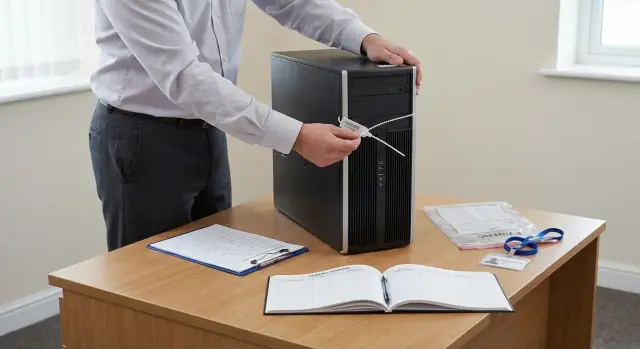
Why tamper control is needed
Tamper control on enclosures is not a formality. It answers four questions in advance: who opened the device, why, what exactly was done, and what happened to the components afterward.
A seal mitigates several typical risks:
- swapping or quiet “migration” of parts between PCs and servers (RAM, SSDs, network cards);
- unauthorized data access by installing a foreign drive or removing a factory one;
- disputes between IT, Security and Service: without traces and records any deviation becomes a conflict.
Agree up front what you consider an "opening." Usually that’s not just removing the lid, but any action that provides access to internal components or requires breaking a mark: opening a side panel, removing a drive from the cage, accessing expansion slots, breaking a seal.
Seals are not always required. If a device sits in a locked server room, access is limited and all work is ticketed and camera‑recorded, a strict access log may be enough. But at workstations, in branches, in shared spaces and for on-site repairs, a seal often gives the clearest signal: the chassis has been touched.
Typically the process solves four tasks: security (fewer unnoticed interventions), audit (a clear history of actions and responsible persons), proper warranty handling and discipline in work.
For manufacturers and integrators who provide support and warranty for supplied PCs and servers, a single opening procedure reduces disputes and speeds incident resolution.
Roles: IT, Security and Service — who is responsible for what
To keep opening control from turning into an argument, split roles in advance. A simple logic: IT is responsible for operation, Security (IB) for control and investigation, Service for repair and warranty requirements.
IT is closest to the equipment: scheduled upgrades, drive replacements, adding memory, moving devices, initial diagnostics. Security defines access rules, records openings, checks suspicious cases and helps preserve evidence so it can be trusted. Service (internal or vendor) carries out repairs, handles warranty cases and clarifies which actions are acceptable without breaking warranty.
It’s convenient to assign roles directly in the process:
- initiator — who noticed a problem or plans the work;
- approver — who gives permission;
- performer — who physically opens the enclosure;
- observer — who is present and confirms the fact;
- evidence custodian — who receives photos, seals, packaging and log entries.
Security often owns the regulation (as an independent function), while IT and Service participate in approval. Exceptions (for example, urgent night openings) should be approved by a predefined matrix. A typical variant:
- office PCs — IT manager;
- servers, storage and finance workstations — Security plus IT;
- warranty repairs — Service plus IT with Security notification.
For critical assets the two‑person rule works well: one opens, the other observes and records. If an SSD needs replacing in a rack, IT can perform the swap, Security confirms the seal integrity and the journal entry, and Service verifies in advance that such access does not break warranty.
Defining the perimeter: what to seal and what not to seal
A perimeter avoids arguing each time. It answers two questions: which devices fall under opening control and in which zones requirements are stricter.
Typically the perimeter includes anything where opening the enclosure could lead to data leakage, part swaps or responsibility disputes. This includes not only office PCs but also equipment that is often left unattended or holds important data: finance and cashier workstations, all‑in‑ones at reception, engineers’ workstations, servers in server rooms or DCs.
Most often you seal desktop PCs, all‑in‑ones and workstations (access to drives and memory), servers and storage nodes (access to drives and controllers), and equipment in critical zones where module substitution is a real risk.
Define levels of criticality. Increased control is needed where financial operations, medical or government data are processed, and in server rooms and DCs. In such zones every opening is recorded and seals should clearly show tampering.
Also list exceptions so IT can work without unnecessary bureaucracy: training labs with test images, benches, pilot machines, decommissioned equipment (if it contains no data).
A concise boundary phrase helps: “Opening control applies to all production workstations and server devices located in offices, server rooms and DCs, except approved test benches, laboratory and decommissioned units.” Add an annex with a list of zones and device types — fewer disputes follow.
Which seals and labels to choose for different enclosures
Choose seals based on what you protect and how often equipment is serviced. More important than a "pretty sticker" is a clear tamper sign and the ability to quickly verify what was on the chassis.
Single‑use tamper‑evident stickers are convenient for office PCs and all‑in‑ones: they’re easy to apply and leaving them usually leaves a message or destroys the layer. Tape seals suit long seams or lids with multiple access points. Plastic or wire seals work where there are lugs, and in dusty or frequently moved places. QR or serial‑numbered options help if the fleet is large and seals are issued by Service or Security.
Practical selection criteria:
- unique number or code;
- obvious tamper evidence;
- resistance to heat and dust (especially in server rooms);
- number legibility after months of operation;
- ability to photograph the number clearly.
Most important is the installation point. A seal should cross the opening line (lid, hatch, screw, latch) but not hinder servicing. On servers it’s often smarter to seal a specific fastener or screw that actually grants access rather than the entire cover.
To avoid confusion, separate identifiers: a dedicated seal number, a device inventory number and a clear point‑of‑installation scheme (for example, “left cover, top screw”). Record the same in the journal and on photos: overall view, close‑up of the seal, and a frame showing the installation point.
Admission rules: who has the right to open
Define in advance who can act independently, who needs approval, and who must never open. The basic principle is simple: the person who is responsible for the result and can properly record the opening should be allowed to open.
Typical access levels:
- full access — can open and replace components within a ticket, with recording;
- access with approval — only after approval;
- access only in presence — work inside the chassis only together with an authorized person;
- forbidden — never (for example, an end user or an unaccredited contractor).
Also list valid reasons: ticketed repair, scheduled upgrade, routine maintenance (cleaning, fan replacement), security incident (suspicion of implant, drive swap, unauthorized access).
Example access matrix
A rights matrix removes ambiguity. Example logic:
| Role | Office PCs | Server room | Critical systems |
|---|---|---|---|
| IT | Full or with approval | Only with approval | Only in presence of Security |
| Security | Only in presence | Full during incident | Full during incident |
| Authorized service | Full by ticket | Full by ticket | With owner approval |
Emergency opening
If there is an emergency (smoke, burning smell, risk of downtime), allow minimal actions: power down, document the state (photo, time, full name), stop any non‑essential work and notify IT and Security. For example, a duty engineer in a server room opens a chassis only to remove power and the overheating unit, then files a ticket and an opening act retroactively the same day.
Step‑by‑step opening and re‑sealing process
To make the process uniform for IT, Security and Service, keep one scenario: justification and recording, the work itself, then restoring protection and reporting.
Before touching the chassis, check the ticket: who initiated, purpose (upgrade, diagnostics, drive replacement, warranty case), whether approval is in place for sensitive systems and whether vendor permission is required by warranty.
Then follow these steps:
- Record the initial state: close‑up photo of the seal and a general view, device and key module serial numbers, external condition and visible damage.
- Remove the seal carefully and pack it as evidence: a separate bag or envelope, date and time, performer’s name, ticket number, signature.
- Perform work with minimal intervention: avoid touching unrelated components and observe anti‑static precautions.
- Record changes: what was replaced, serial numbers, where old components were transferred.
- Re‑seal: new seal, its number in the register, final photo.
After closing the chassis, complete the ticket and notify interested parties: device owner, Security (if storage devices or critical systems were involved), and Service. For warranty items this is especially important: procedure and recordings often resolve disputes before they arise.
Evidence and logs: how to store and not lose them
In disputes, records—not words—decide. Agree in advance what evidence is sufficient and who is responsible for safekeeping.
Minimum to record for each opening:
- who opened and who was present;
- when and where (site, room or rack, inventory number);
- reason and ticket or incident ID;
- seal data (type, number, condition before and after);
- what was changed inside (removed/installed parts, serial numbers of key components).
Photos and videos help if they are repeatable: the same angles, readable numbers and clear context. Usually a short set is enough: device in place, close‑up of the seal before opening, state immediately after removal, final view after re‑sealing.
To prevent materials from "wandering" through chats, establish a chain of custody: who received files, where originals are stored, and who gets copies and on what basis. Often original records are kept by the process owner in Security, while IT and Service access copies via ticket with issuance logged.
Keep an opening log as an official record: sequential numbering, mandatory fields, signatures (or system confirmations), retention period (often at least the warranty period plus internal investigation time). Remember photos may contain personal or commercial data, so limit access by role and mask sensitive parts when issuing copies.
Warranty: how not to lose it because of improper opening
Warranty disputes usually arise not from a failure but from inability to prove who, when and why opened the chassis and what was changed. Therefore opening control should be tied to warranty rules and clear documentation.
Common causes of conflict:
- opening without a ticket or manufacturer service approval;
- breaking or replacing a seal without recording (no photo, number or witness);
- installing “own” parts without checking compatibility and provenance;
- losing serial numbers of replaced parts and old components;
- “on‑site diagnostics” that damage connectors, mounts or cables.
Agree in advance which works the client may do and which must go through service. It’s usually safer to leave simple, user‑accessible operations (for example, replacing a drive in a user‑accessible bay) to the customer, while anything requiring motherboard, heatsink or PSU removal goes to an authorized service. If equipment is supplied and supported by a vendor or integrator such as GSE.kz, confirm with their service team the list of permitted actions and the required format of records.
Track replaced parts carefully: record serial numbers, source and compatibility, otherwise in a warranty claim it will be hard to prove that a failure was not caused by an unsuitable component.
An opening act should contain the minimum that saves time:
- date, place, device (model, inventory and serial number);
- reason and approver;
- seal numbers before and after, photos before and after;
- list of actions and replaced components (serial numbers);
- signatures of IT, Security and performer, and note about return of old parts.
If a seal is damaged and the cause is unclear, do not try to "fix" the situation. Photograph the state, stop work, file an incident and request vendor inspection. This reduces the risk of warranty denial and mutual accusations.
Practical examples: three typical situations and solutions
Below are three situations that commonly cause disputes. In all cases one rule helps: opening control must be part of the overall procedure, not a personal arrangement between shifts.
Situation 1. SSD replacement by user request (for example, GSE L200 PC in the office). The user requests a drive replacement due to slow performance. IT confirms the issue by diagnostics and files a ticket. Security usually does not approve the upgrade itself but checks that the replacement part is allowed and that data transfer will be secure. An authorized engineer or Service opens the chassis, records the seal number and applies a new seal after the work.
Situation 2. Suspected RAM swap at a branch (workstation or server). Security initiates an inspection because the recorded configuration and inventory don’t match. IT provides device access and change history. Opening is done in the presence of two roles (for example, IT plus Security or IT plus Service) with photo evidence and verification of memory module serial numbers. If swap signs are found, the device is taken out of service temporarily and components are packed and labeled.
Situation 3. Emergency server repair at night (for example, S200 in the server room). A duty engineer opens under emergency permission to restore service. In the morning a retroactive report is filed: reason, who opened, what was done, what was replaced and who accepted the work. It’s important to immediately re‑seal and explain why normal approval was impossible.
Typical resulting materials:
- SSD replacement: ticket, work act, photos before and after, record of the new seal, and the old SSD if it must be retained;
- suspected RAM swap: inspection act with serial numbers, photo/video, extraction and packaging protocol, Security conclusion;
- night repair: emergency notification, duty report, recovery act, list of replaced parts, confirmation of preserved warranty terms.
Common mistakes and dispute triggers
The main source of conflict is usually not technology but lack of simple rules understood by IT, Security and Service.
Seals without unique numbers look strict but prove little. If a number is not tied to a device and event (when and by whom it was applied), a seal swap can go unnoticed.
Second mistake — opening without recording the initial state. Then it becomes “it was like this” vs “it wasn’t.” The minimum that often saves the case: a close‑up photo of the seal, a photo of the whole chassis and a recorded device serial number before opening.
Third problem — storing seals and the log "in the open." If anyone can take a seal or edit a record, trust in the process collapses. Access must be role‑based and seal issuance logged.
Fourth — an overly complex regulation. When steps are many and don’t fit real work (night incidents, field visits, quick ticketed swaps), people bypass the procedure.
Another frequent failure is vague exceptions. If you don’t define what to do in emergencies, remote sites or contractor work, disputes recur.
To reduce conflicts usually three things are enough: define who can open and who confirms it, describe 3–4 common scenarios (scheduled replacement, incident, warranty case, field visit), and fix a minimal evidence set (photos plus a journal entry).
Short checklist before opening a chassis
Most disputes start when someone skips one simple step. This checklist keeps the process calm and predictable.
Before breaking a seal, check:
- there is a reason: a ticket/work order, approval under the procedure or a documented emergency with a responsible duty officer;
- the performer’s permission level matches this device and zone, and if needed a witness is present;
- "before" evidence is ready: photo of the seal and installation point, seal number, device and key component serial numbers, date and time;
- materials are at hand: a new seal of the correct type, a bag/envelope for the removed seal, the act form or access to the log;
- the expected finish is clear: "after" photos, record of re‑sealing, list of actions, notifications to responsible parties.
If any item is missing, stop and agree the action in advance. This is cheaper than reconstructing events later and dealing with refusals or claims.
Next steps: how to implement and embed the process
The initial task is simple: make opening control work uniformly for IT, Security and Service, without oral agreements or “exceptions on request.”
Form a short working group: IT (operations), Security (control and investigation), Service (repair and diagnostics) and legal (wording of acts and responsibilities). In 1–2 meetings you can approve a short procedure of 2–3 pages: what counts as an opening, who approves, which documents are mandatory and where photos and removed seals are stored.
Don’t roll out the process to the whole fleet at once. Start a pilot in one unit and one device type (for example, office PCs or a single server rack). After the pilot, adjust pain points: approval time, act template, journal usability, seal storage.
Five steps usually suffice to anchor the process:
- appoint a process owner (often IT) and a controller (often Security) with clear authority;
- maintain a single opening log and the rule “no record — no work”;
- train performers practically (seal application/removal, photos, act);
- define the chain of custody for evidence and retention periods;
- run a monthly spot check of a few cases.
If your infrastructure uses PCs, all‑in‑ones or servers from GSE.kz, agree in advance with the service team on permitted access points and the required documents. This speeds warranty investigations and reduces the "opened incorrectly" risk.
Frequently asked questions
Why control enclosure openings if there is an equipment inventory?
By default, this is needed so it’s clear who accessed internal components, when, and what was changed. It reduces the risk of unnoticed swaps of drives, memory and cards, and simplifies incident and warranty investigations.
What exactly counts as “opening” the chassis?
Typically, any action that grants access to internal components or requires damaging a seal is considered an opening: removing the side panel, accessing expansion slots, pulling a drive from a caddy, or unscrewing a fastener that holds a cover. It’s better to fix this definition in the procedure to avoid arguments.
When are seals really necessary and when can you do without them?
You can often skip seals in a locked server room with strict access control, work done via tickets and camera recording. In offices, branches, shared areas and field repairs a seal is a quick, clear signal that the chassis was handled and helps start an investigation from facts.
Who should own the process: IT, security or service?
A practical division is: IT is responsible for operation and routine work, Security (IB) sets access requirements and investigates, and Service handles repairs and warranty rules. To avoid misunderstandings, assign roles in the process: who initiates, who approves, who opens, who witnesses and who stores evidence.
Which devices should be included in the tamper-control perimeter?
Start with devices where opening actually creates risk: office PCs, all-in-ones, workstations, servers and storage nodes, especially where sensitive or financial data is processed. Exclude approved test benches, labs and decommissioned units with no data.
What types of seals are best for PCs, all-in-ones and servers?
For office PCs and all-in-ones, tamper-evident one-time stickers are convenient. Plastic or wire seals are suitable where there are lugs or frequent transport, and tape seals work for long seams. Ensure each seal has a unique number that stays readable and is easy to photograph.
Where should a seal be placed to be effective?
Place the seal so it crosses the opening line (cover, hatch, screw or latch) but does not interfere with normal servicing. On servers it’s often better to seal a specific fastener that grants internal access rather than the entire lid. Describe the installation point consistently in the journal.
Who is allowed to open the chassis and how are permissions issued?
Introduce access levels: who can open freely, who needs approval, who can act only in the presence of an authorized witness, and who is forbidden to open (e.g., end users or non-accredited contractors). This makes enforcement and warranty protection simpler.
What evidence should be gathered and how should the opening log be maintained?
Minimum proof to collect: photos of the seal and device before opening, the seal number, performer’s name, reason and ticket or incident ID. After work, photograph the new seal and record which components were changed with serial numbers. Store originals in a controlled place so evidence retains value.
How do you avoid voiding the warranty when opening and replacing parts?
The main rule is not to open “just to look” without a ticket, record and clarity on what the warranty allows. Risks arise when seals are changed without recording, serial numbers of swapped parts are lost, or unverified components are installed. If GSE.kz or another supplier provides and maintains equipment, agree in advance which actions are allowed and how to document them.
