8 min read
Employee Self-Service Portal: Platforms for 2025 and Integrations
Employee self-service portal: which platforms to choose in 2025 and how to design integrations with AD, ITSM and the knowledge base without duplicates.
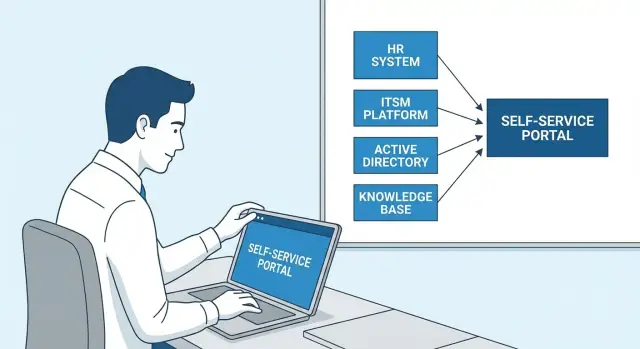
Why a company needs a portal and common pain points
An employee self-service portal is needed where people are repeatedly distracted by the same questions: where to submit a request, who approves it, how to check status. When answers and forms are scattered across email, chats and different systems, time is spent searching for the right entry point instead of doing actual work.
Usually employees want to handle simple, frequent tasks themselves: get a certificate or document (vacation, business trip, HR records), request access (email, folders, business systems), submit an IT request (hardware, software, repair), quickly find a clear answer (instructions, rules, templates) and see status and deadlines without calls or reminders.
Pain appears when there isn’t a single place and common rules. Duplicate requests happen because the user doesn’t see that a request already exists or doesn’t know which type to choose. Knowledge-base duplicates arise when different teams write their own guide on the same topic and after a month those guides start contradicting each other. The result is simple: queues grow, trust falls, and support spends time clarifying instead of solving.
Portal success is measured not by “how many pages we launched” but by clear metrics: fewer inquiries on routine questions, faster time to first response and to resolution, fewer reworks, transparent status at every step. If an employee sees that the request was received, who is approving it and when to expect the result, stress noticeably decreases.
Typically several teams are involved: HR (rules and documents), IT (service catalog and requests), security (access and permissions), and knowledge owners (who’s responsible for articles and their currency). A simple example: a new hire needs system access and a first-login guide. Without a portal they write in a chat, then to IT, then to HR. With a portal they pick one request and receive both access and the current article, without extra back-and-forth.
Define boundaries: HR and IT, roles and data
A good self-service portal starts not from design but from boundaries. If you mix HR questions (personal data, vacations, certificates) and IT questions (access, devices, incidents) into one mashed-up process, you’ll get permission conflicts, duplicate data and long approvals.
A practical principle: separate by purpose, combine for user convenience. A helpful pattern is:
- a single sign-on and user profile (SSO, shared navigation), but different processes and access rights;
- HR stores and validates employee data, IT stores account, access and asset data;
- common scenarios (onboarding, offboarding) are built as end-to-end chains with task handovers between HR and IT.
Next, agree which data are critical for the portal and who is the authoritative source. Usually this includes organizational structure, positions, locations, roles (what can be requested and approved), and assets (laptops, phones, licenses, virtual desktops). Example: an employee moves to another branch. HR updates location and department, and IT automatically reconsiders access sets and assigned equipment. This avoids manual permission grants and loss of control.
Plan access channels in advance. Web is the base, mobile is for quick actions (approve, check status), and corporate messengers like Teams are convenient entry points for routine operations. Email is useful as an intake channel (accept a request and create a ticket) but not as a place to store knowledge and statuses.
From the start, record security and audit requirements. The usual minimum:
- who viewed data and why (role- and department-based rights);
- who approved a request and when;
- who changed data or settings and what exactly;
- log retention periods and access rules.
These agreements later simplify integrations with AD, ITSM and the knowledge base: it’s clear in advance where the “truth” lives, who is responsible and who can change it.
Which platforms to consider in 2025
A platform for an employee self-service portal must solve two tasks: give people a clear single entry point and avoid turning integrations into endless custom work. In 2025 organizations typically choose between several approaches. The right choice depends not on trends but on where the work already lives: in ITSM, in Microsoft 365 or in the Atlassian ecosystem.
ServiceNow Employee Center is usually chosen when you need one front for many processes at once: IT, HR, security, procurement, access. Its strengths are a unified service catalog and approvals, analytics and knowledge management. Downsides are high total cost of ownership and process maturity requirements: without clear service owners the portal quickly becomes a “form dump.”
Jira Service Management paired with Confluence fits when the main need is tickets, a service catalog and a knowledge base “in one stack.” It’s a good option for teams already using Jira for projects and support. It’s important to agree in advance on status rules, queues and knowledge structure, otherwise similar articles and forms will appear.
Microsoft 365 (SharePoint, Power Platform, Teams) is logical if employees already live in Teams and documents and communications are tied to Microsoft. Such a portal often feels most familiar to users, and simple scenarios can be built without heavy development. The risk is a proliferation of DIY forms and lists that become hard to maintain unless you assign data and architecture ownership.
Freshservice or BMC Helix are considered when you need ITSM with a portal and service catalog but don’t want lengthy and expensive customization. This is a pragmatic path if processes are relatively standard and you don’t want to build a platform “for years.”
Before selecting a 2025 self-service platform, ask vendors and integrators practical questions:
- which ready-made connectors exist and how complete are the APIs for AD/SSO, ITSM and the knowledge base;
- how roles and rights are structured: can HR and IT be separated, can fields and articles be hidden by groups;
- where will the “source of truth” for directories live (employees, departments, assets) and how is deduplication handled;
- what reports are available for effectiveness: self-service rate, time to resolution, popular services;
- local requirements: data residency, audit, logs, availability requirements.
Example: if all requests already go through Jira and employees communicate in Teams, sometimes it’s better to keep tickets in JSM and surface the entry point in Teams so you don’t break established habits. But describe in advance where tickets are created, where articles live and who is responsible for order. Otherwise the portal rapidly loses trust.
Architecture: who is the source of truth and how to avoid duplicates
Duplicates almost always appear when the portal tries to become another database. For an employee self-service portal the rule is simple: the portal displays and helps submit requests, while the “truth” lives in source systems.
First, define which data are authoritative. A common layout looks like: personnel data and org structure in HRIS, accounts and groups in AD or Entra ID, requests and the service catalog in ITSM, assets in CMDB, articles and instructions in the knowledge base. If the portal needs a copy, it should be secondary and updated automatically.
Assign data owners. Without them integrations fail not technically but organizationally: it’s unclear who edits fields, approves rules or keeps things current.
Unique identifiers: one employee — one record
To avoid creating “Ivanov I.I. (2)”, agree on keys that systems use to link a person and their account. In practice choose 2–3 stable identifiers and use them everywhere:
- employee number from HRIS as the primary key;
- UPN or email for login and notifications;
- GUID from the directory (AD/Entra ID) for technical linking.
Identifiers should be immutable or have clear rules for change (for example, on name change).
How to connect systems in plain terms
Choose integration methods based on how quickly changes must appear and how critical accuracy is. There are four common approaches: direct API calls (online), events (immediate post-change), scheduled exchanges (hourly or nightly) and an intermediate layer like a bus or ETL (when there are many sources). For access rights and locks you need near-real-time sync, while for org-structure reporting fields scheduled updates are often enough.
A good architecture test: if HRIS or ITSM changes tomorrow, the portal should survive without manual data transfer — only integration adaptation.
Integration with AD and SSO: accounts and rights
If the portal doesn’t rely on the corporate directory it quickly becomes an “island” with manual accounts, different passwords and chaotic access. Active Directory or Entra ID give the portal single sign-on (SSO), clear security groups and basic person data. These can be used in rules and approval routing.
SSO is usually implemented via SAML or OpenID Connect (OIDC). SAML appears more in classic enterprise apps and is suitable when the portal works as a service provider and established enterprise mechanisms are important. OIDC is more convenient for modern web and mobile interfaces, especially if you use APIs. In practice the choice depends on what the platform and your IdP support and on security requirements.
A separate question is which attributes to synchronize so you don’t create duplicates and avoid manual card edits. A minimal useful set typically includes:
- department and location (for visibility rules and requests);
- position (for request templates and access to service showcases);
- manager (for approvals);
- employee status (active, on leave, terminated);
- identifier (employee number or other immutable key).
Build rights on least privilege. Portal roles cover actions (create ticket, approve, admin), and membership in security groups determines which services and data a person can access. Don’t create a “super-role” for all managers without department limits.
Plan lifecycle actions in advance: hire, transfer, leave, termination, lockout. For example, on termination an account may be disabled in AD immediately, but limited portal access to close HR tasks might still be required briefly. It’s better to handle that with a dedicated role and expiry rules than manual exceptions.
Integration with ITSM: tickets, service catalog and approvals
The portal is useful only when it’s not isolated from ITSM. Otherwise the employee sees one thing, support works in another, and statuses and deadlines diverge. The working combination makes the portal the storefront while ITSM remains the accounting and control system.
A minimal integration looks like this: the portal creates a ticket in ITSM, receives the ticket number and updates, and shows a clear progress view to the employee. Typically you need:
- ticket creation from portal forms with correct category and service;
- synchronization of statuses and key fields (assignee, awaiting approval, resolved);
- two-way comments with public vs internal separation;
- notifications: what goes to the employee and what only to the technician;
- closure with confirmation and a short quality rating.
A service catalog often solves more problems than new forms. Describe services in employee language: not “AD group membership” but “Access to the department’s network folder.” Add examples, target times and prerequisites (for example, manager’s full name for approval). A good catalog reduces clarifying questions and speeds processing.
Approvals should be part of the ITSM process, not the portal. The portal collects data and shows who currently has the step, but the decision should be recorded where audits are kept: who approved, when, for how long and with what comment. For access rights it’s important to set expiration and automatic review reminders.
Don’t expose full SLA and internal prioritization to employees. It’s enough to show target completion time, current delay (if any) and the next step. Leave routing rules and technical fields for the support team.
CMDB linkage matters when a service depends on a specific asset: laptop, printer, server, workstation. If requests are mostly about access and typical issues, a simple reference catalog (device model, department, location) is often sufficient without a heavy CMDB. In integration projects GSE.kz often starts with registries and adds CMDB later when processes are stable and data ready for strict accounting.
Knowledge base without duplicates: content rules and lifecycle
Duplicates in the knowledge base almost always appear for one reason: no one decided where the “source of truth” lives. To ensure the portal relieves HR and IT, enforce that every article has a single owner (team or designated person) and only one version is considered current.
Metadata that actually helps
Identical titles with different answers typically stem from missing clear tags. A minimum metadata set helps users, search and automated article selection:
- audience (employees, managers, HR, IT, external contractors);
- service or process (vacation, access, device replacement, business trip);
- product or system (e.g., email, VPN, ERP, printers);
- currency (review date, expiry date);
- version and status (draft, published, deprecated).
It’s important that these fields are filled by template. Then new articles are easier to link to the right service and you avoid creating similar materials.
Search and results without contradictions
If search returns two similar articles, the user will pick one at random and get different instructions. A practical rule is “one question — one article”; put alternative scenarios inside the same page (short blocks: for Windows, for macOS, for branches). For contentious topics include a visible “What changed” block with a date so old screenshots and steps don’t mislead.
The lifecycle must be regular, not “when someone complains.” The article owner should have a clear review rhythm: for example, quarterly for critical instructions and semi-annually for reference materials. Don’t quietly delete outdated content: mark it “deprecated” and leave a redirect to the new article so bookmarks don’t break.
Integration with ITSM delivers maximum benefit when knowledge is suggested before ticket creation. The user starts a request and the system shows relevant articles by topic and service. If the user still creates a ticket after viewing, it’s useful to automatically attach the list of viewed articles to the ticket — this reduces back-and-forth and speeds resolution.
Step-by-step plan: how to design integrations
Start not with connectors but with what people actually want to do in the portal. Collect the top 20 HR and IT requests (from email, ITSM, chats) and turn them into clear services and short knowledge articles. This immediately shows which items are closed by articles and which require tickets and approvals.
Next, map data: which fields and statuses will appear in the portal and where they come from. For example, name, department and position often live in AD or the HR system, while ticket status and assignees live in ITSM. At this stage decide where the “truth” for each field resides to avoid copies.
Practical steps
-
Describe services and knowledge: for each request define the outcome (what the employee receives), required inputs and execution channel (article or ticket).
-
Draw the data map: key fields, reference data, statuses and update frequency (real-time, hourly, daily).
-
Agree identifiers and matching rules. A common choice is corporate email as a key, but verify it doesn’t change (for example, after a name change). If it can change, use a stable ID (employee ID) and define merge rules.
-
Connect systems in sequence: first SSO and roles (who sees and can do what), then ITSM (service catalog, tickets, approvals), and only then the knowledge base. Sequence matters: without roles you can’t properly restrict HR data and internal articles.
-
Run a pilot in one department and measure impact: self-service rate, resolution speed, rework rate, article quality. Also introduce duplicate control: regular reports on similar articles and repeated services, plus a simple rule — every article has an owner and a review date.
Example: when rolling out in a large organization with multiple sites (as in production and service teams) it’s convenient to start with one office or branch to quickly tune roles, account matching and portal-ITSM linkage without affecting everyone at once.
Common mistakes and pitfalls during rollout
Most failures are not about the platform but about launching the portal as a set of forms without agreeing on data, roles and operating rules. As a result employees see different answers in different places and quickly return to email and chats.
One painful trap is having two sources of org structure. For example, HR manages departments in its system while IT uses Active Directory where department names and managers are updated irregularly. The portal then shows wrong approvers and tickets get stuck.
Where it usually breaks
Problems typically look like:
- permissions granted “by habit” (as in an old service desk), without a role model, data owners and clear exceptions;
- integrations made as one-off exports with no handling of changes, errors and conflicts (someone is terminated but access remains);
- service catalog too complex: employees don’t understand differences between similar items and choose randomly;
- knowledge lives in multiple places and articles are later stitched together manually, producing duplicate versions;
- no product owner: controversial decisions are postponed and the portal lacks direction.
How to avoid these traps
Agree simple rules in advance and assign responsibility:
- designate one authoritative source for each data type (org structure, roles, contacts, employee statuses) and forbid manual edits elsewhere;
- describe roles and access in plain language: who sees what, who approves, who keeps content up to date;
- implement event-driven integrations where needed: changes in department, manager or status should update routes and rights;
- simplify the catalog: start with 20–30 top requests and add new items only based on clear statistics;
- introduce an article lifecycle: author, editor, review date, archive.
Small example: if a manager changes in an employee card but the portal doesn’t process it, approval will go to the former manager. From outside it looks like “the portal is slow,” but in fact it’s a lack of data rules and error control. Such details most often erode trust.
Quick checklist before launch
Before opening the portal to everyone, check the items that most often ruin first-day impressions. It’s better to spend 1–2 weeks refining than a month handling complaints and rollbacks.
What must be ready technically and process-wise
- One authoritative source for employee and department data is defined and does not conflict with other systems. Stable identifiers (employee number or UPN) are agreed for integrations so duplicates don’t appear.
- SSO works not just “in theory”: typical scenarios are tested (new hire, transfer, temporary access, termination). Roles and groups are described in plain terms and tested with test accounts.
- The service catalog is understandable to a non-technical person. Each service has a target completion time and a simple description of the result: what the employee will receive and how.
- Knowledge base is manageable: articles have an owner, a next-review date and a rule for handling deprecated content. Duplicates are not “hidden” but removed or merged by the owner’s decision.
- Ticket statuses are transparent: employees see what’s happening and when to expect a response. Notifications help (important changes) and don’t become spam.
A simple test: ask 5–10 employees from different departments to submit a typical request and find an answer in the knowledge base. If at least two get stuck at the same step, that’s your first list of fixes.
Metrics for the first 30 days
Pick 3–4 indicators and record them weekly:
- share of requests resolved via self-service without support involvement;
- reduction in repeat tickets on the same topic;
- time to first response and time to resolution for top services;
- post-closure satisfaction (a one-click short rating).
Example rollout and next steps
Imagine this scenario: on day one a new employee obtains access, equipment and answers to frequent questions without email chains or chats. They log into the portal via SSO and immediately see a personal starter kit: “Corporate email”, “Access to ERP”, “Laptop”, “Access badge”, “Intro course.”
From there it’s straightforward. The employee selects “Laptop”, indicates location and role. The portal auto-fills profile data (department, position, manager). The request goes to ITSM and the manager receives an approval request. After approval the ticket follows the route: warehouse — setup — issuance.
The portal shows progress with clear statuses pulled from ITSM: “Pending approval”, “In progress”, “Ready for pickup.” It suggests relevant knowledge articles like “How to connect to VPN” or “How to set up email on a phone.” Some issues resolve immediately and ticket volume drops.
To avoid duplicates, introduce simple rules: one article — one owner and lifecycle; one service — one template. For integrations use common identifiers (employee number, ticket ID, article ID) and fix data sources: accounts and groups live in AD, statuses and SLAs in ITSM, content in the knowledge base.
Next steps usually are:
- quickly document current systems and where the “truth” currently resides for people, roles, services and content;
- run an architecture session and agree integration flows and permissions;
- launch a 4–6 week pilot in one department with the top 5–10 services;
- after the pilot, enforce service and article ownership rules, then scale.
Who should own it: the internal team if you have experience with SSO, ITSM and content management, or an integrator. For organizations in Kazakhstan some projects — including system integration, infrastructure supply and 24/7 support — are delivered by GSE.kz (gse.kz), especially when workstation and server updates are planned alongside process changes.
Frequently asked questions
What should be in the self-service portal first?
A minimal set — single sign-on, a services catalog, clear request forms, a knowledge base and transparent statuses. If users can’t see what’s happening with their request and when they’ll get a result, they will still go back to chats and emails.
Which services should we start with so the portal actually works?
Start with the top 20 most frequent HR and IT requests and publish them as services and short knowledge articles. This yields quick wins and prevents the portal from growing into hundreds of unmanaged forms.
How to separate HR and IT in one portal so it doesn’t become a mess?
Separate processes and permissions, but keep a single entry point and shared navigation. HR is responsible for personnel data and documents; IT handles accounts, access and devices. Cross-cutting scenarios like onboarding are implemented as task chains between teams.
Why do duplicate requests and data appear in portals, and how to prevent it?
The main rule is: each entity must have one source of truth, and the portal only displays and helps create requests. If the portal starts storing copies of personnel data, access groups and ticket statuses, duplicates and inconsistencies appear quickly.
Which identifiers should we choose to avoid duplicate people across systems?
Use a stable employee identifier from the HR system as the primary key, email or UPN for login and notifications, and a technical GUID from the directory for system linking. This avoids situations where a name or email change creates a “new” person in different systems.
What is critical when integrating the portal with AD/Entra ID and SSO?
Start with SSO via the corporate directory — without it the portal becomes an island with manual accounts and chaotic access. Then synchronize key attributes such as department, manager and employment status so approvals and visibility work automatically.
What is the minimum integration with ITSM to keep statuses consistent?
The portal must be a storefront while ITSM remains the system of record: ticket creation, status synchronization, comments and notifications should flow both ways without manual handoffs. Keep approvals in ITSM so the audit trail is in one place and there’s no dispute about who approved what and when.
How to organize the knowledge base to avoid duplicate or conflicting instructions?
Enforce “one question — one article” and assign an owner responsible for currency and scheduled reviews. If search returns multiple similar instructions, users pick randomly and may get conflicting steps, which increases repeat tickets.
What synchronization method is needed: API, events or daily exchanges?
For access rights and account locks, near-instant synchronization (events or real-time API) is preferable; for reference fields like org structure, scheduled updates (hourly or nightly) can be sufficient if the data source and error handling rules are agreed.
Who should implement the portal and how to tell if it’s successful in the first 30 days?
Run a pilot in one department and measure self-service rate, time to first response and time to resolution, plus repeat tickets on the same topic. If you include integration, infrastructure and support, system integrators usually handle the project; in Kazakhstan, projects with 24/7 support and workstation/server supply are sometimes delivered by GSE.kz.
