7 min read
Electronic Approval of Payment Invoices: Workflows and Deadlines
Electronic approval of payment invoices: how to configure workflows, limits, attaching supporting documents and deadline control so invoices don't get stuck.
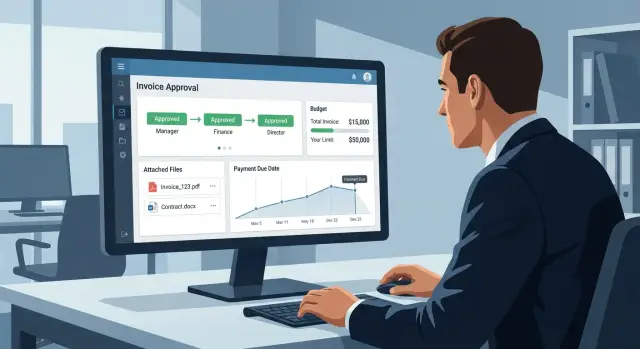
Why move invoice approval to an electronic format
Invoices often arrive through several channels at once: a shared inbox, personal emails, messengers, sometimes even as a scan "in response to a call." As a result the same document is discussed in different places, and the final version gets lost among forwarded chains and attachments.
The problem isn’t only inconvenient. When an invoice gets "stuck" between the initiator and a manager, the payment deadline approaches and the supplier may stop shipments or fail to reserve goods. For the company this means supply disruptions, downtime and extra costs: fines, penalties and paying on less favorable terms.
Electronic approval turns scattered conversations into a clear process where you can see what is happening with the invoice, who is next and when a decision is required. This is especially important when there are many invoices that pass through several control levels.
A unified process usually produces five practical effects: clear statuses and a history for each invoice, assigned responsibility (you can see who holds the document and how long it has been there), deadline control with reminders, uniform rules across departments, and more accurate managerial oversight (bottlenecks are visible early, not only after a delay).
In a typical workflow several roles are involved. The initiator creates the request and explains what we are paying for and under which agreement. Accounting checks the payment details, VAT correctness and compliance with documents. A manager approves the need for the expense. Financial control or treasury checks the budget, priority and payment date.
Real-life example: a procurement manager received an invoice for supplies and forwarded it to a chat. The manager saw the message but postponed it, accounting didn’t get the supporting documents, and the supplier released the reserved goods two days later. In an electronic process that invoice wouldn’t disappear: it would enter a queue, get an owner, reminders and a clear deadline to approve in order to pay on time.
How electronic approval works in simple terms
Electronic approval works like a task queue: the invoice enters the system, goes through checks, then approval according to company rules, and finally is sent for payment. Instead of emails and messages everything happens in one process where it’s visible who currently "holds" the document and what needs to be done next.
It’s important not to confuse document types. The invoice records the amount, payment details and the payment basis (what and to whom we pay). The act, delivery note or combined document (UPD) confirm the delivery of goods or provision of services. Often the invoice comes first and the supporting documents confirm the transaction later. It’s convenient to store documents together but remember their roles: the invoice starts the payment, the supporting documents confirm completion.
To avoid guesswork, statuses are commonly used:
- Under review: checking details, amount, contract, VAT correctness and cost center/article.
- Under approval: managers and budget owners confirm the need and amount.
- Rejected: the document is returned with a reason.
- Ready for payment: all checks are complete and a payment can be prepared.
To prevent the process becoming a chain of messages, assign roles in advance. The initiator attaches the invoice and specifies the payment purpose, the checker confirms data correctness, the approver signs off expenses within the budget, and treasury or accounting sends the payment. When responsibilities are clear there are fewer "who should answer" questions.
A key part of the electronic process is the action log. It records who opened the document, who approved or rejected it, when it happened and what comment was left. This helps quickly understand why a payment was delayed and where the error occurred.
Approval workflows: types and how to choose
An approval workflow is the path an invoice follows from the initiator to payment. When the workflow is chosen correctly the process runs predictably: it’s clear who decides, what is checked and how much time is allowed.
Common workflow types
Companies usually combine several basic schemes:
- Linear: initiator -> manager -> accounting (if needed -> CFO).
- Parallel: multiple approvers receive the invoice simultaneously, the process proceeds after all responses.
- By purchase type: separate chains for services, goods, rent, travel expenses.
- By department or project: different routes for cost centers and budgets.
- Mixed: some steps run in parallel (for example, contract and budget), followed by final approval.
A parallel route usually speeds up approvals but requires clear roles. Otherwise people duplicate checks or assume "someone else will do it."
How to choose a workflow without unnecessary complexity
Identify where decisions are actually made and where only verification is needed. Add a step only if it answers a specific question. For example: the manager confirms the fact and amount, the lawyer checks contract terms, the financial controller checks limits and the accounting team checks payment details and supporting documents.
It helps to answer a few questions in advance:
- Which invoices can be approved without a manager (within limits)?
- Where is a parallel stage useful to avoid waiting for a single person?
- Which expense types require separate checks (contract, budget, payment details)?
- What to do if an approver doesn’t respond (substitute, auto-escalation)?
Example: a rent invoice. The initiator attaches the contract and act, the system sends the document to the lawyer and financial controller in parallel, and after their approval the manager signs off the payment. Fewer messages, fewer returns for minor mistakes.
Limits and rules: make decisions fast and clear
When approvals follow clear rules, invoices don’t depend on "let’s agree in chat." People know in advance who decides, what is checked and how long they have to respond.
Limits by amount and responsibility
The simplest principle is amount-based limits. Up to a certain amount the department manager approves; anything above goes to the finance block (for example, the CFO). This removes unnecessary approvals for small payments and strengthens control where risks are higher.
But amounts alone are often insufficient. You need budget-based limits: the payment must be tied to an expense category with an available balance. If there is no balance, stop the invoice immediately with a clear reason: move budget, change the category, or approve an overspend separately.
A basic rule set usually looks like this:
- up to the amount limit — department manager approves; above the limit — finance joins
- invoices without an expense category do not pass the first approver
- zero balance requires a separate overspend decision
- response times for each step are fixed (for example, 1 business day)
- every decision is recorded: who, when and why
Exceptions, substitution and rejection reasons
Exceptions are inevitable: urgent payments, fines, state fees. Set separate rules for them so "urgent" doesn’t become a universal button.
Simple constraints usually help: an urgent payment requires a comment and confirmation, fines and penalties are approved above the usual limit, state fees go through a separate category, and substitution is enabled automatically for vacations or business trips.
If someone clicks "reject," a reason must be mandatory and specific: no contract, incorrect payment details, wrong expense category, missing act. Then the initiator can quickly fix the error and the invoice won’t circle back endlessly.
Attaching supporting documents: how to assemble a full set without extra requests
Invoices usually get stuck not because of routing but because the document set is incomplete. One person sent the invoice, another asked for the contract, a third noticed the missing act. A simple rule: one invoice — one complete set of supporting documents assembled before starting approval.
The minimum set is usually clear in advance. For most payments the invoice and basis (contract, specification or order) are enough. If delivery or service is completed, add the acceptance act or delivery note. If a document will come later, note this immediately and agree at which step it becomes mandatory so final payment isn’t blocked.
Before sending, quickly check payment details. Errors in BIN/IIN, bank, account number or payment purpose almost always lead to returns and lost days. If the supplier sent a revised invoice, include only the current version in the package.
To avoid searching documents across chats and email, a few simple requirements are enough: a readable scan without cropped edges, a standard format (often PDF), clear file names and a rule “no unrelated invoices in one folder.” Small details, but they save time at every step.
Typically responsibility is split like this: the payment initiator is responsible for a complete package, and accounting checks the quality of details and compliance with accounting rules. Approvers then see everything at once and return fewer invoices for rework.
Payment deadline control: how to prevent overdue payments
Late payments almost never happen "suddenly." Deadlines are usually lost between receiving the invoice, checking supporting documents, approvals and placing the item in the payment calendar. Therefore control is needed not only for the final payment date but across the whole document path.
First, record where the deadline for a specific invoice comes from. These dates should be in the invoice card and used for reminders:
- date of receipt/registration of the invoice
- payment term in the contract or specification
- term specified on the invoice itself (if different)
- planned payment date
- the cutoff date after which fines or supply stops begin
A simple rule follows: the earlier a deviation from the plan is visible, the cheaper the fix. For this set SLAs by stages, for example: document set check — 1 business day, manager approval — 2 days, final approval — 1 day. This makes it clear where time is lost even if the overall payment deadline hasn’t arrived yet.
Reminders and escalations must be predictable. Typically a few thresholds are enough: a reminder to the current performer several days before the planned date, a notice to the process owner on the day an SLA is violated, then escalation to the manager if the delay continues.
You also need a rule for the payment queue. Otherwise the principle "who asks loudest" wins. In practice invoices are often sorted by risk (fines, service stoppage), importance of the supplier, amount and proximity to the deadline.
Good reporting shows not just a list of overdue invoices but bottlenecks: at which stage they get stuck and where SLAs are most frequently missed.
Step-by-step setup: from design to launch
Start from reality, not the system. Take 10–20 recent invoices and analyze how they moved: where they came from (email, EDI, paper), who checked them, where they stalled, who and why returned them for correction.
Next, describe the target workflow with simple stages and roles. Example: invoice registration -> document package check -> budget check -> manager approval -> handoff to payment. For each transition set conditions: which fields are mandatory, which attachments are required, who can send it back and for what reasons.
Then set limits and exceptions. They are usually tied to amount, expense category and purchase type. Example: equipment invoices up to a certain amount are approved by the department head, above that — by the CFO; IT services go through a separate route; urgent payments are expedited but require a mandatory comment and subsequent control.
Design the invoice card. Make fields mandatory that accounting cannot pay without: counterparty, contract/basis, amount, currency, payment term, expense category, department, project, VAT (if applicable). For attachments predefine the minimum: invoice, contract/order, act/delivery note (if available) or proof of receipt.
Practical launch plan:
- choose one department for a pilot and one expense type
- configure workflow, limits and mandatory fields only for that case
- run the process on real invoices for 2–3 weeks and collect reasons for returns
- adjust rules: where fields are missing, where a step is unnecessary, where a substitute is needed
- approve a short regulation: process owner, approval times and change procedures
After the pilot assign responsibilities: who maintains reference data, who changes limits, who manages workflows. Then the process won’t "break" when staff change or invoice volume grows.
Example scenario: how one invoice goes from receipt to payment
A company receives an invoice for equipment. The contract requires payment within 10 calendar days from the date the supporting documents are complete. The goal of the process is to handle the invoice so nobody searches files in email and no amounts are rechecked manually.
The initiator (for example, a procurement manager) creates the invoice in the system: selects the supplier, amount, expense category, deadline and a short comment. They attach the supporting documents as a single package.
The typical package includes the contract, invoice, specification and proof of acceptance (act, delivery note or other document).
Then the workflow triggers. First accounting checks payment details, VAT, contract compliance, dates and attachments. If there is an error the invoice is returned to the initiator with a specific comment (for example, “the specification lists different items”).
After accounting the invoice goes to the manager. Based on limits the system decides whether a second level (for example, the CFO) is required. This avoids debates about "who should sign" and saves time.
Then financial control checks the budget, available balance by category and the planned payment date. If everything is in order, the invoice gets the status "ready for payment" and enters the payment calendar.
To avoid overdue payments the system monitors deadlines: it reminds approvers in advance and escalates with an indication of the stage where the invoice is stuck when SLAs are breached.
Common mistakes and how to avoid them
Biggest problems usually come from undefined rules. Then electronic approval becomes the same chaos, just faster.
Mistake 1: an overly long route "just in case." Every extra participant adds days and blurs responsibility. Keep only those who actually make decisions or perform mandatory checks. Others can receive notifications.
Mistake 2: no process owner and no substitution. A vacation or business trip by one person can stop invoices. Assign an owner (often financial control or accounting) and set substitution and escalation rules in advance.
Mistake 3: launch without mandatory fields and a full document package. Approvers end up asking the same questions and the invoice is returned. Enforce a rule: without key fields and attachments the document does not start.
Processes are most often broken by things like: limits that don’t match actual authority and budgets, no deadline control (reminders and reports), rejections without comments, inconsistent payment purpose formats, and workflows that don’t cover non‑standard cases (urgent payments, advances, partial deliveries).
To fix this, start by reconciling limits with orders and budgets: who approves up to which amount, what to do when exceeded, who signs off on overspend. Then add timers for stages and make comment-on-rejection mandatory with clear reasons to choose from.
Short checklist and next steps
Mini-checklist before launch
Before launch check five things: clear workflows by expense type and department, limits and exception rules, mandatory fields and a supporting documents list, visibility of status and deadlines for all participants, and reminders/escalations plus a designated process owner.
Next steps to keep implementation on track
-
Document the “as-is” and the “to-be” on one page. Take 2–3 most common invoice types (rent, contractor services, material purchases) and write the rules.
-
Run a pilot in one department for 2–3 weeks. Collect return reasons: missing supporting documents, wrong route, no payment term, unclear who is next.
-
Put rules into a short regulation: what is a “complete package,” how much time is allowed for approval, who can change limits and workflows.
-
Introduce measurable KPIs: share of invoices without returns, average approval time, number of overdue invoices. Review bottlenecks monthly and adjust rules selectively.
If you are also rebuilding internal IT foundations for these processes (email, EDI, document storage, accounting systems), make sure the infrastructure is predictable and supportable. In Kazakhstan many organizations rely on locally produced servers and workstations and system integration services from GSE.kz (gse.kz) — convenient when you need to deploy and support corporate services in a single environment.
Frequently asked questions
Why move invoice approvals to an electronic process at all?
An electronic process provides a single source of truth: you can see where the invoice is, who is next and what needs to be done. This reduces the risk of late payment because the invoice no longer gets lost in email and chats, and deadlines and responsibilities are recorded in the system.
Which statuses should be introduced right away for invoices under approval?
Usually it’s enough to have statuses that reflect the process steps: checking, approval, rejection and ready for payment. The important thing is that each status makes it clear who is responsible for the next step and what conditions must be met to move forward.
How do I know a routing workflow isn't too long?
Keep it simple: include only those who actually check mandatory items or make the decision. Build the route around three tasks — verifying details and documents, confirming the need for the expense, and checking the budget and planned payment date.
Which is better: linear or parallel approval?
A linear workflow is easier to control and explain, but it can be slower because each person waits in turn. A parallel workflow speeds things up if roles are clearly defined in advance; otherwise checks may be duplicated and people will expect someone else to act.
Which limits and rules give the fastest benefit?
Start with amount-based limits: small payments are approved by the department manager, larger ones go to finance. Then add a budget rule: without an expense category and available balance the invoice should not proceed, otherwise you'll approve items that can't be paid.
What documents should be attached to an invoice so it isn't returned?
Collect at least the invoice itself and the payment basis (for example, a contract, order or specification) before starting. If delivery is complete, attach the acceptance act or delivery note; if a document is missing, record at which step it will become mandatory so payment doesn't get blocked at the end.
What most often breaks invoice approvals and how to fix it quickly?
Check the details and the version of the invoice before starting, since errors in BIN/IIN, bank, account number or payment purpose almost always cause a return and lost days. Also agree on a clear file format and naming convention so approvers don't have to search for the correct document among similar attachments.
How to control payment deadlines correctly to avoid late payments?
The invoice card should contain dates that determine the deadline: receipt date, contract payment term and the planned payment date. SLA by stages and reminders then help: if a delay appears early, it’s cheaper to fix than waiting until the due date.
How should urgent payments, fines and other exceptions be handled?
Treat urgency as a rule, not an emotion: require a mandatory comment that records the reason and keep the trace in the action log. If an approver is unavailable, have substitution and escalation set up in advance, otherwise “urgent” will become a way to bypass the process.
Why is an action log and approval history for an invoice needed?
The action log provides transparency: it shows who opened the invoice, who approved or rejected it, when it happened and what comment was left. This helps quickly investigate delays, reduces “I didn’t see it” disputes and simplifies internal audits.
