7 min read
EDR/XDR licensing: per endpoint or per server — and servers
EDR/XDR licensing: how to choose per endpoint or per server, and when separate licenses are needed for mail and file servers.
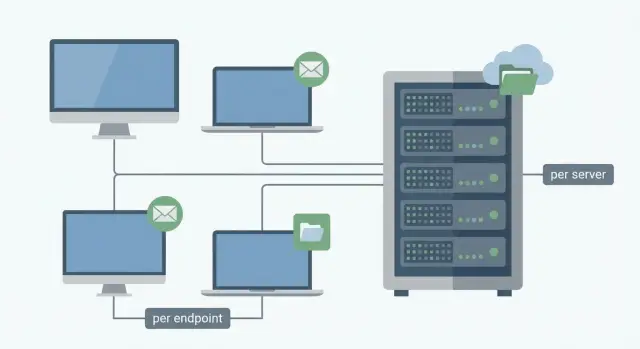
What's the issue when choosing a licensing model
Confusion starts simply: different vendors count EDR/XDR differently, and model names sound similar. In some cases a license is tied to a user device (laptop, PC), in others to a server as a separate category, and sometimes to a role or function (for example, mail protection, file storage, backups). As a result, two offers with the same price per “unit” can lead to very different final sums.
A second common trap is how the vendor defines “server” and “endpoint.” For IT teams this is often “any OS in the rack,” while for licensing it may mean a different agent type, a different feature set and separate rules for virtual environments. Without clarifying these details, it's easy to compare things that aren’t comparable.
IT and procurement usually face a few basic questions: what counts as a unit—device, OS, VM or physical host? Are price and functionality the same for workstations and servers? How are terminal servers and VDI licensed? Does mail and file server protection fall under the general license or are they separate modules? And how are temporary machines, test stands and seasonal loads handled?
If you pick a model by guesswork, the risks are practical but unpleasant. You may under-license critical servers and hit functional limits or audit questions. Or you may over-license and overpay, especially if you have few servers but the server model is “expensive.” A third scenario is that licenses are sufficient but an important feature (for example, extended telemetry for XDR or integration with the mail system) turns out to be a paid option.
Before talking to a vendor it helps to collect a minimal dataset and agree on terminology: a list of workstations, servers, virtual machines and terminal nodes; server roles (mail, files, domain, DBs, applications); what is critical and must be monitored 24/7; and planned changes for the year (virtualization, headcount growth, new services).
A simple example: an organization has 200 PCs and 8 servers. If you choose per endpoint and don’t clarify server roles, you may suddenly find that the mail server requires a different license type. If you choose per server but some services run in dozens of VMs, the bill may grow many times over. That’s why you first work out counting rules, and only then compare prices.
Basic terms: endpoint, server and what counts as a “unit”
In EDR/XDR debates it's often not the price but what exactly is considered a “unit.” Some count devices, others count agent installations, and others count distinct roles.
Endpoint usually means a user device: PCs and laptops, less often thin clients. Mobile devices may be included if the solution has an iOS/Android module, but this isn't universal. The main sign of an endpoint is that a person uses the device, and typical risks are tied to mail, browser and documents.
Server is a system that provides services to others: file shares, mail, databases, applications, domain, virtualization. For licensing, different vendors may treat a server as a physical machine, a virtual machine (VM), a virtualization host (Hyper-V/VMware, etc.), or even a specific server role if their pricing is organized that way.
Why can the same host be counted differently by different vendors? Because the “unit” is linked to how the product is technically deployed and how it measures protection. If an agent is installed on every OS, it makes sense to count by OS (endpoint/VM). If protection operates at the node level, they may count by host. Sometimes a server license is simply pricier because servers carry higher load and the cost of failure is higher.
Additional components are often licensed separately: mail system protection (stream scanning, anti-phishing), protection for file stores and NAS (network scanning, access control), XDR modules (pulling events from cloud, mail, network devices), sandbox and advanced analytics.
Because of this, the phrase “an agent is installed on the server” does not always mean all risks are covered. For example, the agent may detect a ransomware on Windows Server well, but mail stream protection or network file storage protection may require a separate license or connector.
What the per endpoint and per server models affect
The licensing model affects not only price but also how you count coverage, manage risk and pass audits.
For endpoints the primary risk is user actions: phishing, opening attachments, USB drives, browser downloads. Fast and safe responses are valued: isolating the device, terminating a process, quarantining, rollback, and clear notifications for IT and security teams.
For servers the risk is different: they hold data and critical roles. A server runs 24/7, hosts many legitimate services and admin actions, and false positives can disrupt business processes. So on servers depth of telemetry and ease of investigation are usually more important: event chains, correlations, privilege controls, and careful exclusions for service accounts.
When choosing a model it’s useful to clarify in advance:
- what remote actions are available (isolation, process termination, quarantine, rollback);
- how and how long telemetry is stored for investigations;
- whether “silent” monitoring is supported for critical servers;
- whether there are automated rules and response playbooks;
- how a “unit” is counted in terminal environments and on shared servers.
Having a SOC or 24/7 monitoring also changes priorities. If events are monitored around the clock, rich server telemetry is more valuable. If there is no monitoring, clear reports and safe auto-responses on endpoints matter more.
Also consider regulatory and internal policy requirements. They often single out systems with personal data, financial or medical systems. In that case a server model can be convenient because it explicitly separates critical nodes and allows you to set different logging and control levels.
Example: with 300 workstations and 20 servers, per endpoint may cover mass user risks more cheaply, but per server can be advantageous if the servers need extended visibility, separate policies and strict reporting.
Are separate licenses needed for mail and file servers?
Most often mail and file servers are licensed like any other server: a server license is required for the agent installed on the OS that collects events (processes, network connections, changes, attempts to disable protection).
With a file server it's important to understand the goal. EDR sees activity on the OS: mass file renames, a ransomware process, suspicious scripts, creation of new services. But it does not always cover “data-level” tasks such as access control, data leak detection by content, or document classification. If the goal is protecting against ransomware and local attacks, a standard server license is often enough. If you need protection of data as a class, a separate module or a different type of solution may be required.
With a mail server the logic is similar. An EDR agent on the server helps detect attacks on the OS and accounts (admin takeover, malicious processes, suspicious connections). But main mail threats often arrive before the server: phishing, malicious attachments, links, sender spoofing, account compromise via mail. These are usually addressed by a mail gateway or cloud mail protection, not by EDR.
A separate module or license may be needed if the product treats “mail protection” as a distinct function: stream scanning of attachments and URLs, sandboxing files, anti-phishing and BEC protection, or integrations with a specific mail platform as a separate sensor.
To quickly decide what to buy, answer three questions: where do you want to catch threats (on the server or at mail ingress), which event sources are needed (OS, mail traffic, logs), and what exactly does the license state (server, role, module).
Special cases: roles, virtualization, terminal environments
In real networks it’s rare to have “one server — one task.” Because of roles, virtualization and terminal environments it’s easy to miscount and then hit limits or overpay.
A server with multiple roles (for example AD + files + print) is usually counted as one unit if it’s one OS instance and one agent. Exceptions occur when the vendor licenses modules separately (for example protection of mail components or advanced analytics). So look not at the list of roles but at what is actually installed and enabled: one agent per OS or several components with different conditions.
Under-counting in terminal servers and VDI happens due to user density. One RDS/terminal server can host tens or hundreds of users, and one malicious action can quickly become a mass incident. Licensing variants include: server-based (for the terminal server itself), per VDI-VM, or per users/sessions—this depends on vendor rules.
For non-persistent VDI, clarify how rotation is counted: by the maximum concurrently active VMs, by the number of VMs created over a period, or by the pool size. This is critical—otherwise the monthly churn can exceed expectations.
In virtualization and cloud the main question is whether licensing is tied to VMs or to the physical host. In classic models each VM is often counted because the agent is installed in the guest OS. But for data centers licensing by host (sockets/cores) or a license that covers all VMs on a licensed host is also common. If you have frequent VM migrations, clarify what happens to rights when a VM moves between hosts.
Clusters and failover also bring surprises. A “cold” standby that is truly powered off and only brought up in an incident is sometimes allowed without a separate license, but this is not guaranteed. If a node is active, participates in balancing or holds replicas, it usually must be licensed like any other server. Also clarify how a cold node is counted for support and updates.
Before purchase it’s helpful to fix answers in writing:
- whether a unit is counted per OS (physical/virtual) or per virtualization host;
- what happens to a license when a VM migrates between hosts;
- how VDI and terminal environments are counted;
- whether passive cluster nodes and standby servers need licenses;
- whether there are paid modules for specific roles even when one agent is present.
How to choose a licensing model: a step-by-step approach
Choosing between per endpoint and per server almost always depends not on what looks cheaper on paper but on how your workplaces, server roles and response processes are organized.
A practical workflow looks like this.
First, do an inventory: user PCs and laptops, dedicated servers, virtual machines, terminal hosts. It’s important to record not only counts but OS types and criticality.
Then classify servers by purpose: infrastructure (AD, DNS, DHCP), mail, file, databases, applications, VDI/RDS. Different roles may follow different counting rules.
Next, mark where advanced features are required. For mail and web gateways anti-phishing, attachment analysis and sandboxing are often important. For file servers you may want ransomware protection and quick rollback. Sometimes these are not a separate server license but a separate module or package.
After that, check investigation requirements: who responds to incidents, which logs and retention periods are needed, and which integrations are mandatory (SIEM, ticketing, SOC). This determines whether base EDR is sufficient or whether you need XDR with correlation.
Only then ask vendors for exact counting rules tailored to your setup: what counts as an endpoint, what counts as a server, how VMs, clusters, standby and test environments are handled.
If you're buying through an integrator, ask for two calculations (per endpoint and per server) on the same feature set. That immediately shows cases where one option looks cheaper simply because required protections were omitted.
Common mistakes when purchasing EDR/XDR licenses
Licensing mistakes rarely look critical at purchase time but often surface during deployment: the agent is not installed on some nodes, features are unavailable, or costs rise after the contract is signed.
First group of errors is in counting objects. People often count only workstations and forget servers: domain controllers, virtualization hosts, file resources. Another typical problem is mis-accounting for VMs: sometimes VMs are licensed, sometimes hosts, and sometimes both levels are tied to separate packages. Finally, planners do not account for growth and temporary nodes: migration VMs, DR sites, “temporary” services that become production unexpectedly.
Second group is in expectations of functionality. People often expect EDR to provide what mail or perimeter protection does. An agent on a server helps see and stop malicious actions on the host but does not replace incoming mail filtering, anti-spam and attachment scanning if those are required by policy.
Another frequent scenario: buying the minimal edition and later finding limits—insufficient telemetry, no required retention, few automated responses, or missing integrations with SIEM/SOAR. Formally a license exists, but investigative and response tasks remain unresolved.
To avoid overpaying or being left unprotected, document three things in the specification: counting rules (what is a unit), the list of covered roles (mail, files, virtualization) and the list of mandatory functions.
A short checklist before choosing and ordering
Before purchasing, take 20 minutes to verify facts. Overpayment usually comes not from an “expensive vendor” but from incorrect accounting: what is considered a device, where agents are installed, and which roles require separate protection.
Collect answers and record them in one file (a spreadsheet works). Attach it to your request so everyone calculates on the same basis and there are no surprises.
- How many endpoints and servers do you have now, and what will be added in the next 3–6 months?
- Which “special” servers are present: mail, file, terminal, domain controller, application servers?
- Where critical data resides and which nodes will be prioritized during an attack?
- Who responds to incidents: your IT/Sec team or do you need 24/7 monitoring?
- Which counting rules are confirmed in writing: definitions of endpoint and server, VM accounting, license transfer on hardware replacement, and whether separate licenses or modules are needed for mail and files?
A small example: 120 workstations and 15 servers, including 1 mail server, 2 file servers, 2 terminal servers, and the rest infrastructure and apps. If you choose per endpoint and don’t clarify how terminal environments are counted, you may under-order or overpay. Ask that the calculation be tied to your node list and agreed in writing.
Example scenario: how to count licenses for a typical organization
Let's take a 250-employee company. There are user devices, several physical servers and a virtual environment. The goal is to count licenses to cover risk without buying excess.
Step 1. Define what needs protection
First record the inventory:
- 230 employee PCs and laptops;
- 8 physical servers (hypervisors, file server, domain roles, application servers);
- 20 virtual machines (including mail and services);
- mail: on-prem server or cloud service;
- shared file resource (SMB shares).
Remember a simple rule: if an agent is installed on a device or OS, it is usually a separate licensable unit. If mail is in the cloud, there may be no “server” unit, but a separate mail protection module could still be required.
Option A. Per endpoint model
Count all endpoints with an agent: 230 user devices + 8 physical servers + 20 VMs = 258 per endpoint licenses. Add a small buffer, for example 5–10% for new laptops and temporary devices.
Where extra items often appear: mail protection (if you need attachment and phishing scanning at flow level), network sensors (if you want lateral movement visibility), and sandboxing for suspicious files.
Option B. Per server model
The logic differs: workstations may be licensed separately, and servers are counted “by server.” For example: 8 physical servers + 20 VMs = 28 per server licenses.
The nuance is that a separate mail/file server license is needed only if the vendor actually sells those functions as a separate product (e.g., a mail gateway or a separate cloud mail protection module).
To keep the spec tidy, it’s better to collect by functions and assets rather than by role names: EDR/XDR licenses per the chosen model, and separately—mail modules, sandboxing or network sensors if truly required.
Next steps: how to prepare for deployment without overpaying
Saving on licensing is easiest before purchase, when you can calmly compare models and remove unnecessary items.
Gather inventory and topology: workstations and laptops, servers, virtual machines, terminal servers and roles (mail, files, domain, DBs). Mark where critical data lives and which services cannot be stopped even briefly.
Phrase requirements simply: “detect ransomware on a file server,” “see suspicious logins to the mail system,” “require quarantine and remote host isolation.” This helps determine whether EDR on endpoints is enough or you need broader correlation and XDR features.
Compare 2–3 vendors on the same asset list: per endpoint, per server, hybrid options and growth buffer (usually 5–10% per year). At the same time plan deployment infrastructure: where the management console will be, log storage requirements, and admin access organization.
If you need a second opinion during assessment, integrators often provide it. For example, GSE.kz usually start not from “number of employees” but from an exact node list and mail topology so the quote matches real architecture and leaves no critical servers without required functions.
Frequently asked questions
Where should I start when choosing between per endpoint and per server to avoid mistakes?
Start with the vendor's counting rules: what they consider a “unit” (device, OS, VM, host), how they distinguish endpoint and server, and which roles/modules are charged separately. Then take your actual inventory (PCs, servers, VMs, RDS/VDI, clusters) and request a quote in both models with the same set of functions so the comparison is fair.
Why can two offers with the same price per license result in different totals?
The most common mistake is comparing the “price per unit” without understanding what that unit actually is. One vendor may treat a server as a VM, another as a physical host, and a third as a different agent type with different features. As a result, the same price per “license” can lead to very different total budgets and coverage.
What is the practical difference between per endpoint and per server?
Per endpoint is usually counted per protected OS/device where the agent is installed: PCs, laptops and sometimes server OSes if they fall under the same license type. Per server typically treats servers as a separate category with distinct pricing and conditions, while workstations are counted separately. The key is to check in advance whether server OSes are included in an endpoint license and whether features are identical for workstations and servers.
How can I find out what the vendor considers a server and what an endpoint?
Ask the vendor what in their price list is meant by “server” versus “endpoint”: the agent type, available response actions, volume and retention of telemetry, and rules for virtualization. Also clarify how they count virtualization hosts, VMs and clusters—this is where unexpected extra charges often appear.
Is a separate license needed for a mail server with EDR/XDR?
Often a standard server license is enough if the goal is to detect and stop malicious actions on the server OS itself (for example, encryption attempts, suspicious processes, or disabling protection). But if you need to protect the mail flow specifically (phishing, scanning attachments and URLs before delivery), that is frequently a separate module or product. Decide where you want to catch threats: at mail ingress or on the server.
Is a separate license required for a file server, or is a regular server license enough?
To protect against ransomware and OS-level attacks, a normal server license with an agent on the file server is often sufficient because it sees mass file changes and suspicious processes. If your goal is broader—data access control, leak detection by content, or document classification—EDR alone may not cover it without additional components. First define the task: “protect the server” or “protect data as a class.”
How are terminal servers and VDI typically licensed?
In terminal environments one server serves many users, and miscounting becomes costly. Licensing options vary: per RDS server, per VDI image/VM, or even per user/session—this depends on the vendor. Before buying, clarify how the vendor counts units for RDS and VDI and whether price or functionality differs in those scenarios.
What should I clarify about licenses if VDI is non-persistent?
For non-persistent VDI, the important rule is how rotation is counted: by the maximum number of simultaneously active VMs, by the pool size, or by the number of VMs created over a period. If this isn’t clarified, you can exceed the license limit unexpectedly even with a small number of users. Ask for the rule in writing and tie the calculation to your pool scheme.
How should clusters, VM migrations and standby servers be accounted for in licensing?
Clusters, migrations and DR often break neat calculations. Find out what happens to a license when a VM moves between hosts, and whether passive nodes (standby) require licensing if they are occasionally started, hold replicas, or participate in balancing. It’s better to document failover scenarios in advance to avoid emergency purchases later.
What data should I gather before talking to a vendor or integrator (for example, GSE.kz) for an accurate estimate?
Provide a short package: number of PCs/laptops, list of servers and their roles, number of VMs and the virtualization platform, presence of RDS/VDI, and your plans for the year (growth, migrations, new services). Also mark which nodes are critical and need extended monitoring and investigation. With this data, an integrator or vendor can calculate both per endpoint and per server options without hidden “additional modules.”
