8 min read
EDO Integration with Accounting and Archive: What to Synchronize
EDO integration with accounting: which statuses, attributes and identifiers to send to the archive so documents don’t get lost between systems.
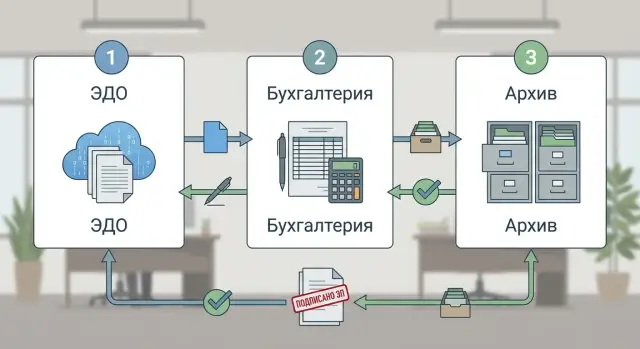
Why documents get lost between EDO, accounting and archive
The most common symptom: a document is visible in EDO, but accounting cannot post the transaction, and the archive does not have the final version. The reverse happens too: the accounting entry exists, but you can’t quickly open the signed file or find the approval chain.
Such breaks almost always appear in one of four areas: status, file, attributes or the link to the business transaction. For example, the document was uploaded to accounting, but the “Signed” status didn’t arrive, and the system won’t close the period. Or the status arrived, but the file (or signature) didn’t, and the archive receives an empty record.
A separate pain point is attributes. EDO often stores what’s needed for exchange (counterparty, number, dates, type), while accounting and archive require strict fields: organization, contract, expense item, responsibility centers, retention period. If some fields aren’t synchronized or are filled “loosely,” the document fails checks, goes to exceptions or gets stuck on export.
Manual edits easily break the chain. If an accountant changes a number or date in one system “for neatness” while another system treats those fields as keys, the link falls apart: the next sync creates a duplicate or updates the wrong document. The same happens when the archive manually replaces a file with a “correct” scan while EDO continues to consider the old version current.
To avoid this, agree in advance on rules: which statuses are authoritative, which fields can be edited manually, what counts as the main identifier and who resolves errors. Without these agreements, even a well-built exchange between EDO and accounting becomes a constant search for missing items and a debate about where the correct version lives.
Process map: what should go where
To prevent lost documents, first draw a simple exchange map between three contours: EDO (where the document appears and is signed), accounting (where it’s reflected in records and affects postings) and archive (where the final version with signing evidence is stored). Without such a scheme, setting up exchange often turns into a set of disconnected exports.
Describe events that trigger exchange, not systems. Usually these are: receipt of an incoming document, signing by both parties, rejection, correction, annulment. Each event should have a clear result: exactly what we send, where, and what we consider completion.
It’s useful to record roles and expectations up front. The accountant needs a record in the ledger with correct attributes and a clear status. Legal needs signing confirmations and immutability. The archivist needs the final version and retention period. IT is responsible for exchange queues, logs and retries.
Which system is authoritative for statuses and files
Decide from the start which contour is authoritative for different kinds of data:
- for signing statuses and legal significance, EDO is usually authoritative
- for accounting attributes and register postings, accounting is authoritative
- for storage of final files and evidence, the archive is authoritative
- for routing and exchange errors, the integration log is authoritative (if available)
A small example map
A supplier sent an act. In EDO it’s marked as received and goes to the lawyer for approval. After signing the status changes to “signed,” and a card with attributes and a link to the file is sent to accounting. When the accountant posts the document, EDO receives a mark “reflected in accounting.” Then the archive receives the final version of the file together with signatures and the completion date, so next year you don’t have to search for the true document.
Unified identifiers: how to properly link records
What to consider the key
To avoid a document disappearing between EDO, accounting and archive, it must have one main technical key. Most often this is the internal unique ID from EDO (GUID or equivalent). It’s important to keep it unchanged when passing to the accounting system and then to the archive, even if the document is renamed, renumbered or its attributes are corrected.
Number and date are convenient for people and search, but they’re poor keys. Numbers can repeat across counterparties, sometimes change during corrections, and dates can be multiple: creation date, signing date, receipt date.
A practical rule: the GUID from EDO is the document’s passport, while number and date are the storefront.
Agree in advance which identifiers you store in each system as mandatory:
- EDO document GUID (key for synchronization)
- package or chain ID (if present: original, correction, adjustment)
- party identifiers: BIN/IIN plus branch or subdivision code (if applicable)
- ID of the related object: contract, order, delivery, payment (ID, not name)
- file(s) and signature(s) IDs so the archive can unambiguously match attachments
How to resolve duplicates and versions
Confusion is most common when a similar document arrives again. Better to fix a few simple rules ahead of time.
If the GUID matches — it’s the same document, even if the number or amount changed (usually an update or clarification).
If the GUID is different but number, date and counterparty match — it’s not necessarily a duplicate. It could be a new version, a correction or a document under a different contract. Here linkages help: contract ID, order or delivery ID.
Example: the supplier sent an invoice and later sent a correction. The number is the same, but in EDO it’s a new GUID with a link to the previous one. In accounting keep both GUIDs, and in the archive record the version chain. Then you can see which document is current and nothing gets lost.
Statuses: which set to synchronize and how to avoid confusion
Problems begin when each system has its own language. In EDO a document may be “signed,” in accounting it’s still “under correction,” and in the archive it’s already “accepted for storage.” For predictable exchange you need a minimal set of statuses that all three parties understand.
Minimal common set
A “core + extensions” approach works well: synchronize a small common set and keep system-specific statuses inside each system, storing them in a technical field or comment.
Usually five basic statuses are enough:
- Draft (card exists but exchange not started)
- Sent/received (delivery and receipt fact)
- Signed (signed by parties)
- Rejected (needs correction or refusal)
- Annulled (document canceled by rules)
In EDO these statuses often exist as: sent, received, signed, rejected, annulled. In accounting similar meanings are expressed as “accepted to accounting,” “posted,” “reversed,” “under correction.” For archive important statuses are “accepted for storage,” “frozen” (no edits allowed), “replaced by version.”
Transition rules and who has authority
Documents usually don’t get lost because of the status itself but because of incorrect transitions. Typical scenario: accounting marks “posted,” then EDO later sends “rejected” — and the record hangs.
Simple prohibitions and roles help:
- Do not move to “accepted for storage” before the document is “signed.”
- “Annulled” should not automatically become “reversed” without accountant confirmation.
- “Rejected” in EDO should place the document in accounting as “under correction,” not delete it.
- “Frozen” in the archive forbids any changes to the card except adding an administrative note.
- Status changes should be performed by the process owner: EDO manages exchange and signatures, accounting manages postings, archive manages storage.
This makes statuses not just words but predictable logic: the document won’t disappear and will remain in a known state.
Document attributes: what to always send to accounting and archive
If you synchronize only the file and number, the document will almost certainly get lost: accounting won’t attach it to the correct object, and in the archive it will be hard to find and prove authenticity. So send not “everything,” but a minimal yet sufficient set of attributes.
Below are attributes that should be mandatory so the document is correctly reflected in accounting and reliably stored in the archive.
- Signatures and authenticity proof: who signed (full name), role/side (supplier, buyer), signing time, signature validity flag (valid/invalid/requires check). For the archive this is evidence; for accounting it’s control for closing.
- Dates for different purposes: creation date, receipt date, signing date, posting date. These dates often differ but each affects perioding, payment terms, VAT and internal rules.
- Parties and “logistics”: supplier and buyer, and shipper/consignee if different. This helps pick the correct contract, warehouse/subdivision and identify who’s responsible for discrepancies.
- Financial data and line items: amount, VAT (rate and amount), currency and exchange rate, plus lines with items/services, quantity and price. If you don’t send lines, accountants will enter them manually, which causes errors.
- Classification and links: expense item, project, responsibility center, flags like “original/correction,” “adjustment” and a link to the previous document (e.g., original invoice). This prevents double postings and confusion with adjustments.
Practical example: an invoice arrives then a debit adjustment arrives. If the accounting system doesn’t receive the “adjustment” flag and the link to the original, it may post the correction as a new primary document. In the archive, without a “previous document” link, reconstructing the chain will take hours and manual reconciliation.
Good rule: anything that affects postings, taxes, search or signature proof should be an attribute, not only text inside the file.
Files, signatures and versions: how not to lose attachments
Often only the document card and status are synchronized. Losses begin where a document has multiple files, a signature is in a separate container, or edits happen after comments.
What to store together with the document
Agree on a minimal package that all systems understand. Usually it includes the primary file, attachments (specs, acts, scans), a printable form (if used for verification), receipts and operational exchange confirmations (delivery, acceptance, rejection), plus error or notification protocols if the document didn’t arrive.
It’s important that accounting and the archive receive not a single file but the whole package. Otherwise you can’t prove the sent composition or restore the chain later.
To control integrity, store file attributes: hash (e.g., SHA-256), size, format, filename and upload date. If one system names the file differently or the size differs, mark a discrepancy immediately.
Signatures, timestamps and versioning
An electronic signature often lives as a separate file or container. The archive needs the signature container itself and verification metadata: who signed, when, certificate used, verification result, and timestamps if applied. Don’t limit yourself to a “signed” status flag.
For versioning the rule is simple: new should not overwrite old. If a document is returned for correction, record the new version as a separate object linked to the same card with a version number and reason for change. Practical policy:
- document ID + version ID as a unique pair
- “current version” flag only on one record
- forbid deletion of version files
- link “corrected on the basis of version X”
One more principle that reduces disputes: decide where the archive always takes the file from. For example, the archive might always take from EDO as the source of legally significant packages, while accounting keeps a working copy. Then it’s easier to investigate where a wrong version appeared.
Step-by-step: how to set up synchronization of statuses and attributes
Follow a simple order: first align directories, then fields, then enable automatic event sending. Otherwise a document will sit in a queue with an error simply because the counterparty was not found.
1) Synchronize basic directories
Agree which system is the source of truth for each directory and synchronize them on a schedule or on change. Most often this is counterparties, contracts and product lists. Transfer not only names but keys: IIN/BIN, contract number and date, item or service codes.
2) Make a field and status mapping table
The same concept often has different names in different systems. Fix this in a table: EDO attribute → accounting field → archive field. Separately describe status rules: what is final, which statuses are intermediate and which transitions are forbidden.
3) Configure sending triggers
Choose events after which data must be forwarded. Usually these are receipt, signing, rejection, annulment and archive transfer. For accounting it often makes sense to send only after “signed by both parties,” and to the archive after the process is complete (by your rules: after period close or final approval).
4) Queues, retries and loss protection
Exchange must be able to retry on failure and not create duplicates. Use message queues, limit retries and implement idempotency: resending the same document does not change data a “second time,” it only confirms delivery.
5) Enable an exchange log suitable for investigations
Logs should help quickly understand where things got stuck. Minimum set:
- external document identifier and internal IDs in all systems
- event (trigger) and send time
- status before and after synchronization
- result (success, error) and error text
- retry count and current queue
Then you can reconcile “signed in EDO, posted in accounting, closed in archive” without searching multiple journals.
Example: the path of one document from EDO to accounting and archive
Scenario
A company receives an incoming invoice (or act) from a counterparty via EDO. The goal is simple: the document appears in EDO once, is posted in accounting once, and is archived once — without duplicates and without lost files.
Step 1. The document arrives in EDO and receives a primary identifier (ID) and receipt date. It’s important to preserve two values: the external document ID from the operator (or GUID) and the internal ID in your database. If this link isn’t preserved, the document can easily become “unknown” to accounting.
Step 2. The responsible person checks attributes: counterparty, IIN/BIN, number and date, VAT, amount, contract/order. After check the document moves to a clear status like “verified, ready for signing.” In practice such statuses are used as a signal: you can create a record in accounting.
Step 3. Accounting receives the document card, creates the posting and must save a link to the same EDO ID. If the document relates to a specific delivery or service, link it to the basis (order, goods receipt). If accounting changes amount or date, this should be returned to EDO as a comment or separate event, not silently live only in accounting.
Step 4. After signing by both parties EDO shows a final status like “signed / legally significant.” Then the archive receives the package: original file, signatures, receipts and protocols (if any), plus metadata.
What must match in the three systems
Check that at minimum these are synchronized:
- unified ID (external and internal, without recreation)
- status (received, verified, signed, rejected) and change date
- amount and currency, VAT where applicable
- main file and all attachments, plus signatures
- link to the accounting operation and document number
If even one of these elements lives separately, the document becomes hard to find: signed in EDO, posted in accounting, but the archive has no amount or no file.
Control: how to quickly find mismatches and stuck documents
Even a well-tuned exchange can fail: a document arrived in EDO but didn’t appear in accounting, or the archive received the wrong version. Build control as regular reconciliation, not a quarterly fire drill.
Quick registry reconciliation
The basis of control is a unified exchange registry showing how many documents arrived, how many were processed successfully and how many ended with errors. Reconcile counts and key attributes: date, type, amount, counterparty.
Keep 4–5 indicators you can check in 5 minutes:
- received in period / forwarded to accounting / forwarded to archive
- processed successfully vs with error
- documents without a final status older than N days
- mismatches in amount or date between EDO and accounting
- share of documents with manual edits
How to catch stuck items and exchange errors
For stuck items set a threshold, e.g., 3 or 5 business days without a final status. Then the rule is simple: either the document moves forward or it must have a documented reason for the stop.
Alerts should be based not just on the error but on the error type. Typical causes: counterparty not found, wrong document format, missing mandatory attribute, archive or storage unavailable. The notification should state who fixes it: accounting, IT, EDO operator or the party owning the directory.
A weekly sample check of 10–20 documents helps: do statuses match across three systems and does the file open with the correct signed version? For example, if accounting shows “posted” but the archive contains a draft without signature, then attachments or versions are being lost.
To keep investigations short, prepare a brief report: cause, how many documents affected, who is fixing it, deadline.
Common integration mistakes and how to avoid them
The nastiest failures usually come not from outages but from small undocumented agreements. As a result a document exists in one system and appears missing in another.
One common mistake is using number and date as the document key. If a counterparty sends a correction or reissues a document you get a duplicate: same number, similar date, but a new entity. It’s more reliable to link records by an immutable identifier (EDO ID) plus a version or package ID.
A second trap is synchronizing statuses “as is” without understanding the reason for the change. If accounting or archive receive intermediate statuses they don’t need, the chain breaks: the document starts “jumping,” and responsible people see an incorrect picture. Predefine which events should be sent to other systems and which remain internal.
What most often breaks accounting
Problems appear when accounting receives only the header without the line items. Totals stop matching: EDO has detailed lines and VAT by row, while accounting gets a single aggregated amount. If the document impacts postings, send line items, VAT rates, currency, discounts and totals in a way that allows verification.
Another typical mistake is overwriting old files during updates. EDO may get a corrected PDF, new XML or additional attachments while the archive retains only the last version. It’s better to keep history: who replaced the file, when, why, and which signature belongs to which version.
Technical details that cause big mismatches
Even time zones and date formats can spoil chronology: “signed” may appear earlier than “received” because one system writes UTC and another uses local time. Normalize time to one standard and send it explicitly.
Without an exchange log you won’t get far: if you don’t record send, receive, errors, retries and link them to a specific document and its version, you won’t know where it went missing.
Quick checklist before go-live:
- don’t use number and date as the only key
- send not only status but the event/reason that changed it
- send line items, not only the total amount
- store file and signature versions, don’t overwrite them
- keep an exchange log with clear errors and a correlation ID
A simple example: a supplier sent a universal transfer document (UPD) and later a correction. If the key is “number+date,” accounting will have two documents while the archive keeps one file. If the key is document ID + version ID, you see one document with two versions and a clear status history.
Quick checklist and next steps
Before going into production check the basics that most often cause lost documents between systems:
- Unified document identifier: one ID stored in EDO, accounting and archive, plus a clear rule for copies and corrections.
- Status mapping: agreed list of statuses and transitions (e.g., created, sent, signed, rejected, annulled, archived) and what counts as final.
- Mandatory attributes: counterparty, contract, date, amount, VAT, currency, subdivision, responsible person, document type, retention period, basis for postings.
- Versions, attachments and signatures: how files, attachments, signatures and timestamps are sent and what to do when a version is updated.
- End-to-end exchange log: who, when and what was sent, what the system accepted, what was rejected, and where to find errors.
Then agree responsibilities. In practice incidents persist not because of technology but because of gray zones: who updates counterparty and contract directories, who fixes status mapping, who closes incidents and in what timeframe. It’s best to fix this with a simple regulation and a single channel for investigations.
Steps that usually give quick wins:
- start with a pilot for one document type (e.g., incoming invoices) and reduce manual edits to zero
- add discrepancy control: a daily report of stuck documents and those missing mandatory attributes
- prepare storage and backups: separate policies for files, metadata and the exchange log
- set up monitoring: message queues, errors, delays, overflows and clear alerts
- after the pilot expand scope one process at a time, not mixing different accounting rules
If you need infrastructure — archive servers, workstations for accounting, resilient storage and 24/7 support — GSE.kz as a system integrator and equipment manufacturer in Kazakhstan can help select and supply hardware and provide support.
Frequently asked questions
Which identifier is best to use so the document doesn’t “fall apart” between EDO, accounting and archive?
The primary key is an immutable technical identifier from EDO (GUID/ID). It must be stored in accounting and archive as a mandatory field and never be "recreated" using number and date. Keep number and date for people and searching, but do not use them as the only method to link records.
Which statuses are really worth synchronizing between the three systems?
Synchronize a short “core” set of statuses that everyone understands: received/sent, signed, rejected, annulled and a basic created status. Leave internal statuses like “with lawyer for approval” inside the system, but store them in a technical field or comment so they don’t break the common logic.
Who should be the “source of truth” for statuses: EDO, accounting or archive?
Typically the source of truth for legal significance and signing is EDO, for accounting actions (posted, reversed, period closed) — accounting, and for storage of the final file package — the archive. It’s important to document this in rules, otherwise one system will keep reverting the status and the document will hang or duplicate.
Which document attributes must be passed to accounting so it can be posted without manual input?
Send not only the header but everything that affects postings and controls: parties, amounts, VAT, currency, dates (creation, receipt, signing), and the line items if they’re needed for verification and posting. Also always provide linkage to the basis: ID of the contract, order, delivery or another object the accounting entry should be tied to.
What exactly should the archive receive so the storage is considered complete?
The archive needs the final legally significant package: the main file, all attachments, the signature container(s) and exchange confirmations, plus metadata about signature verification (who signed, when, verification result). If the archive receives only a PDF without signatures and receipts, it will be hard later to prove authenticity and reconstruct the event chain.
How to handle versions, corrections and adjustments properly so the history is not lost?
Do not overwrite the old with the new. Store corrections and adjustments as separate versions with a clear link to the original so it’s visible which version is current and why it appeared. A practical approach is to separate “document ID” and “version ID” and record the reason for the change; otherwise archives and accounting will quickly have disputed “correct” files.
Why do manual edits so often lead to duplicates and “missing” documents, and how to limit that?
Manual edits to key fields (number, date, counterparty, amount) easily break links between systems and create duplicates on the next sync. If edits are unavoidable, limit which fields can be changed and require a controlled scenario: record the reason and propagate the change back to the authoritative source.
How to quickly find which fields don’t arrive and set up mapping without chaos?
Create a mapping table: EDO field → accounting field → archive field, plus transformation rules for formats (dates, currencies, subdivision codes). Also list which fields are mandatory and what to do if a value is missing: reject to exceptions, request completion, or substitute a default according to rules.
On which events is it better to base the exchange so statuses don’t “jump”?
Send events that actually move the process: document receipt, final signing, rejection, annulment and the moment of archive transfer. Common practice is to send to accounting after “signed by both parties”, and to the archive after the process is completed by your regulation. The key is to make triggers equally understandable to all participants.
How to organize control and investigation if a document is “stuck” or the final version disappeared?
You need an end-to-end exchange log with correlation: EDO document ID, accounting ID, archive ID, event, time, result and error text. For control, run regular reconciliations: documents without a final status longer than N days, mismatches in amount/date, and a check that the final file opens with a valid signature. This finds issues before period close.
