8 min read
EAM/CMMS Development for Maintenance: An Asset Model Without Duplicates
EAM/CMMS development for maintenance: how to model equipment and nodes, track operating hours, PPMs, repair requests and spare parts without data duplication.
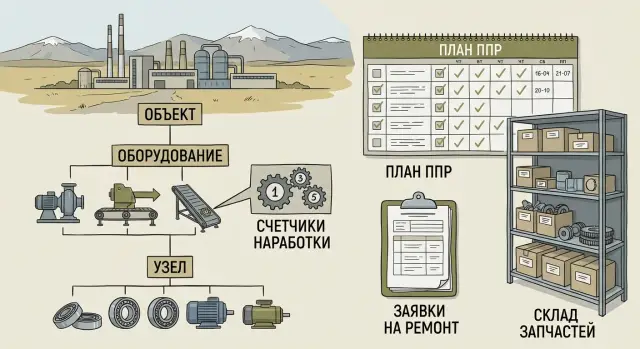
Why EAM/CMMS often fails because of duplicates
Duplicates in EAM/CMMS quickly turn the system into a “second reality” where data doesn’t match what’s happening on the shop floor. People stop trusting the screen and go back to calls, messengers and Excel.
The problem isn’t only that the same equipment is entered twice. Duplicates drag along requests, repairs, PPM rules and spare parts nomenclature. One crew closes work on “Pump 1,” another on “Pump №1,” and the warehouse charges a part to a third card with almost the same name.
Maintenance depends more on the quality of directories than on the interface. If the asset base and MRO nomenclature are collected without rules, no attractive request form will save you: planning creates extra work, reports lie, and operating hours counters don’t reconcile.
Common pain points are always similar: incomplete structure (there’s an assembly but no nodes), different names for identical objects, no single code or clear keys. This is especially visible when EAM/CMMS is built for multiple sites or departments at once.
A quick sign that the system “stands on data,” not on individual enthusiasm:
- one equipment object has a single card and a unique code
- the share of duplicates in equipment and nomenclature tends to zero and is measured regularly
- 90–95% of requests are created linked to the correct object and installation place
- PPM is formed from templates without manual copying of “similar” works
- reports reconcile runtime, downtime, repair costs and disposals
When this is under control, you can safely discuss mobile rounds, integrations, BI and everything else. Without a reliable database the system will look implemented, but won’t actually manage maintenance.
Where to start: goals, scope and data owners
When starting EAM/CMMS development for maintenance, first agree on terminology. Different shops can mean different things by “equipment”: some count only assemblies, others include nodes, tools, fixtures and even IT racks. Without a common definition the system quickly accumulates duplicates and “gray” accounting.
A useful approach is to define three levels you will definitely support in the first version. For example: site (site or area) — asset (machine, pump, server rack) — node (motor, gearbox). Everything else either goes to separate directories or is out of the maintenance scope.
Next, set boundaries: which assets are included and which are not (engineering networks, transport, office equipment, IT). A common mistake is to include “everything at once,” then discover transport already lives in a separate system and IT has its own regulations and inventory.
Third, appoint data owners. Not “project responsibles,” but those responsible for the quality of specific directories and facts:
- operations: equipment structure, work history
- warehouse: nomenclature, stock balances
- accounting: inventory numbers, cost
- IT: integrations, access
To prevent the first version from falling apart, fix in advance the minimal set of processes and reports that must work “out of the box”: PPM for key assets, repair requests with statuses, recording repair work (time, materials, cause), MRO warehouse (issue, return, disposal), basic reports (overdue PPM, top failures, spare parts consumption, downtime).
A simple example: at a pumping station one department calls an assembly “Pump 1,” another writes “P-1,” the warehouse records “pump assembled,” and accounting stores an inventory number. If you don’t decide early which identifier is primary and who owns it, you’ll end up with four “different” pumps and no converging report.
Equipment model: hierarchy of site, assets and nodes
To avoid a proliferation of duplicates, start with a simple hierarchy answering two questions: where is it located and what exactly do we maintain.
The minimal set of entities typically is:
- site (facility, shop, station)
- location (room, zone, position)
- asset (an equipment unit with a passport and history)
- node (repairable part of an asset)
- component (part of a node; sometimes matches a spare part)
The main mistake is mixing location and asset. A location can exist without equipment (for example, “Pumping station N1, room 2”) and you can move assets there. An asset is something with a serial number, passport, repair history and responsibility. If you record “pump” both as a place and as equipment, you almost certainly end up with two different “pumps” in the data.
Don’t overdo nodes. A node is needed when you plan work and accounting by parts: separate PPMs, its own counters, typical defects, separate spare parts. If the distinction doesn’t change maintenance, an attribute in the passport suffices (for example, “power,” “seal type,” “protection class”).
Keep relationships simple: one asset — many nodes; one asset — several counters (running hours, mileage, cycles); one asset — a set of documents (passport, manual, diagrams). Then documents and counters don’t need to be duplicated on every node if they apply to the whole asset.
Plan maintenance at levels in advance. For example, site-level checks can cover environmental inspections (temperature, leaks), while asset-level rules cover a specific pump. This reduces identical tasks while keeping precision where needed.
Passports and directories: what to store to avoid creating entities
Duplicates almost always start in the passport: the same pump gets entered as “Pump №3,” “Pump-3,” “NC-50” and “Inv. 000123.” To avoid this, agree on identification rules: one object — one code, and that code does not change during the asset’s life.
A working scheme: a unique code (inventory or tech number) is used everywhere, and a human-readable name is built by a template (type + location + number). Decide who issues codes and who has the right to create new records.
The asset passport stores only what’s needed for operation and accounting. A useful minimum pays off:
- manufacturer, model, serial number
- commissioning date and status (in service, standby, retired)
- location and owner (department)
- criticality and key parameters (power, capacity, voltage)
Anything that repeats is better placed in directories. In a type directory record the “common”: equipment type, mandatory parameters, typical nodes, recommended PPMs, typical spare parts and consumables. Then when creating a new asset you select the type and the system suggests the structure and required fields instead of manually creating new entities.
Documents should not be scattered across requests or re-uploaded. Usually one attachment store is enough with links to a type (manual, diagram, passport) and to the specific instance (commissioning act, nameplate photo). Reference the document in a request rather than uploading another copy.
Keep history when replacing nodes or upgrading. Don’t “rewrite” a pump when the motor is changed: close the old node with a removal date, create a new node with the serial and attach it to the same asset. That way you see what worked during a period and don’t break failure and spare parts analytics.
Operating hours counters: setup and calculation rules
Counters answer the simple question: when to perform work if a calendar isn’t enough. They’re one of the main sources of accurate PPM, but only if you agree on rules and don’t mix meanings in one field.
First define the counter type for each asset or node: running hours for a motor, kilometers for transport, cycles for a press, throughput (e.g., cubic meters) for filters, one-off readings (pressure, temperature) for condition monitoring. Principle: one counter — one meaning and one unit of measure.
Validity rules
Simple validations keep data intact:
- readings generally don’t decrease (except when replacing a counter or node)
- there is a reasonable reading frequency (shift, day, week)
- set tolerances for spikes (for example, no more than X hours per day)
- define who enters and who confirms readings
- any correction is stored as a separate event with a reason
Distinguish sources: manual entry by a technician, automated upload from DCS/SCADA, import from meters, telemetry. Even with automation leave a manual entry option marked “manually”.
Running hours after repair and errors
After an overhaul or node replacement you often need to calculate “running hours since.” Do this not by wiping history but by creating a “replacement/repair” event and a new start value for the node.
For missing or erroneous values don’t silently erase them. A practical flow:
- mark the reading as an “error” and exclude it from calculations
- add a corrective entry
- recalculate the interval using the last and next valid values
- block PPM if there’s insufficient data to trust it
PPM: how to plan work without drowning in templates
PPM in EAM/CMMS should not become an endless catalog of “almost identical” regulations. Start with rules that cover 80% of tasks, and handle the rest with requests and one-off jobs. This usually delivers results faster than trying to describe everything upfront.
There are three basic PPM types:
- calendar-based — checks and routines “monthly/quarterly”
- usage-based — when wear depends on hours, cycles, mileage
- mixed — “no less often than every N days, but not later than X running hours”
Work templates: fewer, but more precise
A PPM template should be understandable and repeatable. If it’s too detailed people will copy and edit it, and duplicates will reappear.
Typically a template should include: operations and acceptance criteria (what counts as done), roles and labor norms, safety requirements, materials and spare parts (if the norm is stable), expected downtime window.
Schedule: generate and freeze
Generate a schedule automatically for a period (e.g., a month) and then freeze it. This protects against constant recalculation caused by small directory edits.
Practical rules:
- the period plan is approved by a responsible person and not recreated after approval
- new PPMs after freezing go into the next period (or are added with an agreed exception)
- reschedules are recorded with a reason: downtime, seasonality, sending to repair
- for long downtimes pause the calendar counter; usage counters won’t grow anyway
To keep PPM tied to reality each planned job should become a request/work order, and closing must require facts: what was done, how much time, what was issued from the warehouse, which defects were found. If a job consistently expands in scope, that’s a signal to refine the template or move part of the work to a repair scenario rather than creating new “almost the same” PPMs.
Requests and repairs: a clear flow from report to closure
Request, work order and work record — plain language
A request is a message about a problem or need: “leak”, “noise”, “needs inspection.” Anyone who notices a deviation can create it.
A work order is an instruction to perform a specific job: what to do, where, by whom and when. A work order appears after checking the request and planning.
A work record is what was actually done: which operations, time spent, materials and spare parts used, and the outcome.
Statuses and responsibilities
To prevent the flow from turning into a chat, simple roles and statuses are enough:
- requester: creates the request and fills the minimum (asset, symptom, location, photo if needed)
- dispatcher: checks the object, removes duplicates, sets priority and assigns to a technician
- technician: decides whether a visit/diagnosis/work order is needed, what resources and deadlines
- warehouse: confirms availability and issues materials/MRO parts for the work order
Use a short priority scale so people don’t argue about gradations: low, medium, high, emergency.
On closure record the result consistently: reason code (from a list, not free text), performed works, labor time, materials, downtime. Then the asset and node history becomes useful.
Example: an operator creates a request “P-01 pump vibrating.” The dispatcher sees a similar request, merges them and sets high priority. The technician opens a work order to diagnose the “bearing node,” reserves a bearing at the warehouse, replaces it and closes the work order with cause “wear” and actual time. Next time you’ll see that this node fails more often, not just “pump breaks down.”
MRO spare parts accounting: structure, stock and linkage to work
MRO accounting often fails not because of the warehouse itself but because of the nomenclature directory. If the same part is entered as “Bearing 6205”, “6205-2RS” and “Bearing 25x52” you can’t see real stock and procurement becomes guessing. This is solved not by “warehouse discipline” but by rules for creating cards and strict keys.
Start with the part card structure: one product — one record, variants described by attributes. A minimum that really reduces duplicates: unique internal code and normalized name, manufacturer/version (if important), unit of measure and packaging (pcs, pack, kg), equivalents and approved substitutes, compatibility with nodes/equipment.
Units and packaging matter more than they seem. If the warehouse stores “pack of 10 pcs” but issues by “pieces,” the system must know the conversion. Then “1 pack” won’t turn into “1 piece” and balances stop jumping.
Don’t overcomplicate warehouses. Often three levels suffice: warehouse, zone, bin. Detail where people actually look by hand and where responsibility exists. If bins aren’t labeled, don’t pretend they are.
For predictable procurement set min–max and reorder points, and use reservations for work orders. Ensure reservations are automatically released when the order is closed or items are returned.
Balances match reality only when issues and returns are recorded consistently. Example: a mechanic took a repair kit but used not all parts. The return must be processed the same day and linked to the work order, otherwise stock disappears and urgent purchases appear for parts already on the shelf.
Practical example: servicing a pumping station without duplicates
The pumping station is one accounting object, but inside it are several assets: 3 pumps (P-101, P-102, P-103) and a shared control cabinet (CU-01). A common mistake is to register “pumping station” as an asset, then again as a location, and again as equipment in requests. Better to agree up front: sites/locations separate, assets separate.
Hierarchy example for P-101: asset “Pump P-101”, node 1 “Electric motor”, node 2 “Mechanical seal”. For the asset set a counter “Running hours”, source — operator readings once per shift or import from the control system. PPMs come from templates: “Monthly inspection”, “Maintenance at 500 running hours”, “Seal replacement by condition”.
Data flow without extra entities:
- request: “Increased vibration P-101” (required fields: asset, location, symptom, date)
- diagnosis: cause “bearing wear”, recommendation, photo/measurement
- work order: operations and labor time, record of counter at start and end
- spare parts: issue of 2 bearings and lubricant from warehouse linked to the work order
- closure: failure code, performed works, replaced parts, downtime
Duplicates usually appear in three places: assets created “ad hoc” (P-101 and “Pump 1”), nodes created anew in each request, spare parts living under different names. Simple rules work: unique asset code, nodes as part of the type structure, unified MRO directory with normalized names and units.
The result is a clear report: “P-101: 3 repairs in the quarter, 14 hours downtime, top cause — bearings.” And next to it: “PPM at 500 running hours: performed 5 times, 1 overdue, average duration 2.3 hours.”
How to avoid duplication: rules, keys and data migration
Duplicates arise not from “bad users” but from the lack of simple rules: how to name an object, where to get canonical data and what is considered unique. If you plan EAM/CMMS development for maintenance, embed anti-duplicate logic from the start. Otherwise it will start breaking PPMs, requests and the warehouse.
Unique keys and a single source of truth
First decide how the system should recognize “it already exists.” Support several levels of uniqueness:
- for equipment unit: serial number (if present) + site/shop
- for items without serials: inventory number or internal code
- for nodes: node code + parent asset + position (for example, “P-101 - Bearing node - left”)
- for directories: strict codes (not names) for types, models, manufacturers
- for documents: unique request/work order number by a predefined mask
Then make the type and model catalog the single source of truth. Users must choose type and model from a list, not type free text like “pump”, “pumpie”, “pump 2”. Leave free text only for comments.
Migration and post-launch control
When migrating, clean and normalize first: unify case, units, serial formats, remove extra spaces, fill gaps. Then find matches by rules (exact and “similar” by attribute combinations). Mark records as “duplicate candidate” and send them for quick manual review by the data owner.
Perform a monthly reconciliation so duplicates don’t spread:
- new assets without serial or code
- nodes without parent links
- identical models with different names
- requests created on “similar” equipment
- spare parts with the same article but different units
Example: if two technicians added “Grundfos CR 10” and “GRUNDFOS CR10”, PPMs will duplicate and the warehouse will issue different positions. Unique keys and directories solve this without extra bureaucracy.
Step-by-step plan: from data model to shop-floor launch
To keep the project from endless configuration, focus on simple steps: agree on data and rules first, then automate. Start with a pilot on a single site where failures are typical and counters are clear (pumps, compressors, conveyors).
-
Document current maintenance flow: who files a request, who approves, who performs and who closes. Often one page of text and a list of roles is enough.
-
Collect equipment list and normalize it into a unified type directory. Agree in advance what counts as an asset, a node and a consumable.
-
Build the hierarchy (site — asset — nodes) and create passports. Keep only necessary attributes: serial number, installation place, criticality, link to area.
-
Configure counters and rules for running hours. Decide the source (manual, DCS, shift readings) and what to do with gaps and anomalies.
-
Create 10–20 PPM templates for the most frequent tasks and run them in the pilot for 2–4 weeks to reveal unnecessary fields and repeating entities.
Then configure the requests flow: statuses, required fields, failure reasons, and closure rules. For example, you must not close a repair without recording labor time and spare part issue or a comment explaining why not. This locks data discipline before scaling.
Checklist and next steps: how to lock in the result
Before launch agree rules and check data. Otherwise the system will quickly become a set of scattered cards where the same equipment exists in three places.
Short checklist before start:
- approved asset and location hierarchy without excessive levels
- appointed data owner (directories, passports, codes, changes)
- defined uniqueness keys (serial, inventory, internal code, MRO position code)
- configured counters and calculation rules (what we count, sources, update frequency)
- defined unified work flow: request — diagnosis — work order — spare parts issue — closure
Most projects fail because of data discipline, not functionality. Typical mistakes: overly deep hierarchy (nobody navigates it), everything in free text (search and reporting become impossible), no data owner (nobody cleans duplicates or monitors quality).
Quick checks before the pilot can be done in a day: find duplicates by serials and inventory numbers, check empty passports (missing model, power, manufacturer), look at counters (zeros where there should be activity). Removing 80% of the garbage at this stage will make users start trusting the system.
In the second iteration add failure analytics, integrations (ERP/warehouse, SCADA/DCS, procurement, HR), mobile entries for inspections, standards and management reporting (availability, MTBF/MTTR, PPM compliance).
Assign owners and dates for the next steps: who maintains directories, who approves the model, who trains foremen. If you also need to finalize infrastructure (servers, workstations, support and integrations), it’s convenient to do this through a system integrator. For example, GSE.kz (gse.kz) can assist with server infrastructure, deployment and support, and with integrations into the corporate environment.
Frequently asked questions
Why do equipment duplicates appear so quickly in EAM/CMMS?
Duplicates usually appear because there is no single identification rule: people enter items “as they’re used to,” and the system can’t tell it’s the same object. Start with the requirement “one asset — one immutable code” and limit who can create new records, otherwise duplicates will multiply faster than you can clean them.
Which identifier should be primary: name, inventory number, or serial number?
Use a unique code that doesn’t change during the asset’s life: an inventory number or an internal technical ID. Keep the human-readable name as a template (type + location + number), but don’t use the name as a key because people will write it differently.
Which data model mistake most often breaks maintenance accounting?
The most common mistake is mixing “where it is” and “what is being serviced.” A location can be empty or change, while an asset must keep a passport and repair history. If a pump is registered both as a place and as equipment, the system will treat them as different objects and create duplicate cards.
When should you create nodes, and when are passport attributes enough?
Create a node only when you truly want to plan and account for work separately: its own PPM, its own defects, specific spare parts or a separate counter. If the difference doesn’t affect maintenance, keep it as an attribute in the asset passport (for example, power or seal type), otherwise you’ll overload the structure and complicate data entry.
Who should be responsible for data quality in EAM/CMMS?
Assign data owners for each key directory and fact: operations — for equipment structure and work history; warehouse — for nomenclature and units; accounting — for inventory numbers and cost; IT — for access and integrations. Without clear owners, duplicates become nobody’s responsibility and stay in the system forever.
How to set up operating hours counters so they don’t turn into chaos?
Separate different meanings into separate counters and units: one counter = one meaning. Add simple validations: readings generally do not decrease, set a reasonable input frequency and tolerances for spikes. Record any correction as a separate event with a reason so the history stays trustworthy.
How to plan preventive maintenance and avoid hundreds of templates?
Start with a small set of templates that cover most common tasks and make them clear enough to avoid copying and slight editing. A good template describes the expected result and the minimal set of operations, not every possible variant. If the actual job constantly expands, update the template or move part of the work into a repair scenario instead of creating a new “almost the same” template.
Which fields and closure rules for requests actually discipline the data?
Keep a clear flow: request as a signal, work order as an instruction, work record as a required closure. On closing, require the same minimum data: a reason chosen from a list, labor time, materials and downtime (or an explicit comment why any of these are missing). This quickly fixes cases where the repair was done but nothing is recorded, and improves analytics.
How to reduce duplicates in MRO nomenclature and make the warehouse predictable?
Normalize the item card: one part — one record, differences recorded as attributes rather than different names. Agree on units and packaging to avoid inventory jumps from conversions. Link issuance and returns to the work order so consumption is traceable and purchasing stops being a guess.
How to migrate data into the new system without bringing in junk?
First clean and normalize data: unify serial number formats, units, casing and remove extra spaces and empty required fields. Then use matching rules and mark “duplicate candidates” for a short manual review by the data owner. After launch, regularly check new records without a code, nodes without parents and similar models with different names, otherwise duplicates will return.
