8 min read
Downtime Cause Classifier for OEE: Registry and Rules
A downtime cause classifier helps keep a unified registry and calculate OEE by workshops. Code levels, entry rules, and how to reduce “other” and “unknown.”
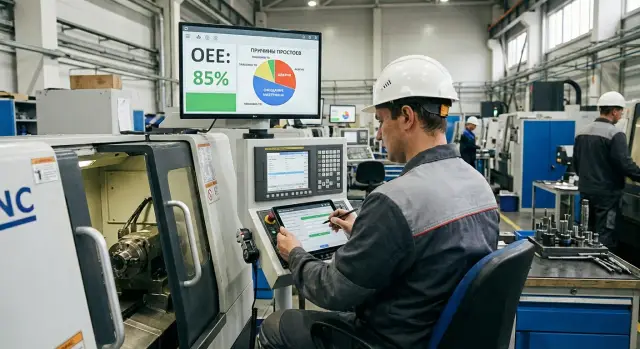
Why a unified downtime registry is needed for OEE
When every workshop names downtimes differently, comparison turns into argument. One place records “no material,” another — “waiting for warehouse,” a third — “logistics.” Formally the reasons differ, but in essence they are the same type of loss. As a result, reports between lines and areas are incomparable: it’s unclear where the problem is larger and why.
This is especially painful for OEE calculation. OEE is not just a number — it helps understand which losses eat into production. But if a significant share of stops falls into "other" and "unknown," the picture is distorted. It may look like causes are small and scattered, while in reality a large recurring issue is often hiding there. Then actions become random: today you “fight discipline,” tomorrow “buy spare parts,” while the real cause could be planning or setup.
A unified downtime registry gives everyone a common language. It helps build consistent reports by shift, line, area and product without rewriting reasons manually or "translating" them between workshops. When categories and selection rules are the same, you can honestly compare losses, see the top-3 causes and check the effect of measures taken.
Business usually needs simple answers: where is most time lost, on which lines, in which shifts, on which products, and what exactly is happening. A single classifier lets you find recurring causes faster, prioritize work by lost time (not by emotions), assign owners and deadlines for specific stop types, and track whether losses decrease after changes.
A simple example: two workshops each lose 40 hours per month. Without a standard, one shows “other 60%,” the other — “repair 50%,” making problems seem different. With unified codes, it may turn out both are mainly due to "waiting for the setup technician" or "waiting for material." Then you solve a common problem and get impact across multiple sites.
What to count as downtime so OEE is fair
OEE is usually split into three parts: availability (how long the equipment is actually running), performance (at what speed it runs) and quality (how much good product is produced). The mistake starts when any fault is automatically recorded as downtime. Then availability drops, while performance may appear better than it is.
Downtime is when a line or machine cannot produce because the process is stopped. If the equipment runs but more slowly, that is usually a performance loss, not downtime. To make OEE calculations fair, agree in advance on the boundary: what counts as a stop and what counts as working at reduced speed.
A practical rule for the registry: record an event as downtime if production at that moment is zero and the operator can name the stop reason. If production continues but below standard, the cause should be allocated to speed losses (for example, “running at 70% due to unstable feed”).
Micro-stops are harder. Short stops of 10–30 seconds can be easily lost but add up to a large deficit. Set a threshold, for example 1–2 minutes: everything shorter is accumulated into one entry per shift or per hour with the reason “micro-stops” and a short hint about the most likely cause (sticking, sensor, manual feed). If a micro-stop repeats in series and consumes notable time, it should be logged as separate events.
To make causes comparable across workshops, embed responsibility boundaries into the classifier from the start. At the top level it is usually enough to have these groups:
- Production (changeover, waiting for operator, no work order).
- Repair (breakdown, planned maintenance).
- Supply and logistics (no raw material, no packaging, no tool).
- Quality (stop for inspection, batch hold).
- External conditions (power, network, temperature, safety).
Example: one workshop logged “waiting for the setup technician” as repair, another as production. In reports this looked like different problems. Agreement on boundaries immediately removes such distortions.
Registry data: mandatory fields
For the registry to work for OEE calculation and comparison, start with the same set of fields. If each area records differently, the discussion will be about formats, not problems.
Minimum fields without which data lose meaning: start and end time of the downtime, duration (best calculated automatically), area/line, specific equipment, reason from the classifier. These fields provide comparability and help catch errors (for example, duration not matching time difference).
Next decide what to attach an event to. Usually three dimensions are needed: the event (each downtime occurrence), the shift (for operational responsibility) and the order/batch (for analyzing production losses). A practical approach: store events in the registry and pull shift and order/batch as attributes if known. Then the same downtime can be analyzed by area and by order without breaking structure.
Comments are useful, but keep them bounded. The reason is chosen only from the classifier; the comment answers “what exactly happened within that reason.” For example: reason “Waiting for setup technician,” comment “technician on neighboring line, arrived in 12 minutes.” If comments continually reveal another cause, that signals a need to clarify definitions or expand the vocabulary.
Also set time rules. They resolve half of disputes:
- one time zone for all workshops and reports;
- a single rounding rule for duration (for example, to the nearest minute);
- no overlaps (one piece of equipment cannot have two downtimes at the same time);
- a clear threshold from which a pause is considered downtime.
When fields and rules are the same, the classifier becomes a common language, not a set of local interpretations.
Classifier structure: levels, codes and names
A good classifier is not for decoration. It ensures the same case in different workshops is called the same thing. Then the registry becomes fit for comparison and OEE calculation without constant arguments.
Optimal depth is 3–4 levels. More usually turns into an "encyclopaedia" where people get lost. Fewer levels don’t provide useful analytics.
Recommended levels
-
Category (top level): the type. Often four buckets suffice: planned, unplanned, internal, external.
-
Subcategory: area in which the cause sits. For example: "equipment", "material", "personnel", "quality", "logistics/warehouse", "energy/infrastructure", "IT/systems".
-
Specific cause: short and unambiguous. For example: "drive failure", "no blanks", "waiting for setup technician", "planned changeover", "no electricity".
-
Clarification (optional): information that helps act but doesn’t break comparability. For example: "assembly: spindle", "material supplier", "shift", "repair request code".
Codes and names
Choose causes by code rather than free text. Codes are more stable during renames, easier to search and link to reports. Make codes readable, for example NP-EQ-010 (unplanned - equipment - specific cause). Keep the name short: 2–6 words, without phrases like "in process", "due to", "not working."
To cover 80% of cases with a short list, keep 15–30 most frequent causes at level three for a workshop or equipment type. Rare events are better kept in a general reference with mandatory clarification at level four. This way the classifier remains convenient for shift use while providing accurate slices for OEE.
Reason dictionary: definitions and selection rules
A reason dictionary is more than a word list. Each cause needs a short clear definition and boundaries: what belongs to the cause and what does not. Then the registry is comparable and the OEE calculation doesn’t “float” from shift to shift.
A convenient structure for each cause: (1) definition, (2) include, (3) exclude, (4) example. For example, "Setup (planned)": include changeover for a new product and first-part check; exclude repair after a breakdown and waiting for a setup technician (that is a different cause).
Selection rules should be simple: assign one primary cause to an event — the one that actually triggered the stop. A secondary cause is allowed only in two cases: if there is a separate field "influencing factor" or if the downtime consists of two stages with different causes and you split it into two intervals. Don’t mix "what happened" and "why it took so long": a breakdown is the primary cause, while "waiting for a spare part" affects duration and should be accounted for separately.
To prevent identical causes from becoming duplicates across workshops, lock in unified names and codes and forbid free-text additions without a registry owner. If a workshop requests a "new" cause, first check whether it is truly a new downtime type or a special case of an existing one. Special cases are better stored as comments or clarifications, while the top-level code should remain common.
When migrating from old lists, prepare a mapping table "old -> new": old causes, their frequency, new code and transfer rule. If an old value was vague (e.g., "repair"), decide in advance how to redistribute it: by request type, responsible unit or key words in the comment. This helps keep history and avoid a spike in "unknown" after rollout.
Step-by-step: how to implement the classifier across workshops
Start with facts, not with a perfect reference. In different workshops the same events are often named differently, so the goal of rollout is to agree on a common language and embed it into daily work.
1) Preparation and alignment
Export downtime history for 1–3 months (if no data, shift logs will do) and calculate which causes account for most time. Usually focusing on the top-20 is enough to quickly get comparability.
Then run a short working session with representatives from all workshops: supervisor, setup technician, mechanic/electrician, process engineer, quality control. Agree on the vocabulary: what each cause means, where the boundaries are between similar items, and who can change a selected cause.
2) Pilot, rollout and improvement cycle
Run a pilot on one area with an engaged supervisor. For 1–2 weeks include quick reviews of shift entries: where reasons are confused, which formulations don’t work, which fields are skipped.
Then roll out to other workshops and establish a rhythm: daily recording, weekly review of the top-5, monthly updates to the reference based on facts. In OEE reports show the share of "other" and "unknown" separately — as a data-quality indicator, not as a fault of the shift.
Example: the machining shop logged "no blanks," while assembly wrote "waiting for a kit." After the pilot these become a single cause "Waiting for materials" with different clarifications. The classifier then works consistently across workshops and yields an honest consolidated report.
How to reduce "other" and "unknown" without pressuring staff
"Other" and "unknown" do not appear because people are lazy. Usually there are too few choice options, formulations are unclear, or there is no time to investigate on the line. The goal is not to punish but to make selecting the correct cause easier than choosing "other."
Good practices — soft rules:
- "Other" is allowed but only with a short comment (what happened and where).
- "Unknown" is a separate cause and requires a minimum: role (operator/setup tech/supervisor), start time and investigation status (open/in progress/closed).
- Selection lists differ by workshop and equipment so people don’t search a long catalog.
Once a week review only "other/unknown" entries. Discuss formulations and lack of suitable causes, not people. A simple process: recode the 10–20 most frequent entries into concrete causes; if one formulation repeats often (e.g., 5+ times or 60+ minutes per week), add a new cause and definition; close "unknown" within 48 hours, otherwise leave it "under investigation."
This way the share of "other" falls naturally: it becomes easier to choose the correct cause, and management can see where time is really lost.
Data quality control: who is responsible and what to check
A good registry rests not on "ideal people" but on clear roles and simple checks. Then the classifier works consistently across workshops and OEE calculation doesn’t turn into an argument.
Who is responsible for what
Assign responsibilities so each person has a short, achievable task:
- Operator records the event: start and end times, equipment, primary cause and a short comment.
- Shift supervisor verifies: correctness of the cause, that the downtime actually occurred, and that the event is closed.
- Data quality engineer (or dispatcher/analyst) checks logic daily and returns errors for clarification.
- Maintenance confirms repair-oriented causes based on work orders and repair tickets.
Important: the operator should not guess the "correct code." Their job is to pick the closest cause and leave the fact in a comment. Accuracy can be improved later.
What to check automatically
Auto-checks catch most noise without manual routine. Minimum set:
- missing mandatory fields (equipment, start time, cause);
- zero or negative duration;
- overlapping events for the same equipment;
- "hanging" downtimes without an end time beyond a set threshold;
- mismatches between cause and status (for example, "repair" without a ticket).
Also perform a simple manual audit. Once a week take 10–20 records and compare with shop paperwork: shift report, repair log, sensor signals. If a report shows "unknown 45 minutes," but the shift report shows waiting for a setup technician after a tooling change, it means people struggle to pick the right cause or the definition is too vague.
To make quality visible, track 3–4 metrics: share of "other," share of records without a comment, average time to close a cause, percentage of records corrected after review.
Typical mistakes when calculating OEE from a downtime registry
The most common cause of a "wrong" OEE is not the formula but how people record downtime. If the registry is kept inconsistently, the final numbers look precise but are not comparable.
Mistake 1: overly detailed classifier
When the reference is bloated to hundreds of causes, the operator spends time searching and ends up choosing "other" or "unknown." Better to start with a short set (20–40 causes) and add new ones only after it’s clear the current list is insufficient.
Mistake 2: recording the symptom instead of the cause
Entries like "not working," "stopped," "won’t start" don’t help improvements. These describe the fact, not the cause. You need reasons you can verify and fix: "no compressed air," "no raw material," "sensor error," "belt break."
Mistake 3: different names for the same thing
Duplicates like "no material," "no raw material," "missing blanks" split statistics. Result — no manageable top causes. The rule is simple: one cause — one name — one code. Other variants go to synonyms in the description, not separate reference lines.
Mistake 4: confusing planned and unplanned downtime
If planned maintenance, changeover or breaks get logged as unplanned downtime, OEE availability drops without a real issue. Decide in advance what counts as planned time versus losses, and how to mark shift tasks, changeovers and scheduled work.
Mistake 5: comparing workshops without calibrating rules
One workshop counts waiting for a setup technician as "breakdown," another as "work organization." In totals the first looks worse though they operate the same. Before comparing, agree common accounting rules, test 1–2 weeks of data and only then build consolidated rankings.
Checklist before launch and rollout
Before including the registry in KPIs and comparing workshops, check basic things. This prevents a situation where numbers look "nice" but downtime causes are not comparable.
- Classifier approved: codes, names and short definitions exist, and for disputed cases there’s a clear selection rule.
- The registry consistently captures the minimum: area (workshop, line), equipment, downtime start and end, and cause. A comment is mandatory only for exceptions: long downtime, manual time edits, choosing "other" or "unknown."
- "Other" and "unknown" are below your threshold (for example, 5–10% by time), and there is a reduction plan: which formulations to clarify, which causes to add, who to retrain.
- A regular review is set up: who looks at top losses, who owns actions, and where decisions and deadlines are recorded. The goal is to eliminate recurring stops, not to find someone to blame.
- OEE calculation rules are identical across workshops: what counts as planned time, how micro-stops, changeovers, waiting for material and test runs are treated. Any exceptions are documented as common rules.
If there are doubts on any item, spend 1–2 weeks refining the standard. Rollout will then be faster and reports more comparable and useful.
Example: two workshops, one report and clear causes
In workshop A the operator writes "repair" in the registry. In workshop B in a similar case the supervisor logs "sensor failure." In the report these look like different causes, though they are the same type of loss. As a result the plant summary fragments and the top causes jump month to month.
The solution is a common classifier: one record — one code, while text stays in the comment. For example, both cases map to: category "Unplanned repair", subcategory "Electrical/sensors." Then the textual description doesn’t matter; the report shows the same cause.
To avoid mixing repair with waiting, separate "what broke" and "why we stand right now." A simple rule: if work is not happening yet repair hasn’t started, it is not repair.
For example, treat "waiting for setup technician" as a separate cause: category "Waiting for personnel", subcategory "Setup technician/electrician." When the specialist starts work, switch the event to "Unplanned repair."
After standardization OEE calculation changes: losses become comparable across workshops and management sees an honest top-3. Then it’s easier to take targeted measures: reduce response time, stock sensors, revise duty schedules, rather than argue about registry phrasing.
Next steps: lock the standard and support rollout
When the classifier is agreed and initial OEE reports are ready, don’t "let it go." Without reinforcement, workshops will start interpreting causes differently in 2–3 months and comparability will be lost again.
Fix the standard in a short regulation of 2–3 pages: what counts as downtime, how to choose a cause, when "other" and "unknown" are allowed, who and how corrects errors. The document should be understandable to supervisors and operators.
Training is better as short 5-minute scenarios than as lectures. For example: "machine stopped due to missing work order," "waiting for setup technician," "tool defect," "no blanks." One scenario — one correct cause and one selection rule.
To avoid drowning in details, start with 20–30 causes. Expand further only based on "other" entries: once a week review frequent records there and either refine formulations or add a new cause with a clear definition.
At the same time prepare the infrastructure. If it’s inconvenient for an operator to record downtime, they will more often mark "unknown."
Minimum to provide
Provide convenient workstations or terminals by the line (so entry takes a couple of clicks), stable network and shared access for shifts, reliable data storage with backups and simple reports on the share of "other/unknown."
If you plan to roll out a registry, OEE reporting and integrations with enterprise systems, such projects are logical to implement with a system integrator. For example, GSE.kz (gse.kz) operates as both manufacturer and integrator: you can cover infrastructure (terminals, servers) and support together so the standard does not rely on specific people and scales smoothly to new workshops.
Frequently asked questions
Why is a unified downtime register needed for OEE?
A unified register gives every workshop the same reason names and codes. This makes it possible to compare losses fairly across lines, shifts, and products instead of debating wording.
What counts as downtime when calculating OEE?
Downtime is the period when equipment or a line produces no output because the process has stopped. If production continues but runs below normal speed, that is typically a performance loss rather than downtime.
How should micro-stoppages be tracked?
Set a threshold, for example one or two minutes. Shorter stops can be totaled by shift or hour under the reason “micro-stoppages,” while recurring series are best recorded as separate events.
Which fields are needed in a downtime register?
The minimum set includes start and end times, an automatically calculated duration, the workshop or line, the specific equipment, and a reason from the reference list. It is also useful to store the shift, order, or batch when this information is available.
How many levels should the classification system have?
Three or four levels are usually enough: category, reason area, specific reason, and an optional clarification. This structure provides useful detail without making the operator search through hundreds of options.
How can confusion between similar reasons be avoided?
Each reason should have a short definition, examples of what it includes, and cases that belong under another code. Select one primary reason for each event, the one that triggered the stoppage.
How can the classification system be introduced across several workshops?
Start with one to three months of downtime history and identify the most frequent reasons. Agree on the rules with supervisors, setup technicians, maintenance staff, process engineers, and quality control, then test the reference list in one area for one to two weeks.
How can the share of “other” and “unknown” be reduced?
Make the precise reason easier to select: show a short list for the specific equipment and require a comment when “other” is chosen. Review these entries weekly, recode recurring cases, and add a new reason only when there is a genuine need.
Who is responsible for the quality of downtime-register data?
The operator records the stoppage and initial reason, the supervisor checks the entry, and the dispatcher or analyst monitors the logic of the data. The maintenance department confirms reasons related to work orders and maintenance tickets.
Which errors most often distort OEE?
Do not mix planned work with unplanned losses, do not record symptoms such as “won’t start” instead of the cause, and do not create several names for the same problem. Before comparing workshops, check that they treat micro-stoppages, changeovers, and waiting for personnel consistently.
