8 min read
DNS, DHCP and IPAM Architecture for a Large Organization
DNS, DHCP and IPAM architecture for a large organization: how to design zones, reservations and address policies to avoid IP conflicts and downtime.
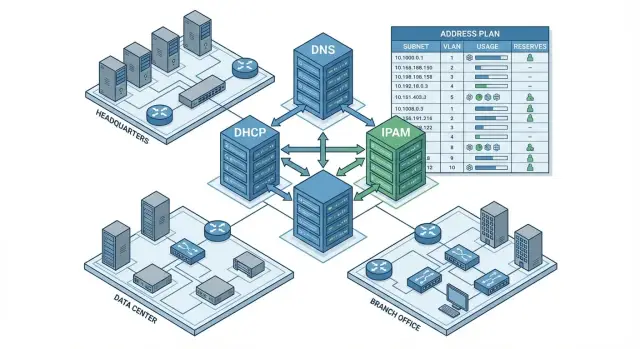
What problem is solved and what to decide in advance
In a large organization DNS, DHCP and the address plan fail not in isolation but in chains. Users see this as “the website won't open”, “1C isn't working”, “printing disappeared”, “phones are silent”, while the cause may be simple: a name doesn't resolve, an address was issued in the wrong place, or the same IP was taken by two devices.
Typical incidents repeat: DHCP pool exhaustion, "stuck" DNS records left after device replacement, forward and reverse zones mixed up, services moved to another subnet without updating rules and dependencies. It's especially painful when critical systems (AD, mail, VoIP, medical systems, payment terminals) depend on correct A/AAAA and PTR records: one mistake can easily become downtime.
IP conflicts occur even with careful operation. The reason is often not "carelessness" but reality: static addresses on devices, shadow DHCP on a router or access point, overlapping ranges between sites, old reservations, reused VLANs, rapid migrations and “temporary” schemes that suddenly became permanent. A thoughtful DNS–DHCP–IPAM combo is needed not for heroics but for change management.
To measure improvement, set measurable goals in advance: recovery time after failure, share of manual operations (how many edits are done "on the server manually"), number of IP conflict incidents and percentage of stale DNS records.
Before design, collect minimal inputs: sites and segments (subnets, VLANs, where DHCP-relay exists), list of critical services and naming/address requirements, device types and addressing methods (DHCP, reservations, static), current DNS zones and management model (centralized or by branches), actual address usage and “grey zones” (unaccounted ranges).
A simple example: a branch adds guest Wi‑Fi and the access point enabled its own DHCP. Some laptops receive addresses from the “wrong” subnet, DNS isn't updated, and access to internal resources disappears. If subnet boundaries, responsibilities and address issuance rules are defined in advance, such situations are caught at the change stage, not after a flood of complaints.
How to separate DNS, DHCP and IPAM roles in a large network
In a large network DNS, DHCP and IPAM often “live” in different teams, but must operate as a single system. DNS handles names and where services point. DHCP issues addresses to devices. IPAM keeps an inventory of address space: subnets, pools, reservations and ownership. When roles blur, “grey” addresses, conflicts and unexpected downtime appear.
Basic principle: IPAM must be the single source of truth for addresses. DHCP and DNS should not become the accounting system, even if they can store the data. Any subnet, pool, reservation, static address or VLAN assignment is recorded in IPAM first, and only then applied to DHCP and DNS.
To make this practical, define responsibilities in advance. A common split works like this:
- Network engineers: address plan, subnets, VLAN/VRF, routing, segmentation rules.
- DNS/DHCP platform administrators: pools, reservations, issuance policies, option parameters.
- Security team: DNS update rules, limits on dynamic records, change audits.
- Local IT at branches: requests for new ranges and reservations, but no direct server edits.
Agree which changes require requests; otherwise inventory will quickly drift from reality. Typical changes that should go through the process: creating new subnets, expanding pools, assigning static IPs, reserving addresses for critical devices, migrating services between sites.
Example: a branch adds 30 terminals. If the local admin simply expands a DHCP pool, IPAM won't know. Later the central team may allocate the same range to Wi‑Fi and a conflict occurs. In the correct scheme the change starts with an IPAM entry, goes through approval and only then is applied to DHCP and, if needed, DNS.
Designing DNS zones: structure, delegation, TTL
A good scheme starts with clear zone separation. An external DNS zone is only for what must be visible on the internet: public sites, mail, verification records. The internal zone holds everything related to the corporate network: hosts, services, printers, cameras, domain controllers, internal load balancers.
If the same domain must resolve differently inside and outside, use split‑horizon: two zones with the same name but different content. This is convenient but easy to confuse. Immediately define which records live only in the internal zone, who changes them and how you guarantee that external DNS won't receive internal names.
Zone structure and a simple naming rule
Avoid splitting zones unnecessarily. Often one internal zone for the organization plus delegated subzones for sites or large divisions is enough.
Set a simple naming convention in advance to avoid collisions and “who is that” questions:
- Name = type + role + site (for example, srv‑files‑alm, pc‑acc‑ast).
- For services use clear aliases (CNAME) rather than embedding IPs in documentation.
- Keep separate namespaces for test (lab) and management (mgmt).
- Don’t mix a person’s name and a device in a single host name.
- Fix site abbreviations and don’t change them retroactively.
Delegation and TTL: common mistakes
Delegation distributes responsibility: the central team maintains the root zone while sites manage their subzones. Delegation must include clear NS records and a consistent update process.
TTL determines how long clients cache DNS answers. Usual logic: keep higher TTLs for stable critical records and lower TTLs for records that may switch (load balancers, migrations). Before migrations lower TTLs in advance and restore them after stabilization. Don’t set low TTLs everywhere — that increases load and makes root cause analysis harder.
Example: before moving an internal portal to a new site, lower the TTL for the portal record, perform the switch, check accessibility and then restore the TTL. This avoids parts of the user base staying pointed at the old address for hours.
DNS records and lifecycle: static, dynamic, reverse zones
A DNS record should reflect a real owner and the management method. This prevents “eternal” entries from decommissioned servers and sudden conflicts when the same IP appears in two places.
Use static records where predictability matters: critical services, load balancers, gateways, infrastructure nodes and any system with a fixed IP. Dynamic updates suit client devices and temporary VMs, but only if the update source is controlled (usually DHCP) and there are clear TTLs/aging rules.
To avoid duplicates, keep simple rules for A, PTR and CNAME: one node — one canonical name with A/AAAA; alternatives via CNAME; PTR must point to the same canonical name. If an IP moves, first remove the old PTR and A, then add the new ones.
Design reverse zones by subnet boundaries and delegate them to whoever manages that subnet’s address plan. For example, an office /24 and a server /24 can be different zones with different owners.
A minimal “record passport” in IPAM/CMDB helps: owner (team or service), type (static or dynamic), lifetime, reason (project, site), emergency contact, removal rule (when decommissioned).
For service devices (printers, cameras, terminals) choose one consistent approach: either DHCP reservations with dynamic DNS or static IP with static DNS. Mixing approaches almost always leads to duplicates and disputes about “who’s right”.
DHCP: pools, reservations and issuance policies
In a large network DHCP often breaks due to chaotic rules rather than server faults. A healthy scheme starts by dividing each subnet into clear parts: addresses for automatic issuance, addresses for static devices and exclusion ranges (for network gear or temporary tests). Main rule: one range — one purpose, and it's recorded in the inventory.
Prefer not to allocate the entire /24 as a single pool. Leave headroom for growth and reserve space for static assignments so you won’t have to renumber critical services later. Treat exceptions as formal rules, not admin memory.
Reservations are useful when a device needs a predictable IP but you want centralized management through DHCP. This is convenient for printers, cameras and POS terminals. Problems arise when reservations are made “just in case” for all PCs: the database explodes, MACs change and conflicts increase.
Separate issuance by device type and connection point. VLAN and Option 82 (for wired networks) help in practice, correct SSID binding for Wi‑Fi, MAC/OUI as an auxiliary signal (not the only one), and separate subnets for guest and IoT to avoid mixing policies.
A unified DHCP parameter standard reduces odd incidents. Minimum parameters to standardize: DNS servers and DNS suffix (so names resolve consistently), NTP (important for telephony and logging), routes (if complex internal routing exists), proxy/auto‑configuration (only if actually used).
Example: on one floor PCs get addresses from the main pool, IP phones from the voice VLAN, IoT from a separate subnet with short leases, and guest Wi‑Fi in its own range with no access to internal DNS zones. Conflicts are then caught by rules, not after a service failure.
IPAM: inventory model, address plan and reservation rules
IPAM exists so addresses are not "in someone's head" but in a single source of truth. DHCP issues addresses, DNS publishes names, and IPAM records who and why owns them.
First agree what you consider address space. Usually it includes RFC1918 ranges, public ranges, DMZ segments, VPN tunnel addresses, guest Wi‑Fi ranges and temporary networks for migration and testing. If something exists in routing or on a firewall, it should exist in IPAM.
Build the address plan in a simple hierarchy: site -> security zone or network type -> segment. This makes it easier to delegate responsibility and find errors. For example: “Astana, office, users”, “Almaty, DC, servers”, “Branches, POS terminals”.
To keep inventory reliable for years, you need clear rules. Keep capacity reserves (often 20–30% in each active segment), tag each subnet (purpose, owner, contact, criticality, last checked date), use standard statuses (planned, allocated, in use, decommissioning) and forbid silent changes: new subnets and large reservations only via request and IPAM entry.
Overlapping ranges often surface during mergers or contractor work. A practical approach is to place them in separate VRFs or NAT zones and plan migration to the corporate standard. Mark such networks in IPAM as isolated and set a migration deadline, otherwise the overlap will eventually become an outage.
Processes and permissions: keeping address accounting intact
IP conflicts usually result not from a “bad DHCP” but from scattered changes: someone spun up a VLAN, someone added a DNS record, and IPAM wasn't updated. So beyond the design you need simple rules: who can change address space, how it coordinates with the network and where results are recorded.
A single‑page RACI is useful. Typical responsibilities:
- Network engineer: responsible for VLANs, routing and approving subnet parameters.
- DNS/DHCP administrator: implements changes in DNS and issuance policies and ensures correctness.
- Service owner: initiates requests and confirms requirements (name, availability, maintenance windows).
- IPAM administrator: maintains inventory, checks uniqueness and tags.
- IT manager/Change manager: approves risky changes and maintenance windows.
A change should be end‑to‑end: a network change (new VLAN or migration) is not complete until DHCP options, forward and reverse DNS zones and the IPAM subnet record are updated. Good habit: one change, one task list, one owner of the result.
To get people to follow the process, use short request templates: new subnet, new service, service migration, decommission. Each template should lock in naming and tagging rules (site, vlan, environment, owner) and be concise.
Minimal IPAM fields without which inventory fails quickly: subnet/VRF, VLAN ID, site; status and change date; owner and purpose; related DNS name and PTR (for servers); issuance source (DHCP pool, reservation, static).
Step‑by‑step rollout plan (without stopping the business)
Roll out the new scheme as a project with short iterations: at each step you know what to test and how to roll back. That way you don't carry old mistakes into the new model or risk stopping critical services.
Start with facts: gather all DNS zones, subnets, DHCP pools, reservations and known IP conflicts. Mark where addresses are handed out manually and which systems depend on reverse zones.
Then follow this plan:
- Consolidate the inventory into a single registry: zones, subnets, ranges, reservations, segment owners, and change entry points.
- Agree the target design: zone structure and delegation, address plan with growth headroom, DHCP policies (offices, servers, guest, IoT) and dynamic addressing rules.
- Run a pilot on one segment: a single site or VLAN (for example, office Wi‑Fi or one floor) to validate dynamic records, reservations and reverse zones.
- Migrate in waves: define maintenance windows, success criteria and clear rollback (revert to old DHCP for the segment and previous NS records for the zone).
- Lock the result: short training for admins and service desk, then move changes into the standard process.
A sign that you’re ready to scale: after the pilot you have a repeatable template for new segments and a clear "point of truth" in IPAM.
Reliability and maintenance: HA, backups, monitoring
In a large network DNS and DHCP outages look like “everything is broken”, though the cause may be mundane: a single server failed or a pool was exhausted. Build redundancy from the start. For DNS you usually need at least two nodes per important zone (in different racks or sites). For DHCP use two servers in failover mode so address issuance continues if one node fails or reboots.
Backups should be more than “just in case” — include verified recovery. Save DNS zones and settings, DHCP configurations (including policies and reservations), IPAM database and change logs. For DHCP it’s useful to also archive lease state so after an incident you can quickly see who had which address and when.
Monitoring should focus on symptoms users and admins notice: spikes in NXDOMAIN and SERVFAIL for key zones, increase in DHCP NACK and DECLINE, frequent lease expirations, pool exhaustion and sudden growth in unknown clients, DNS response delays and dynamic update errors.
To prevent changes from breaking the system, maintain a test environment and rollback plan. Before applying a new DHCP policy to Wi‑Fi test it at one site, then roll out to others in a planned window, keeping the option to revert to old rules quickly.
Common mistakes that lead to IP conflicts
IP conflicts usually stem from a disconnect between DNS, DHCP and address accounting. Even a well‑designed scheme fails if rules are not enforced and people bypass the process.
One frequent cause is manual DNS edits alongside automatic updates. For example, an admin manually creates an A record for a printer and later DHCP’s dynamic update binds the same name to a different address. Some users go to the old IP, some to the new.
A second mistake is "fixing" chaos with excessive DHCP reservations. When almost every address becomes a reservation “just in case”, the pool stops functioning as a pool, free ranges run out and someone sets a static address from whatever looks free — which may already be in use.
Third is changing VLANs and subnets without syncing IPAM. The network migrates but the inventory isn’t updated: old addresses are shown as used, new ones are not reserved, reverse zones don’t match reality.
Another trap is identical hostnames across segments and uncontrolled DNS suffixes on devices. In mixed environments (PCs, IP phones, cameras) this quickly becomes “guess which host you reached”.
Finally, lack of owners for subnets and records. If no one is responsible for cleaning DHCP leases and DNS records, garbage accumulates for months.
Signs a conflict is near: many static addresses inside a DHCP pool; reservations created without request and expiry; duplicate hostnames appearing multiple times; IPAM not updated after network changes; no owner for a subnet or zone.
Short checklist before rollout and after changes
Before introducing a new scheme (and after any change) run a short check. It doesn't replace tests but quickly catches typical causes of IP conflicts and sudden failures.
First ensure there is a single source of truth for address space: an IPAM system or a strictly maintained registry. Subnets, allocation ranges and reservations must not live in different spreadsheets across teams.
Subnet checks (per VLAN/segment): an owner and contact assigned; subnet purpose and device types recorded; DHCP range, exclusions (statics) and reservations defined and matching IPAM; no overlapping ranges across sites, branches, VPNs and temporary networks; a list of untouchable addresses (gateways, load balancers, critical services).
Then check DNS update rules. For dynamic records decide in advance who updates A/AAAA and how PTRs are controlled so garbage records don't accumulate and diagnostics remain reliable.
Finally verify resilience: regular backups of DNS/DHCP/IPAM configurations with confirmed recovery tests. If recovery has never been tested, assume there’s no usable backup.
Example scenario: multiple sites and device types
Imagine an organization with five sites: a headquarters, three branches and a data center. Each site has office PCs, separate segments for training or medical equipment, guest Wi‑Fi and video surveillance. The goal is simple: a staff laptop must not get an address from the camera pool, and a branch must not override central office DNS records.
For DNS keep a single corporate root zone (for example, corp.example) in central infrastructure, and delegate site subzones to branches: almaty.corp.example, astana.corp.example, etc. The central team controls naming rules and critical records while branches manage local hosts without risking other sites. For reverse zones use the same logic: address blocks for branches correspond to their delegated reverse zones.
DHCP policy must be based on VLAN and device type, not eyeballing addresses. For example, the office network gets leases with corporate DNS suffixes; MedEdu uses reservations and specific NTP/DNS parameters; guest segment connects only to the internet without DNS registration; CCTV lives on reservations with restrictions on unknown devices.
IPAM handles practical problems: when a department moves from HQ to a branch you can see which subnets are used, reserved or expandable. Launching a new service in the data center: preallocate a range, record the owner, DNS name, timelines and dependencies. Addresses stop being personal notes and conflicts are caught during planning.
Next steps: how to start and where GSE.kz can help
A practical start is almost always the same: document the current state and change rules. First map subnets and assignments (offices, Wi‑Fi, server VLANs, guest segments, telephony, cameras, printers). Then choose an address plan for 1–2 years and mark ranges for growth and reservations. This significantly reduces the risk of overlaps when a new branch receives a network already used elsewhere.
Next agree responsibilities: who creates new subnets and how they’re approved, who changes DNS and which updates are forbidden without a request, who approves DHCP reservations for critical devices and how exceptions are recorded (temporary labs, contractors, test zones).
Run a pilot on one site or device type (for example, office Wi‑Fi and printers). Make every change through IPAM even if inventory is initially partially manual. Key habit: “record in inventory first, configure second”.
If you need help with design and implementation, working with an integrator is often easier. GSE.kz (gse.kz) provides systems integration and infrastructure support, and supplies servers and workstations — useful when you need not only rules but also stable DNS/DHCP/IPAM services across multiple sites.
Frequently asked questions
Where to start if DNS/DHCP problems and IP conflicts keep appearing?
Start by documenting the current state: list of subnets/VLANs, DHCP pools and reservations, DNS zones (forward and reverse) and critical services. Then set the rules: - IPAM/registry — the single source of truth for subnets and ranges. - New subnet/pool expansion/static address — only via inventory and a formal request. - Assign an owner and contact for each segment; otherwise DNS and DHCP will accumulate “garbage”.
How to correctly separate DNS, DHCP and IPAM roles to avoid chaos?
Role division typically looks like this: - **DNS**: service and host names, zone structure, TTL and delegation. - **DHCP**: address issuance and options (DNS suffix, DNS servers, NTP, etc.), reservations. - **IPAM**: inventory of subnets, pools, reservations, static addresses, owners and statuses. The main rule: **accounting must not live in DHCP or DNS**. First record the subnet/address in IPAM, then apply it in DHCP/DNS.
When is split-horizon (internal and external DNS with the same zone name) really needed?
Split-horizon is needed when the same domain must resolve differently internally and externally (for example, an internal portal reachable by an internal IP). To avoid confusion: - Clearly define which records are internal-only. - Limit who can change the external zone. - Add a simple check: “Is this record visible from the internet?” before publishing.
How to choose TTL for DNS records and what to do before migrating a service?
Basic guidance: - Keep higher TTLs for stable critical names (less load and fewer client-side surprises). - Use lower TTLs for records that will be switched during migrations/load balancing. Migration practice: **lower the TTL in advance**, perform the switch, verify stability and **restore the TTL**. Don’t set low TTLs everywhere — it increases traffic and makes troubleshooting harder.
What rules help avoid duplicate A/PTR records and "stuck" DNS entries?
Working rules: - **One canonical name** per node with A/AAAA. - All alternative names via **CNAME**. - **PTR** should point to the same canonical name. If an IP moves to another host, remove/update the old A and PTR first, then create the new ones. Otherwise you’ll get inconsistent diagnostics and some clients will go to the wrong place.
How to properly organize reverse (PTR) zones in a large network?
Design reverse zones along subnet boundaries and assign them to the team that manages the address plan for that subnet. Practical approach: - Office /24 and server /24 often have different reverse zones and different owners. - Delegate the reverse zone to whoever manages that subnet’s address plan. This keeps the party that issues addresses aligned with the party that manages PTRs and reduces the chance that reverse records stay stale after network changes.
How to carve DHCP pools so addresses don’t run out and conflicts don’t occur?
Split a subnet into clear parts: - a range **for DHCP allocation**; - a range **for static/critical devices**; - **exceptions** (reserved addresses for network gear, test, etc.). Don’t make the DHCP pool the entire /24 — leave headroom for growth and static assignments. Record all exceptions and pool boundaries in the inventory, not just in an administrator’s memory.
When to use DHCP reservations and when is static addressing better?
Reservations are useful for devices that need a predictable IP but you want centralized control: printers, cameras, POS terminals. Don’t turn most addresses into reservations: - the database grows, MACs change, maintenance becomes harder; - conflicts increase due to stale entries. Choose one approach per device class: either **DHCP reservations + controlled DNS** or **static IP + static DNS** — and stick to it.
How to separate address issuance by device type and prevent "shadow DHCP"?
To reduce the risk of „address issued in the wrong place“: - Separate networks by VLAN/SSID and use dedicated subnets for guest and IoT. - For wired networks, tie policies to VLAN and, when available, **Option 82**. - Don’t rely solely on MAC/OUI: it’s a helpful signal but not a guarantee. And disable any “shadow DHCP” on routers and access points — it’s a common cause of sudden problems.
What processes and controls are needed so DNS/DHCP/IPAM don't drift apart over time?
Minimum practices: - One change — one owner; a change is only complete after updating **DHCP + DNS (forward/reverse) + IPAM**. - Permissions: branches submit requests but do not make direct server edits. - Keep short mandatory request templates (new subnet, service move, decommission). For resilience add: - **HA**: at least 2 DNS nodes and DHCP failover. - Backups with recovery verification. - Monitoring for pool fill, NXDOMAIN/SERVFAIL, DHCP DECLINE/NACK and dynamic update errors.
