7 min read
DLP licensing by modules and channels: data map and procurement
DLP licenses by modules and channels: how to map data across mail, web, USB and printing and buy only features you will actually use.
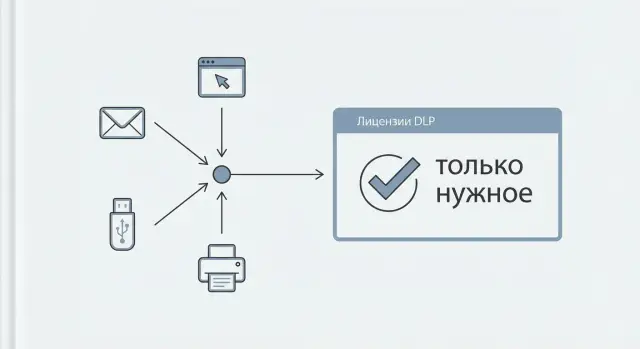
Problem: DLP is bought from a checklist but only partially used
DLP is often purchased “with a margin”: organizations take the maximum set of modules and all control channels because it’s easier to get approval and “close the security topic.” As a result, the budget includes features that are rarely enabled or are used only formally without noticeable benefit.
Overpayment usually occurs for three reasons. First, procurement follows a standard matrix “like everyone else” rather than your actual data flows. Second, during selection nobody really understands which leakage channels are active: where employees send files, how they share reports, what they print, where they copy data. Third, deployment happens in pieces, and some modules sit unused for years: they are postponed or have no process owner.
“Actually used” means not just purchased and installed. The channel is included in policy, events are collected, incidents are investigated, and response rules are clear and followed. This can be checked quickly: by event statistics over 2–4 weeks, by the policies that are active, and by who and how responds to them.
To avoid buying DLP licenses by modules and channels blindly, you need a data map: where sensitive data originates, where it’s stored, who works with it, and through which paths it leaves the organization or moves internally.
A map immediately delivers practical benefits:
- budget: you can see which channels are worth paying for now and which to postpone
- risk: you understand where leaks are most likely and what real damage could be
- implementation priorities: start with 1–2 channels that give quick impact and avoid spreading thin
- clear requirements: procurement turns from “we want everything” into “we need this coverage and this number of licenses”
Without a data map, DLP becomes an expensive “just in case” insurance. With a map, it becomes a tool that covers your scenarios and doesn’t pull in unnecessary licenses.
How DLP licensing is usually structured: modules and channels
Most DLP licensing is modular: you choose functions and enable control for the required transmission paths. Therefore, don’t confuse “module” and “channel.”
A module is what the system does: detect personal data, enforce policies, help investigate incidents, perform OCR on scans, manage devices, and so on.
A channel is where data can leave. Typical channels: mail, web, messengers, cloud services, USB, printing, clipboard, network shares. When people talk about DLP licenses by modules and channels, they usually mean the combination of functionality plus controlled directions.
In practice, one channel often brings several modules together. For example, print control may require not only print monitoring but also content analysis to distinguish an invoice from a draft. Web control often includes a separate traffic interception component and separate categorization rules.
There is another layer: what counts as a licensing unit. Models exist that license by users (accounts), by endpoints (PCs/laptops) or by servers/nodes (mail gateway, proxy, management server).
To avoid mistakes in calculation, clarify with the vendor in advance:
- what is considered a “license unit” for each channel
- which modules are mandatory for the chosen channels
- whether classifiers, dictionaries, OCR and investigation features are included
- how remote employees and VDI are licensed
- what happens if you enable some channels later (extra fees, migration, new key)
These answers quickly show where procurement inflates and what should be fixed in the data map.
Leakage channels: what to include in the map (mail, web, USB, print)
A channel map is needed so DLP licenses by modules and channels match real data flows. Start with four basic channels found in almost any organization, then add what matters specifically to you.
Mail often becomes a source of incidents not out of malice but out of habits. Note outbound mail to external recipients, internal correspondence between departments, and attachments. Specifically record forwarding to personal addresses and auto-forwarding rules.
The web channel is broader than “visiting sites.” Include submissions through web forms (requests, tickets, contact forms), web mail, cloud drives, and browser-based messengers. It helps to separate “reading” and “sending”: many things can be monitored for viewing, but file uploads and pasted text into input fields should be under control.
USB and removable media are not only copying files. Record data transfer to flash drives and external disks, use of memory cards, and running portable applications (e.g., file managers or messengers from a flash drive). Note where removable media are genuinely needed: engineers, service points, training labs.
Printing varies too. Include local and network printers, MFPs in departments and “virtual” printing to PDF printers. PDFs often become a convenient way to exfiltrate a document without a clear trace.
Also consider screenshots and screen recording, clipboard, RDP and remote desktops, cloud services and public file sharing sites.
If you need quick prioritization, take one real document (e.g., a contract) and trace its route: where it’s created, how it’s approved, how it’s sent, where it’s printed and how it’s taken from the workplace. That makes the map alive rather than a template exercise.
Preparation: who participates and what inputs are needed
Before discussing DLP licenses by modules and channels, agree on decision rules: who decides and on what basis. Otherwise you’ll get a nice diagram on paper that doesn’t match how people actually exchange data.
Assemble a short working group (usually 4–6 people) with clear roles:
- InfoSec: risks, data classes, acceptable scenarios
- IT: infrastructure and deployment constraints
- Legal and Compliance: regulator requirements, contractual obligations, retention terms
- HR: offboarding, disciplinary procedures, employee communications
- Data owners in the business: what is critical and which exchanges are needed for work
Collect inputs that are easy to prepare in advance: existing policies (infosec, data classification, media handling), mail and print regulations, results of past incidents and audit requests. If there are public procurement or industry audit requirements, list them separately.
At the same time, list systems through which data flows: mail and gateways, web proxy, MDM for mobile, print servers, file storages and shared folders. Describe not “how it should be,” but “what is actually used.”
To prevent the map from turning into an argument, ask the same questions to each unit: who sends, what type of data, where (internal or external), by which channel and why. For example, accounting may legitimately email acts to contractors, while engineering may transfer files to USB for work on isolated test benches.
Define the output format up front: a single table of flows (channel, sender, recipient, data type, frequency, risk) and a simple diagram with arrows. This becomes the basis for an accurate license and module calculation without overpayment.
How to build the data map: a step-by-step algorithm
A data map is needed so DLP licenses by modules and channels are bought based on facts, not “just in case.” This is not a long audit lasting months, but a clear table showing what data you protect, where it lives and how it typically leaves.
First set the scope: 3–5 key processes (for example, sales, accounting, HR, contractor work). Too broad a scope at the first pass will blur the picture and create noise.
Algorithm that works:
Build the map row by row: one row = one data type in one process (for example, “candidates’ personal data in recruitment” or “financial reports in treasury”). Keep the same fields in each row:
- data category (personal data, finance, trade secrets, medical data) and a simple description of how it looks
- data owner and process owners (who sets rules, who stores, who sends)
- storage locations (work PCs, file shares, servers, mailboxes, cloud drives, CRM/ERP)
- typical transfer routes by channel (mail, web, USB, print): who, to whom, how often, what files
- leakage consequences and priority (e.g., scale 1–3: critical, important, tolerable)
Two time-saving rules: describe a “typical day,” not rare cases; record internal forwards between departments if they regularly occur via mail or browser messengers.
How to quickly set priorities:
If in doubt, ask three questions: will there be fines or inspections, will we lose money, will a process stop? For example, a client proposal often goes by mail and web, while an export of employee personal data may be copied to USB for a regional office. Priorities indicate which channels to include in a pilot and where not to skimp.
How to verify which channels are actually used
To avoid overpaying for DLP licenses by modules and channels, first confirm which transmission paths are actually used. Do this not by feelings but by traces in existing systems.
Start simply: collect statistics where logs already exist. Usually 1–2 weeks is enough to see the picture.
- mail gateways and servers (outbound/inbound, attachments, recipient domains)
- proxy and web gateways (uploads/downloads, cloud drives, web mail)
- EDR/antivirus and OS logs (USB connections, utility executions)
- print servers and print queues (who prints what and how often)
- AD and groups (tie events to departments and roles)
Measure by slices: volume (MB/GB), frequency, user groups and direction (internal or external). 200 emails a day with attachments from accounting is one scenario, while 5 large uploads to the cloud by engineers is another. Licenses and control points will differ.
Separate legitimate processes from “grey” ones. Grey signs are visible in data: personal mail domains, regular uploads to public drives, sending to external addresses, mass printing at the end of the day. But be cautious: sometimes a process is legitimate but undocumented.
When are logs sufficient and when is a short pilot needed? If logs show a channel is rarely used (for example, printing by a handful of employees), logs are enough. A pilot is useful when logs are incomplete, hard to link to users, much traffic is encrypted, there are disputed processes (contractors, remote work, shared mailboxes) or you need to confirm the share of “grey” scenarios before purchasing.
The result should not be “everyone uses everything,” but a short table: channel, departments, event volume, data type. That is the basis for license calculation.
From the data map to procurement: how to count exactly the needed licenses
When the data map is ready, translate it into procurement language: which DLP modules and channels to include, where to place control points and how many users to cover. A simple matrix “data — channel — department — risk” helps. It shows that accounting needs mail and print more than other channels, while developers need web and USB.
Make a table and add a “control point” for each row: where you will see the event and manage the policy (mail gateway, endpoint agent, proxy, print server). This becomes a license list: module(s) + channel(s) + installation type (agent/gateway/server part) + required integrations.
Count coverage by risk groups rather than “all employees.” Start with departments that more often cause leaks and expand later.
A simple logic for initial estimation:
- users under control: risk groups + admins with access to critical data
- channels: only those with real flow in the map
- control points: where the channel is technically implemented in your network
- modules: for the required policies (classification, content analysis, reporting)
- integrations: mail, proxy, print servers, SIEM (if needed)
Stage the purchase. Start with 1–2 hottest channels (often mail and USB), then add web and print after pilot validation. If the organization is distributed (for example, branches across the country), clarify where a unified console will be and whether the current infrastructure can handle logs and integrations.
Common mistakes and pitfalls when choosing modules and channels
The most expensive mistake is buying the “maximum package” because it feels safer and then using 20–30% of its capabilities. When procurement is not tied to a data map, licenses become insurance with no benefit. If you choose DLP licenses by modules and channels, get a clear answer: what data, who sends it, where and how.
A frequent miscalculation is the unit of account. In some solutions a license is per user, in others per control point: workstations, mail gateways, proxies, print servers. People count employees but end up paying for infrastructure, and the budget doesn’t add up.
Another trap is forgotten roles. Admins, service accounts, dedicated workstations in accounting, call centers or checkpoints create separate transfer scenarios. If omitted, blind spots will appear or you’ll have to buy extra licenses mid-deployment.
Channel bias
Teams often overestimate USB because it’s visible and “scary,” but underestimate web and cloud: web mail, browser messengers, uploads to storage, site forms. Or the reverse: they build web control while print and removable media remain uncontrolled.
Example: a branch bans USB, but managers still send proposals via personal web mail. Formally DLP exists, but leaks go through another channel.
Policy owner mistake
DLP degrades quickly if there’s no person maintaining policies and exceptions. Rules accumulate, conflict, false positives rise, and users begin to bypass control.
Before procurement check:
- what license model fits you: per users or per control points
- which channels are confirmed by facts (logs, process survey, pilot)
- whether admins, service accounts and special workstations are accounted for
- whether a policy owner is assigned and an exception process is agreed
- whether time for content tuning (templates, dictionaries, labels) is included
Quick checklist before pilot and procurement
Before a pilot, agree not on “the fullest set” but on what you will measure and validate. Then procurement rests on facts: which channels are actually used, where data most often leaves, and who will sustain the process.
What should be ready before start
You need a short “data passport”: a list of key information types (contracts, personal data, financial reports) and owners who can quickly say what may be sent outside and what may not.
Then list the main flows: where data leaves and to whom. Often you’ll find one official path (mail) and several actual ones (browser messengers, personal mail, flash drives).
Minimum metrics and agreements
For a pilot, collect stats for at least 2–4 weeks for mail, web, USB and printing. Exports from mail servers, proxies, print server logs and USB usage logs are enough. The goal is understanding volumes and frequency rather than perfect accuracy.
Before launch, agree on:
- high-risk groups and minimum pilot coverage (e.g., 30–50 seats in finance and sales)
- success criteria: what counts as an incident, who confirms it, response time and next steps
- infrastructure constraints: where an agent cannot be installed, supported OS, remote access setup
- reporting requirements: what reports management, InfoSec and IT need and how often
If these points are covered, the pilot will quickly answer the main question: which DLP licenses by modules and channels are truly needed and which can be postponed.
Example scenario: choosing DLP modules for real flows
Imagine a company with 300 employees: accounting, sales, procurement, IT, HR. Leadership wants DLP without overpaying for scarcely used channels. They start with a simple data map: where sensitive information is stored and how it actually leaves.
Three risk areas emerge. HR holds personal data (applications, orders, medical notes). Procurement has contracts, invoices, specifications and vendor correspondence. Sales has proposals, price lists, presentations and client communication.
Daily activity shows external exchange mainly via outbound mail and web services (including cloud storage and web mail). Printing matters most in accounting (acts, invoices, closing documents). USB is used selectively: meeting rooms for presentations or a few employees who work with offline equipment.
Procurement is split into stages:
- stage 1: mail + web for risk groups (HR, sales, procurement) and executives
- stage 2: print control for accounting and those who regularly print PII or financials
- stage 3: USB only where truly needed (specific roles/seats), not for everyone
Keep initial rules simple to avoid drowning in false positives. Use a few templates (contract, proposal, application), add key words and identifiers (tax/registration numbers, contract numbers), set file types (PDF, DOCX, XLSX) and define exceptions: corporate mailings, approved vendor addresses, service accounts. In 2–3 weeks reports will show which channels and departments produce real incident flows and justify license expansion.
Next steps: pilot, specification and deployment
When the data map and stats are collected, don’t rush to buy. First validate priority channels and scenarios: where risk is highest, where regulatory requirements exist and what actually happens in your environment (mail, web, USB, print).
Next is a short pilot. Its goal is not just to check that DLP works, but to tune rules so they catch leaks without disturbing business. Choose 1–2 user groups with different roles (e.g., accounting and sales) and enable only the channels you marked as priorities.
Follow a simple cycle:
- record 3–5 pilot goals: what data to protect, which channels to control, acceptable false positive level
- run the pilot on a limited scope and collect stats: recurring events, noisy rules, bypasses
- refine policies (keywords, templates, exceptions for service accounts) and agree on what constitutes an incident
- produce a procurement specification: modules, channels, number of users/endpoints, server components and expansion plan
- describe the incident response process: who reviews incidents, SLA for response, reports for InfoSec, IT and management
At the specification stage verify you buy exactly what you will use: DLP licenses by modules and channels must match the data map and confirmed statistics.
If internal resources are lacking, involve a system integrator for the pilot and deployment. For example, GSE.kz (gse.kz) can assist with design, infrastructure preparation (servers and workstations) and 24/7 support organization.
Frequently asked questions
Where do I start a data map if there’s no time for a large audit?
Start with 3–5 key processes where sensitive data really circulates: for example, HR, finance, sales, procurement. For each process, note the data type, the owner, where it’s stored and how it leaves (mail, web, USB, print). That is usually enough to understand which channels you need in the license and which can be postponed.
What is the difference between a module and a channel in DLP?
A module answers “what DLP can do” (find personal data, content analysis, investigations, OCR, device control). A channel answers “where data can go” (mail, web, USB, print, etc.). Clarify the combination: one channel often requires several modules, otherwise control will be formal and ineffective.
How do I know what the license charges are for: users or devices?
Vendors use different units of measure, so clarify this before budgeting. Licenses are often based on users, endpoints (PCs/laptops) or infrastructure nodes (gateway, proxy, management server). Ask the vendor to explicitly describe what you pay for per channel and how temporary users, shared PCs and service accounts are handled.
How long should I collect channel statistics to avoid mistakes?
A reasonable minimum is 2–4 weeks to see regular patterns rather than spikes. For mail and web, 1–2 weeks is often enough; for printing and USB, 3–4 weeks is better to capture month-end, payroll, reporting or project peaks. If you have seasonality, choose a window that represents normal load.
Where do I get facts about which leakage channels are actually used?
Look at mail server and gateway logs, proxy and web gateway logs, OS and EDR events for removable media, and print server queues. It’s important to tie events to users and departments; otherwise numbers will be an average. If some logs don’t exist or can’t link to people, consider a small pilot group.
Which DLP channels should I enable first: mail, web, USB or print?
Start with channels that have frequent external exchange and clear impact: usually outgoing mail and removable media in high‑risk groups. Add web when you see cloud storage, web mail and browser uploads, and add printing where documents are regularly printed on MFPs or saved to PDF. Let your data map and stats—not templates—dictate the sequence.
When are logs enough and when do I need a DLP pilot?
Run a short pilot when logs don’t show who exactly sends what, when there’s much encrypted traffic, disputed processes with contractors or remote work, or when you expect many "grey" bypasses. The pilot’s goal is to tune rules so they produce useful incidents with acceptable noise. After the pilot, you can specify licenses and infra needs more precisely.
How do I account for remote employees and VDI in licensing and channel choice?
Control corporate devices and accounts by default. For VDI, clarify whether an agent model is supported and how licenses are counted; for remote employees, decide where the control point will be (on the laptop, at the gateway, via proxy). Don’t leave this for later—remote access often breaks channel and server capacity calculations.
How do I reduce false positives so DLP doesn’t disrupt work?
Start with simple rules that catch obvious violations and predefine exceptions for legitimate routes and service accounts. False positives usually come from overly broad dictionaries, lack of context (who is the recipient, what is the document, what process), and outdated exceptions. Review rules regularly and adjust incrementally to avoid users seeking workarounds.
Who should own DLP after deployment and what if we lack resources?
Appoint a policy and process owner before purchase: who approves rules, who investigates incidents, who decides on exceptions and who communicates with employees. Without this, DLP becomes a set of unchecked toggles and licenses end up wasted. If internal resources are limited, engage a system integrator for pilot, tuning and runbooks; GSE.kz can help with infrastructure and support in such projects.
