8 min read
Digital Logbook for Patrols and Inspections: Routes, Tags, Offline
A digital patrol and inspection logbook lets you set routes with NFC/QR, track time, capture photos, work offline and turn remarks into work orders.
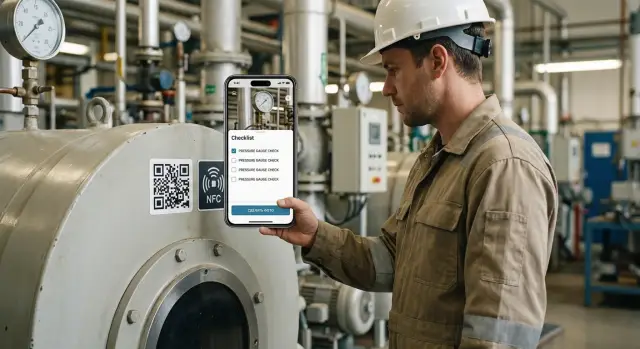
What exactly should be automated and why
A paper patrol logbook does one thing well: it records that someone checked something. But it often breaks on details. Entries are written after the fact, signatures are added "for the record", photos are stored separately, and proving the real time and place of a check is nearly impossible.
Agree on simple terms so everyone speaks the same language. A patrol is a route with points to visit. An inspection (check) is an action at a specific point: looked, measured, verified. A defect (remark) is a deviation from the norm that requires action — from a dirty filter to a leak.
Automation is needed not for the sake of an app, but for manageability. Managers usually care about four outcomes: discipline (who and when was at a point), deadlines (plan vs actual patrols), evidence (photos, comments, tag confirmations), and analytics (where problems occur most and how long fixes take).
A good digital logbook records immutable facts: the point confirmation (via NFC/QR), time, performer, result and proof (for example, a photo). If a guard or engineer marks a pump station, the system should show they were there at that time.
Define the project boundaries early. In the first stage, automate routes and control points, visit confirmation (NFC/QR) and time, a simple checklist result (normal/not normal), photo capture for critical points, and basic plan-vs-actual reports.
Integrations with complex systems, advanced dashboards and custom roles are best left for later. First you need honest and convenient fact recording; otherwise everything built on top will be based on weak data.
Roles, objects and log data structure
To avoid confusion, agree on roles and responsibilities up front. Then routes, tags and reports will be collected consistently across sites instead of "how each shift is used to doing it."
Typical role distribution: the patroller records the check and remarks on site; the master confirms tasks were done correctly; the engineer sets standards and checklists (what counts as a fault); contractors receive work that goes outside; the dispatcher monitors discipline, assigns ad-hoc patrols after incidents and closes the shift.
Describe what you track. A useful structure goes from large to small: site (facility), then zone (workshop, floor, building), then control point (door, panel, unit), and inside the point — attached equipment (pump, UPS, server rack). This separates geography and equipment: "where" and "what" are always distinct.
Limit task types to three clear variants: regular (scheduled), periodic (less frequent but planned) and ad-hoc (after alarm, accident, complaint). For example: daily patrol of fire cabinets, weekly check of electrical panels, and an unscheduled inspection after a power outage.
Each record should keep a minimal data set so there's no later dispute about who was there and what they saw: performer and shift, control point and related equipment, start and finish time, result (normal, deviation, unavailable), short comment and photos if needed.
If these fields are always mandatory, reports become reliable. Then it’s easy to add time control, photo capture and automatic conversion of remarks into work orders.
Designing patrol routes
Start by breaking the site into zones that make sense to the performer and match reality: building, floor, wing, shop, perimeter, server room, warehouse, boiler room. For each zone, set the patrol objective (safety, equipment condition, sanitation, access), then chain zones into logical sequences a person can walk without backtracking.
Design routes not just as on a map, but as people actually walk them. Consider entrances, turnstiles, stairs, lifts, cold outdoor links, noisy areas and places that require escorts. If a route passes risky areas (high voltage, traffic, hot surfaces), add clear rules: where to stop, what not to touch, and required PPE.
Rules of a good route
A route should be short enough to be performed reliably, but complete enough to avoid blind spots. A practical rule: two short routes per shift are better than one long route that gets shortened.
Before launch, check four things. Access: which points need permits, keys or special entry. Safety: prohibited areas and order of movement. Seasonality: perimeter checks and entrances often change in winter. Repeatability: the route must work the same on weekdays and weekends.
Schedules and execution windows
Set not only "when" but also the execution window: for example, a night patrol 22:00–01:00. This makes it easier to spot deviations and avoid penalizing reasonable delays (emergency work, guard calls, incident checks). Note exceptions: holidays, short shifts, planned maintenance days, or heightened security.
If a section is closed for repairs, plan alternative paths. Include a status for sections (open/closed) and a rule: "if closed, perform the control check at the entrance and record the reason." This keeps discipline without fake confirmations.
Step-by-step implementation plan without unnecessary complexity
Start not with the app, but with a clear map of work. List inspection points: rooms, units, cabinets, doors, meters, fire panels. For each point, write 3–7 simple criteria: what to check, what counts as normal, and which photos are required only for deviations.
Next, fix who goes where and when. The same route without a schedule quickly becomes a formality. Define shifts, frequency (every 2 hours or once per shift), time windows and responsible backups for vacations and sick leave.
Prepare tags and placement in parallel. Decide where to place NFC or QR so they can’t be scanned from the corridor and won’t interfere with operation. Rule: a tag is tied to a specific point, not to a route. Otherwise route changes break everything.
Run a short pilot. Pick 1–2 routes in different conditions (office floor and technical room) and run them for a week. Then adjust time norms and checklist hints: where people regularly run out of time, unclear wording, or too many required photos.
After the pilot, roll out to all areas and solidify the process. Define who closes shifts and checks misses, what to do with unavailable points (closed, under repair), when a photo and comment are required, how to record deviations and where they go.
Example: on a site with 40 points, some tags were placed at the panel entrance. Moving tags inside and adding the criterion "seal intact" sharply reduced formal confirmations and disputes.
NFC and QR tags: choice and installation rules
You can use NFC, QR, or both for a control point. NFC is convenient where a quick tap is needed without aiming the camera: dark corridors, basements, dusty or wet places. QR is cheaper and easier to print and replace; it suits office zones and well-lit areas. Use both on critical points: NFC for speed, QR as a backup if a phone can't read NFC or a tag is damaged.
Place the tag so it can be read safely and without extra actions. If someone has to reach behind a panel, crouch under a pipe or use a flashlight, discipline will soon drop.
Short installation rules:
- Height usually 120–160 cm from the floor so people don't have to stoop or stretch.
- The tag should be accessible without keys or removing covers.
- Consider lighting: QR needs stable light and no glare.
- Protect from water, dirt and impacts: frame, transparent pocket or cover.
- Take a photo of the installation site immediately to make later tampering checks easier.
Identification of a point must be unambiguous. Use a unique point code, link to zone (building, floor, room) and specific equipment (UPS, pump, panel). Avoid codes that only one person understands: use a short ID plus a clear name in the app.
To reduce tampering risk, use tamper-evident seals or destructible stickers, store a reference photo and do periodic random checks. If a tag is removed or damaged, follow a rule: put a temporary replacement with a new ID, record the incident (who found it, where, photo), and mark the old point as unavailable until investigated. This preserves the route and time reports.
Time control and patrol discipline
Discipline comes from clear recording rules, not punishment. When the log automatically collects events, disputes drop: you can see who started and finished, which points were visited, where delays occurred and what supports them.
Events to record
A minimal set of events covers 90% of cases. Usually record patrol start, each control point visit (NFC or QR scan), completion, and pauses. Pauses matter: otherwise any call or incident looks like idle time.
Each event should have time, user, route/shift and a reason (for pauses and deviations). That makes reports honest rather than "for the record."
Time norms without overreach
Don't set norms too tight. Real work has gate queues, closed doors, talks with duty staff and bad weather. Use ranges: for example, a route window 20–40 minutes from start, and per-point time 30–120 seconds. Separate norms for night shifts and different sites.
Define what counts as point completion:
- Completed: a scan at the correct point within the allowed window.
- Completed with deviation: scan exists but time is outside the window (comment required).
- Not completed: no scan or a wrong scan (different point/route).
This removes double scans and missed points.
Basic anti-fraud and anomaly signs
At a basic level use three rules: forbid backdating times, record device time with checks during sync, and monitor suspicious patterns. If the phone can provide a geolocation, use it as an extra signal but not the sole criterion.
Typical anomalies: too-fast patrols (all points in two minutes), identical intervals between points, many repeated scans of the same tag, frequent unexplained pauses, or patrols done outside shifts.
Reports: for the shift and for managers
A shift report should answer: what remains to do now. A manager's report should show what was done and where the issues are. The clearest format: route status (completed/with deviation/not completed), list of deviations with reasons and a short time summary (start, finish, duration, total pauses).
Photo evidence and proof
Photos are not for decoration but to resolve disputes: where you were, what you saw and what changed after repair. Clear photos mean fewer messages and repeat visits.
What to photograph so it works
One defect should be 2–4 photos providing context and detail. Usually: a general shot, a shot showing point ID (plate, equipment number, tag/QR), a photo of readings (display, gauge, alarm panel) and a close-up of the defect (crack, leak, corrosion, exposed cable, burn marks).
If there's no defect, a general shot plus the point ID is usually enough to show the check happened.
Minimum photo rules: one meaningful shot per image, no blur, no strong backlight, no distracting reflections. Link the photo to the point, time and performer; ideally the app adds date and point automatically, and the user just takes the photo.
Keep comments short, like a shift log note: "what", "where", "severity", "what's needed." Use templates with 2–3 fields: defect category, urgency level, short description up to ~200 characters.
Storage, quality and additional attachments
Set retention periods by industry and internal rules, but decide early which photos are evidential and which can be compressed. Moderate quality is fine for general shots; high quality is needed for readings and nameplates so numbers and serials are legible.
Additional attachments are used only when photos don't convey the meaning or a formal document is required. Video helps if noise, vibration or unstable operation matter. Documents or scans are needed for permits, acts or schematics. A large close-up of a serial plate is useful if there's a dispute about model, batch or warranty. And almost always a "after" photo helps confirm remediation.
This approach makes photo capture part of discipline, not an extra burden.
Offline mode and data synchronization
Offline mode is not a rare option but a basic scenario. In basements, remote sites or elevator lobbies the connection often drops, and the patrol must finish without data loss. A good logbook guarantees local recording first, then server upload.
For offline work, preload the phone with the minimum needed: that shift's routes and ordered points, checklists and standards, equipment cards (name, location, serial number, reference photo), drafts (text, photos, time stamps), and a list of open remarks for the site (to avoid duplicates).
Synchronize by event queue: each action (tag scan, checklist answer, photo, comment) is recorded as a separate event with a unique ID, timestamp and device ID. The app can then send accumulated events in parts when internet or Wi‑Fi appears. The server applies events idempotently: duplicate events are ignored.
Conflicts occur mostly when two shifts edit the same record. The clearest user approach: records are not edited retroactively but appended. If edits are needed, show a warning: what changed, who last saved, and offer to choose a version (or keep both as separate comments).
On failure the user should see simple statuses: "saved on device", "waiting to send", "sent". If the battery is low, the app should not try to sync large photos in the background without asking.
Before launch test offline with a short checklist:
- Load routes and checklists, turn on airplane mode.
- Visit 5–7 points, add 2 photos and 1 remark.
- Restart the app and ensure data remains.
- Turn off airplane mode and verify everything uploads without duplicates.
- Compare server times, points and attachments with what was on the phone.
Common mistakes and how to avoid them
The main reason a digital patrol log fails is not NFC or QR, but trying to be too "perfect" on day one. People will then try to bypass the system instead of inspecting the site.
Routes and forms: fewer, done regularly
The most common error is routes that are too long and forms that are overloaded. If a patrol takes 60–90 minutes and requires dozens of fields, staff will rush and skip points.
A good rule: one route = one purpose (safety, engineering, sanitation), and forms only include what affects decisions. Make mandatory fields only for critical risks (leak, fire exit, emergency alarm).
Tags, time and photos: evidence, not traps
Tag problems are usually physical: placed where hard to reach, easy to remove, or using duplicate codes with no clear numbering. A tag must be accessible, protected and unambiguously linked to the point.
Time control errors often come from two mistakes: setting unrealistic norms and turning control into fines. Set reasonable time windows and allow for pauses (talking to security, waiting for access, elevator wait). Then data will be honest.
Photo capture also needs a standard or you get chaos: varying angles, no scale, photos not tied to points, and ballooning storage. Agree: 1–2 photos per remark, required general and close-up shots, automatic tie to point and time.
To reduce resistance, run a short training and a pilot on one area. Provide in-app tips and a channel for quick problem reports. Then the log becomes a habit, not extra work.
Before launch check:
- Route fits 20–40 minutes and is easy to follow.
- Form has no more than 6–10 questions, mandatory fields only where needed.
- Tags are protected, unique and in convenient places.
- Time norms are realistic and allow pauses.
- There's a photo standard and limits on number of images.
Turning remarks into work orders
For the logbook to deliver results, every remark must quickly become a task with a clear owner and deadline. Otherwise entries pile up and problems repeat.
Start with a simple status flow. After creation the entry is "remark". A checker (often shift master or engineer) either rejects it as "not an issue" or converts it to a "work order." Then the cycle follows: "in progress" (assignee accepted), "done" (fixed) and "closed" (responsible person confirmed).
Categories and deadlines
Categorization is for assigning people and deadlines, not just reports. Minimum fields: defect type (electrical, fire safety, IT, plumbing), risk/criticality (low, medium, high) and required skill (duty technician, contractor, engineer).
SLA rules can be set once and applied automatically:
- High criticality: deadline today or within 4–8 hours, immediate notification to assignee.
- Medium: 1–3 business days, can be bundled into planned work.
- Low: up to 7–14 days, allowed to be rescheduled with a comment.
Roles and required fields
Make clear who does what: inspector creates the remark, site manager approves and assigns, the assignee marks work done, and the site owner closes the task.
Require fields so work orders don't stall: location (site, zone, point by NFC/QR, date/time), description (what's wrong and how it affects safety or operation), photo (min. 1 "before" and 1 "after" on close), priority and deadline (by criticality), and materials/work needed.
When a work order closes, its result should return to the patrol history: add a "fixed" mark to the original point, upload an "after" photo and record reasons for delays if SLA was missed. Then the log becomes analytics: which points produce defects most often, which problems repeat, and where deadlines slip.
Sample real scenario on one site
A duty engineer's shift at a small site starts with a boiler room patrol. The mobile app shows the chosen route and which points to visit in order. Internet is unreliable in the basement, so data is written locally and synced later.
The route has four control points, each with an NFC or QR tag:
- Entrance door (check access and seals).
- Pump group (noise, vibration, leaks).
- Heat exchanger (temperature, condensation traces).
- Electrical panel (indicators, overheating, cable condition).
The worker hits "Start", scans the first tag and the app records time and place and opens a short checklist. They add photos and a voice or text comment if needed. For example, a pump shows a leak: they take a close-up and a general shot, mark it "leak", set risk to "medium" and note the likely cause (seal).
A work order is created automatically from that remark: point, site, time, photos and defect type are pulled in. The user sets priority (e.g., "by end of shift") and assignee (repair team). If there's no connection, the order gets a temporary number and syncs when online.
At the end of the shift the manager sees a summary: which points were done or missed, where delays occurred, a list of work orders with priorities and assignees, and before/after photos for completed jobs.
Quick checklist and next steps
Before launch check rules, not only tags and the app. Otherwise the log will look "digital" while data remain incomplete and disputed.
Quick checks before start
Walk the site once with a phone and see where the system actually breaks in practice:
- Tags read on the first try, are in visible and safe places, and there are spares for damage.
- Routes match shifts and real walking logic, not the paper diagram.
- Offline mode works: points are recorded without network, photos are saved, and sync later has no duplicates.
- Photo guidance is clear: what to photograph, how many shots, when to retake.
- Access rights set: patroller sees only their tasks, master can close orders, security sees incidents but can’t change records.
At launch don’t chase dozens of reports. Two simple reports are enough: patrol discipline (done/missed/late) and open remarks with deadlines and owners. These two show quickly whether the system helps.
Show results by role. The shift needs a "what remains to do today" list. The master and operations need recurring problems and missed deadlines. Security needs incidents and proof (photos, time, point).
Next steps
Decide where data will be stored and who supports it. For a small site one server and clear procedures are enough: backups, accounts, updates and dispute handling.
Run a 2–4 week pilot on one site or area: choose 1–2 routes and 20–50 control points; set time, photo and mandatory field rules; agree how a remark becomes a work order (who approves, sets priority, deadline and assignee); provide 15–30 minutes training for the shift and master; after the pilot record improvements and then scale.
If you need a reliable host for storage and synchronization, consider selecting server infrastructure and workstations in advance. For on‑premises solutions you can evaluate GSE S200 Series servers and system integration help from GSE.kz so the pilot runs on real infrastructure with clear support.
Frequently asked questions
What should be automated first?
Start with routes, checkpoints, NFC or QR scans, time tracking, and short checklists. Add photos only for critical checkpoints and deviations, and leave complex integrations for the next stage.
What should an NFC or QR tag be linked to?
Link the tag to a specific physical checkpoint, such as an electrical panel or pump group. If the route changes, the checkpoint will retain its history, and you will not have to move the tags.
Which should I choose: NFC or QR?
NFC is more convenient in dark, dusty, and damp areas where it is easier to tap a phone. QR is cheaper and works well in well-lit office areas. At critical checkpoints, use both so one method remains a backup.
Where is the best place to put tags?
Place tags at a height of about 120-160 cm, somewhere accessible and safe. People should scan them right next to the equipment, not from the corridor or at the entrance to the room.
How do I set time standards for inspections?
Set a completion window rather than an exact time down to the minute. For example, a night inspection can be completed from 22:00 to 01:00. Allow for access delays, elevators, emergency work, and other real-world delays.
What if there is no internet connection at the site?
The app should save scans, responses, photos, and comments on the phone, then send them when a connection becomes available. Users should be able to see whether a record is saved, waiting to be sent, or already sent.
What photos are needed when a defect is found?
For a defect, take a wide shot, a photo of the checkpoint or equipment identifier, and a close-up of the issue. Add a brief comment: what happened, where it is, how urgent it is, and what is needed.
How do I turn an observation into a repair request?
Turn an observation into a repair request after a supervisor or engineer reviews it. The request should include the checkpoint, time, description, photos, priority, deadline, and assignee. When closing it, add a post-repair photo.
How can I reduce the risk of superficial inspections?
Do not allow backdating, record the device used, and review suspicious events. These include inspections completed too quickly, repeated scans of the same tag, and frequent unexplained pauses.
How should I run a pilot before rolling out to all sites?
Choose one or two routes with different conditions and test them for 2-4 weeks. Check whether the tags are convenient, the checklists are clear, enough time is available, and observations are correctly turned into requests.
