6 min read
Device Batch Traceability: How to Keep Records Without Confusion
Device batch traceability helps quickly understand where a device came from, where it’s installed and what has been changed after issuance and servicing.
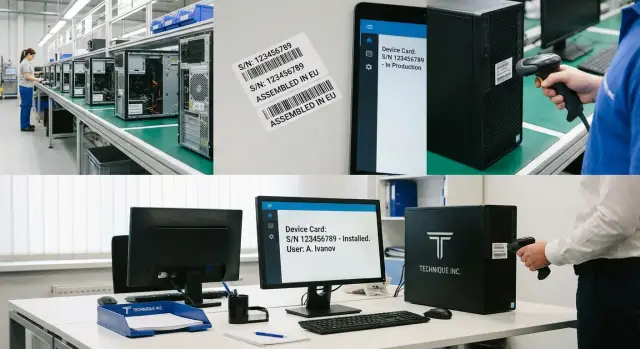
Why track each device’s journey
A single inventory number is useful, but almost always not enough. It only answers the question “what is this item.” Proper tracking needs other answers too: where the device came from, when it was assembled or delivered, which batch it belonged to, where it is now, who is responsible for it, and what has happened to it since issuance and service.
Without that chain, even simple situations quickly become disputed. One department thinks a computer is new, another remembers a recent repair, and the warehouse shows an old storage location. Formally the equipment exists, but its real status is unclear.
The problem is especially visible where equipment is purchased in batches: for an office, school, hospital, bank or government body. When dozens of identical PCs, all-in-ones or servers arrive, they look almost the same. If there’s no history for each device, it’s easy to mix up a unit, its batch or its installation location.
Good tracking shows the full lifecycle of a device: from assembly or delivery to the workstation, repair, relocation and disposal. Then tracking becomes a working tool for the warehouse, IT, accounting and management, not just a formality.
What should be in the records
To keep the history intact, the system should show not only the device itself, but also its links to the batch, shipment and installation point. If those links are missing, in a few months it’s hard to know where a specific computer came from, who uses it and what was changed in it.
Usually three levels are enough: the batch, the individual device, and its operation. The batch answers the question of which shipment or assembly the devices came from. The device record shows the history of a specific unit.
What to store in the device record
A clear minimum in the device record is:
- serial number and internal inventory number
- model and configuration
- batch or shipment number
- assembly date if known, and actual delivery date
- current location and the person or department responsible
- status: in storage, installed, under repair, decommissioned
That is enough to avoid searching through waybills, emails and separate spreadsheets.
It’s important not to confuse a batch with a serial number. A batch is a group of devices produced or shipped together by a common attribute: date, order, shipment or production run. A serial number belongs to one specific machine. If 50 identical computers arrive at an office, they may share a batch number, but each will have a unique serial number.
It’s also useful to store both assembly and delivery dates. The first ties the device to the production run; the second shows when the equipment actually arrived at the organization or branch. This helps with acceptance, warranty and replacement planning.
Keep the location and the responsible person as current fields in the record, and write all changes to a history log. That way you can see where the device is now and where it was before.
If equipment arrives in large batches, this scheme significantly reduces confusion. For computers, all-in-ones and servers from GSE this is also convenient: a device can quickly be linked to its batch, shipment and subsequent operation without manual reconciliation.
How to link a batch, a device and an installation point
A working scheme relies on three links: the batch, the specific device and the installation point. If any one link is missing, it becomes difficult later to know under which document a computer was accepted, where it currently is and who is responsible.
Start by giving batches a clear code. Usually it includes the date, project or supplier and the equipment type. For example: 2026-02-GSE-M200-015. Such a code is easy to find in acceptance reports, waybills and the internal database.
Next, each device within the batch gets its own unique identifier. This can be the manufacturer’s serial number, the company inventory number, or both. The batch has one common code; every device has its own record.
In the device record it’s useful to immediately link four things: the batch code, the delivery document or acceptance report, the installation location and the responsible employee or department. That is enough to keep tracking intact during moves, repairs and audits.
Specify the installation location precisely. Not just “Almaty office,” but “Almaty office, 4th floor, room 412, desk 7.” For servers the logic is the same: building, server room, rack and unit. The more precise the address, the faster you can find the device on site.
If a device is assigned to a person, record full name, position and issue date. If the device is shared, for example in a meeting room or classroom, it’s better to link it to a department and a materially responsible person.
In practice it looks simple. A batch of GSE M200 Series all-in-ones arrives for a new department. The batch has one code, each unit has a serial and inventory number, and the device record shows which specific unit is in room 305, which workstation and who it’s assigned to. If a device is moved, you don’t change the whole delivery record — you only update the installation location and the history.
From assembly to the workstation
It’s better to start tracking not at the moment of issuing to an employee, but right after assembly or acceptance. Then each unit has a clear chain from the start: batch, device, warehouse, installation and all subsequent events.
A practical order is:
- After assembly or acceptance, create a batch record. Include the batch code, release or delivery date, model, configuration and the responsible person.
- Then enter serial numbers for all devices. Entries like “20 computers” are not enough, because later you won’t know which specific computer went to a department and which remained in storage.
- Next, record the physical arrival location: central warehouse, branch, reserve or staging area. Also note the date of arrival.
- When issuing, update the status and the exact installation location: building, room, department and, if needed, the user.
- From that moment, maintain a change history for each unit: moves, part replacements, repairs, returns to storage and decommissioning.
A sign of good tracking is simple: by one serial number you can quickly answer three questions — which batch the device came from, where it is now, and what has been done to it.
For example, 15 new workstations arrive at an office. With proper tracking, by a serial number you immediately see it arrived as part of a specific batch, was accepted into the warehouse on March 12, issued to Finance on March 15, and six months later its SSD was replaced by the service team.
This approach is especially useful where seeing the chain from production to support matters. For equipment from GSE.kz, produced in Kazakhstan and often purchased in batches by organizations, this model is convenient to build in from the start. The same principle works inside any company, even if devices were bought from different suppliers.
A simple office example
Imagine a typical situation. A company opens a new department for 15 employees and receives a batch of 20 computers, for example GSE L200 Series office PCs. All devices arrived in one shipment, but their paths won’t be identical.
The records should show not only the shipment, but the fate of each computer individually. All 20 devices will share the batch connection, acceptance date and documents. But each must have its own device record with serial number, inventory number and current status.
On installation day, 15 computers are issued to new department employees. Five remain as warehouse spares. It’s important that spares are not listed as installed. The status should clearly show that the equipment is in storage and ready for issuance.
A week later one computer is reassigned to another employee. You don’t change the batch or create a new record. It’s enough to update the user, installation location and add an entry to the history. After a month two computers move to other rooms. If you don’t record that, the inventory will show discrepancies: on paper equipment in one place, but in reality it’s somewhere else.
In this example it’s important to see five things: which batch the device came from, where it is now, who uses it, what has happened to it, and whether any parts were replaced or repaired. The batch is one, but each unit has its own lifecycle.
What to record after issuance
Tracking doesn’t end after installation. In fact, the main confusion usually starts later, when the equipment is already in use and changes happen quickly and don’t always get recorded.
To have a real device history, record all events after it’s put into service. Otherwise it becomes unclear what changed, why it happened and where the device is now.
First, record part replacements. If a disk was swapped, RAM added or a power supply replaced, the device remains the same unit, but its state has changed. For each entry record the date, reason and the removed and installed part numbers.
Next are OS reinstalls and baseline software installations, if they matter for support and security. Hardware may remain unchanged, but for the IT team this is still an important event.
Moves matter just as much. Even moving from one room to another affects tracking. If a device is sent to a branch, record the new address, department, responsible person and transfer date.
Track temporary replacement devices separately. When an employee receives a temporary computer while theirs is repaired, the database should show both links: which device went to repair and which was issued in its place. Otherwise after a few weeks you won’t know which was the permanent workstation and which was temporary.
When decommissioning, don’t limit yourself to the status “not in use.” Record the reason, date, final condition and information about reusable parts if any were removed.
A good event record usually includes the date, type of change, the person who performed it, a short description and the device’s new state. Then the lifecycle reads clearly without guessing.
Where tracking fails most often
The most common mistake is mixing up the batch with the individual device. A batch answers which shipment the equipment arrived with. An inventory or serial number answers which specific unit it is. If you mix these levels, it’s hard later to know whether an issue affected all devices in a batch or only one machine.
Another typical mistake is updating data only during inventory checks. That gives a tidy picture once a year, but the rest of the time records quickly become outdated. Equipment moves between rooms, gets issued to new employees, goes to repair and returns with a different configuration. If entries are made retroactively, the history is lost.
Temporary replacements often break the system. A workstation fails, a spare is issued for two weeks, and then no one marks it. In one system the device is listed in storage, in another it’s assigned to a user, and in reality it’s somewhere else.
Another source of confusion is scattered sources. The batch is in a warehouse spreadsheet, moves are with the sysadmin, repairs are in tickets, configuration changes are in a separate file. While the fleet is small this can work. When devices number in the hundreds or thousands, gathering everything manually is almost impossible.
Therefore tracking needs one clear source of data and one role responsible for record accuracy. That person doesn’t have to do everything, but someone must ensure transfers, repairs and decommissioning are entered into the system on time.
Problems usually show up in simple ways: one device is described differently in different tables, the installation location is known only from employees’ words, after a repair it’s unclear what was changed, and by batch number you can’t quickly find all related devices.
How to quickly test the system
Tracking quality is judged not by a pretty table but by how quickly it answers everyday work questions. If an employee reports a failure, you should be able within a minute to find what device it is, which batch it came from, where it is now and what has been done to it before.
You don’t need a complex system with dozens of fields for that. You need a clear model where the device record is always current and changes are entered immediately.
You can check your tracking with a short list:
- find a device by serial number, inventory number or employee name
- the record shows current location, department and responsible person at a glance
- repairs, part replacements, moves and decommissioning are collected in one history
- every change has a date and reason
- warehouse, IT and accounting data do not conflict
If at least two items aren’t fulfilled, confusion already exists even if everything looks neat on the surface.
A useful test is to take five random devices and go through their whole path: date of entry, installation location, repairs, last change, current status. If you can find answers without calls, messages or checking multiple files, tracking works.
What to do next
To make the scheme work daily, start with simple rules. First agree which fields are mandatory for each record and how to fill them. Usually a basic set is enough: batch number, device serial number, model, assembly or delivery date, installation location, responsible person, status and change history. The format consistency matters more than the number of fields.
Don’t try to fix the entire fleet at once. It’s easier to choose one department, one site or one equipment type — for example workstations or all-in-ones — and refine the process on a small scale. This quickly shows where data is lost, who forgets to update status and when the record stops matching reality.
Immediately define who updates data at each stage: when receiving a batch, when issuing to a department, during moves, repairs, part replacements and decommissioning. If no one is assigned, even a good model turns into outdated spreadsheets.
Introduce a short verification rule. For example, once a month review several random devices: where they are, which batch they belong to and whether their record matches the actual condition. Such spot checks help catch errors early.
If your fleet is being renewed now, discuss not only the delivery but also the tracking model. In these projects a conversation with GSE.kz as manufacturer and system integrator can be useful, especially for batches of computers, all-in-ones, servers and ongoing support under one scheme.
A good result looks simple: for any device you can quickly understand where it came from, where it is now and what has happened to it. If that’s visible without calls and long searches, the tracking really works.
Frequently asked questions
Why isn’t a single inventory number enough?
No. An inventory number helps identify an item, but it doesn’t show its history. For proper tracking you also need the batch or shipment, the date of receipt, current location, the person responsible, and a change log.
Which fields are mandatory in a device record?
Usually a basic set is enough: serial number, inventory number, model, configuration, batch or shipment number, assembly or delivery date, current location, the person responsible, and status. It’s also useful to keep a history of moves, repairs and part replacements.
How is a batch different from a serial number?
A batch is a group of devices delivered or produced together. A serial number refers to a single unit. One batch can contain many devices, and each device will have its own serial number.
When should device tracking begin?
It’s best to start immediately after assembly or receipt, not at the moment of issuing to an employee. That way the chain isn’t broken: you can see which batch the device came from, when it arrived at the warehouse, and where it was later installed.
How detailed should the installation location be?
Specify the location as precisely as possible. For an office this usually means building, floor, room and workstation; for a server — server room, rack and unit. The more precise the location, the fewer disputes during checks and searches.
What should be recorded after issuing equipment to an employee?
At minimum, record everything that changes the device’s state: moves, repairs, part replacements, returns to storage, temporary issues, and decommissioning. For each event, record the date, reason, performer and the device’s new state.
How should a temporary replacement device be handled during repairs?
Record a replacement as a separate event. The system should show which device went into repair, which was issued as a replacement, for how long and to whom. Otherwise the spare device quickly gets lost in the records.
What if equipment data is scattered across different files?
The main mistake is keeping data in several unconnected tables. A practical solution is a single source of truth where warehouse, IT and responsible persons see the same information. Otherwise the device history fragments across documents and messages.
How can you quickly check that tracking works?
Pick several random devices and try to find them by serial number without phone calls. If within a minute you can see the batch, current location, responsible person and past changes, the tracking works. If not, simplify the scheme and enforce updates.
Who should be responsible for updating records in the system?
There must be a designated person responsible for keeping records up to date, even if different people enter data. Usually responsibilities are assigned for each stage: receipt, issuance, transfer, repair and decommissioning. Without that, even a good model quickly becomes outdated.
