8 min read
Designing RBAC Access with Object-Level Restrictions
Shows how to design RBAC access with object-level restrictions: policy examples for branches, projects, cases and methods to test them.
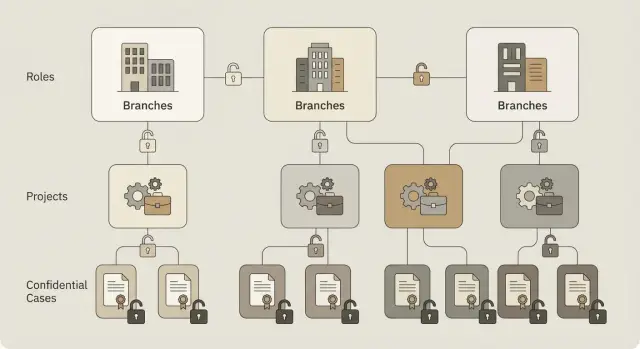
Why a single RBAC is often not enough
RBAC is convenient because access is granted by role: operator, manager, administrator. But in real life roles quickly become too broad. The same manager may handle projects in different branches, while some data must be hidden even from colleagues with the same role.
The problem with "pure" RBAC is that it answers "what a role can do" well, but it poorly answers "which specific objects". As a result, access is widened "just in case" and then exceptions are maintained for years.
Common situations where RBAC alone is usually insufficient:
- an employee needs only their own queue of requests, but the role opens access to all department requests;
- a manager needs access to projects of their branch, but the role gives access to all branches;
- some documents are personal data or tender documents and cannot be shown to everyone with the "manager" role;
- one project is handled by several teams and each team should see only its own artifacts.
In these cases object-level restrictions help: rules that narrow access by attributes of the object and the user. Frequent variants are: "only own records", "only own branch", "only own project", "only cases at clearance level N". Then the role defines the set of actions (read, create, approve), and restrictions set the boundaries.
This is especially important where access mistakes have consequences: documents, citizen or customer requests, HR data, medical records, financial requests. In an organization with multiple sites and branches a service engineer should see requests only for their region, and a project manager only the contracts in their portfolio.
To distinguish security requirements from convenience, a simple test helps: if an employee sees a "foreign" object, does that create a risk (law, contract or internal policy violation) or just hinder work? In the first case restrictions must be strict and testable. In the second case filters and clear queues in the UI are often enough without widening rights.
Minimal glossary: roles, objects and attributes
To avoid confusion about access, agree on terminology up front. Otherwise discussions quickly become "they have the role, so let them see everything", and later you find out "everything" includes other branches and restricted cases.
For design it's useful to keep four entities in mind: who, what they do, on what, and under which conditions.
Roles, permissions, actions and objects
A role explains "why a person needs access", not specific database records. Permissions and actions are closer to what the system actually does.
- Role: a set of responsibilities (e.g., support operator, project manager, accountant).
- Permission: the right for a class of actions (e.g., read requests, change status, export a report).
- Action: a concrete operation in the system (view, create, edit, delete, export).
- Resource (object): the thing the action applies to (request, contract, project, incident, file).
- Policy: a rule that links a role and an action with conditions on the object and context.
Attributes: what we compare in rules
Object-level restrictions work using attributes. An object has fields that help understand "whose it is" and "how sensitive it is": branch, project, owner, confidentiality level.
Users also have attributes: branch, division, position, membership in project groups. In simple cases you compare user.branch == object.branch or user in object.project_team.
Sometimes request context is needed: time, channel, network. This matters when there's a leak risk or compliance requirements: for example, block exports outside the corporate network or allow access to highly confidential cases only during working hours.
A clear formula is: "who + what action + on which object + under which conditions." Example: a support operator reads requests only in their branch; a project manager changes tasks only in their projects; access to cases with Confidential classification is granted only to assigned people and only from a trusted channel.
How to describe roles and responsibilities without confusion
Confusion often starts when roles are named after job titles from the org chart: "manager", "engineer", "department head". The same name can mean different things across teams and access spreads. It's simpler and safer to describe a role as responsibility for specific actions on data.
Where to start
Collect a list of business operations people actually do in the system. This becomes a common language for IT, security and process owners. Most systems repeat a basic set: view, create, change, move to final status, export.
Then map operations to objects: what exactly the person views or changes (request, contract, incident, customer card). This makes it clearer where object-level restrictions are needed rather than new roles.
To keep roles from growing, separate them by responsibility, not by job title. The same employee may have two roles if they have two different responsibilities. Simple example: a support specialist is on night duty as "duty operator" and daytime as "executor". The role names stay the same, but they apply by time.
Data owners and special roles
Agree separately on data owners: who approves access and for which objects. This is a business decision, not about admins. Example: access to financial documents is approved by the finance owner, HR approves access to personnel data. Without this RBAC turns into endless exceptions.
Another common gap is roles that don't create process value but are critical for control and support: platform administrator (settings without content reading), audit (read-only for checks), security (investigations per procedure), support (help users with minimal rights).
Decide in advance where temporary rights are needed: leave cover, 24/7 duty, one-off access for investigations. Better to have a clear mechanism for temporary roles and expirations than "permanent" exceptions that cannot be justified later.
Policy examples for branches
When a company has branches, RBAC quickly hits the question: the same role (e.g., accountant) must see different data depending on branch. Therefore you almost always add object-level restrictions: "which records are available".
Minimal object attributes
Agree that each business object (contract, request, employee, incident, invoice) has at least two fields: branch_id (branch owner) and confidentiality (normal, internal, confidential). For truly shared data add a flag cross_branch=true or project_scope=cross_branch.
Rule examples
Below are examples for branch structure in an "RBAC + object-level restrictions" model:
- Basic rule: read and modify only objects where
branch_idequals the user's branch. This prevents accidental leaks between cities. - Branch manager: broader access within their branch (see all requests and reports), but with
confidentiality=confidentialobjects restricted to a narrow group (e.g., security or HR) even inside the branch. - Cross-branch team: role grants access not to "all branches" but only to objects explicitly marked as inter-branch (
cross_branch=true) and tied to a specific initiative (e.g.,project_id). - Central office: access is assigned by function, not geography. Finance sees invoices and payments for all branches, but not HR records; HR sees employee cards but not commercial contracts. Here restrictions follow object type and attributes, not only
branch_id. - Temporary exceptions: "emergency" access is issued by request with an expiry date, a reason and mandatory action logging. It's better to grant a separate permission with a TTL than to change the role temporarily.
Small example: an accountant in the Almaty branch sees invoices only with branch_id=ALM. If included in an inter-branch ERP project, they additionally see only documents where cross_branch=true and project_id=ERP2026, but not invoices of other branches outside the project.
Policy examples for projects
In projects RBAC often hits boundaries: the same role (e.g., engineer) may work across three projects but should see only their own. Usually you add object-level restrictions: each document, task, message or attachment has project_id and sometimes status, owner_id, doc_type.
Below are policy examples for project folders, tasks, acceptance reports, correspondence and delivery artifacts (for infrastructure rollouts or software integrations).
Clear rules set
-
Project member: reads and edits only objects with their
project_id. If added to two projects, access expands only to those twoproject_idvalues, not to all department projects. -
Project manager: sees the project as a whole (tasks, schedule, budget docs, reports), but does not see personal attachments by default. For example, attachments with
personal=trueordoc_type=personal_noteare accessible only with an explicit permission "view personal attachments" and only when genuinely needed. -
Access matrix by status: an object has
status(draft, in review, approved, closed). Practical rule: members can edit "draft" and "in review", but only read "approved"; "closed" is readable by all project members and cannot be deleted except by the storage administrator. -
External contractor: gets access not to the entire project but to a specific set of objects, e.g., only tasks and the "specs and deliverables" folder, without financials, internal correspondence or personal notes. Also limited by time until
contract_endand revoked automatically. -
Prevent reassigning objects between projects: changing an object's
project_idrequires a separate permission (e.g.,reassign_project_object). This avoids silent leakage when a document accidentally moves to a project with broader access.
Short scenario example
Imagine two parallel projects: "Server modernization" and "Accounting software." An engineer is in the first, an analyst in the second. Even if both have the role "project staff", a filter by project_id prevents the analyst from seeing network diagrams and the engineer from seeing financial attachments. A project manager sees the overall picture, but personal attachments (e.g., a passport scan for an access pass) remain closed without an extra permission.
Such rules are convenient to describe as "who + what action + on which objects + under which attributes". Then disagreements focus on verifiable conditions rather than role names.
Policy examples for confidential cases
For cases (incidents, complaints, investigations) a single role is often not enough. Within a branch people may share a role, but only the assigned person and the owner should see the case. So RBAC is extended with object-level restrictions: case attributes, assigned group, classification level.
Classification and basic visibility rules
A useful setup is four levels: normal, restricted, confidential, highly confidential. Classification is stored in a field like case.classification and used in rules.
Example set of policies (read as "role + object condition + action"):
- Normal: support staff of the branch view cases where
case.branch == user.branch. - Restricted: viewable only by the assigned group and the owner:
user in case.assigned_group OR user == case.owner. - Confidential: same rule but add a ban on role-based viewing even for branch managers (unless explicitly added to the case group).
- Highly confidential: only a small team (e.g., security) and the owner, plus a ban on delegating access without separate approval.
Critical actions and hiding data
For higher-risk operations (closing, export, deletion) a "two-person rule" often applies: one person initiates, a second confirms. This reduces errors and abuse.
Partial viewing is also useful: the case is visible but sensitive fields are hidden. For example, in a "confidential" case a user can see status and history but not attachments and personal data (name, national ID, contacts) until additional permission is granted.
Separate rights are needed for printing and export. Even if viewing is allowed, export and print can be denied by default.
To avoid gaps, verify expectations with test users:
- a branch manager without assignment does not see a "confidential" case;
- an assigned executor sees the case but not PII and attachments until extra rights are granted;
- export and print don't work without separate permission even when viewing is allowed;
- closing/deleting requires confirmation by a second user and is recorded in a clear audit log.
Step-by-step: how to design RBAC + object-level policies
Starting RBAC design without a list of data and object rules quickly turns roles into "super rights." Below is a scheme to keep the model simple and testable.
Design steps
-
Describe what you protect: objects and their attributes. Example: a "Support Request" has branch, project, owner, status and confidentiality flag. A "Project" has a code, customer, manager and a set of participants.
-
Define roles by actions, not by department names. A good role sounds like a set of verbs: "read", "create", "edit", "approve", "close". This makes it easier to spot unnecessary actions.
-
Keep a core principle: deny by default and grant the minimum necessary rights. Access appears only after an explicit rule, not "by default for all employees."
-
Add object-level restrictions so a role operates only in the intended area. Examples: "only own branch", "only own projects", "only cases where I am executor or owner." This reduces the need to create dozens of similar roles for every branch.
-
For approvals, document rules in a decisions table: row = action, column = role, separate columns = object conditions. Agree the table with data owners (who is responsible for project data, requests, finance). In companies with branches these are usually different people.
Exceptions and expiry
To prevent model drift, define an exception process in advance:
- who can request temporary access and for how long;
- who approves (data owner, manager, security);
- what counts as justification (incident, cover, audit);
- how it is recorded and reviewed;
- what happens after expiry (auto-revoke).
This approach keeps boundaries: a role covers "what can be done", object-level restrictions cover "with which objects".
How to test policies: scenarios and expected outcomes
Start testing access not with code but with a scenario table: role × action × object type × object attributes. Attributes can be simple (branch, project, confidentiality, status: active or archived).
To keep the matrix manageable, pick 5–10 common actions and 3–5 critical object types. For a company with branches and projects these usually are "view", "create", "edit", "export", "assign executor". Objects: "project", "task", "document", "case".
For each scenario record the expected result: allowed or denied, and why. Include positive and negative tests. Examples:
- branch operator in Almaty views a case in their branch with status "normal" — allowed;
- the same operator attempts to open a case from Astana branch — denied (branch filter);
- project manager of "ERP-2026" edits project documents — allowed, but only within their project;
- a project member attempts to export all cases (without a project or branch filter) — denied;
- a support role user opens a confidential case without extra clearance — denied.
Also test edge cases that often break the model: employee transfer between branches, role changes, retroactive project additions, archiving projects. Example: an employee moved from Karaganda to Almaty should no longer see Karaganda objects except those where they remain explicitly assigned (if that rule exists).
Prepare test data to provoke errors: at least 2–3 branches, 2 projects with overlapping participants, objects with different confidentiality levels, one archived project. Add similarly named objects to catch search leaks.
When rules change, have regression tests that always run:
- one allow and one deny test per critical action;
- check access after branch change and role change;
- archived projects: view allowed, edit denied (if intended);
- bulk operations (exports, reports, searches) must enforce required filters;
- check bypasses: direct ID access, via related objects, via history.
And don't forget logs. On allow it should be clear who, when, to what and on what basis got access. On deny — who tried, to what, and which check triggered (role, branch, project, confidentiality). This helps investigate incidents and confirm the policy works as intended.
Common mistakes and pitfalls in access models
The most common problem is designing the model once and living with exceptions. After six months no one knows why someone has access and who approved it. So plan maintenance: who owns the role, how rights are reviewed, how exceptions are recorded.
Roles that are too broad and "grant and forget"
If roles are created for convenience they quickly balloon. Eventually a role fits 5% of users while the rest get excess rights. Healthy models describe roles by tasks, not people, and each role has an owner responsible for changes.
If you want to give "a little extra", make it a separate temporary access with an end date and a reason. Without expiry exceptions become permanent holes.
Mixing object and action rights
Often viewing and "dangerous" actions are merged: if you can see a record, you can export, print or download attachments. But export moves data out of the system. Even with correct object restrictions it can violate policy.
Practical approach: separate action rights (view, edit, export, print, delete) and check them independently, even for the same object.
Manual lists instead of attributes
When access is based on static lists of "who is allowed", they cease to be updated. On transfer or role change the person remains in the old list. Rely on attributes: user branch, project membership, clearance level, employment status. Use lists only where necessary (very narrow approval groups).
Forgotten integrations and service accounts
Even if the UI is locked, data can leak via reports, APIs, exports and backups. This often shows up in integrations with BI, document workflows or printing.
Check at least: reports and report builders (what can be assembled and exported), printing and bulk exports (who can run them), API keys and service accounts (what roles they have), background jobs and queues (what they read/write), admin access to logs and attachments (is there a "backdoor" view?).
No clear revoke process
Termination, role change, branch or project transfer should trigger automatic revocation. If the process is manual it will miss cases.
A simple rule helps: any additional rights are issued by request with an owner, expiry, reason and mandatory review whenever the employee's status changes.
Short checklist and next steps
Before launching access model verify you have roles and clear object restrictions, plus a way to prove it works.
Quick checklist that usually saves surprises:
- roles: 3–5 base roles with simple names and clear responsibilities (what they do, not who is more important);
- objects and attributes: a list of key objects (document, request, case, project) and 2–3 attributes that actually cut access (branch, project, confidentiality level);
- exceptions: rare cases (cover, temporary access by request, investigations) with expiry rules;
- logs and audit: what is written on allow and deny, who reviews logs and how quickly the event timeline can be reconstructed;
- test scenarios: checks with expected outcomes (allow/deny), including negative tests and bypass attempts.
Keep a minimal artifact set: a rules table (role + action + object + attribute conditions), an attribute dictionary (how they are filled, sources, allowed values) and a list of data owners (who is responsible for attribute quality and exception decisions).
Start small: choose one process instead of trying to cover everything. For a service desk this could be only read and modify requests, with object restrictions by branch and project and confidential cases handled by separate stricter rules.
Practical rollout plan:
- pilot: one branch or one process (e.g., handling requests) with real users;
- attribute setup: who and when updates
branch,projectandconfidentiality, and what to do with empty values; - run tests: scenarios for each role type plus 2–3 "bad" scenarios (foreign branch, foreign project, elevated confidentiality);
- feedback: record where rules block work and refine object conditions, not roles;
- scale: apply the model to other branches and processes while keeping the approach to attributes and tests.
Assign clear support owners: one model owner (rules and exceptions), one data owner (attributes and quality) and one test owner (updates scenarios when processes change).
If you need practical infrastructure-level implementation (workstations, server side, integrations, audit, 24/7 support), it is usually easier with a system integrator. In Kazakhstan such projects can be discussed with GSE.kz (gse.kz): the company provides system integration and corporate IT support and manufactures computers and servers in Kazakhstan, which can be important for local content requirements and supply chain transparency.
Frequently asked questions
Why is plain RBAC often insufficient?
RBAC answers "what a role can do", but it doesn't answer "which specific objects". When the same role operates across branches, projects or with different sensitivity levels, without object-level restrictions access quickly becomes too broad.
How to combine roles and object-level restrictions correctly?
First define actions through roles — for example, *read*, *edit*, *close*, *export*. Then add rules on objects: "only own branch", "only own projects", "only assigned cases", "only at clearance level N". The role provides the general set of actions, and the conditions narrow the scope of those actions.
What attributes should objects have so object-level rules work?
At minimum — an ownership attribute and a sensitivity attribute. For branch setups `branch_id` on the object and `branch` on the user plus a `confidentiality` tag (normal/internal/confidential) are usually enough. For projects add `project_id` and, if needed, `status`, `owner_id` or `doc_type`.
What is a practical access policy for branches?
A basic rule is: access only to objects of your own branch: `user.branch == object.branch`. For cross-branch work add an explicit flag such as `cross_branch=true` and limit access by project or initiative. This is safer than granting roles "see all branches".
How to limit access so project participants see only "their" data?
Make a rule: a project member reads and edits only objects with their `project_id`. If a user is in several projects, access expands only to those `project_id` values, not to every project in the department. For contractors, also limit duration and types of objects.
What if a case must be visible but without personal data and attachments?
Separate viewing a case card from viewing sensitive fields and attachments. A user may see status and history but not attachments or PII until given an explicit permission. This reduces leakage when a case is needed for handling but personal data is not required.
How to set access to confidential cases inside one branch?
Introduce levels, for example: normal, restricted, confidential, highly confidential, and store them in `case.classification`. Then keep rules simple: "normal" — by branch; "restricted" — assigned group or owner only; "confidential" — exclude role-based viewing even for branch managers unless explicitly added; "highly confidential" — only a small team and the owner.
Why separate export, print and delete from ordinary viewing?
Treat export and print as separate permissions and deny them by default even when viewing is allowed. For closing and deletion add extra controls, such as a second-person confirmation and mandatory logging. This reduces the risk of "if you can see it, you can export it".
How to handle temporary exceptions and "emergency" access without leaving permanent holes?
Use a request process for temporary access: who requests, who approves, end date, reason and mandatory action logging. Technically it's easier to issue a separate permission with TTL than to change a main role temporarily. Access should be automatically revoked after the period.
How to test access policies to catch leaks and bypasses?
Build a scenario table: role × action × object type × attributes (branch, project, classification, status). For each scenario record expected result allow/deny and why, and include negative tests. Also check bypass paths: search, bulk exports, direct ID access, related objects and integration accounts.
