7 min read
DBMS Licensing for High-Availability Clusters: Budget
We examine DBMS licensing for high-availability clusters: how active-passive differs from active-active, which metrics vendors count, and how to estimate the budget.
The problem: an HA cluster and unexpected licensing costs
A high-availability (HA) cluster is bought for a simple promise: if one server or node fails, the service keeps running. For business, that means less downtime and data loss, calmer on-call shifts and clearer SLAs.
But HA often has a surprise: DBMS licenses can be noticeably more expensive than expected. Many vendors count not only "performance" but also "readiness to run". A standby node that looks like free insurance may be considered full compute capacity in licensing rules and therefore must be covered by licenses.
Confusion grows because architectures have different goals. Fault tolerance answers "how not to fail", while scaling answers "how to handle more load". Active-passive is usually about continuity, with a second node waiting for a failure. Active-active is often about load and throughput, with both nodes serving traffic. The licensing budget can differ several times between these modes.
A typical scenario: a company buys two servers for a database (often together with a hardware refresh). IT budgets DBMS costs "as for one server" because the second seems idle. During the request for proposal stage, it turns out the rules require licensing both nodes, the entire resource pool, or even the rights for failover movement.
Before talking to a vendor, clarify five things: project goal (only failover or also performance growth), operating mode (active-passive or active-active), licensing metric (cores, sockets, users), planned operations (migrations, test failovers, planned maintenance) and placement/support requirements. The more precise the answers, the lower the chance that HA becomes an expensive surprise after choosing the architecture.
Terms without confusion: what counts as a cluster and where it runs
Basic concepts
Many licensing mistakes come from terminology. Documentation can call a "cluster" two servers, a group of VMs, or an entire host pool. First, agree on terms in the context of your setup.
Minimum distinctions worth making:
- Node - a separate physical server or VM where the DBMS can run.
- Instance - a running DBMS instance (service/process) that serves databases.
- Database - a set of data and objects used by the application.
- Replica - a copy of a database (or log) maintained synchronously or asynchronously.
- Quorum - a mechanism that decides which node is "primary" during failure to avoid split-brain.
Important: licenses usually cover the right to run the DBMS on particular nodes—by cores, sockets, users or subscription—rather than the number of databases. So the question "how many databases" rarely answers "how many licenses".
Active-passive and active-active in plain words
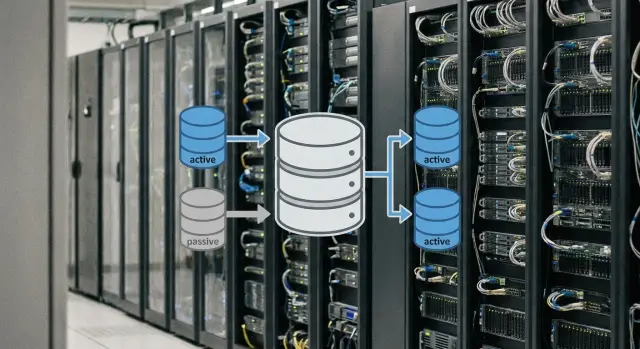
Active-passive: one node serves the load, the second waits in reserve and should quickly take over on failure.
Active-active: the load is distributed between two (or more) nodes at the same time; each node actively serves traffic.
For budgeting this is a key divide. In active-passive people often try not to license the idle node. In active-active you almost always need to budget licenses for all nodes that perform work.
Failovers and geography
Failover is an emergency switch on failure. Switchover is a planned switch (for example, to update OS or DBMS). For licensing, how often and where you switch matters: some rules allow short-term runs on a standby without extra payment, but planned switchovers can be treated as normal operation.
If nodes are in different locations (a geo-cluster) or you have a separate DR site, that's not "just HA." DR often requires separate licensing because there's another site where the DBMS may run (even rarely). For example, two servers in the primary data center plus one at a backup site equals three potential run locations, and that must be explicitly covered in the calculation.
What determines price: license type and units of measure
Cost almost always depends not on the DBMS itself but on how the contract counts the right to run it.
Licensing metrics you commonly meet
Vendor rules vary, but three schemes appear most often:
- Core-based: you pay for the number of cores available to the DBMS on a host or in a virtual environment.
- Socket-based: you pay per processor socket rather than per core.
- User/device: you pay for access rather than hardware.
A detail that often eats the budget is the minimum licensing threshold per server. Even if a node has few cores or you allocate a small vCPU limit to a VM, the contract may require licensing at least a set minimum.
Virtualization, containers and proving what you use
Virtualization can change the calculation. Sometimes you license a specific VM with pinned cores, sometimes the entire physical host if VMs can migrate to it. For HA this is critical: if the cluster can "move" load to any node, the vendor may demand licenses for all nodes, even if normally only one runs.
Simple example: you have 2 hosts with 16 cores each, and the DBMS runs in a VM with an 8-core limit. In one agreement licensing 8 cores for the VM is enough; in another you must license all 32 cores across both hosts because the VM can migrate.
To avoid disputes with audits, decide in advance how you'll demonstrate actual usage. Usually a cluster diagram with a list of nodes, CPU pinning settings (if any), migration rules and placement restrictions, plus SAM/accounting reports, is sufficient.
Active-passive: what you pay for if the second node is idle
Active-passive seems like a straightforward way to save: one node serves users, the second waits. But in licensing "passive" is often interpreted more strictly than in architecture. For budget planning, clarify what the standby node actually does day-to-day.
Many vendors have specific rules for passive nodes (sometimes called rights for a standby instance). The idea is simple: if the node truly performs no productive queries and exists only for failover, it may be allowed not to be licensed or licensed at a discount. But this works only if you meet the contract or support program conditions—not "by default."
Key point: is the node really passive? Once it carries useful load, it stops being a "free standby." A common trap is a read-only replica used for reports, BI dashboards, or exports. Even regular integrity checks or index maintenance can be treated as active use.
Before purchase, get written clarification from the vendor on:
- whether an installed DBMS instance on a standby node can remain unlicensed and under what conditions;
- whether backups, monitoring, maintenance tasks and read-only queries count as active usage;
- whether there are limits on how long the standby can run in active role;
- how planned switchovers for updates are treated;
- whether a separate license is needed for test failovers.
Planned switchovers are a separate risk area. Teams often do a switchover during updates to avoid downtime. From a licensing view, this can look like "both nodes are used in turn," and some rules allow such operation only for a limited time without extra charges.
Practical rule: if the standby node, besides waiting, also serves reports (even at night), budget as if it is a second production instance. If the node truly sits quiet and is only for failover, you may save, but only if you strictly meet the vendor's conditions.
Active-active: why licenses are usually more expensive and how to justify them
In active-active both nodes (and sometimes more) handle requests simultaneously. For vendors this generally means a simple rule: if a node can run production load now, it counts as used and must be licensed. So active-active almost always costs more than active-passive.
The main reason is load balancing. Even if one node handles more work, the other still processes some reads, writes, background tasks, replication or reports. What matters is often not the percentage of load but the fact that the node is available to applications.
Usage typically includes client connections, reads from a replica, reporting and analytics, writes (in multi-master scenarios), queue processing and normal traffic routing to the node.
Budget-wise this is felt quickly. With core-based licensing the increase is almost linear: more active nodes and more cores per node mean more licenses. Two servers with 16 cores each: in active-active you usually assume 32 cores. Add a third node and the count becomes 48.
Active-active makes sense when you get real value for the extra licenses: growing load that a single node can't handle, critical latency requirements, maintenance windows without noticeable degradation, or when downtime is too costly and extra capacity is needed for failover.
Overpaying happens when the second node exists only "just in case" and does almost no useful work. Then active-passive with clear failover rules provides comparable availability with a more predictable budget.
Topologies and modes that change the calculation
Even if you understand active-passive and active-active, the final sum depends on how the cluster will operate in reality. The frequent question is: how many nodes can be active at the same time—including temporary scenarios?
The most common setup is 2 nodes. But projects quickly add a third node (for quorum), an N+1 arrangement (one spare for several workers), or a stretched cluster across sites. Each step changes the calculation because many rules care not about "how many servers are standing" but "how many can be active" and "where this can happen."
Planned migrations and updates often break the neat "one active, one idle" model. Admins switch nodes for maintenance, test rollbacks, warm up caches, and sometimes temporarily run two nodes active to reduce risk. If licensing policy treats that as parallel operation, the budget must cover it.
There is also the peak mode during an incident. When a node fails, load can spike: sessions, reports and background jobs move to remaining resources. If you plan to enable more cores, start additional instances or temporarily scale up VM resources during a failure, check in advance whether this changes the licensing basis.
To avoid missing these modes, document for procurement: the maximum number of simultaneously active nodes (including maintenance), node placement across sites, what counts as "active", whether short-term parallel operation during migration is allowed, and what capacity growth you accept in failure.
Consider standby for DR separately. This is not the same as HA within a single site: a DR node may start rarely but run for weeks in a real disaster. For licensing this can be a "cold standby" with relaxations or a full secondary environment that must be licensed almost like the primary.
How to calculate the budget: a step-by-step approach before purchase
Start not from the DBMS price but from the availability you actually buy. Two clusters with identical nodes can differ in license cost by multiples because they define "used" differently in normal operation and failure.
Step-by-step calculation
Collect inputs and lock them down in writing before asking vendors. Then responses will be comparable and procurement will be faster.
- Define RTO and RPO and acceptable outages. Clarify whether manual switchover is allowed or automatic failover is required.
- Describe the operating mode: which nodes are active day-to-day and what happens on failure. Specify whether the standby node runs reports, backups, tests or maintenance.
- Choose a licensing metric and prepare numbers: for cores—CPU model, sockets and cores per node; for user/device—estimate active users and peaks.
- Account for virtualization and resource limits. Decide in advance what the vendor will consider licensed: the whole host, pinned cores, or specific VMs. Add a growth plan for 12–36 months.
- Calculate 2–3 architecture options and compare total costs: licenses, support/subscription, HA options, test environment and DR requirements.
It helps to run calculations with a mini-scenario. For example, two servers with 16 cores: in active-passive people often try to license only one node, but if the standby handles reports or warming, the math quickly becomes "as for two." In active-active you almost always count both nodes as production, but that cost is easier to explain to the business in terms of performance and reduced degradation risk.
If you are choosing hardware, fix configurations for licensing calculation in advance. That prevents budget changes because the project unexpectedly included more cores.
Common mistakes and traps that inflate the budget
Overspend almost always comes from one thing: estimating licenses "as usual" rather than per the vendor's rules and the cluster's actual operating mode. Even background tasks and a replica's role can change the sum by tens of percent.
Typical mistakes:
- Confusing HA and DR. DR often has different terms (including time limits and separate rules for a "cold" site).
- Assuming a passive node is free by default. Some vendors allow a concession under strict conditions; others do not.
- Overlooking load on a replica. Reads, reports, integrity checks, backups, scans, indexing, monitoring and ETL can turn a "passive" node into active use.
- Not accounting for core count growth when upgrading servers. Moving to a new CPU generation can make core-based licensing much more expensive.
- Buying licenses for the current setup without a scaling plan. Within 6–12 months new reports, services and replicas can increase active connections or required cores.
Small example: a company takes two nodes for active-passive and plans to save by running backups on the second node to avoid slowing the primary. On paper this is an "idle" node, but in reality it regularly performs work and may require a full license.
The best protection is to describe exactly what each node will do (including maintenance tasks) and check this against the vendor's licensing rules before purchase.
Quick checklist before agreeing to procurement
Before signing an invoice, document how the cluster will work day-to-day, not only "on failure." This usually determines the final budget.
First, answer the main question: how many nodes will actually serve requests simultaneously in normal operation. If one node always waits, that's one calculation. If both accept load, even partially, the calculation is usually different.
Then check the failure scenario: will the remaining nodes handle full load or is degradation acceptable? If "no degradation" is required, the remaining node must be licensed for the maximum capacity it might run.
A short pre-purchase checklist:
- Are there read replicas, and what connects to them (applications, reports, analytics)?
- What licensing metric is chosen and what exactly counts as a "core" or "user" in the contract?
- Are there limits on users/connections, including service accounts?
- Is virtualization used and how are resources pinned (fixed vCPU/cores or "floating")?
- Are rules for moving VMs/nodes to other hardware defined for failure?
Also discuss growth for 12–24 months. A common case: today everything fits minimal licensing, but a year later new reports, services and replicas increase active connections or cores.
If procurement is for a public contract, verify the hardware listed for the cluster and how configuration will be confirmed at acceptance. This reduces the risk that licenses are bought "just enough" while the infrastructure ends up more powerful and requires extra payments.
Example scenario: comparing active-passive and active-active for budget
Imagine a clinic with 24/7 appointment booking and lab results. Acceptable downtime is minutes per month; more would disrupt appointments and harm patients. The database runs in a two-node HA cluster, with morning and evening load peaks.
Option A: active-passive. The primary node handles all requests, the second waits. It feels like paying for one server, but rules matter: sometimes the passive node can be unlicensed under strict conditions; sometimes vendors require licenses for both (especially under core-based models). Budget is usually lower, but if load grows the active node can become a bottleneck.
Option B: active-active. Both nodes accept requests and failover is smoother. This almost always means licensing both nodes because they do useful work. Cost is higher but easier to justify to the business as buying performance and reduced degradation risk.
Often teams add a reporting replica and a separate DR site. Reporting replicas often require licensing because they execute queries. DR can be cheaper if it's a cold site, and more expensive if it's a warm site with regular tests.
To keep calculations aligned with reality, ask the vendor in writing:
- whether a passive node is licensable if used only for failover;
- whether regular test failovers are permitted without extra charges;
- whether a replica used for reports or backups needs a license;
- how licensing is counted with virtualization and VM migration;
- what changes in rules when adding DR (cold/warm/hot).
Next steps: how to prepare for deployment and avoid overpaying
To keep licensing from "surfacing" after purchase, start with a simple step: document what you are building and how it will run day-to-day. For licensing this resolves half the questions before vendor conversations.
Create a one-page description of the target architecture. A block diagram is enough: nodes, roles (who is active), replication method, where data lives, what counts as failure and how switching occurs. Add numbers: sockets or cores, expected users, environments (prod/test/dev) and RPO/RTO requirements.
Then plan a pilot and failover tests. Often a "passive" node is not so passive: it runs backups, reports, monitoring, or temporarily serves reads. This can remove standby concessions and materially affect cost.
Before purchase get written agreement on licensing rules: what is a passive node, whether read replicas are allowed, how a DR site is licensed, and what happens when VMs are moved.
A sequence that usually saves time and money:
- Describe the architecture on one page and approve it with IT and security.
- Run a pilot and failover tests, recording actual node loads.
- Obtain vendor confirmation on rules for standby, replicas and DR.
- Separate licenses by environment (prod/test/dev) and budget for 12–24 months growth.
- At the same time verify platform components: servers, network, storage, and redundant power/cooling.
If the project includes hardware supply and HA integration, discuss the platform with an integrator early. For example, GSE.kz (gse.kz) as a manufacturer and system integrator in Kazakhstan can help select servers for the target topology (including the S200 line) and build a solution with 24/7 support so architecture and licenses match actual operation.
Frequently asked questions
Does a passive HA cluster node need to be licensed?
Not always. A standby node may require a full license even if it does not normally handle user requests. This depends on the specific DBMS's rules, support terms, and the tasks performed by the standby.
How does active-passive differ from active-active?
In active-passive, one node handles the workload while the other waits for failover. In active-active, both nodes run simultaneously and share requests, so licensing costs are usually higher.
Does a read-only replica need a license?
Usually, yes. If a replica handles reporting, BI queries, exports, or analytics, the vendor may consider it a production instance. Treating such a replica as fully passive is risky.
What should I gather to budget for DBMS licenses?
First, determine which nodes can run simultaneously, including during maintenance, migrations, and failures. Then check the licensing metric, number of cores or sockets, virtualization rules, support, and separate DR terms.
How does VM migration affect DBMS licensing?
Virtualization can expand the licensing scope. If a VM running a DBMS can migrate between hosts, the agreement may require coverage for every host where it can run, not just its assigned vCPUs.
Are HA and DR the same thing?
Not necessarily. HA protects against failures within the production setup, while DR is intended for recovery at a separate site after a major incident. DR often has its own limits on operating time, testing, and licensing.
Do planned switchovers affect licensing costs?
A planned switchover may count as normal operation, especially if the team regularly changes the active node for updates. Check with the vendor whether such switchovers are permitted without additional charges and whether there is a time limit.
Why can the number of licenses exceed the number of allocated cores?
Core-based licensing often has a minimum requirement per server or instance. As a result, a small VM or lightly loaded server may require more licenses than its simple allocated core count suggests.
When does active-active not justify the cost?
It may be technically possible, but it is often not cost-effective. If the second node is needed only for failover, active-passive usually provides similar availability at a lower cost, provided the vendor's rules allow a standby benefit.
What should I clarify with the vendor before buying licenses?
Request written confirmation for your setup: node roles, read-only replicas, backups, monitoring, test failovers, VM migrations, and the DR site. A sales manager's verbal explanation does not replace contract terms or an official vendor letter.
