7 min read
Data Observability: Problems in the DWH and How to Choose Tools
Data observability helps spot broken loads, schema drift and empty marts in time. We review signals, metrics and how to choose tools for your DWH.
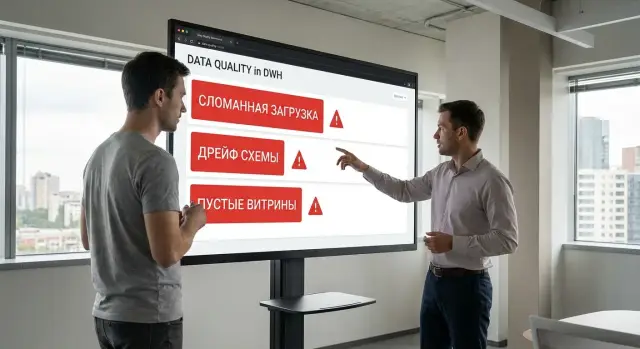
What data observability means in simple terms
Data observability is a way to quickly understand whether the data in your DWH is healthy. If something is wrong, it helps you see what broke and where to look. It watches not only whether a task failed, but the behavior of the data itself: whether it arrives on time, in the expected volume, with the expected structure and without unexpected shifts.
Regular monitoring usually answers "did the process run or not." Data quality tests typically check predefined rules (for example, that a field is not empty). Data observability combines both approaches and adds context: it links a symptom in a mart to a specific pipeline step, source, or schema change.
It helps answer practical questions: what exactly broke (load, transformation, or mart), where it happened (source, ETL/ELT, DWH layer, BI), when it started (a one-time event or from a specific day), and why it happened (for example, schema changed, rows stopped arriving, a filter was reset to zero).
Many errors are not immediately visible in reports. In the morning a mart can look "normal" because BI shows cached data, updates run daily, or checks are done manually weekly. Sometimes a metric "didn't fall" but became quietly wrong: some rows disappeared, new values didn't make it, or zeros appeared where sums should be.
Observability isn't just for data engineers. Analysts need to quickly know whether numbers are trustworthy. Data owners need to see which domains break most often and where agreements with sources are required. Business needs early warning before incorrect data reaches decisions. In large organizations (government, banks, industry) this is especially critical: a single "silent" failure can affect dozens of reports and teams.
Problems it catches in the DWH: from job failures to empty marts
In a DWH problems come in two types: obvious and silent. Obvious ones are visible right away — a job failed, the pipeline didn't start, a task hung. Silent issues are more dangerous: everything is green, but a mart suddenly has far fewer rows, a key field lost values, or metrics started drifting.
A basic thing observability should catch is broken loads. These are situations when a scheduled run didn't finish: source didn't respond, quota was exhausted, disk space ran out, network failed, connector crashed. It's important to distinguish "failed," "did not start," and "running too long" — the actions you take differ.
Silent failures usually look like this: the load completed, but volume or quality is wrong. For example, yesterday the orders table had 120,000 rows per day, and today it's 12,000 because a filter was accidentally changed in a transformation. Or revenue sums became zero because the currency field arrived empty. Observability compares volumes, NULL shares, key uniqueness and other simple signals with their usual "normal" range.
A separate category is schema drift. Sources change: a column is added, a field removed, an attribute renamed, a type changed from integer to string. In one DWH this immediately breaks SQL, in another it results in a "soft" error and pushes incorrect data downstream. Observability records schema changes and shows where they started to have an impact.
Another common scenario is empty marts. A BI table exists but has no rows, or data stopped updating. Often the reason is freshness: data arrives later than the business expects. A manager opens a report at 09:00, but the load now finishes at 11:30 and "today" looks like zero. Observability helps distinguish "no data" from "data haven't arrived yet" and quickly find which step in the chain is delayed.
Observability signals: freshness, volume, schema, distributions, lineage
Data observability relies on simple signals that show what happens to the data from source to mart and report. Think of them as health sensors: if one drops, you know faster where to search.
Freshness answers whether data arrived on time relative to an SLA or whether the mart is outdated. It's crucial for daily reports, morning reconciliations and operational dashboards.
Volume shows how many rows or events were loaded. Track not only drops to zero but also unexpected spikes: they often mean duplicates, repeated dumps or a broken filter.
Schema catches structural changes. A new column, a renamed column, or a type change can cause consumer queries to fail or — worse — silently receive incorrect values.
Distributions give a finer quality signal. For example, the share of category "Unknown" suddenly jumps to 40%, average ticket drops by half, or the number of empty values in a key field grows. The load completed, but the data no longer resembles yesterday's.
Lineage (dependencies) links a mart to its sources and processing steps. It answers "what affected this report" and saves hours of searching.
To make these signals useful, define a simple, clear check for each. For freshness — a lateness threshold (for example, no later than 08:30). For volume — an acceptable deviation band relative to a normal day. For schema — a list of critical columns and type-compatibility rules. For distributions — 1–3 metrics that shouldn’t jump suddenly. For lineage — a dependency map at least at the "mart-to-report" level.
Practical example: in a bank or government body the "Payments per day" mart is empty. Freshness shows the load is late. Volume shows 20x fewer rows arrived from the source. Lineage points to the exact step that filtered out all records because of a new status code. Without these signals the team often starts checking versions, permissions and servers and wastes time.
Where failures occur: sources, pipelines, DWH, BI
A report failure rarely starts in the report itself. The issue usually appears earlier, and in BI you see the consequence: empty charts, metric spikes, or stale data. Observability helps quickly identify which part of the chain broke.
At the source level a common story is that data didn't arrive or arrived in the wrong format. A file might not be dumped on schedule, an API might respond slower, or duplicate events appear due to retries. Sometimes the source changes format: a new field, a different column name, or a different date type.
Next are loading pipelines. Here you see parsing errors, timeouts, unexpected retries and partially loaded batches. As a result a table updates "halfway," which looks like a drop in sales or missing transactions.
Inside the DWH problems often depend on the layer. In staging formats break, blank batches arrive, or key uniqueness is violated. In core tables relationships suffer: joins break and "orphans" appear without reference data. In marts and aggregates increments may not be recalculated, deduplication fails, and a mart becomes empty. In historical tables dates get misaligned, intervals remain open, and a double-state appears.
At the BI and analyst layer errors look "human": a calculation, filter, sort or segmentation logic changed. Another frequent case is the report showing an old snapshot because cache didn't update or the query became too heavy.
There's also the access layer: permissions, roles and policies. A user may suddenly lose access to a table or, conversely, gain access and accidentally change a reference table. That's why observability is useful not only for data and pipelines, but also for tracking access changes and object ownership.
Example: the "Regional deliveries" mart is empty. The cause may be a delayed carrier API (source), a loading timeout (pipeline), a broken join on region code (core) or a BI filter "only current month." Quick troubleshooting starts with understanding where in the chain it could have occurred.
Step by step: how to implement data observability in your DWH
Don't start with a tool — start with what actually hurts. Pick 3–5 marts and reports that affect money, risk or daily decisions: for example, the daily sales report for leadership or the mart used to calculate credit limits.
Next, record expectations. For each mart answer: by what time data must be ready, what minimum rows or sums are considered normal, and which fields must never be empty. These expectations become rules and thresholds.
Third step — a dependency map (lineage). Describe the path from source to mart: tables, loads, transformations, schedules. Without this map an alert will only say "something broke" when you need it to say "where exactly."
Then choose a small set of checks that will deliver quick wins without creating noise. Start with freshness, volume, schema control, NULL share in key fields and 1–2 distribution checks.
Final step — alerts and ownership. Each alert should have an owner (team or person), a clear threshold and a clear action: who to notify, where to look at logs, what to check first. Observability works when the message helps quickly find the root cause, not just record the failure.
How to set rules and detect anomalies so alerts stay useful
A useful alert answers two questions: what broke and what to do next. If a rule is vague (for example, "data is strange"), teams quickly stop reacting.
Start with simple checks that almost always indicate a real problem: mandatory fields must not be NULL (id, dates, relationship keys), values must fall in reasonable ranges (order amount >= 0, date not in the future, percent 0–100), uniqueness must hold where one row per entity is expected, and references to lookup tables must be valid (region code exists in the reference). Also set a minimum row count so a mart cannot suddenly become almost empty.
Then add anomaly detection. It catches not only load failures but gradual degradations: seasonal dips, a slow growth in duplicates, or structure drift. A good practice is to compare metrics to the previous week or the median over several weeks rather than to a single day, so you account for weekends and reporting cycles.
To make alerts more precise, formalize semantics through "data contracts": which fields are mandatory, which types are allowed, and which values are forbidden. For example, quantity cannot be negative in the sales mart, and currency must be from a short approved list.
Define severity levels and default actions in advance. Where the error is critical, it may make sense to stop publication or raise an incident. Where the impact is limited, warn and investigate during the day. It's important that priorities differ: a critical finance mart and an auxiliary table should not look the same.
Example: the "Revenue by region" mart suddenly drops 90%. A volume check catches it immediately, distribution analysis shows one major region disappeared, and a reference rule reveals that the source changed the region code (value drift). The cause becomes clear without long searches.
Common mistakes and traps during rollout
The most common trap is treating observability as just job monitoring. A job can be green while the data is already wrong: 10x fewer rows arrived, key fields were zeroed, or a mart filled with stale values. If you only check job completion, problems surface later in reports.
A second pain is unordered notifications. When alerts flood in for dozens of tables and no one knows the owner, the team stops reacting. Observability becomes noise.
Recurring mistakes that break effectiveness: alerts only for pipeline failures without freshness and volume, equal priority for all alerts, thresholds set "by eye" without seasonality, no incident-review process or protection against repeats, checks only at the mart level without contracts at the input (expected fields and types).
Another trap is schema drift. The source added a column or changed a type, ETL ran successfully, but some fields became NULL or joins broke. Contracts help: which columns are mandatory, which types are allowed and what constitutes a compatible change.
Practical scenario: on Monday the sales mart is empty. A volume threshold fired, but the cause was the source: over the weekend the date format changed and the load filter cut all rows. If you have a schema-drift check at the input and an owner listed on the alert card, the incident closes quickly without endless back-and-forth.
For observability to really work, predefine data owners, severity levels and a short incident review ritual: what happened, why, how it was detected and what protection was added.
How to choose observability tools for your DWH
Tool choice starts with your integration points. Check what your stack actually uses: orchestrator (for example Airflow or alternatives), storage (Snowflake, BigQuery, PostgreSQL, Greenplum, etc.), transformation layer (dbt, SQL scripts), BI and the data catalog. If integration requires manual exports or complex workarounds, observability will quickly become a project for the sake of a project.
Evaluate lineage not as "where the table came from" but as "who will be affected." When a load fails or a schema changes, it's important to immediately see the list of affected marts and reports, not assemble it via email. A mature tool shows impact on consumers and points to where to look next.
Before a pilot run a short checklist: are the needed integrations available, how clearly does lineage and impact appear, are there rule templates and auto-profiling, how are priorities and alert deduplication handled, and are roles and action auditing supported.
A good test is to simulate a real incident. For example, a column name changed overnight in the source, transformation produced an empty mart, and BI shows zeros in the morning. In a pilot, ask the tool to detect schema drift, link it to the specific job, show affected reports and issue a clear alert with priority and a short list of initial checks.
If you operate in regulated industries (public sector, finance, healthcare), evaluate how the tool stores metadata, who can access it and how to pass audits without manual paperwork.
Example scenario: why a mart is empty and how to find it in 30 minutes
Morning. A manager opens a dashboard and sees the daily sales mart for yesterday is empty. It worked yesterday but shows zeros today. You need to quickly answer: did the data not arrive or were they removed by transformations?
In the first minutes check freshness and volume. If the mart is supposed to update at 07:00 and the last successful update was yesterday, it's almost certainly a delivery or load failure. If the update was "successful" but row count is 100x lower, filters, joins or deduplication are the usual suspects.
Then localize along the chain: check for a partition for the date and how many rows it contains. Next inspect the nearest upstream layer (pre-mart or facts). If it's also empty, the issue is upstream in the load. If upstream has data, the problem is in a specific transformation: a filter condition, join, aggregation or deduplication.
After finding the cause you often need a temporary workaround: rebuild the mart for the date from the last correct layer or disable the problematic filter for one run and record an incident. Permanent fixes usually include explicit checks (minimum volume, non-empty keys), a freshness alert and a rule that blocks publishing the mart to BI if it looks suspiciously empty.
Quick checklist: the minimal set worth configuring
If time is short, start with the minimum. It already reduces many silent failures and speeds up root-cause search.
First, agree which marts are critical for the business (finance, sales, regulatory, morning dashboards) and set SLAs for freshness. Then configure a few checks that give the most value with minimal noise: freshness (by what time a table must update), volume (an acceptable deviation band), schema control (column and type changes), clear alerts (owner, priority, cause) and a short regular review process for recurring incidents.
When this minimum runs reliably for 1–2 weeks and the team trusts the signals, expand: distribution checks, key and duplicate controls, fuller lineage and per-step delay metrics.
Next steps: implementation plan and how to organize support
To see quick results, pick 3 key marts for the next two weeks (those that get the most business and finance questions) and create one clear alert channel for the data team and on-call staff.
Then set up basic checks: freshness, volume, schema, NULL share in key fields and uniqueness by business key. Measure success by outcomes, not alert counts: fewer incidents with empty marts, faster root-cause time (minutes instead of hours), fewer manual reconciliations between reports and sources.
When the base is stable, add more sources, deepen lineage (to see the chain from source to report) and add business rules (ranges, balances, statuses).
If you lack time for architecture and operation, consider hiring a system integrator: they can help choose a monitoring approach, set up access roles and incident response, and prepare infrastructure for DWH growth. In Kazakhstan, teams like GSE.kz often assist with server selection, integration and 24/7 technical support.
Frequently asked questions
What is data observability in simple terms?
Data observability helps you quickly understand whether you can trust the data in the DWH and where the problem started if something went wrong. It looks at data behavior (freshness, volume, schema, distributions) and links symptoms in a mart or report to a specific pipeline step and source.
How is observability different from job monitoring?
Monitoring usually answers "did the job finish or fail"—it watches the process. Observability also checks the result: did the data arrive on time, in the expected volume and structure, and did it change "silently" so that reports appear updated but are actually incorrect.
What problems does observability typically catch in a DWH besides job failures?
The most common "silent" failures are a sharp drop in row counts, an increase in NULLs in key fields, unexpected duplicates, or changes in value distributions (for example, a sudden spike in "Unknown"). Another case is schema drift: the source changes columns or types, which later produces empty marts or distorted metrics.
Which observability signals should I set up first?
As a starting minimum, freshness, volume, schema checks, and a couple of simple quality metrics like NULL share in key fields and uniqueness of the business key are usually enough. This set quickly catches empty marts, underloads, and post-source changes without creating too much noise.
How to choose freshness and volume thresholds so alerts aren't noisy?
Start from business expectations: when the mart must be ready and what normal volumes look like. For volume, set a band relative to usual behavior (for example, compare to the median over several weeks) to avoid flagging normal seasonality as an error.
Why is lineage important and what does it give during an incident?
Lineage connects a report and its mart to sources and transformation steps so an alert can point you to where to look. Without dependencies you only see symptoms; with lineage you can quickly localize the segment of the chain: source, loading, DWH layer, or a specific transformation.
What if the mart in BI is empty but jobs are "green"?
First check freshness: the mart may simply not have finished updating by the expected time. Then compare volumes for the target date between the mart and the nearest upstream layer; if upstream has data, the issue is usually a filter, join, deduplication, or aggregation; if upstream is empty, the problem is in the source or the load.
How to protect against schema drift in sources?
Detect schema changes at the input and on critical intermediate layers, not only in marts. A practical approach is to lock which columns are mandatory and which changes are allowed; on incompatible changes trigger a clear alert before bad data reaches reports.
How to choose an observability tool for a specific DWH?
Check the tool's compatibility with your stack: orchestrator, storage, transformation layer, BI and metadata catalog. Evaluate whether it can show impact on consumers (which reports are affected) and provide alerts that include a probable cause and next steps, not just "anomaly detected."
Who should respond to alerts and how to organize support?
Observability only works with clear ownership: every alert needs an owner, priority and a standard first-action. If you lack resources for implementation and operation, consider engaging a system integrator; for example, GSE.kz often helps organizations set up monitoring approaches, access roles and 24/7 support for critical flows.
