8 min read
Data inventory for AI: how to assess a company's readiness
Data inventory for AI: how to map sources, owners, formats and quality so you can pick realistic use cases and avoid drowning in integrations.
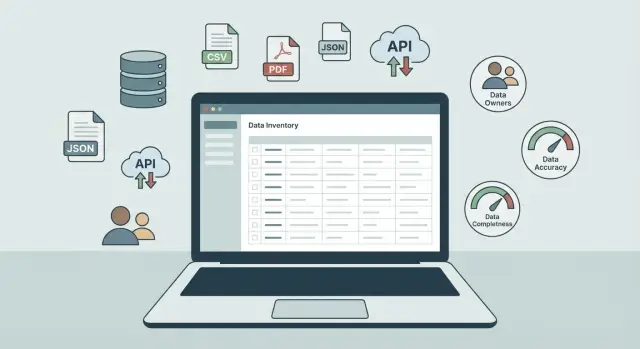
Why assess data readiness for AI at all
Most AI projects stall not because of “bad models” but because of data. You can replace or fine-tune a model or use a prebuilt one. Data can’t be “fixed” so quickly if it’s scattered across systems, nobody knows who’s responsible for it, or part of it lives in files with no update rules.
Data readiness answers a simple question: can you quickly find the data you need, obtain it legally, understand its meaning and quality, and then reliably feed it into a model? If any step leads to weeks of emails and manual exports, readiness is low — even if you technically have “lots of data.”
Without a data map the AI team often starts integrating systems at random. They connect CRM, then remember 1C, add Excel exports, and later discover that customer identifiers don’t match. What’s built isn’t AI but a set of temporary bridges between systems. That’s costly and usually ends with the pilot failing to reach a stable state.
Imagine an organization that wants AI to handle customer requests or forecast demand. Some data sits in a service desk, some in the accounting system, and correspondence history is in email. Even with infrastructure already deployed on-premise, without an inventory you won’t know which sources are usable and which need fixing first.
The good news: practical solutions usually appear after the first inventory. You can:
- pick 1–2 use cases that rely on available data, not on a dream
- identify which sources are critical and where integration is needed versus where periodic exports are enough
- assign data owners and agree access rules to avoid approval bottlenecks
- determine which datasets need cleaning and standardization first
- weed out ideas where data is legally unavailable or too unstable
This approach saves months. You start with what’s realistically feasible and improve data for specific tasks instead of trying to "improve everything at once."
What to prepare before starting an inventory
Before starting, agree on why you’re doing the inventory. Without a goal you’ll end up with a big table “about everything” that doesn’t help choose use cases and drags you into endless integrations.
Formulate the objective in one sentence. Most often it’s one of three:
- pick 1–2 use cases for a pilot
- estimate integration effort and workload
- quickly evaluate data quality in key systems
If there are multiple goals, set priorities: what must be solved now and what can wait.
Next, define the scope. Inventories almost always creep outward if you don’t set boundaries: which departments participate, which systems you’ll look at, the historical period for data, and which data types you’ll definitely exclude (for example, personal data without a separate approval process).
Third, assign owners and the “decision owner.” IT will help export data and explain architecture, but the business must explain field meanings, rules and what counts as an error.
Usually three roles are enough: a business owner (decides priorities), an IT representative (understands systems and integrations) and security/compliance (access and storage constraints). If your company has requirements for technological sovereignty and supply chain transparency, involve security from the start.
Finally, choose a simple recording format. At the start, a single "living" registry (a table or lightweight catalog) that can be updated daily works best. Keep a task board to show status by source. The format should allow capturing at minimum: source, owner, format, update frequency, access and a short quality assessment. Then you can honestly map data to future use cases.
How to link future use cases to specific data
A data inventory for AI begins not with tables but with clear tasks. Otherwise you’ll collect "all company data" and then find that the pilot lacks a couple of key fields or agreed access.
Choose 3–5 tasks where the business impact is clear and results can be checked in 1–2 months. A good sign is a measurable indicator: faster processing, fewer errors, less downtime, or higher forecast accuracy.
Then map each task to entities, not systems. An entity is the object you want to reason about: customer, order, employee, equipment, support ticket, payment.
Simple scheme to link a use case to data
For each task run through a short chain:
- Solution: what the AI should do (predict, classify, detect anomalies, suggest next action)
- Entities: which objects it operates on (e.g., "order" and "shipment")
- Features: which fields are needed (dates, statuses, amounts, categories, parameters, geography)
- Target: what counts as the correct answer (e.g., overdue event or return reason)
- Validation: how you will know it improved (model quality metric and business metric)
This quickly shows which data are critical and which are merely "nice to have."
What “enough data” means for a pilot
Pilots rarely require perfect ingestion into a data lake. Usually the minimum suffices: one primary source of truth per entity (even via exports), 3–10 key fields, a clear target label or labeling rule, and a historical period where data are comparable (e.g., 6–12 months).
Example: to predict equipment downtime you need a downtime log (time, reason), operational data (runtime, modes) and linkage to a specific unit. Extras like weather or purchase prices can wait until the pilot proves value.
If you’re working with a systems integrator, such a map "task -> entities -> minimal data" helps estimate integration scope and avoid scope creep. That’s especially important when infrastructure and data contours are planned in parallel.
Source map: where the data actually lives
A source map lists where data truly resides, not where it “should” be. For AI this is critical: you can train and run a model only on data you can regularly obtain, update and explain.
Start with corporate systems. Key master data and transactions typically live in ERP and CRM, accounting and payment systems, and the service desk. Industry-specific platforms add to that: EHR/EMR in healthcare, LMS in education. In the registry note not just the system name but which entities it contains (customers, tickets, invoices, prescriptions, grades) and in what form they can be exported.
Then include “invisible” sources that often affect quality the most: Excel files on shared drives, scanned contracts, email and messenger correspondence, and logs that someone later transfers manually. These often contain reasons for rejections, comments and clarifications. Without them, accounting data can look "correct" but incomplete.
Don’t forget technical data. Application logs, security events, equipment telemetry, sensor data, call recordings and transcripts provide precise signals about failures, downtime and common customer questions. For predictive maintenance and quality control these sources can be more important than financial data.
Also mark external data: supplier extracts, price lists, catalogs, public registers, partner reports. They often come with restrictions on updates and use; better to document that early.
When the list is complete, add a short note for each dataset: where it’s duplicated and where the single source of truth is. For example, the customer may be in CRM and accounting, but accounting is the source of truth for IIN/BIN and legal details, while CRM holds the contact history. This reduces the risk of drowning in integrations and weeks of arguing over which numbers are right.
Data owners, access and constraints
To prevent the inventory turning into endless approvals, agree on roles and rules upfront. Otherwise you’ll have a source map but no right to access the data, so the pilot can’t start.
A pragmatic minimum is to separate three roles that are often confused:
- Data owner: responsible for meaning, usage rules and who may view the data
- Steward (usually IT): responsible for the system and technical access provisioning
- Data user: the team building reports, models or using data in processes
Also record two points of responsibility: who approves access and who authorizes changes. Access approval is not just "give a login" — it includes whether exports can be copied, anonymized, or stored in a separate environment. Change authorization matters because AI quickly exposes breaking edits: a renamed field, changed reference data, or altered update cadence can make a model fail.
Document constraints. They typically fall into three groups: personal data, trade secrets and industry rules (government and financial sectors often have special regulations and contours). Note permissible options upfront: aggregation, anonymization, or working only inside the perimeter.
Record the current access delivery method because it determines pilot speed. For some organizations only prepared reports are available, others use weekly manual exports, and some offer direct access or APIs. For example, in a hospital admissions data might be available only as a monthly report, making a "tomorrow’s load" forecast impossible without process changes.
Also estimate approval timelines and common blockers. Typical issues include: no assigned data owner, access only granted "by email" without a standard form, copying data into a test environment is forbidden, unclear anonymization responsibility, or IT lacking resources for frequent exports.
If infrastructure and data contours are being planned in parallel, lock in these agreements before purchases and configuration. Then architecture and security will be based on real access rules rather than assumptions.
Formats, updates and links between datasets
Once sources and roles are agreed, describe the data so you don’t discover later that a needed field exists only in PDF or that two systems name the same customer differently. Five things matter: format, update frequency, volume and growth, relationships between entities, and where you have controlled reference data versus free text.
For formats, separate "easy" from "hard" at a glance. Tables (Excel, CSV, databases) and structured messages (JSON) usually go into a pilot fastest. Documents (PDFs, scans), images, audio and video typically require OCR or labeling and thus time and budget. A simple tag like "suitable for a quick prototype" or "needs preparation (OCR, classification, labeling)" helps.
Update frequency affects use case choice as much as format. Note the cadence in simple terms: online, hourly, daily, weekly, monthly, manual on request. If there’s a delay (e.g., exports appear the next day), note that too.
Volume and growth help avoid drowning in infrastructure later. Exact numbers aren’t required — estimates suffice: "10–20 GB/month", "about 2M rows", "quarter-end peaks", "seasonal spikes during enrollment".
The most common integration failure point is links between datasets. For each key entity (customer, employee, device, contract, ticket) record which identifier exists in each system and how reliable it is. If one database uses IIN and another an internal ID without mapping, linking will be expensive.
Check with a short list:
- Is there a single identifier for customer/partner (IIN/BIN, contract number, account number)?
- Are dates, amounts, units and currencies recorded consistently?
- Are there stable reference tables (branch codes, statuses, product catalog) or do people write "as they prefer"?
- Where is free text used (comments, tickets, descriptions) and in which language?
- Are there field renames or encoding differences between systems (e.g., different region codes)?
A good rule: if data relies on reference tables and clear keys, you can assemble a pilot quickly. If everything depends on free text and mismatched identifiers, plan unification first. Otherwise even a strong model will learn confusion.
Quick data quality checks without heavy analytics
A fast quality check keeps the inventory from becoming an endless project. At this stage you’re not building models or writing large code. You’re answering the main question: can this data be trusted for a pilot, or will it need long fixes first?
Start with metrics that both business and IT understand: completeness (are values present), accuracy (do they look like the truth), timeliness (are they up to date) and uniqueness (no unexpected duplicates).
Check examples, not impressions. Take 50–200 rows from each source and inspect key fields.
Mini-checks that quickly reveal issues
Typical quick signals are:
- missing values in mandatory fields (IIN/BIN, SKU, phone, event date)
- duplicate customers or products differing by one character
- odd values (future dates, negative amounts, unrealistic ages)
- inconsistent reference data (the same status named differently across systems)
- update spikes: a daily process but data appears monthly
Then compare the same field across systems. For example, "shipping address" may differ between CRM and logistics, and "product category" may not match between ERP and the catalog. Frequent mismatches mean use cases like personalization or demand forecasting will yield disputable results even with a good model.
If you plan supervised training (ticket classification, defect detection), separately assess labeling: are rules clear, do different labelers agree, and how many errors exist in labeled examples?
Quality scale and risk level
To compare sources, use a simple 1–5 scale per metric and an overall risk (low/medium/high). For example, service desk data might be quality 4/5 and low risk, while Excel files from different departments could be 2/5 and high risk.
Short scenario: an organization buying a fleet of workstations wants to predict support tickets. If serial numbers are recorded differently in inventory and tickets, the model can’t link the device to its failure history. This conclusion is often reached in a day and shows normalization of identifiers is the first priority.
Step-by-step process: run an inventory in 2–4 weeks
To keep the inventory within time, set limits: 2–4 weeks, one process owner, a clear dataset card template and a single registry. The goal is clarity: which data are available, in what condition, and what will be hard to connect — not perfect documentation.
Week 1: quickly gather the landscape
Conduct short interviews (30–45 minutes) and collect existing artifacts: regulations, system descriptions, registries, integration diagrams. Record not only the system but the contact who can provide access and explain field meaning.
Outcome of week 1: a draft list of sources and contacts plus agreement on who will confirm information.
Week 2: fill dataset cards and run mini-checks
For each priority dataset complete a card: what the data is, key fields, format (table, file, log), update frequency, and identifiers to link with other datasets. Don’t try to document everything: better to detail 10 datasets than list 100 names without depth.
Simultaneously, take small samples and run 3–5 quality checks: share of missing values in key fields, duplicates by identifier, strange ranges (dates in the future), mismatched reference data, and sudden volume changes.
Weeks 3–4: assess integrations and pick pilots
Note how data can be obtained: API, direct DB access, manual exports, or security approvals. This often matters more than the dataset’s “perfection”: good data are useless if only available monthly in Excel.
Summarize into clear decisions:
- which 1–2 use cases can realistically run on currently accessible data
- which sources are critical and what blocks access
- where quick fixes are needed (reference tables, mandatory fields, common identifiers)
- who will implement fixes and in what timeframe
- what the initial loading method will be (even a temporary export)
Final step: meet with data owners and IT to confirm priorities and the work plan. If the pilot will run on on-premise infrastructure, confirm the team has a stable path to deliver data to the development environment and clear access rules.
Common mistakes that drown teams in integrations
Inventories fail less on models and more on basic issues: where the data lives, who owns it and whether it’s trustworthy.
Mistake 1: assuming data “exists” because it’s “somewhere in Excel”
Files on desktops and shared folders look like an easy source. But without field definitions, versions, update rules and an origin story, it’s a collection of guesses. The predictable result: weeks of reconciliation followed by a return to the primary system.
Mistake 2: not assigning an owner and then waiting for access
If a dataset has no owner (or the owner is unclear), access is resolved by long email chains. That kills pilot momentum. Assign a responsible person for each source and record access rules and expected delivery time.
Typical problems: collecting “everything found” instead of the minimal set for a scenario; judging datasets only by size while ignoring gaps and duplicates; confusing reporting views with primary data and losing detail; ignoring different update cadences; building complex integrations when scheduled exports would suffice.
Mistake 3: trying to integrate everything at once
The desire to "do it right immediately" leads to connecting ERP, CRM, accounting, call center and several data marts simultaneously. It’s better to pick one use case, the minimal source set, prove value and expand the perimeter later.
Mistake 4: hoping the model will “fix” quality issues
A model won’t correct systemic errors: mismatched units, divergent reference tables, shifted keys, or missing mandatory fields. A check on 100–200 rows often reveals a significant portion of data needs cleaning or business-rule clarification.
Example: predicting delivery times using a monthly aggregated view lacks timestamps for actual approvals, delay reasons and stage statuses. You’ll need to go back to raw logs and restart integration.
Checklist and next steps: from data map to AI pilot
When the map is ready, quickly decide which datasets are pilot-ready and which need work. This turns the inventory from a “table for its own sake” into an action plan.
Short checklist per dataset:
- Source and boundaries: where data lives and what’s included (period, department, system)
- Owner: who’s responsible for meaning and quality and who confirms field interpretation
- Access and constraints: who grants access and any legal or regulatory prohibitions
- Format and update: tables, files, logs; how often and how stable the format is
- Quality: missing values, errors, duplicates, unified reference data
Then create a simple readiness matrix. No need for percent debates: three levels suffice to choose a pilot and estimate work.
| Level | What it means in practice |
|---|---|
| High | Has an owner, access can be arranged quickly, structure is stable and quality acceptable for a pilot |
| Medium | Access is possible but requires approvals; format varies; noticeable gaps or duplicates |
| Low | Owner unclear, access manual or forbidden; data are scarce/contradictory; no documentation |
Pilot selection rule: minimum integrations, maximum value. Look for a use case that relies on 1–2 high-readiness datasets with clear owners. For example, if you want a spare-parts demand pilot but repair logs are in one system, reference data in another, and half the records lack part codes, that’s a bad first project. It’s smarter to start where a complete set already exists: sales and stock in the same contour or service desk tickets with clear fields.
Next steps before deployment:
- fix 1–2 pilot use cases and success metric (time, cost, solution quality)
- formalize owners and access rules (who approves, who grants, deadlines, auditing)
- fix critical fields: reference data, units, keys for joins, filling rules
- agree on a minimal integration contour and update schedule for the pilot
- prepare a test export environment and a short field description
Bring in an integrator when the pilot and the systems to be touched are decided and access constraints are clear. That makes timelines, risks and architecture easier to estimate. If data are sensitive, on-premise deployment or scaling plans should be discussed early.
If you need a partner that covers infrastructure, integrations and support, consider engaging GSE.kz (gse.kz) as a systems integrator. They have experience building data contours and AI infrastructure on their own servers and workstations and offer 24/7 technical support — useful when a pilot is blocked by access, security and reliable data delivery rather than by models.
Frequently asked questions
Why assess data readiness before an AI project?
A readiness assessment answers a practical question: can you quickly **find**, **legally obtain**, **understand** and **regularly update** the data the model needs. If any step requires long email chains, manual exports, or debates about field meaning, the AI pilot will likely stall or fail.
How to correctly state the goal of a data inventory?
Formulate the goal in one sentence: choose 1–2 use cases for a pilot, estimate integration effort, or quickly assess data quality in key systems. Without a clear goal you’ll get a "fat registry about everything" that doesn’t help decisions and only broadens the scope.
How to prevent the inventory from dragging on for six months?
Set the perimeter up front: which departments participate, which systems you review, the historical period, and which data types are excluded. If there are sensitive data, limit work to "inside the perimeter" or "anonymized only" to avoid getting stuck on approvals.
Should I start from tables/systems or from use cases?
Start with 3–5 tasks where the business impact is clear and results can be verified in 1–2 months. Then map each task to entities (customer, order, ticket), required fields and the target label so you quickly see what data is missing and which sources are critical.
What counts as “enough data” for an AI pilot?
For a pilot you usually need one main source of truth per entity, 3–10 key fields, a clear target label (or labeling rule) and a comparable historical period (e.g., 6–12 months). An ideal data lake isn’t required at the start; stable access and repeatable updates matter more.
How to build a source map and not miss important data?
List where data actually lives: corporate systems (ERP/CRM/service desk), invisible sources (Excel, email), technical sources (logs, telemetry) and external feeds. For each source note where it’s duplicated and which copy is the single source of truth, otherwise you’ll drown in debates about correct numbers.
Who should be the data owner and who issues access?
At minimum, separate roles: data owner (meaning and rules), steward (technical host and access), and data user (those building models/reports). Also record who approves access and who authorizes changes, because edits to fields, reference data or update frequency can break a model in production.
Which data characteristics must be recorded in the registry?
Record format (tables, files, logs, documents), update frequency (online, daily, weekly, manual), volume/growth and keys for linking. Mark where free text appears and where identifiers are unstable — these are the most common sources of costly integrations and linking errors.
How to quickly assess data quality without deep analytics?
Take a small sample (e.g., 50–200 rows) and check completeness, duplicates, odd values and update freshness. This quickly shows whether data can be trusted for a pilot or if you first need cleaning, reference data unification and identifier normalization.
What mistakes most often sink a data inventory and AI pilot?
Common failures are trying to integrate everything at once, hoping the model will “figure out” poor-quality data, and relying on files with no owner or update rules. It’s safer to pick one use case, a minimal set of sources, assign owners and access rules, then expand once the value is proven.
