8 min read
Data Catalog for Business: Assessing Value and Integrations
A business data catalog helps find and understand data, reduce risks and speed up analytics. We explain how to calculate its value and which integrations are needed.
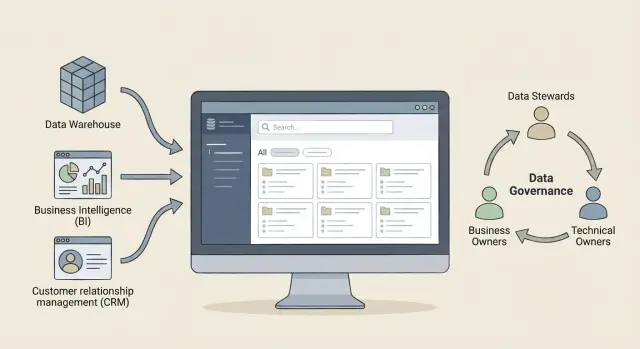
Why a company needs a data catalog and why it often goes unused
A business data catalog is not a storage or a report gallery. Simply put, it’s a directory about data: where it lives, what it means, who is responsible, whether it can be trusted, and how to use it correctly.
It differs from a DWH because a DWH stores and processes data, while a catalog describes it. It differs from BI because BI shows reports and dashboards, while a catalog helps you understand which datasets and metrics lie behind the charts and whether you can rely on them.
Why does a catalog often turn into an empty list of tables? It’s often launched as a one‑time metadata import from several sources. Then regular updates aren’t set up, owners aren’t assigned, and the catalog isn’t tied to daily work. People don’t see the benefit, don’t add descriptions and stop returning.
A catalog is useful not only for data teams. Analysts find the right dataset faster and interpret metrics correctly. Security and compliance teams understand where personal or sensitive data sits, who has access and where the data comes from. Data and process owners can set rules, confirm quality and answer business questions without endless messages.
Typically a catalog solves four needs: quick data discovery, a single business glossary, data lineage, and access management via clear requests and policies.
It’s important to distinguish the root problem. If you already have a catalog but everyone complains about inconsistent report numbers, the problem may be data quality, not missing descriptions. Signs that you actually need a catalog:
- the same metrics are interpreted differently across teams
- finding data takes days and depends on a few “knowledgeable people”
- it’s unclear where sensitive data lives and who owns it
- you can’t quickly explain where a report number came from
- access is granted manually without clear justification
Where value appears: common business scenarios
A catalog creates value where people repeatedly spend time on the same tasks: searching for datasets, clarifying metric meanings, arguing about report versions and figuring out who has access. The catalog pays off when it becomes the single source of truth: what the data is, where it came from, who owns it and how it may be used.
The fastest wins come where many participants and repeatable routines exist. For example, report preparation sees fewer errors from using the “wrong” table and fewer clarification requests. For security teams it becomes easier to audit access and spot areas with personal data. Management and regulatory reporting see faster agreement on definitions and data composition. Another practical result is fewer duplicates when teams build similar marts and reports in parallel. Finally, the catalog speeds onboarding: newcomers can quickly understand terms, sources and access rules.
A later effect is unified KPI definitions, ownership discipline (data owner, steward) and more mature data governance where decisions follow agreed rules and clear accountability.
To see progress, record a baseline before launch. Often 3–5 metrics are enough: average time to find a needed dataset, number of incidents due to wrong data use, number of duplicate reports for a single KPI, time to agree on a KPI definition, and share of access requests that require manual clarifications.
Separate the catalog’s effect from the effect of “cleaning up.” A catalog by itself does not fix data quality. It helps find owners, rules and context quickly. Cleanups and rebuilding marts provide another contribution. In practice, catalogs are evaluated by search time, transparency and reduced chaos, while data quality is measured by accuracy, completeness and the number of report errors.
Expectations that are better not to promise: that publishing descriptions will automatically make data accurate, that everyone will use the catalog without process changes, or that one tool will replace data owners and access policies.
How to calculate value: metrics and a simple ROI
Value is easy to lose in vague terms. It’s simpler to measure benefit through specific scenarios where losses occur today: people spend time finding data, doubt its quality, wait for approvals or rebuild the same things in different teams.
What to count as benefits and costs
Benefits usually come from four areas: time savings (search, clarifications, manual reconciliation), risk reduction (report errors, unauthorized access, fines), faster change implementation (quicker rollout of new reports and sources), and reuse of data (fewer duplicate marts and exports).
On the cost side, consider more than licenses. A catalog becomes “alive” thanks to integrations, support and processes. Real costs typically include connecting sources and BI/ETL, work by administrators and curators, roles and procedures (data owners, approvals), plus training and communications.
Simple ROI calculation for 3–5 scenarios
Pick 3–5 scenarios and measure “before” and “after” over a short pilot (e.g., 8–12 weeks). Example: a bank analyst spends 2 hours each time to determine which table to use and whom to ask. If there are 80 such requests per month, that’s 160 hours. The pilot goal is to reduce this to 60 hours through descriptions, owners and clear quality statuses.
Simple formula: saved hours * cost per hour + estimated risk reduction (expected loss * probability) - monthly costs. Even a rough estimate is better than none if the assumptions are agreed on.
Useful monthly metrics:
- active users (unique)
- coverage of critical datasets (top‑20, top‑50)
- share of datasets with an owner and description
- time to "find the right data" (survey)
- number of incidents or errors due to incorrect data
To keep metrics actionable, assign responsibilities in advance. Business is responsible for outcomes and priorities, IT for sources and integrations, security for access and risks, and the data office (or a designated team) for rules and data entry quality. In a pilot, capture these in a short RACI and review numbers together monthly.
What to evaluate: Collibra, Atlan, Purview, Atlas
Choosing a tool is easier when you first know which sources will bring value in the first months. Prioritize DWH and data lakes (they host most reports and marts), then ERP/CRM (master records and transactions), and later file stores. Files are harder to tidy but often contain critical documents.
The baseline without which a catalog won’t stick
A catalog needs everyday features, not just pretty pages. Minimum checks:
- search across data, terms and owners
- glossary and links between term — field/table — report
- clear roles: data owner, steward, quality owner
- access policies and visibility: who can see or request what
- reporting on coverage: what is complete, what is missing, where quality issues exist
Practical aspects follow: user convenience, interface localization and glossary language, quality of built‑in connectors and how easily you can extract control reports (for security or internal audit).
Typical positioning by solution class: Collibra is often chosen when strong governance and approval processes are needed. Atlan is valued for analyst convenience and quick starts. Microsoft Purview makes sense when you have a large Microsoft stack and need a unified management model. Apache Atlas is commonly used inside Big Data ecosystems when the team can maintain and extend an open source component.
Questions to ask a vendor or integrator
Before signing, ask specific questions rather than broad capability summaries:
- which connectors are available out of the box for your 5–10 key systems?
- how long will a pilot take and what measurable results will it produce?
- which roles do you need on our side and how many hours per week?
- how are training and post‑launch support organized?
- how does the solution scale by users, sources and licenses?
A good test is to ask them to demonstrate a scenario with your data: find the owner of the “revenue” metric and trace from report to table and field. If this takes minutes rather than weeks of messages, you’re on the right track.
Minimum viable catalog: what to achieve in the first 6–8 weeks
A minimally viable catalog is a working tool that already helps find data and assess trust. In the first 6–8 weeks do less, but do it so users open the catalog daily.
Technical minimum — connect 3–5 most important sources and set up regular metadata refresh. Usually this means DWH, the main BI platform, a key CRM or ERP and 1–2 critical marts. If some infrastructure is on‑prem, verify access, scan schedules and who will handle update failures.
Organizational minimum — assign owners and agree on simple description rules. Without this cards will be empty or inconsistent. At start, two roles are often enough: a business owner (why the data exists) and a technical owner (where it comes from and how it updates).
A dataset card should answer three questions: “what is it”, “who to trust” and “how to get access”. Mandatory fields at the start:
- owner (business and technical)
- purpose and typical use cases
- update frequency and last load time
- basic quality assessment (freshness, completeness)
- access rules and contact for requests
Lineage is needed to quickly understand where a report number came from. Early on you don’t need a perfect field‑level graph. A simplified view is often enough: source -> mart -> report. For example, so a financial analyst can explain why a BI metric changed after a recompute in the DWH.
Another common stumbling block is accessibility. Provide a single entry point (SSO if available) and intuitive navigation: domain sections, search by business term, filters for owner, system and access level. If a user needs five clicks and a separate request just to view a description, they will stop using the catalog after the second week.
Integrations without which the catalog becomes a “dead showcase”
A catalog may look good but only delivers value when it receives data automatically and is embedded in everyday work. Otherwise cards become stale, owners are not assigned and search turns into an archive of presentations. This is the main risk for a business data catalog.
Minimum set of integrations that keep the catalog alive usually includes:
- sources and pipelines (DWH, data lake, ETL/ELT, orchestrators) to pull schemas, updates, lineage and schedules automatically
- BI systems so reports and metrics link to tables and fields: a user searches “revenue” and immediately sees where it is calculated and which dashboards use it
- IAM and security (SSO, roles, access policies and a request process with logging) so it’s clear who has access and why
- data quality systems so checks (freshness, completeness, error rates) are visible on cards
- CMDB and service desk so owners, changes and incidents are tied to data and source changes don’t silently break reports
Simple example: finance sees a KPI drop in BI. In a “living” catalog they open the metric, see that the pipeline source changed yesterday, a quality check reported increased missing values, and a service‑desk ticket is already opened with an assigned owner. Without these links people revert to chats and asking “who knows” across the company.
Quick self‑check on integration signs:
- lineage updates automatically after releases and pipeline changes
- every important dataset has an owner and a clear access request path
- metrics are linked to reports and sources, not only text descriptions
- quality and freshness are visible immediately without separate exports
If you implement catalogs as an integrator (especially in corporate or public sectors), agree with security and operations early: the catalog must be part of processes, not a separate “data website”.
Implementation plan: from pilot to scale
To avoid a catalog becoming a pretty card gallery, start small and tie it to real processes. The pilot must be short, with a clear owner and measurable result.
Steps that work for most companies
- choose 2–3 business cases where pain is clear: report preparation, finding BI metrics, audit or regulator requests. For each case list critical datasets (usually 10–30).
- define a basic term model: 30–80 key concepts people actually use (for example: “customer”, “contract”, “revenue”). Assign roles: who approves the definition, who owns quality, who approves access.
- connect sources and enable metadata collection: at least the DWH, 1–2 marts and one master data source. Set update schedules immediately, otherwise trust drops within a week.
- configure access and publishing rules: who sees what, how to request access, who approves, and which card fields are mandatory.
- run a 4–8 week pilot: train a small group, collect metrics (search time, number of requests, share of described datasets), fix issues and decide what to scale.
How to know it’s time to scale
If users stop asking “where is this” and start referencing specific terms and owners, the foundation is ready. For example, the reporting team finds the correct table and calculation rules in minutes rather than through long message threads.
Then expand by domain, not “everything at once”: finance, sales, procurement. Keep the same rules for owners, updates and access in each domain. If you work with integrators, agree upfront who will maintain connectors, roles and procedures after launch.
Common mistakes and traps when launching a catalog
The most common failure is launching the catalog as a showcase rather than a working tool. Metadata exist, but no one uses them because they don’t solve daily tasks.
Typically this looks like entities with no owners: definitions, quality and changes are unclear. Cards are filled manually and half the descriptions are out of sync after a month. The user scenario is missing: an analyst needs to find a metric for a report, understand the formula, request access and contact the owner — but the catalog only shows a table name. There is no unified glossary or naming rules, so search returns nothing or dozens of duplicates. Finally, the catalog lives separate from security and access processes: if usage rules aren’t visible, trust won’t form.
Typical example: a financial analyst searches for “margin”. The catalog has five similar fields, no formula, no owner and no last update. The analyst asks colleagues in chat or recomputes the metric. The catalog becomes another tab that people stop opening.
How to avoid these traps
Start with responsibility and basic order. Assign owners for key domains and KPIs (finance, sales, HR) and require changes to go through them.
Automate what changes daily: technical metadata collection, schema updates and lineage. Leave manual input for business descriptions, rules and exceptions.
Crucially, tie the catalog to access and control processes. Users should request access from a dataset or metric card and see request status: “approved”, “pending”, “granted”, “denied” (with reason). Mark sensitivity and usage rules as well.
When the catalog offers the path: find -> understand -> request access -> use, it stops being a “dead showcase”.
Quick checklist: how to tell the catalog is alive
A living catalog is judged by solving daily tasks, not by pretty cards. Check both how complete it is and how much it’s used.
First signal — a clear focus: a top‑20 list of datasets the business actually needs now (sales by channel, stock levels, customer portfolio, regulator reporting). Without this list the catalog often becomes a dump of everything.
Second signal — critical data have specific people. Each key dataset shows a business owner and technical owner with working contacts, not “owner — whole department”.
Third signal — metadata update automatically. A dataset card shows its last update and it’s not a manual quarterly date.
Fourth signal — access is requested there. Users file requests in the catalog and see approval status.
Fifth signal — quality and a common language exist. Basic quality indicators (completeness, freshness) and simple definitions are visible: what counts as an “active customer”, “revenue” or “delinquency”. A good test is two departments reading one definition and understanding it the same way.
If you can answer “yes” confidently on 3–4 points, the catalog is already alive. If not, start with the top‑20 datasets and make their cards workable.
Example scenario: how the catalog helps in a real process
Imagine a large bank or government organization: dozens of sources, multiple analytics teams, reports for regulators and management. The same KPI, like “active customers”, is calculated differently: one team uses transactions in 30 days, another in 90.
Before the catalog, an analyst searches via chats and contacts, gets several “correct” marts, and meetings show different numbers. Discussion shifts from business to whose SQL is more “accurate”. Duplicate marts appear because it’s easier to rebuild than to understand someone else’s work.
To get quick value, the team implements a minimal working contour: connect two stores (e.g., corporate DWH and a data lake), one BI system, and set basic rules. The glossary has owners and short definitions. Key datasets include purpose, update frequency and basic quality indicators. For critical KPIs, lineage at the source -> mart -> report level is available. Access is granted through a simple request process that the owner approves.
They focus on one process, like weekly sales and risk reporting. The catalog resolves disputes: one term, one formula, an assigned owner, visible restrictions (who can see personal data) and a clear source for the report number.
Impact is measured with simple metrics over 2–4 weeks: time to find the dataset, share of “send me the mart” follow‑ups, time from request to a ready dashboard, and number of incidents from inconsistent definitions.
At the end, executives see a single KPI with a transparent formula and source, and analysts have fewer manual clarifications and rebuilds.
Next steps: how to move from idea to a working catalog
Don’t start with “implement a tool.” Start with a 2–3 month plan: which problems it should solve and who is accountable.
A basic sequence:
- pick 3 priority cases (e.g., find a report owner, agree on the term “customer”, prepare for an audit) and identify systems holding the necessary data
- list initial integrations: usually the data warehouse, BI, main bases (ERP/CRM) and the ETL repository
- assign data owners and stewards by domain (finance, sales, HR) and define what they maintain: descriptions, terms, quality rules, contacts
- align security requirements upfront: roles and access levels, action logging, rules for what can be shown to everyone and what requires approval
- plan a pilot on a limited contour and define success metrics in advance
Run a narrow but complete pilot: one business process and 2–4 key systems. Then decide by numbers: how long to find dataset owners, how many manual chat clarifications decreased, how many reports now have clear definitions and trust levels.
If internal resources for connecting sources, configuring rights, cataloging and ongoing support are limited, discuss working with a system integrator. For example, GSE.kz can help plan integrations, run a pilot and provide support so the catalog delivers value without constant manual upkeep.
Frequently asked questions
What is a data catalog and how is it different from a DWH and BI?
A data catalog is a reference about data: where it is stored, what it means, who is responsible for it, how it is updated and whether it can be trusted. It does not store data or build reports; it helps people quickly understand context and rules for using the data.
Why does a data catalog often stay empty or quickly become outdated?
Most often it is launched as a one‑time metadata dump and then not maintained: regular updates are missing, owners aren’t assigned, terms and access rules aren’t documented. As a result, cards become outdated, people don’t see the benefit and stop using it.
How do I know if the company really needs a data catalog?
If finding data takes days, metrics are interpreted differently across teams, it’s unclear where sensitive data is stored and who is responsible, or the lineage of report numbers is hard to explain, a catalog usually brings quick benefit. It’s especially useful where many recurring questions and approvals revolve around the same metrics.
Will a catalog fix data quality issues and discrepancies in reports?
If discrepancies are caused by load errors, incorrect calculations or problems in marts, a catalog won’t fix them by itself. It helps you find the owner, rules and the source faster, but data quality must be improved with separate checks and changes to pipelines.
How to estimate ROI for a data catalog without a complex model?
Measure value through 3–5 concrete scenarios where time or risk is currently lost: finding the correct dataset, aligning KPI definitions, issuing access, preparing reports. Simple formula: saved hours * cost per hour + estimated risk reduction (expected loss * probability) - monthly costs for the tool, integrations and support.
What should be in a minimally viable catalog in 6–8 weeks?
In the first weeks focus on a closed loop that solves a daily task. Typically connect 3–5 key sources with regular metadata updates, assign business and technical owners, and fill minimal card fields: purpose, update frequency, level of trust and a clear access path.
Which integrations are critical so the catalog doesn’t become a “dead showcase”?
Integrate sources and pipelines so metadata and lineage update automatically, connect BI so metrics and reports link to tables and fields, and connect IAM/security so visibility and access rules are transparent. Also surface basic quality indicators and link changes and incidents to the service desk so the catalog becomes part of daily work, not a separate reference.
How to choose between Collibra, Atlan, Microsoft Purview and Apache Atlas?
Start from what will bring value in the first months: your key sources and BI, requirements for roles and approvals, and user experience. If strong governance and approval processes are required, choose tools with deep governance features; if quick start and analyst convenience matter more, choose a tool that’s simple and fast to use; if you have a large Microsoft stack, evaluate solutions that integrate well with it; open‑source options often require more custom work and maintenance.
Which roles are needed to ensure the catalog is maintained?
Minimum roles are a business owner and a technical owner, plus someone who ensures filling and rules (often a steward or data office). Agree in advance who approves term definitions, who is responsible for quality, and who approves access — otherwise the catalog will quickly become a set of fields without accountability.
How to tell that the catalog is “alive” and used?
Check practical usage rather than card aesthetics: key data have owners, metadata update automatically, quality and freshness are visible, and access can be requested from the card with a visible approval status. If for key data you can find the definition, source and owner in minutes, the catalog is working and people will keep using it.
