8 min read
CRM/ERP Infrastructure: Server in the Office or Data Center?
CRM/ERP infrastructure: how to choose between an office server and a data center, comparing cost, availability, connectivity and responsibilities.
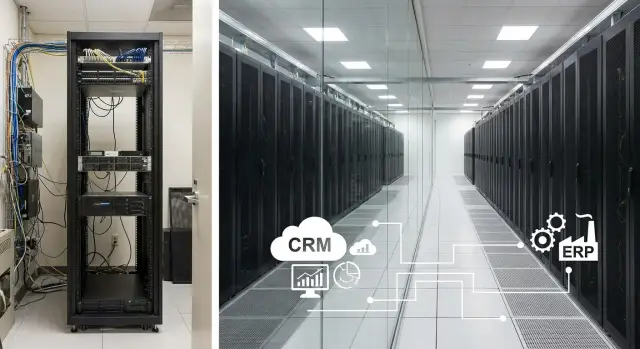
Where the choice begins: what are you really comparing
You are not just choosing a place to put "hardware." You are choosing how the CRM/ERP will work every day: how often it will fail, how quickly the system can be restored, who is responsible for security, and what it will actually cost.
When people say "server in the office or data center," they usually compare three approaches:
- Server in the office (in a server room or even a separate office).
- Colocation in a data center: your equipment but the data center provides the site and engineering.
- Hybrid: part of the systems in the office, part in a data center (for example, the database and backups in the data center, local services on site).
The same CRM/ERP can be "acceptable" in the office and "excellent" in a data center, or vice versa. Often it's not about the application itself but about simple things: power, cooling, connectivity, physical access to hardware, and who is on duty at night if something breaks.
Before comparing costs, clarify basic requirements. They quickly rule out unsuitable options:
- How many users work concurrently and are there peaks (morning, month-end, season).
- Are there branches, remote workers and mobile access, and where are they located.
- What counts as downtime for you: is 10 minutes tolerable or already critical.
- What data is stored (personal, financial, medical) and what security requirements apply.
- Who will handle incidents and how quickly people can physically reach the server.
Example: a head office in Almaty and two regional branches. If the CRM "lags" from branches, the problem is often not the server but connectivity and routing. Moving hardware to a data center closer to backbone nodes can improve performance noticeably even without replacing the server itself.
If you plan to buy servers or workstations, discuss not only specs but also the operating scenario: where the equipment will be located, who maintains it, and how recovery after incidents will be handled. For integrators and manufacturers like GSE.kz, these topics are usually part of a pre-project survey.
Minimum CRM/ERP requirements, in plain language
To argue about location, first understand what the system needs every day. Requirements depend not on the CRM/ERP name but on load, data volume and internal rules.
What to clarify with numbers
Start with users: how many people work at the same time and when are the peaks (month-end closing, mass reports, payroll, inventory). On such days load can easily increase 2–3x, which affects CPU and memory.
Next — the database: current size, growth rate and expected response times (cards, reports, search). Performance issues often hit storage: for CRM/ERP, fast storage and a correct disk configuration are usually more important than the most powerful CPU.
Integrations add background tasks and risks: telephony, mail, 1C, BI reports, exchange with government services or electronic document flow. Clarify what must work in real time and what can be updated on a schedule.
And one more question that solves a lot: how much downtime is acceptable. If 2–3 hours of downtime per month is acceptable — that's one level. If you cannot lose even 30 minutes during business hours — you need a different level of redundancy and recovery.
Before choosing a location, record at least the following:
- number of concurrent users and the nature of peaks;
- current database size and growth forecast for 12–24 months;
- critical integrations and acceptable maintenance windows;
- acceptable downtime and data loss on failure (RTO/RPO);
- company rules: where data may be stored, audit requirements and who approves policies.
A short example
A company with 60 employees uses CRM and accounting. On a typical day 25–30 people work concurrently, but at month-end 50 people generate reports. The database has grown to 400 GB and increases by 30–40 GB per month. Integrations with telephony and document exchange run in parallel.
In this case a "mid-range" server may handle quiet days, but during peaks the system will slow and any disk or network failure immediately halts sales and accounting. It's better to record requirements first, then compare office server vs data center.
Option 1: server in the office — real costs and limits
An office server seems simple: install it, plug it in, and CRM/ERP works. But you actually take responsibility for the whole environment: power, cooling, backups and support.
What costs add up
A one-time server purchase is only the beginning. To keep the system running and data safe you typically need:
- fast disks/controllers or a storage system for the database;
- backups (separate media/second server and storage space);
- licenses and updates (OS, DBMS, backup tools);
- UPS and basic electrical work (surge protection and graceful shutdown);
- air conditioning and decent room ventilation.
Regular costs add up: electricity, replacing disks and fans, consumables and administrator time. Even if the admin is in-house, on-call duties and unplanned tasks appear: a disk dies at night, the database won't start after an update, or internet goes down.
Advantages of an office server
The main benefit is physical access and full control. If you need to attach local equipment (POS, terminals, label printers, some medical devices), the office setup is often simpler.
Companies also choose an office server when security policy requires data to remain on premises and the company can provide proper conditions.
Limits and risks
The most common weak points are power and internet. A single power surge can damage disks, and several hours without connectivity turn the CRM into a "non-working phone." True fault tolerance is harder than it seems: you must provide redundancy not only for the server but also for network, power, backup storage and the recovery process itself.
Example: an office for 30 people runs CRM on one server. After a power outage the database starts but part of the data is corrupted and the last good backup is a week old. The server is physically available, but the business loses time and trust.
An office server is usually suitable when:
- the office is small and 24/7 availability is not required;
- outages of several hours are acceptable and there is a clear plan for such cases;
- there is an internal IT team responsible for backups and recovery;
- the office environment can provide basic power and cooling.
If you choose this path, clearly assign who is responsible for backups, recovery tests and incident response. This saves more money than any "lucky" server purchase.
Option 2: colocating in a data center — what you pay for and what you get
Colocating in a data center is often seen as "renting space." In reality you buy conditions that are hard to reproduce in an office: stable power, cooling, physical security and regulated maintenance. For CRM/ERP this matters because failures more often arise from the environment around the hardware than from the hardware itself.
A basic rate usually includes rack space (U units or a full rack), allocated power, climate control and secure access. Details that shape the final bill come after that.
Common charges include:
- rack unit space: 1U, 2U, etc., or a full rack;
- power: declared wattage (kW) and sometimes metered consumption;
- cross-connects: connections to carriers, neighboring racks or your networks;
- "remote hands": reboot, disk replacement, console access on request;
- extra services: additional circuits, special power requirements, spare parts storage.
Benefits of a data center are obvious for operations. Equipment runs in correct conditions and suffers less from overheating, dust and power issues. Scaling is easier too: add a second server, a backup node or expand a rack without renovating your office.
There are downsides. You become more dependent on network links: if the carrier has issues or there is a bottleneck, users will notice lag even if the server is fine. Physical access follows data center rules: visits and work must be scheduled. It is important to define responsibilities in advance: who manages the network, who handles backups, who responds at night.
A data center usually fits companies with branches, critical sales/support and availability requirements. If CRM/ERP must run "always," a data center is closer to that goal—provided connectivity and role distribution are organized properly.
Connectivity: why CRM can be slow even on a good server
Perceived CRM/ERP speed often depends on the network, not server power. If there are branches, remote staff and mobile users, the system may run fine "in the server room" but feel sluggish on client workstations.
Typical picture: everything is fast at the head office, but at a branch opening a client card takes 10–15 seconds. The cause can be latency and packet loss on the route, not the CRM itself.
What to check in the network
Make simple measurements during working hours, especially at peak times. Important is connection quality, not just "advertised speed":
- latency (ping) and its stability;
- packet loss (even 1–2% noticeably degrades forms and reports);
- performance in the evening and at month-end;
- traffic path (sometimes the provider routes it the long way);
- presence of primary and backup internet links.
If the server is in the office, branches depend on the office internet and network gear. Any carrier outage, overloaded router or accidentally unplugged switch can stop the system for everyone.
If the server is in a data center, the site typically provides predictable external connectivity, but offices and branches still need reliable access to the data center. Otherwise the bottleneck simply moves to the last mile.
Basic measures are similar: VPN for secure access, role-based access control, and monitoring availability. Monitoring should not be just for show: it helps quickly prove the issue is in the network, not the server.
Estimating connectivity costs: office vs data center
Count not the single plan but the set that gives acceptable reliability.
For an office the bill usually includes: business internet + backup channel (second provider or LTE) + equipment (router/firewall) + maintenance.
For a data center: office-to-DC connectivity (often two providers) + access protection (VPN/firewall) + one-time connection/port fees.
For branches: either separate links to the office/DC, or a direct connection to the data center if that gives better stability.
In practice, the winner is the option that makes it easier to ensure stable access for all users, not just one building.
Availability and recovery: what matters beyond the server itself
Even expensive hardware won't help if there is no plan for failures. Availability depends on power, disks, backups, connectivity and who actually restores the service.
Power and hardware: common points of failure
Answer a simple question: what happens if power is lost or a component fails.
Practically, check:
- UPS with runtime to allow a graceful shutdown or to wait for a generator;
- generator or a clear plan for handling a 1–2 hour outage;
- dual power supplies and separate power feeds where possible;
- RAID and capacity margin for at least 12–18 months of growth;
- monitoring that alerts on disk degradation, overheating and power issues.
Important: RAID is not a backup. It helps survive a disk failure but not data deletion, malware or a bad update.
Backups and recovery plan
Backups are useful only if you can actually restore from them. Agree in advance where backups are stored (preferably off-site), how often they are taken and who performs a restore outside business hours.
Fix two metrics here:
- RPO — how much data you can afford to lose. E.g., RPO 15 minutes means in the worst case you lose changes from the last 15 minutes.
- RTO — how long it takes to bring the service back. E.g., RTO 2 hours means the CRM/ERP must be back within 2 hours after a serious failure.
Example: a clinic books patients all day. With RPO 24 hours you may lose a whole day's appointments after a failure. That is usually unacceptable, so you must reduce RPO (more frequent copies or replication) and speed up recovery (standby server, ready image, clear steps).
Also assign responsibilities: who diagnoses the issue, who replaces parts, who restores the database and who decides to switch to a backup. If you involve an integrator (including GSE.kz), agree these roles before launch.
Responsibility: how not to be left holding the bag after an incident
When CRM or ERP "goes down," everyone wants to know who brings it back and in what time. If this isn't written down, the conversation often becomes "it's not our area."
How responsibilities are split
Split the system into layers and assign an owner for each:
- hardware (server, disks);
- virtualization (if any);
- OS;
- database;
- CRM/ERP application;
- backups;
- security (patches, access, antivirus, logs).
In an office almost everything falls on your team. In a data center the provider usually covers the "foundation": power, cooling and physical security (sometimes connectivity). The rest remains with you or your contractor.
It's helpful to record this in a simple table.
SLA: what must be written in black and white
An SLA is useful only if it clearly states what is guaranteed. Check that it covers:
- what is included: power, rack access, physical security, network port;
- response times and recovery times (they are different);
- maintenance windows and how you are notified;
- emergency access procedures (night, weekends);
- how incidents are recorded: ticket, call, log.
Access to equipment is also critical. In a data center this involves passes, scheduled visits, rules for storage media and work windows. In an office access is simpler but often there are no on-call staff or spare parts, so repairs take longer.
A practical tip: keep serial numbers, equipment handover acts, a change log and approval records for firewall settings and accounts. Without this it's hard to quickly understand an incident's root cause.
A good rule: appoint a single service owner (not just "hardware") who keeps SLAs, access rules and contacts in one place.
Step-by-step selection plan: from requirements to solution
Start not with the server but with how the business survives failures. The main question is simple: how long can the system be down without harming sales, warehouse, accounting or the call center.
-
Describe 3–5 critical processes and acceptable downtime. For example: order processing — max 30 minutes, printing waybills — 2 hours, management reports — by end of day.
-
Estimate load for 12–36 months: users, remote sites, database and file growth (scans, contracts), and peaks.
-
Count full cost of ownership, not just server price. Include hardware and licenses, maintenance, connectivity (primary and backup), redundancy (backup storage and recovery testing), and people (on-call, cover for vacations and night incidents).
-
Test connectivity and availability: measure latency to the server, stability at peak times, and operation via VPN/thin client. Add monitoring to see problems rather than guess from complaints.
-
Fix responsibilities and procedures: who responds, who updates, who takes backups, who has site access, and who decides during an outage.
After this, the choice between office, data center or hybrid usually becomes obvious.
Common mistakes when choosing an office server or data center
The most common mistake is starting with "how much does the hardware cost" and ending with unexpected downtime. For CRM/ERP important factors are not only server resources but internet, power, backups and clear responsibilities.
Frequent causes of extra costs:
- counting only the server price and forgetting UPS, cooling, racks, licenses, setup and regular maintenance;
- leaving a single internet channel with no backup;
- not assigning a backup and recovery owner: copies are "made" but no one knows where they are or how to restore;
- underestimating procurement, delivery, installation and testing lead times;
- launching without testing on real data and typical user tasks.
Example: a company moves CRM to an office server because "it's cheaper." A month later the building loses power for 2 hours. The UPS lasts 10 minutes and the backup was on the same disk as the database. The server was fine but the infrastructure wasn't ready for a common outage.
To avoid this, fix three things beforehand: where backups are stored and how often recovery is tested, what to do on internet and power failure, and who is responsible for each area (office, provider, data center, integrator).
Quick checklist, an example and next steps
Sometimes you must decide fast. Put aside details for 10 minutes and check the basics — they often determine whether CRM/ERP will "just work."
10-minute checklist
Write answers in a single file:
- Availability: how many hours of downtime per month are acceptable and who confirms this (SLA or internal agreement).
- Connectivity: is there backup internet, what happens on a cut, and how will branches connect.
- Backups and recovery: how often copies are made, where they are stored and how long recovery takes.
- Security: who manages access, updates, antivirus, logs and the incident procedure.
- Roles and procedures: who is responsible for server, network and the service overall, and what steps are taken "if it goes down."
Example: 80 users and 2 branches
A company has 80 employees; accounting, warehouse and sales actively use CRM/ERP. There are two branches in other cities.
If the server is in the office, branches depend on the office channel. A provider failure or power outage there brings everything to a halt. To reach acceptable availability you usually need UPS, backup internet, VPN, off-site backups and a clear recovery plan.
With a data center it's easier to ensure power, cooling, physical security and stable connections. Branches connect to a single point in the data center and there's less risk that an office issue paralyzes the system. Roles still need to be agreed in advance: the data center covers the site, while OS, applications and access policies are your IT team's or contractor's responsibility.
You should seriously consider a data center if downtime is growing, new branches appear, audit and logging requirements tighten, or the internal team struggles to provide 24/7 support.
Next steps:
- Create short requirements: users, branches, criticality, maintenance windows, RPO/RTO.
- Describe current costs and risks, then request a 3-year TCO for office and data center options.
- Check how support is organized: contacts, response times, escalation.
- Agree responsibilities in writing (what is included in support).
If you need a practical, task-focused solution with single-point responsibility for hardware and implementation, GSE.kz as a manufacturer and systems integrator in Kazakhstan can supply servers (for example, S200 Series) and provide support with 24/7 technical assistance and a nationwide service network.
Frequently asked questions
Where to start when choosing: office server or data center hosting?
First, record requirements for downtime and data loss: how long CRM/ERP can be unavailable and how much data loss is acceptable. If high availability and fast on-site response are needed, a data center is usually easier to guarantee in terms of power, cooling and physical security. If full local control is important and services are tightly tied to office hardware, an office server may be justified, but then you take responsibility for the entire surrounding infrastructure.
What do people usually forget to count in the cost of 'server in office' and 'server in data center'?
In an office, people often underestimate the surrounding infrastructure: UPS, cooling, backup internet, storing backups, licenses and admin time. In a data center, monthly costs include connectivity to the data center, cross-connects and "remote hands". The correct comparison is TCO over 2–3 years including people, downtime and recovery—not just the price of hardware or rack space.
Which server characteristics matter most in practice for CRM/ERP?
For CRM/ERP, fast storage and a proper disk configuration for the database are usually more important than the highest-end CPU. The second key factor is RAM, especially if many reports and concurrent users appear during peaks. Before buying, document peak load, database size and growth for 12–24 months so the system is not "fine on normal days, poor at month-end."
Why can CRM be slow even if the server is powerful?
A common cause is latency and packet loss on the network path, especially between branches and the head office. Even 1–2% packet loss can noticeably slow forms and searches, and an unstable route makes response times "choppy." Check ping and packet loss during working hours, not just the advertised bandwidth, and ensure there is a backup internet link and monitoring that shows where the problem lies.
How should connectivity for branches be organized: route everything to the office or connect directly to the data center?
If the server is in the office, all remote users rely on office internet and networking equipment, and any failure there affects everyone. In a data center, it's easier to make a single reliable connection point for offices and branches, but the last mile quality to each office still matters. A practical minimum is two independent channels where downtime is critical, and a tested access scheme (for example, VPN) with clear support.
What are RPO and RTO, and which values should be chosen for CRM/ERP?
RPO is how much data you can afford to lose; RTO is how long it takes to restore service after a failure. A reasonable starting point for many companies is RPO from 15 minutes to a few hours and RTO from 1 to 4 hours, but these must be tied to processes: sales, warehouse, accounting, call center. Importantly, don't just write numbers down—implement backups and regular recovery tests, otherwise they remain only on paper.
Why is RAID not a backup?
RAID helps survive a disk failure, but it doesn't protect against data deletion, malware, ransomware or a bad update. Backups must be stored separately and preferably off the main site to survive fire, flood or theft. A minimally useful approach is scheduled automatic backups plus periodic verification of recovery on a test environment.
How to allocate responsibility between the company, data center and contractor so there is no blame game during an incident?
Divide the system into layers and assign an owner for each: site (power, cooling, physical access), hardware, virtualization, OS, database, application, backups and security. Specify response and recovery times separately, and define the procedure for night and weekend access to equipment. One person on the business or IT side should be the service owner so that during an incident there is no "that's not our area".
When is an office server a reasonable choice, and when is a data center or hybrid better?
Choose an office server if outages of a few hours per month are acceptable, you have an internal IT team, and you can provide power, cooling and backups. A data center usually makes more sense if CRM/ERP is critical, there are branches, you need more predictable operation, or it's hard for the internal team to provide 24/7 support. Hybrid is convenient when some services must remain local while the database and backups are in a more protected environment.
What steps to take before buying servers and migrating CRM/ERP?
Request a pre-project survey and a fixed list of requirements: users and peaks, database growth, integrations, acceptable downtime, RPO/RTO, rules for data storage and access. Then compare options by TCO and risks, and test the recovery plan in practice, not just on paper. If you need a single supplier for hardware plus integration and support, in Kazakhstan a systems integrator and manufacturer like GSE.kz can supply servers and provide nationwide technical support.
