8 min read
Integration of CRM, ERP and 1C: data exchange patterns and data quality control
CRM, ERP and 1C integration: compare file, API and bus exchange methods and a data quality checklist — queues, retries, deduplication and reconciliation.
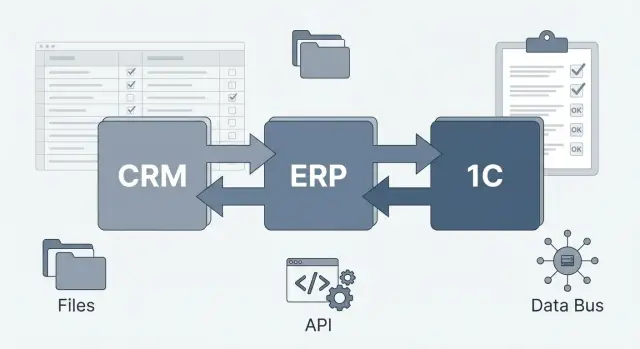
Why exchanges between CRM, ERP and 1C often break accounting
Problems usually don't start with a "bad integration" but with different systems counting the same fact differently. CRM lives by deals and statuses, ERP by planning and logistics, and 1C by accounting records and primary documents. If rules are not aligned, CRM ERP 1C integration quickly becomes a source of discrepancies.
Three failure types appear most often: duplicates (the same client or order entered twice), misses (a document didn't arrive due to an error or timeout), and "different amounts" (discounts, VAT, rounding, currency, partial payments). The worst part is that during exchange everything may look "normal", and the problem appears later: in margin reports, inventory counts, month-end closing, or account reconciliations.
Accounting breaks along a chain of events. For example, a deal in CRM moved to "Paid", but the payment in 1C arrived later or arrived without linking to the contract. Sales think the money is received, while accounting sees receivables. Or ERP reserved goods and reduced stock, but 1C didn't post the sale due to invalid item data — balances start to diverge.
Before writing the first line of code, it's important to agree on who is the source of truth for key directories and rules: who creates and updates clients and details, where items and units of measure live, where prices and discounts are calculated, which order statuses count as final, and in which system primary documents and payments are "official".
Another common failure is a blurry boundary between automation and manual procedures. If some data are changed manually "to go faster", there must be a clear process: what is allowed, where the reason is recorded, and how changes are properly propagated back to other systems. Otherwise even a good exchange will constantly overwrite manual fixes or create new discrepancies.
System roles: what should be stored and calculated where
If system roles are not agreed, CRM ERP 1C integration quickly turns into an argument about where the "correct" amount is, which order status is final, or where duplicates came from. Start with a simple rule: each data type should have one owner (master system), and other systems receive a copy and should not edit it locally.
CRM usually owns the commercial side: who was contacted, what was agreed, on what terms we sell. Leads, deals, activities, funnel stages, commercial offers, discounts, preliminary dates and probabilities live here.
ERP typically handles operations and resources: stocks, reserves, purchases, production, logistics, planning, and managerial finance. It's more convenient to calculate availability, cost, lead times, and shipment statuses here.
1C commonly holds regulated accounting: primary documents, accounting entries, taxes, and period closing. Reporting amounts and legally significant document statuses should be regarded here as authoritative.
How to reduce manual input and disputes
Agree where a record is created and who has the right to change it. A practical minimum is one source for counterparties and their details (consistent tax IDs, registration numbers, addresses), a unified approach to contracts and payment terms (format, statuses "draft - agreed - active"), a single catalog of items and units of measure (with identical codes), and unified identifiers for warehouses and departments so the same object isn't renamed during exchange.
Short example: a manager creates a deal in CRM and agrees the price, ERP confirms availability and shipment date, and 1C issues the invoice and closing documents. If CRM is allowed to edit item data or a counterparty's details, duplicates and mismatches will appear within the first week.
Typical exchange scenarios and fields that are often disputed
In the CRM, ERP and 1C integration, decide in advance which system is the source of truth for each data type. Otherwise the same fact will live in three places and constantly diverge, and integration will become a manual "fix accounting" process.
Most often, new and updated counterparty cards, customer orders, invoices, and key statuses (invoice issued, agreed, canceled) go from CRM to 1C. This lets accounting documents live in 1C while sales continue to work in the CRM.
From 1C to CRM, facts typically return: payments, shipments, balances, and closing documents. A manager needs to see what actually happened, not what was planned. A common example: a customer paid partially, 1C closed part of the invoice, but CRM still shows "awaiting payment". If rules aren't aligned, salespeople make unnecessary calls.
If ERP (warehouse or production) is present, 1C often receives warehouse movements, production output, cost, and batch attributes. Between CRM and ERP, reserves, availability, lead times and item substitutions usually flow. It's easy to make a mistake here: CRM may "promise" a delivery date without accounting for the real reserve and already assembled shipments.
Fields that are most often disputed
Identifiers (code, GUID, national ID), rules for handling matches, addresses and contacts (who can edit), prices, discounts, VAT and currency (where the final amount is calculated), order and payment statuses (which are final), units and packaging (pieces, boxes, multipliers).
What needs to be online and what can be batch
In real time you usually need stocks, reserves, payment and shipment statuses so nothing is overpromised. Batch mode is typically used for directories, closing documents, and large movement volumes for a period — less load and easier error investigation.
Files, API or bus: a practical comparison
The choice of exchange method affects not only speed but also how you find and fix errors. For CRM ERP 1C integration, one of three approaches is usually used.
File exchange is suitable when data can be transferred in batches on a schedule (CSV, XML, JSON). Pros: simplicity and predictability — export, import, archive. Cons: delays and harder handling of partial failures: a file might be uploaded incompletely and you learn about it later.
API exchange is convenient when near-real-time status and quick checks are needed. For example, CRM creates an order and immediately receives confirmation that 1C accepted the document or that a counterparty is missing. It's easier to catch errors, retry, and limit permissions. But consider API limits and peak behavior: if 20,000 documents are sent at the end of the day, the API may slow down or return rate-limit errors.
An integration bus (ESB or message bus) is needed when there are many systems and exchanges and reliability matters more than direct calls. It provides queues, routing, retries, and a buffer during outages. The downside is an extra layer to maintain and monitor.
Quick practical comparison
Files are cheaper to start with and easier to support but require more manual checks. API and bus usually give better error control but need monitoring. For scaling, files are limited by export windows, APIs by rate limits and load, while a bus often handles growth better thanks to queues. Regarding peaks, files survive peaks but introduce delay; APIs require throttling; a bus evens out peaks with queues.
Directories and identifiers: the foundation without which duplicates will appear
Most duplicates and strange mismatches in CRM ERP 1C integration start not with documents but with directories. If an item, counterparty or contract is created in different places without common rules, systems quickly stop recognizing the same object.
First, assign a source of truth (SoT) for each directory. Example: counterparties and contracts are created in CRM, items and units of measure live in ERP, while accounting details and registers are confirmed in 1C. "Source" doesn't always mean the only input place, but it decides which version is correct in a conflict.
Identification must be stable and not depend on "pretty" codes. Good practice: each object has an internal ID in its system and an external key for exchange (usually a UUID). If UUIDs aren't possible, use a key combination (e.g., tax ID + registration number + country for counterparties) but establish rules in advance for handling changes to details.
Versioning and change history help when prices, contract terms or addresses change. Don't overwrite the past: store the start date, author and reason. Then documents posted a month ago can refer to the correct version of a price or contract.
A separate pain point is different classifiers and units. If one system uses "pc", another "pcs", and a third has a packaging factor, amounts and stocks will diverge even with perfect exchange.
To make exchange predictable, maintain an explicit mapping scheme: SoT for each directory and rule owner, the external key field (UUID), rules for creating on import, a correspondence table for classifiers and units (with factors), transformation rules (rounding, date formats, registers, addresses), and a change policy: what we update, what is forbidden, and what becomes a new version.
Example: a sales manager enters "Server S200 2U" in CRM while ERP already has "S200 Rack 2U". Without a common external key, two items appear. Documents diverge and reconciliation becomes a manual "what was meant here" task.
Step-by-step deployment plan from requirements to launch
To prevent CRM ERP 1C integration from turning into endless fixes, start with accounting rules rather than technology. Initially agree which data are "truth" in each system and who is responsible for quality. Otherwise the exchange will work but numbers will diverge.
1) Capture requirements and the meaning of events
List objects and events: create, update, cancel. For each entity (counterparty, item, order, invoice, sale, return) set a simple rule: where it is created, where it is edited, and where it is read-only. Discuss disputed fields separately: price, discount, status, warehouse, VAT, currency, document date.
A short plan helps:
- define exchange objects and events, plus priority (what's critical first)
- choose exchange mode: online, scheduled batch, or mixed
- agree message format and responsibilities: queues, retry rules, SLA for delay and recovery
- prepare test sets: normal cases and "bad" ones (duplicates, cancellations, partial shipments, backdated changes)
- run a pilot in one or two departments, then expand
2) Prototype and control before production
On pilot, introduce measurable criteria: events per day, acceptable delay, error rate, incident handling time. If exchange uses API or bus, test load limits and behavior when one system is unavailable.
Before launch, agree a change process: any new field or status updates not only 1C but also the exchange contract, tests and reconciliations. It's cheaper than hunting discrepancies at month-end.
Queues and retries: how not to lose events or get stuck in loops
When CRM, ERP and 1C exchange data, errors often come from small things: network blips, 1C busy at month close, or a CRM directory change. Queues and proper retries make the exchange resilient: events aren't lost and don't loop forever.
A queue separates "accept event" from "process event". You can then see where the flow is stuck: the event didn't reach the queue, it's stuck in the queue, or it fails in the 1C handler. In practice, monitor queue length and growth rate, the age of the oldest message, error type distribution (timeout, validation, access), retry counts per message, and recipient processing time.
Retries should be finite and predictable. Retry frequently but not forever, and don't try to fix a data error with retries. Typical scheme: 3-5 attempts with increasing delays (e.g., 10s, 30s, 2min, 10min), retries only for transient errors (timeout, 503, locking), an overall time limit after which the message is considered problematic, and protection against loops so identical errors aren't retried endlessly.
A dead-letter queue (DLQ) solves support pain: "where did the operation go?" All unprocessed items are stored with a reason, raw payload and metadata. Handle DLQ items by mode: some are fixed in data and resent, some closed as "canceled", some sent for manual processing.
For safe retries, you need idempotency. Simple approach: each event has a unique key (e.g., document GUID + event type), and the receiver stores processed keys. Then redelivery doesn't create duplicate sale or payment.
Finally — tracing. Use a correlation ID passed from CRM to 1C and back. For a disputed case (order exists in CRM but sale is missing in 1C) one ID shows where the failure happened.
Deduplication and conflicts: rules that save your data
Duplicates appear where a record can be created in multiple places: counterparties (CRM and 1C), orders (CRM and ERP), payments (bank client, ERP and 1C). Typical situation: a manager adds a client in CRM by phone, an accountant later adds the same client in 1C from details, and after a week you have two cards and two contracts.
Effective deduplication starts not with magic but with clear matching rules. For Kazakhstan, relying on IIN/BIN is convenient, but those are often missing at the start, so fallbacks are needed.
Agree in advance:
- matching priority: IIN/BIN -> contract or invoice number -> email -> phone -> combinations for individuals (name + DOB) and legal entities (name + city)
- normalization before comparison: unified phone format, lowercase emails, stripped spaces and characters
- a technical "anchor": a common external identifier (GUID) and unique keys on the receiver side
- version control: use a version number or change tag to avoid overwriting newer data with older updates
Conflicts occur when the same field is changed almost simultaneously in two systems (e.g., an address in CRM and 1C). Decide in advance who wins for each field. Often CRM wins for contacts and communications, 1C or ERP for legal details, prices, stock and postings.
If a conflict happens, use a simple rule: the system-authority for the field wins; otherwise "last confirmed change"; otherwise manual review.
Keep a decision log: what was merged, what rejected, who confirmed and why. Without it, deduplication becomes chaotic and errors are hard to explain or replay in CRM ERP 1C integration.
Reconciliation: how to quickly find divergences between systems
Even if exchange runs without errors, numbers can drift because of different accounting rules, rounding, partial shipments and returns. Reconciliation in CRM ERP 1C integration should be a regular procedure, not a one-time pre-launch check.
Start with key control metrics that can be compared directly: order totals, payment totals, shipment totals, and current receivables. Compare not only company-level totals but slices that reveal the source faster: by day, by counterparty, and by warehouse.
Useful to have dedicated control reports (or exports) built identically in all systems using the same cut-off date and time. That way you can quickly see when a discrepancy appeared: a specific day, client or warehouse.
Check statuses and edge cases. Discrepancies often hide where a document is "live": canceled after payment, partially shipped, returned, or manually closed.
Mini reconciliation checklist that catches most problems:
- compare totals by orders, payments, shipments and receivables with identical slices
- reconcile document counts and statuses (including partial shipments and returns)
- check boundary documents in the period: documents on day cut-offs and warehouse shifts
- record discrepancies as a list: document, amount, status, source system
- repeat reconciliation after fixes and save the result
Set alert thresholds in advance: e.g., "up to 5 discrepancies per day" or "up to 0.1% of turnover", and a separate threshold for critical counterparties.
Most importantly — correction rules. It must be clear who fixes data (accounting, sales, warehouse), where to fix (1C, ERP or CRM) and how to record the reason so the error doesn't repeat.
Example: sales from warehouse with partial shipment and return
A manager runs a deal in CRM: customer, items, terms, planned payment. Stocks and reserves live in ERP, and accounting entries in 1C. On paper it's simple, but exchanges often fail on partial operations.
Scenario: manager enters order in CRM and sends it to ERP. ERP reserves stock and returns confirmation (what was reserved and under what conditions). Based on the reserve an invoice and sale are created in 1C, where VAT, accounting accounts, contract and analytics matter.
Failures usually happen in three places: price changes after agreement, shipments in parts, and returns made with wrong documents or identifiers. Example: the customer paid the invoice in full but only half was shipped. CRM shows "paid", ERP "partially shipped", and 1C may lack the correct sale document for the second batch if the exchange failed.
To avoid losing events, build the exchange as a chain of messages. A queue holds each event (payment, shipment, return) separately, and retries resend it on failure without manual reposting. Ensure retries don't create duplicates: one event should have one external ID across systems.
Mini-reconciliation for this case:
- CRM: payment status and amount by deal
- ERP: reserved amount and quantity, shipped and to be shipped
- 1C: invoice, sales, returns, and final postings
- control: amounts and quantities by line plus final receivable
If CRM shows "paid" but 1C doesn't confirm payment or sale via postings, that's a signal: an event is stuck in the queue, retry didn't work, or deduplication removed a needed message.
Common integration mistakes and how to avoid them
The most common cause of chaos is allowing the same field to be edited in multiple systems. A manager changes delivery address in CRM, accountant corrects it in 1C, ERP later sends the old value. Result — a dispute and manual fixes at month end. The fix is simple: assign a source of truth per field and forbid edits in other systems (or require changes only through an agreed process).
Second issue — lack of a single key. When a counterparty has different codes in CRM and 1C, duplicates appear: "LLP Romashka" and "Romashka LLP", different tax IDs, different contracts. Then payments, limits and reconciliations break. You need persistent identifiers (GUID or external key) and clear matching rules: what to do if a new client arrives without a tax ID or if the legal entity changed.
Third mistake — "we'll fix it manually" without logs and statuses. If exchange fails, you must know exactly what didn't pass, why, how many retries, and whether it's safe to retry. Without that teams re-run exports entirely and create duplicates.
Minimal disciplines that keep the system healthy:
- a data ownership matrix (field - owner system - who changes it)
- a single object key stored in all systems
- a centralized integration log: status, reason, payload, time, retry count
- queue monitoring and alerts for delays and error growth
- tests for retries and reconciliation (document counts, amounts, stocks)
Practical example: if an order from CRM was sent to 1C twice due to a retry, without deduplication two sales will appear. Deduplication by external order key and reconciliation by totals catch this in minutes, not at quarter-end.
Short control checklist and next steps
Once exchange is configured, problems usually stem from control discipline: who owns data, how errors are caught, and how quickly discrepancies are found. This list helps keep CRM ERP 1C integration working and prevents data debt.
Before launch, check basics: unified keys and identifiers (where master-ID is stored, how it gets to other systems, and what to do with "old" cards), field and directory mapping (statuses, VAT, units, warehouses, counterparties, required fields), integration access rights (separate user, minimal permissions, credentials or token rotation), tests for retries and idempotency, and an error plan (where to look in logs, who is on duty, which errors block the process and which can be handled later).
In operation, monitor not only errors but flow "health". For example, if two identical counterparties suddenly appear in 1C, you often notice duplicate growth before exchange failures are obvious.
Set a control rhythm and document it: daily check message queues (size, age, delays, peaks), daily review retries (attempt counts, intervals, "poison" messages separately), daily deduplication checks (duplicate documents and payments), weekly reconciliation (revenue, shipments, payments, stocks) and analyze top discrepancies. For changes, version formats, keep backward compatibility, run tests, and have a rollback plan ready.
Next step — run a pilot on one flow (e.g., orders and shipments), document data ownership rules and operating procedures. If you need help with designing exchange, monitoring and 24/7 support, consider engaging a systems integrator with deployment experience, for example GSE.kz.
Frequently asked questions
How should roles be divided between CRM, ERP, and 1C?
First, assign an owner for each data type. The CRM typically manages deals and contacts, the ERP handles inventory levels, reservations, and logistics, while 1C manages source documents, taxes, and accounting entries. The other systems receive copies and do not change them without an agreed process.
Why do duplicate counterparties appear?
Duplicates appear when the same record is created in several systems without a shared identifier. Store a single external ID, such as a GUID, across all systems and set a verification order using the IIN or BIN, contract, email, and phone number.
Where should prices, discounts, and VAT be calculated?
Define the owner system for every disputed field in advance. For example, the CRM can store contacts and agreements, the ERP can manage product availability, and 1C can calculate VAT and final accounting totals.
What should you choose: files, an API, or an integration bus?
File-based exchange works well for scheduled batch uploads. An API is needed for fast responses on orders, payments, and inventory levels. An integration bus is useful when there are many exchanges and you need to handle failures with queues and retries.
Which data is needed in real time?
It is best to transmit inventory levels, reservations, payment statuses, and shipping statuses online so managers do not promise customers unavailable products. Reference data, closing documents, and large volumes of transactions can be transferred in batches.
Why are queues needed for data exchange?
A queue receives an event separately from its processing. If 1C is temporarily unavailable, the order or payment is not lost but waits to be processed. Monitor the queue size, the age of the oldest message, and the number of errors.
How should retries be configured correctly?
Retry only temporary errors, such as a timeout or service unavailability. Limit the number of attempts, increase the delay between them, and send unsuccessful messages to a separate queue for investigation.
How can you avoid duplicates when an event is resent?
Every event needs a unique identifier, such as the document GUID together with the event type. The recipient stores processed identifiers and does not create a second order, payment, or sale when the event is delivered again.
How can discrepancies between systems be found quickly?
Reconcile order, payment, shipment, and outstanding balance amounts for the same period and dimensions: by day, counterparty, and warehouse. Check partial shipments, returns, and documents at the period boundary separately.
Where should you start when implementing CRM, ERP, and 1C integration?
Start with one flow, such as orders and shipments. Define field owners, set up identifiers, an error log, retry rules, and daily reconciliation. After the pilot, expand the exchange to other documents and departments.
