8 min read
CRM data migration: fields, deduplication and import
CRM data migration without the chaos: field mapping for contacts, companies and deals, deduplication and a step-by-step loading plan.
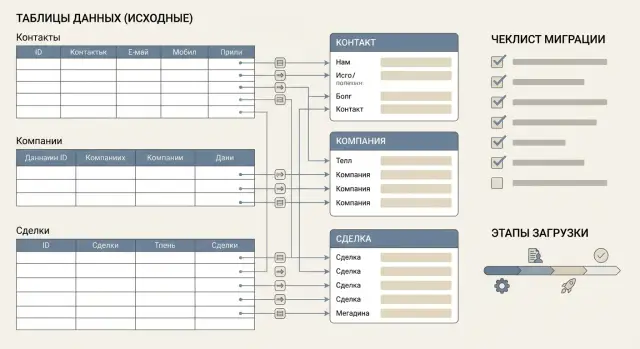
What is data migration and where problems usually appear
CRM data migration is the transfer of a customer base and activity history from old files and systems into a new CRM so the information stays complete and usable for daily work. Usually you move not only phone and email, but also context: who is linked to whom, what stage a deal is in, which calls and meetings happened.
Most often teams migrate contacts, companies, deals and activities (tasks, calls, emails, meetings, comments). Important to understand: if you import only a “directory”, managers will see cards without history and begin working in parallel in the old system.
Transfers break because of simple issues. The same phone number is recorded in different formats, last names and company names are entered inconsistently, some fields are empty, and dates are stored as text. Duplicates also cause trouble: two contacts with the same email might belong to different managers, and careless merging loses history.
The most painful risks usually look like:
- loss of "contact-company-deal" relationships
- incorrectly assigned owners and access rights
- garbage in fields (fragments, extra spaces, odd statuses)
- inability to repeat the import consistently a second time
You can measure migration success by four signs: completeness (all required records are present), accuracy (fields and statuses follow rules), preserved relationships (nothing becomes orphaned), and repeatability (a clear plan and settings exist to load updates or migrate again).
A simple example: if the Deals table only lists "Ivan Petrov" without a unique contact ID, the CRM may attach the deal to a different Ivan Petrov. So problems usually start not in the CRM but in source data and how you described mapping rules.
Inventory sources and requirements before start
Before migration, understand exactly what you will move and why. Most issues appear not at import time but because sources and rules were not documented beforehand.
First, make a complete list of sources and decide which are considered the single source of truth and which will only supplement. Data often lives in several places: Excel files, an old CRM, email, ERP, website forms, and sometimes messengers or individual managers' spreadsheets. If you don't agree on source priority (for example, which phone or company name to trust), you'll get conflicts and a lot of manual work.
Next, assign roles. It is important that data has an owner who understands field meaning and a person who makes final decisions in disputed cases.
- Data owner (often head of sales or CRM administrator)
- Source expert (for example, accounting for ERP)
- Rule approver (direction manager)
- Migration executor (internal specialist or contractor)
At the same time, document business-required fields. For example, without an assignee a lead or deal may end up unowned, without a stage the funnel breaks, and without a source analytics is lost. Focus not on how the system is built but on how you work every day.
One more thing before start: volume. Count records and unique entities (contacts, companies, deals) and estimate duplicates. A rough guideline: 20,000 rows in Excel does not mean 20,000 contacts. These numbers help plan timing, a test import and manual review volume.
Data model: how to link contacts, companies and deals
Before moving data, agree on a simple model: which entities you will import and how they are related. The basic set is usually contact, company and deal. Mistakes at this step lead to orphaned deals without customers or duplicates that are hard to untangle later.
The clearest scheme looks like this: a contact may work at a company, and a deal is conducted either with a company or with a specific contact (depending on CRM rules). In reality one person may be linked to multiple companies (e.g., holds several roles or previously worked elsewhere), and a company can have many contacts. These cases should be explicitly defined in advance.
Keys to identify the same records
Define which fields are treated as anchors for linking and matching. It's better to set priorities from the start:
- Internal ID from the source (if it is stable and preserved during exports)
- Email (often reliable for B2B, but sometimes shared)
- Phone (useful but changes and is recorded inconsistently)
- IIN for contact and BIN for company (if you collect them)
- Combination: full name + company + phone when no unique keys exist
How to store history and complex relationships
Agree separately what to do with notes, comments, statuses and dates. Sometimes it's better to import history as events (with date and author) rather than as one long comment.
Example: if in the old database contact "Aigul N." is linked to two companies, define a default rule in advance (for example, the active company by last deal) and where to keep the second link (additional company field, role, or note). This preserves data meaning and avoids breaking deal reporting.
Field mapping scheme: how to build it without surprises
The field mapping scheme is the main migration document. It answers: what exactly from the source goes into the CRM, where, and in what form. Skip this step and you will almost certainly get malformed dates, empty statuses and broken links between contacts, companies and deals.
Mapping is easiest in a table. It should include not just field names but transformation rules:
- Source field (column name in Excel, CSV or database)
- Target object and field in CRM (Contact: phone, Company: IIN/BIN, Deal: amount)
- Data type (text, number, currency, date/time, list)
- Transformation rule (trim spaces, replace values, concatenate columns)
- Import note (required field, default value, do not import)
Specify formats separately: dates (e.g., DD.MM.YYYY), time, timezone, number separators (1 000,50 or 1,000.50). The same "01.02.2025" can be Feb 1 or Jan 2 — a common source of silent errors.
Decide in advance which values should become reference lists in CRM: deal stages, lead sources, industries, client types. For example, if the file contains "Cold/Warm/Hot", don’t import this as free text — otherwise typos will create many variants.
Plan what to do with data that has no CRM field. Safe options are: create a new field, temporarily put the value into Notes/Comment, or do not import (but record this decision in the mapping table).
Small example: the source has "Responsible manager" as a full name, but CRM needs a user account. In mapping write the rule explicitly: "Full Name -> login" using a prepared matching list. If no match is found — assign to a duty user and flag for manual review.
Preparing data: cleaning and normalizing before import
Before import, bring tables to a consistent and predictable form. This tedious step often prevents malformed cards, extra duplicates and reporting chaos.
Start with phone numbers. Choose a single standard and stick to it: country code, separator rules, and handling extensions. For example, decide to store all numbers as +7XXXXXXXXXX and put extension in a separate field or use a single rule (e.g., "ext. 123"). Then searching and deduplication by phone will work reliably.
Email discipline is also important: convert to lower case, trim spaces, and separate real addresses from placeholders and empty values. A common problem is email fields containing "no", "-", "test@test" or generic boxes like info@. These values are better moved to comments or marked specially so they don’t merge different people into one contact.
Normalize full names and company names with one rule: consistent case, consistent quotation marks, and careful handling of abbreviations (ТОО, ИП, LLC). Agree in advance how to write e.g. "TOO "Company"" and what to do with variants like "Company, TOO".
Before import run a short control checklist:
- remove test records and autogenerated garbage (e.g., "123", "qwe", "no data")
- find duplicate columns and "almost identical" fields (Phone, Phone, Mob.)
- check required fields and fill by rules (default deal stage, currency, assignee)
- align reference lists (cities, industries, statuses) to one set of values
- document decisions so all sources are cleaned consistently
Do this in advance and import will be faster, with consistent data across contacts, companies and deals.
Deduplication rules: how not to delete what’s needed
Deduplication prevents having three "identical" customers after migration but with different histories. The main risk is accidentally merging different people or companies and losing important details.
First define what counts as a unique record. For contacts usually 1–2 reliable signs are enough, but better describe which variants count as a match:
- Email (if corporate — nearly always the most reliable)
- Phone in normalized form (one format for everyone)
- Full name + company pair (as a fallback)
- Additional identifier from the source (ID from ERP/website)
- Flag "key contact" (so you don’t accidentally merge critical contacts)
Then decide conflict rules. For example, one record has a current phone, another has a job title. Define a rule for the authoritative value: take the most recent update, take the trusted source (e.g., ERP) or store both values in separate fields (work and personal phone).
Don't rush merging. Combine only what clearly belongs to the same person or company. Often you need separate records for branches, different legal entities or people with the same name in the same corporate group.
Company rules differ: identical names do not always mean the same legal entity. A reliable key is BIN. For company groups create a separate field "Group/Holding" so brand and legal entity are not merged mistakenly.
For fuzzy matches set a similarity threshold (for example, 2 out of 3: name, phone, address) and send such pairs for manual review. This is crucial when the database is large and data comes from many sources.
Contacts, companies, deals: load order and preserving links
The correct load order is as important as cleaning. If you import deals before companies and contacts, the CRM will either create empty links or start creating duplicates trying to guess which record to attach.
A reliable approach: import reference lists and "parents" first, then "children."
The safest scenario: upload companies first, then contacts, and only then deals. Each entity should include an external ID (from the source) that you keep unchanged between stages. Then links are built by exact key rather than by name or phone (which may differ).
To restore links without manual fixes decide which fields will hold relationships:
- In contact store the external company ID (or a separate "Company External ID" field)
- In deal store the external company ID and, if needed, the external contact ID
- If CRM allows one main contact per deal, choose a rule: by role (decision-maker), by last activity or by a flagged field in the source data
- Agree the deal owner logic in advance: migrate specific manager, assign by region, or assign based on lead source
Before loading deals ensure stages and probabilities match your funnel. A common mistake is importing stage names as free text when CRM stores them as codes. Result: deals end up in an "unknown" stage or drop to the default first step.
Decide separately on amounts and dates. Transfer sums as numbers in a base currency and store currency in a separate field. For dates keep at least creation date and planned close date. Import the actual close date only for already closed deals.
Example: if a source table links a deal to "TOO Alpha" by name, and CRM already has the company as "Alpha, TOO", name-based linking will fail. If both company and deal have the same external ID, the relationship will be restored automatically despite naming differences.
Migration plan by stages: step-by-step
Plan migration as a series of small, verifiable steps so sales keep running. The goal is simple: catch errors on a small volume before moving everything.
Stage 1: testing and rule tuning
Start with a small but representative set: 200–500 records across contacts, companies and a few deals. Always keep a copy so you can compare before/after and roll back if needed.
Then proceed as follows:
- Import the test set into a test environment or isolated segment (for example, one branch or team)
- Check reports and queries: how many objects were created, how many were lost, which fields are empty, and whether links were preserved
- Adjust mapping, formats (phones, dates, currencies) and deduplication rules based on results
You can move forward when the test shows no unexplained discrepancies and every change is explainable and repeatable.
Stage 2: main load and control
Do the main import in batches to prevent errors from affecting the entire base. Useful splits are by region, date ranges or source systems.
- Load in batches and record results: how many records were added, updated, merged
- Run post-checks (control reports, duplicate search, relationship checks between deal-company-contact) and only then grant user access
- Document the procedure: file template, rules, who is responsible for corrections and how to add new sources so the next migration doesn’t start from scratch
Common mistakes and traps during migration
One painful mistake is importing deals without preserving links to contacts and companies. Managers then see a deal but don’t know whom to call and with whom negotiations happened. Funnel and source reports start showing incorrect pictures.
Problems often start with small field issues. For example, storing personal and company mobile phones in one field prevents proper searching or autodialing. Same with email: one place has lower case, another has a trailing space, and these become two different values.
Another trap is importing reference lists (deal stages, industries, sources, client types) without agreeing on values. If sources contain "Negotiations", "negotiations" and "Negotiations " (with a space), after import you will have three different statuses. This breaks analytics and complicates work.
Errors that occur most often and are costly include:
- deals loaded without correct IDs linking to contacts and companies
- phones and other contacts mixed in one field without type (personal, work, primary)
- reference lists imported as-is without uniform writing rules
- duplicates created due to spaces, different formats, case and extra symbols
- on repeated imports fresh data overwritten by older values
Another risk is lacking a rollback plan and change log. Real-world example: a team imported 20,000 contacts and a day later found that names and titles had been pulled from an old file. Without a log it's unclear what changed, and without rollback manual fixes are needed.
Before each import record simple rules: which fields are the source of truth, which fields we update and which never change, and how to log loads (date, file, who ran it, how many records changed). This saves hours when something goes wrong.
Quick quality control checklist after loading
It's tempting to breathe out after import, but 30–60 minutes of checks typically save days of follow-up with sales. This checklist suits any migration and reveals where fields or relationships went wrong.
Check in order:
- Compare record counts to the plan: contacts, companies and deals separately. Compare CRM totals to files or the old system and note discrepancies (for example, "minus 12 companies due to missing BIN").
- Assess duplicates: how many were found before import and how many remain after. Record how many were merged and by which rule.
- Check links: a contact should be linked to a company (if that’s your model), a deal should have a contact or company, a stage and a funnel. Find 5–10 orphaned records quickly and identify causes.
- Manually sample 20–50 records from different sources. For each verify name, phone, email, company and last activity. If 3–4 errors of the same type appear in 30 checks, that’s a systemic mapping problem.
- Verify formats and reference lists: dates (day and month not swapped), amounts and currencies, assignees, lead sources, statuses. A common mistake is "Assignee" imported as text instead of a user, or currency left empty.
Finally give users short input rules: which fields are required, phone format to use, how to pick the source and what to do on contact matches. This reduces new duplicates in the first days after migration.
A realistic scenario: migration for a sales department
The sales department moves to a new CRM. Data is in two places: an Excel file with 12,000 rows (leads for 3 years) and an old CRM that contains companies and part of the deal history. The goal: unify one sales funnel so managers see current contacts, companies and active deals and the manager can trust reports.
First the team decides what to migrate. Example: from Excel — contacts and raw deals (status, amount, source); from the old CRM — companies and current deals for key clients. Historical notes are not moved entirely — only the last 6 months are imported and the rest stays archived.
A key question is deduplication with dirty data. Email is filled for only half the records and phones are inconsistent. The chosen rules are:
- Contacts: main key — normalized phone (digits only). If no phone, then email. If neither, then full name + company (as a soft match for manual review).
- Companies: BIN if available. If not, then tax ID or exact normalized company name (remove "TOO", quotes, extra spaces).
They also decide how to store links. A company may have 3–10 contacts (director, accountant, IT, procurement). A contact may have multiple deals (past purchases and current request). So they set: company = parent, contacts linked to company, deals linked to company and, if available, to the main contact for the deal.
To avoid arguments on upload day responsibilities are assigned. Sales confirm funnel stages, required fields and source priorities (which system is the truth if Excel and old CRM disagree). Support or the CRM admin handles import templates, date/amount format checks and error logs.
At the end results are documented in writing: how many companies, contacts and deals were loaded, how duplicates were merged, how many records moved to "manual review" (for example, 640 contacts without phone or email) and which fields will remain empty until the next stage. This saves weeks when a manager asks: "Why are there two cards for the client?" or "Where did the deal go?"
Next steps: lock the result and prevent data decay
Post-migration regressions usually happen not from the import but because people continue entering data inconsistently. So document agreements and assign owners.
Gather data owners (sales, marketing, support, finance) and approve a single document with field mapping and deduplication rules. It should record:
- which fields are required for contact, company and deal
- what counts as unique (email, phone, IIN/BIN, domain)
- allowed values in reference lists (stages, sources, industries)
- who can create fields and change references
- how to handle disputed cases (duplicate with different owners, differing details)
Plan short iterations: test import on a small set, fix mapping, recheck, then run the main import. This finds logical errors early when fixes are cheap.
To keep data stable after a month you need a simple input regimen: uniform phone format, rules for full names, prohibit free text where a list is required. A good practice is weekly quick quality control of 20–30 new records and review common mistakes with the team.
Also assess which integrations are truly needed, otherwise CRM will drift from other systems:
- email and calendar (communication history)
- telephony (calls and recordings)
- ERP/accounting (details and payments)
- BI and reporting (unified metrics)
- website and forms (lead sources)
If time or skills are lacking, hire a system integrator — especially if integrations and ongoing support are needed. For example, GSE.kz (gse.kz) as a technology provider and system integrator can help with infrastructure, integration tasks and technical support so data rules are embedded in daily processes, not just in a presentation.
Frequently asked questions
What must be moved to CRM so the team actually starts using it?
Primarily, move not only contacts but context: companies, deals and activities. If you only import a "directory", managers will see empty cards without history and continue working in the old system.
Where to start migration if data is in Excel, an old CRM and email?
Start with a list of all sources and agree in advance which is the single source of truth for each field. Without that you will get value conflicts (one file has one phone, another file has a different phone) and lots of manual fixes.
Who should be responsible for data migration?
You need people who understand the data and can make decisions in disputed cases. Usually this is a data owner from sales, source experts (for example, ERP) and the person who prepares files and runs the import.
Which fields are best as keys so identical names are not confused?
Define anchors for matching and linking: external ID from the source, then email, then normalized phone, and only after that combinations like full name + company. The less you rely on text matching, the fewer relationship errors you'll have.
What is a field mapping scheme and why is it needed?
Create a mapping table where each source field is paired with the CRM field, data type and transformation rule. This prevents dates turning into text, statuses with typos and empty required fields.
What data cleaning should be done before import?
Normalize phones to a single format, convert emails to lower case and trim spaces, and unify company names. Also remove test data and align reference lists — otherwise the CRM will create duplicates and messy statuses.
How to deduplicate without merging different customers into one?
First define what qualifies as unique, and which matches require manual checking. Merge only records that certainly belong to the same person, and decide in advance which source wins when values conflict so you don’t lose history.
In what order should companies, contacts and deals be loaded to preserve links?
Typically load companies first, then contacts, and only then deals and activities. Build links by external ID rather than by name or phone, because spelling and formats often differ.
How to migrate safely without stopping sales?
Start with a test set and achieve a repeatable result, then do the main load in batches and record outcomes. This contains errors to a small subset of data and avoids mass manual fixes.
How to quickly check data quality after loading into CRM?
Compare object counts with the plan, check duplicates, find orphaned deals without links, and manually inspect a sample of records from different sources. If the same error repeats, it’s likely a mapping or format problem rather than random mistakes.
