7 min read
Corporate Messenger Without Subscriptions: Checklist and Migration
Corporate messenger without subscriptions: checklist of requirements for Mattermost and Matrix and a clear migration plan for channels, history, guests, archives and integrations.
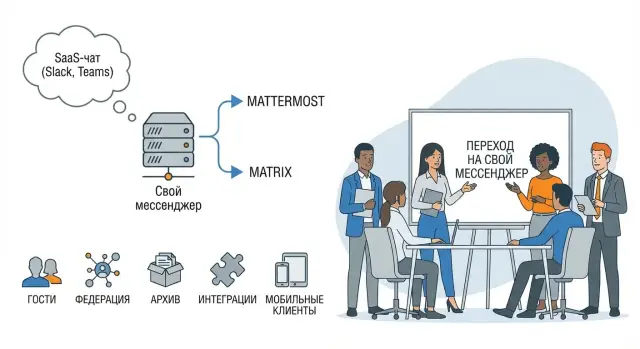
Why companies look for a messenger without subscriptions
Subscription SaaS chats are convenient at first, but over time they start to cause friction. Payments grow with the number of employees and guest users, terms change, and the communications budget becomes a variable that’s hard to plan for.
The second reason is control. When a chat is hosted by an external provider, immediate questions arise: where are messages and files physically stored, who has access, how quickly can you get an export for internal review or an investigation. For companies with audit and retention requirements this becomes an ongoing risk.
Usually the issues come down to one thing: access, data and vendor lock-in. Guests and contractors are harder to keep under control, offboarding is not always timely, history export can be limited, and pricing or terms can change without your input.
When moving, almost everyone wants to keep the familiar workflow: department and project channels, history search, pinned messages, files and integrations (for example, notifications from Helpdesk and CI/CD). So the question “messenger without subscriptions” almost always runs alongside: can we move channels and history without losses and chaos?
In short: Mattermost is often chosen as a ready corporate chat you can deploy on your infrastructure and that maps well to teams and channels. Matrix is a protocol and a federated network: you can build communication between different organizations and servers without giving control to a single center. The price of flexibility is more upfront decisions: client selection, federation policies, moderation and bridges.
For example, an integrator or a production group with branches in different cities may want to store data within the country, have unified rules for employees and separate rules for contractors. In this case leaving subscriptions behind means not only savings but predictability: you define access, storage and audit.
Use cases and project boundaries
Before comparing options, define why you need a corporate messenger. The same tool behaves differently if it’s used only internally, if contractors are regularly added, or if it’s used for customer support.
A practical step is to describe 2–3 core scenarios and immediately mark what is out of scope for the first phase. For example: “internal teams and project channels in the first release,” and “customer-facing portal later.”
Roles and responsibilities
Agree on roles in advance or expectations will drift. Employees need an easy sign-in and clear rules. Admins need channel and policy management. Security needs access control and logs. Finance or audit need retention and export rules. External guests need only the access required for the project.
To keep the project from spreading, answer a few questions:
- who invites external guests and who disables them when work ends;
- who approves the structure of teams and channels;
- who owns the message and file retention policy;
- who decides in disputes between “convenient” and “required by policy.”
Scale and availability in plain terms
Estimate roughly: how many users, how many active channels, how many attachments per month and how long you must retain history. This directly affects servers, backups and search performance.
Separately agree on availability level. Do you need 24/7 or only business hours? Define RTO and RPO in plain language: how long should the chat be restored after a failure and how many messages can be lost (ideally none).
Security, access and compliance
If the goal is to leave subscriptions and regain control, security almost always becomes the main argument. In Mattermost and Matrix much depends not only on features but on how you configure the server, roles and storage.
Start with accounts. The fewer manual logins, the easier it is to control access and offboarding. Check support for SSO and LDAP/AD, the ability to enable MFA and how guest mode works (is a guest limited to one project or can they “roam” across workspaces?).
To avoid channel chaos and leaks via accidental invites, lock down a rights model in advance:
- who can create public channels and teams;
- who can invite guests and external users;
- who sees history and files when joining an existing channel;
- whether file forwarding and attachment sizes can be restricted;
- how admin rights are granted and revoked.
Next—data. Clarify where messages and files live (on the server, in object storage, on disk), who manages encryption keys, and what is encrypted "at rest" versus only "in transit."
Security teams almost always need audit and retention control: login logs, admin actions and permission changes; exports on request; retention and deletion policies; rules for legally significant correspondence; and a clear eDiscovery procedure or equivalent.
A simple test: ask InfoSec to define three typical queries (who invited a guest, who downloaded a file, how to export a project’s history for a period) and check how those are done in the chosen system and how long they take.
Guests and federation: how to keep control
Guests and federation provide flexibility, but they’re also where manageability is most often lost. Decide in advance who can communicate with externals, where, and how quickly you can revoke access.
Guests should not enter “the messenger” broadly but a specific working contour. Practically this means separate channels or a separate team for contractors, banning creation of new channels, limits on file uploads and participant visibility. That reduces the chance an external person ends up in a general chat or sees extra documents.
Federation in Matrix: trust by rules
Federation is convenient for talking with branches or partners, but you shouldn’t trust everyone. Usually organizations introduce a whitelist of domains (or specific servers), rules for joining rooms and clear criteria: who approves a connection, who is responsible for incidents, how changes are recorded. A good habit is separate rooms for inter-organizational communication with no access to internal channels.
To make isolation work, naming rules and separation by division help: separate spaces for IT, procurement, projects and support.
Minimum policy for contractors:
- default access duration and extension only by request;
- a fixed channel owner on the company side;
- regular review of rights and participants;
- disabling a guest on the contract end date;
- channel templates for typical projects (procurement, construction, IT, support).
Example: for a construction contractor create a space “PROJECT-construction-2026,” give the guest access to only 2–3 channels and restrict file uploads, and save the final chat archive inside the company after the work ends.
Archive, search and history retention
Conversation history quickly becomes a working archive: decisions, agreements, document links, incident status. So before choosing Mattermost or Matrix decide what you must retain and for how long. Typically messages, attachments, metadata (who and when wrote) and access/admin logs are counted separately. Retention periods are usually set by internal policy, security requirements and customer contracts.
User search is more than “find a word.” People expect to quickly pull messages by keywords with filters for channel and date, mentions and thread replies, and attachments by name and type. It’s important that search does not show content a user has no access to.
Legally significant chats require a special mode. Agree in advance who approves retention and deletion rules (usually InfoSec, legal and the process owner). Record which channels cannot be cleared manually, how a deletion request is formalized and what to do during investigations and audits.
Plan backups as if you may need to recover from a failure or admin error tomorrow. Minimum set: database, file storage, configs and secrets, search data (if a separate service), and a short recovery runbook with responsible persons.
Also check history export: in what format data can be exported, who can initiate exports, how the request reason is recorded and how the export is protected during transfer. It’s useful to run a test "export request" before going to production.
Integrations: what to check before choosing
Integrations are often more important than the UI. The messenger will either become the control panel for work or remain a separate chat people forget to check.
Minimal set of integrations
List the systems currently in use and where key events happen. Typically that’s email and calendar, issue tracker, support desk, and for development—CI/CD. Check not only that an integration exists but its practicality: is it maintained, documented, and configurable without rare specialists.
Before choosing, clarify:
- which events should appear in chats and whether filters by project and team are flexible;
- how notifications are handled (digests, "quiet" channels) to avoid spam;
- what bot and webhook scenarios are needed (e.g., creating a ticket from a message) and who owns integrations;
- how SSO/AD works: group and role sync, offboarding, department changes;
- what is logged: bot actions, webhook calls, integration setting changes, delivery errors.
Audit and control
Ask separately about journaling. It should be easy to answer: “why did this message arrive in the channel and who sent it—human or integration?” To verify, pick one real process, for example: an email to support creates a ticket, the ticket appears in a channel, a reply from the channel adds a comment. Run the scenario with InfoSec and the SSO owner before a company-wide pilot.
Mobile clients and employee experience
Adoption often depends on phones more than servers. If the mobile client is inconvenient or unstable, people will go back to familiar chats.
The minimal client set is usually: web for quick access from any PC, desktop for full-time computer users, and native apps for iOS and Android. Agree in advance which features must be consistent across platforms: reactions, threads, search, file sending, calls (if needed).
Device management and BYOD are another topic. For corporate phones require PIN or biometrics, auto-lock and the ability to wipe app data if a device is lost. For personal phones policies are usually milder, but rules must be clear: what can be copied, where files can be forwarded, and how quickly access can be revoked.
Test behavior on poor networks. Field teams and on-call staff need reliable push notifications, fast chat loading and reasonable media handling. If an app immediately downloads hundreds of megabytes when opening a channel, it will become complaint number one.
Before choosing, run short tests for real scenarios:
- sign-in and re-login (password, SSO, device change);
- pushes in power-saving mode and on poor networks;
- search through history and opening attachments;
- restrictions on copying and saving files (if required);
- performance in large channels.
User support is also part of usability. Prepare 2–3 short guides, an FAQ for common sign-in issues and a clear path for “notifications not arriving” or “attachments won’t open.”
Migration plan for channels and history
Start with an inventory. List all channels (including private), owners, key roles, external participants, history size, attachment volume and integrations (bots, notifications, webhooks). Note where sensitive data resides and which chats cannot be moved intact.
Then run a pilot with a small group: one department and a couple of contractors. At this stage test guest access, mobile clients, history search and real performance. Run typical actions: file sharing, mentions, reactions, notifications, signing in from different devices.
Agree on rules before migration. A unified channel naming format, who can create new channels, what to do with direct messages, retention timelines and templates for project channels can save weeks.
Migration is usually a mix of automated transfer (channels, members, part of history) and manual tuning (permissions, pins, integrations). Verify integrity: do message counts match in key channels, do important attachments open, does search work correctly.
To avoid disrupting work, have a parallel period:
- announce a deadline after which new discussions happen only in the new chat;
- pin rules for where to post urgent issues;
- prepare a clear “where we moved to” list for each department.
Final checks: enable regular backups, verify archiving and access rights, run a short 15–20 minute training and assign support owners. If moving to Mattermost or Matrix, assign channel owners in advance so nobody is left wondering who is responsible after the switch.
Common mistakes during rollout and migration
Problems usually arise not from platform choice but from lack of agreed rules. Even a self-hosted messenger quickly becomes chaotic if migration is done “however it goes.”
Typical mistakes:
- moving only part of the history without rules: what to migrate, what to archive and where to find old discussions;
- granting overly broad rights: guests see too much, employees create channels without structure;
- underestimating attachments: disk space and backups are remembered after the first complaints;
- leaving integrations to the last minute: bots fail, notifications duplicate, tickets are lost;
- not assigning a process owner: users don’t know where to request access or help.
Loss of context often hurts most. For example, if a support channel kept solutions to common problems and you only migrate the last 30 days, the team will spend time solving the same issues again.
A few pre-start agreements help:
- history rules (migration period, archive format, how to request old data);
- roles and access (employees, guests, admins, channel owners);
- storage (expected volume, attachment limits, backup schedule and restore tests);
- integrations in a test contour (notifications, bots, webhooks, token permissions);
- one responsible person and one support channel.
Pre-production checklist
Before launch, verify that the chosen messenger covers real scenarios, not just “the chat opens.” A day of final checks is cheaper than weeks of incident investigations, missing messages and access chaos.
Compile requirements in a single document and mark what goes to production: guest access for contractors, federation (if needed), archive and search, mandatory integrations, mobile clients. If something is postponed, record the deadline and the owner.
Product and policy readiness
A pilot is successful if users perform daily work and don’t hit blockers. Before production check:
- guests are enabled only where needed, and it’s clear who invites them, for how long and who reviews access;
- federation (if present) is tested on a real case: messages, files, invites, disabling one side;
- archive, search and retention are clear to the business: what is stored, how long and who can search;
- integrations are tested under load: notifications, bots, tickets, calendar, monitoring, and an incident plan;
- mobile clients were tested against your policies: PIN/biometrics, copy restrictions (if needed), pushes and operation on poor networks.
Security and operations
Basic operational and security hygiene:
- SSO/AD connected, MFA enabled by policy, roles separated into groups;
- logs and audit enabled: sign-ins, guest invites, permission changes, exports and deletions;
- backups are restorable: a restore test on a staging environment and clear RPO/RTO;
- monitoring, an update plan, a maintenance window and a rollback plan;
- short documentation ready: how to sign in, create a channel, invite a guest, and where to get support.
Document the decision “Mattermost or Matrix.” Often a one-page note is enough: why you chose it, which compromises you accepted (e.g., federation over ease of administration or vice versa) and who approves the launch.
Example scenario: a company with contractors and branches
Imagine a company of 800 employees: HQ, 6 regional branches and 10–15 regular contractors (lawyers, support, implementers). The goal is simple: move to a messenger without subscriptions, safely grant guest access and keep control over data.
Start with a channel map so people don’t guess where to post. A common scheme works: general channels (announcements, HR, IT support), separate spaces for branches, project channels with clear names and owners, closed channels for executives/finance/security and a separate contour for external guests.
For guests set rules in advance: who can invite, whether a separate external contour is required, and what to do if a contractor works on several projects. If you consider federation (Matrix), decide upfront which rooms can be federated and which must never leave the organization.
Decide on retention before migration. A common approach: keep chat for 1–3 years, archive old channels, delete files after a time (e.g., 180–365 days), and keep important documents in file storage rather than in chat. This reduces risk and makes search easier.
A realistic migration in 2–4 weeks often looks like: pilot with 30–50 people, short role-based training and channel templates, migration of key channels and history, a switch deadline and boosted support during the first days.
After launch monitor metrics: active users by location, share of mobile users, number of access incidents, support response time, and count of “dead” channels. These help adjust permissions, structure and retention without breaking habits.
Next steps: infrastructure, support and launch
When the choice is made and the checklist is passed, capture the decision in a short specification: what must work, what can be postponed, and who makes final calls. Assign owners from IT, InfoSec and the business so there are no “no-man’s” tasks.
Then choose a hosting model: on-prem, virtualization in your cluster or a separate secured contour for sensitive teams and integrations. Decide where files and databases will reside and who has admin access.
To avoid performance blockers, estimate resources and growth for 12–24 months: number of users, history size, attachment volume, activity peaks. Check headroom for CPU, RAM and disk, as well as redundancy (backups, replication) and scaling speed.
Agree support before the pilot:
- who installs updates and how often;
- who accepts and manages incidents;
- shift schedules and response times;
- change logs and rollback procedures;
- who is responsible for backups and restore tests.
If you need turnkey infrastructure and integration, discuss it early: from server provisioning and backups to monitoring and operations. In such projects some use GSE S200 class servers and 24/7 support from GSE.kz (gse.kz) as an option when keeping hardware and support in one contour is important. The final step before launch is a short release plan: date, maintenance window, employee communication and a clear channel for reporting issues.
Frequently asked questions
When should a company realistically switch to a messenger without subscriptions?
Look for a no-subscription option when payments start rising with headcount and guest users and the communications budget becomes unpredictable. Another common reason is to regain control over data, storage, auditability and access rules, so you’re not dependent on changes from an external provider.
What is easier to start with: Mattermost or Matrix?
Mattermost is usually chosen when you need a familiar “corporate chat” with teams and channels that you can deploy on your infrastructure and standardize quickly. Matrix fits better if cross-organization communication via federation is important, but it usually requires decisions up front about clients, moderation, federation policies and bridges.
How should a project start to avoid spreading out of control?
Describe 2–3 primary scenarios for the first release—for example internal departments and project channels—and explicitly note what is out of scope now. This prevents scope creep and helps realistically estimate timelines, especially for guests, integrations and history migration.
Which roles should be assigned before implementation?
At minimum assign a product owner from the business, administrator(s) for configuration and operations, the SSO/AD owner, and a security representative for access, logs and retention rules. Decide in advance who invites guests, who disables access at contract end, and who resolves disputes between convenience and compliance.
Which security settings matter most at the initial stage?
Start with accounts and offboarding: integrate SSO or LDAP/AD, enable MFA according to policy and remove manual logins where possible. Then lock down the permissions model so it’s clear who can create channels, invite externals, view history and files, and how admin rights are granted and revoked quickly.
How to organize guest access for contractors correctly?
Give guests a separate working contour by default—e.g. a separate team or a set of project channels—and restrict creating new channels and issuing invites. Add a default access duration and a responsible channel owner on the company side so it’s easier to revoke access and run audits.
How to keep control with federation in Matrix?
Start with a whitelist of servers or domains allowed to federate, and define who approves connections and who is responsible for incidents. Practically, keep inter-organizational rooms separate from internal ones so federation doesn’t become an accidental bridge to private discussions or documents.
What should be considered about archive, search and exporting history?
Agree retention periods separately for messages, files, metadata and action logs—requirements often differ. Ensure search respects user permissions and that exports are available only to authorized people, are logged with the reason for the request and are protected during transfer.
Which integrations should be tested before choosing a platform?
List the systems that must send events and run one real end-to-end process before the pilot so you don’t discover integration issues in production. Be sure you can distinguish human messages from bot messages, know what is logged for integrations, and can debug delivery failures without manual tricks.
How to migrate channels and history without data loss and chaos?
Inventory channels, private chats, owners, external participants, history and attachments, then run a pilot with one department and a few contractors. Plan a parallel period with a deadline after which new discussions occur only in the new chat, verify data integrity and include regular backups and restore tests so RTO and RPO are practical.
