8 min read
Corporate Certificate Authority on Open Source: PKI Without a Vendor
Corporate Certificate Authority on open source: how to design a CA, set up issuance and revocation, protect keys and integrate web services and Wi‑Fi.
Why a company needs PKI and where problems appear without a vendor
A corporate Certificate Authority (CA) on open source is needed when a company must control trust inside its infrastructure: who connects to what, which services are truly yours, and how quickly you can cut access if something goes wrong. Vendor-free PKI gives freedom and cost savings, but it places responsibility for rules, timelines and control on you.
In practice a CA solves several clear tasks: it encrypts traffic, authenticates services and users, and helps meet security requirements. Certificates appear more often than it seems: a corporate portal in a browser, VPN connections, secure email, and device authentication in Wi‑Fi.
What usually breaks without a vendor
When there are no ready templates or “correct buttons” from a supplier, it’s usually the process, not the cryptography, that fails. Typical stories: certificates are issued “by request in chat”, renewal timelines aren’t tracked, keys live “where it’s convenient”, and revocation exists only on paper.
Common problems look like this:
- certificates issued without a request or verification of the person or device
- timelines undefined: who renews and what to do if a compromise occurs
- private keys stored insecurely, accessible to too many people
- CRL/OCSP configured formally but services don’t check revocation
- lack of inventory, so after a year no one knows where a certificate is used
A real example: an admin issued a Wi‑Fi certificate for a contractor’s laptop “for a week.” The contractor left, the laptop was lost, nobody revoked it because “there was no time” and it was unclear who was responsible. The network access remained open.
Why policies and roles matter
CA technology is only half the story. A stable PKI is built on roles (who approves, who issues, who stores keys, who checks) and policies (how to file a request, which checks are mandatory, incident response times). If these are not defined in advance, even carefully installed software becomes a source of risk.
Basic architecture of a corporate CA in plain language
An open source CA is usually built not as a single server with a “magic button” but as a set of separate roles. This reduces the risk of key compromise and simplifies control.
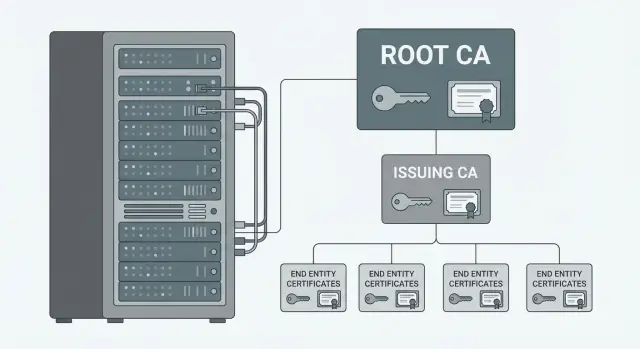
The main separation is Root CA and Issuing CA. The Root CA only signs subordinate CA certificates and does not participate in daily issuance. The Issuing CA signs certificates for users, servers, Wi‑Fi, devices and services.
The Root CA is almost always kept offline: powered off and physically protected. It is turned on rarely — for example, to issue a new certificate for an Issuing CA or to update a revocation list. The Issuing CA, conversely, operates online and is available to those who request certificates.
To let systems know whether a certificate can be trusted right now, you need revocation-check mechanisms:
- CRL (Certificate Revocation List) — a file clients periodically download and check.
- OCSP — an online responder returning “valid or revoked” at check time.
In internal environments CRL is often sufficient. OCSP is typically needed where checks must be fast and frequent: web services, proxies, and critical access points.
Integration points should be planned in advance, otherwise vendor‑free PKI quickly becomes a set of manual tasks. Commonly decided integrations include:
- AD/LDAP (linking issuance to accounts and groups)
- web services (automating TLS installation and renewal)
- NPS/RADIUS (EAP‑TLS in corporate Wi‑Fi)
- MDM (issuing certificates to devices and controlling keys)
A simple scenario: an employee receives a laptop. MDM installs a Wi‑Fi profile with EAP‑TLS and a device certificate, the internal portal gets a TLS certificate, and on termination the user and device certificates are revoked, reflected in CRL/OCSP. This keeps the architecture understandable and manageable even with a fully open source stack.
Choosing an open source stack: criteria and typical options
Start the stack choice not from product names but from what certificates you will issue and to whom. Certificates for web services, VPN, Wi‑Fi (EAP‑TLS), devices and users require different protocols and different discipline.
First check the basics that are hardest to retrofit:
- support for required algorithms and profiles (RSA/ECDSA, key lengths, EKU)
- automation: ACME for web services and, if needed, SCEP for network equipment
- logging and audit: who requested, who approved, when issued and when revoked
- separation of roles (CA and RA) to avoid handing admin rights to everyone
- convenient publication and status checking: CRL and OCSP
Technically the stack usually consists of several parts: CA (signing), RA (request intake and verification), storage (certs, requests, metadata), CRL publication and an OCSP service. Even if you start on one server, plan from the start what will be separated later.
Common choices look like:
- OpenSSL with scripts: minimal dependencies, maximum manual discipline
- EJBCA: a lot of built‑in features (RA, profiles, audit), good for complex policies
- Dogtag: strong PKI ecosystem, common in Linux‑oriented environments
- Step CA: convenient for automated issuance and short lifecycles
Test compatibility on a lab: one internal web service (TLS), one Wi‑Fi EAP‑TLS profile and a couple of client OSes. Test chain import and CRL/OCSP handling in your Wi‑Fi controllers, browsers and proxies. If infrastructure runs on local hardware, verify the chosen components work well with your OS, virtualization and crypto modules.
Policies and procedures: without them a CA won’t run stably
You can technically set up an open source CA in a few days. But without rules it quickly becomes risky: someone issues a certificate “just in case,” keys are stored in a shared folder, and during incidents it’s unclear what to revoke and who is responsible.
Which documents are actually needed
A short set that you can realistically keep current:
- CP/CPS: what you issue, to whom, and how you verify (checks, logging, log retention)
- key policy: where keys are generated, who has access, how backups are made, how media are destroyed
- request procedure: how to request a certificate, mandatory data, approval flow, SLA for issuance and revocation
- certificate profiles: types (TLS, client, Wi‑Fi), fields, extensions, algorithm requirements
Roles and responsibilities
Describe roles so one person cannot unnoticedly both approve and issue:
- CA owner (usually InfoSec): approves policies and accepts risk for exceptions
- CA operator: issues and revokes strictly per requests, maintains logs
- system owners (web, Wi‑Fi, VPN): responsible for correct names, installation and updates
- audit/control: periodically reviews issuances, access rights and configuration changes
Also define concrete profile rules: validity periods (e.g., 90–180 days for internal TLS), unified naming format (FQDN, mandatory SAN), minimum key requirements (e.g., RSA 3072 or ECDSA) and ban on deprecated hashes.
Specify an exception process: if the business requests “urgent and easier,” there must be an approval path, a defined validity for temporary certificates, and clear limits. For example, expedited checks only for internal testbeds, 7‑day validity and mandatory revocation on expiry.
Deploying the CA: root, issuing, CRL and OCSP
For predictable operation separate roles from the start. The idea is simple: the most important key stays offline, and daily work happens on a separate protected server.
Root CA: offline and minimal access
Root CA signs only intermediate CAs and, if needed, its own revocation lists. Keep it powered off and isolated: a dedicated machine without a permanent network, encrypted media, access only per procedure. Conduct a short key ceremony: who attends, where passwords are stored, how copies are made, and who may power the root and under what conditions.
Issuing CA: the workhorse
The Issuing CA issues user and server certificates, so it must be available but strictly limited. Place it in a protected segment, with a separate admin account and a minimal set of open ports.
Plan backups: database, configuration, keys (with access control) and a recovery plan to restore on clean hardware.
A typical deployment includes:
- Offline Root CA
- Issuing CA (online)
- CRL publication (HTTP files)
- OCSP responder (if required)
- log collection and time synchronization
Publish CRL so clients can always access it. Update frequency depends on risk: the faster you need revocation, the more often update the CRL. Use OCSP when you need near real‑time status checks or CRLs become too large. For redundancy keep at least two OCSP instances and manage response caching.
Two commonly broken things in PKI: accurate time (use NTP on all nodes) and immutability of logs. Write issuance and revocation logs to a centralized store with append‑only permissions.
Step‑by‑step certificate issuance process in a company
To avoid turning vendor‑free PKI into manual magic, the issuance process should be uniform and repeatable. Then admins don’t argue over rules, and service owners know what and when to expect.
A typical issuance flow:
-
Request. Submitted by the service owner or unit lead, indicating purpose (web, VPN, Wi‑Fi, code signing), names (CN and SAN), validity, environment (prod or test) and contact for approvals.
-
Proof of right. For a user this is identity verification per internal rules. For a service verify domain ownership, who owns the application and who is responsible for the host.
-
Pre‑issuance checks. Confirm domain and names, SAN correctness, intended usages and extensions (serverAuth or clientAuth), compatibility with the target system and the real validity period.
-
Issuance and delivery. Provide the certificate in the needed format: PEM for servers and PFX when transfer with a private key is required. Protect PFX with a password and transmit the password via a separate channel.
-
Installation and acceptance. The service owner installs the certificate and validates the chain. The CA team records issuance and acceptance.
For corporate Wi‑Fi you usually need a client certificate. Decide in advance how device ownership is verified, who can request issuance, and how the certificate reaches the laptop or phone without manual private key copying.
Plan rotation ahead: reissue before expiry, leaving a window for installation and verification. For critical web services allow extra time and a test environment to avoid outages during updates.
Inventory must not be a formality. At minimum record: owner, purpose, names (CN/SAN), validity, serial number, installation location and approver.
Revocation: rules, timelines and verifying results
Revoke a certificate when it should no longer be trusted. In vendor‑free PKI this is especially important: automation may vary but risk remains the same.
Common reasons: suspected key compromise, employee termination, lost or replaced device, data error (e.g., wrong CN), role or permission change. Distinguish between revocation and expiration: expiration needs no urgent action, while revocation usually does.
Who revokes and what approvals are needed
Revocation rights should be limited and auditable. Typically this is an RA operator or InfoSec team, with the request confirmed by the unit manager or service owner.
Good practice: every revocation must have a ticket or official note listing reason, detection time, certificate serial number, requester and performer. For compromises log initial indicators and containment actions (e.g., account lock, network isolation).
Timelines and how to verify revocation works
Set SLAs: how many minutes or hours until revocation appears in CRL and/or OCSP and is visible to clients. For critical services aim for minutes, not days.
Test it: issue a lab certificate for a web service or Wi‑Fi, connect a client, revoke the certificate and ensure access stops.
Quick practical checklist:
- revocation is reflected in the CRL (new version published on time)
- OCSP responds with revoked for the serial number
- clients and browsers stop accepting the certificate
- services don’t cache status too long
- logs record the denial and reason, not just “connection error”
If a service continues to work after revocation, the issue is almost always status checking: CRL not fetched, OCSP not used, too long cache, or status check disabled in the application.
Key storage: from files to HSM and access procedures
The most common cause of PKI compromise is key handling, not cryptography. Define storage and access rules before the first issuance.
Where to generate keys depends on risk and convenience. For server TLS keys generate on the server or an admin station and then install. For user and some device keys, it’s safer to generate on the device so the key never leaves its store. For CA keys plan HSM from the start or at least strict offline procedures.
CA keys are special. Keep Root CA offline: key on offline media or in an HSM, access only via procedure. Issuing CA may run online but with strict limits: minimal admins, separate accounts, and operation logging.
Access control and separation of duties
Use “two pairs of eyes” for critical actions. For example, issuance for a new corporate domain or revocation of an intermediate certificate is confirmed by two people: one performs the action, the other verifies the request and records approval.
Minimal rules that are actually followed:
- enable Root CA only for rare operations (issue/update intermediate, publish key artifacts)
- grant CA key access only via separate admin accounts and dedicated workstations
- log all key and request operations and review regularly
- do not store passwords/PINs in email or chat; use a secret manager or physical safe
- for HSM assign an owner, backup owner and an unblocking procedure
Backups and recovery
Back up not only keys but also issuance database, configuration, CRL/OCSP artifacts and policy templates, otherwise recovery will be partial. Encrypt backups, store them separately from the CA and at least quarterly perform test restores in a lab.
For user and device keys: if control over a key is lost (termination, lost laptop, handed‑off phone), revoke the certificate and generate a new key. Do not reuse old keys.
Integration with web services and Wi‑Fi: plan ahead
Web services: TLS without surprises
For internal and external web services ensure not only TLS certificates but a correct trust chain. The client must see the full path: server certificate → issuing CA → root CA. If the chain is assembled incorrectly some clients will reject the certificate even if it’s valid.
Plan certificate updates without downtime. Short lifetimes (e.g., 60–90 days) and automated rotation help; aim to restart only the necessary process, not entire systems.
ACME automation is common for internal services. It’s convenient but requires rules: who can request certificates, which domains are allowed, and how domain ownership is validated. Wildcards (e.g., *.corp.local) should have special approval because one certificate can open access to many services.
Wi‑Fi: EAP‑TLS and client requirements
For Wi‑Fi with EAP‑TLS focus shifts to client certificates and the RADIUS role. Ensure the client certificate has the Client Authentication purpose, a clear identifier for user or device, and correct SAN fields.
Reduce chaos with separate certificate profiles per use case: one for servers (Server Authentication, strict SAN), separate profiles for users and devices (Client Authentication bound to account or inventory ID), and an admin profile with short lifetime and stricter control.
Before rollout test:
- full chain verification on different clients
- automatic certificate renewal without service downtime
- OCSP responsiveness and CRL freshness
- trial Wi‑Fi connection: successful login and correct role attribution
- revocation test: client certificate should stop working within the defined time
Common mistakes when building vendor‑free PKI
Problems in vendor‑free PKI are often hidden. Certificates are issued and users are happy, but after six months management becomes nearly impossible.
One frequent mistake is using a single CA for everything: employees, servers, Wi‑Fi, testbeds and temporary tasks. It seems easier at first, but later you can’t separate risks, timelines and rights, and any policy change affects everyone.
Another painful mistake is “invisible revocation.” A CRL may sit in an inaccessible place, updated weekly or forgotten after address changes. The certificate is formally revoked, but clients keep accepting it because they have nowhere to check.
Long validity is another issue: certificates issued for 3–5 years to “avoid frequent changes” without inventory and planned rotation. Then admins leave, domains change, TLS requirements evolve, and active certificates appear in unexpected places.
A separate class of errors concerns CA keys. If CA keys reside on the same server as web services and multiple admins have access without logging, compromising one machine compromises the whole infrastructure.
Also avoid deploying straight to production. Without a test environment you’ll discover problems when Wi‑Fi stops letting staff in or the internal portal starts complaining about chains.
A practical minimum that usually saves you:
- separate CA roles (at least issuing separate from root)
- keep CRL/OCSP accessible and check updates on schedule
- limit validity and keep inventory of where each certificate is installed
- protect CA keys (isolation, access control, logs; HSM preferred)
- test changes in a lab, then deploy according to plan
If you build a corporate CA on open source, treat these items as survival conditions. They make PKI manageable and incidents local rather than widespread.
Short pre‑launch checklist and next steps
Before launch run a quick check. It takes an hour or two but often prevents situations where certificates are already issued and status checking or rotation suddenly breaks services.
Before the first production issuance confirm:
- Root CA is truly offline: stored separately, access is by a clear procedure, and there’s a plan to sign a new issuing CA without improvisation.
- CRL and OCSP are reachable from all required networks (internal, DMZ, branches, VPN) and are updated on schedule.
- Roles and responsibilities are documented: who approves requests, who issues, who has key access, where logs are kept and how they’re audited.
- There is an emergency revocation procedure: who orders it, who executes it, and who verifies that clients actually started rejecting the certificate.
- Inventory is maintained: where certificates are installed, their validity, owners, and a rotation calendar with reminders.
Then don’t try to cover everything at once. Start with a pilot: 1–2 internal web services and Wi‑Fi for a small group. For example, one intranet portal and a corporate SSID for the IT department. This lets you test the trust chain, automated deployment, revocation behavior and OCSP load.
After the pilot formalize the results: update policies based on findings, add CRL/OCSP monitoring and rotation schedules, then expand to other services and sites.
If you need reliable servers and integration help for CA, OCSP and logging, in Kazakhstan organizations often engage GSE.kz as a vendor and system integrator: the company provides servers and workstations, 24/7 technical support and a service network.
Frequently asked questions
Why does a company need a corporate PKI at all if passwords can be used?
A corporate PKI is needed when you want to control who your infrastructure trusts: users, devices and services. It gives control over access, the ability to revoke rights quickly, and unified policies for TLS, VPN, Wi‑Fi and email. Without a vendor you gain more freedom, but you are fully responsible for processes: requests, checks, timelines, key storage and ensuring that revocation is actually checked by clients.
What goes wrong most often in a vendor-free PKI?
Usually it’s not the cryptography that fails, but the discipline. Certificates start being issued “on request” without clear owner verification, and later no one remembers where they are used or when they expire. Another common problem is “paper revocation”: a certificate is formally revoked, but the CRL is unavailable or applications do not check OCSP, so access keeps working.
What CA architecture is considered minimally correct for a company?
The practical minimum is separating the Root CA and the Issuing CA. The Root CA holds the most critical key and is almost always kept offline, while the Issuing CA operates online and issues day-to-day certificates. This reduces risk: compromise of the operational environment should not automatically mean compromise of the root key.
Which to choose for revocation checking: CRL or OCSP?
CRL is a list of revoked certificates that clients download and check periodically. It’s simpler and often sufficient in internal networks if you ensure the file is available and updated regularly. OCSP is an online status check «valid/revoked» at connection time. It’s useful where quick, frequent status checking is required or where CRLs become too large and unwieldy.
Which roles and responsibilities should be defined so PKI doesn't turn into chaos?
Usually you need roles such as a CA owner (approves policies), an operator (issues and revokes per requests) and system owners (ensure correct names and installation). It’s best if one person cannot both approve and issue unnoticed. A good practice is to record approvals in tickets and periodically review issuance and revocation logs.
Which documents and policies are really needed for a corporate CA?
Keep a short set of documents you can actually maintain: CP/CPS (what you issue, to whom and how you verify), a key policy (where keys are generated and how they’re protected), a request and revocation procedure with SLAs, and certificate profiles for different scenarios. If documentation becomes too voluminous and is not kept up to date, people stop using it and everything returns to ad‑hoc agreements.
How to automate certificate issuance and renewal without manual work?
ACME often helps automate issuance and renewal for web services, but you must control who can request certificates and which domains are allowed. For network gear and some MDM scenarios you may need SCEP or other issuance mechanisms. Simple rule: define who can get certificates and for what, then automate. Otherwise you’ll just speed up issuing certificates to the wrong entities.
What to pay attention to for PKI in corporate Wi‑Fi (EAP‑TLS)?
For EAP‑TLS it’s important that the client certificate has the correct purpose `Client Authentication` and a clear binding to the user or device. Errors often come from wrong SAN fields, profile confusion, and lack of a delivery method that avoids copying private keys. Before rollout test revocation: once a certificate is revoked, access must stop within the defined time; otherwise you have a “permanent pass” to the network.
How to store CA private keys correctly and when is an HSM needed?
CA keys are the most critical asset. The Root CA is usually kept offline and only enabled for rare operations; the Issuing CA key must be protected with strict access controls and logging. Consider HSM when the cost of compromise is high or when you need enforced separation of duties and controlled access. If HSM is not available, compensate with strong isolation, separate admin accounts, encrypted backups and strict procedures.
How to verify revocation really works and is not just "on paper"?
Set an SLA: how many minutes or hours before revocation appears in CRL and/or OCSP and becomes visible to clients. Then test on a lab: connect with a certificate, revoke it, and confirm access stops and logs show the reason. If access continues after revocation, usual culprits are an unavailable CRL, disabled status checking in the application, or too long caching on clients/proxies.
