6 min read
Controlling Component Revisions in Long Deliveries
Controlling component revisions helps you understand in advance which changes to motherboards, SSDs and network adapters are risky and which are acceptable.
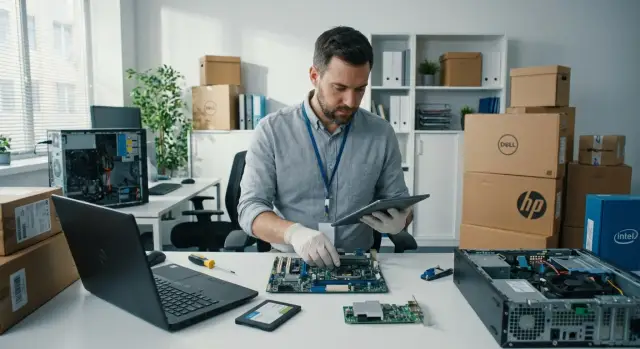
Why this becomes a problem in long deliveries
With short purchases the risk is lower: you test a sample, approve the configuration and quickly receive the whole batch. In long deliveries it’s more complicated. While production, logistics and phased shipping go on, the same part number may arrive with a different revision.
Often this is hard to spot from the outside. The model name on the box doesn’t change, the specification looks familiar, and the difference is hidden in the motherboard revision, the SSD controller or the network adapter chip. For procurement it may seem minor. For IT it’s effectively a different platform for deployment, support and acceptance testing.
The nastiest surprises don’t happen at contract signing but later: when the team applies the corporate image, checks drivers, enables encryption, configures remote management or performs acceptance by the approved checklist. Until then the hardware may appear identical.
So revision control is not a formality but part of schedule management. Even a small swap can break the usual scenario: an old driver no longer works, BIOS behaves differently, an SSD shows different characteristics under load, or a network adapter requires a different driver package or changes available features.
This is especially visible in large batches. If an organization rolls out workstations in waves for a school, hospital, bank or government body, the first wave may pass without issues while the second requires image adjustments and retesting. Formally the delivery is the same; in practice a new variable appears in an already agreed project.
Consequences usually go beyond a single technical tweak: mass deployment dates shift, IT and acceptance workload increases, differences appear between pilot and main batches, and compatibility and documentation must be reapproved.
For manufacturers and integrators running large, long projects this is normal. Components update faster than some delivery cycles close. That’s why it’s important not only to check the model number but also to control what exactly is inside each batch.
Which changes are critical and which are acceptable
The main rule is simple: not every specification difference is critical — only those that change device behavior in your environment. If a new revision requires different drivers, a different BIOS version, a different installation scheme or a separate compatibility check, it’s no longer minor.
Pay special attention to changes that break the standard deployment image. If a different motherboard, SSD or network adapter makes your standard OS image unsuitable, alters encryption, PXE booting or remote management, that replacement cannot be considered equivalent without separate approval.
Critical changes typically include a new chipset, a different storage controller, a different network chip, a new BIOS branch, a change in SSD controller or memory type, and any differences affecting security, certification, monitoring and centralized maintenance.
There are also changes that usually pass without issue. For example, a different heatsink revision, a cable or fastener swap, or minor passive component updates on a board — provided these don’t affect interfaces, power consumption, thermal behavior or serviceability. The same applies to secondary parts that neither the OS nor administrators see.
A useful guideline: if the IT department doesn’t need to redo manuals, the image, driver set, security policy or support processes, the change is likely acceptable. If any of those are affected, treat the replacement as critical until checked.
In practice disputes arise not from the swap itself but from the lack of rules. It’s better to define in advance what the supplier may change without approval and what requires testing, a compatibility report or written consent.
Motherboards: where the risk usually hides
The motherboard is almost always the main source of surprises. Externally the system looks the same, but a single revision change can alter the behavior of the entire estate: from OS image installation to peripheral operation and security tools.
The most sensitive swap is a different chipset or network controller on the board. Formally it’s still the same model, but the IT team gets a different set of drivers, different compatibility constraints and sometimes a new power management logic. If the organization uses a standard image, PXE boot, network policies or a strict allowed-hardware list, such a change quickly exceeds a minor tweak.
Problems also hide in ports. One removed video output, a different USB set, no COM port or a different M.2 slot type can break an established connection scheme. This is particularly painful where PCs work with specific scanners, tokens, POS devices, medical equipment or older monitors.
BIOS should not be treated as a minor detail. Changes in TPM, Secure Boot or default settings affect encryption, domain policies and OS installation. A batch can arrive on time but some machines fail the standard deployment simply because the new revision has a different BIOS setup or firmware version.
Less obvious risks include power design, slot layout and cooling. Even with the same CPU, a board can behave differently under load, run hotter, be noisier, throttle frequencies or conflict with an expansion card. In compact cases and racks this quickly becomes an operational issue.
It’s safer to agree not only on the board model but also on an acceptable range of revisions, BIOS versions and key controllers. For large projects this is not bureaucracy but protection against downtime and reconfiguration of the whole fleet.
SSDs: which differences hit operations
SSD changes often happen quietly. The box and spec may show the same part number, but the drive can contain a different controller and behave differently in real-world use.
For IT this matters not because of dry datasheet numbers but because of everyday operation. The same SSD can sustain workloads differently, recover slower after write peaks, behave differently with encryption or not match an already approved system image.
The most common risk is a controller change under the same model name. Nothing looks different externally, but caching algorithms, queue handling, thermal behavior and compatibility with monitoring utilities can change. The result is an estate that is no longer uniform even though the paperwork says otherwise.
Firmware is a separate risk zone. Under identical load, two SSDs of the same model but different firmware may show different latency, throttle differently and handle write spikes in different ways. This is most noticeable on workstations with heavy databases, local caches, journaling and frequent updates.
A shift from TLC to QLC is not trivial either. In a normal office scenario the difference may be barely noticeable, but under heavy writing QLC loses speed faster after its cache fills and depends more on free space. Tests may look fine initially but problems can appear later.
For long deliveries ask the supplier in advance not only for capacity and interface but also for memory type, controller model, firmware version and write endurance figures if those matter. If the organization uses hardware encryption, standardized images or proprietary inventory tools, compatibility with them should be documented separately.
Network adapters: minor only on paper
Network adapters are often underestimated: a port is present and the link comes up, so everything seems fine. In practice replacements here can cause the worst surprises after deployment.
The main risk is the chip rather than the connector. If a batch contains adapters with a different controller, the IT team must use a different driver set, a different installation order and sometimes experiences entirely different behavior in Windows, Linux or virtualization environments.
This is especially painful where the network is used not only for access but also for booting, administration and security. A server or workstation can formally match the spec but lose key functions: network boot, Wake-on-LAN, a required VLAN mode or stable operation with the current driver stack.
Problems also show up in real-world compatibility with the network. On paper an adapter might support 1G, 2.5G or 10G, but that doesn’t guarantee trouble-free operation with existing switches, cabling and autonegotiation settings. In older or mixed infrastructures a single network-chip change can unexpectedly cause link errors, speed drops or instability under load.
MAC addresses are another topic. Many organizations rely on MAC-based network access, NAC rules, DHCP reservations, device inventory and even licensing. If the controller changes, this layer of compatibility can change as well.
Network adapters are checked most carefully where PXE, Wake-on-LAN, driver-level VLAN configuration, MAC-based access control and sustained heavy loads are used. Under load differences between chips surface fastest: one adapter handles backups, video streams or storage traffic fine, while another starts dropping packets, increasing CPU load or producing intermittent errors.
If the network chip changes, that’s a reason for functional testing, compatibility checks with switches and load testing — not a mere formal approval.
How to check revisions without extra bureaucracy
If a delivery spans months, make the check a routine procedure. Otherwise an SSD or network adapter swap will be discovered too late, after the image is already deployed and drivers don’t match.
A typical workflow looks like this. Before ordering, list critical components: motherboard, SSD, network adapter, and when needed TPM module, storage controller and graphics subsystem. For each item categorize changes into acceptable and unacceptable. Then request from the supplier not only the product model but also component composition, revision and change date.
It’s important to test the pilot batch using your standard scenario: image installation, drivers, domain join, network boot, disk speed, and network stability. Even a few devices help reveal risks before mass deployment.
Also define acceptance and escalation rules. Documents should clearly state who confirms acceptability, how soon the supplier must notify changes and what happens if a revision doesn’t match the agreed one. Without this, disputes almost always begin at the warehouse when time is short.
A short principle: if a change affects the image, drivers, security, network or support, it cannot be considered technically equivalent without verification.
A simple procurement example
Imagine buying 300 PCs for branches, delivered in three waves over several months. The first batch arrives fine. The IT team checks a few machines, deploys the standard image and puts them into service.
In the second batch the SSD is labeled the same on the box and in documents. Capacity and form factor match. On the surface nothing changed.
The problem appears later: the drive uses a different controller and behaves differently under load. Image installation takes longer, some devices handle updates differently, and a few PCs have noticeably different boot times compared to the first batch. For end users this may not be critical. For IT it means extra hours of work and unpredictable outcomes.
If procurement conditions already specify which changes are acceptable, the situation is resolved calmly. For example, parties may agree that an SSD swap is allowed if interface and capacity remain, the standard image installs without manual fixes, deployment time stays within an agreed range, and there are no driver or encryption issues. Then IT performs a short check and accepts the batch without dispute.
Without such criteria, manual comparisons, reports, supplier disputes and acceptance delays begin. Hardware may sit in a warehouse and branch rollouts are postponed.
Common mistakes in agreements
The most common mistake is relying only on the model name and assuming it’s enough. The same model can be produced with different revisions, controllers, network chips or firmware. For IT this is not a formality but a risk of an inhomogeneous estate.
The second mistake is not dividing components into critical and non-critical. Case color, packaging type or small cable changes usually don’t affect operation. But swapping a motherboard revision with a different network controller, an SSD with another memory type or an adapter with a different chip impacts the system image, drivers, performance and security.
The third mistake is testing only the first sample and calling it done. In long deliveries the first and later batches can differ, especially if the cycle spans months.
Another weak point is the lack of basic rules. Before the project starts, record which components cannot be changed without written approval, which changes are acceptable without extra approval, who on the customer side makes decisions, the time in which the supplier must notify changes and which documents confirm a new revision.
People also often forget advance notification of changes. Then the IT team learns about a swap during acceptance or after commissioning. This is almost always more expensive because you must recheck compatibility, update images, renegotiate drivers and sometimes change the rollout plan.
A quick check before acceptance
You don’t need to inspect everything before accepting a batch. The key question is quick: is this the same configuration IT already tested, or are there replacements inside that could break the image, drivers or security settings?
A short checklist is enough:
- compare the part number, revision and key controllers with the agreed specification;
- verify whether there are new drivers, BIOS or firmware versions;
- run the standard image installation on at least a few devices from the batch;
- check basic functions: network, disk encryption, remote administration, PXE if used;
- record a simple result: accept, accept after fixes, or halt acceptance until agreement.
It helps to test 2–3 devices from different boxes rather than a single random sample. This makes mixed deliveries easier to spot when part of the batch is built on one revision and part on another.
If after checks it’s unclear whether the batch can be accepted without manual fixes, don’t sign the documents immediately. One extra day of checking is almost always cheaper than mass reconfiguration after deployment.
What to document
After checks you need a working rule for procurement. Revision control only helps when the team has a pre-agreed list of acceptable and unacceptable swaps.
It’s useful to create a simple matrix for three groups: motherboards, SSDs and network adapters. For each item note what may be changed without approval, what is allowed only after testing, and what must not be changed. This approach greatly reduces disputes at acceptance and helps procurement, IT and the supplier speak the same language.
Then validate the matrix on a pilot, not on a mass batch. Even 5–10 devices quickly show where risks lie: your image won’t install, drivers aren’t picked up, network boot breaks or disk behavior changes under typical load.
Also agree in advance the format for notifications about revision changes. It should include old and new part numbers, the reason for the change, technical differences and the time the customer has to respond. For critical changes in boards and network adapters require a sample and testing. For SSD swaps within an agreed range of characteristics, provide a simplified procedure.
In practice such rules are easier to discuss with a manufacturer or integrator that controls the whole cycle — from production to delivery and service. In Kazakhstan this approach is used by GSE.kz: when one party handles production, integration and support, it’s easier to fix acceptable revisions, notification procedures and pilot test scenarios in advance.
The earlier these rules are fixed, the lower the chance that a subtle swap inside a batch will turn into delayed deployment, repeated testing and extra load on the IT team.
Frequently asked questions
Why are component revisions important during extended PC deliveries?
With long delivery times, the same model may arrive with a different motherboard, SSD, or network controller revision. This can affect drivers, BIOS behavior, corporate image deployment, and acceptance test results.
Which component changes are considered critical?
Critical changes are those that affect the OS image, drivers, security, PXE boot, remote management, or support. If the IT team needs to update instructions or retest the configuration, the replacement must be approved.
Which changes can usually be accepted without separate testing?
Replacements of fasteners, cables, heatsinks, or passive components can usually be accepted without separate testing if they do not change interfaces, heat output, power consumption, or serviceability. This rule should be set out in the specification in advance.
What are the risks of changing the motherboard revision?
A new motherboard may have a different chipset, network controller, port selection, slots, and BIOS settings. As a result, the standard image may fail to install, peripherals may stop working, or TPM and Secure Boot behavior may change.
What should be checked when receiving PCs with a new motherboard?
Check the chipset, network controller, video outputs, USB ports, M.2 slots, BIOS version, and TPM settings. Also deploy the corporate image and test the connected hardware.
Why can an SSD with the same name perform differently?
Under the same SSD part number, the controller, memory type, or firmware can sometimes change. This affects performance under load, latency, heat, encryption, and compatibility with monitoring tools.
Does a switch from TLC to QLC SSDs need approval?
For office workloads, the difference may be unnoticeable. With frequent writes, local databases, caches, and logs, QLC usually loses more speed after its cache fills, so this transition is best tested separately.
What changes when the network adapter is replaced?
A different network chip may require a different driver and affect PXE, Wake-on-LAN, VLANs, speed auto-negotiation, and stability under load. Having the same connector does not confirm full compatibility.
How can a new batch be checked quickly before acceptance?
Compare the part number, revision, and controllers with the approved configuration. Take 2-3 devices from different boxes, deploy the standard image, and test the network, encryption, drivers, and PXE if your organization uses it.
What should be included in the contract or specification?
Specify the critical components, acceptable revision ranges, notification procedure, customer response time, and steps for non-compliance. A motherboard and network adapter usually require a sample and testing, while a pre-approved SSD replacement can follow a simplified check.
