7 min read
Contract Management System: Approval Routes and Deadline Control
A contract management system lets you set approval routes, control limits, send deadline notifications and keep an obligations registry — all without confusion.
Why you need a contract management system: common pains
When contracts are approved via email and messengers it initially seems fast. Then email threads grow, files become "final_2", and lawyers' comments stay in messages where they're hard to find.
The problem is usually not people, but the lack of a single "source of truth." Versions, deadlines and responsibilities get lost: who should approve, who already approved, and who is holding things up. If someone goes on vacation or is replaced, the history of decisions can disappear with the messages.
Often it looks like this: several parallel versions of the same contract appear, it’s unclear who currently owns the task and how many days the document has "been sitting", and approvals drag out because reminders are manual. The contract is signed, but executors don't know key terms (deadlines, penalties, volumes), and at the end of the month it's suddenly discovered that the budget is already committed.
Another risk is unchecked limits and verbal agreements. If the amount wasn't verified in advance, a contract can easily exceed the budget or procurement limit. Then urgent requests to "approve retroactively", payment postponements and disputes over who allowed it begin.
Imagine supplying equipment and services to a large client: sales promised deadlines, lawyers adjusted liabilities, finance calculated the advance, and the project team waited to start. Without a transparent process it’s easy to sign a document with the wrong delivery date or without a required appendix.
A contract management system covers the basics: a single registry and one current version, clear approval stages, limit control before signing, reminders for key dates and assigned responsibility for every step.
Components of a contract management system
A contract management system is a set of simple building blocks that together bring order. You can see who is approving, which terms are already accepted, how much money the contract occupies and what needs to be done next.
Main elements
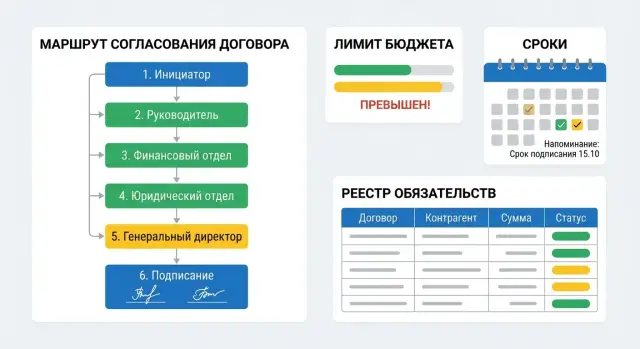
Approval routes. Each contract should have a clear path: initiator, lawyer, security (if needed), finance, manager. A history of decisions is important: who approved, who returned for revision and with what comment. This removes "I didn't see it" disputes and helps quickly reconstruct the logic of changes.
Limit control and link to budget. The system shows whether the amount fits the available limit by expense item, project or department, and what exactly is reserved: the whole amount or by stages. This prevents contracts from appearing unexpectedly "over budget."
Deadline management. This covers not only signing and end dates but also renewal alerts, tracking of key milestones and obligations. Reminders work better when tied to a specific action: prepare an amendment, request an acceptance act, issue an invoice, close a stage.
Single contract registry and obligations registry. The contracts registry answers "what we have", while obligations show "what we must do and what is owed to us." For example, when procuring a batch of workstations for branches it’s useful to see not only the contract but also the delivery schedule, acceptance, warranty obligations and payments.
Reports people actually use
Managers and finance usually need short answers: which contracts are stuck in approval, where deadlines are ending, where limits are exceeded and which obligations are overdue. If this is available in a couple of clicks, the system enforces discipline instead of becoming a file archive.
Approval routes: how to set them up clearly and without excess
An approval route answers a simple question: who and in what order must confirm the contract so that it is lawful and executable. If the route isn't described in advance, decisions go into chats and emails, and later it’s hard to understand why the document was delayed and who "allowed" a contentious clause.
Which routes exist and when they are useful
There are typically three schemes:
- sequential — when it’s important to pass stages in order (initiator, lawyer, finance, manager);
- parallel — when several departments can check the contract at the same time (for example, lawyer and security);
- mixed — the most common: some approvals run in parallel, and final approval is always the last step.
For this to work in practice, set clear rules for starting a route. They should be clear and verifiable: by contract type, amount, department, counterparty. For example: if a supply contract is above threshold X — add the CFO; if it’s IT services — include security; if the counterparty is new — include a compliance check. Then the route is assembled automatically without manual improvisation.
One of the most useful mechanisms is escalation. If an approver doesn't respond in time, the task goes to a deputy or manager and the initiator gets a notification. But deadlines for each step must be fixed in advance, otherwise escalation will turn into endless reminders.
To keep decisions transparent, the contract card should record four things: comments by clause, edits and document versions, a concise reason for refusal, and who and when made the decision.
A simple example: in a company that buys equipment and services, contracts below the threshold follow a short route, while a large project automatically adds finance, lawyers and the business manager. This reduces delays and retroactive disputes.
Limit control: so contracts don’t exceed the budget
Limit control prevents contracts from becoming a surprise for finance. A limit is not just the overall budget. Most often it’s defined by a combination of parameters: expense item, project, cost center, period (month, quarter, year), sometimes counterparty or purchase type. The more precise the limit logic, the fewer manual reviews later.
It’s convenient to start with a simple rule set and make it more complex as the process matures. For example, server purchases for a data center can be checked by project and cost center, while routine services (telecom, cleaning) are checked by expense item and period.
Where to check the limit
Checks should trigger at least twice: when creating the request (or contract card) and right before signing. At the start this filters out obviously impossible contracts. Before signing it catches changes that occurred during approval: amount increased, term changed, additional work added.
Show the initiator a simple picture: available, reserved, already spent and what will remain after this contract.
What to do if the limit is exceeded
The response depends on company policy. In practice there are three workable scenarios: strict blocking of signing when exceeded, approval of an exception (with reason and responsible person), or moving part of the payment/volume to the next period. Budget revision is also possible, but as a planned correction, not a way to bypass rules.
To keep numbers stable, fix reservations: once a request passes a key approval the amount is reserved and reduces the available limit. After signing and receiving acts/invoices reflect actual execution. Then you can see both "what was planned" and "what was actually closed."
Deadline notifications: how not to miss important dates
Without proper reminders, everything depends on memory and messages. As a result renewals are missed, payments shift and deliveries suddenly become overdue.
First determine which dates are critical for you. Usually these are not only signing and term dates. In practice important dates include staged delivery dates, acceptance checkpoints, final payment deadlines and the window for renewal or termination.
Notifications should go not to "everyone" but to those who can actually influence the situation. To the supplier — about delivery and acceptance, to the lawyer — about renewal and changes, to finance — about invoices and payments, to the manager — about risks and overdue items that require a decision.
A good scheme has three levels: in advance (for example 30/14/7 days), on the due date and after the due date (overdue). To avoid notification spam, set frequency and priorities: one "quiet" reminder in advance and one "loud" one on the due date, escalate overdue only if it’s not closed.
Example: a contract for a batch of workstations. 14 days before the due date the supplier (readiness to deliver) and finance (payment plan) get a notice. On the delivery date — the supplier and the person responsible for acceptance. If overdue for 3 days, the manager is additionally notified and the risk is recorded against the obligation.
Obligations registry: how to keep execution under control
A contract states "what was agreed." Obligations state "what exactly must be done and by which date." One contract can contain several obligations: delivery, installation, training, service, staged payments. If you don't separate them, parts of the work can be lost or acceptance of the whole may replace staged closures.
An obligations registry turns a contract from a file into a clear plan. For control, a small set of fields is enough: amount and currency, link to a limit or budget item, stage (advance, delivery, commissioning), due date, responsible person from your company and status (in progress, partially executed, closed, overdue).
It’s important to link obligations to proofs: payments, deliveries, acceptance acts, invoices. Then you see not only "what is due" but also "what is already confirmed by documents." For example, when buying servers for a data center it’s useful to split obligations into delivery by waybills and commissioning by acceptance act and immediately see whether the delay is in logistics or in acceptance.
Partial execution is better tracked with numbers and dates rather than notes: record an amount or percentage, attach a confirming document and leave the remainder until full closure. When an obligation is closed, the status changes automatically or by confirmation of the responsible person. The registry becomes a live "control panel" rather than an archive.
Roles, access and transparency: who sees what and who is responsible
If roles are undefined, any system quickly turns into a chat with files and endless questions: who must approve, who can edit, who only views. So assign responsibility first and then configure routes.
Basic roles usually suffice: initiator, approvers, lawyer, finance, procurement and manager. Next, access rights must protect sensitive data while not slowing down work. Often amounts, attachments (commercial proposals, specifications), personal data and bank details are shown only to those who need them for the task.
Common rules are: amounts and limits are visible to finance, the manager and assigned approvers; commercial attachments are visible to procurement participants and the lawyer; personal data is shown on a need-to-know basis; text editing is limited by stages (the initiator edits a draft, after lawyer edits the lawyer controls the final wording).
Transparency comes from an activity log: who and when changed details, replaced a file, sent for approval or returned for revision.
A separate area is document versions. Clear storage rules are needed: a single registry, search by number, counterparty and amount, mandatory version records (what changed and who approved). Then six months later you can quickly find the signed version and explain why that particular edit ended up in the contract.
Step by step: how to implement a contract management system
Start not with choosing "buttons" but with understanding real processes. Even within one company the same contract type is often approved differently: someone involves a lawyer at the start, someone at the end, and financial control sometimes exists only "in words."
1) Record how things are done now
Collect 10–20 recent contracts of each type and map the facts: who initiated, who approved, where delays occurred, which edits repeated. It’s important to describe real routes, not how things "should be by regulation."
Then agree rules with finance about budgets: which limits apply, where exceptions are allowed and who approves them. For example, purchases within the quarterly budget go via a short route, while exceeding a limit automatically requires the CFO.
2) Configure the system for simple scenarios
To get adoption, make it so that an employee performs the minimum actions. At the start templates for contract cards by main types, clear statuses (draft, in approval, signed, in execution), notifications for key deadlines, an obligations registry with basic amounts and dates, and rules for limit control and escalation are usually enough.
Run a pilot in 1–2 departments. Prefer teams with many typical contracts: procurement, sales, leasing. In 2–3 weeks bottlenecks will become visible: who delays most often, which fields are missing, which notifications annoy people.
When the pilot stabilizes, migrate the base of active contracts and train on three scenarios only: create a contract from a template, approve it, find an obligation and a deadline. Example: a manager creates a supply contract, the system checks limits, sends it along the route and then reminds about payment and the end of the warranty period.
Common mistakes and traps in contract automation
The first trap is trying to "digitize" chaos. If contracts used to live in email and rules were in people's heads, the system will only reproduce the same mistakes faster.
Problems often start with routes: they are made too detailed (12 steps, dozens of conditions, exceptions on exceptions). People then look for workarounds and speed drops. A simple test: if a new employee can't understand the route in 10 minutes, it’s too complex. Keep only what actually reduces risks.
Another pain is no process owner. When it’s unclear who is responsible for rules, directories and disputes, each department follows its own norms. Different statuses appear ("on visa", "in approval", "in progress"), multiple counterparty cards and reports stop matching.
Notifications are similar: a reminder alone changes nothing if no one is assigned and it’s unclear what to do next. If a contract-end notice goes to everyone, it’s easy to have no one initiate renewal because "it’s not my area."
Before launch, assign one process owner and rules for exceptions (urgent procurements, amendments, signatory changes), unify directories of counterparties/statuses/contract types, assign responsibility for notifications (who decides and in what timeframes), set a minimal default route and only special routes for real risks, and keep one source of truth for obligations and payments.
A separate trap is when the obligations registry lives in Excel and doesn’t match the contract. This happens with companies that have recurring deliveries and services: a contract is signed but deliveries and payments are tracked separately and surprises appear at month-end. It’s better when obligations, amounts and dates are taken from the contract and change together with amendments.
Short checklist: what to check before launch
Before launch, make sure the system actually helps people work faster and with less stress. It’s better to spend one day testing than spend weeks fixing signed documents and missed deadlines.
Test with sample contracts (different types and amounts): the contract card is unified and clear, the current file version is stored inside with a record of who replaced it and when; the route starts by simple rules (amount, type, department) and you can explain why it was chosen; limit control is enabled before signing and records the decision on exceedance; notifications reach the right people without duplicates and include specifics (which contract, which date, what action); obligations are created as separate records with a due date, status and responsible person.
Also check reporting: in 2–3 clicks you should get lists of overdue obligations and contracts at risk of missing deadlines without manual Excel assembly.
A small reality test: take a supply contract with stages (advance, delivery, acceptance, payment). Run it through the route, artificially reduce the limit and observe system behavior: does it block signing, request confirmation or send for an additional approval?
Practical example and next steps
Scenario: procurement prepares a contract for equipment supply. Amount: 9.8 million tenge with a 10 million limit, delivery term 30 days, payment after acceptance. Legal and finance approvals are required, then the manager signs.
In the system they create a contract card, attach the draft and fill key fields: amount, counterparty, term, payment stages. The route starts automatically: the lawyer checks risks and wording, then the financial controller verifies budget and expense items.
If during clarifications the amount changes to 10.4 million, the route switches: an exception approval is added. The CFO confirms the limit exceedance, the department manager provides justification (why it can’t be bought cheaper or split). After that the contract returns to financial control to record the updated conditions.
Notifications remove the need for manual reminders. Usually three types are enough: in advance of contract expiry (to renew or close), before planned payment (to check documents and limit) and on the day of overdue if an act or invoice isn’t uploaded on time.
After delivery obligations are closed by facts: the warehouse marks acceptance, accounting attaches signed acts, the contract owner moves the obligation to "executed." The registry shows delivery closed, payment processed and no claims.
To move from idea to rollout: appoint a process owner (responsible for rules and route changes), collect 10–15 typical contracts and mark frequent delay points, agree limits, roles and exceptions (who and under what conditions can approve), define notifications and important dates, and prepare integration requirements (mail, accounting system, EDI).
If you also need integration and reliable infrastructure, GSE.kz as a system integrator can help design and deploy the solution, including server infrastructure using in-house hardware.
Frequently asked questions
What problems does the contract management system solve first?
If contracts are handled through email and messengers, parallel versions almost always appear, comments get lost and it’s unclear who currently has the task. A system provides a single "source of truth": the current file, a history of decisions, statuses and deadlines for every step.
Which modules should a basic contract management system include?
A minimal set usually includes a contract card, version storage, approval routes, limit checks before signing, notifications for key dates and an obligations registry. That’s enough to see where a document is stuck, what’s already approved and what needs to be done next.
How to configure approval routes so they don’t become too complex?
Start with one default route and clear rules for triggering it by contract type and amount. Add further checks only where there is actual risk; otherwise people will look for workarounds and speed will drop.
When is sequential, parallel or mixed approval better?
A sequential scheme is good when steps must be taken in order (e.g., lawyer, then finance, then manager). A parallel scheme speeds things up if several departments can review at the same time. In practice the mixed option usually works best: some reviews run in parallel and final approval is the last step.
Where and when should budget limits be checked to avoid surprises?
Check the limit when creating the contract card or request to immediately filter out impossible contracts. Check again right before signing because amounts, terms or scope may have changed during reviews.
What to do if a contract exceeds the limit?
Show the initiator how much is available, how much is reserved and what will remain after this contract. For limit exceedances, pick a single default rule (for example, block signing) and provide a clear exceptions mechanism with a recorded reason and responsible person.
Which deadlines and events should have notifications?
Track not only the contract term but also milestone delivery dates, acceptance checkpoints, payment deadlines and the window for renewal or termination. Notifications should go only to people who can act and must state which contract, which date and what needs to be done.
How is the obligations registry different from the contracts registry?
The contracts registry answers "what is signed", while the obligations registry answers "what exactly must be done and by when". When obligations are separate records it’s easier to control delivery stages, acceptance acts, payments and to see overdue items by status and dates rather than by feeling.
How to set roles and accesses so it’s secure and convenient?
Typically roles are initiator, approvers, lawyer, finance, procurement and manager, with clear rules on who can edit the text at which stage. For transparency, an activity log and version control are important so it’s clear who changed details, replaced a file and made decisions.
How to implement a contract management system without failure and user resistance?
Don’t start by digitizing chaos: first document the real process using sample contracts and assign an owner responsible for rules and exceptions. Then run a pilot in 1–2 departments, keep minimal statuses and routes, and refine the system based on actual bottlenecks rather than theory.
