8 min read
Contact Center Automation: Client Card and Smart Prompts
Contact center automation shows the agent the customer card, interaction history, and real-time prompts during a call. Implementation steps and common mistakes.
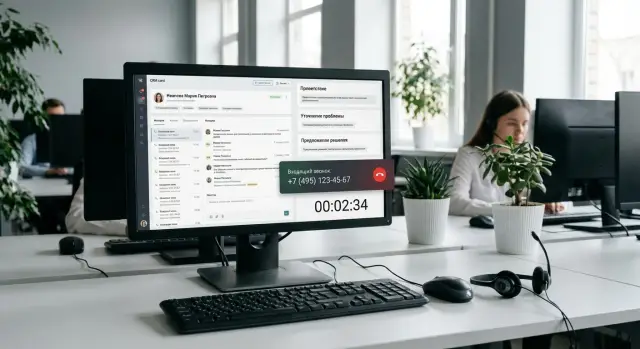
Why agents need a client card during the call
Without integration, an agent often works blind: telephony in one window, CRM in another, email or chat in a third, and some data stored in spreadsheets. During the call they must manually search the number, copy the full name, check the contract and recall how the previous ticket ended.
Time is lost not only on searching. The agent switches between windows, asks clarifying questions the customer has already answered, and writes notes on paper “for later.” The result is predictable: calls take longer, queues grow, and the customer feels forgotten. Repeat contacts happen more often simply because the issue wasn’t resolved the first time.
A client card appearing during the call closes that gap: the needed information is available immediately without manual searching. This is the foundation of contact center automation because it reduces idle time in the conversation and helps the agent act confidently.
The first screen should show data that conveys context in 5–10 seconds: who is calling, what the issue is, what already happened and what can be done right now. Typically that means name and contacts, client status, recent interactions and outcomes, active tickets or incidents, and the next step (including a hint about tone and mandatory phrases).
Imagine a customer calls for the second time this week about the same problem. Without the card the agent starts from zero: “Please give the contract number,” “When did you contact us?” “What did they tell you?” With the card they immediately see the previous ticket, an engineer’s comment and the promised deadline. Instead of repeating questions the agent clarifies one or two facts and proposes a solution or a clear plan: what will be done and when to expect a response. For the customer that’s the difference between “I’m being sent in circles” and “I was heard.”
What a client card and “smart prompts” include
A good client card is not a full-screen form but a short set of facts that helps the agent speak confidently and avoid unnecessary questions. In automation it functions as a control panel: the important items are visible immediately, and there’s no need to jump between windows.
The top of the card usually contains what is needed in the first 10 seconds:
- who is calling: name, phone, alternative contacts
- context: contract or account number, client status, segment
- preferences: preferred channel, best time to contact, language
- important flags: VIP/vulnerable customer, marketing opt-out, trusted contact
- current services: active options, open tickets, restrictions
Below is the interaction history. It’s important that this shows not only calls but other channels: tickets, chats, emails, visits. That way the agent quickly understands why the person is calling again and doesn’t make them repeat everything. A useful detail is the reason for repeats (for example, “not delivered on time,” “no response on ticket,” “setting failed”). This helps spot a systemic issue rather than label someone “a difficult customer.”
“Smart prompts” add another layer to the card: a short step-by-step script that adapts to the situation (topic, product, contract status, outcome of past contacts). Usually 2–3 precise questions, answer options in plain language and mandatory regulatory phrases are enough.
The final block is outcome capture. After the call the agent should be able to fill a summary, tags, result and create the next task in 15–30 seconds (for example, “call back after check,” “escalate to tech support,” “await documents”).
For quality control, some items are better recorded automatically so the agent isn’t overloaded: whether a mandatory step (e.g., identification) was completed, how many transfers occurred, whether response SLAs were met, whether a follow-up task was created and who is assigned.
Which systems typically need to be connected
For the client card to open automatically and for prompts to be relevant, data must come from several places. The problem is not usually a lack of systems but that each stores its own “truth.” Contact center automation starts by deciding where the main source of client data will be and where only operational statuses and history live.
First layer — CRM or client database. This should hold the main information: full name or company name, contacts, contracts, segment, responsible manager, communication consents. Agree up front which fields are canonical so agents don’t see outdated phones or closed contracts.
Second layer — telephony or PBX. This is the source of the call event: number, direction, queue, call recording, wait time. Without it you can’t open the card at the moment of the call and correctly tie the conversation to the client.
Third layer — service desk or ticket system. Tickets contain status, reasons, SLAs and engineers’ comments. When an agent sees the last 2–3 tickets and their results, they ask fewer unnecessary questions and explain what happens much faster.
Fourth layer — knowledge base. This is not a long manual but short answers for prompts: what to clarify, which steps to offer, what to say about deadlines, and what diagnostic questions to ask.
To glue it all together you need a single client identifier. Frequently a phone number alone is insufficient: numbers can be shared or change. It’s practical to keep several keys and a priority rule:
- phone(s) and email for primary lookup
- IIN/BIN as a reliable identifier
- contract or account number
- CRM client ID as the main key
- a list of contacts within the same organization
Simple example: a medical organization calls from a shared reception number. By number the system finds the organization, and the agent verifies IIN/BIN or contract number and immediately sees an open ticket with status and a prompt about what to check and whom to escalate to. Such integrations require careful mapping and clear rules — a job usually handled by systems integrators, including GSE.kz.
Step-by-step implementation plan: idea to pilot
Start with one measurable goal. Not “build a card,” but for example reduce average call time by 20 seconds, lower repeat-question rate, or improve accuracy of ticket classification. The goal tells you which data and prompts are needed and what is unnecessary.
Next, assemble a minimal client card. A good rule: if a field doesn't help the agent say the next phrase or make a decision, remove it. Usually 8–12 fields are enough: name, contract status, active services, open tickets, the last 1–3 interactions, balance/limits (when relevant), preferred channel.
Then define common call reasons and prompts. Don’t try to cover everything. Pick 5–10 frequent scenarios: “ticket status,” “service not working,” “billing question,” “data update,” “complaint.” For each, decide what the agent should see in the first 5 seconds: a short question, checks, the next step and safe phrasing.
Work plan for 2–4 weeks
To reach a pilot quickly and avoid drowning in detail, follow a simple scheme:
- Fix the goal and metrics to measure before and after.
- Approve the card fields and scenario list with the contact center leader.
- Configure client matching: by phone number and fallback attributes (contract number, IIN, email) with a clear “client not found” flow.
- Assign the source of truth for data: who updates contacts, ticket statuses and comments so two versions don’t appear.
- Launch a pilot with one agent group and gather daily feedback.
Pilot: what to measure and how to know it works
Look at speed and quality: ID time, share of escalations to second level, repeat calls within 24–48 hours, agent notes and mistakes in chosen reason.
Example: a customer calls from a new number, the system doesn't find them by ANI, but the agent quickly locates them by IIN and sees the latest ticket. That’s exactly the kind of rescue automation is built for. If such “rescues” increase while calls become shorter and calmer, expand the pilot to the whole flow.
How to make the system work "at the moment of the call"
During the call the agent has only a few seconds to understand who is calling and why. Automation should act reflexively: call arrives, card opens, agent sees context and doesn’t waste time searching manually.
A pop-up card on incoming calls should appear almost instantly (target is usually 1–2 seconds). Inside, show not everything but only what helps start the conversation correctly: name, client status, recent interactions, active tickets and important notes (for example, “do not call after 18:00”).
If the number is unknown, the agent needs a quick plan without extra questions. A minimal check of 1–2 items works well: full name or IIN, organization, purpose of the call. At the same time the system can suggest options: similar contacts, recent interactions with matching data, or cards by email domain if the customer mentions an address.
To avoid time spent on logging, the interaction should be created with one click. Click a button — a template opens with prefilled fields (phone, channel, agent, time, default topic). The agent only clarifies the reason and briefly describes the issue.
Auto-prompts are best shown based on the conversation, not prematurely. They appear when the agent selects the reason or the system recognizes keywords. For example: customer says “won’t turn on” — the prompt offers three diagnostic questions and common fixes, and warns if a similar incident already exists for that device.
A typical real-time scenario looks like this:
- Call -> card and last 3–5 interactions open instantly.
- Number not found -> quick search by name or IIN and create a new contact if needed.
- One click -> create an interaction from a template with auto-filled fields.
- Prompts -> short questions and steps for the chosen topic.
- Finish -> mandatory outcome: status, result, agreements, next step.
The most common gap is the end of the call. A simple rule helps: don’t allow closing a call without selecting an outcome (resolved, transferred, call back, ticket needed). That ensures outcomes are captured even during peak hours and the history is useful on the next contact.
Conversation scripts: make them useful, not checkbox items
A script helps only if agents actually use it. Instead of long texts, create micro-scripts on 3–7 steps that fit one screen and can be read during the call. In automation this solves half the problems: fewer pauses, fewer mistakes, more confidence.
A good micro-script is like a short route: it suggests what to say and check but doesn’t force reading word-for-word. It usually contains a greeting and purpose, quick identification (2–3 fields), mandatory checks (consent, security, access limits), resolution or next step, and outcome capture.
Mandatory checks should be phrased as prompts without bureaucratic language. For example: “Please confirm the last 4 digits of your ID” or “May I record the call for quality purposes?” If the customer fails verification, the script should provide a safe branch rather than leaving the agent to improvise.
Branches are needed for common tricky moments: angry customer (acknowledge emotion, state next step, give deadline), customer who won't confirm data (offer an alternative method, limit actions), request for a manager (explain escalation rules, record the reason), or an unclear request (ask 2 clarifying questions and pick a category).
Product and tariff prompts must be up to date and verifiable. If a statement cannot be supported by system data, remove it or replace it with a neutral phrase: “I will check and get back with an exact answer.”
Sometimes a script isn't needed. For example, with an experienced B2B customer, long steps will interfere. In such cases leave the agent freedom and use prompts as support: reminders about checks, short phrases for difficult moments and ready outcome options in the client card.
Common mistakes and pitfalls in automation
The first mistake looks like caring for the agent: make the client card as complete as possible. The result is dozens of fields on the screen, many never used, and agents stop reading anything at all. Rule of thumb: show only what helps make a decision in the next 30 seconds.
Second trap — no single client identifier. If a client exists under different keys in different systems (phone, IIN, contract number, email) duplicates appear and the interaction history fragments. Automation then becomes a hunt for the “correct record” instead of real help.
Third problem — speed. If the card opens in 5–10 seconds, the agent asks for data again and the customer gets irritated. This is often caused not by telephony but by heavy CRM queries, unnecessary fields and weak infrastructure.
Signals you are in a trap:
- Agents keep paper cheatsheets and don’t trust system prompts.
- Call outcomes are written in free form and reports cannot be compared.
- Customers are promised outdated conditions because prompts weren’t updated.
- Interaction history “disappears” when the phone number changes.
- The card shows data irrelevant to the agent’s role.
Another common mistake is forcing manual entry of call results. It seems like discipline, but in practice leads to gaps and inconsistent styles, making analytics costly.
A separate risk is access controls. If roles are not designed properly an agent might see sensitive data (financials or medical records), and managers will have difficulty proving compliance.
Simple measures help: reduce the card to a “minimum to resolve” and add fields only when needed, introduce a unified ID and rules for merging duplicates, set a target card opening time and measure it in the pilot, assign an owner for prompts and an update schedule, and standardize call outcomes (short statuses and mandatory fields).
Security, access and compliance
Automation often starts with operator convenience but quickly hits security. The client card should show exactly what is needed to resolve the case and not become a display of personal data.
A simple principle for personal data: fewer fields, clearer purpose. If the agent needs only name, contract number and ticket status, don't show IIN, registration address or extra documents. Define processing purposes in advance: identification, servicing, fulfilling obligations, feedback. That makes it easier to justify why fields are present.
Access rights should be role- and scenario-based. The same client may call about payment, equipment delivery or a service ticket, and each employee needs a different level of visibility:
- agent: minimal data for verification and handling
- supervisor: access to quality, disputed cases and corrections
- analyst: anonymized exports and reports without extra details
- administrator: integration and reference data setup (preferably without default access to call contents)
To investigate incidents and disputes you need logs: who opened the card, what they changed, who created an interaction and when. Logs are useful for discipline, investigations and as evidence if a customer disputes actions.
Also define retention periods for recordings and interactions. A common mistake is inconsistent rules between telephony and CRM. One system may have deleted a recording while the card still shows a link, or vice versa. A single policy and clear exceptions are needed (for example, keep claim-related data longer).
Reliability is part of security. If the card fails to open during an outage, agents start writing notes in notebooks and messengers. Minimum measures: redundancy for key services (telephony, CRM, database), caching reference data for short-term reads, an emergency mode (search by phone and create an interaction with minimal fields), regular backups and restore checks.
Example: a customer calls again, the agent sees only the necessary fields and ticket history, while payment details are available only to the finance team. If a dispute arises later, logs show who opened the card and what changes were made.
Quick readiness checklist before launch
Before launch check not only “does it work” but “does it work fast and consistently for everyone.” In automation small things matter: if the card loads slowly or agents must search manually, people quickly revert to old habits.
Test basic flows with real calls and real agents. Spending 1–2 hours running 20–30 test scenarios is better than spending a week handling complaints later.
Technical readiness
The client card must open automatically within 1–2 seconds after call start. If that’s not achievable, the cause is often telephony, network or overloaded CRM. Also ensure the agent sees the last 3–5 interactions and their outcomes without extra clicks.
If you run your own infrastructure, test load in advance. Predictable performance during peak hours is critical. Sometimes moving heavy components to dedicated servers and configuring redundancy helps.
Process readiness for agents
A quick operational skeleton should be clear from minute one. A starter set that covers 80% of calls is enough:
- short scripts for the top 5 call reasons (step-by-step with prompts)
- interactions created in 1–2 clicks with no duplicate manual entry
- a clear path for unknown numbers: how to identify and create a new contact
- consistent capture of call outcomes (uniform statuses and reasons)
- access rights configured so agents see only what they need
Final item — metrics. Record "before" and "after": average handling time, repeat call rate and card opening time. That will show what truly improved and what needs work.
Practical example: repeat call and quick resolution
A customer calls again about an overdue ticket. Previously the agent would ask for the number, the customer would be annoyed, and the agent would search across windows. With automation the card opens immediately: full name, company, channel and most importantly — the ticket number, creation date and full history.
The agent sees that a callback was promised last week and wasn’t made. The card notes who gave the promise and an engineer’s comment: “on-site visit required but address not confirmed.” This prevents the typical mistake of promising the same thing again without resolving the cause.
The scenario then guides the agent. It doesn’t read the text to them but helps quickly clarify what matters now. Three short questions appear on the screen:
- Please confirm the address and contact for the visit — have any details changed?
- Is there access during working hours or is a pass required?
- What’s more important now: restore service today or schedule a specific date?
While the customer answers, the agent selects options in the script and the system suggests actions: schedule a visit, escalate to the shift lead, or agree a temporary workaround. The agent also sees what was already offered previously and can honestly explain what changed and why the new action will be different.
After the call there is no need to manually send an email to start work. Based on the selected outcome a task is automatically created for the right group, an SLA deadline is set and the next step for the customer is recorded. The customer gets a clear status: what will be done, when and who is responsible — without a third call to check progress.
Next steps: lock in results and scale
After the pilot there’s often a temptation to connect everything at once. It’s more practical to start with one process that is visible to both agents and customers, for example ticket status and clear next steps. Bring that to stable operation: consistent card fields, clear prompts and correct outcome capture. When metrics stop fluctuating, scaling becomes easier.
From there the bottlenecks are usually not ideas but infrastructure: operator workstations, connectivity and server capacity for integrations. If computers freeze and CRM opens in 20 seconds, any script becomes an annoyance. Check performance, headset quality, network stability and capacity for systems that process events at the moment of the call.
To keep results for months, plan ongoing support. Scripts and the knowledge base go out of date as products, tariffs and rules change. A simple update cycle helps:
- review prompts for the top 5 call reasons every 2–4 weeks
- check bottlenecks in talk time and after-call time weekly
- clean and refine unused card fields monthly
- continuously monitor integration errors and slowdowns
Assign one owner for integrations and quality across the chain: telephony, CRM, knowledge base, analytics. The vendor should have clear requirements: which events to send, which fields to fill, SLA for card opening time, how to test changes and roll back if needed.
If you need help with infrastructure for such a project, GSE.kz provides typical contact center essentials: operator workstations, integration servers and 24/7 technical support. This is especially useful when automation grows from a single script into a system that must be kept stable every day.
Frequently asked questions
What does the client card provide first of all on an incoming call?
You typically gain time on identification and understanding the context: the agent doesn't search for data manually and avoids repeating questions. Average call duration often drops, transfers and repeat calls decrease, because the next step is recorded immediately and consistently for everyone.
Which fields really need to be visible to the agent on the first screen?
Show only what helps to start the call and make a decision within the next 30 seconds: who is calling, contract/client status, active tickets, recent interactions and their outcomes, important notes and the next step. If a field doesn't help form the next phrase or action, hide or remove it.
Which systems need to be connected so the client card opens automatically?
The minimal set usually includes CRM (main data and contracts), telephony/PBX (call event and binding), a ticket system or service desk (statuses and history), and a knowledge base for prompts. Agree in advance where the “source of truth” is for each data type so agents don't see conflicting versions.
Why can't you rely only on the phone number to find a client?
Phone number is good for a quick lookup, but it is often shared, changed or not matched with the record in the database. Use several keys with priority: CRM client ID as the primary key, and phone, email, contract number and IIN/BIN as search attributes and confirmations. This greatly reduces duplicates and fragmented history.
What to do if an unknown number calls and the card isn't found?
Have a clear 10–15 second script: the agent asks one or two identifiers (for example, full name and IIN/BIN or contract number), searches quickly and, if needed, creates the contact. The interaction must be created immediately from a template with auto-filled fields, otherwise agents will note details "for later" and the history will again scatter.
How to make prompts and scripts useful rather than formalities?
Keep micro-scripts of 3–7 steps that help ask precise questions and not forget mandatory checks. The script should adapt to the reason for the contact and show only relevant prompts, not force reading long text. Branches for difficult situations—angry client, unclear request, refusal to confirm data—are especially useful.
Where to start the rollout and how long does a pilot take?
Start by defining the goal and "before/after" metrics, then assemble a minimal card and 5–10 common call reasons, and set up client matching and automatic ticket creation. A typical pilot can be done in 2–4 weeks if you don't try to cover all products and processes at once.
Which metrics best show that automation actually worked?
Track not only speed but quality: identification time, transfer rate, repeat calls within 24–48 hours, errors in selecting the reason, and card opening time. If the card reliably appears in 1–2 seconds and repeat questions and calls drop, it's a strong sign the automation is working, not just looking good.
How to avoid breaching personal data and access requirements?
Show agents only what is needed for service and separate access by roles so sensitive data doesn't appear on screens unnecessarily. Enable logs: who opened the card, what changed, who and when created interactions—these help investigate disputes. Also design an emergency mode for when systems are unavailable, otherwise staff will start keeping notes in personal places and that creates risk.
Why can the card open slowly and how to fix it?
Slow pop-ups are usually caused by heavy CRM queries, too many fields or weak infrastructure rather than telephony itself. Start by simplifying the card and optimizing queries, then check operator workstations, network and the servers that handle call events. For large scale stability, dedicate server resources for integrations and reliable workstations so the interface doesn't lag during peaks.
